

- Home
- Play books
- CrowdStrike Falcon- Unauthorized admin role assignment response
CrowdStrike Falcon- Unauthorized admin role assignment response
In this page
Playbook Description
This playbook investigates suspicious CrowdStrike Falcon admin-role activity by assessing failed logons, IP reputation, related critical alerts, and whether the actor or target accounts are newly created, then remediates confirmed high-risk abuse by resetting both users’ passwords, revoking elevated roles, and blocking the source IP from the network.
MITRE ATT&CK mapping
| Tactics | Techniques | Sub-techniques |
|---|---|---|
| Persistence(TA0002) | Account Manipulation (T1098) | - |
MITRE D3FEND mapping
| Tactics | Techniques | Sub-techniques |
|---|---|---|
| Isolate(D3-Isolate) | D3-APA | User Account Permissions(D2-UAP) |
Playbook input type
Alert
Prerequisites
User Account Permissions(D2-UAP)
Playbook creation input
connectionName - Provide the VirusTotal connection name for executing the VirusTotal APIs
Dependencies
Extensions - CrowdStrike
- crowdstrike_retrieveUserInfo
- crowdstrike_retrieveUserUuid
- crowdstrike_resetUserPassword
- crowdstrike_getUserRoleId
- crowdstrike_revokeUserRole
Extensions - VirusTotal
- virustotal_ipReputation
- virustotal_calculateRiskScore
Utility functions
- utility_getRequiredTime
- utility_isEntityNew
- utility_extractFieldFromList
Connections
- VirusTotal connection - Need to connect with VirusTotal API and fetch access key to check the malware IP details.
- CrowdStrike connection - OAuth2 connection with clientId and client secret along with region.
Sub playbooks
CrowdStrike Falcon - Block IP
Execution workflow
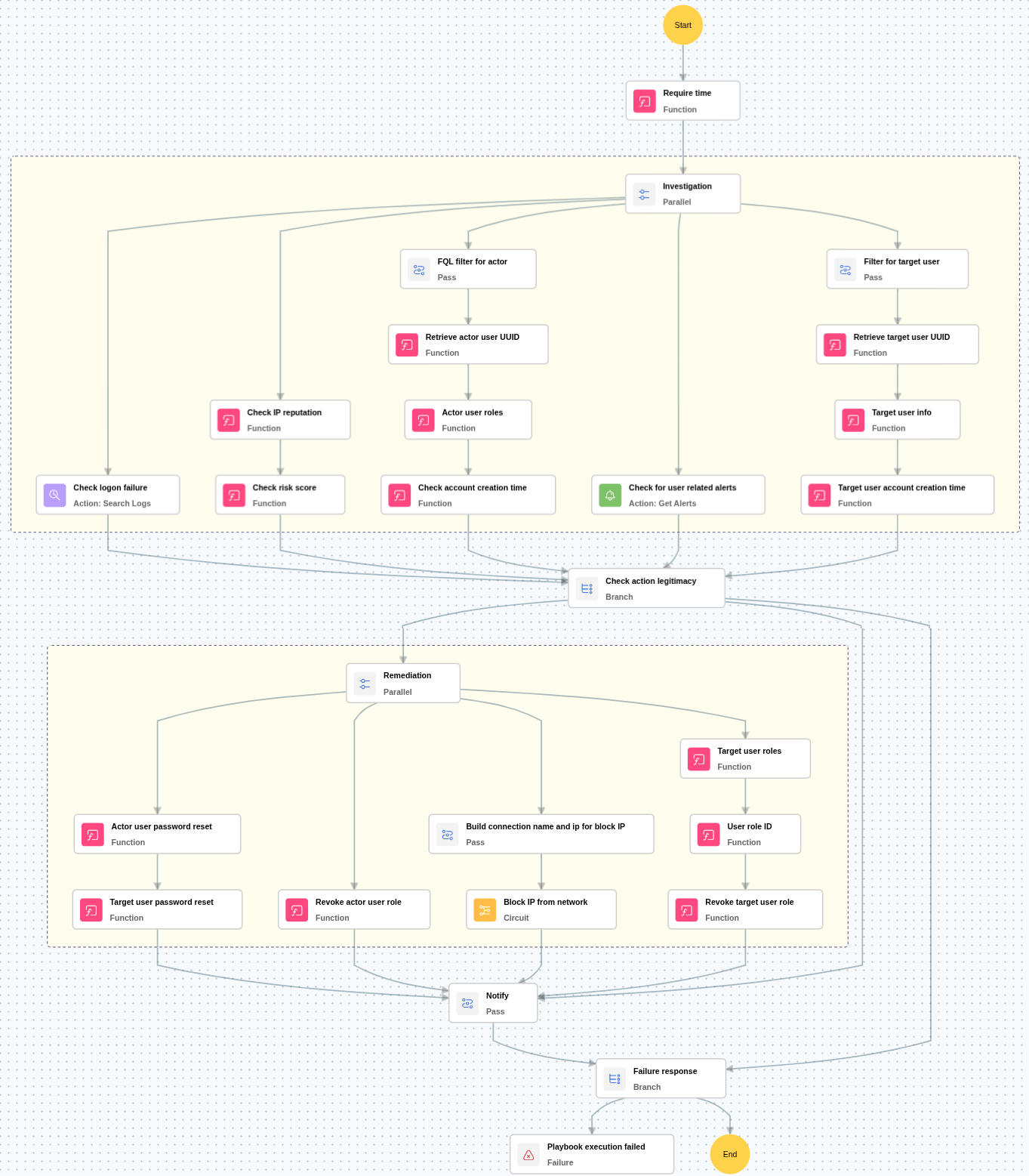
Investigation:
- Checks for more than 5 logon failures within the last 24 hours for the active user and target user.
- Checks for any critical alerts related to the active user and target user.
- Checks the reputation of the source IP address involved in the activity.
- Calculates the malicious IP risk score based on threat intelligence data.
- Retrieves and verifies the account creation time of both the active user and the target user.
Decision logic:
- Proceeds to remediation based on the following conditions:
- The IP address is malicious or has a high-risk score.
- Either the active user or the target user has more than 5 logon failures within 24 hours.
- Alerts are present for either the active user or the target user.
- Either account was recently created.
- Stops remediation and notifies the relevant users if the above conditions are not fully satisfied.
Remediation:
- Confirms the activity as malicious and executes the “Block IP” sub-playbook.
- Enforces a password reset for both the active user and the target user.
- Revokes all roles assigned to the active user.
- Revokes all roles assigned to the target user.
- Sends notification to both users regarding the actions taken and required next steps.
Post execution procedure
- Verify remediation in CrowdStrike Falcon: Confirm the actor user's admin role is revoked, both users' passwords are reset, and the source IP is blocked across all network segments.
- Audit for lateral movement: Search for other accounts accessed from the same source IP during the incident window and review endpoint activity for the affected users.
- Handling false positives: If the alert is confirmed as a false positive, restore the blocked IP and re-grant revoked roles.

