

- Home
- Play books
- CrowdStrike Falcon - Unauthorized tamper protection deactivation response
CrowdStrike Falcon - Unauthorized tamper protection deactivation response
In this page
Playbook Description
This playbook monitors for the unauthorized disabling of tamper protection by analyzing user roles, login failures, and network connections. It cross-references source IP reputations and account history to differentiate between legitimate administrative changes and malicious tampering. Upon confirming a threat, the system restores tamper protection, revokes user permissions, forces password resets, and blocks malicious IPs while alerting the security team.
MITRE ATT&CK mapping
| Tactics | Techniques | Sub-techniques |
|---|---|---|
| Defense Evasion(TA0005) | Exploitation for Defense Evasion(T1211) | - |
| Defense Evasion(TA0005) | Impair Defense (T1562) | Disable or Modify Tools(T1562.001) |
MITRE D3FEND mapping
| Tactics | Techniques | Sub-techniques |
|---|---|---|
| User Behavior Analysis(D3-Detect) | D3-UBA | Local Account Monitoring(D2-LAM) |
Playbook input type
Alert
Prerequisites
- User management - Read, Write
- Prevention policies - Write
Playbook creation input
- connectionName - Provide the VirusTotal connection name for executing the VirusTotal APIs
- preventionPolicyName - Provide the policy name for updating the policy
- privilegeRoleIds - Provide the privilege role ID of the user roles
Dependencies
Extensions - CrowdStrike
- crowdstrike_retrieveUserInfo
- crowdstrike_retrieveUserUuid
- crowdstrike_resetUserPassword
- crowdstrike_getUserRoleId
- crowdstrike_revokeUserRole
- crowdstrike_updatePreventionPolicy
Extensions - VirusTotal
- virustotal_ipReputation
- virustotal_calculateRiskScore
Utility functions
- utility_getRequiredTime
- utility_isEntityNew
- utility_extractFieldFromList
- utility_extractMaliciousEntitiesByRiskScore
- utility_filterAndMatchEvents
Connections
- VirusTotal connection - Need to connect with VirusTotal API and fetch access key to check the malware IP details.
- CrowdStrike connection - OAuth2 connection with clientId and client secret along with region.
Sub playbooks
CrowdStrike Falcon - Block IP
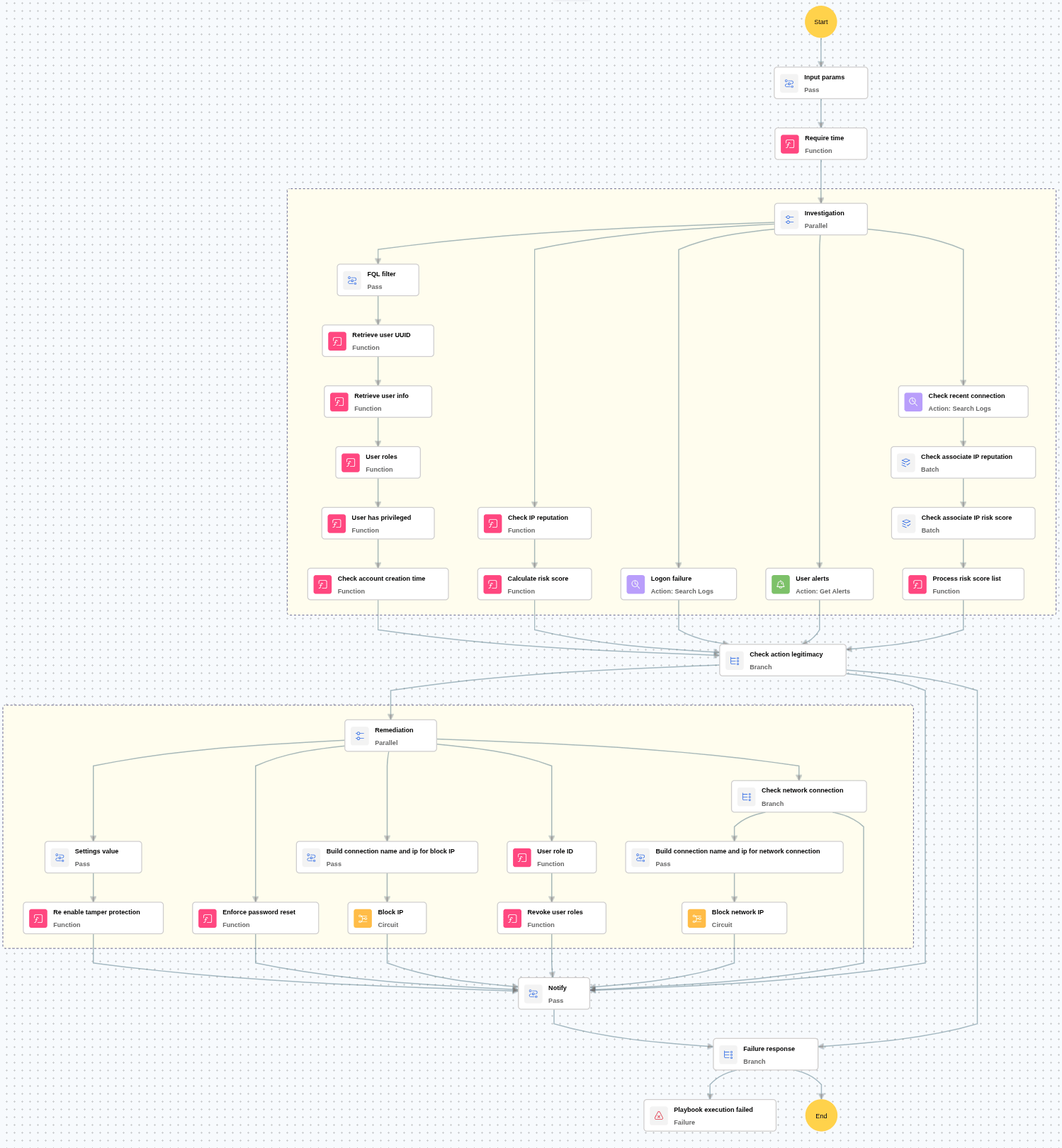
Execution workflow
Investigation:
- Checks whether the user has more than 5 logon failures within the last 24 hours.
- Checks for any critical alerts related to the user.
- Checks the reputation of the IP address associated with the activity.
- Calculates the malicious IP risk score based on threat intelligence data.
- Retrieves and verifies the account creation time of the user.
- Checks the most recent connection made by the user.
- Verifies the reputation of the recent connection IP address.
- Calculates the malicious IP risk score for the recent connection IP.
- Reviews the user’s assigned roles and verifies whether the user has roles other than "privileged groups" like "endpoint_manager" or "falconhost_admin.
Decision logic:
- Proceeds to remediation based on the following conditions:
- The primary activity IP is malicious or has a high-risk score.
- The recent connection IP is malicious or has a high-risk score.
- The user has more than 5 logon failures within 24 hours, or user-related alerts are present.
- Either account was recently created.
- If no malicious indicators are confirmed, notify the user and stop further remediation actions.
Remediation:
- Confirms the activity as malicious.
- Executes the “Block IP” sub-playbook for the identified malicious IP address(es).
- Enforces a password reset for the user.
- Updates the tamper protection setting as required.
- Revokes all roles assigned to the user.
- Sends notification to the user regarding the actions taken and required next steps.
Post execution procedure
- Enable Just-in-Time (JIT) access: Configure JIT access for admin roles to minimize persistent privileges and reduce the window for misuse.
- Review and limit role assignment permissions: Audit which users or services can assign FalconAdmin roles and restrict this ability to a minimal, trusted group.
- Conduct regular role audit reviews: Periodically review all accounts with FalconAdmin roles to ensure continued business justification and detect any anomalies.
- Role assignment restriction to approved users: Restrict role assignments to a predefined group of approved users. Instruct Falcon Admins to assign roles only to members of this group.
- Handling false positives: If this alert is confirmed as a false positive, revert all associated remediation steps.
- Unblock the non-malicious IP.
- Assign the required admin role to the user

