Windows 11 23H2 Feature pack deployment
Steps to deploy Windows 11 23H2 update
- Released on October 2023
- What's new in Windows 11 23H2?
For users with Windows 11 version 22H2, it is only required to deploy the Enablement Package patches to upgrade to Windows 11, version 23H2.
1.Prerequisites
- Before deployment, run through the Compatibility Check available under the Important Notes section to find if you meet all the minimum requirements that impact upgradability.
- Ensure that feature pack option is enabled under Patch database settings.
- In Endpoint Central, navigate to Patch Mgmt -> Settings -> Patch Database Settings -> click on the Windows tab and enable the Feature Pack option.
- In Patch Manager Plus, navigate to: Admin -> Settings -> Patch Database Settings -> click on the Windows tab and enable the Feature Pack option.
- Ensure that you have not declined the feature pack updates under Decline Patches.
2.Download and add the dependency patch (ISO file) to the distribution store.
Note: For roaming users and those with direct download enabled,
You can download the Windows 11 23H2 ISO file and then deploy the patches by referring to the mentioned Patch ID details.
If upgrading within Windows 11 versions,
- You can deploy Windows 11 23H2 patches from the Missing Patches view.
If upgrading from Windows 10 version to Windows 11 23H2,
- You can deploy the patches from the Supported Patches view.
Windows 11 version 23H2 Enterprise Edition
Follow the below steps to download the ISO image.
- Method 1:
- Download Windows 11 23H2 ISO file from the Microsoft 365 Admin Center or by referring to this page.
- Navigate to distribution store in the Distribution Server: To find the distribution store location <DS_INSTALL_DIR> -> Replication -> Store.
- Copy the downloaded ISO file manually into the distribution store directory, and rename the ISO file as given below:
Language-English:- 64 Bit: 110951-Win11_23H2_en_enterprisex64.iso
The above naming convention is applicable only for Windows 11 Enterprise edition.
- Patch Manager Plus supports the deployment of feature packs for multiple languages. Click here to view the ISO setup file for the language of your choice.
Note - To deploy Win 11 feature packs in more than one language, check the respective ISO files for each language, download and place them in the distribution store.
- Method 2:
- Download Windows 11 23H2 ISO file from the Microsoft 365 Admin Center or by referring to this page.
- Click on Upload near the Download failed error message
- In the pop-up window, browse and select the file to upload
- Choose between the Checksum types (MD5 and SHA256)
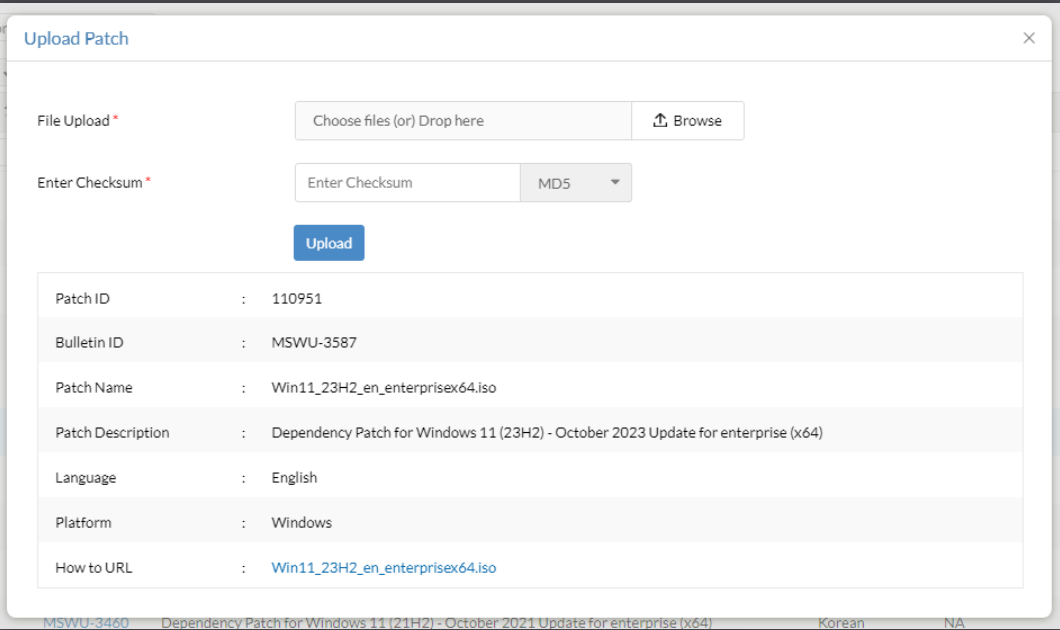
- Enter the checksum and wait for it to be validated
- Once validated, click on Upload
- Once the patch has been uploaded, it can be installed
Windows 11 version 23H2 Professional Edition
Follow the below steps to download the ISO image.
- Method 1:
- Download Windows 11 23H2 ISO file from the Microsoft 365 Admin Center or by referring to this page.
- Navigate to distribution store in the Distribution Server: To find the distribution store location <DS_INSTALL_DIR> -> Replication -> Store.
- Copy the downloaded ISO file manually into the distribution store directory, and rename the ISO file as given below:
Language-English:- 64 Bit: 110949-Win11_23H2_enx64.iso
The above naming convention is applicable for all Windows 11 editions except the Enterprise edition.
- Patch Manager Plus supports the deployment of feature packs for multiple languages. Click here to view the ISO setup file for the language of your choice.
Note - To deploy Win 11 feature packs in more than one language, check the respective ISO files for each language, download and place them in the distribution store.
- Method 2:
- Download Windows 11 23H2 ISO file from the Microsoft 365 Admin Center or by referring to this page.
- Click on Upload near the Download failed error message
- In the pop-up window, browse and select the file to upload
- Choose between the Checksum types (MD5 and SHA256)
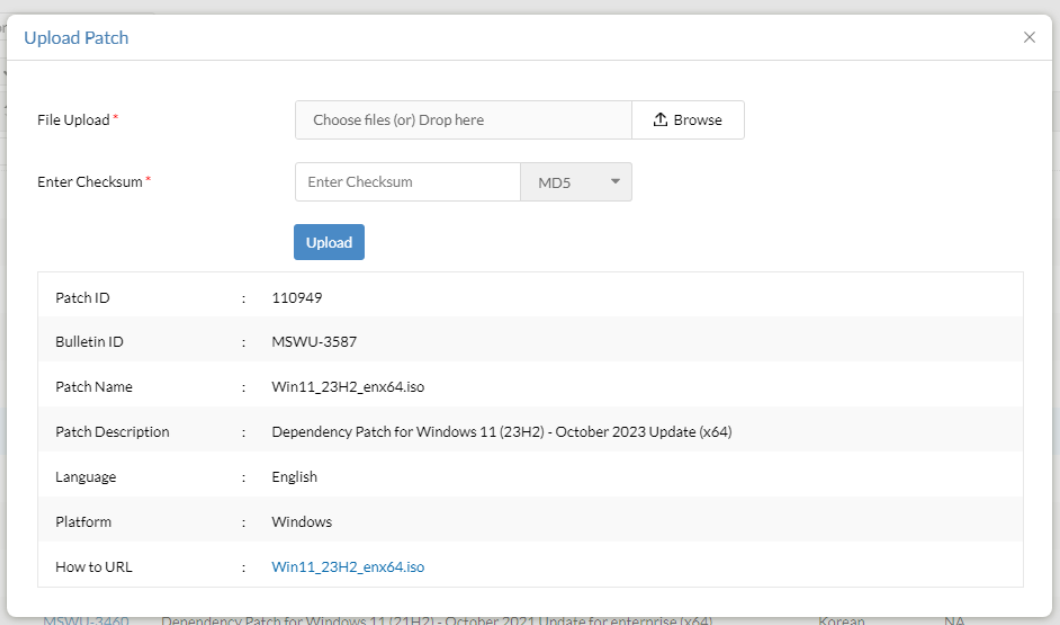
- Enter the checksum and wait for it to be validated
- Once validated, click on Upload
- Once the patch has been uploaded, it can be installed
3.Deploy the Windows 11 23H2 Feature Pack.
If you are upgrading from Windows 11 version 21H2, refer to the following steps:
- In the server web console, navigate to Missing Patches view.
- Choose the Windows 11 23H2 feature pack patches you wish to deploy.
Patch ID details:
- 110952 - Windows 11 23H2 Enterprise Edition - 64 Bit
- 110950 - Other Windows 11 23H2 Editions - 64 Bit
If you are upgrading from Windows 10, refer to the following steps:
- In the server web console, navigate to Supported Patches view.
- Choose the Windows 11 23H2 feature pack patches you wish to deploy.
Patch ID details:
- 110958 - Windows 11 23H2 Enterprise Edition - 64 Bit
- 110956 - Other Windows 11 23H2 Editions - 64 Bit
Enablement Package patch ID details:
| Current version | Version to upgrade to | Patch ID |
| Windows 11, version 22H2 | Windows 11, version 23H2 | 110035 (x64) |
- To create an APD task for deploying feature packs, make sure to select the Feature Pack check box while defining the patch task.
- Once the dependency patch is downloaded and stored in the Patch Store, Feature Packs will be successfully deployed to the target computers during the subsequent deployment window. A separate configuration can be created for the particular patch on demand.
Are you facing issues while installing or upgrading to Windows 11 23H2? Refer knowledge base for resolution.
Below table contains the language wise ISO file name. Rename the ISO file name based on the language of your choice before deployment.
| Language | Other Editions | Enterprise Edition |
| English | 64-Bit: 110949-Win11_23H2_enx64.iso | 64-Bit: 110951-Win11_23H2_en_enterprisex64.iso |
| Spanish | 64-Bit: 110949-Win11_23H2_Spx64.iso | 64-Bit: 110951-Win11_23H2_Sp_enterprisex64.iso |
| Arabic | 64-Bit: 110949-Win11_23H2_Arx64.iso | 64-Bit: 110951-Win11_23H2_Ar_enterprisex64.iso |
| Chinese (Simplified) | 64-Bit: 110949-Win11_23H2_csx64.iso | 64-Bit: 110951-Win11_23H2_cs_enterprisex64.iso |
| Chinese (Traditional) | 64-Bit: 110949-Win11_23H2_ctx64.iso | 64-Bit: 110951-Win11_23H2_ct_enterprisex64.iso |
| Czech | 64-Bit: 110949-Win11_23H2_Czx64.iso | 64-Bit: 110951-Win11_23H2_Cz_enterprisex64.iso |
| Danish | 64-Bit: 110949-Win11_23H2_Dax64.iso | 64-Bit: 110951-Win11_23H2_Da_enterprisex64.iso |
| Dutch | 64-Bit: 110949-Win11_23H2_Dux64.iso | 64-Bit: 110951-Win11_23H2_Du_enterprisex64.iso |
| Finnish | 64-Bit: 110949-Win11_23H2_Fix64.iso | 64-Bit: 110951-Win11_23H2_Fi_enterprisex64.iso |
| French | 64-Bit: 110949-Win11_23H2_Frx64.iso | 64-Bit: 110951-Win11_23H2_Fr_enterprisex64.iso |
| German | 64-Bit: 110949-Win11_23H2_Gex64.iso | 64-Bit: 110951-Win11_23H2_Ge_enterprisex64.iso |
| Greek | 64-Bit: 110949-Win11_23H2_Grx64.iso | 64-Bit: 110951-Win11_23H2_Gr_enterprisex64.iso |
| Hebrew | 64-Bit: 110949-Win11_23H2_Hbx64.iso | 64-Bit: 110951-Win11_23H2_Hb_enterprisex64.iso |
| Hungarian | 64-Bit: 110949-Win11_23H2_Hnx64.iso | 64-Bit: 110951-Win11_23H2_Hn_enterprisex64.iso |
| Italian | 64-Bit: 110949-Win11_23H2_Itx64.iso | 64-Bit: 110951-Win11_23H2_It_enterprisex64.iso |
| Japanese | 64-Bit: 110949-Win11_23H2_Jpx64.iso | 64-Bit: 110951-Win11_23H2_Jp_enterprisex64.iso |
| Japanese (NEC) | 4-Bit: 110949-Win11_23H2_Jpnx64.iso | 64-Bit: 110951-Win11_23H2_Jpn_enterprisex64.iso |
| Korean | 64-Bit: 110949-Win11_23H2_Kox64.iso | 64-Bit: 110951-Win11_23H2_Ko_enterprisex64.iso |
| Norwegian | 64-Bit: 110949-Win11_23H2_Nrx64.iso | 64-Bit: 110951-Win11_23H2_Nr_enterprisex64.iso |
| Polish | 64-Bit: 110949-Win11_23H2_Pox64.iso | 64-Bit: 110951-Win11_23H2_Po_enterprisex64.iso |
| Portuguese (Brazil) | 64-Bit: 110949-Win11_23H2_Pbx64.iso | 64-Bit: 110951-Win11_23H2_Pb_enterprisex64.iso |
| Portuguese (Portugal) | 64-Bit: 110949-Win11_23H2_Ppx64.iso | 64-Bit: 110951-Win11_23H2_Pp_enterprisex64.iso |
| Russian | 64-Bit: 110949-Win11_23H2_Rux64.iso | 64-Bit: 110951-Win11_23H2_Ru_enterprisex64.iso |
| Swedish | 64-Bit: 110949-Win11_23H2_Sdx64.iso | 64-Bit: 110951-Win11_23H2_Sd_enterprisex64.iso |
| Turkish | 64-Bit: 110949-Win11_23H2_Tkx64.iso | 64-Bit: 110951-Win11_23H2_Tk_enterprisex64.iso |
| Thai | 64-Bit: 110949-Win11_23H2_Thx64.iso | 64-Bit: 110951-Win11_23H2_Th_enterprisex64.iso |
| Slovenian | 64-Bit: 110949-Win11_23H2_Slx64.iso | 64-Bit: 110951-Win11_23H2_Sl_enterprisex64.iso |
| Croatian | 64-Bit: 110949-Win11_23H2_Crx64.iso | 64-Bit: 110951-Win11_23H2_Cr_enterprisex64.iso |
| Slovak | 64-Bit: 110949-Win11_23H2_Skx64.iso | 64-Bit: 110951-Win11_23H2_Sk_enterprisex64.iso |
| English (Great Britain) | 64-Bit: 110949-Win11_23H2_en-gbx64.iso | 64-Bit: 110951-Win11_23H2_en-gb_enterprisex64.iso |
| Spanish (Mexico) | 64-Bit: 110949-Win11_23H2_es-mxx64.iso | 64-Bit: 110951-Win11_23H2_es-mx_enterprisex64.iso |
| Bulgarian | 64-Bit: 110949-Win11_23H2_bg-bgx64.iso | 64-Bit:10951-Win11_23H2_bg-bg_enterprisex64.iso |
| French (Canada) | 64-Bit: 110949-Win11_23H2_fr-cax64.iso | 64-Bit: 110951-Win11_23H2_fr-ca_enterprisex64.iso |
| Estonian | 64-Bit: 110949-Win11_23H2_et-eex64.iso | 64-Bit: 110951-Win11_23H2_et-ee_enterprisex64.iso |
| Latvian | 64-Bit: 64-Bit: 110949-Win11_23H2_lv-lvx64.iso | 64-Bit: 110951-Win11_23H2_lv-lv_enterprisex64.iso |
| Lithuanian | 64-Bit:110949-Win11_23H2_lt-ltx64.iso | 64-Bit: 110951-Win11_23H2_lt-lt_enterprisex64.iso |
| Romanian | 64-Bit: 110949-Win11_23H2_ro-rox64.iso | 64-Bit: 110951-Win11_23H2_ro-ro_enterprisex64.iso |
| Serbian | 64-Bit: 110949-Win11_23H2_sr-latn-rsx64.iso | 64-Bit: 110951-Win11_23H2_sr-latn-rs_enterprisex64.iso |
| Ukranian | 64-Bit: 110949-Win11_23H2_uk-uax64.iso | 64-Bit: 110951-Win11_23H2_uk-ua_enterprisex64.iso |
| Maori (New Zealand) | 64-Bit: 110949-Win11_23H2_mi-nzx64.iso | 64-Bit: 110951-Win11_23H2_mi-nz_enterprisex64.iso |
FAQs
1) How do I update Windows 11 23H2?
To deploy the Windows 11 23H2 feature update via Patch Manager Plus, navigate to Admin -> Settings -> Patch Database Settings -> click on the Windows tab and enable the Feature Pack option.
2) What are the Windows 11 23H2 system requirements?
To install Windows 11 23H2 feature update, the device should be running on Windows 10 2004 or later versions. Refer here for a complete list of the system requirements.