Upgrade Windows 10 End of Life versions (EOL)
Microsoft's Windows 10 has been the choice of users worldwide due to its user-friendliness, and the large suite of pre-installed productivity apps. However, with as many as twenty Windows 10 End of Life versions, users need to be cautious and proactive in upgrading to the latest Windows 10 versions to ensure security and the latest features in their systems.
This article talks about:
Windows 10 End of Life Versions
Here's a list of the Windows 10 versions that have reached or are yet to reach the end of life:
| Windows 10 version | Release date | Active support ends on | Security support ends on |
|---|---|---|---|
| Windows 10, version 22H2 (E) | 18 Oct 2022 | 13 May 2025 | 13 May 2025 |
| Windows 10, version 22H2 (W) | 18 Oct 2022 | 14 May 2024 | 14 May 2024 |
| Windows 10, version 21H2 IoT (LTS) | 16 Nov 2021 | 12 Jan 2027 | 13 Jan 2032 |
| Windows 10, version 21H2 (LTS) | 16 Nov 2021 | 12 Jan 2027 | 12 Jan 2027 |
| Windows 10, version 21H2 (E) | 16 Nov 2021 | 11 Jun 2024 | 11 Jun 2024 |
| Windows 10, version 21H2 (W) | 16 Nov 2021 | 13 Jun 2023 | 13 Jun 2023 |
| Windows 10, version 21H1 (E)(W) | 18 May 2021 | 13 Dec 2022 | 13 Dec 2022 |
| Windows 10, version 20H2 (E) | 20 Oct 2020 | 09 May 2023 | 09 May 2023 |
| Windows 10, version 20H2 (W) | 20 Oct 2020 | 10 May 2022 | 10 May 2022 |
| Windows 10, version 2004 (E)(W) | 27 May 2020 | 14 Dec 2021 | 14 Dec 2021 |
| Windows 10, version 1909 (E) | 12 Nov 2019 | 10 May 2022 | 10 May 2022 |
| Windows 10, version 1909 (W) | 12 Nov 2019 | 11 May 2021 | 11 May 2021 |
| Windows 10, version 1903 (E)(W) | 29 Aug 2019 | 08 Dec 2020 | 08 Dec 2020 |
| Windows 10, version 1809 (LTS) | 13 Nov 2018 | 09 Jan 2024 | 09 Jan 2024 |
| Windows 10, version 1809 (E) | 13 Nov 2018 | 11 May 2021 | 11 May 2021 |
| Windows 10, version 1809 (W) | 13 Nov 2018 | 10 Nov 2020 | 10 Nov 2020 |
| Windows 10, version 1803 (E) | 30 Apr 2018 | 11 May 2020) | 11 May 2021 |
| Windows 10, version 1803 (W) | 30 Apr 2018 | 12 Nov 2019 | 12 Nov 2019 |
| Windows 10, version 1709 (E) | 17 Oct 2017 | 13 Oct 2020 | 13 Oct 2020 |
| Windows 10, version 1709 (W) | 17 Oct 2017 | 09 Apr 2019 | 09 Apr 2019 |
| Windows 10, version 1703 (E) | 11 Apr 2017 | 08 Oct 2019 | 08 Oct 2019 |
| Windows 10, version 1703 (W) | 11 Apr 2017 | 09 Oct 2018 | 09 Oct 2018 |
| Windows 10, version 1607 (LTS) | 02 Aug 2016 | 12 Oct 2021 | 13 Oct 2026 |
| Windows 10, version 1607 (E) | 02 Aug 2016 | 09 Apr 2019 | 09 Apr 2019 |
| Windows 10, version 1607 (W) | 02 Aug 2016 | 10 Apr 2018 | 10 Apr 2018 |
| Windows 10, version 1511 (E)(W) | 10 Nov 2015 | 10 Oct 2017 | 10 Oct 2017 |
| Windows 10, version 1507 (LTS) | 29 Jul 2015 | 13 Oct 2020 | 14 Oct 2025 |
| Windows 10, version 1507 (E)(W) | 29 Jul 2015 | 09 May 2017 | 09 May 2017 |
How to upgrade Windows 10 EOL versions to the latest?
You can upgrade the Windows 10 End of Life versions to the latest feature pack through one of the two below-mentioned methods:
- How to manually upgrade windows 10 EOL via Windows update?
- How to update windows 10 EOL versions automatically?
How to manually upgrade windows 10 EOL via Windows update?
To update your Windows 10 End of Life versions via windows update:
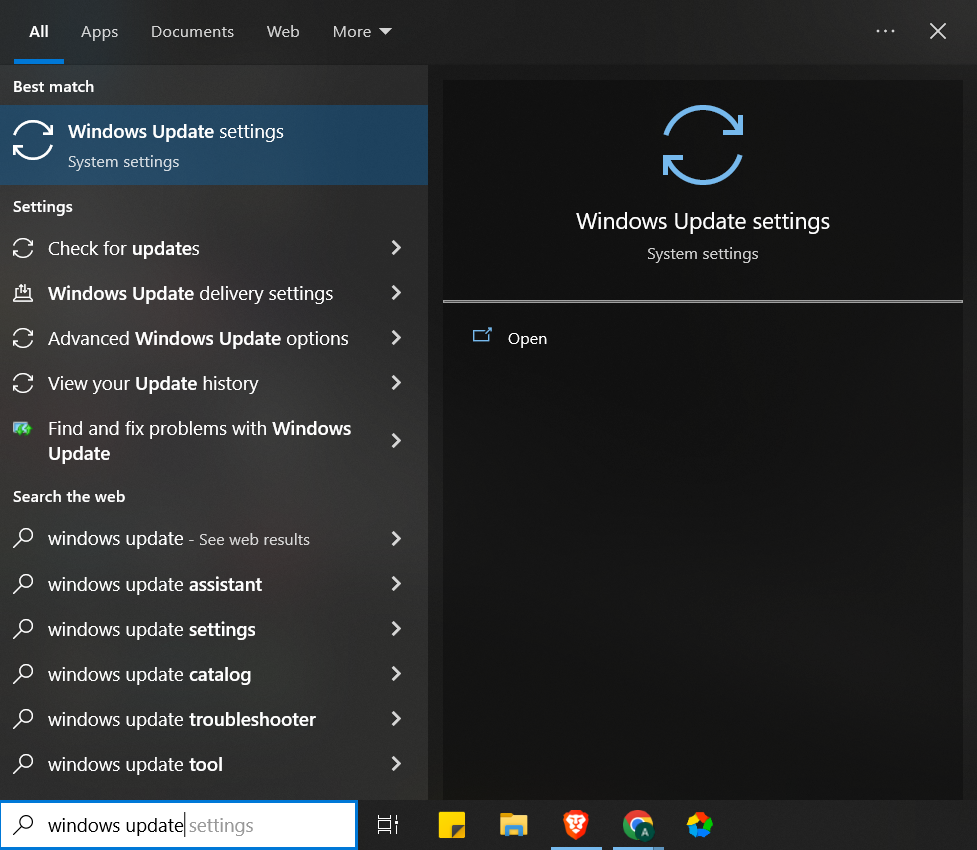
- Type windows update in the search box
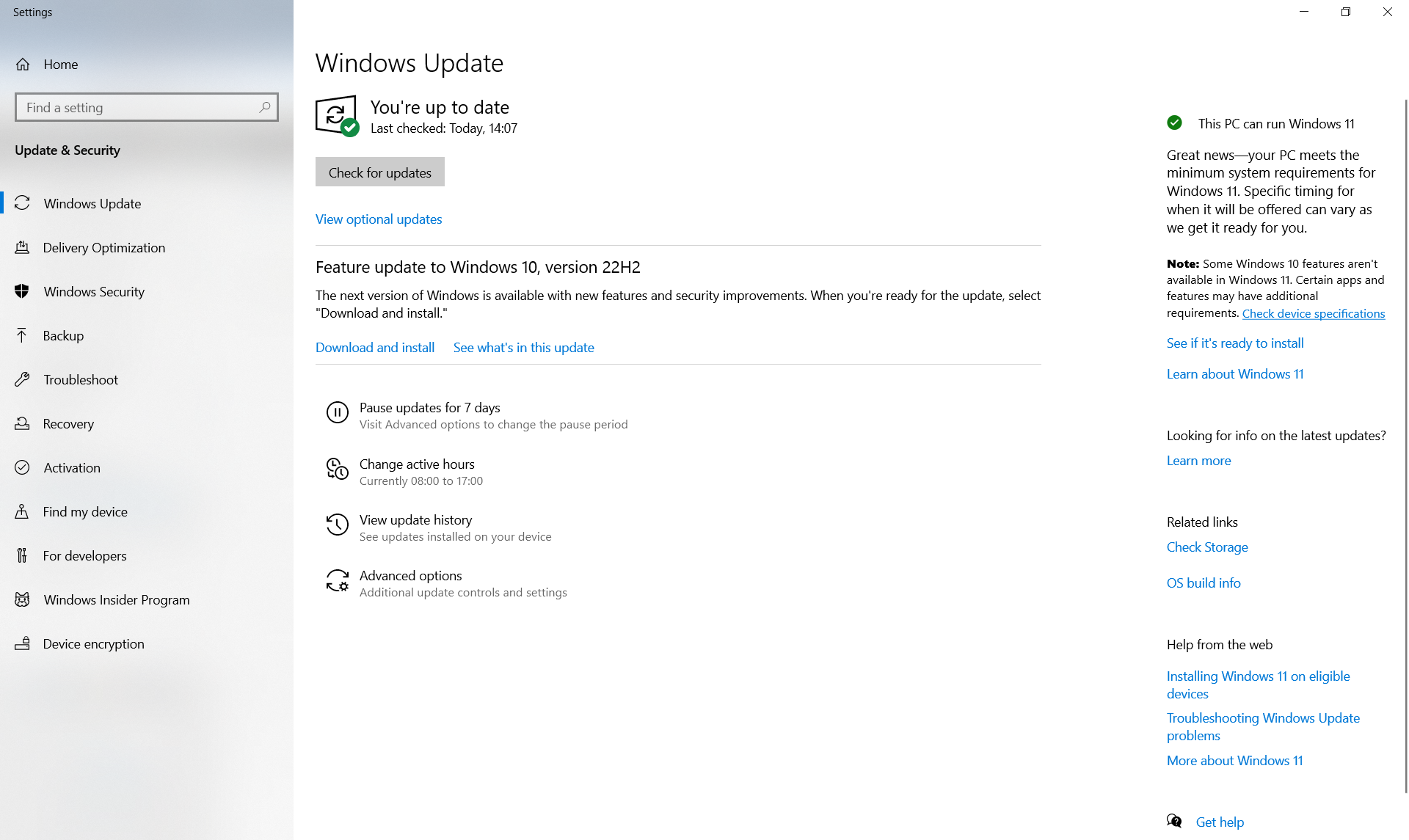
- Click on Windows Update Settings > Check for updates
- The system will check for available updates. Once done, the latest available feature pack will be listed.
- Click on Download and install
- Once the download is complete and the latest feature pack is ready to be installed, the system will notify so that the user can pick a convenient time for installation.
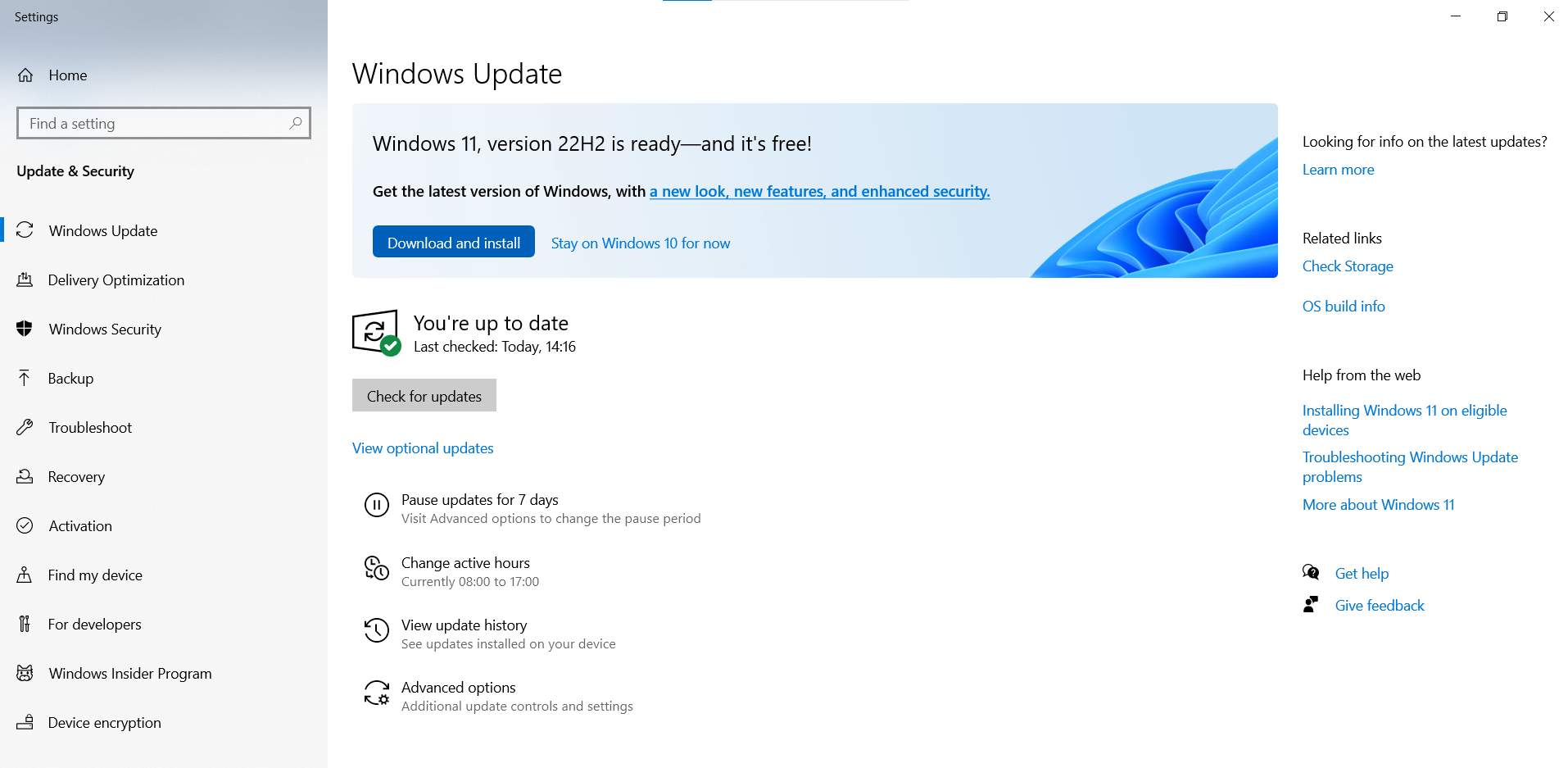
Note: For systems that are eligible for being upgraded to Windows 11, the following message will be displayed:
How to update windows 10 EOL versions automatically?
You can seamlessly automate the entire process of updating your Windows 10 EOL systems to the latest versions with ManageEngine Patch Manager Plus.
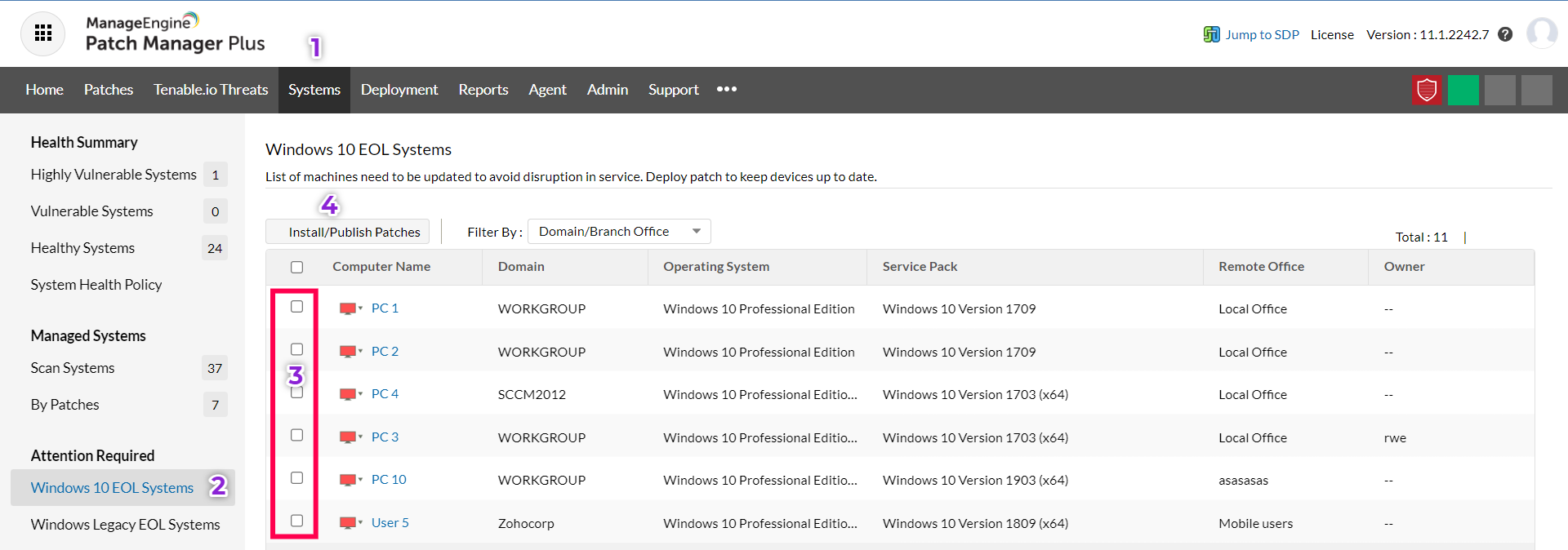
- In the Patch Manager Plus console, navigate to Systems
- Click on Windows 10 EOL Systems. The list of systems with the EOL versions along with the Service Pack details will be listed under this view.
- Select the systems that you want to update.
- Click on Install/Publish patches
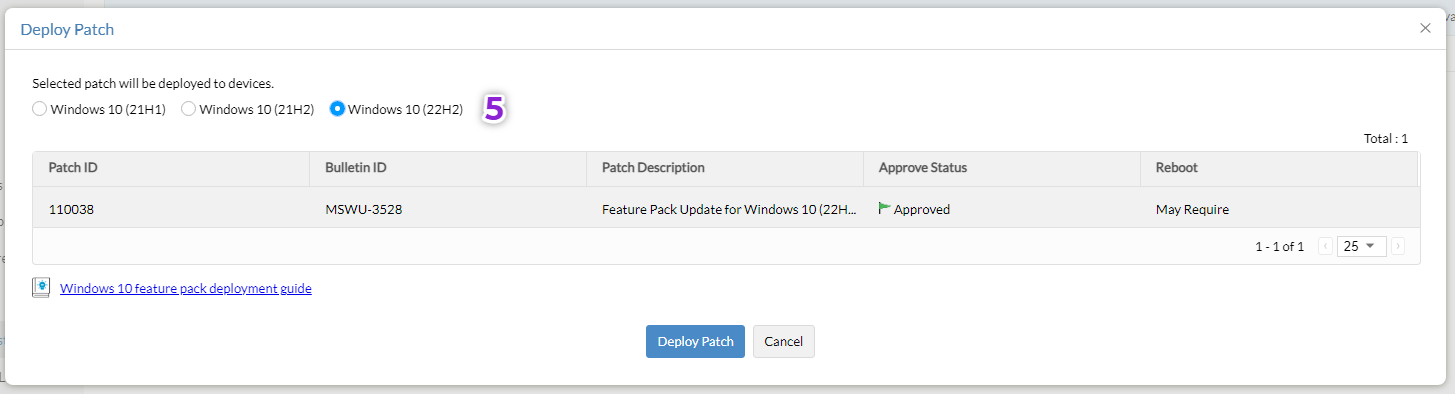
- Choose the required version of Windows 10 that you want to update to and click on Deploy Patch
- Configure the manual deployment task and click on Deploy or Deploy Immediately
Related articles
FAQs
1) What is the EOL for Windows 10?
Microsoft has stated that they will continue to support at least one Windows 10 release until October 14, 2025.
2) Which Windows 10 version is end of life?
The Windows 10, version 20H2 for Enterprise, Education, and IoT Enterprise will reach the end of servicing on May 9, 2023
3) Will Windows 11 be a free upgrade?
Yes, the Windows 11 upgrade is free. To check for available updates, navigate to Windows Update Settings > Check for updates. If Windows 11 is supported for your system, the following message will be displayed:

4) How long will Windows 10 21H2 be supported?
The Windows 10 21H2 EOL dates are as follows:
| Windows version | Release date | Active support ends on | Security support ends on |
|---|---|---|---|
| Windows 10, version 21H2 IoT (LTS) | 16 Nov 2021 | 12 Jan 2027 | 13 Jan 2032 |
| Windows 10, version 21H2 (LTS) | 16 Nov 2021 | 12 Jan 2027 | 12 Jan 2027 |
| Windows 10, version 21H2 (E) | 16 Nov 2021 | 11 Jun 2024 | 11 Jun 2024 |
| Windows 10, version 21H2 (W) | 16 Nov 2021 | 13 Jun 2023 | 13 Jun 2023 |
5) What is the EOL of Windows 11?
The Windows 11 EOL dates are as follows:
| Windows version | Release date | Active support ends on | Security support ends on |
|---|---|---|---|
| Windows 11, version 22H2 (E) | 20 Sep 2022 | 14 Oct 2025 | 14 Oct 2025 |
| Windows 11, version 22H2 (W) | 20 Sep 2022 | 14 Oct 2024 | 14 Oct 2024 |
| Windows 11, version 21H2 (E) | 04 Oct 2021 | 08 Oct 2024 | 08 Oct 2024 |
| Windows 11, version 21H2 (W) | 04 Oct 2021 | 10 Oct 2023 | 10 Oct 2023 |