Implementing Zero Trust Approach via PAM360
Zero Trust is the trending methodology of granting access privileges to users to the resources in an organization by verifying their activities and state with the score-based access policy method instead of trusting them instinctively, irrespective of their identity. The foremost motto of this approach is never to trust and always verify before granting privileges in an organization. By formulating real-time user/resource scores, the Zero Trust approach highlights vulnerable users and non-compliant devices, thus restricting further access privileges to the users and the resources via policy-based access privilege methodologies.
Zero Trust Approach in PAM360
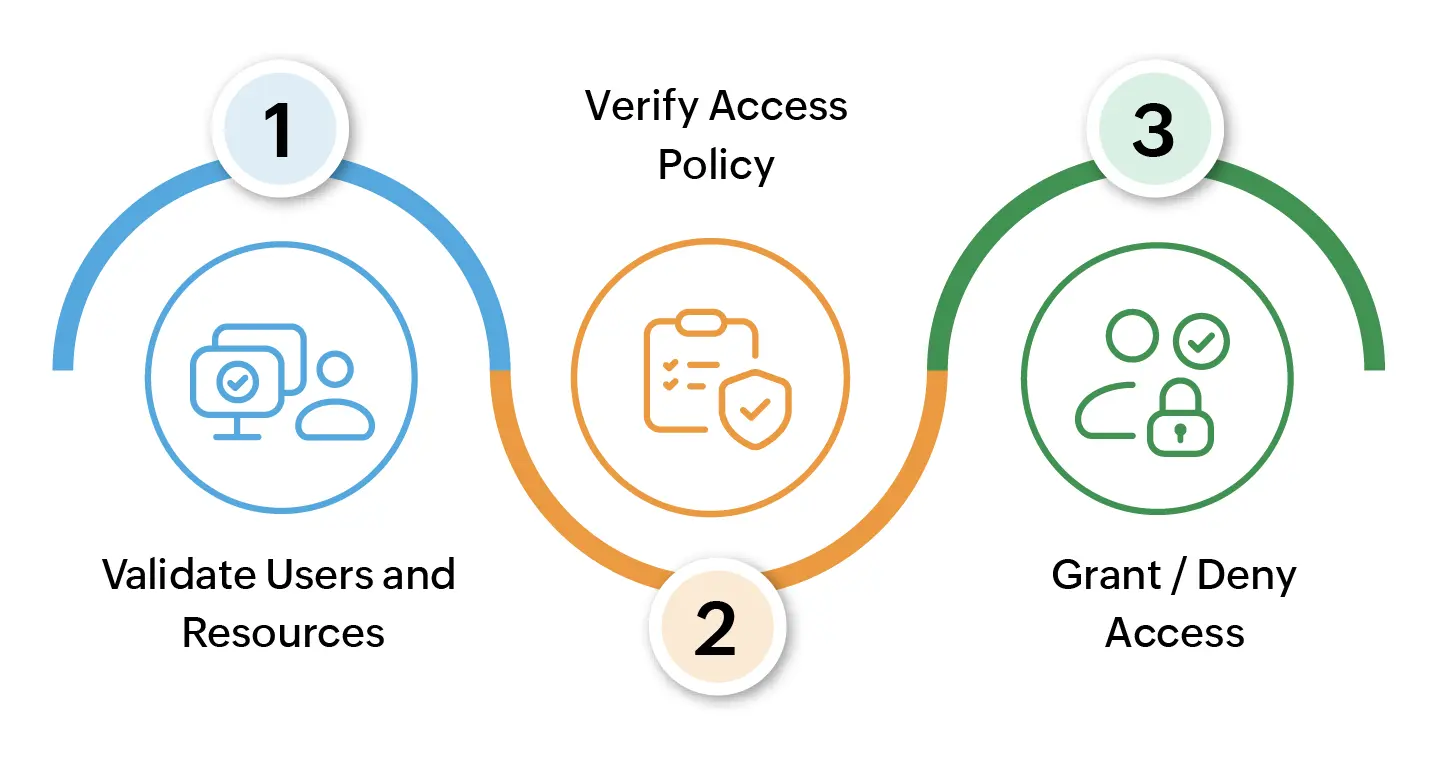
Where does this Zero Trust Approach Benefit the organization?
When an infrastructure of an organization enlarges, managing the privileged resources and user activities gets out of control, and monitoring them throughout will be a tedious process. There comes the Zero Trust approach, which minimizes the risk of data breaches and cyber attacks by eliminating the concept of trust altogether by calculating user and resource trust scores using predefined conditional parameters with an assist from respective installed agents. This decisive action ensures that only authorized users/devices have access to critical resources, minimizing the risk of data breaches and cyber-attacks.
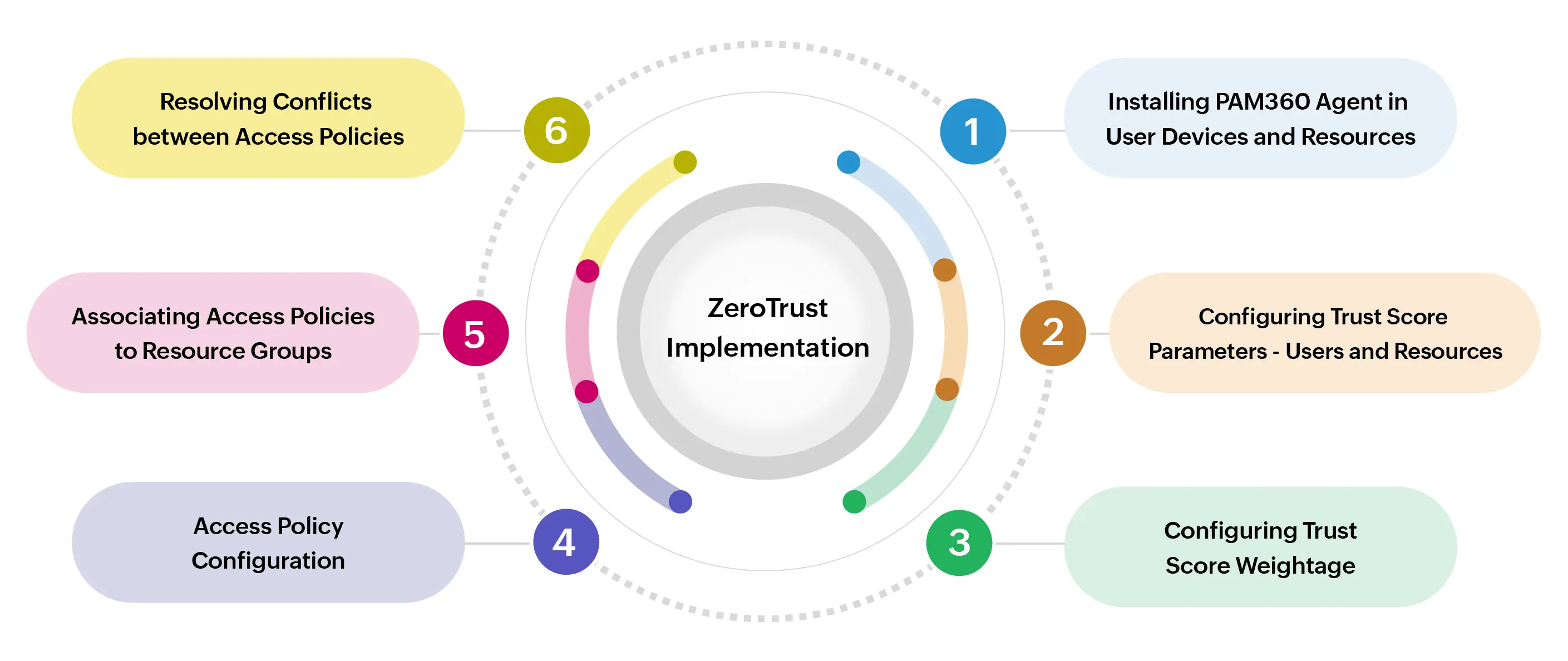
This document will help you learn more about implementing the Zero Trust approach in your organization via PAM360. Refer to the below sub-sections to learn more about the further Zero Trust implementation process:
- User Roles
- Installing PAM360 Agent with Zero Trust Module
- Configuring Trust Score Parameters
- Configuring Weightage for Trust Scores
- Zero Trust Access Policies
- Associating Access Policies to Resource Groups
- Resolving Conflict between Access Policies
- Limitations in Policy-Based Access Privilege Functionality
1. User Roles
Zero Trust configuration involves four main operations: configuring parameters and trust score weightage, configuring access policies, approving access policy requests, and resolving conflicts between access policies for a resource. By default, users with:
- The Privileged Administrator role has access to all of these operation privileges.
- The Administrator role can create, manage and resolve conflicts in their access policies, approve access policies and view the access policies created by other administrators.
- The Password Administrator role can perform all operations as Administrators except for access policy approval.
If you require a custom user role to meet your specific needs, you can navigate to Admin >> Customization >> Roles >> Zero Trust and enable the necessary permissions that follow:
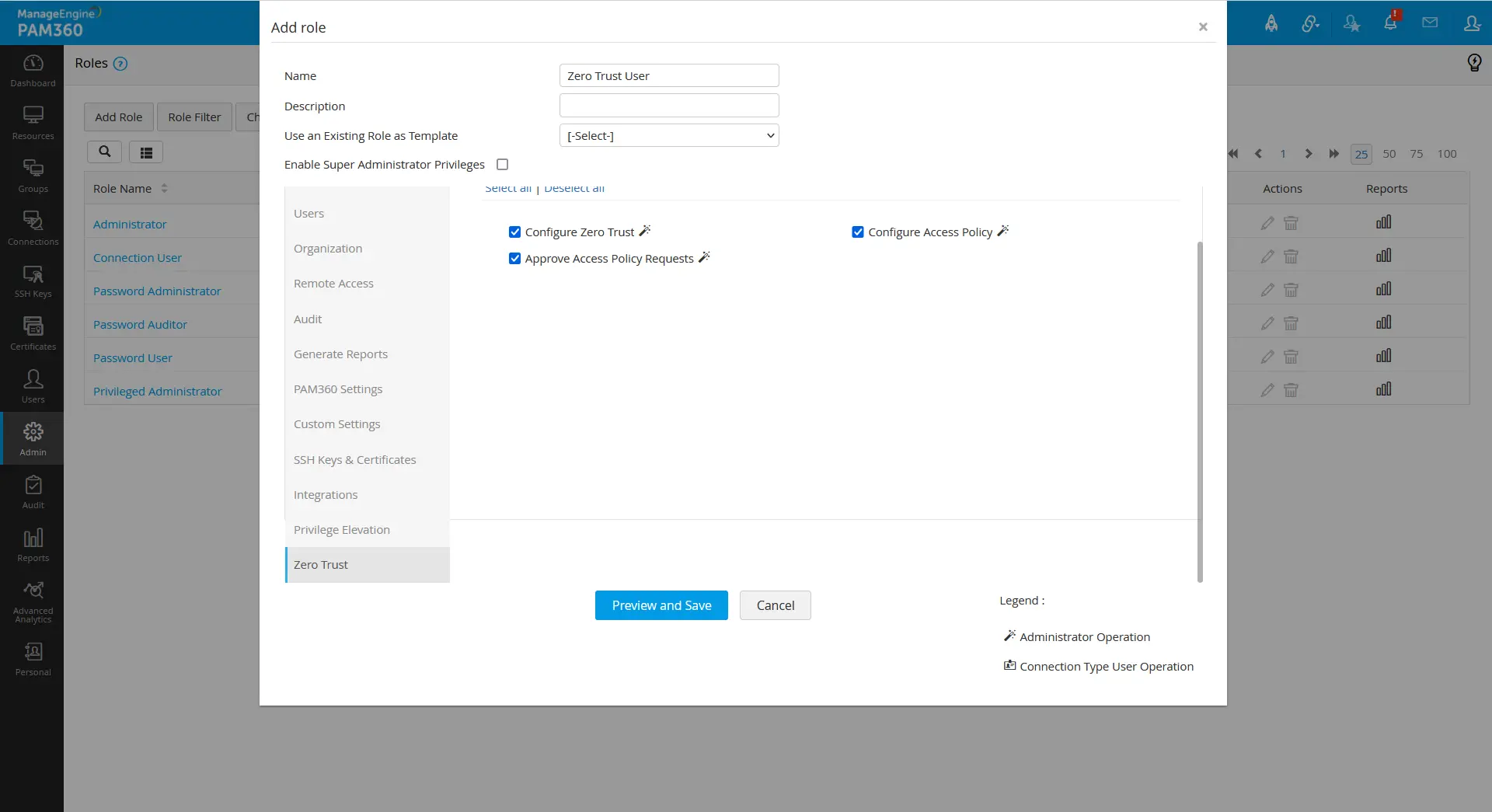
- Configure Zero Trust - A user with this role enabled can define parameter values and trust score weightage.
- Configure Access Policy - Can create, manage and resolve conflicts in their access policies and view the access policies created by other administrators.
- Approve Access Policy Request - Can view and approve the access policies created by another administrator along with the operations performed by the Configure Access Policy role.
Additional Detail
Granting the Approve Access Policy Request role will automatically permit the Configure Access Policy role to the users.
2. Installing PAM360 Agent with Zero Trust Module
The Zero Trust methodology works in an organization based on access policies defined via a set of score parameters. For the policy-based access privilege feature to fetch data for different parameters from user devices and resources for score validations, an agent with the relevant usage type is to be installed in the respective user devices and resources that come under the Zero Trust approach for privileged access and account governance.
To fetch data for User Score Parameters, an agent with the usage type User Device is to be installed in the user machines. Similarly, an agent with the usage type Resource should be installed in all the resources with the enabled Zero Trust Module to fetch the data for Resource Score Parameters.
Additional Detail
If you want to implement the policy-based access control via the Zero Trust feature in an agentless approach, you can proceed with user authentication parameters for configuring the parameters, weightage and access policy.
Refer to this help section to learn more about installing the PAM360 agent in the required user devices and resources.
3. Configuring Trust Score Parameters
The Zero Trust approach is micro-segment behavioral analytics of users and resources based on the predefined parameters for the trust score calculation. Nineteen types of parameters revolve around the Zero Trust approach in PAM360 for the trust score calculation. They are organized into two different categories:
- User Score Parameters (user authentication postures and user device configuration/security postures)
- Resource Score Parameters (resource configuration/security postures)
In the Admin >> Zero Trust >> Configuration page, you can set the desired baseline passing value for those parameters for the trust score calculation as per your organization's needs. To know more about each parameter in detail and about defining the parametric conditions for trust score calculation, refer to this help document.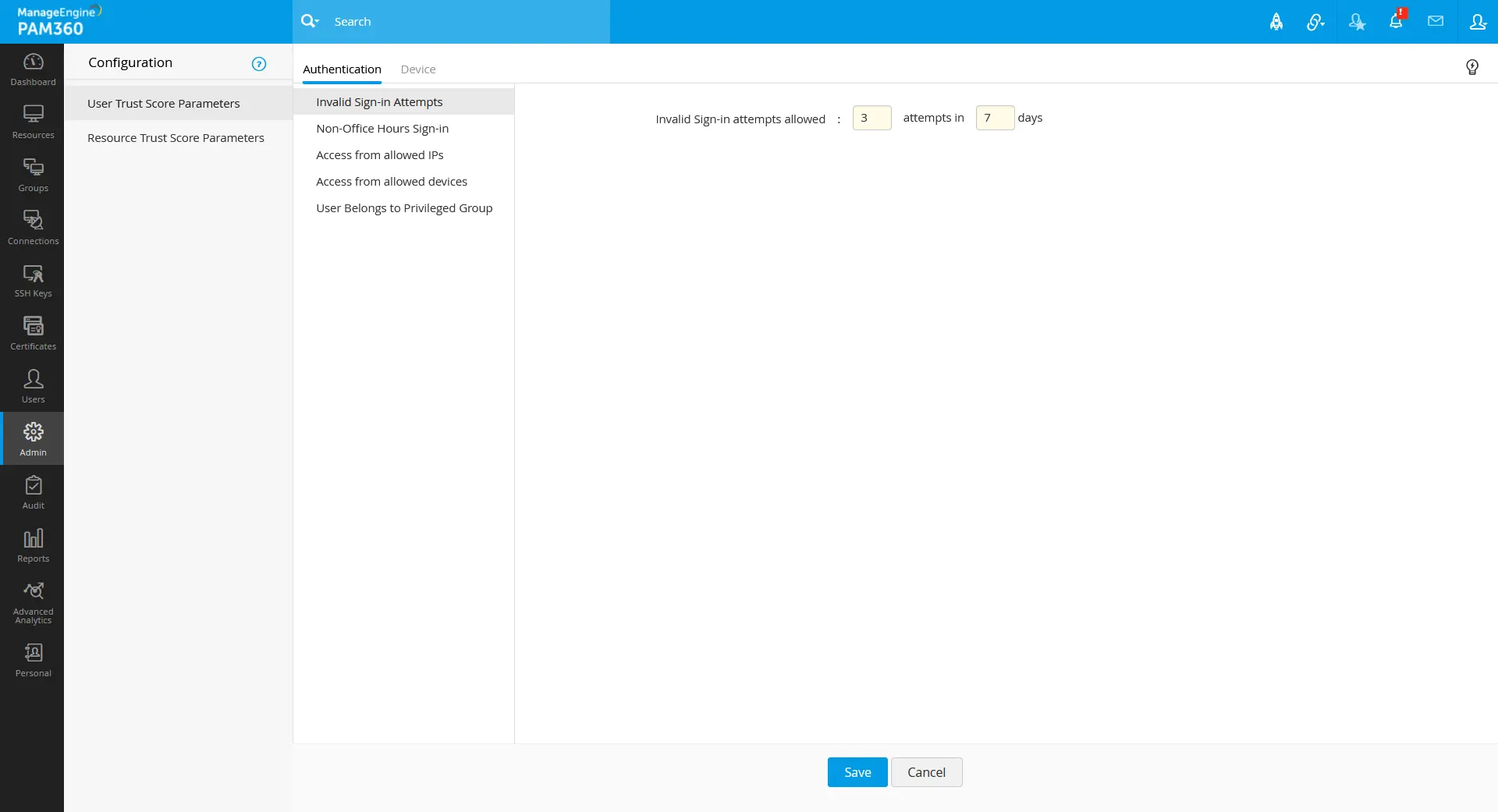
Once the Zero Trust approach is implemented in your organization, users must maintain those minimum predefined conditional parameters to maintain their trust scores high, thus granting them access to privileged accounts or elevating their self-privileges based on the administrator's configuration.
4. Configuring Weightage for Trust Scores
Configuring upon the parameter weightage in this section, the user trust score will be calculated based on user authentication and user device configuration/security postures, and the resource trust score will be calculated based on resource configuration/security postures. The calculated trust scores will be shown in the Users and Resources tabs beside the respective users and the resources.
To configure the trust score weightage for the user score parameters:
- Navigate to Admin >> Zero Trust >> Trust Score >> User Trust Score.
- The user trust score is derived using the Authentication and Device parameters of the users. In the Authentication and Device tabs, enter a weightage value between 0 - 10 in the field beside the respective parameters based on your organization's importance over the parameter.
- The bar chart presented in the User Trust Score window will be updated with the points for each parameter based on the fixed weightage values out of 10, resulting in a total score of 100 that will be considered for the final trust score validation of the user when the respective parametric conditions are met.
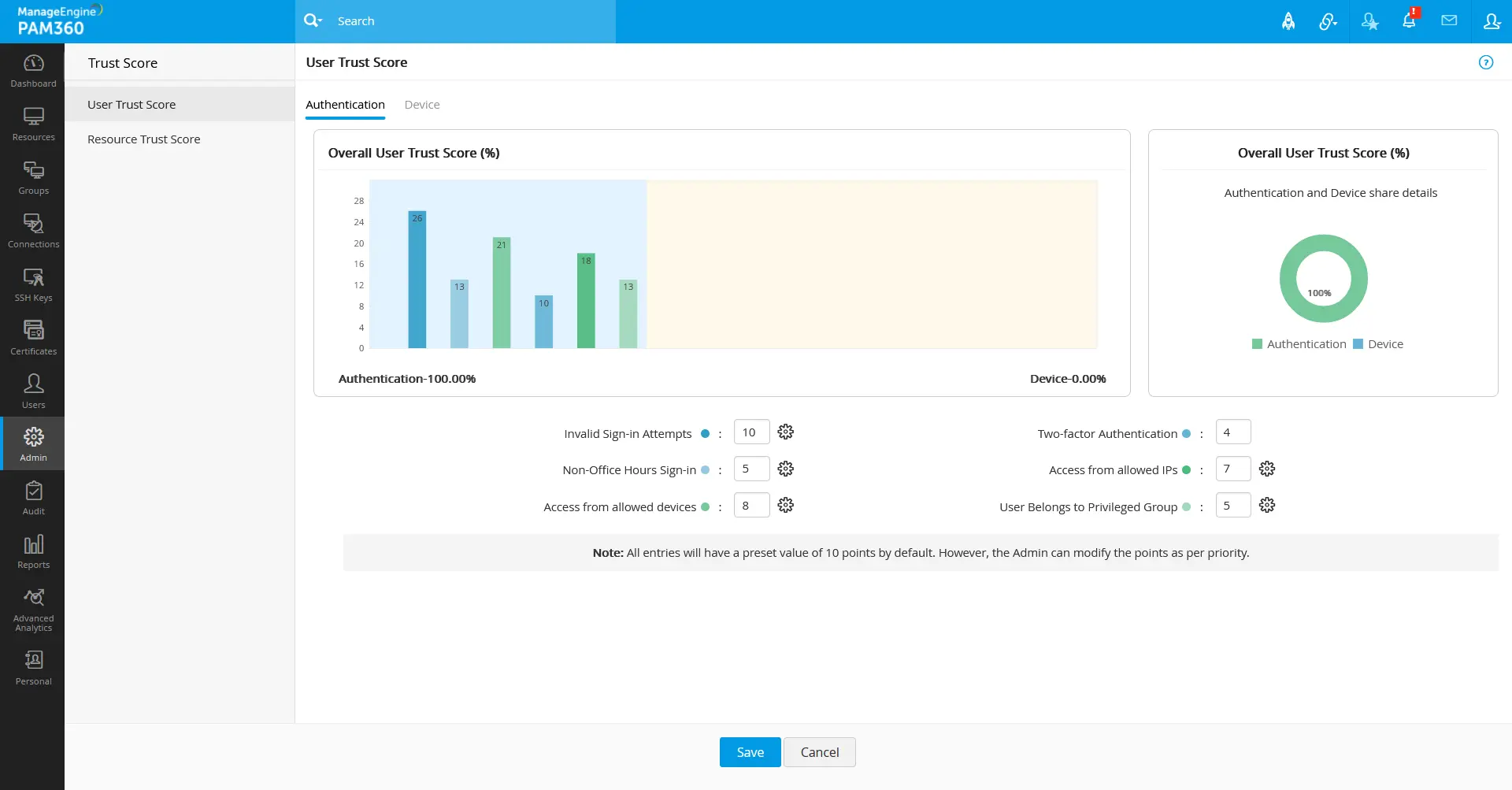
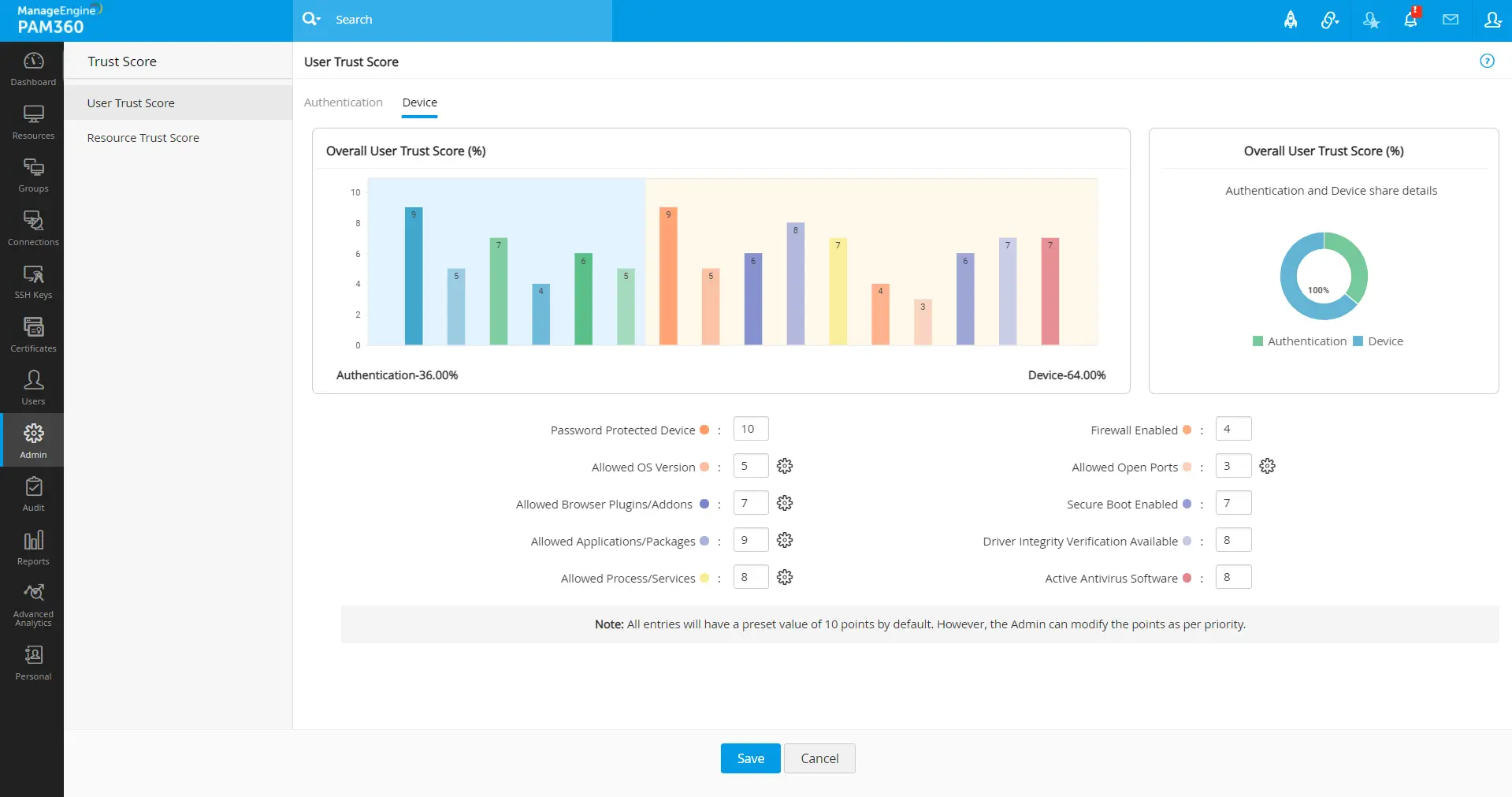
- The User Trust Score is a combination of points from the user authentication and user device state based on the configured weightage values.
- The user authentication parameter points will be updated only during each PAM360 login.
Additional Details
Similarly, to configure the trust score weightage for the resource score parameters:
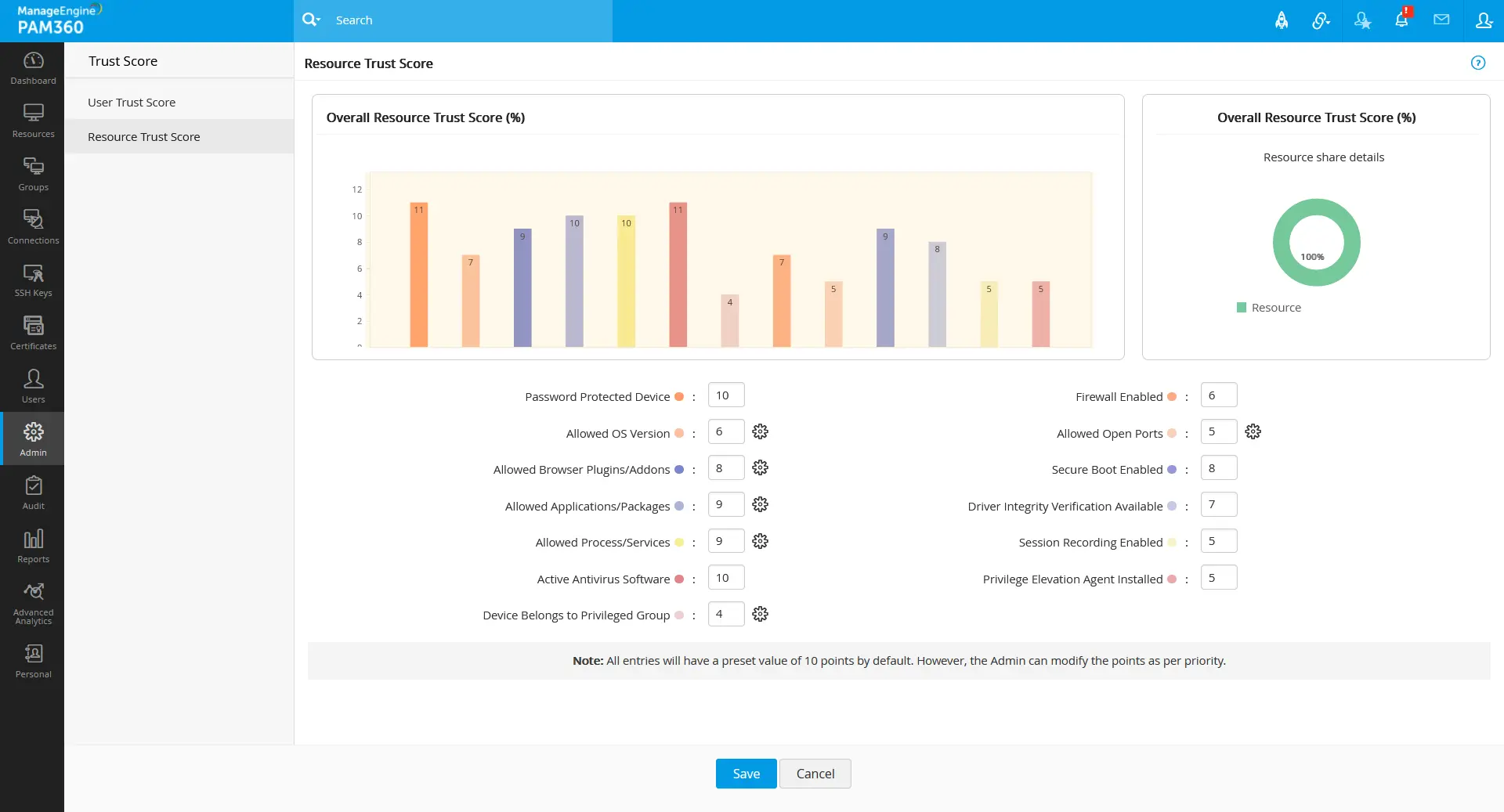
- Navigate to Admin >> Zero Trust >> Trust Score >> Resource Trust Score.
- Enter a weightage value between 0 - 10 in the field beside the respective parameters.
- The bar chart presented in the Resource Trust Score window will be updated with the points for each parameter based on the fixed weightage values out of 10, resulting in a total score of 100 that will be considered for the final trust score validation of the resource when the respective parametric conditions are met.
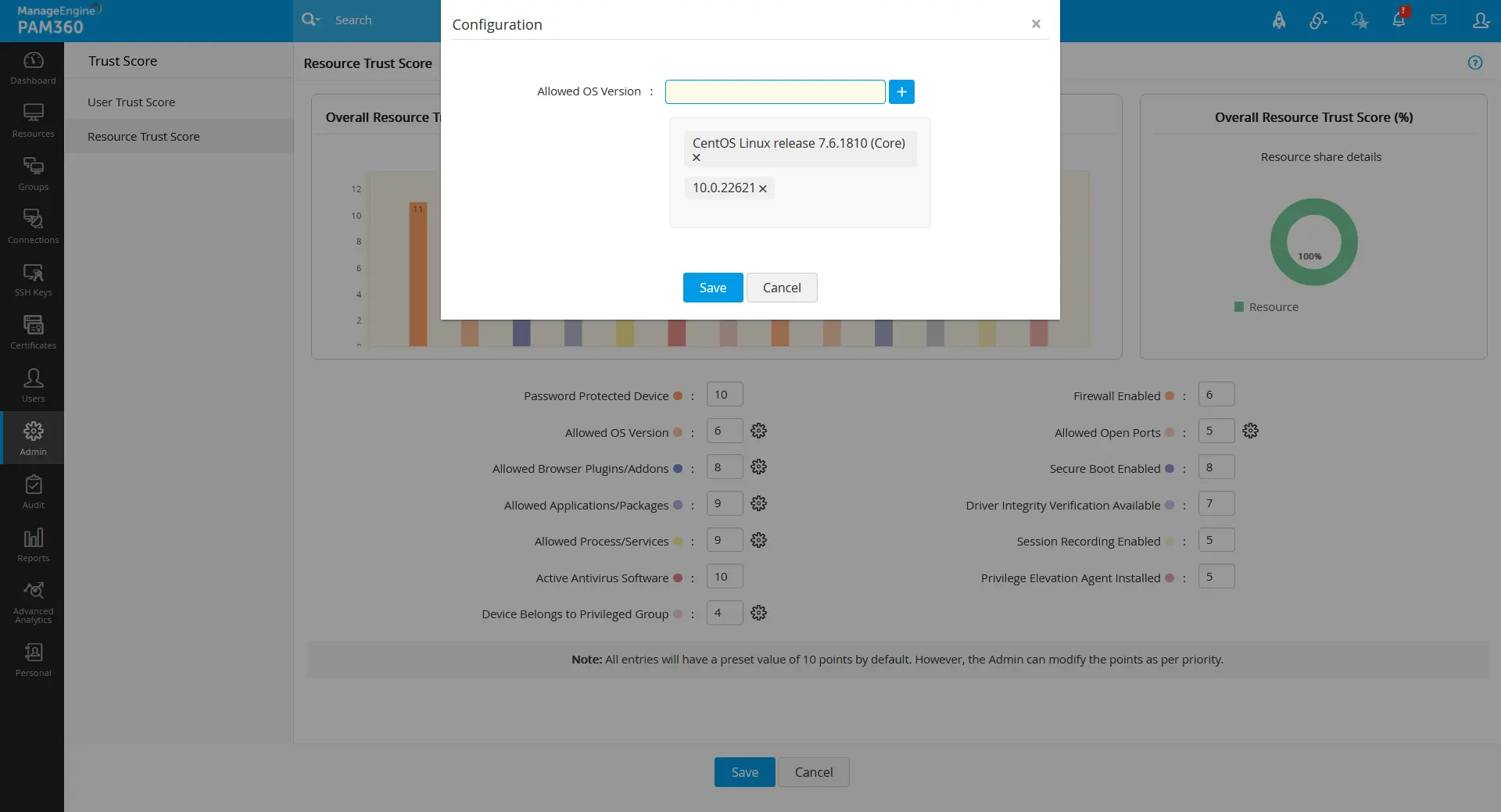
From the Trust Score page, you can also modify or define the condition parameters that are defined or left in the Admin >> Zero Trust >> Configuration page. To do so:
- Click on the gear icon beside the respective parameter.
- In the pop-up that opens, modify/define the conditions as required for your organization.
- Click Save to save the newly defined or the modified changes. The respective parameter change will get reflected in the Admin >> Zero Trust >> Configuration page.
4.1 Trust Score Details and Usage
Once you have configured the above sections 2 - 4, you can see the real-time trust scores of the users and the resources in the Users and the Resources tabs based on user authentication and user device and resource activities.
Additional Details
Even-though without any above configurations, the user trust score will be shown in the PAM360 GUI based on the following conditions that are defined on zero trust upgrade/installation.
- Invalid Sign-In Attempts - 3 attempts in 7 days.
- Non-Office Hour Sign-In - 09:00 - 18:00
- Enabled Two-Factor Authentication.
- Password Protected Device.
- Session Recording Enabled.
- Privileged Elevation Agent installed.
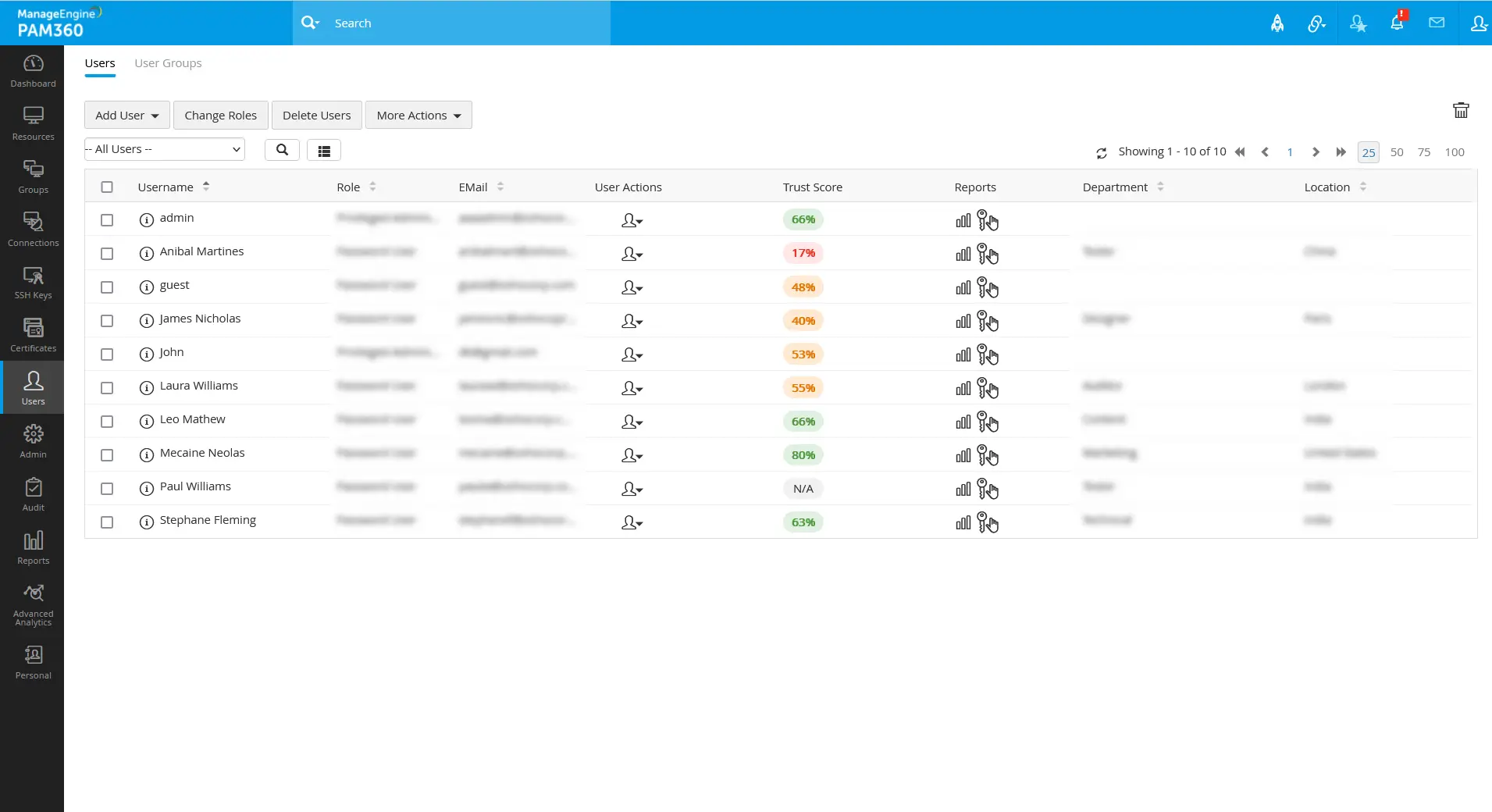
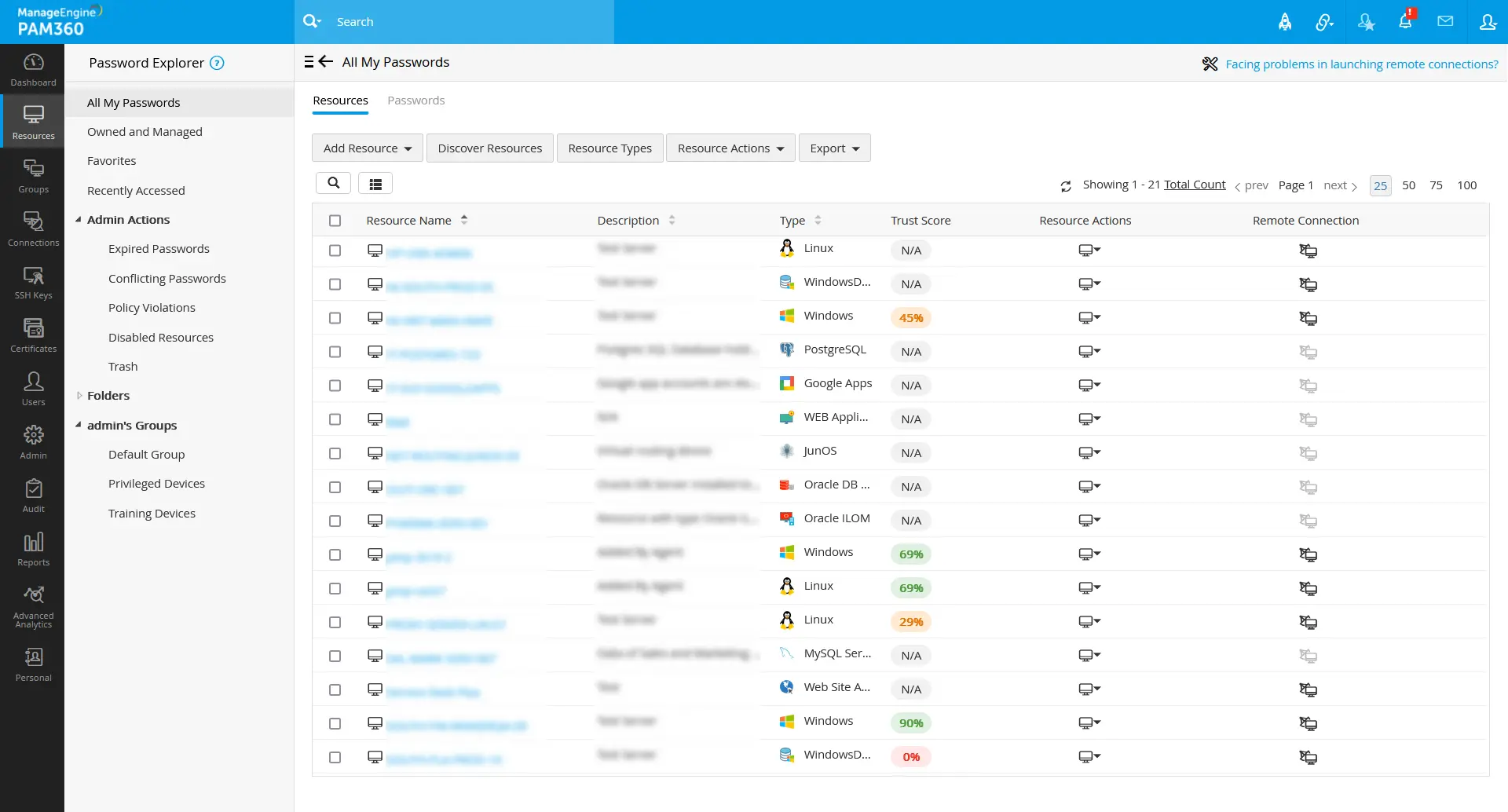
When the user authentication, user device, and resource data fetched meet the conditional and predefined parametric values, the user/resource trust score will be increased based on the configured parameter weightage value. Vise versa, if any of the parameters do not meet the conditional or predefined parameters, the user/resource trust score will decrease based on the fixed weightage values for those parameters.
Click on the respective trust score value to see the configured parameter scores in detail. The parameter configured for the user/resource will be shown here with the score based on the weightage assigned to them.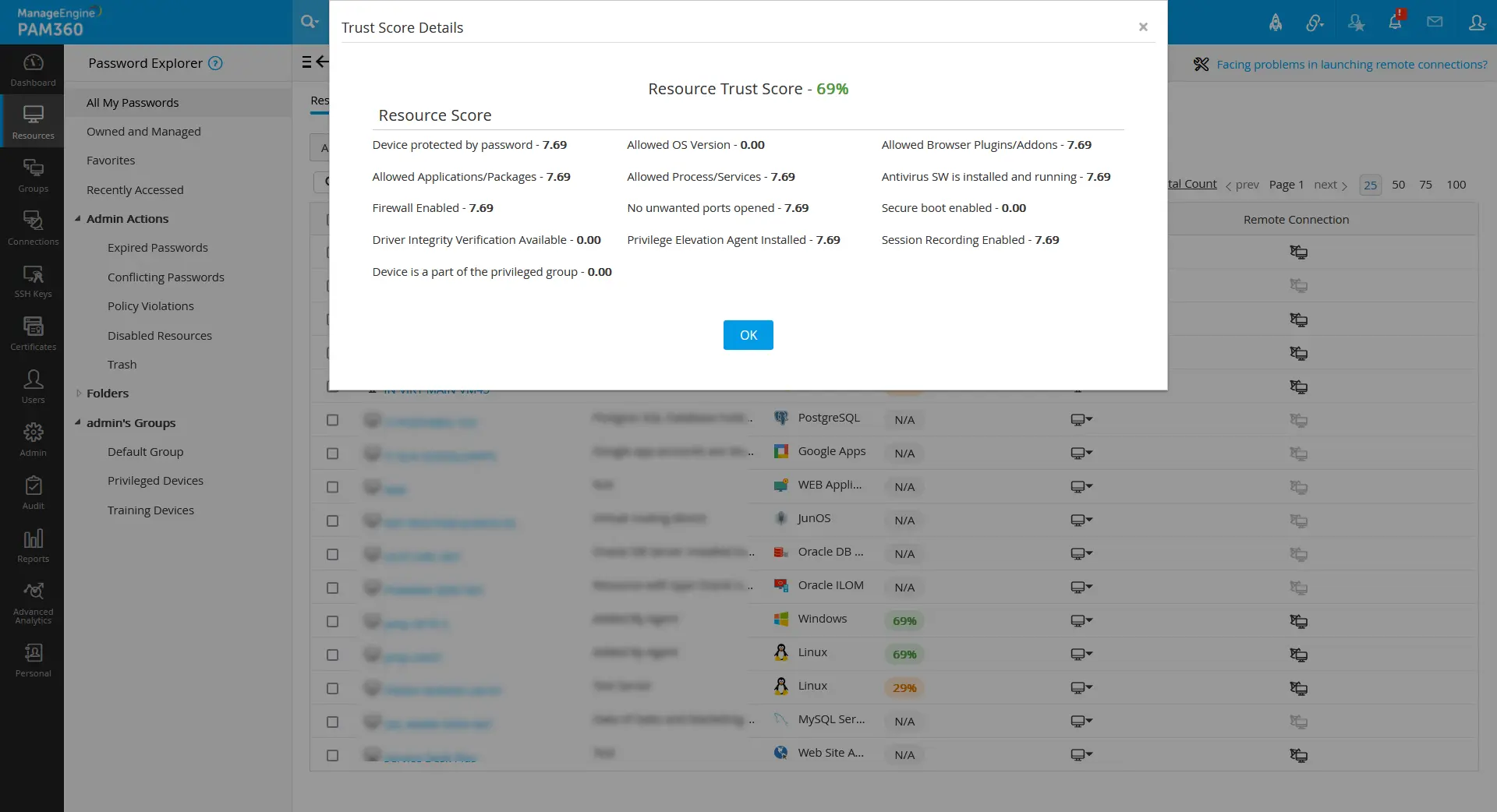
Based on the available trust scores, you can determine the credibility of the resources and the users. If you wish to scrutinize the access privileges and resource governance in a policy-based manner, you can proceed with further access policy configurations that automate the process with a policy-based trust score mechanism.
5. Zero Trust Access Policies
Once you have finished setting up the trust score parameters and the trust score weightage, you can create access policies by which the policy-based access method will be implemented in your organization with the help of generated trust scores. You can create fine-grained dynamic access policies based on your organization's needs and requirements, on which users will be given access privileges to the respective resources.
Navigate to Admin >> Zero Trust >> Access Policy to create new access policies with desired conditions concerning your requirements. Every access policy created for this zero trust approach is to be approved by another administrator of the organization to check for valid access policy conditions towards the users and the resources.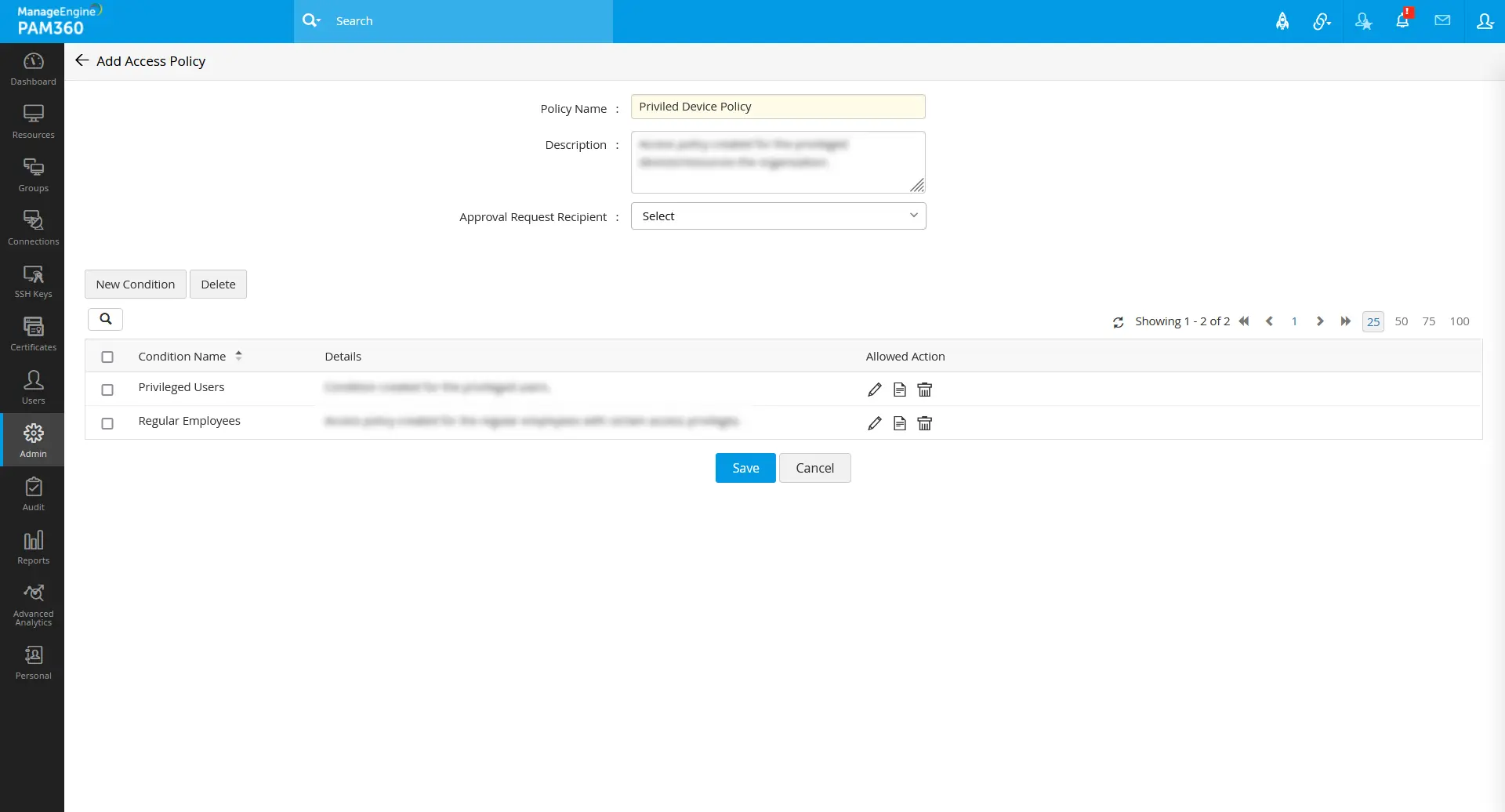
To learn more about creating access policies with various conditions and their limitations, refer to this help document.
6. Associating Access Policies to Resource Groups
Zero Trust is an automated policy-based access privilege approach based on the derived trust scores of the users and the resources. For this approach to work, the users and the resources have to be associated with an access policy with the required set of grant or deny conditions. While configuring the conditions in the access policy, the users will be associated with it using the Applies To option. For the users to opt for further privileges and connections using the Zero Trust approach, the configured access policies must be associated with the resources via static resource groups. To do this:
- Navigate to the Groups tab.
- Click on the Actions icon beside the respective static resource group.
- Select the option Edit Group Attributes.
- In the pop-up that appears, select the respective access policy in the Access Policy field that is to be associated with the resource group.
- Click Save to apply the changes.
- You can also associate an access policy for the resources when you are creating a new resource group post-configuration of access policies.
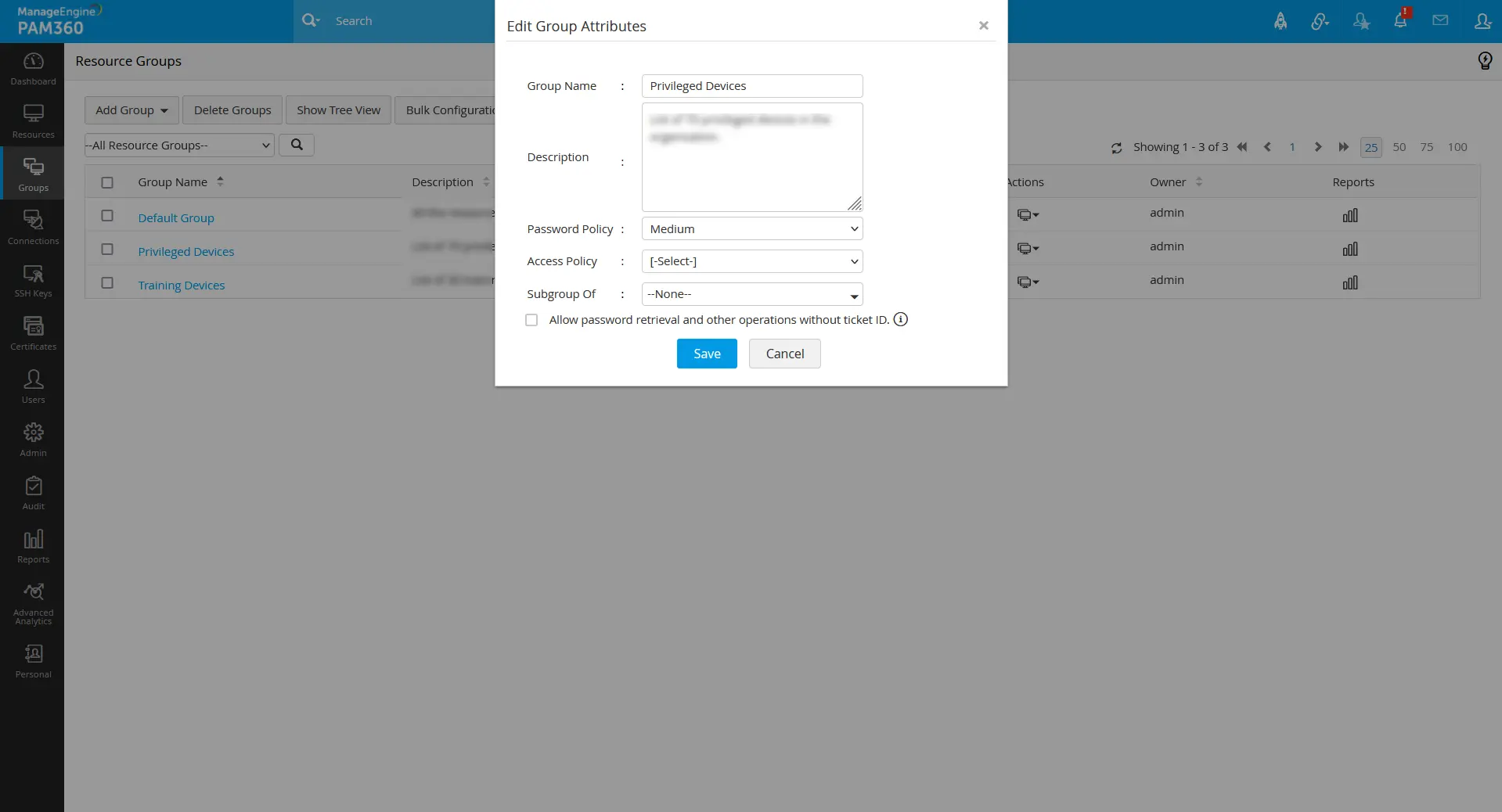
Now your organization is implemented with the Zero Trust approach for granting access privileges, remote connections, and elevated privileges to users. Under this approach, whenever a user requests access, their trust score is evaluated alongside the trust score of the resource they seek to access. The access policy conditions that have been configured are then used to determine whether the user is permitted access or not. If all the criteria in the access policy are satisfied, the user is permitted the access they require. However, if any of the access policy criteria fail, the system will either audit, issue a warning, request a reason, or deny the user access request, depending on the configuration of the access policy.
Additional Detail
If an existing access policy is modified and in a pending approval/suspended state, then the access policy with the conditions that exist before the modification will be active in the respective resource groups.
Refer to this help document for real-time Zero Trust implementation process in an organization.
7. Resolving Conflict between Access Policies
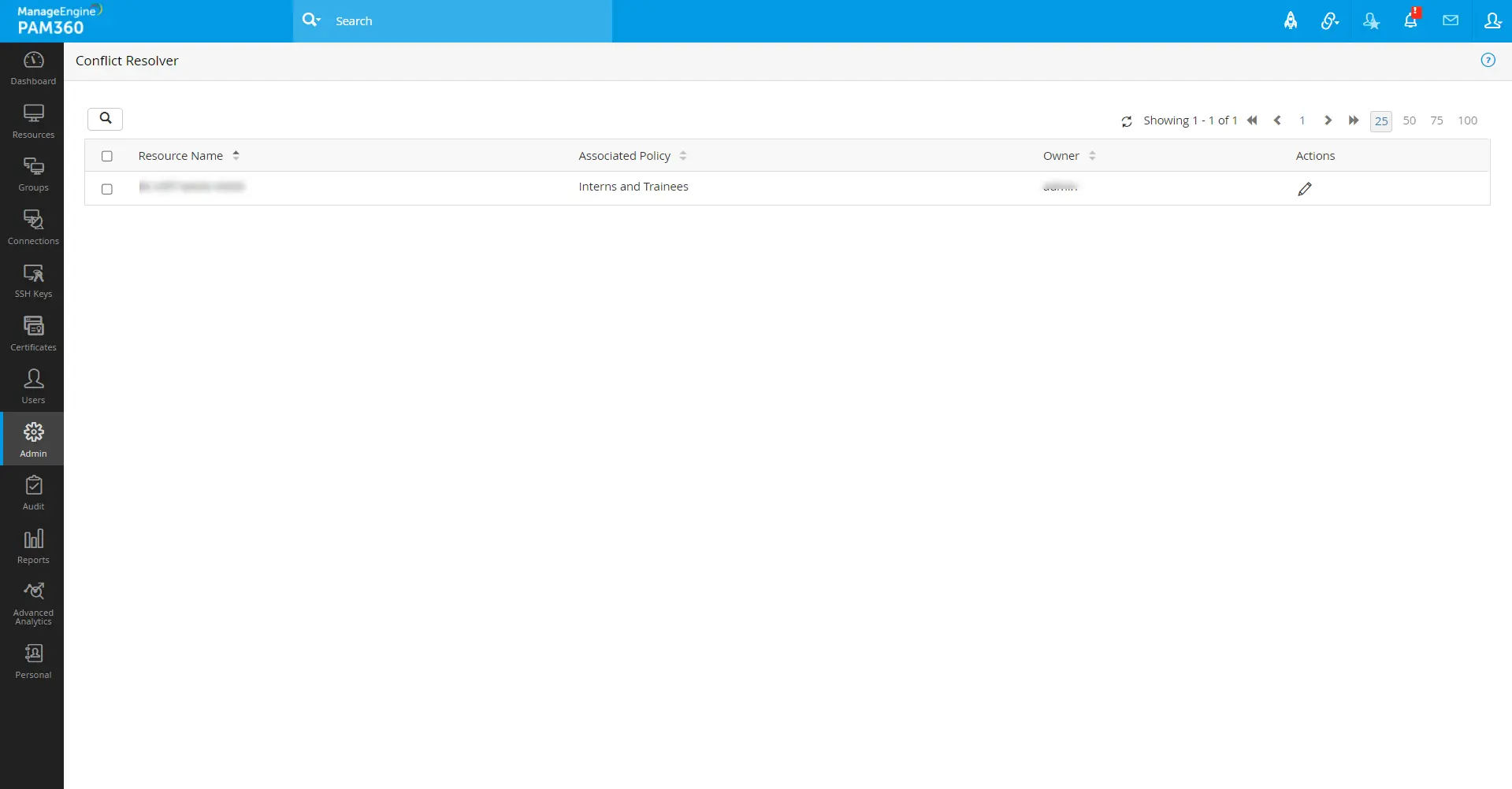
In the Zero Trust approach, when a resource is present in multiple static resource groups, and each of the resource groups is associated with different Zero Trust access policies, there will be a conflict between the access policies of that resource. Admin >> Zero Trust >> Conflict Resolver page will show all the available access policy conflicts on the resources in the Zero Trust configuration.
Consider a resource 'pam-server-1' grouped in static resource groups 'Privileged Devices' and 'Shared Devices'. At first, the resource group 'Privileged Devices' was associated with an access policy 'Regular Employees', and later the 'Shared Device' was associated with an access policy 'Contractual Employees'.
In above such cases, the access policy for a resource will always be applied based on the most recent resource group mapping. So, the resource 'pam-server-1' will be applied with the access policy 'Contractual Employees' configured via the resource group 'Shared Device'. If you want to change the access policy of a resource back to any other access policy, do the steps that follow:
- Navigate to Admin >> Zero Trust >> Conflict Resolver.
- Click on the Actions icon beside the respective resource for which you want to change the access policy from the recently applied one.
- In the pop-up that appears, select the desired access policy in the Associated Access Policy field.
- Click the document icon beside the Associated Access Policy field to see the access policy criteria in detail.
- Click Save to apply the respective access policy to the resource.

8. Limitations in Policy-Based Access Privilege Functionality
- When multiple users share a device in an organization, we recommend configuring user authentication parameters solely for the device. Because on a user device shared with multiple users, any device-related unauthenticated operation performed by a user will lead the user device to restrict access for all other users.
- The designated approver for the access policy must review and approve it, as approval cannot be delegated to other administrators.
- The access policy is not applicable for mobile applications, browser add-ons, and REST API users, and any activities performed through them will not affect the trust score of the user and resource.
- Access policy conditions are now limited to static resource groups only.
- User authentication parameters are calculated from the PAM360 audits; if the audit data is purged, the user authentication could be impacted based on fixed parameter weightage.
- The allow access privilege is currently supported for the primary landing server.
- The resource trust score validation will be bypassed for currently logged-in AD/LDAP and Microsoft Entra ID accounts.
- A user can attain VNC and SFTP connections irrespective of the access policy configured for a resource.
- Our access policy condition now only permits the allowed access for password reset and not for key rotation.