If I were the IT lead for Black Friday:
Implementing my Black Friday playbook
Category: General, Digital Experience monitoring
Published on: Nov 21, 2025
10 minutes
After analyzing the impact of Black Friday traffic spikes (as discussed in part 1 of my "If I were an IT lead during Black Friday" series) and knowing what to monitor (as discussed in part 2 of my "If I were an IT lead during Black Friday" series), I'll tell you how I'd plan to implement my strategy in this blog.
The ultimate failure is hindsight monitoring in my opinion. We're turning those depressing numbers into predictable success by using monitoring as a preemptive weapon, not a postmortem tool. Here is the no-nonsense implementation schedule I'd bet my career on.
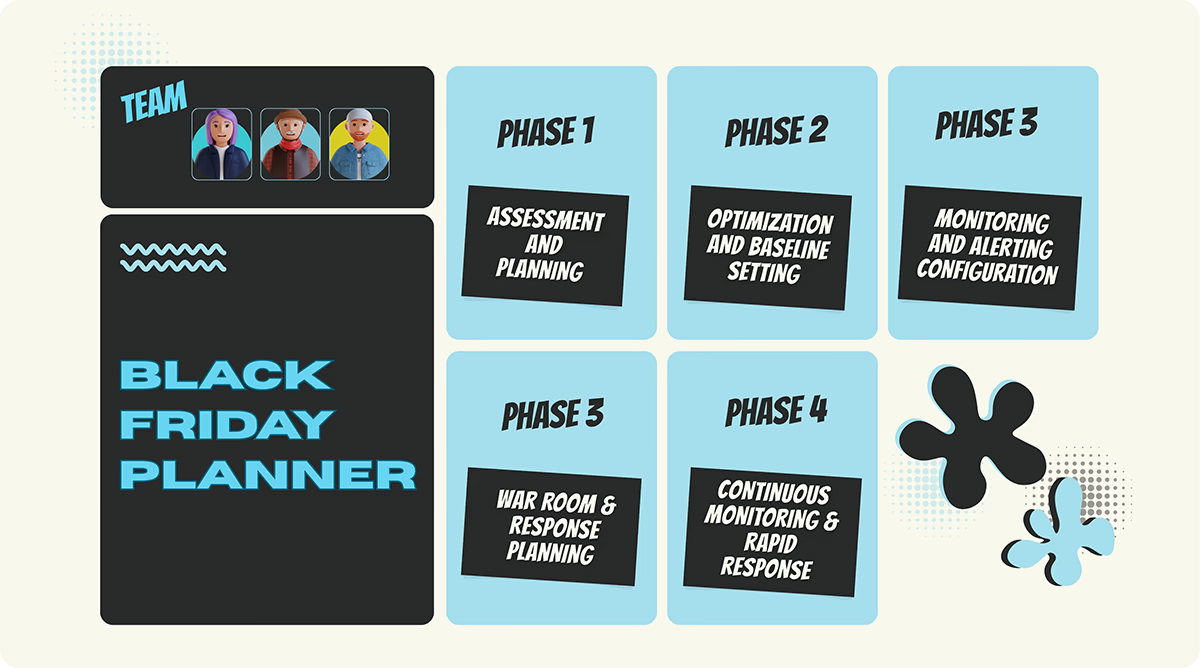
Phase 1: Assessment and planning (8–12 weeks before)
Two or three months before the actual event, I'd start by ruthlessly analyzing historical Black Friday data:
- What were the peak traffic volumes?
- When did they occur, exactly?
- Which specific microservice choked first?
We need facts to predict where the next attack will come from.
Next, it's time to break things on purpose. Why? Because finding bottlenecks before customers do is the only valuable form of QA. As this study shows, one fashion retailer proved this by simulating 5x peak traffic and slashing their page-load time by 50%, which guaranteed them 100% uptime for the entire holiday weekend.
Phase 2: Optimization and baseline setting (6 weeks before)
Based on the load tests conducted in the previous weeks, I'd optimize everything. This means fine-tuning slow database queries, locking down optimal CDN configurations, and ensuring caching is airtight.
This would establish my 'Normal' as well. This new 'normal' would become my clean performance baseline, i.e my expectations. This is the foundation for smart alerting, so I can immediately identify when performance drops below projected values.
Phase 3: Monitoring and alerting configuration (4 weeks before)
It’s time for full visibility. I'd deploy comprehensive monitoring across the mandatory layers:
- Server health
- APM for application visibility
- RUM, synthetics for user experience
- Network and bandwidth monitoring
- Dedicated database tracking
I'd configure alerts that notify my team when metrics approach dangerous levels. Then we ditch reactive scaling (scaling up only after the CPU is maxed out). Instead, we configure predictive auto-scaling based on traffic forecasts to allocate resources before the surge hits.
Phase 4: War room setup and response planning (2 weeks before)
We establish a War Room (virtual or physical) with real-time dashboards dedicated solely to critical business SLIs.
My team needs their marching orders. We create clear, simple runbooks for every common failure scenario. Everyone needs to know exactly what to do if the database response time spikes or if the checkout error rate approaches its danger threshold.
Phase 5: Continuous monitoring and rapid response (Black Friday week)
During Black Friday peak hours, I'd have my team actively monitor dashboards. The key metric now is speed. We aim for rapid detection (under 30 seconds) and rapid response (under 2 minutes). That two-minute window is often the difference between a minor hiccup and a catastrophic outage.
We don't just wait for real users to suffer. Beyond monitoring real user traffic, we'd also employ synthetic monitoring as our early warning system, to run continuous simulations of critical user paths. Every minute, the synthetic monitors would:
- Load the homepage.
- Search for products.
- Add items to cart.
- Proceed through checkout.
- Attempt to complete a purchase.
If the synthetic monitor fails, we are alerted before the customer even sees the error.
6 principles for failure-proof infrastructure
A monitoring strategy is only as good as the infrastructure it defends. To survive Black Friday, you need a resilient architecture built on these 6 principles:
1. Don't react, anticipate
I'd configure auto-scaling policies to predictively allocate resources based on forecasted traffic patterns. The days of waiting for the current load to exceed capacity (reactive scaling) are over. We pre-allocate based on predicted peak demand because it works.One e-commerce platform achieved 94% forecasting accuracy and prevented major outages during critical surges by switching from reactive to predictive autoscaling.
2. Distribute the stress
Traffic must be distributed across multiple web servers using robust load balancers. This is non-negotiable for two reasons: it ensures no single server becomes a bottleneck for a popular product page, and it provides essential redundancy—if one server fails, the others seamlessly continue serving traffic.
3. Always have a backup
We would implement master-replica database architectures complete with automatic failover. If the primary database begins to struggle or becomes unavailable due to unexpected load, the system instantly switches to a replica. This is service continuity insurance.
4. Offload at the Edge
I'd leverage a CDN like Cloudflare to serve static content from edge locations closer to users. This strategy drastically reduces latency and server load on the core infrastructure. Cloudflare's own deployment documented a 40% reduction in page-load times during Black Friday simply through effective CDN integration.
5. Intelligent caching strategy
Caching is the difference between a smooth experience and a crashed system when tens of thousands of users view the same products. I'd implement caching at multiple mandatory levels:
- Browser caching: For static assets cached directly on user devices.
- CDN caching: For dynamic content cached at edge locations.
- Application caching: For frequently accessed data cached in memory.
- Database caching: For query results cached to reduce database load.
6. Manage your access
I'd configure database connection pools to efficiently manage the limited number of database connections. This prevents the frustrating scenario where legitimate queries can't connect because all connections were unnecessarily exhausted by other requests under heavy transaction load.
How ManageEngine Applications Manager can safeguard your Black Friday surge
When facing the intense pressure of Black Friday, complete with massive traffic, intermittent failures, and complex scaling issues, I’d strongly recommend prioritizing a mature, comprehensive digital experience monitoring and APM solution such as ManageEngine Applications Manager. Here is the breakdown of how its unified capabilities support the precise monitoring, alerting, and capacity management required during peak loads.
1. End-to-end visibility: APM meets infrastructure
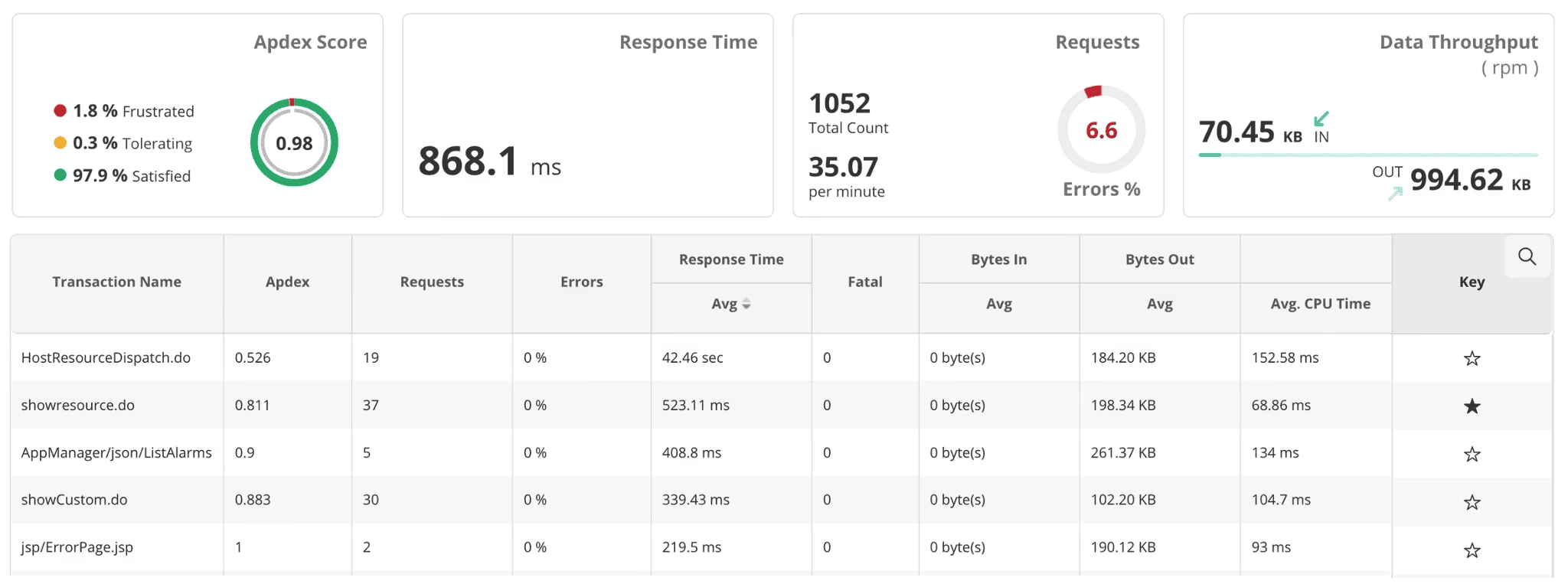
Survival in the cloud-native world requires seeing the entire transaction flow, not just a server's CPU usage. Applications Manager provides full-stack coverage, supporting over 150 technologies, including your servers, VMs, containers, and databases. Crucially, it builds automatic service maps and dependency mapping in real-time. If a downstream API or a critical database becomes a bottleneck during peak checkout, you instantly spot which service chain is causing the trouble. Furthermore, its distributed tracing allows you to follow individual transactions through your microservices, pinpointing slow code paths or overloaded database queries for fast resolution.
2. Monitoring the customer experience
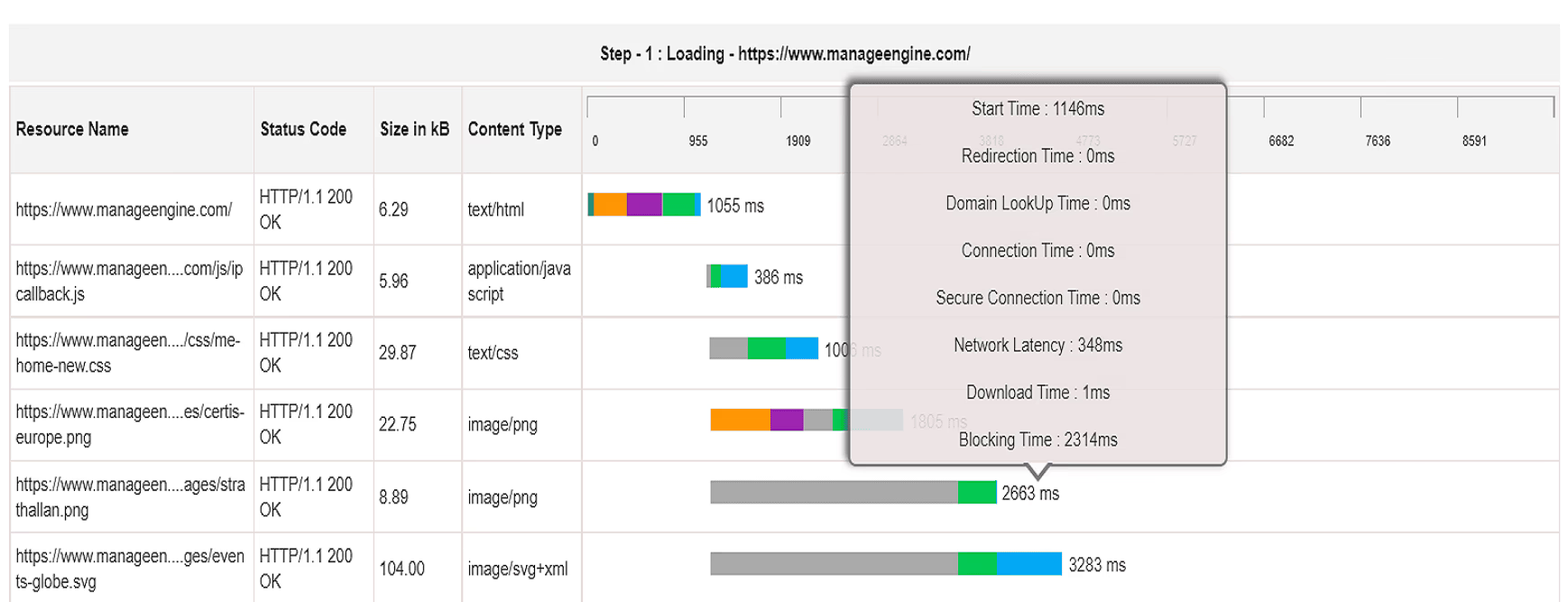
Traffic volume means nothing if it doesn't convert to customers. You can't rely on just server health, you need to know what users are actually experiencing. Applications Manager delivers this through two methods:
- Real-User Monitoring (RUM): It passively tracks real user behavior, capturing page load times, session flows, and error rates, which can be segmented by device or geography. This ties performance directly to user satisfaction using Apdex scoring.
- Synthetic transaction monitoring: You can script and run simulated transactions (login, product search, checkout) continuously from different global locations. This is vital for Black Friday: you can detect a failing checkout flow before real customers hit it and abandon their carts.
3. Comprehensive infrastructure & server health
Maintaining the foundation is non-negotiable. Applications Manager provides meticulous monitoring of all core resources:
- Real-time metrics: Continuous monitoring of server metrics (CPU, memory, disk, network) ensures the host machines supporting your containers are stable.
- Database performance: Under high transaction loads, you gain immediate visibility into slow queries, deadlocks, execution times, and queuing, essential for preventing bottlenecks at the data layer.
- Capacity planning reports: Using historical data and ML-driven insights, you can generate clear reports to plan resource scaling ahead of Black Friday, helping you avoid both under-provisioning (lost sales) and expensive over-provisioning.
4. Proactive intelligence with anomaly detection
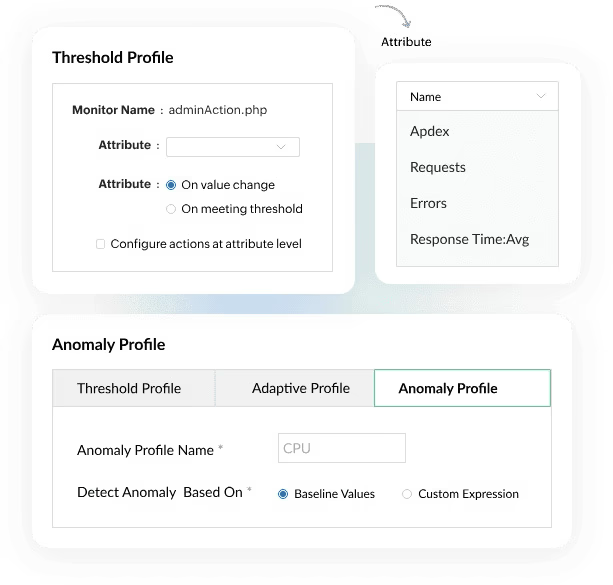
In unpredictable peak seasons, static thresholds are useless. Applications Manager helps you achieve predictive resilience:
- AI-powered alerts: The solution learns your environment's "normal" behavior and uses anomaly detection to flag deviations. This catches performance degradation early, rather than waiting for a simple CPU limit to be hit.
- Predictive forecasting: It forecasts key resource consumption metrics, giving you the lead time necessary to plan capacity ahead of anticipated surges, allowing you to scale out gracefully instead of scrambling reactively.
- Smart root-cause analysis: By combining distributed tracing, application dependency mapping, and anomaly alerts, Applications Manager helps you isolate the issue; be it code, database, or infrastructure.
5. Custom dashboards, reports, and runbooks
Clarity and communication are paramount during an incident. Applications Manager facilitates this by allowing you to build custom dashboards for different stakeholders (DevOps, IT Ops, and business leaders), surfacing the Key Performance Indicators (KPIs) that matter during a sales event. You can tailor alerts based directly on business SLIs (checkout failures, P99 latency) and seamlessly map those alerts to immediate automated actions. This ensures that the moment a business objective is missed, the right team gets the right context for the fix.
6. Operational resilience and lower MTTR
Ultimately, Applications Manager helps you build a strong defense during peak retail:
- Preemptive detection: Synthetic checks and anomaly alerts help you detect performance bottlenecks before they impact users.
- Pinpoint accuracy: Distributed tracing and service maps allow you to understand precisely which service, database, or code path is degrading.
- Intelligent scaling: Capacity forecasts and real-time infrastructure metrics inform intelligent, timely scaling or resource rerouting decisions.
- Faster recovery: Dashboards and alerts aligned to your business-critical flows allow teams to run faster diagnostics and quickly trigger the correct runbook.
The final takeaway is clear:
ManageEngine Applications Manager is especially valuable during high-risk events because it provides unified monitoring (no silos), supports predictive capacity planning, offers crystal-clear root-cause clarity, and enables highly proactive alerting. Download now to experience Applications Manager first-hand.
Final TL;DR: What I'd bet on

The bottom line is: The financial pressure is massive during sale time, especially during Black Fridays, and you simply can't afford a crash. When you’re staring down that multi-week digital marathon, the decision of which monitoring tool to use boils down to a few critical, non-negotiable bets. If I were betting my wager on a successful season, here is the absolute minimum I would require:
- Monitoring is revenue protection: Start treating your monitoring system as a revenue protection system, not just a debugging tool. You must instrument every single component that can stop a purchase: the checkout flow, payment processors, inventory sync, and your CDN.
- Monitor business SLIs: Move beyond simple averages. Focus on percentiles (P95/P99), as these truly reflect customer experience. Track business-critical Service Level Indicators (SLIs)—like checkout success rate and revenue per minute—right alongside technical metrics.
- Automate, Automate, Automate: You won't have time to react manually. You must pre-warm your systems, conduct serious load-testing, and have automated mitigation ready: think circuit breakers, feature flags, and instant backups. Since you must expect malicious traffic, plan your DDoS and WAF mitigations accordingly.
- Build and rehearse playbooks: Knowing is half the battle. Your team needs clear, rehearsed playbooks for every major scenario (like the ones above). Minutes matter immensely, both for recovering lost revenue and for maintaining customer trust.
Whether you choose the extensibility of a Prometheus stack, the power of a SaaS platform, or the unified visibility of ManageEngine Applications Manager, success comes down to having a tool that provides predictive intelligence and supports immediate, automated action during peak chaos.