COMPLIANCE > CIS
25+ yrs
of community-driven security guidance & from the Center for Internet Security
100+
CIS Benchmarks providing
prescriptive configuration guidance153
Safeguards organized
across the 18 controls90%+
reduction in manual compliance
and remediation through automation
The Center for Internet Security (CIS) is a community-driven, non-profit organization that develops globally recognized best practices to safeguard organizations against pervasive cyber threats. Through the CIS Critical Security Controls and CIS Benchmarks, CIS provides a prioritized and evidence-based foundation for cyber defense. The CIS Controls are a set of prioritized actions that form a defense-in-depth approach to mitigating prevalent cyberattacks, while the CIS Benchmarks provide detailed hardening guidance for operating systems, applications, and network devices.
Endpoint Central, ManageEngine's unified endpoint management and security solution, helps organizations operationalize the CIS Controls and audit endpoints against CIS Benchmarks by translating prescriptive guidance into practical, automated enforcement across Windows, macOS, Linux, and mobile devices.
- Why Endpoint Central
- CIS Controls Overview
- The Need for CIS Compliance
- CIS Controls Mapping
- CIS Benchmarks
Why organizations use Endpoint Central for CIS compliance
- Asset Visibility & Vulnerability Management
- Application Control & Privileged Access
- Configuration Hardening & Endpoint Defense
Continuous discovery and inventory of every hardware and software asset across your network, including roaming and off-network devices. Built-in vulnerability assessment scans endpoints for missing patches, zero-day exposures, and high-risk software, with automated remediation through Automated Patch Deployment (APD) for first-party and third-party applications.

Enforce application allowlisting and blocklisting, eliminate excessive admin rights through privilege management, and grant temporary elevation via Just-in-Time (JIT) access. Directly addresses CIS Controls 2 (Inventory and Control of Software Assets), 4 (Secure Configuration), and 6 (Access Control Management).

Enforce secure baseline configurations, host-based firewall rules, browser security policies, and USB/peripheral controls. Anti-malware, ransomware protection, and endpoint isolation map to the malware defense, data protection, and incident response objectives of the CIS Controls.
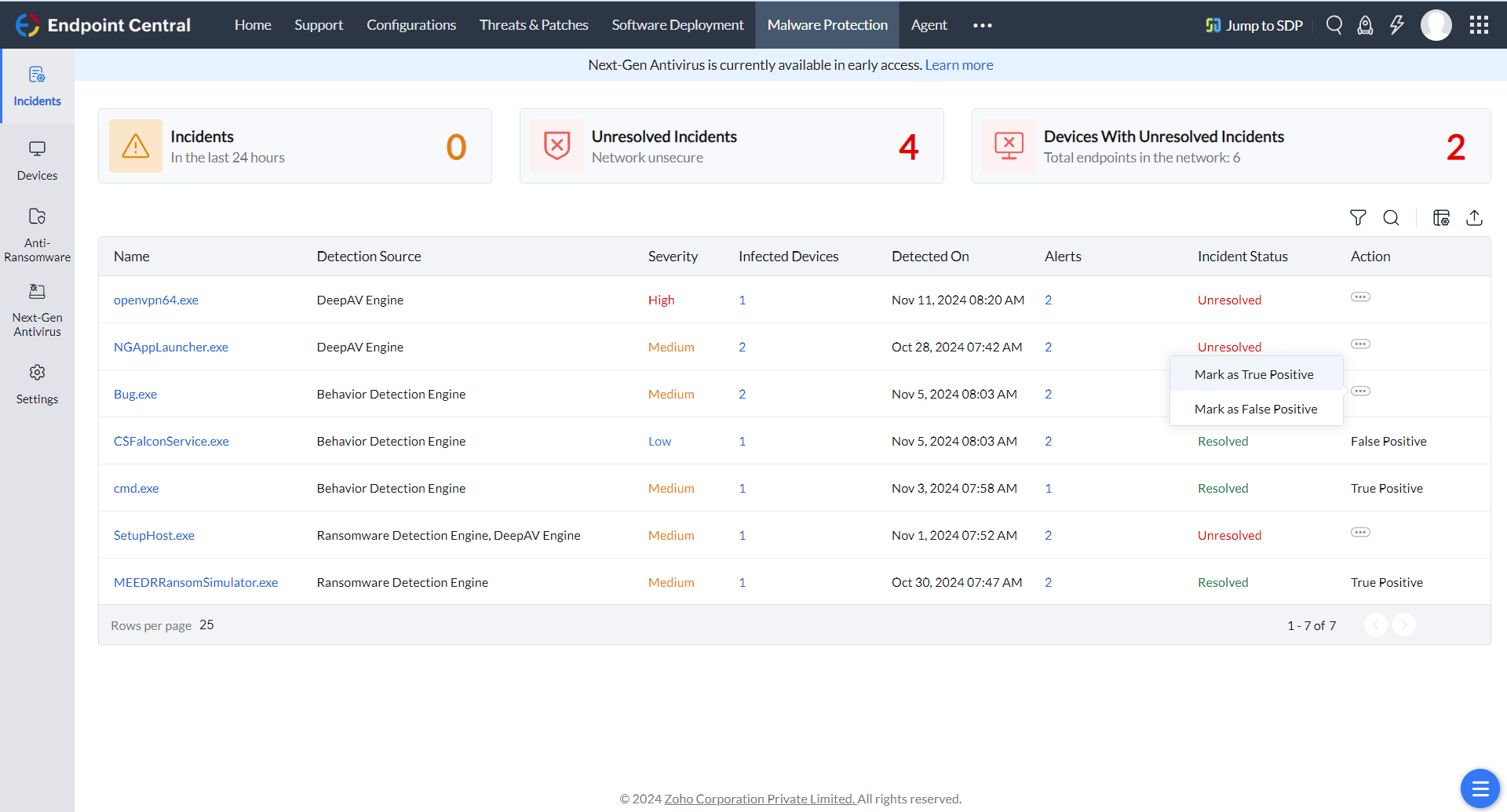
CIS Controls: High-level overview
- Basic Controls: Foundational cyber hygiene actions every organization must implement: asset inventory, vulnerability management, controlled use of administrative privileges, and secure configuration.
- Foundational Controls: Technical best practices that deliver clear security benefits: email and browser protection, malware defenses, port and protocol control, data recovery, and boundary defense.
- Organizational Controls: People- and process-focused controls including security awareness, application security, incident response, and penetration testing.
Each safeguard is mapped to one of three Implementation Groups (IG1, IG2, IG3), allowing organizations to adopt controls in phases that align with their size, resources, and risk profile.
The need for CIS compliance
- Establish a measurable, prioritized baseline of cyber hygiene mapped to real-world threat data.
- Reduce the likelihood and impact of the most prevalent cyberattacks through proven safeguards.
- Demonstrate due diligence to auditors, regulators, customers, and insurers.
- Align internal security programs with internationally recognized best practices.
- Map readily to other frameworks — NIST CSF, ISO/IEC 27001, PCI DSS, and HIPAA.
- Scale adoption progressively through Implementation Groups (IG1, IG2, IG3).
Endpoint Central mapping to CIS Controls
We have mapped Endpoint Central capabilities to the CIS Controls and CIS Benchmarks to help organizations translate CIS security recommendations into actionable endpoint security practices. This mapping demonstrates how Endpoint Central supports secure configuration enforcement, vulnerability remediation, device control, compliance monitoring, and continuous cyber hygiene across managed endpoints.
| Control | Requirement Description | How Endpoint Central fulfills the requirement |
|---|---|---|
1.1 | Utilize an active discovery tool to identify devices connected to the organization's network and update the hardware asset inventory. | Endpoint Central's Active Directory scan automatically discovers computers and installs agents as soon as devices are added to the domain. Once agents are deployed, scheduled inventory scans capture hardware and software details continuously. Email/SMS alerts can be triggered when new hardware is detected or removed from a managed endpoint. |
1.4 | Maintain an accurate and up-to-date inventory of all technology assets with the potential to store or process information. This inventory shall include all hardware assets, whether connected to the organization's network or not. | Endpoint Central agents perform recurring inventory scans on all managed devices. For roaming endpoints not connected to the corporate network, agents communicate with the Endpoint Central server over the internet to keep inventory data current (provided the server is reachable from the agent). |
1.5 | Ensure that the hardware asset inventory records the network address, hardware address, machine name, data asset owner, and department for each asset, and whether the hardware asset has been approved to connect to the network. | Endpoint Central maintains complete asset records, including network and hardware addresses, machine name, ownership, and department, through its inventory and file scan capabilities. Custom columns can be used to track approval status for each asset. |
1.7 | Utilize port-level access control, following 802.1x standards, to control which devices can authenticate to the network. The authentication system shall be tied into the hardware asset inventory data to ensure only authorized devices can connect to the network. | Endpoint Central can configure 802.1x settings for Wi-Fi, VPN, and Ethernet connections on managed devices. Firewall configurations help allow or block ports on Windows endpoints, and the Device Control Plus add-on extends control to 17 categories of peripheral devices. |
1.8 | Use client certificates to authenticate hardware assets connecting to the organization's trusted network. | IT administrators can configure client certificates and authentication settings for Wi-Fi, VPN, and Ethernet profiles. Certificates are applied automatically to endpoints, with renewal management and visibility through asset scans to identify missing or expiring certificates. |
2.3 | Utilize software inventory tools throughout the organization to automate the documentation of all software on business systems. | Endpoint Central scans desktops and mobile devices to collect software details. Inventory Management supports scheduled scans for continuous tracking, with email alerts for software inventory changes. |
2.4 | The software inventory system should track the name, version, publisher, and install date for all software, including operating systems authorized by the organization. | Endpoint Central's Inventory Management captures the name, version, publisher, and installation date of every application and operating system across the managed environment. |
2.5 | The software inventory system should be tied into the hardware asset inventory so all devices and associated software are tracked from a single location. | Endpoint Central provides a unified view of hardware and software inventory, listing all installed software for each managed computer alongside its hardware profile. |
2.6 | Ensure that unauthorized software is either removed or the inventory is updated in a timely manner. | Application Control allows administrators to blocklist applications and executables that are not permitted in the environment, preventing them from running on managed endpoints. |
2.7 | Utilize application allowlisting technology on all assets to ensure that only authorized software executes and all unauthorized software is blocked from executing on assets. | Application Control supports allowlisting; only explicitly approved applications and executables are permitted to run on managed computers. |
3.1 | Utilize an up-to-date Security Content Automation Protocol (SCAP) compliant vulnerability scanning tool to automatically scan all systems on the network on a weekly or more frequent basis to identify all potential vulnerabilities on the organization's systems. | Endpoint Central's Vulnerability Management performs continuous vulnerability scanning across endpoints and supports zero-day vulnerability mitigation to remediate identified issues. |
3.2 | Perform authenticated vulnerability scanning with agents running locally on each system or with remote scanners that are configured with elevated rights on the system being tested. | Endpoint Central performs agent-based, authenticated vulnerability scanning on every managed endpoint, ensuring deep visibility into installed software and configuration weaknesses. |
3.4 | Deploy automated software update tools in order to ensure that the operating systems are running the most recent security updates provided by the software vendor. | Endpoint Central periodically scans systems for missing OS patches. Automated Patch Deployment (APD) deploys missing patches automatically without user intervention. |
3.5 | Deploy automated software update tools in order to ensure that third-party software on all systems is running the most recent security updates provided by the software vendor. | Endpoint Central identifies missing patches for both native and third-party applications. Automated Patch Deployment ensures these updates are applied automatically on schedule. |
3.7 | Utilize a risk-rating process to prioritize the remediation of discovered vulnerabilities. | Endpoint Central classifies patches by severity — Critical, Important, Moderate, and Low — enabling administrators to prioritize remediation. The System Health Policy settings allow further customization of the risk-rating process. |
4.1 | Use automated tools to inventory all administrative accounts, including domain and local accounts, to ensure that only authorized individuals have elevated privileges. | Endpoint Central provides comprehensive Active Directory and user-based reports detailing privileges of users and computers. The Data Protection Officer (DPO) dashboard offers a consolidated view of computers and the accounts that access them. |
4.2 | Before deploying any new asset, change all default passwords to have values consistent with administrative level accounts. | Endpoint Central's User Management configuration enables administrators to change passwords and configure password policy settings for end users. Local Windows accounts can be added, modified, or removed at scale. |
4.9 | Configure systems to issue a log entry and alert on unsuccessful logins to an administrative account. | Logon-based reports surface details on unused accounts, recent logon activity, and failed logon attempts, giving administrators the visibility needed to detect anomalous access to administrative accounts. |
5.2 | Maintain secure images or templates for all systems in the enterprise based on the organization's approved configuration standards. | Endpoint Central's OS Imaging and Deployment module creates and deploys secure images to Windows machines. Images are stored in a protected repository accessible only to Endpoint Central agents, preserving configuration integrity. |
5.3 | Store the master images and templates on securely configured servers, validated with integrity monitoring tools, to ensure that only authorized changes to the images are possible. | Master images created in Endpoint Central are stored in a controlled repository accessible only to authorized agents. An integrity check is performed prior to deployment, ensuring images have not been altered. |
7.1 | Ensure that only fully supported web browsers and email clients are allowed to execute in the organization, ideally only using the latest version of the browsers and email clients provided by the vendor. | Endpoint Central's patch management ensures browsers and email clients are kept on the latest vendor-supported versions through automated update deployment. |
7.2 | Uninstall or disable any unauthorized browser or email client plugins or add-on applications. | Browser Security Plus within Endpoint Central provides browser allowlisting/blocklisting and add-on management to control plug-ins and extensions across the environment. |
7.4 | Enforce network-based URL filters that limit a system's ability to connect to websites not approved by the organization. This filtering shall be enforced for each of the organization's systems, whether they are physically at an organization's facilities or not. | Browser Security Plus allows administrators to filter websites based on trust level and apply restrictions consistently, on-premises or off-network. |
7.7 | Use Domain Name System (DNS) filtering services to help block access to known malicious domains. | Endpoint Central, through Browser Security, blocks access to malicious domains identified by policy. |
8.2 | Ensure that the organization's anti-malware software updates its scanning engine and signature database on a regular basis. | Endpoint Central's Patch Management distributes regular antivirus definition updates for major anti-malware vendors. Antivirus status of Windows endpoints is captured during inventory scans. |
9.1 | Associate active ports, services, and protocols to the hardware assets in the asset inventory. | Endpoint Central inventories services running on each managed endpoint. The System Manager tool enables administrators to remotely start, stop, restart, and configure startup mode for services. Firewall configurations let admins block or unblock ports and protocols across endpoints. |
9.2 | Apply host-based firewalls or port filtering tools on end systems, with a default-deny rule that drops all traffic except those services and ports that are explicitly allowed. | Endpoint Central's Firewall and Services configuration enables administrators to define rules that restrict or enable ports, protocols, and services on Windows machines. |
10.2 | Ensure that all of the organization's key systems are backed up as a complete system, through processes such as imaging, to enable the quick recovery of an entire system. | Full system backups can be captured as OS images using Endpoint Central and stored in the centralized image repository for rapid recovery. |
13.6 | Utilize approved cryptographic mechanisms to protect enterprise data stored on all mobile devices. | Endpoint Central's Mobile Device Management offers Containerization to isolate corporate data from personal data on BYOD devices. The corporate container encapsulates corporate apps, data, and policies, keeping it cryptographically separated from the personal workspace. |
13.7 | If USB storage devices are required, enterprise software should be used that can configure systems to allow the use of specific devices. An inventory of such devices should be maintained. | Device Control blocks or selectively allows USB devices on managed endpoints. A complete USB audit history is maintained for compliance and forensic review. |
14.6 | Protect all information stored on systems with file system, network share, claims, application, or database specific access control lists. | Endpoint Central's Permission Management configuration enforces granular file and folder-level access control, ensuring that only authorized users can access information based on their job responsibilities. |
15.4 | Disable wireless access on devices that do not have a business purpose for wireless access. | Endpoint Central's Wi-Fi configuration enables administrators to enable or disable wireless adapters on managed computers, removing wireless access where it is not required. |
16.6 | Maintain an inventory of all accounts organized by authentication system. | Endpoint Central captures all user accounts present on managed endpoints as part of its inventory scan. The User Management configuration allows local accounts to be added, modified, or removed at scale. |
16.8 | Disable any account that cannot be associated with a business process or business owner. | The User Management configuration allows administrators to disable or delete local accounts on Windows endpoints that are not tied to a documented business process. |
16.11 | Automatically lock workstation sessions after a standard period of inactivity. | Endpoint Central's Power Management configuration enables administrators to enforce sleep, screen lock, and password-on-resume policies after a defined period of inactivity. |
CIS Benchmarks
While the CIS Controls outline what to do, the CIS Benchmarks define how to securely configure specific operating systems, applications, and network devices. Developed and maintained through community consensus, the Benchmarks are organized into Level 1 (baseline security with minimal performance impact) and Level 2 (defense-in-depth, suited for high-security environments).
Endpoint Central's vulnerability management module includes built-in CIS Benchmark auditing capabilities, allowing administrators to continuously evaluate managed endpoints against benchmark recommendations and surface configuration drift in real time. Where deviations are detected, remediation can be triggered directly from the console, turning prescriptive benchmark guidance into automated, enforceable controls.
Endpoint Central helps in achieving the following compliances

CIS

FERPA
NIST 800-171

UK CYBER ESSENTIALS

NCA
ISO 27001
PCI DSS
NIST 2.0 CSF

HIPAA

DORA

GDPR

NIS2

RBI
Essential 8
Recommended reads
Real Stories, Real Impact: Endpoint Central and Compliance

"Endpoint Central has allowed us to move towards our goal of a centralized application to cover off IT support activities. The deployment was really simple with no real issues. We use it mainly for the integration with ServiceDesk Plus and the reports it provide for our ISO implementation"

Talk to Us About Your Compliance Needs
Feel free to connect with our experts to address your specific queries and discover how Endpoint Central can assist you in meeting CIS requirements.




