Configuring Juniper Devices
Firewall Analyzer supports the following Juniper devices. Configuring to send Syslog Messages from SRX deviceUsing J-Web- Log in to the Juniper SRX device.
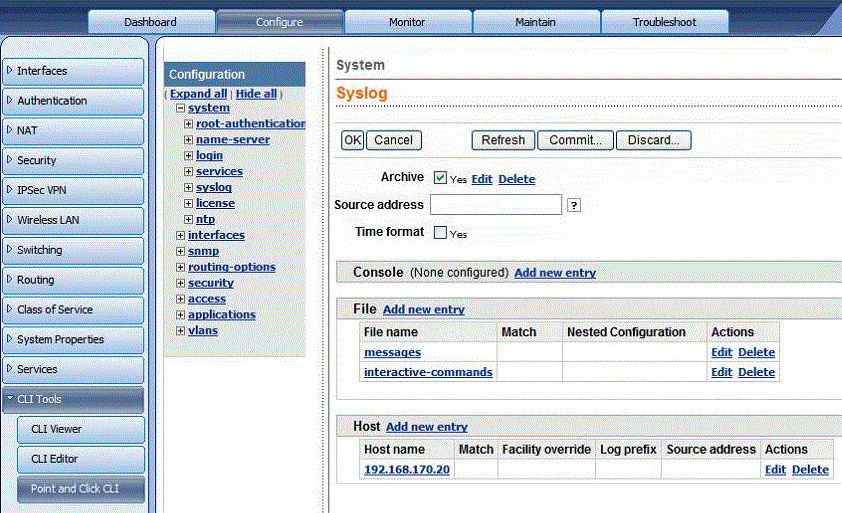
- Click Configure > CLI Tools > Point and Click CLI in the Juniper SRX device.
- Expand System and click Syslog.
- In the Syslog page, click Add New Entry placed next to 'Host'.
- Enter the IP address of the remote Syslog server (i.e., Firewall Analyzer).
- Click Apply to save the configuration.
Using CLI- Log in to the Juniper SRX device CLI console.
- Execute the following command:
| user@host# set system syslog host <IP address of the remote Syslog server (i.e., Firewall Analyzer)> any any |
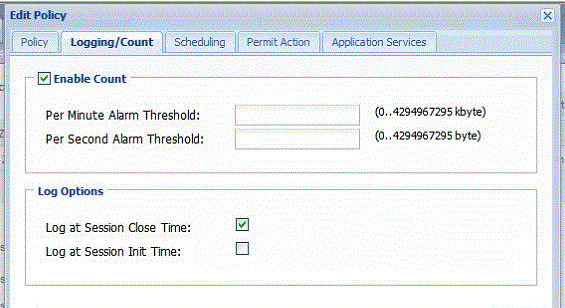
To enable logging for Security policy:Using J-Web - Select Configure > Security > Policy > FW Policies.
- Click on the policy for which you would like to enable logging.
- Navigate to Logging/Count and in Log Options, select Log at Session Close Time.
Using CLI- Log in to the Juniper SRX device CLI console.
- Execute the following command:
user@host# set security policies from-zone trust to-zone untrust policy permit-all then log session-close |
Juniper Networks IDP Device (version IDP 50)Configuring to send Syslog Messages directly from Sensor - Log in to the Juniper Networks IDP device.
- Click Device > Report Settings > Enable Syslog in the Juniper Networks IDP device.
- Select the Enable Syslog Messages check box.
- Click Apply to save the changes.
This configuration will generate syslogs for: - All attacks
- Policy load
- Restart
This configuration will not provide: - Profiler logs
- Device connect/disconnect logs
- Interface UP/DOWN logs
- Logs for Bypass State Changes
Configuring to send Syslog Messages from NSM- Log in to NSM.
- Click Action Manager > Action Parameters > Define a Syslog Server in the NSM.
- Click Action Manager > Device Log Action Criteria > Category in the NSM.
- Select Category = all and Actions = syslog enable
- Click Apply to save the changes.
This configuration will generate syslogs for: - All attacks
- Policy load
- Restart
- Profiler logs
- Device connect/disconnect logs
This configuration will not provide: - Interface UP/DOWN logs
- Logs for Bypass State Changes
|


