Open API Specification (OAS)
API Collection
OAuth Authentication
Server-based Applications
Client-based Applications
Mobile-based Applications
Non-browser Applications
Self Client
Instance-level OAuth
Incremental Authorization
Cost Centers
Cost Centers Management
Cost Analytics
Reports
Resource Insights
Anomaly Detection
Tag Management
Account Association
Reports
Summary Report
Tagging Compliance
Solution Report
Custom Dashboard
Resource Inventory
Report Scheduling
Zia Anomaly
Savings
Cost Allocation
Unit Economics
Reservation
Checks
Budget
Anomaly
Governance
Accounts
Anomaly Detection
Analytics
Reports
Tags
Cost Allocation
Account Management
Resource Management
Admin
Licensing
Rule Engine
Budget Policy
Currency
Tag Profile
Settings
Permission Boundary
User Management
Schedule Report
User Role
User Group
Report Profile
ManageEngine CloudSpend is a multi-cloud cost management and FinOps platform designed to help organizations achieve cost visibility, cost control, and continuous cloud cost optimization across AWS, Azure, and GCP. It provides a centralized view of cloud cost and usage data, enabling complete cost transparency across accounts, services, and regions.
Through the CloudSpend API, you can programmatically access cost and usage data, enabling integration with external systems, dashboards, and FinOps workflows. The platform supports cost allocation and cost attribution using cost centers, allowing teams to map cloud spend to business units, applications, projects, or environments. This enables accurate chargeback and showback models, improves cost accountability, and supports cloud financial planning and forecasting.
In CloudSpend, proactive cost governance is enabled through policy driven governance checks. Governance insights can be retrieved through the APIs to help identify cost inefficiencies. Additionaly, the anomaly detection feature continuously monitors spending patterns to detect cost spikes, unusual usage behavior, and potential cloud cost overruns in real time.
The platform also supports cloud financial management with budget management and cost control capabilities. Using the APIs, you can create and manage budgets, configure thresholds, and track budget performance programmatically. Cost reporting and analytics APIs provide detailed insights into spend trends, service level consumption, and key cost drivers, enabling data driven FinOps decision making and continuous optimization.
FinOps capabilities in CloudSpend are enhanced with integrations such as Zia Agents for AI driven insights and automated remediation, and Zoho MCP for orchestration and workflow automation across platforms.These capabilities can be used alongside the API to automate FinOps processes, enforce governance policies, and integrate cloud financial operations into existing systems, pipelines, and tooling ecosystems.
Learn more
All API requests are made to:
https://www.site24x7.com/cs/api/cost
For other data centers, use the respective base URL:
| Data Center | Base URL |
|---|---|
| US | https://www.site24x7.com |
| EU | https://www.site24x7.eu |
| IN | https://www.site24x7.in |
| AU | https://www.site24x7.net.au |
| CN | https://www.site24x7.cn |
| JP | https://www.site24x7.jp |
| UK | https://www.site24x7.uk |
CloudSpend APIs use OAuth 2.0 for authentication. All requests must include a valid access token in the `Authorization` header.
Authorization: Zoho-oauthtoken {access_token}
To get started:
See the OAuth Authentication section for detailed steps.
CloudSpend uses the following OAuth scopes:
| Scope | Description |
|---|---|
| CloudSpend.Internal.Read | Read access to CloudSpend resources |
| CloudSpend.Internal.Create | Create access to CloudSpend resources |
| CloudSpend.Internal.Update | Update access to CloudSpend resources |
| CloudSpend.Internal.Delete | Delete access to CloudSpend resources |
All API responses follow a standard structure:
{
"code": 0,
"message": "success",
"data": {
// Response data
}
}| Field | Description |
|---|---|
| code | Response status code. `0` indicates success |
| message | Status message (`success` or error description) |
| data | Response payload containing the requested data |
| HTTP Status | Description |
|---|---|
| 200 | Success |
| 400 | Bad Request - Invalid parameters |
| 401 | Unauthorized - Invalid or expired access token |
| 403 | Forbidden - Insufficient scope permissions |
| 404 | Not Found - Resource does not exist |
| 500 | Internal Server Error |
© 2026, Zoho Corporation Pvt. Ltd. All Rights Reserved.
| Method Name | Method Type | URL | OAuth Scope | Operation |
|---|---|---|---|---|
| List alert configurations for cost centers | GET | /cs/api/cost/cost_centers/integration/alert_configs | CloudSpend.Internal | Read |
| List cost centers users and groups | GET | /cs/api/cost/cost_centers/users | CloudSpend.Internal | Read |
| List all cost centers | GET | /cs/api/cost/cost_centers | CloudSpend.Internal | Read |
| List MSP alert configurations for cost centers | GET | /cs/api/cost/cost_centers/integration/msp_alert_configs | CloudSpend.Internal | Read |
| Get cost centers user settings | GET | /cs/api/cost/cost_centers/cost_user_settings | CloudSpend.Internal | Read |
| Create or configure cost centers | POST | /cs/api/cost/cost_center | CloudSpend.Internal | Create |
| Get cost centers accounts configuration data | GET | /cs/api/cost/cost_centers/accounts_data | CloudSpend.Internal | Read |
| Check MSP admin status | GET | /cs/api/cost/integration/msp_customers | CloudSpend.Internal | Read |
No APIs found for this search.
| Method Name | Method Type | URL | OAuth Scope | Operation |
|---|---|---|---|---|
| Get cost centers budget metadata | GET | /cs/api/cost/cost_centers/budget_meta | CloudSpend.Internal | Read |
| Get cost centers trend box | POST | /cs/api/cost/cost_centers/trend_box | CloudSpend.Internal | Read |
| Get aggregated cost widgets for cost centers | POST | /cs/api/cost/cost_centers/common_widget_api | CloudSpend.Internal | Read |
| Get account-wise cost splitup | POST | /cs/api/cost/cost_centers/accounts_splitup | CloudSpend.Internal | Read |
| Get cost centers spend analysis panel | POST | /cs/api/cost/cost_centers/spend_analysis_panel | CloudSpend.Internal | Read |
| Get cost centers spend analysis | GET | /cs/api/cost/cost_centers/cc_spend_analysis | CloudSpend.Internal | Read |
| Group cost centers accounts by property | POST | /cs/api/cost/cost_centers/group_by_property | CloudSpend.Internal | Read |
| Get comprehensive cost centers cost data | GET | /cs/api/cost/cost_centers/cost | CloudSpend.Internal | Read |
No APIs found for this search.
| Method Name | Method Type | URL | OAuth Scope | Operation |
|---|---|---|---|---|
| Generate spend analysis report for cost centers | POST | /cs/api/cost/cost_centers/spend_analysis/report | CloudSpend.Internal | Create |
| List cost centers report profiles | GET | /cs/api/cost/cost_centers/report/profiles | CloudSpend.Internal | Read |
| Generate resource explorer report for cost centers | POST | /cs/api/cost/cost_centers/resource_explorer/report | CloudSpend.Internal | Create |
| Generate cost centers list report | POST | /cs/api/cost/cost_centers/report | CloudSpend.Internal | Create |
| List resource explorer report profiles | GET | /cs/api/cost/cost_centers/resource_explorer/report/profiles | CloudSpend.Internal | Read |
| List spend analysis report profiles | GET | /cs/api/cost/cost_centers/spend_analysis/report/profiles | CloudSpend.Internal | Read |
No APIs found for this search.
| Method Name | Method Type | URL | OAuth Scope | Operation |
|---|---|---|---|---|
| Get cost by resource for cost centers | POST | /cs/api/cost/cost_centers/cost_by_resource | CloudSpend.Internal | Read |
| Get cost by instance type for cost centers | POST | /cs/api/cost/cost_centers/cost_by_instance | CloudSpend.Internal | Read |
| Get cost centers resource monthly cost breakdown | POST | /cs/api/cost/cost_centers/resource_pagination | CloudSpend.Internal | Read |
| Get cost centers resource count with cost breakdown | POST | /cs/api/cost/cost_centers/resource_count | CloudSpend.Internal | Read |
No APIs found for this search.
| Method Name | Method Type | URL | OAuth Scope | Operation |
|---|---|---|---|---|
| Get similar cost centers anomalies | GET | /cs/api/cost/cost_centers/spend_analysis/anomaly/similar | CloudSpend.Internal | Read |
| Get cost centers anomaly chart data | GET | /cs/api/cost/cost_centers/spend_analysis/anomaly/chart | CloudSpend.Internal | Read |
| Get cost centers anomaly details metadata | GET | /cs/api/cost/cost_centers/spend_analysis/anomaly/details/meta | CloudSpend.Internal | Read |
| Generate anomaly details report for cost centers | POST | /cs/api/cost/cost_centers/spend_analysis/anomaly/details/report | CloudSpend.Internal | Create |
| Get cost centers anomaly root cause analysis | GET | /cs/api/cost/cost_centers/spend_analysis/anomaly/details/rca | CloudSpend.Internal | Read |
| List anomaly report profiles | GET | /cs/api/cost/cost_centers/spend_analysis/anomaly/details/report/profiles | CloudSpend.Internal | Read |
| Get cost centers anomaly history data | GET | /cs/api/cost/cost_centers/spend_analysis/anomaly/data | CloudSpend.Internal | Read |
No APIs found for this search.
| Method Name | Method Type | URL | OAuth Scope | Operation |
|---|---|---|---|---|
| Get available tags for cost analysis grouping | POST | /cs/api/cost/show_more_tags | CloudSpend.Internal | Read |
| Get cost centers tags | GET | /cs/api/cost/cost_centers/cc_tags | CloudSpend.Internal | Read |
| Set custom tags for cost centers cost account | POST | /cs/api/cost/cost_centers/custom_tags_for_cc_ca | CloudSpend.Internal | Create |
No APIs found for this search.
| Method Name | Method Type | URL | OAuth Scope | Operation |
|---|---|---|---|---|
| List cost centers accounts | GET | /cs/api/cost/cost_centers/accounts | CloudSpend.Internal | Read |
No APIs found for this search.
| Method Name | Method Type | URL | OAuth Scope | Operation |
|---|---|---|---|---|
| Get Report Tile Status | GET | /cs/api/cost/reports/report_tile_status | CloudSpend.Internal | Read |
| Get schedule profiles for summary report scheduling | GET | /cs/api/cost/reports/summary_report/report/profiles | CloudSpend.Internal | Read |
| Get cloud discounts for summary report | GET | /cs/api/cost/cloud_discounts | CloudSpend.Internal | Read |
| Get cloud overall cost for summary report | GET | /cs/api/cost/cloud_overallcost | CloudSpend.Internal | Read |
| Get available data range for summary report | GET | /cs/api/cost/cloud_available_range | CloudSpend.Internal | Read |
| Get cloud cost grouped by entities (summary report - step 5) | GET | /cs/api/cost/cloud_group_by_entities | CloudSpend.Internal | Read |
| Create scheduled summary report | POST | /cs/api/cost/reports/summary_report/report | CloudSpend.Internal | Create |
| Get sankey chart data (summary report - step 4) | GET | /cs/api/cost/sankey_chart_data | CloudSpend.Internal | Read |
No APIs found for this search.
| Method Name | Method Type | URL | OAuth Scope | Operation |
|---|---|---|---|---|
| Get custom tagging compliance reports list | GET | /cs/api/cost/reports/compliance/tagging/list | CloudSpend.Internal | Read |
| Get unbilled resources tagging compliance details | GET | /cs/api/cost/reports/compliance/unbilled/custom/tagging | CloudSpend.Internal | Read |
| Get tagging compliance summary metrics | GET | /cs/api/cost/reports/compliance/summary/tagging | CloudSpend.Internal | Read |
| Get tagging compliance unbilled resource count and metadata | GET | /cs/api/cost/reports/compliance/tagging/unbilled/count | CloudSpend.Internal | Read |
| Get schedule profiles for tagging compliance report scheduling | GET | /cs/api/cost/reports/compliance/tagging/report/profiles | CloudSpend.Internal | Read |
| Get unbilled resource names for compliance analysis | GET | /cs/api/cost/reports/compliance/unbilled/names | CloudSpend.Internal | Read |
| Get billed resources for default tagging compliance report | GET | /cs/api/cost/reports/compliance/autogenerated/tagging | CloudSpend.Internal | Read |
| Get default tagging compliance reports by cloud provider | GET | /cs/api/cost/compliance/tagging/cx_preference | CloudSpend.Internal | Read |
| Get default tagging compliance resource list by cloud and report type | GET | /cs/api/cost/reports/compliance/tagging/resource/meta | CloudSpend.Internal | Read |
| Create scheduled tagging compliance report | POST | /cs/api/cost/reports/compliance/tagging/report | CloudSpend.Internal | Create |
| Create custom tagging compliance report | POST | /cs/api/cost/reports/compliance/tagging | CloudSpend.Internal | Create |
| Get tagging compliance report details with resource analysis | GET | /cs/api/cost/reports/compliance/tagging | CloudSpend.Internal | Read |
| Download tagging compliance report file | GET | /cs/api/cost/reports/compliance/tagging/download | CloudSpend.Internal | Read |
| Get billed resource names for compliance analysis | GET | /cs/api/cost/reports/compliance/tagging/billed/names | CloudSpend.Internal | Read |
| Get unbilled resources for default tagging compliance report | GET | /cs/api/cost/reports/compliance/unbilled/autogenerated/tagging | CloudSpend.Internal | Read |
No APIs found for this search.
| Method Name | Method Type | URL | OAuth Scope | Operation |
|---|---|---|---|---|
| Get all available tags for cost account | GET | /cs/api/cost/reports/tags | CloudSpend.Internal | Read |
| Get solution reports metadata - call first to validate report names | GET | /cs/api/cost/solution_reports_meta | CloudSpend.Internal | Read |
| Get cost by skus/instance for named solution report | POST | /cs/api/cost/sol_reports/cost_by_instance | CloudSpend.Internal | Create |
| Get resource count for named solution report drill-down | POST | /cs/api/cost/sol_reports/resource_count | CloudSpend.Internal | Create |
| Get accounts splitup for named solution report | POST | /cs/api/cost/sol_reports/accounts_splitup | CloudSpend.Internal | Create |
| Get guidance metadata view configuration | GET | /cs/api/cost/guidance/meta-view | CloudSpend.Internal | Read |
| Get solution reports listing (level 1 cards) - not for spend analysis | GET | /cs/api/cost/sol_reports | CloudSpend.Internal | Read |
| Get cost optimization guidances and recommendations | GET | /cs/api/cost/guidances | CloudSpend.Internal | Read |
| Get cost by region/service/component for named solution report | POST | /cs/api/cost/sol_reports/common_widget_api | CloudSpend.Internal | Create |
| Get cost by resource for named solution report | POST | /cs/api/cost/sol_reports/cost_by_resource | CloudSpend.Internal | Create |
| Get cost centers tags configuration | GET | /cs/api/cost/reports/cc_tags | CloudSpend.Internal | Read |
| Get trend chart for named solution report | POST | /cs/api/cost/sol_reports/trend_box | CloudSpend.Internal | Create |
| Get spend analysis panel for solution reports | POST | /cs/api/cost/sol_reports/spend_analysis_panel | CloudSpend.Internal | Create |
| Get resource monthly cost details for named solution report | POST | /cs/api/cost/sol_reports/resource_pagination | CloudSpend.Internal | Create |
| Get cost centers scoped configuration for solution reports | GET | /cs/api/cost/reports/cc_spend_analysis | CloudSpend.Internal | Read |
| Get multi-cloud spend analysis for specific cost account (aws/azure/gcp) | GET | /cs/api/cost/reports/spend_analysis | CloudSpend.Internal | Read |
| Get resource explorer grouped data for named solution report | POST | /cs/api/cost/sol_reports/group_by_property | CloudSpend.Internal | Create |
No APIs found for this search.
| Method Name | Method Type | URL | OAuth Scope | Operation |
|---|---|---|---|---|
| Get spend analysis panel for custom dashboard widgets only | POST | /cs/api/cost/custom_report/spend_analysis_panel | CloudSpend.Internal | Read |
| Get accounts cost breakdown for custom dashboard widgets only | POST | /cs/api/cost/custom_report/accounts_splitup | CloudSpend.Internal | Read |
| Get custom anomaly chart data | GET | /cs/api/cost/custom_report/chart | CloudSpend.Internal | Read |
| Get available data range for custom report widgets | GET | /cs/api/cost/custom_report/cloud_available_range | CloudSpend.Internal | Read |
| Get cloud discounts analysis | GET | /cs/api/cost/custom_report/cloud_discounts | CloudSpend.Internal | Read |
| Get resource inventory regional distribution for inventory usage table widgets | POST | /cs/api/cost/custom_report/ri_top_region_list | CloudSpend.Internal | Read |
| Get reserved instance trend chart data | POST | /cs/api/cost/custom_report/ri_trend_chart | CloudSpend.Internal | Read |
| Get budget information details | GET | /cs/api/cost/custom_report/budget_info/{budget_id} | CloudSpend.Internal | Read |
| Get accounts data for custom report creation | GET | /cs/api/cost/custom_report/accounts_data | CloudSpend.Internal | Read |
| Get available widgets for custom report creation | GET | /cs/api/cost/widgets | CloudSpend.Internal | Read |
| Get cost by resource for custom dashboard widgets only | POST | /cs/api/cost/custom_report/cost_by_resource | CloudSpend.Internal | Read |
| Get trend chart data for custom dashboard widgets only | POST | /cs/api/cost/custom_report/trend_box | CloudSpend.Internal | Read |
| Create new custom dashboard | POST | /cs/api/cost/dashboard | CloudSpend.Internal | Create |
| Get custom dashboards list | GET | /cs/api/cost/dashboard | CloudSpend.Internal | Read |
| Get multi-dimensional cost data for custom dashboard widgets only | POST | /cs/api/cost/custom_report/common_widget_api | CloudSpend.Internal | Read |
| Get cloud overall cost analysis | GET | /cs/api/cost/custom_report/cloud_overallcost | CloudSpend.Internal | Read |
| Get reserved instance splitup | POST | /cs/api/cost/custom_report/ri_splitup | CloudSpend.Internal | Read |
| Get specific custom dashboard | GET | /cs/api/cost/dashboard/{id} | CloudSpend.Internal | Read |
| Get checks status summary for checks category numerical widgets | GET | /cs/api/cost/custom_report/checks/status | CloudSpend.Internal | Read |
| Get resource inventory service distribution for inventory usage table widgets | POST | /cs/api/cost/custom_report/ri_top_service_list | CloudSpend.Internal | Read |
| Get budget metadata for custom report creation | GET | /cs/api/cost/custom_report/budget_meta | CloudSpend.Internal | Read |
No APIs found for this search.
| Method Name | Method Type | URL | OAuth Scope | Operation |
|---|---|---|---|---|
| Get resource inventory report schedule profiles | GET | /cs/api/cost/reports/resource_inventory/report/profiles | CloudSpend.Internal | Read |
| Get all custom user tags | GET | /cs/api/cost/reports/all_custom_user_tags | CloudSpend.Internal | Read |
| Get resource details list | POST | /cs/api/cost/ri_list | CloudSpend.Internal | Read |
| Get comprehensive resource tags data | POST | /cs/api/cost/resource/{resource_id}/tags | CloudSpend.Internal | Read |
| Get resources list grouped by service, account, or region | POST | /cs/api/cost/resources_list | CloudSpend.Internal | Read |
| Add custom tags to resource | POST | /cs/api/cost/reports/resource_tags | CloudSpend.Internal | Create |
| Get individual resource trend chart data | POST | /cs/api/cost/ri_resouce_trend_chart | CloudSpend.Internal | Read |
| Create scheduled resource inventory list report | POST | /cs/api/cost/reports/resource_inventory/ri_list/report | CloudSpend.Internal | Create |
| Create scheduled resource inventory report | POST | /cs/api/cost/reports/resource_inventory/report | CloudSpend.Internal | Create |
No APIs found for this search.
| Method Name | Method Type | URL | OAuth Scope | Operation |
|---|---|---|---|---|
| List alert configurations for reports module | GET | /cs/api/cost/reports/integration/alert_configs | CloudSpend.Internal | Read |
| Get users and groups for report delivery | GET | /cs/api/cost/reports/users | CloudSpend.Internal | Read |
| Get budget policies by account type for reports module | GET | /cs/api/cost/reports/budget_policys/{account_type} | CloudSpend.Internal | Read |
| Get available accounts for cost reports (allocation and savings) | GET | /cs/api/cost/reports/accounts_data | CloudSpend.Internal | Read |
| List msp customer alert configurations for reports module | GET | /cs/api/cost/reports/integration/msp_alert_configs | CloudSpend.Internal | Read |
| Create scheduled custom report | POST | /cs/api/cost/reports/custom_report/report | CloudSpend.Internal | Create |
| Get all available accounts for spend analysis | GET | /cs/api/cost/reports/accounts | CloudSpend.Internal | Read |
| Get available schedule profiles for report scheduling | GET | /cs/api/cost/reports/custom_report/report/profiles | CloudSpend.Internal | Read |
No APIs found for this search.
| Method Name | Method Type | URL | OAuth Scope | Operation |
|---|---|---|---|---|
| Get anomaly trend chart data | GET | /cs/api/reports/anomaly/summary/list/chart | CloudSpend.Internal | Read |
| Create scheduled zia anomaly report (summary and category) | POST | /cs/api/reports/anomaly/report | CloudSpend.Internal | Create |
| Get anomaly metadata and summary information | GET | /cs/api/reports/anomaly/summary/list/details/meta | CloudSpend.Internal | Read |
| Get schedule profiles for zia anomaly report scheduling | GET | /cs/api/cost/reports/anomaly/report/profiles | CloudSpend.Internal | Read |
| Get all available anomalies for details report scheduling | GET | /cs/api/reports/anomaly/all | CloudSpend.Internal | Read |
| Get zia anomaly detection summary | GET | /cs/api/reports/anomaly/summary | CloudSpend.Internal | Read |
| Get comprehensive anomaly root cause analysis | GET | /cs/api/reports/anomaly/summary/list/details/rca | CloudSpend.Internal | Read |
| Get anomaly detection list by category | GET | /cs/api/reports/anomaly/summary/list | CloudSpend.Internal | Read |
| Get detailed anomaly analysis data | GET | /cs/api/reports/anomaly/summary/list/data | CloudSpend.Internal | Read |
| Get similar anomaly recommendations | GET | /cs/api/reports/anomaly/summary/list/similar | CloudSpend.Internal | Read |
| Create scheduled zia anomaly details report | POST | /cs/api/reports/anomaly/list/details/report | CloudSpend.Internal | Create |
| Get schedule profiles for zia anomaly details report scheduling | GET | /cs/api/reports/anomaly/list/details/report/profiles | CloudSpend.Internal | Read |
No APIs found for this search.
| Method Name | Method Type | URL | OAuth Scope | Operation |
|---|---|---|---|---|
| Get savings analysis data | POST | /cs/api/cost/savings/overall | CloudSpend.Internal | Read |
| Get schedule profiles for savings report scheduling | GET | /cs/api/cost/reports/savings_report/report/profiles | CloudSpend.Internal | Read |
| Create scheduled savings report | POST | /cs/api/cost/reports/savings_report/report | CloudSpend.Internal | Create |
No APIs found for this search.
| Method Name | Method Type | URL | OAuth Scope | Operation |
|---|---|---|---|---|
| Get available tags for cost allocation hierarchy | GET | /cs/api/cost/reports/allocations/tags | CloudSpend.Internal | Read |
| Get hierarchical cost allocation data for interactive navigation | GET | /cs/api/cost/reports/hierarchy/report/{allocation_id}/graph | CloudSpend.Internal | Read |
| Get schedule profiles for allocation report scheduling | GET | /cs/api/cost/reports/hierarchy/report/profiles | CloudSpend.Internal | Read |
| Get cost allocation report details with hierarchical configuration | GET | /cs/api/cost/reports/allocation/{allocation_id} | CloudSpend.Internal | Read |
| Create scheduled allocation report | POST | /cs/api/cost/reports/hierarchy/report | CloudSpend.Internal | Create |
| Create custom cost allocation with hierarchical structure | POST | /cs/api/cost/reports/allocations | CloudSpend.Internal | Create |
| Get cost allocation reports list | GET | /cs/api/cost/reports/allocations | CloudSpend.Internal | Read |
No APIs found for this search.
| Method Name | Method Type | URL | OAuth Scope | Operation |
|---|---|---|---|---|
| Get unit economics unit list | GET | /cs/api/cost/reports/unit/economics/unit/list | CloudSpend.Internal | Read |
| Get unit economics customer preferences | GET | /cs/api/cost/reports/unit/economics/cx_preference | CloudSpend.Internal | Read |
| List unit economics custom reports | GET | /cs/api/cost/reports/unit/economics/custom/report/list | CloudSpend.Internal | Read |
| Create unit economics custom report | POST | /cs/api/cost/reports/unit/economics/custom/report | CloudSpend.Internal | Create |
| Get unit economics schedule profiles | GET | /cs/api/cost/reports/unit/economics/schedule/report/profiles | CloudSpend.Internal | Read |
| Create unit economics scheduled report | POST | /cs/api/cost/reports/unit/economics/schedule/report | CloudSpend.Internal | Create |
| Get unit economics custom report details | GET | /cs/api/cost/reports/unit/economics/custom/report/details/{report_id} | CloudSpend.Internal | Read |
| Get usage unit resource details | POST | /cs/api/cost/reports/unit/economics/resource/list | CloudSpend.Internal | Read |
| Get unit cost details | POST | /cs/api/cost/reports/unit/economics/list | CloudSpend.Internal | Read |
| Get usage unit resource trend details | POST | /cs/api/cost/reports/unit/economics/resource/trend | CloudSpend.Internal | Read |
No APIs found for this search.
| Method Name | Method Type | URL | OAuth Scope | Operation |
|---|---|---|---|---|
| Get reservation utilization chart data for cost analysis (aws/azure) | GET | /cs/api/cost/optimization/{cost_account_id}/utilization/{plan_id}/chart | CloudSpend.Internal | Read |
| Get detailed reservation utilization for multi-cloud services (aws/azure) | GET | /cs/api/cost/optimization/{cost_account_id}/utilization/{product_id}/list | CloudSpend.Internal | Read |
| Get reservation optimization summary for multi-cloud accounts (aws/azure) | GET | /cs/api/cost/optimization/{cost_account_id}/summary | CloudSpend.Internal | Read |
No APIs found for this search.
| Method Name | Method Type | URL | OAuth Scope | Operation |
|---|---|---|---|---|
| Get cost centers for budget management | GET | /cs/api/cost/budget/cost_centers | CloudSpend.Internal | Read |
| Get account tags for budget configuration | GET | /cs/api/cost/budget/tags | CloudSpend.Internal | Read |
| Get solution reports metadata for budget management | GET | /cs/api/cost/budget/solution_reports_meta | CloudSpend.Internal | Read |
| Create new budget policy | POST | /cs/api/cost/budget/budget_policy | CloudSpend.Internal | Create |
| Get budget trend analysis | GET | /cs/api/cost/budget/{budget_id}/trend | CloudSpend.Internal | Read |
| Get budget usage history | GET | /cs/api/cost/budget/budget_history/{budget_id} | CloudSpend.Internal | Read |
| Get budget dashboard data | GET | /cs/api/cost/budget/dashboard | CloudSpend.Internal | Read |
| Create budget configuration | POST | /cs/api/cost/budget/budget_details | CloudSpend.Internal | Create |
| Get budget currency formats | GET | /cs/api/cost/budget/currencies_format | CloudSpend.Internal | Read |
| Get budget policies by account type | GET | /cs/api/cost/budget/budget_policys/{account_type} | CloudSpend.Internal | Read |
| Get detailed budget information | GET | /cs/api/cost/budget/budget_info/{budget_id} | CloudSpend.Internal | Read |
| Get budget alert history | GET | /cs/api/cost/budget/budget_alerts/{budget_id} | CloudSpend.Internal | Read |
| Get budget users and groups | GET | /cs/api/cost/budget/users | CloudSpend.Internal | Read |
| Get account processing status | GET | /cs/api/cost/accounts_status | CloudSpend.Internal | Read |
| Get accounts for budget management | GET | /cs/api/cost/budget/accounts | CloudSpend.Internal | Read |
No APIs found for this search.
| Method Name | Method Type | URL | OAuth Scope | Operation |
|---|---|---|---|---|
| Get cloud accounts for anomaly check creation | GET | /cs/api/cost/anomaly/accounts | CloudSpend.Internal | Read |
| Get anomaly budget policies by account type | GET | /cs/api/cost/anomaly/budget_policys/{account_type} | CloudSpend.Internal | Read |
| Get anomaly detection dashboard | GET | /cs/api/cost/anomaly/dashboard | CloudSpend.Internal | Read |
| Create anomaly check configuration | POST | /cs/api/cost/checks | CloudSpend.Internal | Create |
| Get anomaly currency formats | GET | /cs/api/cost/anomaly/currencies_format | CloudSpend.Internal | Read |
| Get similar anomaly patterns | GET | /cs/api/checks/anomaly/similar | CloudSpend.Internal | Read |
| Get anomaly historical data and timeline | GET | /cs/api/checks/anomaly/data | CloudSpend.Internal | Read |
| Get solution reports metadata for anomaly check creation | GET | /cs/api/cost/anomaly/solution_reports_meta | CloudSpend.Internal | Read |
| Get anomaly root cause analysis | GET | /cs/api/checks/anomaly/details/rca | CloudSpend.Internal | Read |
| Get anomaly users and groups | GET | /cs/api/cost/anomaly/users | CloudSpend.Internal | Read |
| Get cost centers for anomaly check creation | GET | /cs/api/cost/anomaly/cost_centers | CloudSpend.Internal | Read |
| Get anomaly timeline chart data | GET | /cs/api/checks/anomaly/chart | CloudSpend.Internal | Read |
| Get anomaly user settings and configuration | GET | /cs/api/cost/anomaly/cost_user_settings | CloudSpend.Internal | Read |
| Get anomaly metadata details | GET | /cs/api/checks/anomaly/details/meta | CloudSpend.Internal | Read |
| Create new budget policy for anomaly checks | POST | /cs/api/cost/anomaly/budget_policy | CloudSpend.Internal | Create |
| Get available tags for specific accounts | GET | /cs/api/cost/anomaly/tags | CloudSpend.Internal | Read |
No APIs found for this search.
| Method Name | Method Type | URL | OAuth Scope | Operation |
|---|---|---|---|---|
| Get governance unbilled resource details for rca | GET | /cs/api/cost/governance/checks/rca/unbilled_resource_details | CloudSpend.Internal | Read |
| Get governance billed resource details for rca | GET | /cs/api/cost/governance/checks/rca/billed_resource_details | CloudSpend.Internal | Read |
| Get governance compliance dashboard | GET | /cs/api/cost/governance/dashboard | CloudSpend.Internal | Read |
| Get governance check detailed information | GET | /cs/api/cost/governance/budget_info/{governance_id} | CloudSpend.Internal | Read |
| Get governance alert history | GET | /cs/api/cost/governance/budget_alerts/{governance_id} | CloudSpend.Internal | Read |
| Get governance rca unbilled resource names | GET | /cs/api/cost/governance/checks/rca/unbilled_resource/names | CloudSpend.Internal | Read |
| Get governance policies by account type | GET | /cs/api/cost/governance/budget_policys/{account_type} | CloudSpend.Internal | Read |
| Get governance usage history | GET | /cs/api/cost/governance/budget_history/{governance_id} | CloudSpend.Internal | Read |
| Get governance accounts overview | GET | /cs/api/cost/governance/accounts | CloudSpend.Internal | Read |
| Get governance rca summary metrics | GET | /cs/api/cost/governance/checks/rca/summary | CloudSpend.Internal | Read |
| Get governance resource trend chart data | POST | /cs/api/cost/governance/ri_resouce_trend_chart | CloudSpend.Internal | Read |
| Get governance resource inventory list | POST | /cs/api/cost/governance/ri_list | CloudSpend.Internal | Read |
| Get governance rca billed resource names | GET | /cs/api/cost/governance/checks/rca/billed_resource/names | CloudSpend.Internal | Read |
| Get governance resource tags | POST | /cs/api/cost/governance/resource/{resource_id}/tags | CloudSpend.Internal | Read |
| Get governance check tags | GET | /cs/api/cost/governance/checks/tags | CloudSpend.Internal | Read |
| Get governance users and groups for policy-specific access | GET | /cs/api/cost/governance/users | CloudSpend.Internal | Read |
| Get governance spend analysis by account | GET | /cs/api/cost/governance/spend_analysis | CloudSpend.Internal | Read |
| Create governance policy profile | POST | /cs/api/cost/governance/budget_policy | CloudSpend.Internal | Create |
| Create governance check configuration | POST | /cs/api/cost/governance/checks | CloudSpend.Internal | Create |
| Get governance resource data transfer details | POST | /cs/api/cost/governance/resource/{resource_id}/data_transfer | CloudSpend.Internal | Read |
No APIs found for this search.
| Method Name | Method Type | URL | OAuth Scope | Operation |
|---|---|---|---|---|
| List Account Anomaly History | GET | /cs/api/accounts/spend_analysis/anomaly/data | CloudSpend.Internal | Read |
| Get Account Spend Anomaly Chart Data | GET | /cs/api/accounts/spend_analysis/anomaly/chart | CloudSpend.Internal | Read |
| Get Similar Anomalies for Pattern Analysis | GET | /cs/api/accounts/spend_analysis/anomaly/similar | CloudSpend.Internal | Read |
| Get Account Spend Anomaly Details Metadata | GET | /cs/api/accounts/spend_analysis/anomaly/details/meta | CloudSpend.Internal | Read |
| Get Account Anomaly Root Cause Analysis | GET | /cs/api/accounts/spend_analysis/anomaly/details/rca | CloudSpend.Internal | Read |
| Generate anomaly details report | POST | /cs/api/cost/accounts/spend_analysis/anomaly/details/report | CloudSpend.Internal | Create |
No APIs found for this search.
| Method Name | Method Type | URL | OAuth Scope | Operation |
|---|---|---|---|---|
| Get Trend Box Data | POST | /cs/api/cost/accounts/trend_box | CloudSpend.Internal | Create |
| Get daily incurred cost trend for accounts | POST | /cs/api/cost/accounts/incurred_cost | CloudSpend.Internal | Create |
| Group accounts by property | POST | /cs/api/cost/accounts/group_by_property | CloudSpend.Internal | Create |
| Get spend analysis panel data | POST | /cs/api/cost/accounts/spend_analysis_panel | CloudSpend.Internal | Create |
| Get cost breakdown data by dimensions for dashboard widgets | POST | /cs/api/cost/accounts/common_widget_api | CloudSpend.Internal | Create |
| Get Account Cost Splitup by Billing Accounts | POST | /cs/api/cost/accounts/accounts_splitup | CloudSpend.Internal | Create |
| Get entity-level cost forecast data for an account | POST | /cs/api/cost/accounts/entity_forecast | CloudSpend.Internal | Create |
No APIs found for this search.
| Method Name | Method Type | URL | OAuth Scope | Operation |
|---|---|---|---|---|
| Generate resource explorer report | POST | /cs/api/cost/accounts/resource_explorer/report | CloudSpend.Internal | Create |
| Generate dashboard/accounts report | POST | /cs/api/cost/accounts/report | CloudSpend.Internal | Create |
| Generate spend analysis report | POST | /cs/api/cost/accounts/spend_analysis/report | CloudSpend.Internal | Create |
| List Account Report Profiles | GET | /cs/api/cost/accounts/report/profiles | CloudSpend.Internal | Read |
No APIs found for this search.
| Method Name | Method Type | URL | OAuth Scope | Operation |
|---|---|---|---|---|
| Get Account Tags | GET | /cs/api/cost/accounts/tags | CloudSpend.Internal | Read |
| Set custom tags for cost accounts | POST | /cs/api/cost/accounts/custom_tags_for_cc_ca | CloudSpend.Internal | Create |
| Create custom tags for resources | POST | /cs/api/cost/accounts/resource_explorer/resource_tags | CloudSpend.Internal | Create |
| Get all available custom user tags | GET | /cs/api/cost/accounts/resource_explorer/all_custom_user_tags | CloudSpend.Internal | Read |
No APIs found for this search.
| Method Name | Method Type | URL | OAuth Scope | Operation |
|---|---|---|---|---|
| Generate allocation hierarchy report | POST | /cs/api/cost/accounts/hierarchy/report | CloudSpend.Internal | Create |
| Get Account Hierarchy Graph | GET | /cs/api/cost/accounts/hierarchy/report/{reportId}/graph | CloudSpend.Internal | Read |
| Get Account Hierarchy Node | GET | /cs/api/cost/accounts/hierarchy/report/{reportId}/node | CloudSpend.Internal | Read |
| Get Hierarchy Report Profiles | GET | /cs/api/cost/accounts/hierarchy/report/profiles | CloudSpend.Internal | Read |
| Get Available Hierarchy Reports | GET | /cs/api/cost/accounts/hierarchy/reports | CloudSpend.Internal | Read |
| Get Account Allocations | GET | /cs/api/cost/accounts/allocations | CloudSpend.Internal | Read |
No APIs found for this search.
| Method Name | Method Type | URL | OAuth Scope | Operation |
|---|---|---|---|---|
| Get Account Usage Statistics | GET | /cs/api/cost/account_usage | CloudSpend.Internal | Read |
| List alert configurations for accounts module | GET | /cs/api/cost/accounts/integration/alert_configs | CloudSpend.Internal | Read |
| Get Account Settings and Configuration | GET | /cs/api/cost/account_settings | CloudSpend.Internal | Read |
| List MSP customer alert configurations for accounts module | GET | /cs/api/cost/accounts/integration/msp_alert_configs | CloudSpend.Internal | Read |
| Get Accounts Metadata | GET | /cs/api/cost/accounts/accounts_data | CloudSpend.Internal | Read |
| List Account Users and Access | GET | /cs/api/cost/accounts/users | CloudSpend.Internal | Read |
| List account spend details | GET | /cs/api/cost/accounts | CloudSpend.Internal | Read |
No APIs found for this search.
| Method Name | Method Type | URL | OAuth Scope | Operation |
|---|---|---|---|---|
| Get resource cost trend chart data | POST | /cs/api/cost/accounts/resource_explorer/ri_resouce_trend_chart | CloudSpend.Internal | Create |
| Get detailed monthly cost breakdown for specific resources | POST | /cs/api/cost/accounts/resource_pagination | CloudSpend.Internal | Create |
| Get detailed resource metadata and tags | POST | /cs/api/cost/accounts/resource_explorer/ri_list | CloudSpend.Internal | Create |
| Get Billed Resource Count by Account | GET | /cs/api/cost/billed_res_count | CloudSpend.Internal | Read |
| Get tags for specific resource | GET | /cs/api/cost/accounts/resource_explorer/resource/{resource_id}/tags | CloudSpend.Internal | Read |
| Get detailed resource list with cost data for specific billing account | POST | /cs/api/cost/accounts/resource_count | CloudSpend.Internal | Create |
| Get Cost by Instance Type | POST | /cs/api/cost/accounts/cost_by_instance | CloudSpend.Internal | Create |
| Get Cost by Resource | POST | /cs/api/cost/accounts/cost_by_resource | CloudSpend.Internal | Create |
No APIs found for this search.
| Method Name | Method Type | URL | OAuth Scope | Operation |
|---|---|---|---|---|
| Get billing and license details | GET | /cs/api/cost/bills | CloudSpend.Internal | Read |
No APIs found for this search.
| Method Name | Method Type | URL | OAuth Scope | Operation |
|---|---|---|---|---|
| Trigger execution of a rule | POST | /cs/api/cost/admin/rule/run | CloudSpend.Internal | Create |
| Get full configuration details of a rule | GET | /cs/api/cost/admin/rule/configuration | CloudSpend.Internal | Read |
| View detailed results of a rule execution | GET | /cs/api/cost/admin/rule/history/view | CloudSpend.Internal | Read |
| Create a new rule in Rule Engine | POST | /cs/api/cost/admin/rule | CloudSpend.Internal | Create |
| List all rules configured in Rule Engine | GET | /cs/api/cost/admin/rule | CloudSpend.Internal | Read |
| Get execution history of all rules | GET | /cs/api/cost/admin/rule/history | CloudSpend.Internal | Read |
No APIs found for this search.
| Method Name | Method Type | URL | OAuth Scope | Operation |
|---|---|---|---|---|
| Create a budget, anomaly, or governance policy | POST | /cs/api/cost/admin/budget_policy | CloudSpend.Internal | Create |
| Get cost center tags for governance profiles | GET | /cs/api/cost/admin/cc_tags | CloudSpend.Internal | Read |
| Get solution reports metadata for profile configuration | GET | /cs/api/cost/admin/solution_reports_meta | CloudSpend.Internal | Read |
| Get anomaly profiles by account type | GET | /cs/api/cost/admin/budget_policys/{accountType} | CloudSpend.Internal | Read |
| Get cost centers for profile configuration | GET | /cs/api/cost/admin/cost_centers | CloudSpend.Internal | Read |
| Get budget metadata for all budgets | GET | /cs/api/cost/admin/budget_meta | CloudSpend.Internal | Read |
No APIs found for this search.
| Method Name | Method Type | URL | OAuth Scope | Operation |
|---|---|---|---|---|
| Get current display currency setting | GET | /cs/api/cost/display_currency | CloudSpend.Internal | Read |
| Get historical exchange rates by month | GET | /cs/api/cost/exchange_rates | CloudSpend.Internal | Read |
| Get all supported currency formats | GET | /cs/api/cost/currencies_format | CloudSpend.Internal | Read |
| Add a custom exchange rate | POST | /cs/api/cost/exchange_rate | CloudSpend.Internal | Create |
No APIs found for this search.
| Method Name | Method Type | URL | OAuth Scope | Operation |
|---|---|---|---|---|
| Create a new tag profile | POST | /cs/api/cost/admin/tag_profile | CloudSpend.Internal | Create |
| Get available tags for profile creation | GET | /cs/api/cost/admin/tags | CloudSpend.Internal | Read |
| Get all virtual tags | GET | /cs/api/cost/admin/all_custom_user_tags | CloudSpend.Internal | Read |
| Get all tag profiles | GET | /cs/api/cost/admin/tag_profiles | CloudSpend.Internal | Read |
No APIs found for this search.
| Method Name | Method Type | URL | OAuth Scope | Operation |
|---|---|---|---|---|
| Get accounts overview with processing status | GET | /cs/api/cost/admin/accounts | CloudSpend.Internal | Read |
| Get custom dashboards and reports list | GET | /cs/api/cost/admin/dashboard | CloudSpend.Internal | Read |
| Get cost user settings and configuration | GET | /cs/api/cost/cost_user_settings | CloudSpend.Internal | Read |
| Get admin details and workspace information | GET | /cs/api/cost/admin/details | CloudSpend.Internal | Read |
No APIs found for this search.
| Method Name | Method Type | URL | OAuth Scope | Operation |
|---|---|---|---|---|
| Get rule group details | GET | /cs/api/cost/admin/rule/group/details | CloudSpend.Internal | Read |
| Get accounts data for permission boundary configuration | GET | /cs/api/cost/admin/accounts_data | CloudSpend.Internal | Read |
| List rule groups for permission boundaries | GET | /cs/api/cost/admin/rule/group/list | CloudSpend.Internal | Read |
| List all permission boundaries | POST | /cs/api/cost/admin/tag/virtual/list | CloudSpend.Internal | Read |
| Create a new permission boundary | POST | /cs/api/cost/admin/tag/virtual | CloudSpend.Internal | Create |
| Delete a permission boundary | DELETE | /cs/api/cost/admin/tag/virtual | CloudSpend.Internal | Delete |
| Update an existing permission boundary | PUT | /cs/api/cost/admin/tag/virtual | CloudSpend.Internal | Update |
No APIs found for this search.
| Method Name | Method Type | URL | OAuth Scope | Operation |
|---|---|---|---|---|
| Create a new user | POST | /cs/api/cost/users | CloudSpend.Internal | Create |
| Get all users and user groups | GET | /cs/api/cost/users | CloudSpend.Internal | Read |
| Update user details | PUT | /cs/api/cost/users/{userId} | CloudSpend.Internal | Update |
| Get user details by ID | GET | /cs/api/cost/users/{userId} | CloudSpend.Internal | Read |
| Resend user invitation email | POST | /cs/api/cost/resend_invite | CloudSpend.Internal | Create |
No APIs found for this search.
| Method Name | Method Type | URL | OAuth Scope | Operation |
|---|---|---|---|---|
| Create a new scheduled report | POST | /cs/api/cost/report | CloudSpend.Internal | Create |
| Get all scheduled reports by category | GET | /cs/api/cost/reports | CloudSpend.Internal | Read |
No APIs found for this search.
| Method Name | Method Type | URL | OAuth Scope | Operation |
|---|---|---|---|---|
| Get all custom user roles | GET | /cs/api/cost/user_roles | CloudSpend.Internal | Read |
| Create a custom user role | POST | /cs/api/cost/user_role | CloudSpend.Internal | Create |
| Get custom role details by ID | GET | /cs/api/cost/user_role/{roleId} | CloudSpend.Internal | Read |
No APIs found for this search.
| Method Name | Method Type | URL | OAuth Scope | Operation |
|---|---|---|---|---|
| Create a new user group | POST | /cs/api/cost/user_group | CloudSpend.Internal | Create |
| Update a user group | PUT | /cs/api/cost/user_group | CloudSpend.Internal | Update |
No APIs found for this search.
| Method Name | Method Type | URL | OAuth Scope | Operation |
|---|---|---|---|---|
| Get all report profiles for scheduled reporting | GET | /cs/api/cost/report/profiles | CloudSpend.Internal | Read |
| Create a new report profile | POST | /cs/api/cost/report/profile | CloudSpend.Internal | Create |
No APIs found for this search.
© 2026, Zoho Corporation Pvt. Ltd. All Rights Reserved.
OAuth 2.0 is an industry standard protocol which allows you to grant a third-party website or an application (i.e., a client) delegated access to the protected resources of Zoho via Zoho APIs. It is a way to authenticate and authorize API requests made to Zoho.
Refer to the OAuth 2.0 glossary section to understand more about the terms used here.
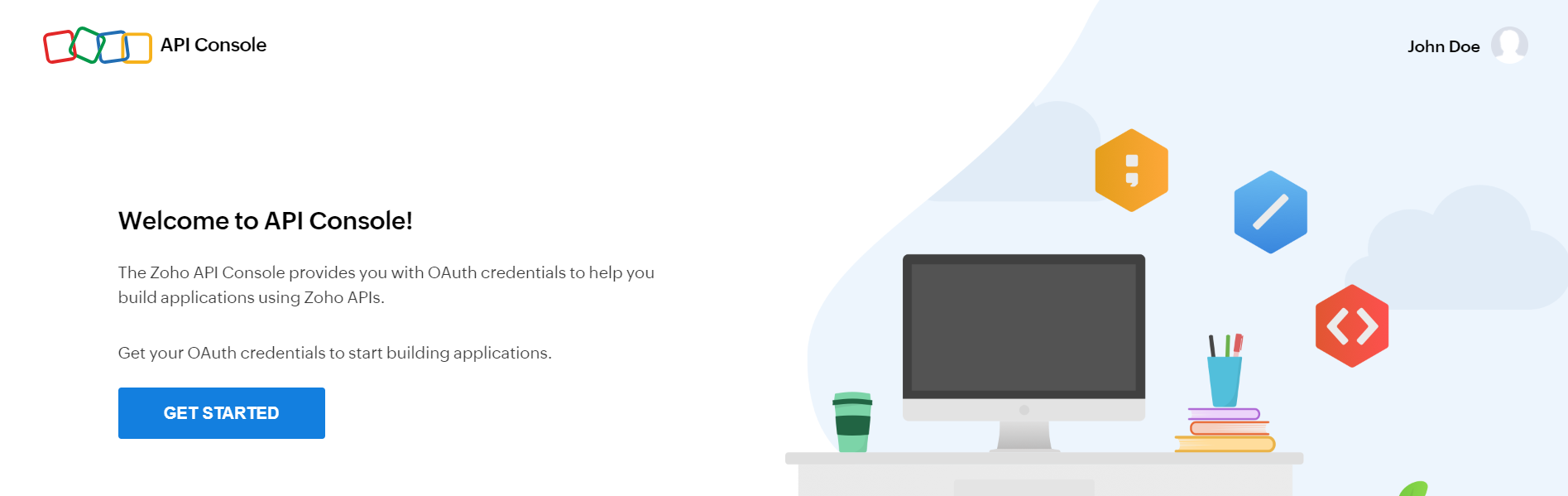
The first step in using OAuth authentication is registering your app with the Zoho API console. Once you register your client, you will get a Client ID and Client secret for your application. This Client ID and Client secret are used to authorize your app's OAuth requests.
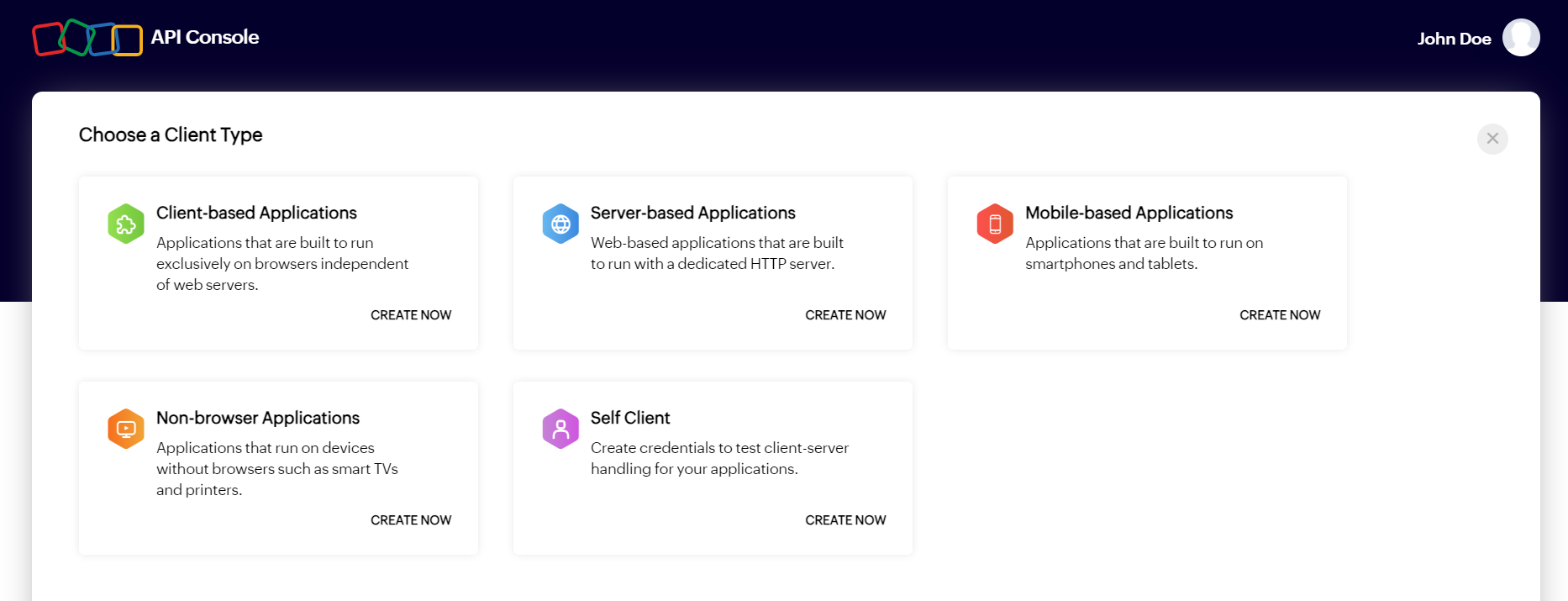
Access token is an OAuth token used to access Zoho's protected resources. The way in which the access token can be generated depends on the type of app. For example, server-based apps can use the authorization code flow to generate an access token, while client-based apps can use the implicit flow to generate an access token. However, in any method, access token will be provided only after the user grants permission through consent. Also, access tokens are always granted for the specific scopes which are mentioned in the request, and the scopes will be displayed to the user while asking for permission.
To learn about the workflows for different types of clients, refer to the below pages:
After your app has the access token, it can access Zoho's protected resources. On giving the access token to the resource server, your app will be granted access as per the scopes defined in the request. Zoho's OAuth implementation uses Bearer authentication scheme, hence while making API calls, the access token has to be passed in the Authorization header with the prefix Zoho-oauthtoken or Bearer.
Supported formats:
Authorization: Zoho-oauthtoken <space> {access-token-value}
Authorization: Bearer <space> {access-token-value}
Example: Authorization: Zoho-oauthtoken 1000.2deaf8d0c2...
Access tokens have limited validity, i.e., their lifetime is only 1 hour, post which they expire and cannot be used to access the resources any longer. However, if the app wants to access the resource for more than 1 hour, then a refresh token can be retrieved and stored. This refresh token allows the app to generate a new access token whenever required.
If a refresh token is no longer required or appears to be compromised, it can be revoked and made invalid. It can be revoked by making an API request and after successful revocation, it can no longer be used to generate access tokens, and the existing access tokens generated using this refresh token will also become invalid.
© 2026, Zoho Corporation Pvt. Ltd. All Rights Reserved.
It is the data present in a Zoho service that the client wants to access. For example, if the client wants to access the records module in Zoho CRM using an API, then the records module is called the protected resource. This data (i.e., module) can be accessed by the client only after proper authorization using OAuth, hence then name protected resource.
Resource owner is the user who can grant permission to the client and in turn access to the protected resource of their Zoho account.
The server where the protected resources are stored, and to where the client must make API calls is called the resource server. In our case, the Zoho app which has the resource the client wants to access represents the resource server.
The server which grants access tokens and refresh tokens on behalf of the resource owner (i.e., the user), for the client to access protected resources is called the authorization server. In our case, Zoho Accounts is the authorization server.
The application which needs access to the protected resource is called the client. The client can be a server-based application, single page JavaScript application, mobile/desktop application, or a non-browser limited input application. The client can make API requests to the resource server after successful authorization by the authorization server on behalf of the user.
Indicates the type of application you develop. The four types of clients are:
A unique identifier for your application which you can receive when registering your application in the Zoho API console.
A unique secret key for your application which you can receive when registering your application in the Zoho API console. Client secret is know only between your application and Zoho, therefore, must be kept confidential. (Client secret is not needed for client-based applications and will not be provided).
Access tokens are granted by the authorization server (Zoho Accounts) and are used by the client to access the protected resources. It contains information about the user and the scopes. It essentially tells the resource owner that the bearer of this token has been authorized by the user to access the protected resource as per the scope defined. The validity of an access token is 1 hour.
Refresh tokens are used to generate a new access token after the old one expires. Refresh tokens are granted by the authorization server (Zoho Accounts) and can be stored by the client to generate access tokens whenever required.
For server-based applications and mobile-based applications, access tokens cannot be generated directly. Instead, the client must first get an authorization code from the authorization server (Zoho Accounts), and then exchange it for an access token. The lifetime of authorization code is only two minutes and can be used only once.
© 2026, Zoho Corporation Pvt. Ltd. All Rights Reserved.
Scope limits the level of access the application can have when making requests to the resource server (to access protected resources). It is what enables the user to provide delegated access to the client.
For example, if the client only needs to access the Invoices module in Zoho Books, then it can be defined in the scope when requesting for access token. When the client makes API requests with the access token, the resource server will provide access only to the Invoices module. It can also be defined what kind of operations (create/read/update/delete) are permissible for the client with respect to the module.
When the user is asked for permission to grant access to the client, the scopes defined in the request will be shown.
A Zoho OAuth scope has three parts:
SYNTAX:
service_name.scope_name.OPERATION_TYPE
Examples:
ZohoCRM.users.CREATE
ZohoBooks.purchaseorders.UPDATE
ZohoCliq.channels.DELETE
ZohoCRM.modules.contacts.ALL
Access tokens can also be generated with multiple scopes. In such cases, the scopes should be separated by commas.
SYNTAX:
service_name.scope_name.OPERATION_TYPE,service_name.scope_name.
OPERATION_TYPE
Example:
ZohoCRM.modules.READ,ZohoCRM.settings.READ
© 2026, Zoho Corporation Pvt. Ltd. All Rights Reserved.
To access the resources of Zoho using the various Zoho APIs, you will need to register your application with Zoho first. You can register your application as one of the following client types:
On successful registration of your application, you will get a Client ID and Client secret. You can use them to get the access token which is needed to make API calls to Zoho.
| Details required | Server-based | Client-based | Mobile-based | Non-browser based | Self client |
|---|---|---|---|---|---|
| Client Name | Y | Y | Y | Y | Y |
| Homepage URL | Y | Y | Y | Y | N |
| Authorized Redirect URI | Y | Y | Y | N | N |
| Javascript Domain | N | Y | N | N | N |

INFO:
You can find the Client ID and Client secret in the Client Secret tab of your application in the console.
To learn more about self client, refer to this article.
© 2026, Zoho Corporation Pvt. Ltd. All Rights Reserved.
Server-based apps typically involve a separation between the front-end (client-side) and back-end (server-side) components. The application logic is performed on the server, and the rendered content is sent to the browser for display.
These apps can securely store credentials on the server-side, such as client secrets, and are referred to as " confidential clients " in OAuth terminology.
For such apps, the Authorization Code Flow is used to obtain access tokens. It involves exchanging an authorization code (received from the authorization server) for access tokens. Refresh tokens can also be obtained in this flow, allowing the server-based app to obtain new access tokens without requiring user intervention.
To begin with, you need to register your app in the API console as a "server-based app". You will get a client ID and client secret. You will need them to make the API calls to receive OAuth tokens. Once you receive an access token, you can use it to access the protected resources of Zoho.
For server-based apps, you can optionally use the authorization code flow with the Proof Key for Code Exchange (PKCE) extension for added security. It is required for mobile-based apps, but recommended for server-based apps as well. Learn more about PKCE
The authorization code flow to obtain access token is as follows:
Step 1:
Make a GET request to the endpoint oauth/v2/auth mentioning the required scopes. The end user will be displayed the permissions you're requesting. If the user grants access, an authorization code will be returned to the redirection URL. This code will be valid for 2 minutes.
Step 2:
Using the received authorization code, make a POST request to the endpoint oauth/v2/token . The authorization server will return an access token and an optional refresh token. This access token will be valid for 1 hour.
Step 3:
Using the received access token, you can call the Zoho APIs to access protected resources. If you need to access the resources again after the access token expires, you can use the refresh token to obtain access tokens whenever required. Send a POST request to the endpoint oauth/v2/token with the refresh token to obtain another access token.

In Zoho, we use different data centers (DC) to store users' information. This information is not shared between data centers. Learn more about data centers
If your app is registered in the a certain DC, to access the data of the users in other DCs, then you need to enable multi DC support for your app. After you enable this support, when you make API calls, you will have to change your endpoint URL depending on the user's DC.
Incremental authorization allows your app to request for a permission from the user only when it is needed and not upfront. Let's say your app needs to obtain profile information of the user to provide basic functionality; and for certain features, need additional permission. Normally, your app will have to request profile info permission and additional permissions upfront when user grants access. But this would provide a bad experience for the user because they would have to give permission for features which they aren't even using yet. Incremental authorization helps avoid this and provides a better user experience.
Refresh tokens can be revoked programmatically or by the user themselves.
Refresh tokens can be revoked by users in two ways:
Programmatically, refresh tokens can be revoked by making a POST request to the endpoint oauth/v2/token/revoke . Refer API reference
Note : Access tokens can also be revoked programmatically. When an access token is revoked, if it is granted via a refresh token, it will also get revoked.
© 2026, Zoho Corporation Pvt. Ltd. All Rights Reserved.
Request for an authorization code from our authorization server. You will need to mention which scopes you need permission for. We will display the required permissions to the user. If the user grants permission, an authorization code will be sent to the redirect URL, which is valid for 2 minutes.
| Parameter | Description |
| client_id | required The unique ID of your application. You can find this in the API console . |
| response_type | required Should be sent with the value code . |
| redirect_uri | required The URI to which the authorization server will redirect the browser back with the authorization code. It has to be the same URI which is provided when registering the app in the API console. Should start with http:// or https://. For example: https://www.zylker.com/oauthredirect |
| scope | required The corresponding scope for the resource you want to access from the user's account. The scopes will be displayed to the user when asking for consent. For example: ZohoCRM.settings.READ |
| access_type | optional Determines whether your app can refresh the access token on its own once the access token expires (without user intervention). If the value is online , only the access token will be provided and it cannot be refreshed by the app once expired. If the value is offline , a refresh token will also be provided for the first time the app requests for an access token , which the app can store and then use to refresh the access token whenever required. Default value: online |
| prompt | optional If this parameter is included, the user will be prompted for consent every time your app requests access to the resource. If not included, the user will be prompted only the first time. The value must be consent . |
After authenticating the user, we will display to the user what are all the permissions your app is requesting. Once the user grants permission, the authorization code will be sent to the redirect_uri .
| Parameter | Description |
| code | The authorization code that can be exchanged for an access token . Its validity is two minutes and can be used only once. |
| location | Indicates the data center (DC) location of the user (i.e., where their account is stored). If the user's DC is different from that of your app, then you will need to enable multi DC support and make the access token request to the user's DC. |
| Error | Reasons |
| access_denied |
|
| Invalid Client |
|
| Invalid response type |
|
| Invalid OAuth scope |
|
| Invalid Redirect Uri |
|
| An error occurred/500 server error |
|
| 400 not found |
|
CopiedGET {accounts-server-url}/oauth/v2/auth Note: The accounts-server-url is specific to the location (i.e., datacenter) where your app is registered.
Copiedhttps://accounts.zoho.com/oauth/v2/auth
?response_type=code
&client_id=1000.GMB0YULZHJK411284S8I5GZ4CHUEX0
&scope=AaaServer.profile.Read
&redirect_uri=https://www.zylker.com/oauthredirect
&access_type=offline
&prompt=consentCopiedhttps://oauth.pstmn.io/v1/browser-callback
?code=1000.a1110799eac53c491fee9efef8246535.df7da86ff64daa66413e2899e9b7fad7
&location=in
&accounts-server=https://accounts.zoho.in© 2026, Zoho Corporation Pvt. Ltd. All Rights Reserved.
Get the access token from our authorization server by exchanging the authorization code.
| Parameter | Description |
| client_id | required The unique ID of your application. You can find this in the API console . |
| client_secret | required The unique secret for your app which is known only to your app and Zoho. You can find this in the API console . |
| grant_type | required Should be sent with the value authorization_code . |
| code | required The authorization code you received after you made the authorization code request . |
| redirect_uri | required It has to be the same URI which is provided when registering the app in the API console. Should start with http:// or https://. For example: https://www.zylker.com/oauthredirect |
| Parameter | Description |
| access_token | A token that your app needs to access the resources (as defined by the requested scopes). This token is valid for 1 hour. |
| refresh_token | A special token that can be used by your app to refresh the access token once it is expired. The refresh token will be included in the response if you have passed the parameter access_type with the value offline when making the authorization code request (for the first time). |
| api_domain | The domain to which your app needs to make API requests, for accessing the protected resources. |
| token_type | Indicates the type of access token that is generated. The access tokens issued by Zoho are Bearer tokens. When your app makes API requests to access the protected resources, access tokens need to be sent using the "Authorization" header. Syntax: |
| expires_in | Indicates the time (in seconds) in which the access token expires. The lifetime of an access token is 1 hour (3600 seconds). |
| Error | Reasons |
| invalid_client |
|
| invalid_client_secret |
|
| invalid_redirect_uri |
|
| invalid_code |
|
| 400 Bad Request |
|
CopiedPOST {accounts-server-url}/oauth/v2/tokenNote: The accounts-server-url is specific to the location (i.e., datacenter) where the user is present. Mentioned as location in the response of the authorization request .
Copiedhttps://accounts.zoho.com/oauth/v2/token
?client_id=1000.GMB0YULZHJK411248S8I5GZ4CHUEX0
&client_secret=122c324d3496d5d777ceeebc129470715fbb856b7
&grant_type=authorization_code
&redirect_uri=https://www.zylker.com/oauthredirect
&code=1000.86a03ca5dbfccb7445b1889b8215efb0.cad9e1ae4989a1196fe05aa729fcb4e1Copied{
"access_token":"1000.2deaf8d0c268e3c85daa2a013a843b10.703adef2bb337b8ca36cfc5d7b83cf24",
"refresh_token":"1000.18e983526f0ca8575ea9c53b0cd5bb58.1bd83a6f2e22c3a7e1309d96ae439cc1",
"api_domain":"https://api.zoho.com",
"token_type":"Bearer",
"expires_in":3600
}© 2026, Zoho Corporation Pvt. Ltd. All Rights Reserved.
Use the refresh token to generate another access token for the same set of scopes.
Using a refresh token, your app can create up to ten access tokens in a span of ten minutes. If the limit is reached, the access token creation will be blocked for the rest of the ten minutes. For more information, refer to Token limits .
| Parameter | Description |
| client_id | required The unique ID of your application. You can find this in the API console . |
| client_secret | required The unique secret for your app which is known only to your app and Zoho. You can find this is the API console . |
| grant_type | required Should be sent with the value refresh_token . |
| refresh_token | required The refresh token you received after you made the access token request . |
| Parameter | Description |
| access_token | A token that your app needs to access the resources (as defined by the requested scopes). This token is valid for 1 hour. |
| api_domain | The domain to which your app needs to make API requests, for accessing the protected resources. |
| token_type | Indicates the type of access token that is generated. The access tokens issued by Zoho are Bearer tokens. When your app makes API requests to access the protected resources, access tokens need to be sent using the "Authorization" header. Syntax: |
| expires_in | Indicates the time (in seconds) in which the access token expires. The lifetime of an access token is 1 hour (3600 seconds). |
| Error | Reasons |
| invalid_client |
|
| invalid_client_secret |
|
| invalid_code |
|
| 400 Bad Request |
|
The parameters can be sent in one of the following formats:
(1) Query String
All parameters can be sent in the form of query string in the request URL.
Example:
https://accounts.zoho.com/oauth/v2/token?
client_id=1000.QVF8O5MXFUYATAQGJKEWUXJKZH7OOE
&grant_type=refresh_token
&client_secret=31a99ae27deff7fr34e419fe321b712a02cdedted7
&refresh_token=1000.3421ad0e1a6fe44663ea112b8b1c4fdf.cd38e645e3d7423651d17368855bc1c5
(2) Request Body
All parameters can be sent in the request body using the data type form-data or x-www-form-urlencoded .
Example:
client_id: "1000.QVF8O5MXFUYATAQGJKEWUXJKZH7OOE"
client_secret: "31a99ae27deff7fr34e419fe321b712a02cdedted7"
grant_type: "refresh_token"
refresh_token: "1000.3421ad0e1a6fe44663ea112b8b1c4fdf.cd38e645e3d7423651d17368855bc1c5"
(3) Basic Auth Header
Only the client_id and client_secret can be sent using this method. The credentials will have to be base64 encoded and sent.
Encoding format:
Base64encode(client_id:client_secret)
Header format:
Authorization: Basic {Base64 encoded credentials}
Example:
Authorization: Basic MTAwMC5RVkY4TzVNWEZVWUFUQVFHSktFV1VYSktaSDdPT0U6MzFhOTlhZTI3ZGVmZjdmcjM0ZTQxOWZlMzIxYjcxMmEwMmNkZWR0ZWQ3
CopiedPOST {accounts-server-url}/oauth/v2/tokenNote: The accounts-server-url is specific to the location (i.e., datacenter) where the user is present. Mentioned as location in the response of the authorization request.
Copiedhttps://accounts.zoho.com/oauth/v2/token
?client_id=1000.GMB0YULZHJK411248S8I5GZ4CHUEX0
&client_secret=122c324d3496d5d777ceeebc129470715fbb856b7
&grant_type=refresh_token
&refresh_token=1000.86a03ca5dbfccb7445b1889b8215efb0.cad9e1ae4989a1196fe05aa729fcb4e1Copied{
"access_token":"1000.2deaf8d0c268e3c85daa2a013a843b10.703adef2bb337b8ca36cfc5d7b83cf24",
"api_domain":"https://api.zoho.com",
"token_type":"Bearer",
"expires_in":3600
}© 2026, Zoho Corporation Pvt. Ltd. All Rights Reserved.
Client-based apps, such as single-page JavaScript apps, perform the application logic directly in the browser using JavaScript.
These apps typically cannot securely store credentials, including client secrets, on the client-side due to the potential for exposure or compromise. Client-based apps are often referred to as " public clients " in OAuth, indicating their inability to keep credentials confidential.
For such apps, the Implicit Flow is used for obtaining access tokens. It returns the access token directly to the client-side environment as part of the redirection process. Refresh tokens are not provided in the Implicit Flow, but the app may be able to obtain new access tokens without user intervention if the user has granted permission for the session.
To begin with, you need to register your app in the API console as a "client-based app". You will get a client ID. You will need it to make the API calls to receive access token. Once you receive an access token, you can use it to access the protected resources of Zoho.
The implicit flow to obtain access token is as follows:
Step 1:
Make a GET request to the endpoint oauth/v2/auth mentioning the required scopes. The end user will be displayed the permissions you're requesting. If the user grants access, an access token will be returned to the redirection URL. This access token will be valid for 1 hour.
Step 2:
Using the received access token, you can call the Zoho APIs to access protected resources. If you need to access the resources again after the access token expires, you can obtain another access token if the user has granted access for the entire session in step 1. Send a GET request to the endpoint oauth/v2/auth/refresh to obtain another access token.

In Zoho, we use different data centers (DC) to store users' information. This information is not shared between data centers. Learn more about data centers
If your app is registered in the a certain DC, to access the data of the users in other DCs, then you need to enable multi DC support for your app. After you enable this support, when you make API calls, you will have to change your endpoint URL depending on the user's DC.
Access tokens can be revoked programmatically or by the user themselves. Users can go to the Connected Apps section in accounts.zoho.com and revoke the access they've granted for an app, which will revoke the access tokens.
Programmatically, access tokens can be revoked by making a POST request to the endpoint oauth/v2/token/revoke . Refer API reference
© 2026, Zoho Corporation Pvt. Ltd. All Rights Reserved.
Request for an access token from our authorization server. You will need to mention which scopes you need permission for. We will display the required permissions to the user. If the user grants permission, an access token will be sent to the redirect URL, which is valid for 1 hour.
| Parameter | Description |
| client_id | required The unique ID of your application. You can find this in the API console . |
| response_type | required Should be sent with the value token . |
| redirect_uri | required The URI to which the authorization server will redirect the browser back with the access token. It has to be the same URI that is provided when registering the app in the API console. Should start with http:// or https://. For example: https://www.zylker.com/oauthredirect |
| scope | required The corresponding scope for the resource you want to access from the user's account. The scopes will be displayed to the user when asking for consent. For example: ZohoCRM.settings.READ |
After authenticating the user, we will display to the user what are all the permissions your app is requesting. Once the user grants permission, the access token will be sent to the redirect_uri .
| Parameter | Description |
| access_token | A token that your app needs to access the resources (as defined by the requested scopes). This token is valid for 1 hour. |
| api_domain | The domain to which your app needs to make API requests, for accessing the protected resources. |
| location | Indicates the data center (DC) location of the user (i.e., where their account is stored). |
| expires_in | Indicates the time (in seconds) in which the access token expires. The lifetime of an access token is 1 hour (3600 seconds). |
| granted_for_session | Indicates whether the user has granted permission for your app to refresh the access token . Returns true if permission is granted. If the user doesn't grant permission, this parameter won't be returned. In that case, the app would need to prompt the user again to reauthenticate for obtaining a new access token. |
| Error | Description |
| access_denied |
|
| Invalid Client |
|
| Invalid response type |
|
| Invalid OAuth Scope |
|
| Invalid Redirect URI |
|
| An error occurred/400 bad request |
|
| 400 bad request |
|
CopiedGET {accounts-server-url}/oauth/v2/auth Note: The accounts-server-url is specific to the location (i.e., datacenter) where your app is registered.
Copiedhttps://accounts.zoho.com/oauth/v2/auth
?response_type=token
&client_id=1000.GMB0YULZHJK411284S8I5GZ4CHUEX0
&scope=AaaServer.profile.Read
&redirect_uri=https://www.zylker.com/oauthredirectCopiedhttps://www.zylker.com/oauthredirect
#access_token=1000.2350e7afbb173426e5fe3e5977db2f69.0cddd2403ee2e6309d44e7007bf21c05
&expires_in=3600
&location=in
&api_domain=https://www.zohoapis.in
&granted_for_session=true© 2026, Zoho Corporation Pvt. Ltd. All Rights Reserved.
When the access token expires, your app can obtain a new one without user intervention, provided the session is active. However, this requires the user to have granted permission for the app to refresh the token.
If the user grants permission, the granted_for_session parameter will be returned as true in the response to the access token request ; otherwise, this parameter won't be returned.

Token refresh behavior
If permission is granted and the user's session is active:
If permission is not granted or the user's session has expired/terminated:
| Parameter | Description |
| client_id | required The unique ID of your application. You can find this in the API console . |
| response_type | required Should be sent with the value token . |
| redirect_uri | required The URI to which the authorization server will redirect the browser back with the access token. It has to be the same URI which is provided when registering the app in the API console. Should start with http:// or https://. For example: https://www.zylker.com/oauthredirect |
| scope | required The scopes to include in the new access token. Only scopes that were previously granted by the user in the oauth/v2/auth request can be included. New scopes cannot be added. |
After verifying your app, the access token will be sent to the redirect_uri.
| Parameter | Description |
| access_token | A token that your app needs to access the resources (as defined by the requested scopes). This token is valid for 1 hour. |
| api_domain | The domain to which your app needs to make API requests, for accessing the protected resources. |
| location | Indicates the data center (DC) location of the user (i.e., where their account is stored). |
| expires_in | Indicates the time (in seconds) in which the access token expires. The lifetime of an access token is 1 hour (3600 seconds). |
| Error | Description |
| client_not_granted |
|
| prompt_required |
|
| OAuthErrorCode.invalid_scope |
|
| general_error |
|
| An error occurred/40 bad request |
|
| OAuthErrorCode.invalid_client |
|
| OAuthErrorCode.invlid_redirect_uri |
|
CopiedGET {accounts-server-url}/oauth/v2/auth/refreshNote: The accounts-server-url is specific to the location (i.e., datacenter) where your app is registered.
Copiedhttps://accounts.zoho.com/oauth/v2/auth/refresh
?response_type=token
&client_id=1000.GMB0YULZHJK411284S8I5GZ4CHUEX0
&redirect_uri=https://www.zylker.com/oauthredirect
&scope=AaaServer.profile.ReadCopiedhttps://www.zylker.com/oauthredirect
#access_token=1000.2350e7afbb173426e5fe3e5977db2f69.0cddd2403ee2e6309d44e7007bf21c05
&expires_in=3600
&location=in
&api_domain=https://www.zohoapis.in© 2026, Zoho Corporation Pvt. Ltd. All Rights Reserved.
Native mobile applications on different mobile operating systems can gain authorized access to Zoho's APIs via OAuth. The authorization flow is similar to the server-based application flow . The mobile device must additionally provide an app schema, so the redirection can be caught by the mobile application.
Mobile and desktop-based apps can communicate with Zoho and obtain the access token using the authorization code flow. Since, mobile and desktop apps are public clients , the Proof Key for Code Exchange (PKCE) extension must also be used to obtain the access token.
Note: Previously, PKCE was not mandated for mobile and desktop apps. Apps previously registered with Zoho that haven't supported PKCE can still obtain access tokens. However, it is strongly advised to support the PKCE extension from now on to improve the security of your app.
When public clients use the authorization code flow, there is a risk of an "authorization code inception attack" due to the following reasons:
PKCE mitigates this attack, and ensures the access token is provided only to the correct app and not to any malicious app.
Prerequisite: Refer to the authorization code flow to understand the the fundamental workflow of getting access tokens.
In regular authorization code flow, the app will open the browser and initiate the OAuth flow. However, with the PKCE extension, before opening the browser, the app will generate a code_verifier and code_challenge , then proceeds with the OAuth flow.
The PKCE flow will be as follows:
The code_verifier is a cryptographically-generated random string. The code_verifier must:
The code_verifier can be transformed into code_challenge using the following methods:
If the client can support the SHA256 method, it is mandatory to use this method. The plain method should be used only if the client is unable to support SHA256.
The issue with the plain method is that it can mitigate the attack if the malicious app can only observe the responses. If a malicious app is able to observe the requests, then the plain method will be ineffective as the app will be able to steal the code_verifier and use it to obtain the access token, since the code_verifier is the same as the code_challenge .
Follow this API reference doc to send an authorization request and obtain the authorization code.
Follow this API reference doc to send an access token request and obtain the access token.
© 2026, Zoho Corporation Pvt. Ltd. All Rights Reserved.
Request for an authorization code from our authorization server. You will need to mention which scopes you need permission for. We will display the required permissions to the user. If the user grants permission, an authorization code will be sent to the redirect URL, which is valid for 2 minutes.
| Parameter | Description |
| client_id | required The unique ID of your application. You can find this in the API console . |
| response_type | required Should be sent with the value code . |
| redirect_uri | required The URI to which the authorization server will redirect the browser back with the authorization code. It has to be the same URI which is provided when registering the app in the API console. Should start with http:// or https://. For example: https://www.zylker.com/oauthredirect |
| scope | required The corresponding scope for the resource you want to access from the user's account. The scopes will be displayed to the user when asking for consent. For example: ZohoCRM.settings.READ |
| code_challenge_method | required The method used to transform the code_verifier into code_challenge . Must be either S256 or plain . Default value: plain |
| code_challenge | required A string that is generated when code_verifier is transformed using the code_challenge_method . |
| access_type | optional Determines whether your app can refresh the access token on its own once the access token expires (without user intervention). If the value is online , only the access token will be provided and it cannot be refreshed by the app once expired. If the value is offline , a refresh token will also be provided for the first time the app requests for an access token, which the app can store and then use to refresh the access token whenever required. Default value: online |
| prompt | optional If this parameter is included, the user will be prompted for consent every time your app requests access to the resource. If not included, the user will be prompted only the first time. The value must be consent . |
After authenticating the user, we will display to the user what are all the permissions your app is requesting. Once the user grants permission, the authorization code will be sent to the redirect_uri .
| Parameter | Description |
| code | The authorization code that can be exchanged for an access token. Its validity is two minutes and can be used only once. |
| location | Indicates the data center (DC) location of the user (i.e., where their account is stored). If the user's DC is different from that of your app, then you will need to enable multi DC support and make the access token request to the user's DC. |
CopiedGET {accounts-server-url}/oauth/v2/auth Note: The accounts-server-url is specific to the location (i.e., datacenter) where your app is registered.
Copiedhttps://accounts.zoho.com/oauth/v2/auth
?response_type=code
&client_id=1000.GMB0YULZHJK411284S8I5GZ4CHUEX0
&scope=AaaServer.profile.Read
&redirect_uri=https://www.zylker.com/oauthredirect
&code_challenge_method=S256
&code_challenge=cyBsZfGoX8dFwP-JVpT4U6MkDLrb8ZWGMdpBQtHsZPY
&access_type=offline
&prompt=consentCopiedhttps://www.zylker.com/oauthredirect
?code=1000.a1110799eac53c491fee9efef8246535.df7da86ff64daa66413e2899e9b7fad7
&location=in© 2026, Zoho Corporation Pvt. Ltd. All Rights Reserved.
Get the access token from our authorization server by exchanging the authorization code.
| Parameter | Description |
| client_id | required The unique ID of your application. You can find this in the API console . |
| client_secret | required The unique secret for your app which is known only to your app and Zoho. You can find this in the API console . |
| grant_type | required Should be sent with the value authorization_code . |
| code | required The authorization code you received after you made the authorization code request. |
| redirect_uri | required It has to be the same URI which is provided when registering the app in the API console. Should start with http:// or https://. For example: https://www.zylker.com/oauthredirect |
| code_verifier | required cryptographically-generated random string. |
| Parameter | Description |
| access_token | A token that your app needs to access the resources (as defined by the requested scopes). This token is valid for 1 hour. |
| refresh_token | A special token that can be used by your app to refresh the access token once it is expired. The refresh token will be included in the response if you have passed the parameter access_type with the value offline when making the authorization code request (for the first time). |
| api_domain | The domain to which your app needs to make API requests, for accessing the protected resources. |
| token_type | Indicates the type of access token that is generated. The access tokens issued by Zoho are Bearer tokens. When your app makes API requests to access the protected resources, access tokens need to be sent using the "Authorization" header. Syntax: |
| expires_in | Indicates the time (in seconds) in which the access token expires. The lifetime of an access token is 1 hour (3600 seconds). |
CopiedPOST {accounts-server-url}/oauth/v2/tokenNote: The accounts-server-url is specific to the location (i.e., datacenter) where the user is present. Mentioned as location in the response of the authorization request.
Copiedhttps://accounts.zoho.com/oauth/v2/token
?client_id=1000.GMB0YULZHJK411248S8I5GZ4CHUEX0
&client_secret=122c324d3496d5d777ceeebc129470715fbb856b7
&grant_type=authorization_code
&redirect_uri=https://www.zylker.com/oauthredirect
&code=1000.86a03ca5dbfccb7445b1889b8215efb0.cad9e1ae4989a1196fe05aa729fcb4e1
&code_verifier=wJJP-KJdoj2iF9ZvjJq9sxf2UgvjPpW_SqowzYsZr_oCopied{
"access_token":"1000.2deaf8d0c268e3c85daa2a013a843b10.703adef2bb337b8ca36cfc5d7b83cf24",
"refresh_token":"1000.18e983526f0ca8575ea9c53b0cd5bb58.1bd83a6f2e22c3a7e1309d96ae439cc1",
"api_domain":"https://api.zoho.com",
"token_type":"Bearer",
"expires_in":3600
}© 2026, Zoho Corporation Pvt. Ltd. All Rights Reserved.
Some apps run on devices that don't have a browser and only have limited input capabilities, such as TVs and printers. Hence, users won't be able to grant permission to the app directly, the regular OAuth flow can't be used. These apps are called Non-browser apps.
For such apps, the "Device Authorization Grant" flow has to be used. To request for permission, the app will need to display a URL and verification code to the user. The user will have to go to the verification URL (in a browser of their mobile device or computer) and enter the code to grant permission. After the permission is granted, an access token and refresh token will be provided to the app.
Register your client with the Zoho API console and generate client ID and client secret.
The device won't be able to get permission from the user directly, due to the lack of a browser. The device needs to make an initiation request to Zoho Accounts server to get the following:
See API reference for initiation request
After the initiation request, the device must display the verification_URL and user_code to the user. The user can grant permission to the device by navigating to the verification_URL from their mobile phone or laptop and entering the user_code . Simultaneously, the device will have to send polling requests to the Zoho server.
When the user navigates to the verification_URL in a browser, the following screen will be shown, where the user needs to enter the user_code and click Verify . After clicking Verify , the required permissions will be shown. The user needs to grant permission by clicking Accept . 


If the user has granted permission, the device can make requests to the Zoho server to get an access token. But the device won't know whether the user has granted permission or not. Hence, the device will have to keep polling requests to the server at a rate of 1 request per 5 seconds. The server will respond with a feedback response depending on the user's action. If the user has granted permission, the server will provide the access token to the device.
Using the access token, the device can access the resources specified in the scope.

In Zoho, we use different data centers (DC) to store users' information. This information is not shared between data centers. Learn more about data centers
If your app is registered in the a certain DC, to access the data of the users in other DCs, then you need to enable multi DC support for your app. After you enable this support, when you make API calls, you will have to change your endpoint URL depending on the user's DC.
Refresh tokens can be revoked programmatically or by the user themselves.
Refresh tokens can be revoked by users in two ways:
Programmatically, refresh tokens can be revoked by making a POST request to the endpoint oauth/v2/token/revoke . Refer API reference
Note : Access tokens can also be revoked programmatically. When an access token is revoked, if it is granted via a refresh token, it will also get revoked.
© 2026, Zoho Corporation Pvt. Ltd. All Rights Reserved.
Get the device code, user code, and verification URL from the Zoho Accounts server, which are needed to get the permission from the user and to make the polling request.
| Parameter | Description |
| client_id | required The unique ID of your application. You can find this in the API console . |
| grant_type | required Should be sent with the value device_request . |
| scope | required The corresponding scope for the resource you want to access from the user's account. The scopes will be displayed to the user when asking for consent. For example: ZohoCRM.settings.READ |
| access_type | optional Determines whether your app can refresh the access token on its own once the access token expires (without user intervention). If the value is online , only the access token will be provided and it cannot be refreshed by the app once expired. If the value is offline , a refresh token will also be provided for the first time the app requests for an access token , which the app can store and then use to refresh the access token whenever required. Default value: online |
| prompt | optional If this parameter is included, the user will be prompted for consent every time your app requests access to the resource. If not included, the user will be prompted only the first time. The value must be consent . |
| Parameter | Description |
| user_code | A unique code that user should enter in a browser to grant permission to the client. This code needs to be displayed to the user. Validity: 5 minutes |
| device_code | A unique code used to identify the device that is requesting for access token. Needs to be passed as a parameter when making the polling request. |
| interval | The time duration, in milliseconds, the limited input device needs to wait after a polling request before sending another one. |
| expires_in | The validity of the device_code in milliseconds. |
| verification_url | The URL the user must navigate to in a browser in order to grant permission to the requesting client. The user would need to go to this URL and then enter the user_code . This URL needs to be displayed to the user. |
| verification_uri_complete | The verification_url with the device_code appended as query parameter. When the user navigates to this URL, they are taken directly to the consent page without needing to manually enter the device code. |
| Error | Reasons |
| invalid_client |
|
| 400 bad request |
|
| invalid_response_type |
|
| invalid_scope |
|
| general_error |
|
CopiedPOST {accounts-server-url}/oauth/v3/device/codeNote: The accounts-server-url is specific to the location (i.e., datacenter) where your app is registered.
Copiedhttps://accounts.zoho.com/oauth/v3/device/code
?grant_type=device_request
&client_id=1000.GMB0YULZHJK411284S8I5GZ4CHUEX0
&scope=AaaServer.profile.Read
&access_type=offline
&prompt=consentCopied{
"user_code": "ABCD-1234",
"device_code":"1004.c458057b370ec928086e679db8fbf15d.2dbe3e41e18b39e33236fb72ff3b1fd4”,
"interval": 5000,
"verification_uri_complete": "https://accounts.zoho.in/oauth/v3/device/setCode?devcode=XhyYgsfyO",
"expires_in": 300000,
"verification_url": "https://accounts.zoho.in/oauth/v3/device"
}© 2026, Zoho Corporation Pvt. Ltd. All Rights Reserved.
Get the access token from the Zoho Accounts server by exchanging the device code.
| Parameter | Description |
| client_id | required The unique ID of your application. You can find this in the API console . |
| client_secret | required The unique secret for your app which is known only to your app and Zoho. You can find this in the API console . |
| grant_type | required Should be sent with the value device_token . |
| code | required The device_code you received after you made the initiation request . |
Once a polling request is sent, the authorization server will respond with one of the following messages.
| Parameter | Description |
| slow_down | Two polling requests have come within 5 seconds. The device must maintain a request rate of only one request per 5 seconds. |
| authorization_pending | The user hasn't entered the user_code in the verification_url and granted the requested permissions. |
| other_dc | The user granted permission, but the user's datacenter is different from the device's datacenter. The datacenter location of the user will also be included in the response ( user_location ). Subsequent polling requests from the device have to be sent to this datacenter. See Multi DC support |
| access_denied | The user has denied permission. |
| expired | The user hasn't done any action within the expires_in duration mentioned in the response of the initiation request, and hence, the request is expired. |
If the user grants permission, the server will return the following parameters in the response.
| Parameter | Description |
| access_token | A token that your app needs to access the resources (as defined by the requested scopes). This token is valid for 1 hour. |
| refresh_token | A special token that can be used by your app to refresh the access token once it is expired. The refresh token will be included in the response if you have passed the parameter access_type with the value offline when making the initiation request (for the first time). |
| api_domain | The domain to which your app needs to make API requests, for accessing the protected resources. |
| token_type | Indicates the type of access token that is generated. The access tokens issued by Zoho are Bearer tokens. When your app makes API requests to access the protected resources, access tokens need to be sent using the "Authorization" header. Syntax: |
| expires_in | Indicates the time (in seconds) in which the access token expires. The lifetime of an access token is 1 hour (3600 seconds). |
| Error | Reasons |
| invalid_client |
|
| invalid_client_secret |
|
| invalid_response_type |
|
| invalid_code |
|
| 400 Bad Request |
|
CopiedPOST {accounts-server-url}/oauth/v3/device/tokenNote: The accounts-server-url is specific to the location (i.e., datacenter) where your app is registered.
Copiedhttps://accounts.zoho.com/oauth/v3/device/token
?client_id=1004.JNB00640KVIR87109F4XV941E2SY22
&client_secret=215734b0b2ca5f80f058a4be261e29cbbda609c2b6
&grant_type=device_token
&code=1004.71c4b3d036cbcc5ca5e6f26e4ac0ef11.3a141ff0e7fb15cbf8fc83113b10ec6eCopied{
"access_token": "1004.ce70fccd3edf901d37859fe5124ae975.f61ca1a9d7979387cc02fb3f279",
"refresh_token": "1004.7ed4fdccd7e68a9b898b6ba9538590af.f19b5b44251826323a5c2bae653fe7eb",
"api_domain": "https://www.zohoapis.com",
"token_type": "Bearer",
"expires_in": 3600
}© 2026, Zoho Corporation Pvt. Ltd. All Rights Reserved.
Use the refresh token to generate another access token for the same set of scopes.
Using a refresh token, your app can create up to ten access tokens in a span of ten minutes. If the limit is reached, the access token creation will be blocked for the rest of the ten minutes. For more information, refer to Token limits .
| Parameter | Description |
| client_id | required The unique ID of your application. You can find this in the API console . |
| client_secret | required The unique secret for your app which is known only to your app and Zoho. You can find this in the API console . |
| grant_type | required Should be sent with the value refresh_token . |
| refresh_token | required The refresh token you received after you made the polling request . |
| Parameter | Description |
| access_token | A token that your app needs to access the resources (as defined by the requested scopes). This token is valid for 1 hour. |
| api_domain | The domain to which your app needs to make API requests, for accessing the protected resources. |
| token_type | Indicates the type of access token that is generated. The access tokens issued by Zoho are Bearer tokens. When your app makes API requests to access the protected resources, access tokens need to be sent using the "Authorization" header. Syntax: |
| expires_in | Indicates the time (in seconds) in which the access token expires. The lifetime of an access token is 1 hour (3600 seconds). |
| Error | Reasons |
| invalid_client |
|
| invalid_client_secret |
|
| invalid_code |
|
| 400 Bad Request |
|
CopiedPOST {accounts-server-url}/oauth/v2/tokenNote : The accounts-server-url is specific to the location (i.e., datacenter) where the user is present.
Copiedhttps://accounts.zoho.com/oauth/v2/token
?grant_type=refresh_token
&client_id=1000.GMB0YULZHJK411284S8I5GZ4CHUEX0
&client_secret=122c324d3496d5d7eeebc129470715fbb856b7
&refresh_token=1000.86a03ca5dbfccb7445889b8215efb0.cad1ae4989a1196fe05aa729fcb4e1Copied{
"access_token": "1004.ce70fccd3edf901d37859fe5124ae975.f61ca1a9d7979387cc02fb3f279",
"api_domain": "https://www.zohoapis.com",
"token_type": "Bearer",
"expires_in": 3600
}© 2026, Zoho Corporation Pvt. Ltd. All Rights Reserved.
If you want your app to fetch data from your own Zoho account, or set up app-to-app communication in the backend without any user interaction, you can use the Self Client option. In this situation, you will be the resource owner and there will be no end-user authorization required. The client will request access permission on behalf of itself and not any end-user.
Follow the steps to set up Self Client:
There are two ways in which you can get an access token for your self client:
In the authorization code grant flow, you will need to generate an authorization code from the API console, then exchange it for an access token and refresh token. When the access token expires, you can use the refresh token to get a new access token. See API reference
In the client credentials grant flow, you will need to provide your client credentials to get an access token. A refresh token won't be provided. So, you will need to send the same request again to get a new access token whenever required. See API reference
© 2026, Zoho Corporation Pvt. Ltd. All Rights Reserved.
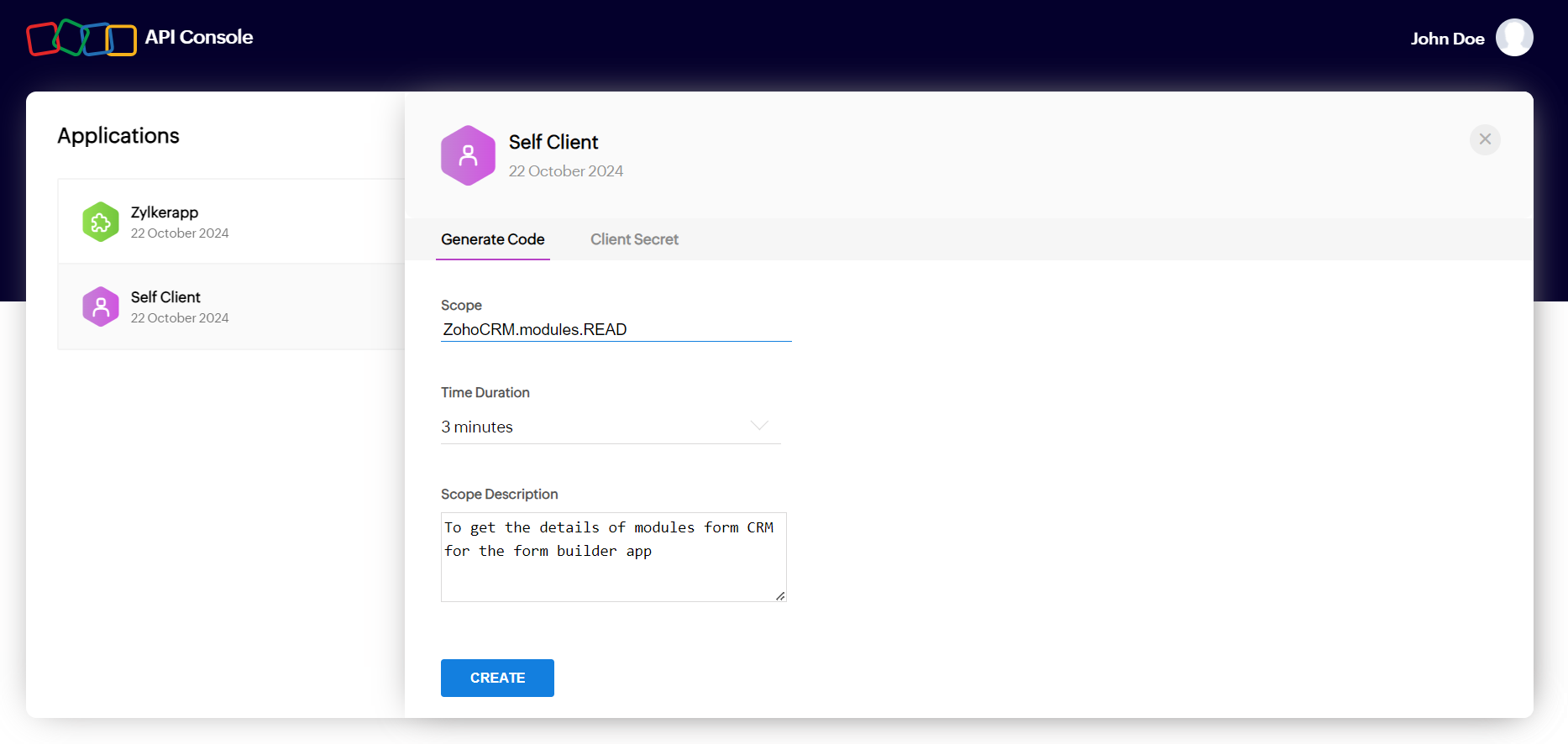
Exchange the authorization code for an access token and a refresh token.
| Parameter | Description |
| client_id | required A unique ID displayed under Self Client > Client Secret. |
| client_secret | required A unique confidential secret displayed under Self Client > Client Secret. |
| grant_type | required Should be passed with the value authorization_code. |
| code | required The authorization code generated in the previous step. |
| Parameter | Description |
| access_token | An authorized key that can be used by your application to access the required resource (mentioned in the scope). Validity: 1 hour. |
| refresh_token | A special token that can be used by your application to refresh the access token once it is expired. This token won't expire. |
| api_domain | The domain the app needs to make service API requests to. |
| token_type | Indicates the type of access token that is generated. The token type that is used in Zoho's OAuth implementation is Bearer. |
| expires_in | Indicates the time (in seconds) in which the access token will expire. |
Make request calls to the service you want to access through the api_domain you get from the response of the access token request. Using an access token, you can access the resource for an hour, after which it will expire. To get a new access token, use the refresh token (see Step 4).
When an access token expires, get a new access token using the refresh token.
| Parameter | Description |
| client_id | required A unique ID displayed under Self Client > Client Secret. |
| client_secret | required A unique confidential secret displayed under Self Client > Client Secret. |
| grant_type | required Should be passed with the value refresh_token. |
| refresh_token | required The refresh token you've obtained in step 2. |
| Parameter | Description |
| access_token | An authorized key that can be used by your application to access the required resource (mentioned in the scope). Validity: 1 hour. |
| api_domain | The domain the app needs to make service API requests to. |
| token_type | Indicates the type of access token that is generated. The token type that is used in Zoho's OAuth implementation is Bearer. |
| expires_in | Indicates the time (in seconds) in which the access token will expire. |
Copied
Note: The accounts-server-url is specific to the location (i.e., datacenter) where the client is registered. See all the server-specific URLs
Copied
Copied
Copied
Note: The accounts-server-url is specific to the location (i.e., datacenter) where the client is registered. See all the server-specific URLs
Copied
Copied
© 2026, Zoho Corporation Pvt. Ltd. All Rights Reserved.
| Parameter | Description |
| client_id | required A unique ID displayed under Self Client > Client Secret. |
| client_secret | required A unique confidential secret displayed under Self Client > Client Secret. |
| grant_type | Should be passed with the value client_credentials. |
| scope | required The corresponding scope for the resource you want to access using the access token. Eg: ZohoCRM.settings.READ |
| soid | required based on the Zoho app This parameter is required only for certain Zoho apps that allow creating multiple portals/organizations. Refer to the respective app's API documentation to check whether this parameter is required. (Tip: If the request sent without this parameter throws the exception missing_org_info, then this parameter must be sent.)
Syntax: {servicename}.{zsoid}
Example: ZohoCRM.600*****434 |
| Parameter | Description |
| access_token | An authorized key that can be used by your application to access the required resource (mentioned in the scope). Validity: 1 hour. |
| api_domain | The domain the app needs to make service API requests to. |
| token_type | Indicates the type of access token that is generated. The token type that is used in Zoho's OAuth implementation is Bearer. |
| expires_in | Indicates the time (in seconds) in which the access token will expire. |
Make request calls to the service you want to access through the api_domain you get from the response of the access token request. Using an access token, you can access the resource for an hour, after which it will expire. To get a new access token, repeat Step 1.
Copied
Note: The accounts-server-url is specific to the location (i.e., datacenter) where the client is registered. See all the server-specific URLs
Copied
Copied
© 2026, Zoho Corporation Pvt. Ltd. All Rights Reserved.
An app instance refers to a specific environment or container within a Zoho app. Some Zoho apps support having only one instance (for example, Zoho Mail or Zoho Vault), while others allow multiple instances (for example, Zoho CRM or Zoho Books). The instances may be referred to differently across apps, such as “Organizations” in Zoho CRM and Zoho Books, and “Portals" in Zoho Desk and Zoho Projects.
When you want to set up an integration that needs access to data across an entire app instance, using the regular user-based OAuth flow can be limiting. Each user must give consent individually, and also their tokens stop working if they revoke access or if a user is removed from the app instance.
With the instance-level OAuth flow, an administrator grants consent once on behalf of the entire instance. The integration can then access the required data from the instance as a whole. And the tokens remain valid even if the administrator who authorized it is later removed from the instance.
An example use case: Your app wants to generate an analytical report using the tickets and agents data pulled from Zoho Desk, specifically from a particular instance (that is, a Portal). With user-based OAuth, each user would have to grant access individually, and the access will be limited to only the tickets associated with them. With instance-level OAuth, the department administrator can grant access once at the Portal level, allowing your app to retrieve the required data.
User-based OAuth | Instance-level OAuth |
|---|---|
Used to access "per-user" resources. | Used to access "instance-wide" resources. |
Consent given by individual users to access their data. | Consent given by an administrator for the data in an instance as a whole. |
Tokens are bound to the user and are invalidated if the user revokes it or if the user is removed from the instance. | Tokens are bound to the app instance and are not invalidated even if the admin who set it up is removed from the instance. It will be invalidated only if the instance gets deleted or it's programmatically revoked. |
You need to first create an "ORG" type client for each integration. These clients can be created at the API console. Follow the steps below to create an "ORG" client:
Sign in with your Zoho account if prompted.
Enter a name for the client.
Enter the Homepage URL and Authorized Redirect URIs of your app.
INFO:
Homepage URL :
The full URL to your application's home page.
Authorized Redirect URI :
It is the URI of the application to which the authorization server (Zoho Accounts) sends the response back to, with the authorization code after the admin grants permission through consent. The URI should begin with https:// or http://. You can add multiple redirect URIs by clicking [plus]. Example: https://www.zylker.com/oauthredirect
Click CREATE . Client ID and Client Secret will be displayed. You can also view them anytime at the API console.
Scopes are limited to one Zoho app per refresh token
The client must request for scopes of only one Zoho app per refresh token. This is because in the integration context, a refresh token defines authorization between your client and a single Zoho app, not multiple apps. The exception to this requirement is the scopes of certain common Zoho services listed below:
User must be an administrator in at least one instance
The user granting permission must be an administrator in at least one instance of the Zoho app mentioned in the scope.
Request for an authorization code. We will display the requested permissions to the administrator. If they are the administrator of multiple instances, they will have to select which instance to grant permission for. If they grant it, an authorization code will be sent to your redirect URL, which is valid for 2 minutes.


Exchange the authorization code to receive an access token and a refresh token. Store this refresh token so you can use it to generate new access tokens whenever your apps wants to access the data.
Generate new access tokens using your stored refresh token whenever needed. Each access token will be valid for 1 hour.
Revoking tokens
If you want to revoke a refresh token created for an integration, you can make a POST request to oauth/v2/token/revoke . For more details, refer to Revoke OAuth tokens .
© 2026, Zoho Corporation Pvt. Ltd. All Rights Reserved.
Request for an authorization code from our authorization server. You will need to mention which scopes you need permission for. We will display the requested permissions to the administrator. If they are the administrator of multiple instances, they will have to select which instance to grant permission for. If they grant it, an authorization code will be sent to your redirect URL, which is valid for 2 minutes.
| Parameter | Description |
| client_id | required The unique ID of your application. You can find this in the API console . |
| response_type | required Should be sent with the value code . |
| redirect_uri | required The URI to which the authorization server will redirect the browser back with the authorization code. It has to be the same URI which is provided when registering the app in the API console. Should start with http:// or https://. For example: https://www.zylker.com/oauthredirect |
| scope | required The corresponding scope for the resource you want to access from the user's account. The scopes will be displayed to the administrator when asking for consent. Eg: ZohoCRMsettings.READ Refer to points to note for allowed scopes |
| access_type | optional Determines whether your app can refresh the access token on its own once the access token expires (without user intervention). If the value is online , only the access token will be provided and it cannot be refreshed by the app once expired. If the value is offline , a refresh token will also be provided for the first time the app requests for an access token , which the app can store and then use to refresh the access token whenever required. Default value: online Note: To get a refresh token every time the app requests for an access token, then include access_type=offline and prompt=consent when making the authorization request. |
| Parameter | Description |
| code | The authorization code that can be exchanged for an access token . Its validity is two minutes and can be used only once. |
| location | Indicates the data center (DC) location of the app instance. If its DC is different from that of your app, then you will need to enable multi DC support and make the access token request to the app instance's DC. |
| Parameter | Description |
| access_denied |
|
| Invalid Client |
|
| Invalid Response Type |
|
| Invalid OAuth Scope |
|
| Scope Changes Required |
|
| Invalid Redirect Uri |
|
| An error occurred/500 server error |
|
| 404 not found |
|
CopiedGET {accounts-server-url}/oauth/v2/org/auth Note: The accounts-server-url is specific to the location (i.e., datacenter) where your app is registered.
Copiedhttps://accounts.zoho.com/oauth/v2/org/auth
?response_type=code
&client_id=1000.GMB0YULZHJK411284S8I5GZ4CHUEX0
&scope=ZohoCRM.Modules.Read
&redirect_uri=https://www.zylker.com/oauthredirect
&access_type=offlineCopiedhttps://www.zylker.com/oauthredirect
?code=1000.a1110799eac53c491fee9efef8246535.df7da86ff64daa66413e2899e9b7fad7
&location=in
&accounts-server=https://accounts.zoho.in© 2026, Zoho Corporation Pvt. Ltd. All Rights Reserved.
Incremental authorization is an OAuth implementation strategy that allows your app to get a required permission from the user only when it is needed and not upfront. It improves the user experience of your app.
It has the following advantages:
For example, let’s say you’re developing an app that integrates with Zoho Mail. When the user signs in, your app only needs to get the user’s basic profile information and also the permission to display the user’s inbox and emails in your app. Later, user may choose to send emails right from your app (which your app supports). Now, your app can request permission from the user to send emails. At this time, the user will be asked only the permission to send emails and not the already granted permissions such as basic profile information and view emails permission.
Initially, your app would have got the basic permissions that are needed upfront. Later on, when your app needs to ask for further permissions from the user, follow these steps.
User will be prompted with the consent screen asking for the newly required permissions. If the user approves, the refresh token (sent in step 1) and its associated access tokens will be appended with the additional scopes, and a success response will be returned.

© 2026, Zoho Corporation Pvt. Ltd. All Rights Reserved.
Get a scope enhancement token from our authorization server. You will need to send a refresh token to which the additional scopes are to be appended.
| Parameter | Description |
| client_id | required The unique ID of your application. You can find this in the API console . |
| client_secret | required The unique secret for your app which is known only to your app and Zoho. You can find this is the API console . |
| grant_type | required Should be sent with the value update_scopes_token . |
| refresh_token | required The refresh token to which the additional scopes are to be appended. |
| Parameter | Description |
| access_token | The scope enhancement token that can be used to append additional scopes to a refresh token. |
| token_type | Indicates the type of token that is generated. |
| expires_in | Indicates the time (seconds) in which the scope enhancement token expires. |
| Error | Reasons |
| invalid_client |
|
| invalid_client_secret |
|
| invalid_code |
|
| 400 Bad request |
|
CopiedPOST {accounts-server-url}/oauth/v2/token/scopeenhanceNote: The accounts-server-url is specific to the location (i.e., datacenter) where your app is registered.
Copiedhttps://accounts.zoho.in/oauth/v2/token/scopeenhance
?grant_type=update_scopes_token
&client_id=1000.HRLOVZ0U6LSAZ14OQHYZYTZBTL3SGR
&client_secret=fa10d952be6bd6654cbb6b5fe271042de9546541e781
&refresh_token=1000.0d50a4d6a383005cc1f899968b9f9d97.2183743f8798bea2f71e193e34e37ef0dCopied{
"access_token": "1000.f95a0db717f52b825e3f94654f651.ced2cf4e786cf04c0e91daee545jh51cd",
"token_type": "update_scope",
"expires_in": 600
}© 2026, Zoho Corporation Pvt. Ltd. All Rights Reserved.
Use the scope enhancement request to append additional scopes to a refresh token.
| Parameter | Description |
| client_id | required The unique ID of your application. You can find this in the API console . |
| response_type | required Should be sent with the value update_scopes . |
| redirect_uri | required The URI to which the authorization server will redirect the browser back with success or failure response. It has to be the same URI which is provided when registering the app in the API console. Should start with http:// or https://. For example: https://www.zylker.com/oauthredirect |
| scope | required The list of additional scopes for the resource you want to access from the user's account. The scopes will be displayed to the user when asking for consent. For example: ZohoCRM.settings.READ |
| enhance_token | required The scope enhancement token you've received from the previous request (step 1). |
| logout | required If you want the user's session to be terminated after they grant/reject the permission, send the value as true . |
After authenticating the user, we will display to the user what are all the permissions your app is requesting. Once the user grants permission, the refresh token will be appended with the additional scopes and success response will be returned. If the user rejects them, failure response will be returned.
CopiedGET {accounts-server-url}/oauth/v2/token/addextrascope Note: The accounts-server-url is specific to the location (i.e., datacenter) where your app is registered.
Copiedhttps://accounts.zoho.in/oauth/v2/token/addextrascope
?response_type=update_scopes
&client_id=1000.HRLOVZ0544JSAZ14OQ1NHYHZBTL3SGR
&redirect_uri=https://zylker.com/oauthredirect
&scope=AaaServer.profile.Read,ZohoCliq.users.read,ZohoCRM.users.READ
&enhance_token=1000.e3b9859da1d36faf1e299889f6354da75.d83c513417fdfsdg514fb9ee38a6775fd50
&logout=true Success Response:
https://www.zylker.com/oauthredirect?status=success&scope_enhanced=true
Failure Response:
https://www.zylker.com/oauthredirect?error=access_denied
© 2026, Zoho Corporation Pvt. Ltd. All Rights Reserved.
Data protection and privacy laws in multiple countries state that user data can only be stored in data centers located on that country's soil. In compliance, Zoho has set up data centers in multiple countries. Each data center only holds the data of users who have registered at that domain. See the available data centers
Clients require user data to execute their business logic. Clients such as extension programmers or plugin developers will have a user audience across all the data centers (DC), and will want to reach all of Zoho users. Such clients need to enable Multi DC support at Zoho API console to access Zoho's global user base.
If your app is present in the US data center and your app is going to be used by users present in the EU data center, then you need to enable EU DC support for your app. While making the initial request, you will be provided with the location of the user in the response. Using that, you will need to make the further API calls to the server URL corresponding to the concerned user's location.
The data centers and their respective server URL are given below:
| Data Center | Server URL |
|---|---|
| United States (US) | https://accounts.zoho.com |
| Europe (EU) | https://accounts.zoho.eu |
| India (IN) | https://accounts.zoho.in |
| Australia (AU) | https://accounts.zoho.com.au |
| Japan (JP) | https://accounts.zoho.jp |
| Canada (CA) | https://accounts.zohocloud.ca |
| Saudi Arabia (SA) | https://accounts.zoho.sa |
| United Kingdom (UK) | https://accounts.zoho.uk |
You can receive JSON format server URLs for all the data centers here .
The Client ID will be common for all DCs, but the Client Secret can be either common to all the DCs or unique for each DC depending on your preference.
See how the multi DC flow works in:
Server-based apps | Client-based app s | Non-browser app s
While enabling Multi DC support, you can either choose to have individual client secrets for separate DCs or use the same client secret for all the enabled DCs.

In server-based applications , the Multi DC flow will be as follows:
In the authorization request, you will send calls to the domain https://accounts.zoho.com . In the response, the location of the user's DC will be included as the parameter location. You can view the respective server URL for this location using https://accounts.zoho.com/oauth/serverinfo .
Sample authorization response :
https://oauth.pstmn.io/v1/browser-callback
?code=1000.abbb4c9e0902704b90cc556f32ec0336.5ff4478926a43657280d5cbe1af1917a
&location=in
&accounts-server=https://accounts.zoho.in
In this example, location=in .
Once you have identified the user's data center, you need to make the access token request to the server URL corresponding to that location. For example, if location=eu, you will need to make access token request to https://accounts.zoho.eu .
Example request :
https://accounts.zoho.eu/oauth/v2/token
?client_id=1000.GMB0YULZHJK411248S8I5GZ4CHUEX0
&grant_type=authorization_code
&client_secret=122c324d3496d5d777ceeebc129470715fbb856b7
&redirect_uri=https://www.zylker.com/oauthredirect
&code=1000.86a03ca5dbfccb7445b1889b8215efb0.cad9e1ae4989a1196fe05aa729fcb4e1
Example response :
{
"access_token":"1000.2deaf8d0c268e3c85daa2a013a843b10.703adef2bb337b 8ca36cfc5d7b83cf24",
"refresh_token":"1000.18e983526f0ca8575ea9c53b0cd5bb58.1bd83a6f2e22c3a7e1309d96ae439cc1",
"api_domain":"https://api.zoho.eu",
"token_type":"Bearer",
"expires_in":3600
}
In the response, you will find api_domain , which is where you will need to make the service API requests.
Make request calls to the service you want to access through the api_domain you get from the response of the access token request.
In client-based applications , the Multi DC flow will be as follows:
In the access token request, you will send calls to the domain https://accounts.zoho.com . In the response, the location of the user's DC will be included as the parameter location . You can view the respective server URL for this location using https://accounts.zoho.com/oauth/serverinfo . You will also find api_domain , which is where you will need to make the service API requests.
Sample authorization response :
https://www.zylker.com/oauthredirect#
&access_token=1000.835d578e9a2103d2e87994ae8752074d.4496b74ddde6413f83fe615e8388e488
&expires_in=3600
&location=in
&api_domain=https://www.zohoapis.in
Make request calls to the service you want to access through the api_domain you get from the response of the access token request.
In non-browser based applications , the Multi DC flow will be as follows:
After getting the device_code from the initiation request, you will poll requests and wait for user's permission. After the user grants permission, if your app and the user are present in the same location (i.e., data center), the server will respond with an access token. However, if your app and the server are present in different DCs, you will get the feedback other_dc from the server along with the actual location of the user.
Example feedback :
{
user_location": "eu",
"error": "other_dc"
}
Now, you will need to send further polling requests to the server URL corresponding to the user's location. In the response, you will get the access_token and the api_domain , which is where you will need to make the service API requests.
Example response :
{
access_token": "1004.a3fdad1f7115c8d00a491938a3650a2f.68485f81304",
"api_domain": "https://api.zoho.com",
"token_type": "Bearer",
"expires_in":3600
}
Make request calls to the service you want to access through the api_domain you get from the response of the access token request.
© 2026, Zoho Corporation Pvt. Ltd. All Rights Reserved.
Although OAuth is primarily used for authorization, it can also be used to sign-in users for a custom application.
The steps involved in the sign-in process are as follows:
This authentication flow is based on the OpenID connect specification. Zoho’s OIDC metadata (or discovery document) can be retrieved through the following URL. You can select the required data center.
This endpoint contains details about Zoho’s OIDC configuration including supported endpoints, scopes, claims, public keys, and such.
Register your application with the Zoho API console. You will obtain a client ID and a client secret. These credentials will be used to communicate with Zoho.
When the user tries signing in to your app using Zoho (typically via a 'Sign in using Zoho' option), this request needs to be sent to Zoho to obtain the authorization code. The request must include the parameter scope=email .
| Parameter | Description |
| client_id | required The unique ID of your application. Obtained from the Zoho API console when you register your application. |
| response_type | required Must be passed with the constant value code . |
| redirect_uri | required The URI endpoint that Zoho will redirect the web browser back to, with the authorization code after authorizing the client. The redirect_uri has to be the same URI that is provided when registering the client in the API console. Should start with http:// or https://. |
| scope | required The value can be email , phone , profile , and openid .
|
After Zoho authenticates the user, a consent page will be shown to the them, and all the permissions your app is requesting will be displayed there. Once the user provides consent, the authorization code will be sent to the redirect_uri of the application.
| Parameter | Description |
| code | The authorization code that can be exchanged for an id_token by making a request (step 3) to Zoho Accounts server. The lifetime of the authorization code is two minutes and can be used only once. |
| location | Indicates the data center (DC) location of the user (i.e., where their account is stored). If the user's DC is different from that of your app, then you will need to enable multi DC support and make the ID token request to the user's DC. For example, if the location mentioned in the response is in , then the ID token request URL should be https://accounts.zoho. in /oauth/v2/token . |
After receiving the authorization code, this request needs to be sent to Zoho to obtain the ID token. The ID token will contain the details of the user.
| Parameter | Description |
| client_id | required The unique ID of your application. Obtained from the Zoho API console when you register your application. |
| client_secret | required The unique secret of your application that is know only to your application and Zoho. Obtained from the Zoho API console when you register your application. |
| grant_type | required Indicates the way the application gets the id_token from the authorization server. In this case, it is by providing an authorization code and the value must be authorization_code . |
| code | required The authorization code received through the authorization code request (step 2). |
| redirect_uri | optional The URI endpoint that Zoho will redirect the web browser back to with the id_token , after authorizing the client and the authorization code. The redirect_uri has to be the same URI which is provided when making the authorization code request. Should start with http:// or https://. For example: https://www.zylker.com/oauthredirect |
| Parameter | Description |
| id_token | A JWT that contains the details of the user who is to be authenticated. |
| access_token | An authorized key that can be used by your application to access the protected resource (mentioned in the scope) on behalf of the user. Validity: 1 hour. |
| token_type | Indicates the type of access token that is generated and how it must be passed when making API requests to access protected resources. The token type that is used in Zoho OAuth implementation is Bearer . |
| expires_in | Indicates the time (in seconds) after which the access token expires. The lifetime of an access token is 1 hour (3600 seconds). |
In the response of the ID token request (step 3), the id_token of the user will be present. The id_token is a JWT and contains the details of the user. The user details returned depends on the requested scope.
As it is a JWT, it will have three sections: Header, Payload, and Signature (each section separated by a period). Your application will need to decrypt it using the Base64 decryption algorithm. The payload part of the id_token will contain the following claims including the user's details. Not all of the following claims will be present, as the user details claims depend on the requested scope (email, phone, profile, openid).
Note: Do not use email as the unique identifier for a user. A user's email address can be changed and hence, won't always be unique. You should use sub as it will be always unique to the user.
| Parameter | Description |
| at_hash | Access token hash. It is used to validate that the access token granted is indeed associated with this ID token. |
| sub | Subject. A unique identifier for the user who is being authenticated. This identifier will always be unique to this user and never reassigned. |
| aud | Audience. The entity this id_token is intended for, which is your application. The value will be the client_id of your application. |
| azp | Authorized party. The entity to which the id_token is issued, which is your application. The value will be the client_id of your application. |
| iss | Issuer. Identifier for the entity that issued this token. Will always be accounts.zoho.com (the ccTLD may vary). |
| exp | Expiry. The time on or after which the id_token must not be accepted by your application. Represented in the Unix time format. |
| iat | Issued at. The time at which the id_token was issued. Represented in the Unix time format. |
| The primary email address of the user who is being authenticated. | |
| email_verified | Indicates whether the email address of the user is verified or not. |
| phone_number | The primary mobile number of the user who is being authenticated, along with country code. |
| phone_number_verified | Indicates whether the mobile number of the user is verified or not. |
| picture | The profile picture of the user. |
| first_name | The first name of the user. |
| name | The display name of the user. |
| last_name | The last name of the user. |
| gender | The gender of the user. |
Refer to this specification to learn more about these claims.
Check if your requirements for authentication are met from the decrypted id_token . Next, query your database to check if the user is already present. If yes, then initiate a session for the user in your app. If the user is not present, then redirect them to your app's sign-up page.
CopiedGET {accounts-server-url}/oauth/v2/authNote: The accounts-server-url is specific to the location (i.e., datacenter) where your app is registered.
Copiedhttps://accounts.zoho.com/oauth/v2/auth
?response_type=code
&client_id=1000.GMB0YULZHJK411284S8I5GZ4CHUEX0
&scope=email
&redirect_uri=https://www.zylker.com/oauthredirectCopiedhttps://www.zylker.com/oauthredirect
?code=1000.a1110799eac53c491fee9efef8246535.df7da86ff64daa66413e2899e9b7fad7
&location=in
&accounts-server=https://accounts.zoho.inCopiedPOST {accounts-server-url}/oauth/v2/tokenNote : The accounts-server-url is specific to the location (i.e., datacenter) where the user is present. Mentioned as location in the response of the authorization request.
Copiedhttps://accounts.zoho.com/oauth/v2/token
?client_id=1000.GMB0YULZHJK411248S8I5GZ4CHUEX0
&client_secret=122c324d3496d5d777ceeebc129470715fbb856b7
&grant_type=authorization_code
&redirect_uri=https://www.zylker.com/oauthredirect
&code=1000.86a03ca5dbfccb7445b1889b8215efb0.cad9e1ae4989a1196fe05aa729fcb4e1eCopied{
"access_token":"1000.2deaf8d0c268e3c85daa2a013a843b10.703adef2bb337b 8ca36cfc5d7b83cf24",
"id_token":"eyJrZXlfaWQiOiI3NDM5ODNiNDU0NTUyODNlNTQ1Nm2RkNDQxNjBhYSIsInR5cCI6IkpXUyIsImFsZyI6IlJTMjU2In0=.eyJhdF9oYXNoIjoiUlFkWVN3X0t4MzNoa2FoNVI3Q2kzQSIsInN1YiI6IjczMzE4MDE5Mi45NDI2Njk1MjIiLCJhdWQiOiIxMDAwLlI1MFFPRkFNV0FSN0pEU0FTVEU2WDdDTzA2Ukg5SyIsImVtYWlsX3ZlcmlmaWVkIjp0cnVlLCJhenAiOiIxMDAwLlI1MFFPRkFNV0FSN0pEU0FTVEU2WDdDTzA2Ukg5SyIsImlzcyI6ImFjY291bnRzLnpvaG8uY29tIiwiZXhwIjoxNjA4MTQwNzY2LCJpYXQiOjE2MDgxMzc4ODYsImVtYWlsIjoib2F1dGh0ZXN0YWNjbnRAZ21haWwuY29tIn0=.OmuBheTwE2ijpvF4AHZnkDrt5pwOj8jKw0X8ATZ4k8noHHMJHP5B7m1N/DEBxCX2BzBdWChGJZVNtxKT8MIEoKubz95XsCn9Z7Lto6PvFtFSp2iHaKi22exwexcRNBCcEDNVOuUq6mWyp/AsTx2QqYy+55cQHHlrBZA4hltaNoUN3nognIonnzjmBzTjRt6oxi2IcbWgT4tgJUO+cKrhWbyPRmM2nJwXTe2VelXICQsnIZQAi6DMzC4UOniOSAeFI8Qfwk8so9b6kdi66DgH7s18dmh/dKumiMbk73S0ZTfdOvULfmtlZJn4LX ujD0oBSvl3Ai6+Q7GkX5g==",
"api_domain":"https://api.zoho.com",
"token_type":"Bearer",
"expires_in":3600
}Copied{
"at_hash": "RQdYSw_Kx33hkah5R7Ci3A",
"sub": "733180192.942669522",
"aud": "1000.R50Q*****06RH9K",
"email_verified": true,
"azp": "1000.R50Q*****6RH9K",
"iss": "accounts.zoho.com",
"exp": 1608140766,
"iat": 1608137886,
"email": "johndoe@zylker.com"
}© 2026, Zoho Corporation Pvt. Ltd. All Rights Reserved.
OAuth tokens can be revoked in two ways:
Users themselves can remove the tokens for the apps they've granted permission to. To revoke:
Programmatically, OAuth tokens can be revoked by making a POST request to the endpoint oauth/v2/token/revoke . Both access tokens and refresh tokens can be revoked. If a refresh token is revoked, all the access tokens that are generated using it also get revoked.
Query parameter
token
required
Refresh token or access token that needs to be revoked.
Response
| {"status":"success"} | The token is successfully revoked. |
| 400 Bad Request | The token passed in the request is invalid. |
CopiedPOST {accounts-server-url}/oauth/v2/token/revoke Note: The accounts-server-url is specific to the location (i.e., datacenter) where your app is registered.
Copiedhttps://accounts.zoho.com/oauth/v2/token/revoke
?token=1000.18e983526f0ca8575ea9c53b0cd5bb58.1bd83a6f2e22c3a7e1309d96ae439cc1© 2026, Zoho Corporation Pvt. Ltd. All Rights Reserved.
When a client wants to generate OAuth tokens (i.e, access tokens and refresh tokens ), we've applied some limits regarding how many tokens can be stored and how many requests can be sent at a time.
These limits are applied for the following reasons:
The limits differ for access token, refresh token, and authorization code.
For access tokens, two types of limits are applied:
At a time, a maximum of 10 active access tokens can be stored by a client per refresh token. After the count reaches 10, when the client requests for an additional token, a new token will be provided and the oldest token will be invalidated, making sure only 10 tokens remain at a time. When an invalid access token is used, "INVALID_OAUTHTOKEN" exception will be thrown.
We’ve also applied a throttle limit for the number of times an app can request for an access token within a specific time period. A total of 10 access token requests can be made within 10 minutes.
If the throttle limit is reached, the following exception will be thrown:
JSON response
{
"error_description": "Y ou have made too many requests continuously. Please try again after some time. ",
"error": "Access Denied"
}
Roadblock error page
Access Denied: Maximum request limit reached for your account. Please try again after some time or contact the app's developer.
To avoid this exception, reuse your access tokens until it expires, instead of using different tokens for each request.
At a time, a maximum of 20 active refresh tokens can be stored by a client per user (i.e, 20 refresh tokens for each user). After the count reaches 20 for a user, when the client requests for an additional token, a new token will be provided and the oldest token will be invalidated, making sure only 20 tokens remain at a time.
Within 10 minutes, a client can generate a maximum of 10 authorization codes per user. If the limit is reached, "access_denied" exception will be thrown for the remaining time. Also, the validity of each authorization code is two minutes.
For non-browser clients, a throttle limit will be applied based on the IP address where the requests are coming from. From a specific IP address, a maximum of 30 device tokens can be requested and generated by a client within 10 minutes. If the limit is reached, “access_denied” exception will be thrown for the remaining time. Also, the validity of each device token is five minutes.
© 2026, Zoho Corporation Pvt. Ltd. All Rights Reserved.
The REST API Postman collection is a set of all the API requests. Using these boilerplate requests, you can test and explore the APIs in various environments for multiple organizations.
Going through the entire API documentation to set up environments, variables, authorization, and so on every time you need to test an API can be tedious. Using the API Postman collection can make the process of exploring APIs swift and effortless. It also significantly reduces the risk of errors.
© 2026, Zoho Corporation Pvt. Ltd. All Rights Reserved.
An OpenAPI Specification (OAS) is a standardized way to describe RESTful APIs. It defines API structure, authentication methods, endpoints, request and response formats, in JSON or YAML.
The Open API Specification is designed to provide:
API Endpoints: The request URL and HTTP methods are specified, along with the optional and mandatory parameters required to make an API call request. The response formats for all possible HTTP response codes are available.
Authorization: Supports OAuth authentication for secure access.
Request and Response formats: Standardized request formats for GET, POST, PUT, and DELETE operations, detailed response schemas to explain returned data structures, and error handling guidelines to help developers debug API requests.
© 2026, Zoho Corporation Pvt. Ltd. All Rights Reserved.
Retrieves Site24x7 monitor alert configurations available for cost account integration in the cost centers module. Use this to populate notification profile selectors when creating or editing budget and anomaly checks.
https://www.site24x7.com/cs/api/cost/cost_centers/integration/alert_configs
CloudSpend.Internal.Read
Error message
Detailed error description
Error code
Error message
Authentication error description
Error code
Error message
Server error description
Error code
Successfully retrieved alert configurations
Bad request - Invalid parameters or request format
Unauthorized - Invalid or missing authentication
Internal server error
Retrieves detailed unbilled resource information for governance violations - resources not yet reflected in billing. Use this as part of the 5-API RCA workflow to get paginated details of unbilled resources causing non-compliance.
https://www.site24x7.com/cs/api/cost/governance/checks/rca/unbilled_resource_details
CloudSpend.Internal.Read
Governance policy identifier associated with the governance check.
Unix timestamp in milliseconds for the governance check period start time.
Page number for pagination control (0-based indexing).
Response message
Paginated unbilled resource details
Array of unbilled resource details with cost breakdown
Cost for this resource
Cost account identifier
Name of the billed account
Cloud service name
Billed account identifier
Resource identifier
Cloud region name
Name of the resource
Current page number (0-based)
Indicates if more pages of data are available
Response status code
Error message
Detailed error description
Error code
Error message
Authentication error description
Error code
Error message
Server error description
Error code
Successfully retrieved unbilled resource details for governance RCA
Bad request - Invalid parameters or request format
Unauthorized - Invalid or missing authentication
Internal server error
Returns user-created tagging compliance reports with ID, name, creation time, starred status, and enabled or disabled state. Use this to populate the custom report selection dropdown for compliance analysis.
https://www.site24x7.com/cs/api/cost/reports/compliance/tagging/list
CloudSpend.Internal.Read
Formatted creation timestamp
Whether the report is starred/favorite
Report availability status
Unique identifier for the custom compliance report
User-defined name for the compliance report
Error message
Detailed error description
Error code
Error message
Authentication error description
Error code
Error message
Forbidden access error description
Error code
Error message
Internal server error description
Error code
Successfully retrieved custom tagging compliance reports
Bad request - Invalid parameters or request format
Unauthorized - Invalid or missing authentication
Forbidden - Insufficient permissions
Internal server error
Retrieves cost centers for budget management with account associations and cloud type information. Use this to discover available cost centers for BU-level budget policy creation with cloud provider details.
https://www.site24x7.com/cs/api/cost/budget/cost_centers
CloudSpend.Internal.Read
Available cost centers for budget policy creation
Cost center display name
Whether BU spans multiple cloud providers
Cloud provider type (-1=Hybrid, 0=AWS, 1=Azure, 2=GCP)
Cost center identifier for policy creation
Associated cost account IDs within this cost center
Error message
Detailed error description
Error code
Error message
Authentication error description
Error code
Error message
Server error description
Error code
Successfully retrieved cost centers for budget policy creation
Bad request - Invalid parameters or request format
Unauthorized - Invalid or missing authentication
Internal server error
Retrieves cloud accounts with cost metrics, billing data, and processing status for anomaly check creation. Use this to discover and select target accounts for anomaly monitoring setup with spending trends and status breakdown.
https://www.site24x7.com/cs/api/cost/anomaly/accounts
CloudSpend.Internal.Read
Optional filter parameters in JSON format: - account_ids: Array of specific account IDs to retrieve - cloud_type: Filter by cloud provider (0=AWS, 1=Azure, 2=GCP) - status: Filter by processing status
Response message
Total cost across all accounts for current month
Total cost across all accounts for previous month
Total number of accounts
Response status code
Error message
Detailed error description
Error code
Error message
Authentication error description
Error code
Error message
Forbidden access error description
Error code
Error message
Internal server error description
Error code
Successfully retrieved accounts data
Bad request - Invalid parameters or request format
Unauthorized - Invalid or missing authentication
Forbidden - Insufficient permissions
Internal server error
Provides comprehensive anomaly history with timeline analysis, financial impact details, and status tracking for investigation workflows.
https://www.site24x7.com/cs/api/accounts/spend_analysis/anomaly/data
CloudSpend.Internal.Read
Anomaly identifier for retrieving historical anomaly data.
Start date for anomaly history analysis in YYYY-MM-DD format.
End date for anomaly history analysis in YYYY-MM-DD format.
Response for listAccountAnomalyHistory API - anomaly history timeline
Response message
Anomaly history container
Account/resource name
Chronological list of anomaly occurrences
Detection time (Unix ms) - use for RCA/meta APIs
Currency symbol
Percentage deviation
Severity (Low/Medium/High)
Currency code
Status (Open/Closed)
Numeric status code
Type (upper=spike, lower=drop)
Expected/predicted cost
Human-readable detection timestamp
Actual cost value
Response status code (0 = success)
Error message
Detailed error description
Error code
Error message
Authentication error description
Error code
Error message
Server error description
Error code
Anomaly history data for timeline analysis and display.
Bad request - Invalid parameters or request format
Unauthorized - Invalid or missing authentication
Internal server error
Retrieves comprehensive tag inventory for a cost account including all tag keys, values, and metadata. Use this for tag compliance rule definition, savings report filtering, and missing tag identification.
https://www.site24x7.com/cs/api/cost/reports/tags
CloudSpend.Internal.Read
URL-encoded JSON object. Must use format {\"cost_account_id\":[\"account_id_1\",\"account_id_2\"]}. A plain array will fail with 'JSON is not well formed'.
Error message
Detailed error description
Error code
Error message
Authentication error description
Error code
Error message
Forbidden access error description
Error code
Error message
Internal server error description
Error code
Successfully retrieved account tags
Bad request - Invalid parameters or request format
Unauthorized - Invalid or missing authentication
Forbidden - Insufficient permissions
Internal server error
Retrieves detailed unbilled resource information for tagging compliance with pagination support. Use this to display the unbilled/non-compliant resources table in the compliance dashboard.
https://www.site24x7.com/cs/api/cost/reports/compliance/unbilled/custom/tagging
CloudSpend.Internal.Read
Custom tagging compliance report ID for unbilled resource details
Page number for paginated unbilled resource list (0-based indexing)
Whether more pages are available
Error message
Detailed error description
Error code
Error message
Authentication error description
Error code
Error message
Forbidden access error description
Error code
Error message
Internal server error description
Error code
Successfully retrieved unbilled compliance details
Bad request - Invalid parameters or request format
Unauthorized - Invalid or missing authentication
Forbidden - Insufficient permissions
Internal server error
Provides service-level cost trend analysis with AWS service costs over time, timestamps, month-over-month analysis, and optimization insights.
https://www.site24x7.com/cs/api/cost/accounts/trend_box
CloudSpend.Internal.Create
End date in YYYY-MM-DD format. CALCULATE: current system date
Empty array [] (required constant)
Period setting: 1 (required constant)
Account structure array with cost_account_id and billing_account_ids
Parent account ID
Child billing account IDs. Use billing_account_ids array from the selected parent account's child_accounts structure.
Cost type: 0 for AWS, 20 for Azure/GCP (from getAccountsMetadata cloud_type field)
Start date in YYYY-MM-DD format. CALCULATE: first day of previous month
Response message
Trend mode (1 = standard)
Response code (0 = success)
Error message
Detailed error description
Error code
Error message
Authentication error description
Error code
Error message
Not found error description
Error code
Error message
Server error description
Error code
Successful response with service-level cost trends
Bad request - Invalid parameters or request format
Unauthorized - Invalid or missing authentication
Not found - Resource does not exist
Internal server error
Generates resource exploration reports with cost breakdown by regions, services, accounts, and resource groups.
https://www.site24x7.com/cs/api/cost/accounts/resource_explorer/report
CloudSpend.Internal.Create
Account ID array
Profile identifier for report generation
Report format: 1=PDF, 2=CSV
User-defined report name
Report type: 3 (Resource Explorer)
Array of contact objects for report delivery
Contact identifier for report delivery
Type of contact (1=user, 2=group)
Grouping method: 1=Region, 2=Service, 3=Accounts, 4=Resource Group
Use EXACT frequency value response. Get profile.frequency from API response.
Response for generateResourceExplorerReport API - resource explorer report scheduling confirmation
Response message indicating report generation status
Report generation result data
Scheduled delivery time for the report
Unique identifier for the generated report
Grouping method used: 1=Region, 2=Service, 3=Accounts, 4=Resource Group
Report generation status (scheduled, processing, completed)
Response status code (0 = success)
Error message
Detailed error description
Error code
Report generation initiated successfully
Bad request - Invalid parameters or request format
Retrieves spend analysis KPI metrics including total cost, top/bottom accounts, and anomaly counts. Use this to populate spend overview numerical widgets in user-configured custom dashboards.
https://www.site24x7.com/cs/api/cost/custom_report/spend_analysis_panel
CloudSpend.Internal.Read
Analysis end date - map dateRangeId from widget config to actual dates
Cost tag filters from dashboard widget config params
Period type from dashboard widget config params
Account configurations for analysis. Get cost_account_id from dashboard widget config params, then get billing_account_ids response.
Cost account identifier extracted from dashboard widget config params
Billing account IDs array child_accounts
Cost calculation type from dashboard widget config params
Analysis start date - map dateRangeId from widget config to actual dates
Response status message
Spend analysis metrics data
Summary metrics object
Account name with highest cost
Maximum cost value
Total cost across all selected accounts
Anomaly detection status
Number of anomaly occurrences
Last anomaly detection timestamp
Minimum cost value
Cost difference calculation
Account name with lowest cost
Response status code
Error message
Detailed error description
Error code
Error message
Authentication error description
Error code
Error message
Forbidden access error description
Error code
Error message
Internal server error description
Error code
Successfully retrieved spend analysis metrics
Bad request - Invalid parameters or request format
Unauthorized - Invalid or missing authentication
Forbidden - Insufficient permissions
Internal server error
Retrieves CloudSpend billing records for a date range showing total cost, billed amount, payment status, and cloud provider breakdown per account per month. Use this to display the Licensing page with monthly billing summary chart and cost-per-account breakdown table.
https://www.site24x7.com/cs/api/cost/bills
CloudSpend.Internal.Read
Start date for billing period (YYYY-MM-DD format). Typically set to last few months for trending analysis or specific month start for detailed view.
End date for billing period (YYYY-MM-DD format). Can be current date for overall summary or specific month end for detailed analysis.
Response status message
Array of billing records for the specified date range
Billing period start timestamp
When the billing entry was processed and recorded
Whether this period is currently chargeable: - true: Current active billing period - false: Historical or completed periods
Total cost amount for the billing period
Actual billed amount (typically 1% of total cost)
Cloud provider for this billing record
Unique identifier for the cost account
Display name of the cost account
Payment status indicator (true=unpaid, false=paid)
Response status code
Error message
Detailed error description
Error code
Error message
Authentication error description
Error code
Error message
Forbidden access error description
Error code
Error message
Internal server error description
Error code
Successfully retrieved billing and license information
Bad request - Invalid parameters or request format
Unauthorized - Invalid or missing authentication
Forbidden - Insufficient permissions
Internal server error
Retrieves available scheduling profiles for resource inventory report delivery configuration. Use this to get scheduling profiles with frequency, timing, and timezone options before configuring automated resource inventory reports.
https://www.site24x7.com/cs/api/cost/reports/resource_inventory/report/profiles
CloudSpend.Internal.Read
Response status message
Array of available scheduling profiles
Report period type
AM/PM indicator (1=AM, 2=PM)
Unique profile identifier
Timezone for report delivery
Delivery hour (1-12)
Whether this is default profile (1=default, 0=custom)
Profile display name
AM/PM text representation
Delivery frequency in days
Response status code
Error message
Detailed error description
Error code
Error message
Authentication error description
Error code
Error message
Forbidden access error description
Error code
Error message
Internal server error description
Error code
Successfully retrieved resource inventory schedule profiles
Bad request - Invalid parameters or request format
Unauthorized - Invalid or missing authentication
Forbidden - Insufficient permissions
Internal server error
Returns solution reports metadata with report names, IDs, and category hierarchy for all cloud providers. Use this as mandatory first step to validate report names and extract business_unit_id before any report-by-name query.
https://www.site24x7.com/cs/api/cost/solution_reports_meta
CloudSpend.Internal.Read
Response message
Navigation structure with entity counts
Navigation level name
Cloud provider ID
Response status code
Error message
Detailed error description
Error code
Error message
Authentication error description
Error code
Error message
Forbidden access error description
Error code
Error message
Internal server error description
Error code
Successfully retrieved solution reports metadata
Bad request - Invalid parameters or request format
Unauthorized - Invalid or missing authentication
Forbidden - Insufficient permissions
Internal server error
Retrieves existing anomaly budget policies filtered by account type for anomaly check configuration. Use this to discover available anomaly policies by account type before creating or associating anomaly checks.
https://www.site24x7.com/cs/api/cost/anomaly/budget_policys/{account_type}
CloudSpend.Internal.Read
Account type filter for anomaly budget policies: - 0: Account-level anomaly policies - 1: Cost Center-level anomaly policies - 2: Report-level anomaly policies
Anomaly policies filtered by account type
Policy type classification
Account type (0=Account, 1=Cost Center, 2=Report)
Account, Cost Center, or Report identifier
Anomaly policy identifier
Cost calculation type (20=Azure/GCP, 0=AWS)
User-defined anomaly policy name
Empty string when no tags
Array of tag objects when tags are present
List of integrated Zoho Account IDs
Number of budgets associated with this policy
Error message
Detailed error description
Error code
Error message
Authentication error description
Error code
Error message
Server error description
Error code
Successfully retrieved anomaly budget policies for the specified account type
Bad request - Invalid parameters or request format
Unauthorized - Invalid or missing authentication
Internal server error
Retrieves cost breakdown by billing accounts for custom dashboard widget rendering. Use this to populate the Cost by Subscriptions widget with account-level cost pairs in user-configured dashboards.
https://www.site24x7.com/cs/api/cost/custom_report/accounts_splitup
CloudSpend.Internal.Read
Analysis end date - map dateRangeId from widget config to actual dates
Cost tag filters from dashboard widget config params
Period type from dashboard widget config params
Array of account configurations with billing account selections
Cost account identifier from widget config
Array of billing account IDs from spend_analysis API
Cost calculation type from dashboard widget config params (20=unblended, etc.)
Analysis start date - map dateRangeId from widget config to actual dates
Response status message
Cost breakdown data
Array of subscription cost breakdowns for flexible visualization (pie chart, bar chart, table, etc.)
Response status code
Error message
Detailed error description
Error code
Error message
Authentication error description
Error code
Error message
Forbidden access error description
Error code
Error message
Internal server error description
Error code
Successfully retrieved accounts cost breakdown
Bad request - Invalid parameters or request format
Unauthorized - Invalid or missing authentication
Forbidden - Insufficient permissions
Internal server error
Returns instance/SKU-level cost breakdown with instance types for the named solution report. Use this to display the cost by SKUs/instance widget for AWS named reports.
https://www.site24x7.com/cs/api/cost/sol_reports/cost_by_instance
CloudSpend.Internal.Create
Standard payload structure for all sol_reports APIs - ensures consistent request format
Analysis end date (typically current date)
Pass empty array [] for widget APIs (spend_analysis_panel, common_widget_api, cost_by_resource, cost_by_instance, trend_box, accounts_splitup). Only populate cost_tags when calling group_by_property for tag-based filtering. Non-empty cost_tags on widget APIs causes 500 errors.
Tag version or value reference
Tag identifier for filtering (from business_unit_tags in bu_spend_analysis response)
Time granularity (1=daily, 2=weekly, 3=monthly)
Cost center identifier from getSolutionReportsReports response
Cost calculation type (0=standard, 1=amortized, 20=Azure resource groups)
Account scope for analysis
Cost account identifier
Associated billing account IDs
Cost center type classification
Analysis start date (typically previous month 1st or current billing period start)
Instance cost breakdown (may be empty for serverless services)
Instance identifier
Cost amount for this instance
Instance deployment region
Instance type and size
Cost by instance data retrieved successfully
Invalid request parameters
Authentication required
Access denied to cost centers or accounts
Internal server error
Retrieves high-level tagging compliance summary metrics including resource counts, cost, and compliance percentages. Use this to display compliance KPIs in the Cost and Resources summary cards on the dashboard.
https://www.site24x7.com/cs/api/cost/reports/compliance/summary/tagging
CloudSpend.Internal.Read
Custom tagging compliance report ID for summary metrics
Number of resources checked for compliance
Total cost of all resources
Total number of resources in scope
Percentage of non-compliant resources
Cost of resources checked for compliance
Percentage of non-compliant cost
Error message
Detailed error description
Error code
Error message
Authentication error description
Error code
Error message
Forbidden access error description
Error code
Error message
Internal server error description
Error code
Successfully retrieved compliance summary metrics
Bad request - Invalid parameters or request format
Unauthorized - Invalid or missing authentication
Forbidden - Insufficient permissions
Internal server error
Triggers execution of a specific rule as a background task that applies configured actions to matching resources.
https://www.site24x7.com/cs/api/cost/admin/rule/run
CloudSpend.Internal.Create
Unique identifier of the rule to execute
Error message
Detailed error description
Error code
Error message
Authentication error description
Error code
Error message
Forbidden access error description
Error code
Error message
Internal server error description
Error code
Rule execution task scheduled successfully
Bad request - Invalid parameters or request format
Unauthorized - Invalid or missing authentication
Forbidden - Insufficient permissions
Internal server error
Retrieves available scheduling profiles for summary report delivery with daily, weekly, and monthly options. Use this as the first step in summary report scheduling to present profile options for frequency selection.
https://www.site24x7.com/cs/api/cost/reports/summary_report/report/profiles
CloudSpend.Internal.Read
1=AM, 2=PM
1=Monthly, 4=Daily, 7=Weekly
1=Default profile, 0=Custom profile
Error message
Detailed error description
Error code
Error message
Authentication error description
Error code
Error message
Forbidden access error description
Error code
Error message
Internal server error description
Error code
Successfully retrieved summary schedule profiles
Bad request - Invalid parameters or request format
Unauthorized - Invalid or missing authentication
Forbidden - Insufficient permissions
Internal server error
Retrieves all custom user-defined tags across all cost accounts for tag catalog and discovery. Use this to populate tag pickers when adding tags to resources, showing available custom tags for selection.
https://www.site24x7.com/cs/api/cost/reports/all_custom_user_tags
CloudSpend.Internal.Read
Response status message
Array of all custom user-defined tags with complete metadata
Cost account ID that owns/created this tag
Tag variation indicator for versioning and changes (negative values indicate user-defined tags)
Custom tag key name
Unique identifier for the custom tag
Custom tag value
Response status code
Error message
Detailed error description
Error code
Error message
Authentication error description
Error code
Error message
Forbidden access error description
Error code
Error message
Internal server error description
Error code
Successfully retrieved all custom user tags
Bad request - Invalid parameters or request format
Unauthorized - Invalid or missing authentication
Forbidden - Insufficient permissions
Internal server error
Retrieves resource list with cost breakdown after drilling down by account, region, service, or tag in a solution report. Use after getGroupByPropertyReports to get individual resources under a specific account, region, service, or tag.
https://www.site24x7.com/cs/api/cost/sol_reports/resource_count
CloudSpend.Internal.Create
Analysis end date (typically current date)
Global tag filter. Pass [] when no tag filter. Can be populated to filter costs by tag.
Tag version or value reference
Tag identifier for filtering
Time granularity (1=daily, 2=weekly, 3=monthly)
Cost center identifier
Cost calculation type (0=standard, 1=amortized)
Property object from group_by_property response
Property version or type identifier
Property identifier from group_by_property
Pass same value used in the parent group_by_property call.
Tag version for filtering
Tag identifier for grouping
Account scope for analysis
Cost account identifier
Associated billing account IDs
Page number for pagination (-1 for all resources)
Cost center type classification
Property type for grouping analysis
Analysis start date (typically previous month 1st)
List of resources with cost details
Chart data for this resource
Deployment region for this resource
Cloud provider account ID
Resource name or identifier
Additional resource identifier
Unique resource identifier
AWS product/service name
Resource variation or type code
Total cost for this resource
Cost calculation details
AWS Name tag value if available
Time reference for cost calculation
Resource count data retrieved successfully
Invalid request parameters
Authentication required
Access denied to cost centers or accounts
Internal server error
Retrieves anomaly detection dashboard with status categorization for accounts, cost centers, and reports. Use this to list all anomaly checks with occurrence counts, status categories, and filtering by entity type and date range.
https://www.site24x7.com/cs/api/cost/anomaly/dashboard
CloudSpend.Internal.Read
Anomaly detection type filter: - 2: Standard anomaly detection mode
Anomaly status filter for dashboard results: - 0: All anomalies (including resolved) - 1: Active anomalies only
Entity type for anomaly detection scope: - 0: Account-level anomaly detection - 1: Cost Center-level anomaly detection - 2: Report-level anomaly detection
Start date for anomaly detection analysis (YYYY-MM-DD)
End date for anomaly detection analysis (YYYY-MM-DD)
Status category name
Anomaly check identifier
Number of anomaly occurrences
Last detection timestamp (formatted)
Entity type (0=Account, 1=Cost Center, 2=Report)
Unique anomaly identifier
Associated policy identifier
Last detection timestamp (ISO format)
Last check timestamp (ISO format)
Associated account identifier
Last detection time (human readable)
Current anomaly status
Last check timestamp (formatted)
Anomaly check name
Check status (1=Active, 0=Inactive)
Status category ID
Error message
Detailed error description
Error code
Error message
Authentication error description
Error code
Error message
Server error description
Error code
Successfully retrieved anomaly detection dashboard
Bad request - Invalid parameters or request format
Unauthorized - Invalid or missing authentication
Internal server error
Retrieves anomaly chart metadata and configuration including cloud provider details and cost account information. Use this to load anomaly detail widgets with chart configuration parameters from dashboard anomaly selections.
https://www.site24x7.com/cs/api/cost/custom_report/chart
CloudSpend.Internal.Read
Unique identifier for the anomaly
Chart analysis start date
Chart analysis end date
Response status message
Custom anomaly chart metadata
Anomaly metadata and configuration
Unique anomaly identifier
Cloud provider name
Cloud provider type (0=AWS, 1=Azure, 2=GCP)
Anomaly category identifier
Cost account display name
Anomaly display name
Anomaly category description
Response status code
Error message
Detailed error description
Error code
Error message
Authentication error description
Error code
Error message
Forbidden access error description
Error code
Error message
Internal server error description
Error code
Successfully retrieved custom anomaly chart data
Bad request - Invalid parameters or request format
Unauthorized - Invalid or missing authentication
Forbidden - Insufficient permissions
Internal server error
Creates an anomaly check with policy association, threshold percentage, and user notifications. Use this to set up anomaly detection monitoring with spending deviation thresholds and alert recipients.
https://www.site24x7.com/cs/api/cost/checks
CloudSpend.Internal.Create
User-defined anomaly check name for identification
Anomaly monitoring period: - "Monthly": Monthly monitoring - "Daily": Daily monitoring - "Weekly": Weekly monitoring
Anomaly unit type: - 3: Anomaly detection mode
Contact notification type (1=individual users)
Anomaly policy ID obtained from either: - getAnomalyPoliciesChecks (existing policy selection), OR - createAnomalyBudgetPolicyChecks response (newly created policy_id)
Anomaly threshold value for detection.
Trend calculation flag (0=disabled, 1=enabled)
Alert configuration array (empty for basic anomaly creation)
Anomaly alert level configuration settings
Enable low severity anomaly alerts
Enable high severity anomaly alerts
Enable medium severity anomaly alerts
Currency code for anomaly threshold
User IDs for anomaly notification recipients (obtained with policy filter - users[].user_id)
Created anomaly check identifier for tracking
Anomaly creation confirmation message
Error message
Detailed error description
Error code
Error message
Authentication error description
Error code
Error message
Server error description
Error code
Anomaly check created successfully
Bad request - Invalid parameters or request format
Unauthorized - Invalid or missing authentication
Internal server error
Retrieves Site24x7 monitor alert configurations available for cost account integration in the reports module.
https://www.site24x7.com/cs/api/cost/reports/integration/alert_configs
CloudSpend.Internal.Read
Error message
Detailed error description
Error code
Error message
Authentication error description
Error code
Error message
Internal server error description
Error code
Successfully retrieved alert configurations
Bad request - Invalid parameters or request format
Unauthorized - Invalid or missing authentication
Internal server error
Retrieves detailed billing for resources causing governance violations with cost breakdown by service and region. Use this as part of the 5-API RCA workflow to get paginated billed resource details with cost, service, and region data.
https://www.site24x7.com/cs/api/cost/governance/checks/rca/billed_resource_details
CloudSpend.Internal.Read
Governance policy identifier associated with the governance check.
Unix timestamp in milliseconds for the governance check period start time.
Page number for pagination control (0-based indexing).
Response message
Paginated billed resource details
Array of billed resource details with cost breakdown
Cost for this resource
Cost account identifier
Name of the billed account
Cloud service name
Billed account identifier
Resource identifier
Cloud region name
Name of the resource
Current page number (0-based)
Indicates if more pages of data are available
Response status code
Error message
Detailed error description
Error code
Error message
Authentication error description
Error code
Error message
Server error description
Error code
Successfully retrieved billed resource details for governance RCA
Bad request - Invalid parameters or request format
Unauthorized - Invalid or missing authentication
Internal server error
Creates a monitoring policy for cost thresholds, anomaly detection, or governance compliance within a specified account scope. Configure the policy using policy_type and the appropriate tags.
https://www.site24x7.com/cs/api/cost/admin/budget_policy
CloudSpend.Internal.Create
Tag validation rules for Governance policies (policy_type=2). Required nested array Not used for Budget/Anomaly policies.
Resource scope type: - 0: Cloud Accounts (individual AWS/Azure/GCP accounts) - 1: Cost Centers (organizational cost centers) - 2: Solution Reports (regions, services, linked accounts, etc.)
Policy classification type: - 0: Budget/Anomaly policies (use budget_tags) - 2: Governance policies (use governance_tags and label)
Target account, cost center, or solution report ID based on account_type: - account_type 0: Cost account ID - account_type 1: Cost center ID - account_type 2: Solution report entity ID
Cost calculation method based on cloud provider and account type
User-defined display name for the budget policy
Tag filtering for Budget/Anomaly policies (policy_type=0). Use empty array [] for no filtering or tag objects [{id, v}] for specific tags. Not used for Governance policies (use governance_tags instead).
Tag version or selection indicator
Tag identifier from available tags API
Label metadata for Governance policies (policy_type=2). Key-value pairs for policy classification and organization. Not used for Budget/Anomaly policies.
Response status message
Unique identifier for the newly created budget policy
Creation status confirmation message
Response status code
Error message
Detailed error description
Error code
Error message
Authentication error description
Error code
Error message
Forbidden access error description
Error code
Error message
Internal server error description
Error code
Budget policy created successfully
Bad request - Invalid parameters or request format
Unauthorized - Invalid or missing authentication
Forbidden - Insufficient permissions
Internal server error
Retrieves min and max date boundaries for cloud cost data availability across all connected accounts. Use this to validate and constrain date picker selections when configuring time-based custom dashboard widgets.
https://www.site24x7.com/cs/api/cost/custom_report/cloud_available_range
CloudSpend.Internal.Read
Response status message
Available data range boundaries
Latest available data timestamp
Earliest available data timestamp
Response status code
Error message
Detailed error description
Error code
Error message
Authentication error description
Error code
Error message
Forbidden access error description
Error code
Error message
Internal server error description
Error code
Successfully retrieved available data range
Bad request - Invalid parameters or request format
Unauthorized - Invalid or missing authentication
Forbidden - Insufficient permissions
Internal server error
Retrieves available currency formats for anomaly check configuration with formatting examples and localization support. Use this to populate currency selectors when creating anomaly checks, providing proper symbol display and formatting patterns.
https://www.site24x7.com/cs/api/cost/anomaly/currencies_format
CloudSpend.Internal.Read
Available currencies with formatting examples for anomaly checks
Currency code (ISO 4217)
Formatted value example showing currency symbol and number formatting
Error message
Detailed error description
Error code
Error message
Authentication error description
Error code
Error message
Server error description
Error code
Successfully retrieved available anomaly currencies with formatting
Bad request - Invalid parameters or request format
Unauthorized - Invalid or missing authentication
Internal server error
Provides cost allocation tags including usage types, operation types, and resource categories for tag-based cost analysis workflows.
https://www.site24x7.com/cs/api/cost/accounts/tags
CloudSpend.Internal.Read
JSON string with account filtering parameters. MUST be valid JSON format.
Response for getAccountTags API - cost allocation tags
Response message
Container for tags data
Array of cost allocation tags
Tag type classification
Tag display color (optional)
Unique tag identifier
Tag value
Tag key name (usageType, operationType, etc.)
Tag version/variation number
Response status code (0 = success)
Error message
Detailed error description
Error code
Error message
Authentication error description
Error code
Error message
Not found error description
Error code
Error message
Server error description
Error code
Successful response
Bad request - Invalid parameters or request format
Unauthorized - Invalid or missing authentication
Not found - Resource does not exist
Internal server error
Retrieves the currently configured display currency (e.g., USD, CAD, INR) used for cost reporting across CloudSpend. Use this to initialize currency dropdowns and determine which currency format to apply when displaying cost values.
https://www.site24x7.com/cs/api/cost/display_currency
CloudSpend.Internal.Read
Response status message
ISO currency code for current display currency
Response status code
Error message
Detailed error description
Error code
Error message
Authentication error description
Error code
Error message
Forbidden access error description
Error code
Error message
Internal server error description
Error code
Successfully retrieved display currency
Bad request - Invalid parameters or request format
Unauthorized - Invalid or missing authentication
Forbidden - Insufficient permissions
Internal server error
Discovers similar anomaly patterns for correlation analysis, trend detection, and pattern recognition. Use this to find related anomalies across services/accounts to identify systemic cost issues or correlated spikes.
https://www.site24x7.com/cs/api/checks/anomaly/similar
CloudSpend.Internal.Read
Anomaly identifier with occurrences > 0
Start date for similarity analysis (YYYY-MM-DD)
End date for similarity analysis (YYYY-MM-DD)
Name of the similar anomaly
Category classification: 1=Region, 2=Service, 3=Account, 10001=Account Type, 10002=Cost Center, 13=Resource, 15=Resource Group, 32=Instance Type, 33=Tag
Related anomaly identifier
Error message
Detailed error description
Error code
Error message
Authentication error description
Error code
Error message
Server error description
Error code
Successfully retrieved similar anomaly patterns
Bad request - Invalid parameters or request format
Unauthorized - Invalid or missing authentication
Internal server error
Retrieves governance compliance dashboard with check status monitoring for accounts, cost centers, and reports. Use this to view all governance checks with compliance status, thresholds, and filtering by entity type and open/closed state.
https://www.site24x7.com/cs/api/cost/governance/dashboard
CloudSpend.Internal.Read
Governance check type filter.
Governance status filter for dashboard results.
Entity type for governance monitoring scope.
Start date for governance analysis period.
End date for governance analysis period.
Governance check identifier
Check mode (5=Governance compliance)
Entity type (0=Account, 1=Cost Center, 2=Report)
Associated entity ID
Governance policy ID
Human-readable last check timestamp
ISO formatted last check timestamp
Governance threshold value
Unix timestamp of last check (milliseconds)
User-defined governance check name
Compliance status (1=Compliant, 2=Non-Compliant)
Current measured value for comparison
Error message
Detailed error description
Error code
Error message
Authentication error description
Error code
Error message
Server error description
Error code
Successfully retrieved governance compliance dashboard
Bad request - Invalid parameters or request format
Unauthorized - Invalid or missing authentication
Internal server error
Retrieves users and user groups available for configuring report delivery recipients. Use this to populate recipient selectors when scheduling any report type including anomaly, custom, allocation, savings, or tagging reports.
https://www.site24x7.com/cs/api/cost/reports/users
CloudSpend.Internal.Read
JSON string containing module and report context parameters
Response status message
Users and groups data
System from email for reports
Current user contact ID
Available users for report delivery
User email for delivery
User display name
General user role
Whether user is account contact
Unique user identifier for contact_ids
User role in CloudSpend
Available user groups for bulk delivery
Whether this is a master group
Group display name
Group identifier for bulk selection
User IDs in this group
Response status code
Error message
Detailed error description
Error code
Error message
Authentication error description
Error code
Error message
Forbidden access error description
Error code
Error message
Internal server error description
Error code
Successfully retrieved users and groups for delivery
Bad request - Invalid parameters or request format
Unauthorized - Invalid or missing authentication
Forbidden - Insufficient permissions
Internal server error
Retrieves budget and anomaly detection policies for cost centers with status tracking, period types, and account associations. Use this to get budget/anomaly policy IDs for report generation or to display active budget configurations.
https://www.site24x7.com/cs/api/cost/cost_centers/budget_meta
CloudSpend.Internal.Read
Response message
Array of budget and anomaly policies
Budget period type
Account classification (0=Cost Centers, 1=Cloud Account, 2=Linked Account)
Associated account identifier
Budget policy identifier
Budget identifier for report generation
Budget or anomaly policy name
Type of monitoring (BUDGET or ANOMALY)
Policy status (1=Active, 5=Suspended, 15=Other)
Status code (0 indicates success)
Error message
Detailed error description
Error code
Error message
Authentication error description
Error code
Error message
Server error description
Error code
Successfully retrieved budget metadata
Bad request - Invalid parameters or request format
Unauthorized - Invalid or missing authentication
Internal server error
Retrieves tags available within a specific cost center for use as governance compliance rules. Use this when creating a governance profile with Account Type set to Cost Centers, to load which tags can be validated for compliance.
https://www.site24x7.com/cs/api/cost/admin/cc_tags
CloudSpend.Internal.Read
JSON string containing cost center and cost account configuration for tag retrieval
Response status message
Available tags for the cost center
Tag type classification
Unique identifier for the tag
Tag value
Tag key/name
Version or status indicator (can be negative for governance)
Response status code
Error message
Detailed error description
Error code
Error message
Authentication error description
Error code
Error message
Forbidden access error description
Error code
Error message
Internal server error description
Error code
Successfully retrieved cost center tags
Bad request - Invalid parameters or request format
Unauthorized - Invalid or missing authentication
Forbidden - Insufficient permissions
Internal server error
Retrieves cloud discount analysis across AWS, Azure, and GCP for custom dashboard widgets. Use this to populate dashboard widgets showing cost savings and discount utilization by cloud provider.
https://www.site24x7.com/cs/api/cost/custom_report/cloud_discounts
CloudSpend.Internal.Read
JSON string containing date range parameters for discount analysis.
Response status message
Response status code (0 = success)
Error message
Detailed error description
Error code
Error message
Authentication error description
Error code
Error message
Forbidden access error description
Error code
Error message
Internal server error description
Error code
Successfully retrieved cloud discount data
Bad request - Invalid parameters or request format
Unauthorized - Invalid or missing authentication
Forbidden - Insufficient permissions
Internal server error
Sets custom tag assignment for CloudSpend accounts with user-defined key-value pairs.
https://www.site24x7.com/cs/api/cost/accounts/custom_tags_for_cc_ca
CloudSpend.Internal.Create
Tag assignment type
MUST be -3 for custom account tag assignment
Array of tag objects with key-value pairs from USER INPUT ONLY.
Tag value from user input.
Tag key name from user input.
Response for setCustomTagsForAccount API - tag creation result
Response message
Tag creation result
Created tag identifier
Operation status message
Response status code (0 = success)
Error message
Detailed error description
Error code
Successful response
Bad request - Invalid parameters or request format
Retrieves anomaly historical data with financial impact, status tracking, and timeline analysis. Use this to get detailed anomaly occurrence history with cost impact and status for a specific anomaly check.
https://www.site24x7.com/cs/api/checks/anomaly/data
CloudSpend.Internal.Read
Anomaly identifier with occurrences > 0
Start date for anomaly historical analysis (YYYY-MM-DD)
End date for anomaly historical analysis (YYYY-MM-DD)
Name of the anomaly check
Unix timestamp when anomaly was last updated
Unix timestamp when anomaly was detected (use for RCA APIs)
Currency symbol for cost values
Currency locale formatting
Percentage deviation from expected value
Severity level of the anomaly
ISO currency code
Human-readable update timestamp
Current status of the anomaly
Numeric status code
Type of anomaly detected
Expected cost value
Human-readable detection timestamp
Actual cost value that triggered anomaly
Error message
Detailed error description
Error code
Error message
Authentication error description
Error code
Error message
Server error description
Error code
Successfully retrieved anomaly historical data
Bad request - Invalid parameters or request format
Unauthorized - Invalid or missing authentication
Internal server error
Creates a tag profile that groups cloud resources by selected tags from specified cost accounts, with a display name and color for identification. Use this when an admin wants to define a reusable tag-based categorization for cost allocation and reporting across selected accounts.
https://www.site24x7.com/cs/api/cost/admin/tag_profile
CloudSpend.Internal.Create
Display name for the tag profile
List of cost account IDs to associate with this tag profile
Color code for visual identification of the profile
Complex tag configuration structure with nested arrays for tag selection
Response status message
Unique identifier for the newly created tag profile
Creation status confirmation message
Response status code
Error message
Detailed error description
Error code
Error message
Authentication error description
Error code
Error message
Forbidden access error description
Error code
Error message
Internal server error description
Error code
Successfully created tag profile
Bad request - Invalid parameters or request format
Unauthorized - Invalid or missing authentication
Forbidden - Insufficient permissions
Internal server error
Retrieves detailed governance check information with policy details, status tracking, and configuration metadata. Use this to inspect a specific governance check's policy associations, threshold settings, and compliance status.
https://www.site24x7.com/cs/api/cost/governance/budget_info/{governance_id}
CloudSpend.Internal.Read
Governance check identifier.
Governance check creation timestamp
Governance monitoring period
Forecasted governance value
Currency locale for formatting
Forecast percentage
Notification method (1=email)
Budget percentage utilization
Currency code for governance thresholds
Governance mode that determines how values are measured and displayed: - Count: Values represent occurrence counts (not currency). Display as integers without currency symbols. - Percentage: Values represent percentage thresholds.
Period resource handle
Currency symbol
Last update timestamp
Mode identifier that determines value interpretation: - 5 (Count): All values (usage, threshold, deviation) are occurrence COUNTS. Do NOT prefix with currency symbols. - 6 (Percentage): Values are percentage-based thresholds.
Governance check name
Policy name
Account type (0=Account, 1=Cost Center, 2=Report)
Account identifier
Policy identifier
Cost type configuration
Account name
Governance status (1=Compliant, 2=Non-Compliant)
Error message
Detailed error description
Error code
Error message
Authentication error description
Error code
Error message
Server error description
Error code
Successfully retrieved governance check information
Bad request - Invalid parameters or request format
Unauthorized - Invalid or missing authentication
Internal server error
Generates cost allocation hierarchy reports with organizational structure, cost breakdowns, and allocation distribution.
https://www.site24x7.com/cs/api/cost/accounts/hierarchy/report
CloudSpend.Internal.Create
Allocation IDs
Report scheduling profile
Report profile ID for scheduling
Report format (1=PDF, 2=CSV)
Name for the allocation report
Report type (34 for allocation reports)
Contact details for report delivery
User contact ID
Contact type (1=user)
Report frequency from profile (use exact profile values)
Response for generateHierarchyReport API - hierarchy report scheduling confirmation
Response message indicating report generation status
Report generation result
Scheduled delivery time with timezone
Generated report identifier
Report status (scheduled, processing, etc.)
Response status code (0 = success)
Error message
Detailed error description
Error code
Report generation initiated successfully
Bad request - Invalid parameters or request format
Retrieves available tags for accounts to enable tag-based filtering in budget configuration. Use this to discover which tags are available for a specific account before creating tag-filtered budget policies.
https://www.site24x7.com/cs/api/cost/budget/tags
CloudSpend.Internal.Read
JSON string containing account ID for tag retrieval.
Available tags for the account
Tag type classification
Unique tag identifier for policy configuration
Tag value for display and filtering
Tag version number
Tag key name for identification
Error message
Detailed error description
Error code
Error message
Authentication error description
Error code
Error message
Server error description
Error code
Successfully retrieved tags for the specified account
Bad request - Invalid parameters or request format
Unauthorized - Invalid or missing authentication
Internal server error
Retrieves unbilled and billed resource metadata with data freshness timestamps for compliance analysis. Use this to verify data availability before generating detailed compliance reports.
https://www.site24x7.com/cs/api/cost/reports/compliance/tagging/unbilled/count
CloudSpend.Internal.Read
Custom tagging compliance report ID for count analysis
Flag indicating this is a custom report analysis
Error message
Detailed error description
Error code
Error message
Authentication error description
Error code
Error message
Forbidden access error description
Error code
Error message
Internal server error description
Error code
Successfully retrieved unbilled count metadata
Bad request - Invalid parameters or request format
Unauthorized - Invalid or missing authentication
Forbidden - Insufficient permissions
Internal server error
Retrieves time-series anomaly occurrence data by status for trend visualization and pattern analysis. Use this to display anomaly frequency trends over time with status breakdown in the anomaly trend chart view.
https://www.site24x7.com/cs/api/reports/anomaly/summary/list/chart
CloudSpend.Internal.Read
Unique anomaly identifier for trend chart generation
Chart analysis start date for trend data
Chart analysis end date for trend data
Anomaly metadata for chart context
Last detection timestamp in ISO format
Anomaly identifier
Cloud provider name
Cloud provider type (0=AWS, 1=Azure, 2=GCP)
Last detection timestamp (epoch milliseconds)
Category type identifier
Associated cost account
Anomaly display name
Category name (Region, Service, Account, etc.)
Total anomaly occurrences count
Chart data grouped by anomaly status
Open anomalies trend data
False positive anomalies trend data
Acknowledged anomalies trend data
Error message
Detailed error description
Error code
Error message
Authentication error description
Error code
Error message
Forbidden access error description
Error code
Error message
Internal server error description
Error code
Successfully retrieved anomaly trend chart data
Bad request - Invalid parameters or request format
Unauthorized - Invalid or missing authentication
Forbidden - Insufficient permissions
Internal server error
Retrieves savings breakdown by accounts, regions, and services with on-demand, charged, and savings metrics. Use this to display cost savings from Reserved Instances, Savings Plans, and committed use discounts in the savings report.
https://www.site24x7.com/cs/api/cost/savings/overall
CloudSpend.Internal.Read
End date for savings analysis period
Cost tags filter (always empty array for savings reports)
Period identifier (always 1 for savings reports)
Selected cost accounts with their billing account IDs for savings analysis
Parent cost account ID from accounts data API
Child billing account IDs from spend analysis API
Cost type identifier (always 0 for savings reports)
Start date for savings analysis period
Savings analysis data for each billing account. Field names vary by cloud provider (check cloud_type_id).
AWS only: On Demand cost without discounts. Maps to UI 'On Demand ($)'
GCP only: Credits applied (negative value). Savings = -CREDIT_AMOUNT
Account/subscription display name. Maps to UI 'Display Name' column
Azure only: Pay-As-You-Go price (On Demand equivalent). Maps to UI 'On Demand ($)'
Billing account ID
Azure/GCP: Actual charged cost after reservations/discounts. Maps to UI 'Charged ($)'
AWS only: Charged cost after RIs/Savings Plans. Maps to UI 'Charged ($)'
Cloud provider type (0=AWS, 1=Azure, 2=GCP)
Error message
Detailed error description
Error code
Error message
Authentication error description
Error code
Error message
Forbidden access error description
Error code
Error message
Internal server error description
Error code
Successfully retrieved savings analysis data
Bad request - Invalid parameters or request format
Unauthorized - Invalid or missing authentication
Forbidden - Insufficient permissions
Internal server error
Retrieves solution report entities (regions, services, linked accounts, resource groups, etc.) organized by cost account for report-level profile and boundary configuration. Use this as source data when creating budget profiles with Resource Type set to Reports, or when configuring Permission Boundary source rules.
https://www.site24x7.com/cs/api/cost/admin/solution_reports_meta
CloudSpend.Internal.Read
Response status message
Navigation structure for organizing report categories by cloud provider
Navigation category name
Subcategories organized by cost account
Cost account name
Report categories available for the account
Report category name
Number of entities in this category
Report type identifier
Cost account identifier
Cloud type identifier
Response status code
Error message
Detailed error description
Error code
Error message
Authentication error description
Error code
Error message
Forbidden access error description
Error code
Error message
Internal server error description
Error code
Successfully retrieved solution reports metadata
Bad request - Invalid parameters or request format
Unauthorized - Invalid or missing authentication
Forbidden - Insufficient permissions
Internal server error
Retrieves governance alert history with notification details, timestamps, and metadata. Use this to review chronological governance alert notifications and threshold breach events for a specific check.
https://www.site24x7.com/cs/api/cost/governance/budget_alerts/{governance_id}
CloudSpend.Internal.Read
Governance check identifier.
Governance mode (Count or Percentage)
Governance check creation timestamp
Account type (0=Account, 1=Cost Center, 2=Report)
Governance check name
Currency symbol
Mode identifier (5=Count, 6=Percentage)
Currency locale for formatting
Currency code
Governance status (1=Compliant, 2=Non-Compliant)
Recent alerts list
Notification method (Email, SMS, etc.)
Alert period
Notification timestamp (Unix milliseconds)
Occurred/usage value
Deviation from threshold
Configured threshold
Status (1=Compliant, 2=Non-Compliant)
Error message
Detailed error description
Error code
Error message
Authentication error description
Error code
Error message
Server error description
Error code
Successfully retrieved governance alert history
Bad request - Invalid parameters or request format
Unauthorized - Invalid or missing authentication
Internal server error
Retrieves all CloudSpend accounts with their processing status, current and previous month spending, forecast values, and top spending entities. Use this to display the admin accounts dashboard showing which accounts are processed, suspended, or have configuration errors along with cost trends.
https://www.site24x7.com/cs/api/cost/admin/accounts
CloudSpend.Internal.Read
Response status message
Complete accounts overview and status information
Total spending across all accounts for current month
Total spending across all accounts for previous month
Total number of accounts configured
Response status code
Error message
Detailed error description
Error code
Error message
Authentication error description
Error code
Error message
Forbidden access error description
Error code
Error message
Internal server error description
Error code
Successfully retrieved accounts overview
Bad request - Invalid parameters or request format
Unauthorized - Invalid or missing authentication
Forbidden - Insufficient permissions
Internal server error
Retrieves available cost tags for selected accounts to enable tag-based hierarchy levels in cost allocations. Use this after account selection to discover system and user-defined tags for building custom allocation hierarchies.
https://www.site24x7.com/cs/api/cost/reports/allocations/tags
CloudSpend.Internal.Read
Array of cost account IDs to retrieve tags for (URL-encoded JSON array)
Pagination start index (typically 0)
Cloud types present in selected accounts
Error message
Detailed error description
Error code
Error message
Authentication error description
Error code
Error message
Forbidden access error description
Error code
Error message
Internal server error description
Error code
Successfully retrieved tags for allocation hierarchy creation
Bad request - Invalid parameters or request format
Unauthorized - Invalid or missing authentication
Forbidden - Insufficient permissions
Internal server error
Retrieves unbilled resource names for governance analysis - resources not yet reflected in billing. Use this as part of the 5-API RCA workflow to identify non-compliant resources that haven't appeared in billing yet.
https://www.site24x7.com/cs/api/cost/governance/checks/rca/unbilled_resource/names
CloudSpend.Internal.Read
Governance policy identifier associated with the governance check.
Unix timestamp in milliseconds for the governance check period start time.
Name of the resource
Resource identifier
Name of the account
Error message
Authentication error description
Error code
Error message
Server error description
Error code
Successfully retrieved unbilled resource names for governance RCA
Unauthorized - Invalid or missing authentication
Internal server error
Retrieves historical exchange rates organized by month, showing base currency to display currency conversion rates and whether they are system-generated or custom. Use this to display the Exchange Rates table in Currency Management with columns for Base Currency, Display Currency, and Conversion Rate per month.
https://www.site24x7.com/cs/api/cost/exchange_rates
CloudSpend.Internal.Read
Response status message
Historical exchange rates organized by month
Month and year for the exchange rate period
Exchange rate conversions for this month
Source currency code
Target currency code for conversion
Whether exchange rate is available/valid
Conversion rate from base to display currency
Whether this is a manually input custom rate
Response status code
Error message
Detailed error description
Error code
Error message
Authentication error description
Error code
Error message
Forbidden access error description
Error code
Error message
Internal server error description
Error code
Successfully retrieved exchange rates
Bad request - Invalid parameters or request format
Unauthorized - Invalid or missing authentication
Forbidden - Insufficient permissions
Internal server error
Retrieves the detailed rule configuration for a specific rule group, showing which accounts (sourceIds) and variation types are included or excluded. Use this after selecting a permission boundary to load its specific access restriction rules for display or editing.
https://www.site24x7.com/cs/api/cost/admin/rule/group/details
CloudSpend.Internal.Read
Rule group identifier from virtual tag list
Rule group identifier
Array of rules defining data access restrictions
Pattern for matching (NULL for direct ID match)
Variation type (-1000 for account-based)
Individual rule identifier
Rule mode (1=include)
List of account IDs this rule applies to
Rule group display name
Error message
Detailed error description
Error code
Error message
Authentication error description
Error code
Error message
Forbidden access error description
Error code
Error message
Internal server error description
Error code
Successfully retrieved rule group details
Bad request - Invalid parameters or request format
Unauthorized - Invalid or missing authentication
Forbidden - Insufficient permissions
Internal server error
Creates a new CloudSpend user with a specified role (Admin, User, Alert Contact, or Custom), job title, and user group assignments, then sends an invitation email. Use this when an admin invites a new team member to CloudSpend with specific access permissions.
https://www.site24x7.com/cs/api/cost/users
CloudSpend.Internal.Create
Site24x7 user role (REQUIRED - must match cloudspend_role): - 0: Alert Contact (with cloudspend_role=0) - 1: Admin (with cloudspend_role=12) - 10: User (with cloudspend_role=11) - Custom: Use role's user_role value (with cloudspend_role=101)
User's email address (must be unique)
CloudSpend role assignment: - 0: Alert Contact (receives alerts only, set user_role=0) - 11: Cost User (standard access, set user_role=10) - 12: Cost Admin (full admin access, set user_role=1) - 101: Custom Role (set user_role from custom role, requires cloudspend_custom_role_id)
Custom role ID (required only when cloudspend_role=101)
User's display name
User's job title category: - 0: None - 1: IT Engineer - 2: Cloud Engineer - 3: DevOps Engineer - 4: Webmaster - 5: Internal IT - 6: Others
List of user group IDs to assign the user to (optional)
Response status message
Unique identifier for the newly created user
Creation status message
Response status code
Error message
Detailed error description
Error code
Error message
Authentication error description
Error code
Error message
Forbidden access error description
Error code
Error message
Internal server error description
Error code
User created successfully
Bad request - Invalid parameters or request format
Unauthorized - Invalid or missing authentication
Forbidden - Insufficient permissions
Internal server error
Retrieves all CloudSpend users (with name, email, role, job title) and user groups (with name, members) for the User Management interface. Use this to populate the Users tab showing individual users and the User Groups tab showing group memberships.
https://www.site24x7.com/cs/api/cost/users
CloudSpend.Internal.Read
Response status message
Users and groups data
Current user's contact identifier
List of all CloudSpend users
Site24x7 user role (maps from cloudspend_role)
User's email address
CloudSpend role assignment: - 0: Alert Contact - 11: Cost User - 12: Cost Admin - 101: Custom Role
Custom role ID if cloudspend_role is 101
Unique user identifier (contact_id)
Whether user has pending invitation
User's alert preferences
Email format preference (1=HTML, 2=Text)
Days to suppress alerts (1=Sunday…7=Saturday)
User's display name
User's job title: - 0: None - 1: IT Engineer - 2: Cloud Engineer - 3: DevOps Engineer - 4: Webmaster - 5: Internal IT - 6: Others
List of user group IDs the user belongs to
List of CloudSpend user groups (product_id=2)
Group display name
Unique group identifier
List of user IDs in this group
Product identifier (2=CloudSpend)
Response status code
Error message
Detailed error description
Error code
Error message
Authentication error description
Error code
Error message
Forbidden access error description
Error code
Error message
Internal server error description
Error code
Successfully retrieved users and user groups
Bad request - Invalid parameters or request format
Unauthorized - Invalid or missing authentication
Forbidden - Insufficient permissions
Internal server error
Generates a scheduled spend analysis report for a cost centers with cost breakdowns, trends, and variance analysis. Use this to create scheduled spend analysis reports delivered in PDF or CSV to selected contacts.
https://www.site24x7.com/cs/api/cost/cost_centers/spend_analysis/report
CloudSpend.Internal.Create
Cost centers ID array user selection
Profile object for report scheduling
Profile identifier for report generation
Report format (1=PDF, 2=CSV)
User-defined report name
Report type (4 for Cost Centers Spend Analysis)
Cost centers identifier selection
Array of contact objects for report delivery
Contact identifier for report delivery
Type of contact (1=user, 2=group)
Report frequency from selected profile (1=Monthly, 2=Quarterly, 3=Yearly, 4=Daily, 7=Weekly)
Response message
Unique identifier for the generated report
Status code (0 indicates success)
Error message
Detailed error description
Error code
Error message
Authentication error description
Error code
Error message
Server error description
Error code
Report generation initiated successfully
Bad request - Invalid parameters or request format
Unauthorized - Invalid or missing authentication
Internal server error
Retrieves time-series trend data for cost centers spend patterns across services. Use this to visualize spending trends per service over time or compare service costs within a cost centers.
https://www.site24x7.com/cs/api/cost/cost_centers/trend_box
CloudSpend.Internal.Read
End date for the cost aggregation period in YYYY-MM-DD format
Aggregation period in months
Error message
Detailed error description
Error code
Error message
Authentication error description
Error code
Error message
Server error description
Error code
Successful response with trend values for the cost centers.
Bad request - Invalid parameters or request format
Unauthorized - Invalid or missing authentication
Internal server error
Retrieves discount analysis by cloud provider including RI discounts, savings plans, and committed use discounts. Use this to display total discount utilization across all clouds in the summary report dashboard.
https://www.site24x7.com/cs/api/cost/cloud_discounts
CloudSpend.Internal.Read
URL-encoded JSON: {"start_date":"YYYY-MM-DD","end_date":"YYYY-MM-DD"}
Successfully retrieved cloud discounts
Retrieves available governance policies filtered by account type for governance check creation. Use this to discover existing policies by account type before creating or associating governance checks.
https://www.site24x7.com/cs/api/cost/governance/budget_policys/{account_type}
CloudSpend.Internal.Read
Account type filter for governance policies.
Policy classification type
Entity type (0=Accounts, 1=Cost Centers, 2=Reports)
Associated account identifier
Unique policy identifier for governance check creation
Cost type classification
Human-readable policy name
Tag filtering configuration for policy
Integrated Zoho Account IDs
Number of existing governance checks for this policy
Error message
Detailed error description
Error code
Error message
Authentication error description
Error code
Error message
Server error description
Error code
Successfully retrieved governance policies
Bad request - Invalid parameters or request format
Unauthorized - Invalid or missing authentication
Internal server error
Retrieves available usage units for a specific account to populate unit selection in Unit Economics reports. Use this to present measurable usage dimensions like requests, hours, or GB for analysis.
https://www.site24x7.com/cs/api/cost/reports/unit/economics/unit/list
CloudSpend.Internal.Read
Cost account ID to retrieve units for
Account type identifier (0=AWS, 1=Azure, 2=GCP)
Response status message
Array of available units for Unit Economics analysis
Unit display name (e.g., Hrs, GB, Requests)
Unique unit identifier
Associated region
Associated cloud service
Response status code
Error message
Detailed error description
Error code
Error message
Authentication error description
Error code
Error message
Forbidden access error description
Error code
Error message
Internal server error description
Error code
Successfully retrieved unit list for the account
Bad request - Invalid parameters or request format
Unauthorized - Invalid or missing authentication
Forbidden - Insufficient permissions
Internal server error
Retrieves interactive hierarchy drilling for cost allocation analysis.
https://www.site24x7.com/cs/api/cost/accounts/hierarchy/report/{reportId}/graph
CloudSpend.Internal.Read
Node identifier for hierarchy navigation
Hierarchy level to retrieve (2=account, 3=region, 4=service, etc.)
Start date for hierarchy data (YYYY-MM-DD)
End date for hierarchy data (YYYY-MM-DD)
Response message
Hierarchy nodes at requested level
Node display name
Cost center identifier
Allocated cost for this node
Entity identifier for next-level navigation
Number of child sectors (0 = leaf node)
Actual cost for this node
Response code (0 = success)
Error message
Detailed error description
Error code
Error message
Authentication error description
Error code
Error message
Not found error description
Error code
Error message
Server error description
Error code
Successful response
Bad request - Invalid parameters or request format
Unauthorized - Invalid or missing authentication
Not found - Resource does not exist
Internal server error
Retrieves the full list of supported currencies with their display format examples (e.g., USD shows as 7,000,000.52 with symbol prefix). Use this to show currency options with formatting preview when the admin selects a display currency in Currency Management.
https://www.site24x7.com/cs/api/cost/currencies_format
CloudSpend.Internal.Read
Response status message
List of supported currencies with formatting examples
ISO currency code
Example formatted value showing currency symbol and number format
Response status code
Error message
Detailed error description
Error code
Error message
Authentication error description
Error code
Error message
Forbidden access error description
Error code
Error message
Internal server error description
Error code
Successfully retrieved currency formats
Bad request - Invalid parameters or request format
Unauthorized - Invalid or missing authentication
Forbidden - Insufficient permissions
Internal server error
Retrieves resource count distribution by region with geographic map coordinates for resource inventory widgets. Use this to display regional resource distribution in tables and maps for resource inventory or custom dashboard RI widgets.
https://www.site24x7.com/cs/api/cost/custom_report/ri_top_region_list
CloudSpend.Internal.Read
Analysis end date
Cost tag filters for resource analysis (empty array for no filtering)
Period type for analysis (1=daily)
Array of account configurations with billing account selections
Parent cost account identifier
Array of selected billing account IDs
Analysis start date
Response status message
Regional distribution and mapping data
Geographic mapping data for visualization with cloud provider keys (AWS, AZURE, GCP) Contains region coordinates for map plotting
AWS region mapping data with coordinates
AWS region technical name
Latitude coordinate
Longitude coordinate
Region display identifier
Azure region mapping data with coordinates
Azure region technical name
Latitude coordinate
Longitude coordinate
Region display identifier
GCP region mapping data with coordinates
GCP region technical name
Latitude coordinate
Longitude coordinate
Region display identifier
Regional resource count data for table display Each item is a [region_name, resource_count] pair
Response status code
Error message
Detailed error description
Error code
Error message
Authentication error description
Error code
Error message
Forbidden access error description
Error code
Error message
Internal server error description
Error code
Successfully retrieved regional resource distribution with mapping data
Bad request - Invalid parameters or request format
Unauthorized - Invalid or missing authentication
Forbidden - Insufficient permissions
Internal server error
Retrieves all user-created custom dashboards and custom reports with their type (dashboard vs report), sharing status, and widget configurations. Use this to populate the Custom Report dropdown when creating a scheduled report of type 24 (Custom Report).
https://www.site24x7.com/cs/api/cost/admin/dashboard
CloudSpend.Internal.Read
Pagination start index (0-based). Required parameter.
Maximum number of results to return (0 for all). Required parameter.
List of custom dashboards/reports
Public sharing URL (only for type=0 with encryption_key)
Creation timestamp in milliseconds
Last update timestamp in milliseconds (empty if never updated)
JSON string with additional configuration
Description of the dashboard/report
Whether this is the default dashboard
Dashboard type: 0=Dashboard (shareable), 1=Custom Report (private)
Grid size for dashboard layout
Whether dashboard is marked as favorite
Display name of the dashboard/report
Encryption key for public sharing (empty if private)
Dashboard theme: 0=Light, 1=Dark
Unique dashboard/report identifier (use in cost_ids for scheduling)
Status: 0=Public/Shared, 1=Private
Error message
Detailed error description
Error code
Error message
Authentication error description
Error code
Error message
Forbidden access error description
Error code
Error message
Internal server error description
Error code
Successfully retrieved custom dashboards list
Bad request - Invalid parameters or request format
Unauthorized - Invalid or missing authentication
Forbidden - Insufficient permissions
Internal server error
Retrieves solution reports metadata for budget management with account associations and report type classification. Use this to discover available reports organized by account for creating report-level budget policies.
https://www.site24x7.com/cs/api/cost/budget/solution_reports_meta
CloudSpend.Internal.Read
Navigation structure for report organization
Navigation category name
Subcategory or account name
Report category name
Number of reports in category
Category identifier
Account identifier
Navigation level identifier
Error message
Detailed error description
Error code
Error message
Authentication error description
Error code
Error message
Server error description
Error code
Successfully retrieved solution reports metadata for budget policy creation
Bad request - Invalid parameters or request format
Unauthorized - Invalid or missing authentication
Internal server error
Retrieves scheduled report profiles for cost centers with frequency, timezone, and scheduling details. Use this to get profile IDs required by report generation APIs like generateCostCentersReport and generateResourceExplorerReport.
https://www.site24x7.com/cs/api/cost/cost_centers/report/profiles
CloudSpend.Internal.Read
Response message
List of report profiles associated with the cost centers
Reporting period identifier: - 1: This period - 5: Last three months - 10: Custom period - 11: Previous period - 14: Current month
Meridiem flag (1=AM, 2=PM)
Timezone of the report schedule
Hour at which the report is scheduled (0-23)
Text representation of the meridiem
Report frequency (1=Monthly, 4=Daily, 7=Weekly)
Day of the month/week when the report runs
Report time in hours (0-23)
Unique identifier for the report profile
Flag indicating whether the profile is default (1) or custom (0)
Name of the report profile
Month configuration for the report
Internal configuration string for system use
Status code of the response (0 indicates success)
Error message
Detailed error description
Error code
Error message
Authentication error description
Error code
Error message
Server error description
Error code
Successfully retrieved report profiles.
Bad request - Invalid parameters or request format
Unauthorized - Invalid or missing authentication
Internal server error
Retrieves customer-level preference configuration for Unit Economics reports with default entity type settings. Use this to load initial preferences before configuring the Unit Economics dashboard view.
https://www.site24x7.com/cs/api/cost/reports/unit/economics/cx_preference
CloudSpend.Internal.Read
Entity type identifier for preferences lookup.
Error message
Detailed error description
Error code
Error message
Authentication error description
Error code
Error message
Forbidden access error description
Error code
Error message
Internal server error description
Error code
Successfully retrieved Unit Economics customer preferences
Bad request - Invalid parameters or request format
Unauthorized - Invalid or missing authentication
Forbidden - Insufficient permissions
Internal server error
Retrieves aggregated cost widget data for a cost centers including regions, services, data transfer, and components breakdown. Use this to populate dashboard widgets showing consolidated cost views across multiple dimensions.
https://www.site24x7.com/cs/api/cost/cost_centers/common_widget_api
CloudSpend.Internal.Read
End date for the cost aggregation period in YYYY-MM-DD format
Period for aggregation in months
Cost breakdown by type
Error message
Detailed error description
Error code
Error message
Authentication error description
Error code
Error message
Server error description
Error code
Aggregated cost data successfully retrieved.
Bad request - Invalid parameters or request format
Unauthorized - Invalid or missing authentication
Internal server error
Retrieves multi-cloud cost summary with month-to-date, month-over-month, and year-over-year comparisons and per-cloud breakdown. Use this to display environment-wide cost overview and spending trends in the summary report dashboard.
https://www.site24x7.com/cs/api/cost/cloud_overallcost
CloudSpend.Internal.Read
URL-encoded JSON: {"start_date":"YYYY-MM-DD","end_date":"YYYY-MM-DD"}
Current month-to-date total cost
Previous month same period cost
Total cloud accounts
Year-over-Year % change
Month-over-Month % change
Per-cloud breakdown (AWS, Azure, GCP)
Successfully retrieved cloud overall cost
Retrieves available scheduling profiles for tagging compliance report delivery with daily, weekly, and monthly options. Use this as the first step in tagging compliance report scheduling to present profile options for frequency selection.
https://www.site24x7.com/cs/api/cost/reports/compliance/tagging/report/profiles
CloudSpend.Internal.Read
Available scheduling profiles
Report period - 1=Daily, 7=Weekly, 11=Monthly, 14=Bi-weekly
Hour format - 1=AM, 2=PM
Timezone for report delivery
Hour of day for report delivery (1-12)
AM/PM text representation
Delivery frequency - 1=Monthly, 4=Daily, 7=Weekly
Day of week/month for delivery
Time configuration
Unique profile identifier for scheduling
Default profile indicator - 0=Custom, 1=Default
Profile display name
Month configuration
Configuration string
Error message
Detailed error description
Error code
Error message
Authentication error description
Error code
Error message
Forbidden access error description
Error code
Error message
Internal server error description
Error code
Successfully retrieved tagging compliance schedule profiles
Bad request - Invalid parameters or request format
Unauthorized - Invalid or missing authentication
Forbidden - Insufficient permissions
Internal server error
Retrieves CloudSpend account usage stats, setup progress, config status for platform overview.
https://www.site24x7.com/cs/api/cost/account_usage
CloudSpend.Internal.Read
Response message
Total number of cost accounts configured
Total number of setup stages (typically 6)
Number of cost centers configured
Number of tag profiles created
Number of users in the account
Current setup stage (e.g., 5.0 = Stage 5)
Number of budgets configured
Setup completion percentage as string (e.g., '83')
Primary cost user identifier
Number of scheduled reports configured
Response code (0 = success)
Error message
Detailed error description
Error code
Error message
Authentication error description
Error code
Error message
Not found error description
Error code
Error message
Server error description
Error code
Account usage statistics with configuration, progress, and usage metrics.
Bad request - Invalid parameters or request format
Unauthorized - Invalid or missing authentication
Not found - Resource does not exist
Internal server error
Retrieves time-series resource count data for resource inventory growth trend visualization. Use this to display monthly resource count trends in bar/line charts for resource inventory or custom dashboard RI widgets.
https://www.site24x7.com/cs/api/cost/custom_report/ri_trend_chart
CloudSpend.Internal.Read
Trend analysis end date
Cost tag filters for RI analysis
Period type for trend granularity (1=daily, etc.)
Array of account configurations with billing account selections
Cost account identifier
Array of billing account IDs for RI trend analysis
Trend analysis start date
Response status message
Reserved instance trend chart data
Array of time-series data points
Response status code
Error message
Detailed error description
Error code
Error message
Authentication error description
Error code
Error message
Forbidden access error description
Error code
Error message
Internal server error description
Error code
Successfully retrieved reserved instance trend data
Bad request - Invalid parameters or request format
Unauthorized - Invalid or missing authentication
Forbidden - Insufficient permissions
Internal server error
Retrieves governance usage history with chart data, timeline analysis, and compliance status tracking. Use this to get historical compliance chart data for trend visualization and to extract incidentTime for RCA workflows.
https://www.site24x7.com/cs/api/cost/governance/budget_history/{governance_id}
CloudSpend.Internal.Read
Governance check identifier.
Governance check identifier
Creation timestamp
Governance check name
Account type (0=Account, 1=Cost Center, 2=Report)
Policy identifier
Currency symbol
Currency locale
Governance monitoring period
Currency code
Governance status (1=Compliant, 2=Non-Compliant)
Usage values with timestamp-value pairs
Budget values with timestamp-value pairs
Period end date
Period start time (Unix timestamp)
Check execution time (Unix timestamp)
Notification method (Email, SMS, etc.)
Period end time (Unix timestamp)
Usage value for the period. Interpretation depends on governance mode: - Count mode (mode_id=5): This is an occurrence COUNT (integer). Display WITHOUT currency symbol. - Percentage mode: This is a percentage value.
Deviation from configured threshold. Interpretation depends on governance mode: - Count mode (mode_id=5): This is a COUNT deviation (positive = under threshold, shown with ↓ in UI). - Percentage mode: This is a percentage deviation.
Notification timestamp (Unix milliseconds, -1 if not notified)
Root cause analysis availability
Period start date
Configured threshold value for governance check. Interpretation depends on governance mode: - Count mode (mode_id=5): This is a COUNT threshold. Display WITHOUT currency symbol (e.g., "10,000,000,000,000,000,000,000,000"). - Percentage mode: This is a percentage threshold.
Error message
Detailed error description
Error code
Error message
Authentication error description
Error code
Error message
Server error description
Error code
Successfully retrieved governance usage history
Bad request - Invalid parameters or request format
Unauthorized - Invalid or missing authentication
Internal server error
Retrieves comprehensive governance accounts overview with cost data, processing status, and spending trends. Use this to discover available accounts for governance check creation with spending metrics and status breakdown.
https://www.site24x7.com/cs/api/cost/governance/accounts
CloudSpend.Internal.Read
Current month total across all accounts
Previous month total across all accounts
Total number of accounts
Error message
Detailed error description
Error code
Error message
Authentication error description
Error code
Error message
Server error description
Error code
Successfully retrieved governance accounts overview
Bad request - Invalid parameters or request format
Unauthorized - Invalid or missing authentication
Internal server error
Creates a budget policy for cost management supporting accounts, cost centers, and reports with optional tag filtering. Use this to define a new budget policy that groups accounts or resources for budget tracking and threshold alerting.
https://www.site24x7.com/cs/api/cost/budget/budget_policy
CloudSpend.Internal.Create
Resource type (0=Account, 1=Cost Center, 2=Report)
Policy type for budget management: - 0: Budget policy type
Account, Cost Center, or Report identifier based on account_type
Policy ID for updates (optional for new policies)
Cost calculation type: - AWS: 0=Blended, 1=Unblended, 2=Amortized, 3=Recurring - Azure/GCP: 20 - Cost Center: 0
Optional tag filtering for budget policy (empty array if no tags)
Tag version number
Tag identifier from tag selection
User-defined policy name for identification
Error message
Detailed error description
Error code
Error message
Authentication error description
Error code
Error message
Server error description
Error code
Budget policy created successfully
Bad request - Invalid parameters or request format
Unauthorized - Invalid or missing authentication
Internal server error
Creates a scheduled anomaly report for automated Zia anomaly detection reporting with summary or category scope. Use this to complete anomaly report scheduling with profile, recipients, and status filtering for summary or category-specific reports.
https://www.site24x7.com/cs/api/reports/anomaly/report
CloudSpend.Internal.Create
Cost account IDs for anomaly filtering (empty array for all accounts)
Filter anomalies by status (1=Open, 2=False Positive, 3=Acknowledged)
Scheduling profile configuration
Profile ID from schedule profiles API
Report delivery format (1=PDF, 2=CSV)
Display name for the scheduled anomaly report
Report type identifier (14=Anomaly summary, 15=Anomaly category)
Recipients for report delivery (users and groups)
User ID or group ID for report delivery
Contact type (1=User, 2=Group)
Report frequency (1=Monthly, 4=Daily, 7=Weekly)
Error message
Detailed error description
Error code
Error message
Authentication error description
Error code
Error message
Forbidden access error description
Error code
Error message
Internal server error description
Error code
Successfully created scheduled anomaly report
Bad request - Invalid parameters or request format
Unauthorized - Invalid or missing authentication
Forbidden - Insufficient permissions
Internal server error
Retrieves Site24x7 monitor alert configurations available for cost account integration in the accounts module.
https://www.site24x7.com/cs/api/cost/accounts/integration/alert_configs
CloudSpend.Internal.Read
Error message
Detailed error description
Error code
Error message
Authentication error description
Error code
Error message
Server error description
Error code
Successfully retrieved alert configurations
Bad request - Invalid parameters or request format
Unauthorized - Invalid or missing authentication
Internal server error
Retrieves time-series trend analysis for a specific budget showing spending patterns across services over time. Use this to visualize service-wise cost trends and monthly spending patterns for a selected budget.
https://www.site24x7.com/cs/api/cost/budget/{budget_id}/trend
CloudSpend.Internal.Read
Budget identifier user selection
Currency symbol for trend values
Trend analysis mode indicator
Error message
Detailed error description
Error code
Error message
Authentication error description
Error code
Error message
Server error description
Error code
Successfully retrieved budget trend analysis
Bad request - Invalid parameters or request format
Unauthorized - Invalid or missing authentication
Internal server error
Returns account-level cost breakdown sorted by cost for solution report donut chart. Use this to display subscription/project cost distribution in the named solution report.
https://www.site24x7.com/cs/api/cost/sol_reports/accounts_splitup
CloudSpend.Internal.Create
Analysis end date (typically current date)
Always pass empty array []. This widget API does not support tag filtering.
Tag version or value reference
Tag identifier for filtering
Time granularity (1=daily, 2=weekly, 3=monthly)
Cost center identifier
Cost calculation type (0=standard, 1=amortized)
Account scope for analysis
Cost account identifier
Associated billing account IDs
Cost center type classification
Analysis start date (typically previous month 1st)
Account name and cost pairs for split-up analysis
Accounts split-up data retrieved successfully
Invalid request parameters
Authentication required
Access denied to cost centers or accounts
Internal server error
Retrieves the list of user-created custom reports for Unit Economics analysis. Use this to display custom report selection before drilling into details.
https://www.site24x7.com/cs/api/cost/reports/unit/economics/custom/report/list
CloudSpend.Internal.Read
Response status message
Array of custom Unit Economics reports
User-defined report name
Formatted creation timestamp
Unique identifier for the custom report
Whether the report is starred/favorite
Report availability status
Response status code
Error message
Detailed error description
Error code
Error message
Authentication error description
Error code
Error message
Forbidden access error description
Error code
Error message
Internal server error description
Error code
Successfully retrieved Unit Economics custom reports list
Bad request - Invalid parameters or request format
Unauthorized - Invalid or missing authentication
Forbidden - Insufficient permissions
Internal server error
Retrieves detailed resource information with name, service, region, account, tags, and status for inventory browsing. Use this to display paginated resource details after drilling down from the resource inventory dashboard.
https://www.site24x7.com/cs/api/cost/ri_list
CloudSpend.Internal.Read
Resource details analysis end date
Array of account configurations for resource details retrieval
Parent cost account identifier
Array of billing account IDs for resource details
Array of resource IDs for detailed information retrieval
Resource details analysis start date
Error message
Detailed error description
Error code
Error message
Authentication error description
Error code
Error message
Forbidden access error description
Error code
Error message
Internal server error description
Error code
Successfully retrieved detailed resource information
Bad request - Invalid parameters or request format
Unauthorized - Invalid or missing authentication
Forbidden - Insufficient permissions
Internal server error
Retrieves guidance metadata view configuration for cost optimization recommendations display. Use this alongside the guidances API to set up the complete guidance recommendation system.
https://www.site24x7.com/cs/api/cost/guidance/meta-view
CloudSpend.Internal.Read
Error message
Detailed error description
Error code
Error message
Authentication error description
Error code
Error message
Forbidden access error description
Error code
Error message
Internal server error description
Error code
Successfully retrieved guidance metadata view
Bad request - Invalid parameters or request format
Unauthorized - Invalid or missing authentication
Forbidden - Insufficient permissions
Internal server error
Retrieves comprehensive budget details including alert history, usage tracking, and policy configuration for a specific budget. Use this to display budget performance panels with alert history and threshold monitoring in budget management widgets.
https://www.site24x7.com/cs/api/cost/custom_report/budget_info/{budget_id}
CloudSpend.Internal.Read
Unique identifier for the budget
Response status message
Comprehensive budget information
Historical budget alerts and notifications
Alert period end date
Alert period start timestamp
Alert notification timestamp
Alert notification timestamp in milliseconds
Alert period start date
Actual usage amount for the period
Alert period end timestamp
Deviation from budget (negative = over budget)
Budget threshold amount
Human-readable start date
Budget amount for the period
Budget configuration and current status
Budget creation timestamp
Budget period (Monthly, etc.)
Forecasted value for current period
Currency locale setting
Forecast percentage
Notification method
Budget utilization percentage
Currency code
Total budgeted amount
Budget mode (Amount, etc.)
Current alert configuration
Budget alert configuration and history
Alert period end date
Alert period start timestamp
Alert notification timestamp
Alert notification timestamp in milliseconds
Alert period start date
Actual usage amount for the period
Alert period end timestamp
Deviation from budget (negative = over budget)
Budget threshold amount
Human-readable start date
Budget amount for the period
Period resource handle
Currency symbol
Last update timestamp
Budget mode identifier
Budget name
Current usage value
Budget policy configuration
Account type
Account identifier
Policy identifier
Cost type
Account name
Policy name
Budget status
Response status code
Error message
Detailed error description
Error code
Error message
Authentication error description
Error code
Error message
Forbidden access error description
Error code
Error message
Internal server error description
Error code
Successfully retrieved budget information
Bad request - Invalid parameters or request format
Unauthorized - Invalid or missing authentication
Forbidden - Insufficient permissions
Internal server error
Retrieves anomaly metadata including identity, status, severity, deviation metrics, and cost impact analysis. Use this to load anomaly header information and context for summary displays and status management workflows.
https://www.site24x7.com/cs/api/reports/anomaly/summary/list/details/meta
CloudSpend.Internal.Read
Unique anomaly identifier for metadata retrieval
Specific detection timestamp for anomaly instance metadata (epoch milliseconds)
Comprehensive anomaly metadata and summary information
Last update timestamp (epoch milliseconds)
Unique anomaly identifier
Detection timestamp (epoch milliseconds)
Associated cost account name
Currency symbol for cost formatting
Locale for currency formatting
Anomaly display name (region, service, account)
Percentage deviation from expected value
Severity classification
ISO currency code for cost values
Cloud provider name
Cloud provider type (0=AWS, 1=Azure, 2=GCP)
Last update timestamp in ISO format
Current anomaly status
Status code (1=Open, 2=False Positive, 3=Acknowledged)
Anomaly direction
Expected cost value for comparison
Detection timestamp in ISO format
Actual cost value that triggered anomaly
Error message
Detailed error description
Error code
Error message
Authentication error description
Error code
Error message
Forbidden access error description
Error code
Error message
Internal server error description
Error code
Successfully retrieved anomaly metadata
Bad request - Invalid parameters or request format
Unauthorized - Invalid or missing authentication
Forbidden - Insufficient permissions
Internal server error
Retrieves existing budget policies filtered by account type within the reports module context.
https://www.site24x7.com/cs/api/cost/reports/budget_policys/{account_type}
CloudSpend.Internal.Read
Account type filter for budget policies: - 0: Account-level policies - 1: Cost Centers-level policies - 2: Report-level policies
Array of budget policies for the specified account type
Policy display name
Policy type classification
Account type (0=Account, 1=BU, 2=Report)
Unique policy identifier
Error message
Detailed error description
Error code
Error message
Authentication error description
Error code
Error message
Internal server error description
Error code
Successfully retrieved budget policies for the specified account type
Bad request - Invalid parameters or request format
Unauthorized - Invalid or missing authentication
Internal server error
Retrieves account configuration, user profile, organization details, and role assignments for management.
https://www.site24x7.com/cs/api/cost/account_settings
CloudSpend.Internal.Read
Response message
Account contact and identification information
Primary account contact email
Organization information and administrative details
Organization name with product identifier
Organization administrator email address
User profile and role information
User email address
User selection type (0 = default)
Unique user identifier
General role identifier
Username for the account
CloudSpend-specific role identifier
Organizational role level (2 = standard admin)
Zoho User ID for internal tracking
Mail administration control panel URL
Site24x7 subproduct integration information
Array of active subproduct IDs
Response code (0 = success)
Error message
Detailed error description
Error code
Error message
Authentication error description
Error code
Error message
Not found error description
Error code
Error message
Server error description
Error code
Account configuration response with organization, user, contact, and integration data.
Bad request - Invalid parameters or request format
Unauthorized - Invalid or missing authentication
Not found - Resource does not exist
Internal server error
Returns time-series RI utilization data with daily/monthly usage percentages and trend patterns. Use this to visualize reservation utilization trends and identify underutilization periods.
https://www.site24x7.com/cs/api/cost/optimization/{cost_account_id}/utilization/{plan_id}/chart
CloudSpend.Internal.Read
Cost account ID from accounts data API (AWS/Azure)
Plan ID from utilization list API plan_id field
Cost account ID (matches path parameter)
Plan ID (matches path parameter)
Chart data start date for utilization analysis
Chart data end date for utilization analysis
Chart mode (1=utilization percentage, 2=normalized units)
Error message
Detailed error description
Error code
Error message
Authentication error description
Error code
Error message
Forbidden access error description
Error code
Error message
Internal server error description
Error code
Successfully retrieved reservation utilization chart data
Bad request - Invalid parameters or request format
Unauthorized - Invalid or missing authentication
Forbidden - Insufficient permissions
Internal server error
Retrieves top 5 highest-cost resources within a cost centers with name, type, cost value, and resource group. Use this for quick resource-level cost identification and optimization targeting.
https://www.site24x7.com/cs/api/cost/cost_centers/cost_by_resource
CloudSpend.Internal.Read
End date for the cost aggregation period in YYYY-MM-DD format
Aggregation period in months
Top 5 highest-cost resources with detailed metadata
Human-readable resource name
Internal resource identifier
Cloud service resource type
Total cost incurred for this resource
Resource grouping or tag group
Error message
Detailed error description
Error code
Error message
Authentication error description
Error code
Error message
Server error description
Error code
Successfully retrieved cost by resource
Bad request - Invalid parameters or request format
Unauthorized - Invalid or missing authentication
Internal server error
Retrieves all connected cloud accounts organized by cost account with billing account details for custom report creation. Use this as the first step in custom report workflow to present account selection before configuring widgets.
https://www.site24x7.com/cs/api/cost/custom_report/accounts_data
CloudSpend.Internal.Read
Response status message
Accounts data for custom report creation
All available accounts organized by cost account
Zoho account identifier
Cloud provider type (0=AWS, 1=Azure, 2=GCP)
Billing accounts under this cost account
Account display name
Internal billing account identifier
Cloud provider type
Cloud account identifier (subscription ID for Azure, account ID for AWS, project ID for GCP)
Whether this is a payer account
Account name with entity information
Cost account identifier for grouping
Cost account display name
Response status code
Error message
Detailed error description
Error code
Error message
Authentication error description
Error code
Error message
Forbidden access error description
Error code
Error message
Internal server error description
Error code
Successfully retrieved accounts data for custom report creation
Bad request - Invalid parameters or request format
Unauthorized - Invalid or missing authentication
Forbidden - Insufficient permissions
Internal server error
Creates custom tags for individual resources such as EC2 instances, storage accounts, and other cloud resources.
https://www.site24x7.com/cs/api/cost/accounts/resource_explorer/resource_tags
CloudSpend.Internal.Create
Parent cost account ID
Specific resource ID to tag (from resource explorer APIs)
Array of key-value pairs for new custom tags
Error message
Detailed error description
Error code
Successful response with new tag information
Bad request - Invalid parameters or request format
Retrieves per-account cost breakdown showing which child accounts drive spending within a cost centers. Use this to identify cost distribution across child accounts for chargeback or cost allocation analysis.
https://www.site24x7.com/cs/api/cost/cost_centers/accounts_splitup
CloudSpend.Internal.Read
End date for the cost aggregation.
Period for aggregation in months.
List of accounts and their respective costs.
Cost entry for a specific account
Unique identifier of the cost account
Total cost for this account
Name of the account
Error message
Detailed error description
Error code
Error message
Authentication error description
Error code
Error message
Server error description
Error code
Successful response with account-wise cost splitup.
Bad request - Invalid parameters or request format
Unauthorized - Invalid or missing authentication
Internal server error
Retrieves budget usage history with chart data and timeline analysis. Use this to get historical usage-vs-budget chart data for trend visualization and deviation tracking.
https://www.site24x7.com/cs/api/cost/budget/budget_history/{budget_id}
CloudSpend.Internal.Read
Budget identifier user selection
Budget history metadata and context
Budget checks identifier
Budget creation timestamp
Budget display name
Account type (0=Account, 1=BU, 2=Report)
Associated policy identifier
Currency symbol for formatting
Currency locale for localization
Budget monitoring period
Currency code (USD, INR, etc.)
Budget status (1=active, 0=inactive)
Chart visualization data with usage and budget timeline arrays
Timeline array of actual usage values
Timeline array of budgeted values
Detailed budget performance history by period
Human-readable period end
Period start time (Unix milliseconds)
When budget was checked (Unix milliseconds)
Period end time (Unix milliseconds)
Actual usage value for period
Budget deviation (negative = over budget)
Notification timestamp (Unix milliseconds)
Human-readable period start
Budgeted amount for period
Error message
Detailed error description
Error code
Error message
Authentication error description
Error code
Error message
Server error description
Error code
Successfully retrieved budget usage history
Bad request - Invalid parameters or request format
Unauthorized - Invalid or missing authentication
Internal server error
Retrieves all users and user groups associated with cost centers including roles, emails, and group membership. Use this to get contact IDs for report delivery, manage permissions, or audit user roles within cost centers.
https://www.site24x7.com/cs/api/cost/cost_centers/users
CloudSpend.Internal.Read
Optional URL-encoded JSON filter with module context.
Response message
Information about workspace migration status and details
Current status of workspace migration
Whether workspace migration is enabled
Organization information and configuration details
Timestamp when the organization was created
Main service URL for the organization
URL for Zoho directory services
Whether the organization is a paid customer
Whether the user has free tier access
Unique identifier for the organization
Primary contact email for notifications or communications
Contact identifier for the cost centers
List of individual users within the cost centers
Indicates if the user is the account contact
Role ID within CloudSpend (8 = CloudSpend Admin, 12 = CloudSpend User)
Whether the user has been invited
ID of the user who sent the invitation
User's display name
Role name of the user in the system
Role of the user in the organization (-1 = default, 1 = admin)
CloudSpend specific role name
Type of user selection (0 = individual, 1 = group)
User role identifier (matches cloudspend_role)
User's email address
Timestamp of the last update for the user
Unique identifier for the user
URL of the user's profile photo
Preferred notification channels
List of user groups within the cost centers
Indicates if the group is a master group
Identifier for the attribute group (can be empty for master groups)
Display name of the group
Unique identifier for the group
List of user_id strings that belong to this group
Associated product ID (0 = default/all products)
Status code of the response (0 indicates success)
Error message
Detailed error description
Error code
Error message
Authentication error description
Error code
Error message
Server error description
Error code
Successfully retrieved users and groups for cost centers
Bad request - Invalid parameters or request format
Unauthorized - Invalid or missing authentication
Internal server error
Retrieves all cost centers with name, cloud type, hybrid status, and associated cost account IDs. Use this to discover cost centers and extract cost_account_ids for downstream cost analysis APIs.
https://www.site24x7.com/cs/api/cost/cost_centers
CloudSpend.Internal.Read
Response message
List of cost centers
Cost centers with associated cost accounts
Name of the cost centers
Indicates if the cost centers spans multiple cloud platforms
Cost centers ID from listCostCenters selection (use BUSINESS_UNIT_IDENTIFIER field)
Cloud platform type:
-1 = Hybrid (multiple cloud platforms)0 = AWS1 = Azure2 = GCPList of cost account IDs associated with this cost centers
Response status code
Error message
Detailed error description
Error code
Error message
Authentication error description
Error code
Error message
Server error description
Error code
Cost centers retrieved successfully.
Bad request - Invalid parameters or request format
Unauthorized - Invalid or missing authentication
Internal server error
Retrieves all cost accounts with their child billing accounts (subscriptions, linked accounts, projects) organized by cloud provider for permission boundary source selection. Use this when the admin selects Account as the variation type in Add Permission Boundary to load the hierarchy of selectable source accounts.
https://www.site24x7.com/cs/api/cost/admin/accounts_data
CloudSpend.Internal.Read
List of all cost accounts by cloud provider
Zoho account application ID
Cloud provider (0=AWS, 1=Azure, 2=GCP)
List of linked/child accounts under this cost account
Billing account identifier
Child account name
Cloud provider type
Cloud provider account/subscription ID
Whether this is a payer/management account
Full name with entity suffix
Cost account identifier
Cost account display name
Error message
Detailed error description
Error code
Error message
Authentication error description
Error code
Error message
Forbidden access error description
Error code
Error message
Internal server error description
Error code
Successfully retrieved accounts data
Bad request - Invalid parameters or request format
Unauthorized - Invalid or missing authentication
Forbidden - Insufficient permissions
Internal server error
Retrieves solution reports metadata for anomaly check creation with account associations and report type classification. Use this to discover available reports organized by account for creating report-level anomaly budget policies.
https://www.site24x7.com/cs/api/cost/anomaly/solution_reports_meta
CloudSpend.Internal.Read
Response message
Response status code
Error message
Detailed error description
Error code
Error message
Authentication error description
Error code
Error message
Server error description
Error code
Successfully retrieved solution reports metadata for anomaly check creation
Bad request - Invalid parameters or request format
Unauthorized - Invalid or missing authentication
Internal server error
Retrieves governance RCA summary metrics including resource counts, cost totals, and compliance percentages. Use this as the first step in the 5-API RCA workflow to get high-level non-compliance metrics before drilling into resources.
https://www.site24x7.com/cs/api/cost/governance/checks/rca/summary
CloudSpend.Internal.Read
Governance policy identifier associated with the governance check.
Unix timestamp in milliseconds for the governance check period start time.
Number of resources checked for compliance
Total cost of all resources
Total number of resources in scope
Percentage of non-compliant resources
Cost of resources checked for compliance
Percentage of non-compliant cost
Error message
Detailed error description
Error code
Error message
Authentication error description
Error code
Error message
Server error description
Error code
Successfully retrieved governance RCA summary
Bad request - Invalid parameters or request format
Unauthorized - Invalid or missing authentication
Internal server error
Returns reservation details with subscription, terms, payment, utilization rates, and regional data. Use this for RI/reservation contract analysis after selecting a product from the summary.
https://www.site24x7.com/cs/api/cost/optimization/{cost_account_id}/utilization/{product_id}/list
CloudSpend.Internal.Read
Cost account ID from accounts data API (AWS/Azure)
Product ID from optimization summary opt_prod_id field
Cost account ID (matches path parameter)
Product ID (matches path parameter)
Start date for utilization analysis
End date for utilization analysis
Cloud provider type - 0=AWS, 1=Azure, 2=GCP
Detailed reservation utilization data
Reservation offering type
Contract duration
AWS reservation subscription ID
Reservation start timestamp
Availability zone
Upfront payment amount
Reservation end timestamp
AWS reservation ARN
Account name that purchased the reservation
Reserved instance utilization factor
AWS region
AWS account ID
Internal plan identifier
Error message
Detailed error description
Error code
Error message
Authentication error description
Error code
Error message
Forbidden access error description
Error code
Error message
Internal server error description
Error code
Successfully retrieved reservation utilization details
Bad request - Invalid parameters or request format
Unauthorized - Invalid or missing authentication
Forbidden - Insufficient permissions
Internal server error
Retrieves available scheduling profiles for Zia anomaly report delivery with daily, weekly, and monthly options. Use this as the first step in anomaly report scheduling to present profile options for frequency selection.
https://www.site24x7.com/cs/api/cost/reports/anomaly/report/profiles
CloudSpend.Internal.Read
Available scheduling profiles for anomaly reports
Period configuration for scheduling
AM/PM indicator (1=AM, 2=PM)
Timezone for report delivery
Hour for report delivery (0-12)
AM/PM text representation
Report frequency (1=Monthly, 4=Daily, 7=Weekly)
Day configuration for scheduling
Time configuration identifier
Unique profile identifier
Default profile flag (0=Custom, 1=Default)
Profile display name
Month configuration for scheduling
Profile configuration details
Error message
Detailed error description
Error code
Error message
Authentication error description
Error code
Error message
Forbidden access error description
Error code
Error message
Internal server error description
Error code
Successfully retrieved anomaly schedule profiles
Bad request - Invalid parameters or request format
Unauthorized - Invalid or missing authentication
Forbidden - Insufficient permissions
Internal server error
Returns Level 1 solution report cards with summary details. Use this for report listing only - for spend analysis data, use the solution report widget APIs such as getSolSpendAnalysisPanelReports.
https://www.site24x7.com/cs/api/cost/sol_reports
CloudSpend.Internal.Read
URL-encoded JSON with business_unit_id and report_type arrays.
Response message
Response status code
Error message
Authentication error description
Error code
Error message
Forbidden access error description
Error code
Error message
Internal server error description
Error code
Successfully retrieved solution reports
Bad Request - Invalid JSONString parameter
Unauthorized - Invalid or missing authentication
Forbidden - Insufficient permissions
Internal server error
Retrieves complete tagging information for a specific resource including tag names, values, and variations. Use this to display resource tag details for governance, compliance monitoring, and metadata analysis on the resource detail page.
https://www.site24x7.com/cs/api/cost/resource/{resource_id}/tags
CloudSpend.Internal.Read
Specific resource ID for tag information retrieval
Parent cost account identifier for resource context
Specific resource ID for tag retrieval (same as path parameter)
Response status message
Resource tagging information container
Array of comprehensive tag information for the resource
Tag key name
Unique tag identifier
Tag value
Tag variation indicator for versioning and changes
Response status code
Error message
Detailed error description
Error code
Error message
Authentication error description
Error code
Error message
Forbidden access error description
Error code
Error message
Internal server error description
Error code
Successfully retrieved resource tags data
Bad request - Invalid parameters or request format
Unauthorized - Invalid or missing authentication
Forbidden - Insufficient permissions
Internal server error
Retrieves the widget catalog organized by categories for custom dashboard creation and configuration. Use this after account and budget selection to present available widget types for the user to choose from.
https://www.site24x7.com/cs/api/cost/widgets
CloudSpend.Internal.Read
Response status message
Available widgets catalog
Widget catalog data
Complete catalog of available widgets
Widget display name (localization key)
Unique widget identifier
Widget main category classification
Widget sub-category classification
Response status code
Error message
Detailed error description
Error code
Error message
Authentication error description
Error code
Error message
Forbidden access error description
Error code
Error message
Internal server error description
Error code
Successfully retrieved available widgets catalog
Bad request - Invalid parameters or request format
Unauthorized - Invalid or missing authentication
Forbidden - Insufficient permissions
Internal server error
Retrieves hierarchical cost allocation nodes for level-by-level drill-down navigation across clouds, accounts, and services. Use this to power cost allocation exploration where each node can be expanded to reveal children from root to service level.
https://www.site24x7.com/cs/api/cost/reports/hierarchy/report/{allocation_id}/graph
CloudSpend.Internal.Read
Parent node identifier to retrieve child nodes for. - Level 1: Use same root_node_id value used in path param - Level 2+: Use entityDataId from previous level's response nodes to drill down
Hierarchy level to retrieve. Level 1=Root summary, 2=Cloud type breakdown (AWS/Azure/GCP), 3=Accounts within cloud type, 4=Account details, 5+=Service/resource breakdown. Start at level 1 and drill down incrementally.
Cost analysis start date for hierarchy calculation
Cost analysis end date for hierarchy calculation
Response status message
Hierarchical node data for current level
Array of child nodes at requested hierarchy level
Cost center/cost account identifier for the node
Total cost amount for this node in current period
Actual cost amount (typically same as cost)
Display name of the hierarchy node (cloud type, account name, etc.)
Unique node identifier for subsequent drill-down navigation
Number of child nodes available for further expansion Values: 0=leaf node (no children), >0=expandable with children
Percentage of costs with proper cost tagging (0-100)
Percentage change in cost from previous period
Response status code
Error message
Detailed error description
Error code
Error message
Authentication error description
Error code
Error message
Forbidden access error description
Error code
Error message
Internal server error description
Error code
Successfully retrieved hierarchical cost allocation data
Bad request - Invalid parameters or request format
Unauthorized - Invalid or missing authentication
Forbidden - Insufficient permissions
Allocation hierarchy node not found
Internal server error
Discovers similar anomaly patterns across regions, services, accounts, and tags for correlation analysis. Use this to find related anomalies after completing the primary investigation to identify systemic cost issues. Use this to find related anomalies after completing the primary investigation to identify systemic cost issues.
https://www.site24x7.com/cs/api/cost/cost_centers/spend_analysis/anomaly/similar
CloudSpend.Internal.Read
Anomaly identifier
Start date for similar anomaly search in YYYY-MM-DD format
End date for similar anomaly search in YYYY-MM-DD format
List of similar anomalies with categorization
Name of the similar anomaly
Anomaly category classification: 1=Region, 2=Service, 3=Account, 10001=Account Type, 10002=Cost Centers, 13=Resource, 15=Resource Group, 32=Instance Type, 33=Tag
Unique identifier of similar anomaly
Error message
Detailed error description
Error code
Error message
Authentication error description
Error code
Error message
Server error description
Error code
Successfully retrieved similar anomalies
Bad request - Invalid parameters or request format
Unauthorized - Invalid or missing authentication
Internal server error
Retrieves top 5 highest-cost instance types within a cost centers with service name, instance type, cost, and availability zone. Use this for instance-level optimization, rightsizing analysis, or identifying expensive compute workloads.
https://www.site24x7.com/cs/api/cost/cost_centers/cost_by_instance
CloudSpend.Internal.Read
End date for cost analysis (YYYY-MM-DD)
Period identifier for cost analysis
Top 5 highest-cost instance types with detailed metadata
AWS service name (e.g., AmazonEC2, AmazonES)
Instance type contributing to the cost
Total cost for this instance type
AWS availability zone of the instance
Error message
Detailed error description
Error code
Error message
Authentication error description
Error code
Error message
Server error description
Error code
Successfully retrieved cost by instance data
Bad request - Invalid parameters or request format
Unauthorized - Invalid or missing authentication
Internal server error
Retrieves alert configurations for MSP customers within the accounts module context.
https://www.site24x7.com/cs/api/cost/accounts/integration/msp_alert_configs
CloudSpend.Internal.Read
JSON string containing MSP customer filter parameters
Error message
Detailed error description
Error code
Error message
Authentication error description
Error code
Error message
Server error description
Error code
Successfully retrieved MSP alert configurations
Bad request - Invalid parameters or request format
Unauthorized - Invalid or missing authentication
Internal server error
Provides anomaly timeline chart data showing occurrence patterns and severity levels over time for anomaly visualization.
https://www.site24x7.com/cs/api/accounts/spend_analysis/anomaly/chart
CloudSpend.Internal.Read
Anomaly identifier. return_data.anomaly_widget.anomaly_id g., "1", "123", "456")
Start date for anomaly timeline analysis in YYYY-MM-DD format.
End date for anomaly timeline analysis in YYYY-MM-DD format.
Response for getAccountSpendAnomalyChart API - anomaly timeline chart data
Response message
Container for anomaly chart data
Anomaly metadata
Human-readable last detection timestamp
Anomaly identifier
Cloud provider name
Cloud type (0=AWS, 20=Azure)
Unix milliseconds of last detection
Anomaly category ID
Account/resource name
Anomaly category
Total occurrence count
Response status code (0 = success)
Error message
Detailed error description
Error code
Error message
Authentication error description
Error code
Error message
Not found error description
Error code
Error message
Server error description
Error code
Anomaly timeline chart data with occurrence patterns and metadata.
Bad request - Invalid parameters or request format
Unauthorized - Invalid or missing authentication
Not found - Resource does not exist
Internal server error
Retrieves available scheduling profiles for cost allocation report delivery with frequency, timing, and timezone options. Use this to present scheduling options before creating automated allocation report delivery configurations.
https://www.site24x7.com/cs/api/cost/reports/hierarchy/report/profiles
CloudSpend.Internal.Read
Available scheduling profiles for allocation reports
Report period type (1=current month, 7=last week, 11=last month, 14=current month)
Day of week (for weekly) or day of month (for monthly)
AM/PM indicator (1=AM, 2=PM)
Unique profile identifier for allocation scheduling
Timezone for delivery scheduling
Hour of day for delivery (0-23)
Whether this is the default profile (1=default, 0=custom)
Display name for profile selection
Text representation of AM/PM
Frequency ID (1=monthly, 4=daily, 7=weekly)
Error message
Detailed error description
Error code
Error message
Authentication error description
Error code
Error message
Forbidden access error description
Error code
Error message
Internal server error description
Error code
Successfully retrieved allocation schedule profiles
Bad request - Invalid parameters or request format
Unauthorized - Invalid or missing authentication
Forbidden - Insufficient permissions
Internal server error
Retrieves resource-level cost breakdown with name, type, cost, and classification for custom dashboard widgets. Use this to populate cost by resource table widgets in user-configured custom dashboards with resource group filtering support.
https://www.site24x7.com/cs/api/cost/custom_report/cost_by_resource
CloudSpend.Internal.Read
Analysis end date
Cost tag filters for resource selection. Supports resource group filtering.
Period type for analysis
Array of account configurations with billing account selections
Cost account identifier
Array of billing account IDs
Cost calculation type (20=unblended, etc.)
Analysis start date
Response status message
Cost by resource breakdown data
Array of resource cost data
Resource group name (e.g., vidyashankar_group)
Resource cost value (AWS format)
Cloud service name
Account display name
Resource name (Azure format)
Unique resource identifier (AWS format)
Resource identifier (Azure format)
Resource display name or ARN (AWS format)
Cloud region
Resource type / service category (Azure format)
Resource cost value (Azure format)
Resource group or organizational unit (Azure format)
Response status code
Error message
Detailed error description
Error code
Error message
Authentication error description
Error code
Error message
Forbidden access error description
Error code
Error message
Internal server error description
Error code
Successfully retrieved cost by resource data
Bad request - Invalid parameters or request format
Unauthorized - Invalid or missing authentication
Forbidden - Insufficient permissions
Internal server error
Retrieves available tags organized by category for use in tag-based cost grouping within groupAccountsByProperty. Use this to discover which tags are available before constructing group_by_tags arrays for tag-based cost analysis.
https://www.site24x7.com/cs/api/cost/show_more_tags
CloudSpend.Internal.Read
End date in YYYY-MM-DD format
Cost allocation tags filter (typically empty for tag discovery)
Period type (always 1 for monthly)
Cost type - 0 for AWS/GCP, 20 for Azure
Account structure array with cost_account_id and billing_account_ids
Parent cost account ID
Child billing account IDs
Must be 'tag' for tag-based analysis
Start date in YYYY-MM-DD format
Response message
Status code (0 indicates success)
Error message
Detailed error description
Error code
Error message
Authentication error description
Error code
Error message
Server error description
Error code
Successfully retrieved available tags organized by categories
Bad request - Invalid parameters or request format
Unauthorized - Invalid or missing authentication
Access denied to cost centers or accounts
Internal server error
Generates accounts dashboard reports and account overviews with widget visualizations, cost allocation views, and dashboard snapshots.
https://www.site24x7.com/cs/api/cost/accounts/report
CloudSpend.Internal.Create
Payload structure for ALL report types: Required parameters: cost_ids, report_name, type, format, frequency, contact_ids, profile
Account ID array user selection
User-readable format selection: ''PDF'' or ''CSV''
DEPRECATED: Use profile object instead
Human-readable schedule from selected profile (e.g., 'Daily at 2:00 AM')
Profile object for ALL report types
Profile identifier for report generation
Report format: 1=PDF, 2=CSV
DEPRECATED: Use contact_ids array instead
User-defined report name
Report type: 1=Accounts dashboard
Contact array for ALL report types
Individual contact identifier for report delivery
Type of contact (1=user, 2=group, etc.)
Report frequency setting from selected profile
Response for generateAccountReport API - dashboard report scheduling confirmation
Response message indicating report generation status
Report generation result data
Scheduled delivery time for the report
Unique identifier for the generated report
Report generation status (scheduled, processing, completed)
Response status code (0 = success)
Error message
Detailed error description
Error code
Successful response
Bad request - Invalid parameters or request format
Retrieves resource IDs grouped by service, account, region, or resource group for inventory drilldown. Use this to get resource identifiers organized by category before fetching detailed resource data via getRIListReports.
https://www.site24x7.com/cs/api/cost/resources_list
CloudSpend.Internal.Read
Trend analysis end date for resource data retrieval
Cost tag filters for resource selection (empty array for no filtering)
Period type for resource trend analysis granularity
Array of account configurations for resource analysis
Parent cost account identifier
Array of billing account IDs for resource analysis
Resource grouping strategy for inventory analysis
Trend analysis start date for resource data retrieval
Response status message
Resources grouped by specified criteria
Container for grouped resource data
Resources grouped by service type, account name, or region depending on group_by_type parameter
Response status code
Error message
Detailed error description
Error code
Error message
Authentication error description
Error code
Error message
Forbidden access error description
Error code
Error message
Internal server error description
Error code
Successfully retrieved resources data grouped by service, account, or region
Bad request - Invalid parameters or request format
Unauthorized - Invalid or missing authentication
Forbidden - Insufficient permissions
Internal server error
Retrieves unbilled resource names for tagging compliance analysis within the report scope. Use this to identify non-compliant unbilled resources requiring tagging remediation.
https://www.site24x7.com/cs/api/cost/reports/compliance/unbilled/names
CloudSpend.Internal.Read
Custom tagging compliance report ID for unbilled resource names
Human-readable resource name
Unique resource identifier
Cloud account or subscription name
Error message
Detailed error description
Error code
Error message
Authentication error description
Error code
Error message
Forbidden access error description
Error code
Error message
Internal server error description
Error code
Successfully retrieved unbilled resource names
Bad request - Invalid parameters or request format
Unauthorized - Invalid or missing authentication
Forbidden - Insufficient permissions
Internal server error
Retrieves root cause analysis for anomalies with historical patterns, forecast analysis, and resource breakdown. Use this to investigate a specific anomaly incident's cost drivers with historical trends and forecast projections.
https://www.site24x7.com/cs/api/checks/anomaly/details/rca
CloudSpend.Internal.Read
Anomaly identifier
Unix timestamp in milliseconds when specific anomaly instance was detected.
Anomaly identifier
Currency symbol for cost formatting
Currency locale for formatting
Array of [timestamp, cost] pairs for historical analysis
Array of [timestamp, predicted_cost] pairs for forecasting
Currency code identifier
ISO currency code
Currency code for the analysis
Unix timestamp of anomaly detection
Error message
Detailed error description
Error code
Error message
Authentication error description
Error code
Error message
Server error description
Error code
Successfully retrieved anomaly root cause analysis
Bad request - Invalid parameters or request format
Unauthorized - Invalid or missing authentication
Internal server error
Retrieves the list of tags that exist within the specified cost accounts, for use as selectable options when creating a tag profile. Use this after the admin selects cost accounts in the tag profile creation form to load which tags are available for grouping.
https://www.site24x7.com/cs/api/cost/admin/tags
CloudSpend.Internal.Read
JSON string containing cost account ID filter for tag retrieval
Response status message
Available tags from the specified cost accounts
Tag type classification
Unique identifier for the tag
Tag value
Tag key/name
Version or status indicator
Response status code
Error message
Detailed error description
Error code
Error message
Authentication error description
Error code
Error message
Forbidden access error description
Error code
Error message
Internal server error description
Error code
Successfully retrieved available tags for the specified accounts
Bad request - Invalid parameters or request format
Unauthorized - Invalid or missing authentication
Forbidden - Insufficient permissions
Internal server error
Retrieves anomaly detection profiles filtered by account type, returning policy name, associated account ID, and type classification. Use this to display the Anomaly Profiles table in Admin > Profiles > Anomaly tab. Pass accountType=1 to get all profile types at once.
https://www.site24x7.com/cs/api/cost/admin/budget_policys/{accountType}
CloudSpend.Internal.Read
Account type filter for anomaly profiles: - 0: Cloud Accounts only - 1: Returns ALL profile types (recommended for Anomaly tab) - 2: Solution Reports only
Response status message
Array of anomaly policies/profiles
Type classification of the policy (empty for anomaly policies)
Account type classification (shown in Type column): - 0: Cost Account - 1: Cost Center - 2: Solution Report
Associated account identifier. Resolve to account_name using getAccountsAdmin (account_type=0), getBusinessUnitsAdmin (account_type=1), or getSolutionReportsMetaAdmin (account_type=2)
Unique identifier for the anomaly policy
Cost calculation type identifier (0=Standard, 20=Actual Cost)
Display name of the anomaly policy (shown in Display Name column)
Anomaly tag configurations when present
Empty string when no tags configured
List of integrated Zoho Account Application IDs
Number of active budgets using this policy
Response status code
Error message
Detailed error description
Error code
Error message
Authentication error description
Error code
Error message
Forbidden access error description
Error code
Error message
Internal server error description
Error code
Successfully retrieved anomaly profiles for the specified account type
Bad request - Invalid parameters or request format
Unauthorized - Invalid or missing authentication
Forbidden - Insufficient permissions
Internal server error
Retrieves anomaly timeline chart data with occurrence patterns and severity levels for visualization. Use this to plot anomaly occurrence frequency over time with severity-coded data points for dashboards.
https://www.site24x7.com/cs/api/cost/cost_centers/spend_analysis/anomaly/chart
CloudSpend.Internal.Read
Anomaly ID.data.return_data.anomaly_widget.anomaly_id
Start date for chart data in YYYY-MM-DD format
End date for chart data in YYYY-MM-DD format
Anomaly metadata and summary information
Unix timestamp of last detection
Anomaly category identifier
Anomaly category name
Total number of anomaly occurrences
Chart data with severity levels as keys
Low severity anomaly occurrences
Medium severity anomaly occurrences
High severity anomaly occurrences
Error message
Detailed error description
Error code
Error message
Authentication error description
Error code
Error message
Server error description
Error code
Successfully retrieved anomaly chart data
Bad request - Invalid parameters or request format
Unauthorized - Invalid or missing authentication
Internal server error
Retrieves aggregated spend analysis for a cost centers with child account comparison and anomaly ID extraction. Use this as the entry point for anomaly detection workflows - extracts anomaly_id needed by all anomaly investigation APIs.
https://www.site24x7.com/cs/api/cost/cost_centers/spend_analysis_panel
CloudSpend.Internal.Read
End date for cost aggregation
Period for aggregation (in months)
Error message
Detailed error description
Error code
Error message
Authentication error description
Error code
Error message
Server error description
Error code
Successful response with aggregated spend analysis for the cost centers.
Bad request - Invalid parameters or request format
Unauthorized - Invalid or missing authentication
Internal server error
Provides resource-specific cost trend analysis showing monthly cost breakdown for individual resources.
https://www.site24x7.com/cs/api/cost/accounts/resource_explorer/ri_resouce_trend_chart
CloudSpend.Internal.Create
End date in YYYY-MM-DD format
Resource ID results
Account structure with parent cost_account_id and all child billing_account_ids
Parent account ID
Child billing account ID of user selected parent ID, use getAccountsMetadata tool to get valid IDs
Start date in YYYY-MM-DD format
Array of [timestamp, cost] pairs showing monthly resource costs
Error message
Detailed error description
Error code
Successful response with resource trend data
Bad request - Invalid parameters or request format
Retrieves cost optimization guidance settings and recommendations for cloud accounts. Use this to display guidance recommendations and configure optimization settings.
https://www.site24x7.com/cs/api/cost/guidances
CloudSpend.Internal.Read
Response message
Whether to show guidance recommendations
User ID for guidance personalization
New guidance UI mode enabled
Response status code
Error message
Detailed error description
Error code
Error message
Authentication error description
Error code
Error message
Forbidden access error description
Error code
Error message
Internal server error description
Error code
Successfully retrieved guidance settings
Bad request - Invalid parameters or request format
Unauthorized - Invalid or missing authentication
Forbidden - Insufficient permissions
Internal server error
Retrieves cloud accounts with status breakdown: processed, suspended, and configuration-error accounts plus cost data and forecasts. Use this to get numeric billing_account_ids and account hierarchy required for downstream cost analysis POST APIs.
https://www.site24x7.com/cs/api/cost/cost_centers/accounts
CloudSpend.Internal.Read
Response message
Aggregated spend for the current month
Aggregated spend for the previous month
Total number of accounts in the cost centers
Categorized list of accounts by status
Accounts with configuration issues that need attention
Accounts that are actively processed with complete cost data
Status code of the response (0 indicates success)
Error message
Detailed error description
Error code
Error message
Authentication error description
Error code
Error message
Server error description
Error code
Successfully retrieved cost centers accounts
Bad request - Invalid parameters or request format
Unauthorized - Invalid or missing authentication
Internal server error
Retrieves alert configurations for MSP customers within the cost centers module context. Use this for MSP admins to fetch per-customer alert configs when managing budget or anomaly checks across customer cost centers.
https://www.site24x7.com/cs/api/cost/cost_centers/integration/msp_alert_configs
CloudSpend.Internal.Read
JSON string containing MSP customer filter parameters
Error message
Detailed error description
Error code
Error message
Authentication error description
Error code
Error message
Server error description
Error code
Successfully retrieved MSP alert configurations
Bad request - Invalid parameters or request format
Unauthorized - Invalid or missing authentication
Internal server error
Provides detailed allocation node analysis with resource breakdown, cost contributors, and anomaly detection for hierarchy nodes.
https://www.site24x7.com/cs/api/cost/accounts/hierarchy/report/{reportId}/node
CloudSpend.Internal.Read
Node identifier from selected hierarchy node for detailed analysis
Cost center identifier from selected hierarchy node
Start date for node analysis (YYYY-MM-DD)
End date for node analysis (YYYY-MM-DD)
Response message
Top resources contributing to this node's cost
Resource name
Resource identifier
Resource type (e.g., microsoft.compute/virtualmachines)
Cost contribution
Resource group
Total cost for this allocation node
Anomaly detection information
Number of anomalies detected
Anomaly identifier for use with anomaly analysis APIs
Timestamp of last anomaly detection
Cost savings information
Actual cost incurred
Cost that would have been charged
Total savings achieved
Total number of resources in this node
Response code (0 = success)
Error message
Detailed error description
Error code
Error message
Authentication error description
Error code
Error message
Not found error description
Error code
Error message
Server error description
Error code
Successful response
Bad request - Invalid parameters or request format
Unauthorized - Invalid or missing authentication
Not found - Resource does not exist
Internal server error
Provides daily cost trend tracking for detailed day-by-day analysis over custom time periods.
https://www.site24x7.com/cs/api/cost/accounts/incurred_cost
CloudSpend.Internal.Create
Cost type: 0 for AWS, 20 for Azure/GCP (from getAccountsMetadata cloud_type field)
Cost tag structure array for selected billing account
Version parameter: 0 (required constant)
Selected child billing_account_id (same as in accounts array)
Account structure array with parent cost_account_id and selected child billing_account_ids
Parent account ID user selection
Array containing selected child billing account ID
Response message
Array of daily cost data pairs [timestamp, cost_amount]
Response status code (0 for success)
Error message
Detailed error description
Error code
Successful response with daily cost trend data: - return_data: Array of [timestamp, daily_cost] pairs - Shows cumulative daily costs over the selected time period - Timestamps in ISO format with timezone offset - Cost values as floating point numbers
Bad request - Invalid parameters or request format
Retrieves time-series cost data keyed by service name for multi-line trend chart widgets. Use this to display cost trend charts with per-service breakdowns in user-configured custom dashboards.
https://www.site24x7.com/cs/api/cost/custom_report/trend_box
CloudSpend.Internal.Read
Trend analysis end date
Period type for trend granularity (1=daily)
Array of account configurations with billing account selections
Parent cost account identifier
Array of selected billing account IDs from child_accounts
Cost calculation type (20=unblended cost)
Trend analysis start date
Response status message
Multi-service trend data for chart visualization
Trend data container with mode and service breakdown
Trend mode indicator
Response status code
Error message
Detailed error description
Error code
Error message
Authentication error description
Error code
Error message
Forbidden access error description
Error code
Error message
Internal server error description
Error code
Successfully retrieved multi-service trend box data
Bad request - Invalid parameters or request format
Unauthorized - Invalid or missing authentication
Forbidden - Insufficient permissions
Internal server error
Provides allocation report scheduling profiles with delivery timing, frequency settings, and timezone options for automated allocation report generation.
https://www.site24x7.com/cs/api/cost/accounts/hierarchy/report/profiles
CloudSpend.Internal.Read
Error message
Detailed error description
Error code
Error message
Authentication error description
Error code
Error message
Not found error description
Error code
Error message
Server error description
Error code
Successful response with hierarchy report profiles
Bad request - Invalid parameters or request format
Unauthorized - Invalid or missing authentication
Not found - Resource does not exist
Internal server error
Retrieves budget dashboard with spending analysis and status tracking. Use this to list all budgets with utilization, remaining amounts, and status for accounts, cost centers, or reports.
https://www.site24x7.com/cs/api/cost/budget/dashboard
CloudSpend.Internal.Read
Type of check to retrieve: - 1: Budget checks - 2: Anomaly checks - 3: Governance checks
Entity type for budget monitoring: - 0: Account-level budgets - 1: Cost Center-level budgets - 2: Report-level budgets
Response message
Array of budget monitoring entries
Display currency code (USD, INR, EUR, etc.)
Name of the budget policy
Entity type (0=Account, 1=Cost Center, 2=Report)
Budget monitoring period
Associated policy identifier
Budget limit amount
Trend indicator (0=stable, 1=increasing, -1=decreasing)
Unique budget identifier
Currency locale for formatting
Unit type for budget calculation
Budget utilization percentage
Remaining budget amount (negative if over budget)
Period resource handle for localization
Budget unit identifier
Associated account identifier
Current spending amount
Currency symbol for display
Previous period budget value
Budget status (1=active, 0=inactive)
Response status code (0 indicates success)
Error message
Detailed error description
Error code
Error message
Authentication error description
Error code
Error message
Server error description
Error code
Successfully retrieved budget dashboard data
Bad request - Invalid parameters or request format
Unauthorized - Invalid or missing authentication
Internal server error
Creates a budget configuration with policy association, notification contacts, and monitoring thresholds. Use this to set up a new budget with spending limits, alert recipients, and currency settings after gathering dependencies.
https://www.site24x7.com/cs/api/cost/budget/budget_details
CloudSpend.Internal.Create
User-defined budget name for identification.
Budget monitoring period: - \"MTD\": Month-to-Date tracking - \"Monthly\": Monthly budget cycle - \"Daily\": Daily budget monitoring - \"YTD\": Year-to-Date tracking - \"Forecast_Month\": Forecast-based monthly budget
Budget policy ID (from user selection or newly created).
Budget limit amount.
Trend calculation flag: - 0: Disabled (default) - 1: Enabled for trend analysis
Checks type identifier.
Budget calculation type: - 1: Amount-based calculation (standard)
User IDs for budget notification recipients.
Budget unit type: - 1: Amount-based budget - 2: Percentage-based budget
Contact notification type: - 1: Individual user notifications (standard)
Currency code for budget calculations.
Account type from policy configuration.
Budget creation confirmation message
Created budget identifier for tracking
Error message
Detailed error description
Error code
Error message
Authentication error description
Error code
Error message
Server error description
Error code
Budget created successfully
Bad request - Invalid parameters or request format
Unauthorized - Invalid or missing authentication
Internal server error
Shows allocation hierarchy overview as a tree structure with total costs and account breakdowns for interactive drilling.
https://www.site24x7.com/cs/api/cost/accounts/hierarchy/reports
CloudSpend.Internal.Read
Start date for allocation report period (YYYY-MM-DD)
End date for allocation report period (YYYY-MM-DD)
Response message
Period end date with timezone
Period start date with timezone
Available allocation reports
Cost center identifier
Total cost for this allocation
Report identifier for hierarchy navigation
Human-readable report name
Root node ID for hierarchy start
Number of sectors in this allocation
Report status (1 = active)
Response code (0 = success)
Error message
Detailed error description
Error code
Error message
Authentication error description
Error code
Error message
Not found error description
Error code
Error message
Server error description
Error code
Successful response with available allocation reports
Bad request - Invalid parameters or request format
Unauthorized - Invalid or missing authentication
Not found - Resource does not exist
Internal server error
Creates a new custom dashboard with configured widgets and layout for cost analysis and reporting. Use this to save a user-configured dashboard with selected accounts, widgets, and layout after completing the creation workflow.
https://www.site24x7.com/cs/api/cost/dashboard
CloudSpend.Internal.Create
Dashboard name for identification and display
Dashboard visibility setting for sharing
Dashboard description for user reference
Global dashboard configuration as JSON string
Dashboard grid layout size (width in grid units)
Array of widget configurations for the dashboard
Widget display name
Widget description (optional)
Widget-specific configuration as JSON string including grid layout and parameters
Widget type identifier from widget catalog
Widget deletion flag for updates (false for new widgets)
Response status message
Created dashboard information
Dashboard details with assigned IDs
Dashboard creation timestamp
Last update timestamp
Dashboard configuration
Dashboard description
Default dashboard flag
Dashboard type (0=public, 1=private)
Created widget configurations with assigned IDs
Widget name
Widget description
Assigned widget ID
Widget configuration with escaped JSON
Widget type reference
Parent dashboard ID
Dashboard grid size
User favorite flag
Dashboard name
Encryption key for secure access
Dashboard theme ID
Unique dashboard identifier
Dashboard status
Response status code
Error message
Detailed error description
Error code
Error message
Authentication error description
Error code
Error message
Forbidden access error description
Error code
Error message
Internal server error description
Error code
Successfully created custom dashboard
Bad request - Invalid parameters or request format
Unauthorized - Invalid or missing authentication
Forbidden - Insufficient permissions
Internal server error
Retrieves paginated custom dashboards with report configurations, widgets, and visualization settings. Use this to list all available custom dashboards for navigation, selection, or building a reports catalog.
https://www.site24x7.com/cs/api/cost/dashboard
CloudSpend.Internal.Read
Starting index for pagination. Use 0 to get results from the beginning. Combined with limit parameter to control result set size and implement efficient pagination.
Maximum number of dashboards to return in single request. Use 0 to return all available dashboards without pagination limits.
Response status message
Custom dashboards data container
Array of custom dashboard objects with complete metadata
Timestamp when dashboard was created (epoch milliseconds)
Timestamp of last dashboard modification (epoch milliseconds)
Shareable public link for dashboard access (only for public dashboards)
JSON string containing dashboard configuration and settings
User-provided description of dashboard purpose and contents
Indicates if this is the user's default dashboard
Dashboard access type (0=public/shared, 1=private)
Whether dashboard is starred by user for quick access
Dashboard size configuration affecting layout and widget arrangement
User-defined name for the dashboard
Security key for dashboard access and sharing (present for public dashboards)
Dashboard theme/layout configuration (0=light, 1=dark)
Unique identifier for the dashboard
Dashboard status (0=inactive/deleted, 1=active)
Response status code
Error message
Detailed error description
Error code
Error message
Authentication error description
Error code
Error message
Forbidden access error description
Error code
Error message
Internal server error description
Error code
Successfully retrieved custom dashboards list
Bad request - Invalid parameters or request format
Unauthorized - Invalid or missing authentication
Forbidden - Insufficient permissions
Internal server error
Retrieves billed resource details for a default (auto-generated) tagging compliance report. Use this after getTaggingComplianceResourceMetaReports to drill down into a specific entity. The business_unit_id should be taken from the resource meta response. Results are paginated using the offset parameter.
https://www.site24x7.com/cs/api/cost/reports/compliance/autogenerated/tagging
CloudSpend.Internal.Read
Entity ID id field.
Pagination offset (0-based).
Resource cost
Error message
Detailed error description
Error code
Error message
Authentication error description
Error code
Error message
Forbidden access error description
Error code
Error message
Internal server error description
Error code
Successfully retrieved auto-generated billed resources
Bad request - Invalid parameters or request format
Unauthorized - Invalid or missing authentication
Forbidden - Insufficient permissions
Internal server error
Retrieves comprehensive anomaly metadata with financial impact analysis, status, and currency formatting for root cause investigation. Use this to get detailed context about a specific anomaly occurrence before performing root cause analysis.
https://www.site24x7.com/cs/api/cost/cost_centers/spend_analysis/anomaly/details/meta
CloudSpend.Internal.Read
Anomaly identifier
Unix timestamp in milliseconds when the specific anomaly instance was detected.
Comprehensive anomaly metadata
Unix timestamp when last updated
Unix timestamp when detected
Percentage deviation from expected
Actual cost value
Error message
Detailed error description
Error code
Error message
Authentication error description
Error code
Error message
Server error description
Error code
Successfully retrieved anomaly metadata
Bad request - Invalid parameters or request format
Unauthorized - Invalid or missing authentication
Internal server error
Creates a scheduled report with automated delivery by specifying report type, format (CSV/PDF), frequency (daily/weekly/monthly), recipients, and optional profile/scope parameters. Use this when the admin configures a new automated report delivery from the Schedule Report creation form.
https://www.site24x7.com/cs/api/cost/report
CloudSpend.Internal.Create
Solution Report ID for Tagging Compliance Resource Meta (type 40). Get.
Optional. Custom scheduling profile configuration. If omitted, backend auto-generates a default profile based on frequency and report type.
Existing profile ID. Set to null or omit profile_id to create a new profile with custom time/period/timezone settings.
Report format: 1=PDF, 2=CSV
Linked account IDs. Required for Recommendations (type 28) and Optimization (type 35). Get from linked accounts of selected cost account.
Report type ID determining which report to generate.
Array of recipients (users or user groups) who will receive the scheduled report.
User ID or User Group ID
Contact type: 1=User, 26=User Group
Delivery frequency: 1=Daily, 2=Weekly, 3=Bi-weekly, 4=Monthly
Array of source entity IDs.
Cloud provider type. Required for Reservations (type 30-33) as 'cloud_type'. For Tagging Resource Meta (type 40), use 'cloudType' parameter instead. Values: 0=AWS, 1=Azure, 2=GCP
Whether the tagging compliance is custom (true) or system-defined (false). Required for type 41.
Anomaly status filter. Required for Zia Anomaly (14-17) and Anomaly Checks (25-26). 1=Open, 2=False Positive, 3=Acknowledged
Cloud type for Tagging Compliance Resource Meta (type 40). 0=AWS, 1=Azure, 2=GCP. Note: This is different from 'cloud_type' used in Reservations.
Product ID for Reservations reports. Required for Purchases(31), Utility(32), Coverage(33). Get from optimization level data.
Tagging Compliance ID for Tagging Compliance View (type 41). Can be report ID from tagging compliance list.
Display name for the scheduled report. Must be unique and descriptive.
Cost Center ID. Required for Cost Centers tab reports (type 4-6). Same value as cost_ids[0].
Plan ID for Reservations Utility report. Required only for type 32. Get from optimization level data.
Newly created report identifier
Error message
Detailed error description
Error code
Error message
Authentication error description
Error code
Error message
Forbidden access error description
Error code
Error message
Internal server error description
Error code
Successfully created scheduled report
Bad request - Invalid parameters or request format
Unauthorized - Invalid or missing authentication
Forbidden - Insufficient permissions
Internal server error
Retrieves default tagging compliance reports organized by cloud provider with account counts and report configurations. Use this to display built-in compliance options for AWS, Azure, and GCP alongside custom reports.
https://www.site24x7.com/cs/api/cost/compliance/tagging/cx_preference
CloudSpend.Internal.Read
Number of Azure accounts available
Error message
Detailed error description
Error code
Error message
Authentication error description
Error code
Error message
Forbidden access error description
Error code
Error message
Internal server error description
Error code
Successfully retrieved default tagging compliance preferences
Bad request - Invalid parameters or request format
Unauthorized - Invalid or missing authentication
Forbidden - Insufficient permissions
Internal server error
Retrieves complete anomaly inventory organized by cost accounts, cost centers, and individual records for report scheduling. Use this to select specific anomalies for detailed reporting and scheduling configuration.
https://www.site24x7.com/cs/api/reports/anomaly/all
CloudSpend.Internal.Read
Cost centers with anomaly data
Cost accounts containing anomalies
Error message
Detailed error description
Error code
Error message
Authentication error description
Error code
Error message
Forbidden access error description
Error code
Error message
Internal server error description
Error code
Successfully retrieved all available anomalies
Bad request - Invalid parameters or request format
Unauthorized - Invalid or missing authentication
Forbidden - Insufficient permissions
Internal server error
Retrieves indexed cost breakdown by location, service, data transfer, and component for custom dashboard widgets. Use this to populate multi-dimensional cost widgets in user-configured custom dashboards with categorized cost arrays.
https://www.site24x7.com/cs/api/cost/custom_report/common_widget_api
CloudSpend.Internal.Read
Analysis end date
Cost tag filters
Period type for analysis
Array of account configurations with billing account selections
Cost account identifier
Array of billing account IDs
Cost calculation type (20=unblended, etc.)
Analysis start date
Response status message
Multi-dimensional cost breakdown data for pie chart widgets
Indexed cost breakdown data by dimension for different pie chart types
Cost by Location - Regional cost breakdown for location pie chart
Cost by Service - Service-level cost breakdown for service pie chart
Cost by Data Transfer - Data transfer cost breakdown for transfer pie chart
Cost by Component - Component usage breakdown for component pie chart
Response status code
Error message
Detailed error description
Error code
Error message
Authentication error description
Error code
Error message
Forbidden access error description
Error code
Error message
Internal server error description
Error code
Successfully retrieved common widget data
Bad request - Invalid parameters or request format
Unauthorized - Invalid or missing authentication
Forbidden - Insufficient permissions
Internal server error
Retrieves resource-specific cost trend data for governance analysis with time-series visualization. Use this to plot cost trends for a specific resource identified during RCA to detect cost spikes and spending patterns.
https://www.site24x7.com/cs/api/cost/governance/ri_resouce_trend_chart
CloudSpend.Internal.Read
End date for trend analysis (YYYY-MM-DD).
Resource identifier for trend analysis.
List of accounts for governance analysis.
Cost account identifier from governance accounts.
Associated billing account IDs from spend analysis.
Start date for trend analysis (YYYY-MM-DD).
Time-series resource cost data with timestamp-value pairs
Error message
Detailed error description
Error code
Error message
Authentication error description
Error code
Error message
Server error description
Error code
Successfully retrieved resource trend data
Bad request - Invalid parameters or request format
Unauthorized - Invalid or missing authentication
Internal server error
Retrieves a list of accounts, projects, or subscriptions with their untagged resource counts for default tagging compliance reports. Use this as an intermediate step when viewing default reports, listing entities for a selected cloud provider grouped by report type.
https://www.site24x7.com/cs/api/cost/reports/compliance/tagging/resource/meta
CloudSpend.Internal.Read
Cloud provider identifier. 0=AWS, 1=Azure, 2=GCP.
Report type ID (e.g., Id field under PROJECTS, REGION, SERVICE, BILLED_ACCOUNTS).
Number of billed untagged resources
Parent cost account ID
Parent cost account name
Total cost of untagged resources
Number of unbilled untagged resources
Entity name (project name, account name, subscription name)
Entity ID used as business_unit_id for drill-down into getTaggingDetailsReports
Error message
Detailed error description
Error code
Error message
Authentication error description
Error code
Error message
Forbidden access error description
Error code
Error message
Internal server error description
Error code
Successfully retrieved resource meta for default compliance report
Bad request - Invalid parameters or request format
Unauthorized - Invalid or missing authentication
Forbidden - Insufficient permissions
Internal server error
Creates a new custom report for Unit Economics analysis with user-defined name, account scope, and tags. Use this to save a custom Unit Economics report configuration for repeated analysis.
https://www.site24x7.com/cs/api/cost/reports/unit/economics/custom/report
CloudSpend.Internal.Create
Label IDs to remove from the report
Account type identifier
Cost account ID to scope the report
User-defined name for the custom report
Tags filter as a JSON-encoded string
Error message
Detailed error description
Error code
Error message
Authentication error description
Error code
Error message
Forbidden access error description
Error code
Error message
Internal server error description
Error code
Successfully created Unit Economics custom report
Bad request - Invalid parameters or request format
Unauthorized - Invalid or missing authentication
Forbidden - Insufficient permissions
Internal server error
Retrieves resource inventory for governance analysis with metadata, cost, and tagging information. Use this to get detailed inventory of resources identified during RCA, including cost data and tag classifications.
https://www.site24x7.com/cs/api/cost/governance/ri_list
CloudSpend.Internal.Read
End date for resource inventory (YYYY-MM-DD).
List of accounts for governance analysis.
Cost account identifier from governance accounts.
Associated billing account IDs from spend analysis.
List of resource IDs for inventory retrieval.
Start date for resource inventory (YYYY-MM-DD).
Error message
Detailed error description
Error code
Error message
Authentication error description
Error code
Error message
Server error description
Error code
Successfully retrieved resource inventory
Bad request - Invalid parameters or request format
Unauthorized - Invalid or missing authentication
Internal server error
Generates a scheduled anomaly details report for a cost centers with cost analysis and investigation insights. Use this to create anomaly-focused reports (PDF/CSV) delivered to selected contacts on a scheduled profile.
https://www.site24x7.com/cs/api/cost/cost_centers/spend_analysis/anomaly/details/report
CloudSpend.Internal.Create
Anomaly budget ID array selection (checks_type="ANOMALY")
Custom profile creation
Name for the new custom profile
Reporting period (11=Previous period, 14=Current month, etc.)
Scheduled hour (0-23)
Scheduled day
Timezone for scheduling
Report format (1=PDF, 2=CSV)
User-defined report name
Report type (26 for Anomaly Details)
Array of contact objects for report delivery
Contact identifier for report delivery
Type of contact (1=user, 2=group)
Report frequency (1=Monthly, 2=Quarterly, 3=Yearly, 4=Daily, 7=Weekly)
Response message
Unique identifier for the generated report
Status code (0 indicates success)
Error message
Detailed error description
Error code
Error message
Authentication error description
Error code
Error message
Server error description
Error code
Anomaly details report generation initiated successfully
Bad request - Invalid parameters or request format
Unauthorized - Invalid or missing authentication
Internal server error
Returns cost breakdown by region, service, or component for the named solution report. Use this to display cost by region (key 0), cost by service (key 1), or cost by component (key 2) widgets.
https://www.site24x7.com/cs/api/cost/sol_reports/common_widget_api
CloudSpend.Internal.Create
Standard payload structure for all sol_reports APIs - ensures consistent request format
Analysis end date (typically current date)
Pass empty array [] for widget APIs (spend_analysis_panel, common_widget_api, cost_by_resource, cost_by_instance, trend_box, accounts_splitup). Only populate cost_tags when calling group_by_property for tag-based filtering. Non-empty cost_tags on widget APIs causes 500 errors.
Tag version or value reference
Tag identifier for filtering (from business_unit_tags in bu_spend_analysis response)
Time granularity (1=daily, 2=weekly, 3=monthly)
Cost center identifier from getSolutionReportsReports response
Cost calculation type (0=standard, 1=amortized, 20=Azure resource groups)
Account scope for analysis
Cost account identifier
Associated billing account IDs
Cost center type classification
Analysis start date (typically previous month 1st or current billing period start)
Regional cost breakdown data
Service cost breakdown data
Usage type cost breakdown data
Common widget data retrieved successfully
Invalid request parameters
Authentication required
Access denied to cost centers or accounts
Internal server error
Retrieves anomaly counts categorized by region, service, account, billing account, and cost centers for the anomaly dashboard. Use this to display the Zia anomaly dashboard overview with category-level occurrence summaries and status filters.
https://www.site24x7.com/cs/api/reports/anomaly/summary
CloudSpend.Internal.Read
Filter anomalies by status for focused analysis
Analysis start date in YYYY-MM-DD format for anomaly detection window
Analysis end date in YYYY-MM-DD format for anomaly detection window
Response status message
Anomaly occurrences grouped by classification types
Regional anomaly distribution
Service-level anomaly distribution
Account-level anomaly distribution
Cost account anomaly distribution
Cost center anomaly distribution
Response status code
Error message
Detailed error description
Error code
Error message
Authentication error description
Error code
Error message
Forbidden access error description
Error code
Error message
Internal server error description
Error code
Successfully retrieved anomaly summary data
Bad request - Invalid parameters or request format
Unauthorized - Invalid or missing authentication
Forbidden - Insufficient permissions
Internal server error
Generates a cost centers resource explorer report with cost breakdown by regions, services, or accounts. Use this to create scheduled resource-level cost reports for a specific cost centers with PDF or CSV delivery.
https://www.site24x7.com/cs/api/cost/cost_centers/resource_explorer/report
CloudSpend.Internal.Create
Cost centers ID array
Create new profile inline
Name for the new profile
Report frequency: 1=Monthly, 4=Daily, 7=Weekly
Hour to run report (0-23)
Day of week (1-7) or month (1-31) when report runs
Timezone for scheduling
Report format: 1=PDF, 2=CSV
User-defined report name
Report type: 5 (Resource Explorer for Cost Centerss)
Cost centers identifier (same as cost_ids value)
Array of contact objects for report delivery
Contact identifier for report delivery
Type of contact (1=user, 2=group)
Grouping method: 1=Region, 2=Service, 3=Accounts
Report frequency from selected profile
Response message
Unique identifier for the generated report
Status code (0 indicates success)
Error message
Detailed error description
Error code
Error message
Authentication error description
Error code
Error message
Server error description
Error code
Resource explorer report generation initiated successfully
Bad request - Invalid parameters or request format
Unauthorized - Invalid or missing authentication
Internal server error
Retrieves all available rule groups (tagId, ruleGroupName, ruleGroupId) that can be linked to permission boundaries. Use this to populate the rule group selection when creating or editing a permission boundary.
https://www.site24x7.com/cs/api/cost/admin/rule/group/list
CloudSpend.Internal.Read
List of available rule groups
Associated virtual tag ID
Unique rule group identifier
Rule group display name
Error message
Detailed error description
Error code
Error message
Authentication error description
Error code
Error message
Forbidden access error description
Error code
Error message
Internal server error description
Error code
Successfully retrieved rule groups
Bad request - Invalid parameters or request format
Unauthorized - Invalid or missing authentication
Forbidden - Insufficient permissions
Internal server error
Retrieves billed resource names causing governance violations with account associations and resource identifiers. Use this as part of the 5-API RCA workflow to identify which billed resources are non-compliant.
https://www.site24x7.com/cs/api/cost/governance/checks/rca/billed_resource/names
CloudSpend.Internal.Read
Governance policy identifier associated with the governance check.
Unix timestamp in milliseconds for the governance check period start time.
Name of the resource
Resource identifier
Name of the billed account
Error message
Detailed error description
Error code
Error message
Authentication error description
Error code
Error message
Server error description
Error code
Successfully retrieved billed resource names for governance RCA
Bad request - Invalid parameters or request format
Unauthorized - Invalid or missing authentication
Internal server error
Retrieves available currency formats for budget configuration with formatting examples and localization support. Use this to populate currency selectors when creating budgets, providing proper symbol display and formatting patterns.
https://www.site24x7.com/cs/api/cost/budget/currencies_format
CloudSpend.Internal.Read
Available currencies with formatting examples
Currency code (ISO 4217)
Formatted value example showing currency symbol and number formatting
Error message
Detailed error description
Error code
Error message
Authentication error description
Error code
Error message
Server error description
Error code
Successfully retrieved available budget currencies with formatting
Bad request - Invalid parameters or request format
Unauthorized - Invalid or missing authentication
Internal server error
Retrieves detailed account structure and hierarchy for a specific cost centers with child accounts, billing details, and tag associations. Use this to visualize account hierarchy, set up cost allocation, or identify child accounts for chargeback workflows.
https://www.site24x7.com/cs/api/cost/cost_centers/cc_spend_analysis
CloudSpend.Internal.Read
Whether to automatically fetch related cost centers
Unique identifier of the cost centers to analyze. Obtain from listCostCenters endpoint response.
Optional billing account ID to filter spend analysis to a specific account.
Response message
Maximum date for the spend data in the response
Whether the cost centers contains multiple cloud provider accounts
List of cost account IDs associated with the cost centers
List of cost centers with their complete account hierarchy
Child accounts under this cost centers with detailed information
Billing account identifier
Account display name
AWS account ID, Azure subscription ID, or GCP project ID
Internal cost account identifier
Whether this is a payer account
Account name with entity information
Cost centers display name
Cost centers level tags with version information
Default tags with key-value pairs
Tag identifier
Tag value
Tag version number
Tag key
Cost centers identifier
Integrated ZAAID information
Cost centers type identifier
Minimum date for the spend data in the response
Status code of the response (0 indicates success)
Error message
Detailed error description
Error code
Error message
Authentication error description
Error code
Error message
Server error description
Error code
Successful response containing spend analysis and account hierarchy.
Bad request - Invalid parameters or request format
Unauthorized - Invalid or missing authentication
Internal server error
Generates a scheduled cost centers list report with cost insights delivered to selected contacts. Use this to create multi-CC summary reports in PDF or CSV format with scheduled delivery to users or groups.
https://www.site24x7.com/cs/api/cost/cost_centers/report
CloudSpend.Internal.Create
Cost centers IDs selection
Create new profile
Name for the new profile
Report period (1=This period, 11=Previous period, 14=Current month)
Delivery hour (0-23)
Day of month/week for delivery
Timezone for report scheduling
Report format (1=PDF, 2=CSV)
User-defined name for the CC list report
Report type (6 = Cost Centers List)
Report delivery contacts (users and/or groups)
User ID or user group ID
Contact type (1=user, 2=user_group)
Report frequency (1=Daily, 7=Weekly, 4=Monthly)
Response message
Status code (0 indicates success)
Error message
Detailed error description
Error code
Error message
Authentication error description
Error code
Error message
Server error description
Error code
Successfully generated cost centers dashboard report
Bad request - Invalid parameters or request format
Unauthorized - Invalid or missing authentication
Internal server error
Retrieves all custom-defined user roles with their module-level permissions, permission boundary assignments, and creation metadata. Use this to display the Roles table in Admin > Users > Roles tab for managing custom RBAC configurations.
https://www.site24x7.com/cs/api/cost/user_roles
CloudSpend.Internal.Read
Response status message
List of custom role definitions
Account type scope for the role
Last modification timestamp
Product identifier (2=CloudSpend)
Role display name
Role description
Associated permission boundary tag ID
Unique role identifier
User ID who created the role
Response status code
Error message
Detailed error description
Error code
Error message
Authentication error description
Error code
Error message
Forbidden access error description
Error code
Error message
Internal server error description
Error code
Successfully retrieved custom roles
Bad request - Invalid parameters or request format
Unauthorized - Invalid or missing authentication
Forbidden - Insufficient permissions
Internal server error
Retrieves existing budget policies filtered by account type for budget configuration and management. Use this to discover available policies by account type (accounts, cost centers, reports) before creating or associating budgets.
https://www.site24x7.com/cs/api/cost/budget/budget_policys/{account_type}
CloudSpend.Internal.Read
Account type filter for budget policies: - 0: Account-level policies - 1: Cost Center-level policies - 2: Report-level policies
Array of budget policies for the specified account type
Policy type classification
Account type (0=Account, 1=BU, 2=Report)
Associated account identifier
Unique policy identifier
Cost type (0=AWS Blended, 1=Unblended, 2=Amortized, 3=Recurring, 20=Azure)
Policy display name
Integrated Zoho Account IDs
Number of budgets using this policy
Error message
Detailed error description
Error code
Error message
Authentication error description
Error code
Error message
Server error description
Error code
Successfully retrieved budget policies for the specified account type
Bad request - Invalid parameters or request format
Unauthorized - Invalid or missing authentication
Internal server error
Groups cost centers accounts by dimension: accounts, regions, services, resource type, or tags with time-series cost data. Use this to break down costs by any dimension for chargeback, geographic optimization, or tag-based allocation. Use this to break down costs by any dimension for chargeback, geographic optimization, or tag-based allocation.
https://www.site24x7.com/cs/api/cost/cost_centers/group_by_property
CloudSpend.Internal.Read
End date for cost analysis (YYYY-MM-DD)
Tag version number
Tag identifier for cost filtering
Aggregation period (1 = monthly, standard for cost analysis)
Cost centers ID selection (use BUSINESS_UNIT_IDENTIFIER field)
Cost type based on cloud provider: - 0: AWS accounts (cloud_type: 0) - 20: Azure accounts (cloud_type: 1) and GCP accounts (cloud_type: 2)
REQUIRED Use getAvailableTagsForGrouping first. Format: [{id:tagId, v:version}]
Tag version number (typically 0 for grouping).
Tag identifier (/cs/api/cost/show_more_tags) response.
Account structure. Use NUMERIC billing IDs (NOT subscription names)
Cost account ID selection
Child billing account IDs (NUMERIC values only)
Cost centers type identifier (0 = standard cost centers)
Property to group accounts by
Start date for cost analysis (YYYY-MM-DD)
Response message
Data mode identifier (1 = chart data mode)
Grouped cost data where keys are account/property names and values contain: - cloud_account_id: Account identifier - chart_data: Time-series cost arrays [timestamp, cost] - property: Object with version (v) and ID for grouping
Status code (0 indicates success)
Error message
Detailed error description
Error code
Error message
Authentication error description
Error code
Error message
Server error description
Error code
Successfully grouped accounts by the specified property
Bad request - Invalid parameters or request format
Unauthorized - Invalid or missing authentication
Internal server error
Retrieves detailed budget information including alerts, policy details, usage statistics, and configuration metadata. Use this to inspect a specific budget's alert history, policy associations, forecast projections, and notification settings.
https://www.site24x7.com/cs/api/cost/budget/budget_info/{budget_id}
CloudSpend.Internal.Read
Budget identifier user selection
Array of alert notifications for this budget
Unix timestamp in milliseconds
Unix timestamp in milliseconds
Actual usage amount
Unix timestamp in milliseconds
Deviation from budget (negative if over budget)
Budget threshold amount
Human-readable start period
Budgeted amount for period
Comprehensive budget information and configuration
Budget creation timestamp
Budget monitoring period
Forecasted spending amount
Currency locale for formatting
Forecast accuracy percentage
Notification method (1=email)
Budget utilization percentage
Currency code (USD, INR, etc.)
Total budgeted amount
Budget mode (Amount/Percentage)
Period resource handle for localization
Currency symbol
Last update timestamp
Budget mode identifier
Budget name
Current usage value
Associated policy configuration
Account type (0=Account, 1=BU, 2=Report)
Associated account identifier
Policy identifier
Cost calculation type
Account display name
Policy display name
Budget status (1=active, 0=inactive)
Error message
Detailed error description
Error code
Error message
Authentication error description
Error code
Error message
Server error description
Error code
Successfully retrieved detailed budget information
Bad request - Invalid parameters or request format
Unauthorized - Invalid or missing authentication
Internal server error
Retrieves all permission boundaries with their display names, associated rule group IDs, and linked custom role IDs. Use this to display the Permission Boundary table in Admin > Access Control where admins manage data scope restrictions for custom roles.
https://www.site24x7.com/cs/api/cost/admin/tag/virtual/list
CloudSpend.Internal.Read
Optional admin sub-module IDs filter (1-100 items)
Optional report sub-module IDs filter (1-100 items)
Required array of module IDs to filter permission boundaries (1-20 items). Module IDs: 1=Accounts, 2=Cost Centers, 3=Budget, 4=Anomaly, 5=Reports, 6=Admin
List of all permission boundaries
Deleted rules tracking (internal use)
Unique identifier for the permission boundary
Display Name shown in UI for the permission boundary
Added rules tracking (internal use)
Rule group name (may be empty)
Rules JSON (empty when listing, populated in details)
Tag key name (always "vTag" for permission boundaries)
Rule group ID - use with /cs/api/cost/admin/rule/group/details to get rules
Cost user who created the boundary
Allowed modules configuration (may be empty)
Tag variation type (10000 indicates permission boundary)
Edited rules tracking (internal use)
Empty string when no roles use this boundary
Array of role IDs using this permission boundary
Admin sub-modules allowed (may be empty)
Report sub-modules allowed (may be empty)
Error message
Detailed error description
Error code
Error message
Authentication error description
Error code
Error message
Forbidden access error description
Error code
Error message
Internal server error description
Error code
Successfully retrieved all permission boundaries
Bad request - Invalid parameters or request format
Unauthorized - Invalid or missing authentication
Forbidden - Insufficient permissions
Internal server error
Provides detailed account information including hierarchy, billing structure, metadata, and cloud provider details for multi-account setups and cost analysis integration.
https://www.site24x7.com/cs/api/cost/accounts/accounts_data
CloudSpend.Internal.Read
Response for getAccountsMetadata API - account hierarchy with child accounts
Response message
Container for account metadata
Array of all cloud accounts with their hierarchies
Zoho Analytics account identifier
Cloud provider type: 0=AWS, 1=Azure, 2=GCP
Array of linked/child billing accounts
Name of the linked account
Billing account identifier
Cloud provider type: 0=AWS, 1=Azure, 2=GCP
AWS account ID (for AWS accounts)
Whether this is a payer/management account
Full name including entity identifier
Unique identifier for the cost account
Display name of the cloud account
Response status code (0 = success)
Error message
Detailed error description
Error code
Error message
Authentication error description
Error code
Error message
Not found error description
Error code
Error message
Server error description
Error code
Successful response
Bad request - Invalid parameters or request format
Unauthorized - Invalid or missing authentication
Not found - Resource does not exist
Internal server error
Retrieves users and groups for anomaly management with roles, permissions, and notification filtering. Use this to get contact IDs for anomaly notification recipients or to list all users with their CloudSpend roles.
https://www.site24x7.com/cs/api/cost/anomaly/users
CloudSpend.Internal.Read
Optional JSON string for filtered notification users by anomaly policy. EXACT
Organization configuration and admin details
Zoho Directory security URL
Organization display name
Organization admin email address
Zoho Directory users URL
Zoho Directory organization URL
Whether current user is org admin
Default sender email for anomaly notifications
Primary contact identifier
Complete user directory with permissions and CloudSpend role details
Whether user is account primary contact
CloudSpend role identifier (12=Cost Administrator, 11=Cost User)
Last user login timestamp
Whether user was invited
Who invited this user (if invited)
User display name
User role display name
Organization role identifier (2=Super Admin, -1=Invited User)
CloudSpend role display name
Zoho User ID
StatusIQ role display name
User selection type
User role identifier (1=Super Admin, 11=Cost User)
StatusIQ role identifier
User email address
Last profile update timestamp
Unique user identifier
SiteScan role identifier
User profile photo URL
SiteScan role display name
Notification medium preferences
User groups for anomaly notification management
Whether this is a master admin group
Attribute group identifier
User group display name
Unique user group identifier
List of user IDs in this group
Product identifier (0=General, 2=CloudSpend)
Error message
Detailed error description
Error code
Error message
Authentication error description
Error code
Error message
Server error description
Error code
Successfully retrieved anomaly users and groups information
Bad request - Invalid parameters or request format
Unauthorized - Invalid or missing authentication
Internal server error
Retrieves budget alert history with notification details, usage tracking, and deviation analysis. Use this to review chronological alert notifications, threshold breaches, and usage-vs-budget deviations for a specific budget.
https://www.site24x7.com/cs/api/cost/budget/budget_alerts/{budget_id}
CloudSpend.Internal.Read
Budget identifier user selection
Chronological alert history for the budget
Alert period end date
Period start time (Unix milliseconds)
When notification was sent
Notification timestamp (Unix milliseconds)
Period start date numeric
Actual usage amount during period
Period end time (Unix milliseconds)
Budget deviation (negative = over budget)
Budget threshold amount
Human-readable period identifier
Budgeted amount for period
Budget alert metadata and context
Budget creation timestamp
Account type (0=Account, 1=BU, 2=Report)
Budget display name
Currency symbol for formatting
Currency locale for localization
Currency code (USD, INR, etc.)
Budget status (1=active, 0=inactive)
Error message
Detailed error description
Error code
Error message
Authentication error description
Error code
Error message
Server error description
Error code
Successfully retrieved budget alert history
Bad request - Invalid parameters or request format
Unauthorized - Invalid or missing authentication
Internal server error
Provides monthly cost breakdowns for specific resources, requiring resource IDs.
https://www.site24x7.com/cs/api/cost/accounts/resource_pagination
CloudSpend.Internal.Create
End date in YYYY-MM-DD format. CALCULATE: current system date
Empty array [] (required constant)
Period setting: -1 (required constant for pagination)
Cost type: 0 for AWS, 20 for Azure/GCP (from getAccountsMetadata cloud_type field)
Property parameter - ALWAYS object format regardless of group_by_type. FOR group_by_type="tag": Use {v: 1, id: "tag_id_from_group_by_tags"}. FOR OTHER group_by_type: Use {v: 0, id: "billing_account_id"}.
Version parameter: 1 for tag grouping, 0 for others
Tag ID (for tag grouping) or billing_account_id (for others)
Array of tag objects from /cs/api/cost/show_more_tags endpoint for tag-based resource filtering.
Tag version number (typically 1 for resource filtering)
Tag ID from show_more_tags endpoint
Account structure array with cost_account_id and billing_account_ids selected by user
Parent account ID
Child billing account IDs. Use billing_account_ids array from the selected parent account's child_accounts structure.
Array of resource IDs obtained response
Grouping type: ''accounts'' (default) or user specified
Start date in YYYY-MM-DD format. CALCULATE: first day of previous month
Response message
Response mode (1 = standard)
Response code (0 = success)
Error message
Detailed error description
Error code
Paginated resource table with monthly costs from values object.
Bad request - Invalid parameters or request format
Provides user and group management for report generation workflows with role-based access and contact selection.
https://www.site24x7.com/cs/api/cost/accounts/users
CloudSpend.Internal.Read
Response for listAccountUsersAndAccess API - users and groups for report delivery
Response message
Container for users and groups data
Workspace migration information
Whether migration was triggered
Contact identifier
Time user was invited
Time user confirmed invitation
Organization information
Zoho Directory security URL
Organization name
Admin email address
Zoho Directory users URL
Zoho Directory organization URL
Whether current user is org admin
Default sender email address
Primary contact identifier
List of users with access
CloudSpend role identifier
Whether user is account contact
Last login timestamp
Whether user was invited
Inviter user ID
User display name
General user role name
Organization role identifier
CloudSpend role name (Cost Administrator, Cost User, etc.)
Zoho user identifier
StatusIQ role name
Selection type identifier
General user role identifier
StatusIQ role identifier
User email address
Last update timestamp
Unique user identifier
SiteScan role identifier
User photo URL
SiteScan role name
Notification medium preferences
List of user groups
Whether this is the master group
Attribute group identifier
Group display name
Unique group identifier
List of user IDs in this group
Product identifier
Response status code (0 = success)
Error message
Detailed error description
Error code
Error message
Authentication error description
Error code
Error message
Server error description
Error code
Successful response
Bad request - Invalid parameters or request format
Unauthorized - Invalid or missing authentication
Internal server error
Retrieves multi-cloud cost analysis with period comparisons for overall cost dashboard widgets. Use this to load cloud overall cost widget data including month-over-month and year-over-year trends and AWS, Azure, and GCP breakdown.
https://www.site24x7.com/cs/api/cost/custom_report/cloud_overallcost
CloudSpend.Internal.Read
JSON string containing date range parameters for cost analysis.
Response status message
Overall cost analysis data with cloud breakdown
Aggregated cost metrics across all cloud providers
Current month-to-date total cost across all clouds
End date of previous month comparison period
End date of current analysis period with timezone
Total cost for the specified period
Previous year same period total cost for year-over-year comparison
Month-over-Month percentage change (negative = decrease)
Start date of previous year comparison period
Previous month same period total cost for month-over-month comparison
End date of previous year comparison period
Start date of current analysis period with timezone
Total number of accounts contributing to costs
Year-over-Year percentage change
Start date of previous month comparison period
Individual cloud provider cost breakdown and analysis
Current month-to-date cost for this cloud provider
Year-over-Year percentage change for this cloud provider
Cloud provider identifier
Total cost for this cloud provider in the specified period
Previous year same period cost for this cloud provider
Month-over-Month percentage change for this cloud provider
Previous month same period cost for this cloud provider
Percentage of total spending attributed to this cloud provider
Response status code (0 = success)
Error message
Detailed error description
Error code
Error message
Authentication error description
Error code
Error message
Forbidden access error description
Error code
Error message
Internal server error description
Error code
Successfully retrieved cloud overall cost analysis
Bad request - Invalid parameters or request format
Unauthorized - Invalid or missing authentication
Forbidden - Insufficient permissions
Internal server error
Finds similar anomaly patterns for correlation analysis, trend detection, and pattern recognition across time periods.
https://www.site24x7.com/cs/api/accounts/spend_analysis/anomaly/similar
CloudSpend.Internal.Read
Anomaly identifier for finding similar patterns. return_data.anomaly_widget.anomaly_id g., "64", "1", "123")
Start date for similar anomaly search in YYYY-MM-DD format.
End date for similar anomaly search in YYYY-MM-DD format.
Response message
Array of similar anomalies with pattern matching
Human-readable name of the similar anomaly (account name, service name, region, etc.)
Category classification: 1=Region, 2=Service, 3=Account, 10001=Account Type, 10002=Cost Center, 13=Resource, 33=Tag. Optional field - may not be present for all anomalies.
Unique identifier for the similar anomaly
Response code (0 = success)
Error message
Detailed error description
Error code
Error message
Authentication error description
Error code
Error message
Not found error description
Error code
Error message
Server error description
Error code
Response with similar anomaly patterns.
Bad request - Invalid parameters or request format
Unauthorized - Invalid or missing authentication
Not found - Resource does not exist
Internal server error
Returns individual resources with name, ID, service type, and cost for the named solution report. Use this to display the cost by resource table in the solution report dashboard.
https://www.site24x7.com/cs/api/cost/sol_reports/cost_by_resource
CloudSpend.Internal.Create
Standard payload structure for all sol_reports APIs - ensures consistent request format
Analysis end date (typically current date)
Pass empty array [] for widget APIs (spend_analysis_panel, common_widget_api, cost_by_resource, cost_by_instance, trend_box, accounts_splitup). Only populate cost_tags when calling group_by_property for tag-based filtering. Non-empty cost_tags on widget APIs causes 500 errors.
Tag version or value reference
Tag identifier for filtering (from business_unit_tags in bu_spend_analysis response)
Time granularity (1=daily, 2=weekly, 3=monthly)
Cost center identifier from getSolutionReportsReports response
Cost calculation type (0=standard, 1=amortized, 20=Azure resource groups)
Account scope for analysis
Cost account identifier
Associated billing account IDs
Cost center type classification
Analysis start date (typically previous month 1st or current billing period start)
Resource name or identifier
Internal resource ID
Service type classification
Cost amount for this resource
Resource group classification
Cost by resource data retrieved successfully
Invalid request parameters
Authentication required
Access denied to cost centers or accounts
Internal server error
Creates a scheduled tagging compliance report delivery for automated custom compliance reporting. Use this to complete tagging compliance scheduling with profile, recipients, and report format preferences.
https://www.site24x7.com/cs/api/cost/reports/compliance/tagging/report
CloudSpend.Internal.Create
Unique identifier for the created scheduled report
Error message
Detailed error description
Error code
Error message
Authentication error description
Error code
Error message
Forbidden access error description
Error code
Error message
Internal server error description
Error code
Successfully created scheduled tagging compliance report
Bad request - Invalid parameters or request format
Unauthorized - Invalid or missing authentication
Forbidden - Insufficient permissions
Internal server error
Provides cost allocation configurations with organizational structures, allocation IDs, and status for allocation report generation.
https://www.site24x7.com/cs/api/cost/accounts/allocations
CloudSpend.Internal.Read
Error message
Detailed error description
Error code
Error message
Authentication error description
Error code
Error message
Not found error description
Error code
Error message
Server error description
Error code
Successful response with allocation configurations
Bad request - Invalid parameters or request format
Unauthorized - Invalid or missing authentication
Not found - Resource does not exist
Internal server error
Retrieves root cause analysis including new resources, top contributors, historical patterns, cost history, and forecasts. Use this to investigate cost spike root causes with detailed contributor analysis and resource-level breakdowns.
https://www.site24x7.com/cs/api/reports/anomaly/summary/list/details/rca
CloudSpend.Internal.Read
Unique anomaly identifier for RCA analysis
Specific anomaly detection timestamp for RCA analysis (epoch milliseconds)
Anomaly identifier for RCA analysis
Currency symbol for cost formatting
Locale for currency formatting
Resource analysis data for RCA investigation
Analysis of newly created resources contributing to anomaly
Total cost of new resources in anomaly period
Percentage impact of new resources on total cost
Historical resource analysis with cost impact rankings
Historical analysis date ranges
Current anomaly month analysis
Days in month-to-date calculation
Total month cost
Month-to-date average cost
Month-to-date total cost
Historical cost trends and forecast data for pattern analysis
Historical daily cost data for trend analysis
Forecasted cost projections for trend prediction
Currency code identifier
ISO currency code
ISO currency code for cost values
Anomaly detection timestamp (epoch milliseconds)
Error message
Detailed error description
Error code
Error message
Authentication error description
Error code
Error message
Forbidden access error description
Error code
Error message
Internal server error description
Error code
Successfully retrieved anomaly root cause analysis
Bad request - Invalid parameters or request format
Unauthorized - Invalid or missing authentication
Forbidden - Insufficient permissions
Internal server error
Generates detailed spend analysis reports with cost breakdowns, trends, and variance analysis for accounts.
https://www.site24x7.com/cs/api/cost/accounts/spend_analysis/report
CloudSpend.Internal.Create
Account ID array user selection
Profile identifier for report generation
Report format: 1=PDF, 2=CSV
User-defined report name
Report type: 2 (Spend Analysis)
Array of contact objects for report delivery
Contact identifier for report delivery
Type of contact (1=user, 2=group)
Report frequency from selected profile
Response for generateSpendAnalysisReport API - report scheduling confirmation
Response message indicating report generation status
Report generation result data
Scheduled delivery time for the report
Unique identifier for the generated report
Report generation status (scheduled, processing, completed)
Response status code (0 = success)
Error message
Detailed error description
Error code
Report generation initiated successfully
Bad request - Invalid parameters or request format
Performs root cause analysis for a specific anomaly with resource breakdown and top contributing factors. Use this to identify which new resources, services, or regions caused the cost spike and their percentage impact. Use this to identify which new resources, services, or regions caused the cost spike and their percentage impact.
https://www.site24x7.com/cs/api/cost/cost_centers/spend_analysis/anomaly/details/rca
CloudSpend.Internal.Read
Anomaly identifier
Unix timestamp in milliseconds when the specific anomaly instance was detected.
Comprehensive root cause analysis data
Resource analysis breakdown
Analysis of new resources contributing to anomaly
Total cost of new resources
Percentage impact of new resources
Top contributing resources analysis
Historical date ranges for analysis
Anomaly month summary
Historical and forecast cost data
Historical daily cost data
Forecasted daily cost data
Unix timestamp when anomaly was detected
Error message
Detailed error description
Error code
Error message
Authentication error description
Error code
Error message
Server error description
Error code
Successfully retrieved root cause analysis
Bad request - Invalid parameters or request format
Unauthorized - Invalid or missing authentication
Internal server error
Retrieves all cost centers (organizational cost centers) with their hybrid status and associated cloud accounts. Use this to populate cost center selection dropdowns in budget profile creation and permission boundary configuration forms.
https://www.site24x7.com/cs/api/cost/admin/cost_centers
CloudSpend.Internal.Read
Response status message
Array of available cost centers for budget policy creation
Cost center display name
Whether cost center spans multiple cloud providers
Unique cost center identifier
Cloud provider type or hybrid indicator: - -1: Hybrid (multiple cloud providers) - 0: AWS - 1: Azure - 2: GCP
List of cost account IDs associated with this cost center
Response status code
Error message
Detailed error description
Error code
Error message
Authentication error description
Error code
Error message
Forbidden access error description
Error code
Error message
Internal server error description
Error code
Successfully retrieved cost centers list
Bad request - Invalid parameters or request format
Unauthorized - Invalid or missing authentication
Forbidden - Insufficient permissions
Internal server error
Retrieves monthly cost breakdown for specific resources with time-series data and tag values. Use this as step 2 after getCostCentersResourceCount to get detailed monthly trends for selected resources.
https://www.site24x7.com/cs/api/cost/cost_centers/resource_pagination
CloudSpend.Internal.Read
End date for monthly cost analysis in YYYY-MM-DD format
Cost tag filtering array (typically empty [] unless specific filtering)
Period setting (-1 for detailed monthly breakdown, 1 for summary)
Cost centers ID from workflow
Cost type based on cloud provider: - 0: AWS accounts (cloud_type: 0) - 20: Azure accounts (cloud_type: 1) and GCP accounts (cloud_type: 2)
Property filter object
Version parameter from costByResource response: - 0: For account filtering - version_number: For region/service/resourcegroup filtering
Filter identifier from costByResource response: - accounts: billing_account_id from accounts array - region/service/resourcegroup: identifier from costByResource
Account structure array
Parent account ID
Child billing account IDs
Cost centers type identifier (always 0)
Resource IDs
Resource grouping type (should match getCostCentersResourceCount)
Start date for monthly cost analysis in YYYY-MM-DD format
Response message
Analysis mode (1 = monthly breakdown)
Status code (0 indicates success)
Error message
Detailed error description
Error code
Error message
Authentication error description
Error code
Error message
Server error description
Error code
Successfully retrieved monthly cost breakdown for selected resources
Bad request - Invalid parameters or request format
Unauthorized - Invalid or missing authentication
Internal server error
Displays all CloudSpend accounts with comprehensive cost information, monthly trends, and cost summaries for account selection.
https://www.site24x7.com/cs/api/cost/accounts
CloudSpend.Internal.Read
Response for listAccountSpendDetails API - all CloudSpend accounts with cost info
Response message
Container for account spend data
Total cost incurred in current month across all accounts
Total cost incurred in previous month across all accounts
Total number of accounts in the system
Response status code (0 = success)
Error message
Detailed error description
Error code
Error message
Authentication error description
Error code
Error message
Server error description
Error code
Successful response
Bad request - Invalid parameters or request format
Unauthorized - Invalid or missing authentication
Internal server error
Retrieves all custom virtual tags showing tag key, value, type (resource, cost account, cost center, or report), and associated entity name. Use this to display the Virtual Tags management table in Admin > Profiles > Virtual Tags tab.
https://www.site24x7.com/cs/api/cost/admin/all_custom_user_tags
CloudSpend.Internal.Read
Response status message
Array of all virtual tags across accounts and cost centers
Associated cost account, cost center, or report identifier
Tag type classification (appears as Tag Type in UI): - -2: Resource Tag / Manual Tag - -3: Cost Account Tag - -4: Cost Center Tag - -5: Report Tag
Tag key/name (appears as Tag Key in UI)
Unique identifier for the virtual tag
Tag value (appears as Tag Value in UI)
Response status code
Error message
Detailed error description
Error code
Error message
Authentication error description
Error code
Error message
Forbidden access error description
Error code
Error message
Internal server error description
Error code
Successfully retrieved all virtual tags
Bad request - Invalid parameters or request format
Unauthorized - Invalid or missing authentication
Forbidden - Insufficient permissions
Internal server error
Retrieves all custom user tags including resource tags and account-level tags.
https://www.site24x7.com/cs/api/cost/accounts/resource_explorer/all_custom_user_tags
CloudSpend.Internal.Read
Error message
Detailed error description
Error code
Successful response with all available custom tags
Bad request - Invalid parameters or request format
Creates a custom exchange rate for a specific base-to-display currency pair during a given month, overriding the system default rate. Use this when the admin needs to manually set exchange rates for billing accuracy or when system rates are unavailable for a currency pair.
https://www.site24x7.com/cs/api/cost/exchange_rate
CloudSpend.Internal.Create
Month and year in MM-YYYY format for the exchange rate period
Array of exchange rate entries to add
Source currency code (ISO format)
Target currency code for conversion (ISO format)
Custom exchange rate value for conversion
Response status message
Operation status confirmation
Response status code
Error message
Detailed error description
Error code
Error message
Authentication error description
Error code
Error message
Forbidden access error description
Error code
Error message
Internal server error description
Error code
Successfully added exchange rate
Bad request - Invalid parameters or request format
Unauthorized - Invalid or missing authentication
Forbidden - Insufficient permissions
Internal server error
Retrieves anomaly records with IDs, timestamps, accounts, and status for drilling into specific category instances. Use this to display the anomaly list view after clicking a category in the anomaly summary dashboard.
https://www.site24x7.com/cs/api/reports/anomaly/summary/list
CloudSpend.Internal.Read
Anomaly status filter for targeted analysis
Analysis start date in YYYY-MM-DD format for anomaly detection window
Analysis end date in YYYY-MM-DD format for anomaly detection window
Classification category for anomaly filtering
Analysis end timestamp
Analysis start timestamp
Error message
Detailed error description
Error code
Error message
Authentication error description
Error code
Error message
Forbidden access error description
Error code
Error message
Internal server error description
Error code
Successfully retrieved anomaly list
Bad request - Invalid parameters or request format
Unauthorized - Invalid or missing authentication
Forbidden - Insufficient permissions
Internal server error
Retrieves resource count distribution by billing accounts for RI analysis widgets. Use this to display resource inventory breakdown across accounts in custom dashboard RI widgets or resource inventory tables.
https://www.site24x7.com/cs/api/cost/custom_report/ri_splitup
CloudSpend.Internal.Read
Analysis end date
Cost tag filters for RI analysis
Period type for RI analysis
Array of account configurations with billing account selections
Cost account identifier
Array of billing account IDs for RI analysis
Analysis start date
Response status message
Reserved instance splitup data
Array of subscription name and RI count pairs
Response status code
Error message
Detailed error description
Error code
Error message
Authentication error description
Error code
Error message
Forbidden access error description
Error code
Error message
Internal server error description
Error code
Successfully retrieved reserved instance splitup data
Bad request - Invalid parameters or request format
Unauthorized - Invalid or missing authentication
Forbidden - Insufficient permissions
Internal server error
Retrieves resource list with cost breakdown for a cost centers filtered by account, service, region, or resource group. Use this to get detailed resource-level costs for optimization analysis or as step 1 before resource pagination.
https://www.site24x7.com/cs/api/cost/cost_centers/resource_count
CloudSpend.Internal.Read
End date for resource cost analysis in YYYY-MM-DD format
Cost tag filtering array (typically empty [] unless specific tag filtering required).
Aggregation period (always 1 for monthly analysis)
Cost centers ID user selection
Cost type based on cloud provider: - 0: AWS accounts (cloud_type: 0)
Optional: Specific service name when group_by_type="service". Examples: "AmazonEC2", "AmazonRDS", "AmazonS3", "microsoft.compute"
Property filter object
Version parameter from costByResource API response: - 0: For account filtering only (no API call needed) - Dynamic value: For service/region/resourcegroup (
Filter identifier from costByResource API response: - accounts: billing_account_id from accounts array (no API call needed) - service/region/resourcegroup
Account structure array
Parent account ID
Child billing account IDs
Pagination control (-1 for all resources, positive integers for pages)
Cost centers type identifier (always 0 for standard CC)
Resource grouping type varies by cloud provider
Start date for resource cost analysis in YYYY-MM-DD format
Response message
List of resources with cost details, sorted by cost (highest first)
Chart data for visualization (typically empty in list view)
Region where resource is located (may be empty)
Cloud account ID where resource belongs
Resource name or identifier
Additional identifier for the resource
Unique resource identifier in CloudSpend
Product or service name (may be empty)
Resource variation identifier
Total cost for this resource over the specified period
Cost object information (typically empty)
AWS Name tag value if available
Time reference for cost calculation (typically empty)
Status code (0 indicates success)
Error message
Detailed error description
Error code
Error message
Authentication error description
Error code
Error message
Server error description
Error code
Successfully retrieved resource count with cost breakdown
Bad request - Invalid parameters or request format
Unauthorized - Invalid or missing authentication
Internal server error
Retrieves a specific custom dashboard configuration with widgets array for complete rendering. Use this to load a selected dashboard's full configuration including widget layout and parameters for data API calls.
https://www.site24x7.com/cs/api/cost/dashboard/{id}
CloudSpend.Internal.Read
Dashboard ID from the /cs/api/cost/dashboard list response. Must be a valid dashboard ID that exists and user has access to view.
Response status message
Custom dashboard data container
Complete dashboard configuration with widgets
Creation timestamp (epoch milliseconds)
Last update timestamp (epoch milliseconds)
Dashboard configuration JSON string
Dashboard description
Whether this is default dashboard
Dashboard access type (0=public, 1=private)
Array of dashboard widgets with complete configuration
Widget display name
Widget description
Widget unique identifier
Widget configuration JSON containing grid_details, chart_data, params, and dateRangeId
Widget type ID (maps to /cs/api/cost/widgets response)
Parent dashboard ID
Whether dashboard is starred
Dashboard grid size
Dashboard name
Encryption key for dashboard security
Dashboard theme (0=light, 1=dark)
Dashboard unique identifier
Dashboard status (0=inactive, 1=active)
Response status code
Error message
Detailed error description
Error code
Error message
Authentication error description
Error code
Error message
Forbidden access error description
Error code
Error message
Internal server error description
Error code
Successfully retrieved custom dashboard details
Bad request - Invalid parameters or request format
Unauthorized - Invalid or missing authentication
Forbidden - Insufficient permissions
Dashboard not found
Internal server error
Retrieves allocation hierarchy configuration with root node, level definitions, and account mappings for drill-down. Use this after selecting an allocation to get root_node_id and structure before navigating the hierarchy tree.
https://www.site24x7.com/cs/api/cost/reports/allocation/{allocation_id}
CloudSpend.Internal.Read
Allocation report identifier from allocation list API. Must be a positive integer (custom allocation IDs only). Default Allocation (id=-1) is NOT supported -- use the allocation list API response directly for default allocation details.
Response status message
Allocation report configuration and hierarchy setup
Current date range for allocation analysis
Analysis end timestamp
Analysis start timestamp
Associated cost centers/cost account ID
Whether allocation is starred by user
Allocation report name
Cost account to billing account mapping for hierarchical cost allocation Key: Cost account ID, Value: Array of billing account IDs
Hierarchical organization levels defining cost allocation structure
Display name of the hierarchy level
Hierarchy level type identifier Values: 1=Cloud Type, 2=Accounts, 3=Linked Accounts
Variation identifier for level configuration
Position in hierarchy (1=top level)
Allocation report identifier
Allocation type (2=Default, 3=Custom)
Root node identifier for hierarchy tree
Allocation status (1=active)
Response status code
Error message
Detailed error description
Error code
Error message
Authentication error description
Error code
Error message
Forbidden access error description
Error code
Error message
Internal server error description
Error code
Successfully retrieved allocation report details
Bad request - Invalid parameters or request format
Unauthorized - Invalid or missing authentication
Forbidden - Insufficient permissions
Allocation report not found
Internal server error
Provides comprehensive anomaly metadata with financial impact analysis, deviation percentages, status tracking, and currency formatting.
https://www.site24x7.com/cs/api/accounts/spend_analysis/anomaly/details/meta
CloudSpend.Internal.Read
Anomaly identifier for detailed metadata retrieval. return_data.anomaly_widget.anomaly_id g., "1", "123")
Unix timestamp in milliseconds when the specific anomaly instance was detected. detected_time g., "1759276800000")
Response for getAccountSpendAnomalyDetailsMeta API - anomaly metadata with financial impact
Response message
Anomaly metadata container
Update time (Unix milliseconds)
Anomaly identifier
Detection time (Unix milliseconds)
Currency symbol for display
Account/resource name
Percentage deviation from expected
Severity level (Low/Medium/High/Critical)
Currency code (USD, EUR, etc.)
Cloud provider name
Cloud type (0=AWS, 20=Azure)
Status (OPEN/CLOSED/ACKNOWLEDGED)
Human-readable update timestamp
Numeric status code
Type (upper=spike, lower=drop)
Predicted/expected cost
Actual cost value
Human-readable detection timestamp
Response status code (0 = success)
Error message
Detailed error description
Error code
Error message
Authentication error description
Error code
Error message
Not found error description
Error code
Error message
Server error description
Error code
Anomaly metadata with financial impact, timing, status, and cloud context.
Bad request - Invalid parameters or request format
Unauthorized - Invalid or missing authentication
Not found - Resource does not exist
Internal server error
Creates a custom tagging compliance report with user-defined tag criteria and account scope. Use this to define complex tag compliance rules with nested AND/OR logic for tagging governance.
https://www.site24x7.com/cs/api/cost/reports/compliance/tagging
CloudSpend.Internal.Create
User-defined name for the custom compliance report
Report scope type (0 = accounts, 1 = cost centers)
Triple-nested array defining OR groups containing AND groups containing tag requirements
Array of cost centers IDs for scope (used when reportType = 1)
Array of account IDs for scope (used when reportType = 0)
Success message
Unique ID of the created compliance report
Name of the created report
Report creation timestamp
Creation status
Error message
Authentication error description
Error code
Error message
Forbidden access error description
Error code
Error message
Internal server error description
Error code
Successfully created custom tagging compliance report
Bad Request - Invalid tag criteria or missing parameters
Unauthorized - Invalid or missing authentication
Forbidden - Insufficient permissions
Internal server error
Retrieves detailed tagging compliance analysis for a custom report with resource-level compliance metrics. Use this to display the main compliance dashboard showing tagged and untagged resources with cost impact.
https://www.site24x7.com/cs/api/cost/reports/compliance/tagging
CloudSpend.Internal.Read
Custom tagging compliance report ID for detailed analysis
Page number for paginated resource list (0-based indexing)
Error message
Detailed error description
Error code
Error message
Authentication error description
Error code
Error message
Forbidden access error description
Error code
Error message
Internal server error description
Error code
Successfully retrieved tagging compliance details
Bad request - Invalid parameters or request format
Unauthorized - Invalid or missing authentication
Forbidden - Insufficient permissions
Internal server error
Adds new custom tags with key-value pairs to a specific resource for governance and cost allocation. Use this to apply custom tagging to resources after selecting from existing tags or creating new key-value pairs. Use this to apply custom tagging to resources after selecting from existing tags or creating new key-value pairs.
https://www.site24x7.com/cs/api/cost/reports/resource_tags
CloudSpend.Internal.Create
Parent cost account identifier for resource context
Specific resource ID to which tags will be applied
Array of custom tag key-value pairs to apply to the resource
Response status message
Tag creation confirmation data
Unique identifier for the newly created tag assignment
Response status code
Error message
Detailed error description
Error code
Error message
Authentication error description
Error code
Error message
Forbidden access error description
Error code
Error message
Internal server error description
Error code
Successfully added tags to resource
Bad request - Invalid parameters or request format
Unauthorized - Invalid or missing authentication
Forbidden - Insufficient permissions
Internal server error
Retrieves cost centers for anomaly check creation with account associations and cloud type information. Use this to discover available cost centers for BU-level anomaly budget policy creation with cloud provider details.
https://www.site24x7.com/cs/api/cost/anomaly/cost_centers
CloudSpend.Internal.Read
Response message
Available cost centers for anomaly policy creation
Cost center name for identification
Whether cost center spans multiple cloud providers
Cloud provider type (-1=Hybrid, 0=AWS, 1=Azure, 2=GCP)
Unique cost center identifier for policy creation
Array of associated cost account IDs
Response status code
Error message
Detailed error description
Error code
Error message
Authentication error description
Error code
Error message
Server error description
Error code
Successfully retrieved cost centers for anomaly check creation
Bad request - Invalid parameters or request format
Unauthorized - Invalid or missing authentication
Internal server error
Retrieves tag configuration data for cost accounts including profiles, metadata, and color coding. Use this for tag-based filtering setup and dashboard color configuration in solution reports.
https://www.site24x7.com/cs/api/cost/reports/cc_tags
CloudSpend.Internal.Read
URL-encoded JSON string containing cost account IDs for tag retrieval.
Cost center tags configuration retrieved successfully
Invalid JSONString parameter format
Authentication required
Access denied to cost accounts
Internal server error
Retrieves users and groups for budget management with roles, permissions, and notification filtering. Use this to get contact IDs for budget notification recipients or to list all users with their CloudSpend roles.
https://www.site24x7.com/cs/api/cost/budget/users
CloudSpend.Internal.Read
Optional JSON string for filtered notification users.
Organization configuration and admin details
Zoho Directory security URL
Organization display name
Organization admin email address
Zoho Directory users URL
Zoho Directory organization URL
Whether current user is org admin
Default sender email for budget notifications
Primary contact identifier
Complete user directory with permissions and details
Whether user is account primary contact
CloudSpend role identifier
Last login timestamp (if available)
Whether user was invited
Who invited this user (if invited)
User display name
User role display name
Organization role identifier
CloudSpend role display name
Zoho user identifier (if available)
User selection type
User role identifier
User email address
Last profile update timestamp
Unique user identifier
User profile photo URL
Notification delivery methods
User groups with membership details
Whether this is a master group
Attribute group identifier
Group display name
Unique group identifier
Array of user IDs in this group
Associated product identifier
Error message
Detailed error description
Error code
Error message
Authentication error description
Error code
Error message
Server error description
Error code
Successfully retrieved budget users and groups information
Bad request - Invalid parameters or request format
Unauthorized - Invalid or missing authentication
Internal server error
Retrieves all cloud accounts organized by cost accounts for cost allocation and savings report workflows. Use this as the first step in allocation creation to get account hierarchy with AWS, Azure, and GCP billing details.
https://www.site24x7.com/cs/api/cost/reports/accounts_data
CloudSpend.Internal.Read
Available cost accounts with billing account details
Organization account identifier
Cloud provider type (0=AWS, 1=Azure, 2=GCP)
Billing accounts within this cost account
Billing account name
Unique billing account identifier
Cloud provider type
Cloud provider specific account ID
Whether this is the primary payer account
Full account name with entity details
Unique cost account identifier
Display name of the cost account
Error message
Detailed error description
Error code
Error message
Authentication error description
Error code
Error message
Forbidden access error description
Error code
Error message
Internal server error description
Error code
Successfully retrieved accounts data for allocation creation and savings reports
Bad request - Invalid parameters or request format
Unauthorized - Invalid or missing authentication
Forbidden - Insufficient permissions
Internal server error
Retrieves the full configuration of a specific rule including source, criteria, and action settings for editing.
https://www.site24x7.com/cs/api/cost/admin/rule/configuration
CloudSpend.Internal.Read
Unique identifier of the rule to retrieve
Error message
Detailed error description
Error code
Error message
Authentication error description
Error code
Error message
Forbidden access error description
Error code
Error message
Internal server error description
Error code
Successfully retrieved rule configuration
Bad request - Invalid parameters or request format
Unauthorized - Invalid or missing authentication
Forbidden - Insufficient permissions
Internal server error
Downloads a ZIP file containing tagging compliance data for a specified month. Use this to power the download button in the History tab of the tagging compliance report view. The available months come from dfs_meta.billed timestamps in getTaggingComplianceUnbilledCountReports response. Response is a binary file download (ZIP), not JSON.
https://www.site24x7.com/cs/api/cost/reports/compliance/tagging/download
CloudSpend.Internal.Read
Custom tagging compliance report ID.
Epoch milliseconds for the month start. Get from dfs_meta.billed array in getTaggingComplianceUnbilledCountReports response.
Report type. 1 for billed resources, 2 for unbilled resources.
Error message
Detailed error description
Error code
Error message
Authentication error description
Error code
Error message
Forbidden access error description
Error code
Error message
Internal server error description
Error code
Binary ZIP file download containing tagging compliance data
Bad request - Invalid parameters or request format
Unauthorized - Invalid or missing authentication
Forbidden - Insufficient permissions
Internal server error
Retrieves scheduled report profiles specifically for cost centers anomaly details reports. Use this to get profile IDs required by the generateAnomalyDetailsReport API for scheduling anomaly report delivery.
https://www.site24x7.com/cs/api/cost/cost_centers/spend_analysis/anomaly/details/report/profiles
CloudSpend.Internal.Read
Response message
List of anomaly report profiles
Reporting period identifier: - 1: This period - 2: Quarterly period - 3: Yearly period - 5: Last three months - 10: Custom period - 11: Previous period - 14: Current month
Meridiem flag (1=AM, 2=PM)
Timezone of the report schedule
Hour at which the report is scheduled (0-23)
Text representation of the meridiem
Report frequency (1=Monthly, 2=Quarterly, 3=Yearly, 4=Daily, 7=Weekly)
Day of the month/week when the report runs
Report time in hours (0-23)
Unique identifier for the report profile
Flag indicating whether the profile is default (1) or custom (0)
Name of the report profile
Month configuration for the report
Internal configuration string for system use
Status code of the response (0 indicates success)
Error message
Detailed error description
Error code
Error message
Authentication error description
Error code
Error message
Server error description
Error code
Successfully retrieved anomaly report profiles.
Bad request - Invalid parameters or request format
Unauthorized - Invalid or missing authentication
Internal server error
Retrieves scheduled report profiles for cost centers resource explorer reports with inline profile creation support. Use this to get existing profile IDs or understand parameters needed to create new inline profiles for resource explorer reports.
https://www.site24x7.com/cs/api/cost/cost_centers/resource_explorer/report/profiles
CloudSpend.Internal.Read
Response message
List of resource explorer report profiles
Reporting period identifier: - 1: This period - 5: Last three months - 10: Custom period - 11: Previous period - 14: Current month
Meridiem flag (1=AM, 2=PM)
Timezone of the report schedule
Hour at which the report is scheduled (0-23)
Text representation of the meridiem
Report frequency (1=Monthly, 2=Quarterly, 3=Yearly, 4=Daily, 7=Weekly)
Day of the month/week when the report runs
Report time in hours (0-23)
Unique identifier for the report profile
Flag indicating whether the profile is default (1) or custom (0)
Name of the report profile
Month configuration for the report
Internal configuration string for system use
Status code of the response (0 indicates success)
Successfully retrieved resource explorer report profiles.
Retrieves earliest and latest available cost data dates for summary report date range initialization. Use this to set date picker boundaries before loading summary report dashboard widgets.
https://www.site24x7.com/cs/api/cost/cloud_available_range
CloudSpend.Internal.Read
Latest available data timestamp
Earliest available data timestamp
Successfully retrieved available data range
Returns time-series cost data for trend visualization in the named solution report. Use this to display the cost trend chart showing daily/monthly spending patterns.
https://www.site24x7.com/cs/api/cost/sol_reports/trend_box
CloudSpend.Internal.Create
Standard payload structure for all sol_reports APIs - ensures consistent request format
Analysis end date (typically current date)
Pass empty array [] for widget APIs (spend_analysis_panel, common_widget_api, cost_by_resource, cost_by_instance, trend_box, accounts_splitup). Only populate cost_tags when calling group_by_property for tag-based filtering. Non-empty cost_tags on widget APIs causes 500 errors.
Tag version or value reference
Tag identifier for filtering (from business_unit_tags in bu_spend_analysis response)
Time granularity (1=daily, 2=weekly, 3=monthly)
Cost center identifier from getSolutionReportsReports response
Cost calculation type (0=standard, 1=amortized, 20=Azure resource groups)
Account scope for analysis
Cost account identifier
Associated billing account IDs
Cost center type classification
Analysis start date (typically previous month 1st or current billing period start)
Trend calculation mode (1=time-series)
Trend analysis data retrieved successfully
Invalid request parameters
Authentication required
Access denied to cost centers or accounts
Internal server error
Retrieves available scheduling profiles for Unit Economics report delivery with frequency and timing options. Use this as the first step in Unit Economics report scheduling to present profile options.
https://www.site24x7.com/cs/api/cost/reports/unit/economics/schedule/report/profiles
CloudSpend.Internal.Read
Response status message
Array of available scheduling profiles
Report period type
AM/PM indicator (1=AM, 2=PM)
Unique profile identifier
Timezone for report delivery
Delivery hour (1-12)
Whether this is default profile (1=default, 0=custom)
Profile display name
AM/PM text representation
Delivery frequency in days
Response status code
Error message
Detailed error description
Error code
Error message
Authentication error description
Error code
Error message
Forbidden access error description
Error code
Error message
Internal server error description
Error code
Successfully retrieved Unit Economics schedule profiles
Bad request - Invalid parameters or request format
Unauthorized - Invalid or missing authentication
Forbidden - Insufficient permissions
Internal server error
Retrieves comprehensive cost analytics for multiple cost centers with historical trends, forecasting, and detailed breakdowns. Use this for cost dashboards, executive reporting, budget planning, or forecast monitoring across cost centers.
https://www.site24x7.com/cs/api/cost/cost_centers/cost
CloudSpend.Internal.Read
JSON string with cost centers IDs. Format: {"business_unit_id":["id1","id2"]} IDs obtained from listCostCenters endpoint response.
Response message
Object containing detailed cost data for each requested cost centers. Keys are cost centers IDs, values contain comprehensive cost analytics.
Status code (0 indicates success)
Error message
Detailed error description
Error code
Error message
Authentication error description
Error code
Error message
Server error description
Error code
Successfully retrieved comprehensive cost data for requested cost centers
Bad request - Invalid parameters or request format
Unauthorized - Invalid or missing authentication
Internal server error
Retrieves detailed results of a specific rule execution including the list of resources that were affected.
https://www.site24x7.com/cs/api/cost/admin/rule/history/view
CloudSpend.Internal.Read
Unique identifier of the rule execution to view details for
Error message
Detailed error description
Error code
Error message
Authentication error description
Error code
Error message
Forbidden access error description
Error code
Error message
Internal server error description
Error code
Successfully retrieved execution details
Bad request - Invalid parameters or request format
Unauthorized - Invalid or missing authentication
Forbidden - Insufficient permissions
Internal server error
Returns RI optimization metrics including active purchases, utilization, coverage, wastage, and expiring reservations. Use this to monitor reservation efficiency and identify optimization opportunities across AWS and Azure.
https://www.site24x7.com/cs/api/cost/optimization/{cost_account_id}/summary
CloudSpend.Internal.Read
Cost account ID from accounts data API (AWS/Azure)
Cost account ID (matches path parameter)
Total number of active reservations
Total reservations expiring across all services
Overall payment type distribution
Error message
Detailed error description
Error code
Error message
Authentication error description
Error code
Error message
Forbidden access error description
Error code
Error message
Internal server error description
Error code
Successfully retrieved reservation optimization summary
Bad request - Invalid parameters or request format
Unauthorized - Invalid or missing authentication
Forbidden - Insufficient permissions
Internal server error
Provides comprehensive resource details including metadata, tags, pricing model, and account information.
https://www.site24x7.com/cs/api/cost/accounts/resource_explorer/ri_list
CloudSpend.Internal.Create
End date in YYYY-MM-DD format
Account structure with parent cost_account_id and all child billing_account_ids
Parent account ID
Child billing account ID of user selected parent ID, use getAccountsMetadata tool to get valid IDs
Array of resource IDs
Start date in YYYY-MM-DD format
Error message
Detailed error description
Error code
Successful response with detailed resource information keyed by resource_id
Bad request - Invalid parameters or request format
Returns total cost, max/min spending accounts, anomaly count, and cost difference for a named solution report. Use this to display the spend overview card in the solution report dashboard.
https://www.site24x7.com/cs/api/cost/sol_reports/spend_analysis_panel
CloudSpend.Internal.Create
Standard payload structure for all sol_reports APIs - ensures consistent request format
Analysis end date (typically current date)
Pass empty array [] for widget APIs (spend_analysis_panel, common_widget_api, cost_by_resource, cost_by_instance, trend_box, accounts_splitup). Only populate cost_tags when calling group_by_property for tag-based filtering. Non-empty cost_tags on widget APIs causes 500 errors.
Tag version or value reference
Tag identifier for filtering (from business_unit_tags in bu_spend_analysis response)
Time granularity (1=daily, 2=weekly, 3=monthly)
Cost center identifier from getSolutionReportsReports response
Cost calculation type (0=standard, 1=amortized, 20=Azure resource groups)
Account scope for analysis
Cost account identifier
Associated billing account IDs
Cost center type classification
Analysis start date (typically previous month 1st or current billing period start)
Total cost for the period
Error message
Detailed error description
Error code
Error message
Authentication error description
Error code
Error message
Internal server error description
Error code
Spend analysis panel data retrieved successfully
Bad request - Invalid parameters or request format
Unauthorized - Invalid or missing authentication
Internal server error
Checks account bill processing status to ensure data availability before governance operations. Use this as the first step before governance dashboard or check creation to verify billing data is ready. Use this as the first step before governance dashboard or check creation to verify billing data is ready.
https://www.site24x7.com/cs/api/cost/accounts_status
CloudSpend.Internal.Read
Whether bill processing is currently active
Error message
Detailed error description
Error code
Error message
Authentication error description
Error code
Error message
Server error description
Error code
Successfully retrieved account processing status
Bad request - Invalid parameters or request format
Unauthorized - Invalid or missing authentication
Internal server error
Creates a scheduled allocation report delivery for individual or meta view reports with PDF/CSV format. Use this to complete the allocation report scheduling workflow after selecting profiles and recipients.
https://www.site24x7.com/cs/api/cost/reports/hierarchy/report
CloudSpend.Internal.Create
Array of allocation IDs (empty array for meta view, specific allocation ID for individual reports)
Selected scheduling profile configuration
Profile ID from allocation profiles API
Report format (1=PDF, 2=CSV)
Display name for the scheduled allocation report
Report type identifier (29 for allocation meta reports, 34 for individual allocation reports)
Array of recipient configurations with contact IDs and types
User ID or group ID for delivery
Contact type (1=user, 2=group)
Delivery frequency
Response message
Unique identifier for the created scheduled allocation report
Response status code
Error message
Detailed error description
Error code
Error message
Authentication error description
Error code
Error message
Forbidden access error description
Error code
Error message
Internal server error description
Error code
Successfully created scheduled allocation report
Bad request - Invalid parameters or request format
Unauthorized - Invalid or missing authentication
Forbidden - Insufficient permissions
Internal server error
Retrieves cost centers user settings including branding, default email, cost precision digits, and integration flags. Use this to apply consistent branding to dashboards and reports or configure notification emails and display precision.
https://www.site24x7.com/cs/api/cost/cost_centers/cost_user_settings
CloudSpend.Internal.Read
Response message
Custom branding and report settings for the cost centers
URL path to the cost centers logo
Background color for reports or dashboards (HEX)
Default email for sending notifications
Font color for reports or dashboards (HEX)
Company name to display in reports
Whether a custom logo image is present
Number of digits to show for cost values
General configuration settings for cost users
Default sender email for notifications
Flag indicating whether monitoring integration is configured
Flag to indicate whether Azure PAYG cost should be treated as actual
Status code of the response (0 indicates success)
Error message
Detailed error description
Error code
Error message
Authentication error description
Error code
Error message
Server error description
Error code
Successfully retrieved cost centers cost user settings
Bad request - Invalid parameters or request format
Unauthorized - Invalid or missing authentication
Internal server error
Retrieves comprehensive anomaly details including historical data, deviation metrics, expected vs actual values, and severity levels. Use this to investigate a specific anomaly with full analysis data for the Summary and History sections of the anomaly view.
https://www.site24x7.com/cs/api/reports/anomaly/summary/list/data
CloudSpend.Internal.Read
Unique anomaly identifier from anomaly list API
Analysis start date for detailed anomaly data retrieval
Analysis end date for detailed anomaly data retrieval
Display name of the anomaly (region, service, account)
Historical anomaly records with detailed metrics
Last update timestamp (epoch milliseconds)
Initial detection timestamp (epoch milliseconds)
Currency symbol for cost values
Currency locale formatting
Percentage deviation from expected value
ISO currency code
Severity classification
Current anomaly status
Last update timestamp in ISO format
Status code (1=Open, 2=False Positive, 3=Acknowledged)
Anomaly direction (upper=above expected, lower=below expected)
Expected cost value for comparison
Actual cost value that triggered anomaly
Detection timestamp in ISO format
Error message
Detailed error description
Error code
Error message
Authentication error description
Error code
Error message
Forbidden access error description
Error code
Error message
Internal server error description
Error code
Successfully retrieved detailed anomaly data
Bad request - Invalid parameters or request format
Unauthorized - Invalid or missing authentication
Forbidden - Insufficient permissions
Internal server error
Retrieves tag information for a specific governance resource including tag variations and classifications. Use this to inspect complete tag inventory for a resource to verify compliance or investigate governance violations.
https://www.site24x7.com/cs/api/cost/governance/resource/{resource_id}/tags
CloudSpend.Internal.Read
Resource identifier from governance inventory or RCA
Cost account identifier for resource.
Resource identifier (same as path param).
Tag name
Tag identifier
Tag value
Tag variation type (0=system, -2=manual)
Error message
Detailed error description
Error code
Error message
Authentication error description
Error code
Error message
Server error description
Error code
Successfully retrieved resource tags
Bad request - Invalid parameters or request format
Unauthorized - Invalid or missing authentication
Internal server error
Creates a user group with a display name and member contact IDs for organizing users with similar permissions or access needs. Use this when the admin needs to batch-manage permissions or report delivery by grouping related users together.
https://www.site24x7.com/cs/api/cost/user_group
CloudSpend.Internal.Create
Display name for the user group
List of user contact IDs (user_id from users list) to include in the group
Unique identifier for the newly created group
Error message
Detailed error description
Error code
Error message
Authentication error description
Error code
Error message
Forbidden access error description
Error code
Error message
Internal server error description
Error code
User group created successfully
Bad request - Invalid parameters or request format
Unauthorized - Invalid or missing authentication
Forbidden - Insufficient permissions
Internal server error
Updates an existing user group's display name and member list. Use this when the admin modifies group membership or renames a user group from the User Groups edit form.
https://www.site24x7.com/cs/api/cost/user_group
CloudSpend.Internal.Update
Updated display name for the group
Updated list of user IDs in the group
ID of the user group to update
Error message
Detailed error description
Error code
Error message
Authentication error description
Error code
Error message
Forbidden access error description
Error code
Error message
Internal server error description
Error code
User group updated successfully
Bad request - Invalid parameters or request format
Unauthorized - Invalid or missing authentication
Forbidden - Insufficient permissions
Internal server error
Retrieves billed resource names for tagging compliance analysis within the report scope. Use this for resource discovery and identification in compliance analysis workflows.
https://www.site24x7.com/cs/api/cost/reports/compliance/tagging/billed/names
CloudSpend.Internal.Read
Custom tagging compliance report ID for billed resource names
Human-readable resource name
Unique resource identifier
Cloud account or subscription name
Error message
Detailed error description
Error code
Error message
Authentication error description
Error code
Error message
Forbidden access error description
Error code
Error message
Internal server error description
Error code
Successfully retrieved billed resource names
Bad request - Invalid parameters or request format
Unauthorized - Invalid or missing authentication
Forbidden - Insufficient permissions
Internal server error
Groups account costs by dimensions such as region, service, resource type, tags, and accounts for cost allocation analysis.
https://www.site24x7.com/cs/api/cost/accounts/group_by_property
CloudSpend.Internal.Create
End date in YYYY-MM-DD format. CALCULATE: today''s date
Empty array [] (required constant)
Period setting: 1 (required constant)
Cost type: 0 for AWS, 20 for Azure/GCP (from getAccountsMetadata cloud_type field)
Version field (v field). Example: 0
Tag ID (tagId field). Example: "33240000000061639"
Account structure array with cost_account_id and billing_account_ids
Parent account ID user selection
Array containing selected child billing account IDs
Type of grouping: ''region'', ''service'', ''accounts'', ''resource_type'', ''tag''. Azure also supports ''resourcegroup''
Start date in YYYY-MM-DD format. CALCULATE: first day of previous month
Response for groupAccountsByProperty API - grouped cost data by dimension
Response message
Container for grouped cost data
Array of grouped cost entries by dimension
Name of the group (region/service/account/tag value)
Total cost for this group
Response status code (0 = success)
Error message
Detailed error description
Error code
Successful response with grouped cost data by selected dimension
Bad request - Invalid parameters or request format
Creates a custom access role with module-level permissions (Accounts, Cost Centers, Budget, Anomaly, Reports, Admin) and an optional permission boundary for resource-level scoping. Use this when the built-in roles (Admin, User, Alert Contact) are too broad and the admin needs fine-grained control over which modules a user can access.
https://www.site24x7.com/cs/api/cost/user_role
CloudSpend.Internal.Create
Role description explaining its purpose and scope
Main module-level permission configurations. Required for all roles.
Read permission (0=none, 1=partial, 2=full)
Module identifier (1-6)
Write permission (0=none, 1=partial, 2=full)
Delete permission (0=none, 1=partial, 2=full)
Optional Permission Boundary (virtual tag) ID for data filtering. Restricts role's access to specific accounts, cost centers, or other entities. Use GET /cs/api/cost/admin/rbac_tags to retrieve available tag IDs.
Display name for the custom role. Must be unique within the account.
Optional granular sub-module permissions for Reports (module_id: 5) and Admin (module_id: 6). Only include this if you need finer control than main module permissions provide. Each item specifies permissions for a specific sub-module within a parent module.
Sub-module identifier within the parent module
Read permission for this sub-module
Parent module identifier (5 or 6)
Write permission for this sub-module
Delete permission for this sub-module
Product identifier. Always use 2 for CloudSpend.
Array of module permission configurations
Account type scope
Creation timestamp in milliseconds
Unique identifier for the newly created role
Product identifier (2=CloudSpend)
Role description
Role display name
Creator user ID
Error message
Detailed error description
Error code
Error message
Authentication error description
Error code
Error message
Forbidden access error description
Error code
Error message
Internal server error description
Error code
Custom role created successfully
Bad request - Invalid parameters or request format
Unauthorized - Invalid or missing authentication
Forbidden - Insufficient permissions
Internal server error
Creates a new custom cost allocation with user-defined hierarchical structure combining accounts, subscriptions, and tag-based levels. Use this to define organizational cost breakdowns for cost center management and departmental allocation.
https://www.site24x7.com/cs/api/cost/reports/allocations
CloudSpend.Internal.Create
User-defined name for the allocation
Selected accounts with billing account mappings MCP Construction: From accounts_data API response
Cost account identifier from accounts_data API MCP Source: all_accounts[].cost_account_id
Selected billing accounts within the cost account MCP Source: all_accounts[].child_accounts[].billing_account_id (user selected)
Allocation type identifier: 2 = Default allocation 3 = Custom user-defined allocation
Hierarchical level definitions in top-to-bottom order MCP Construction: User-selected hierarchy from tags API
Hierarchy level type: 2 = Account level 3 = Subscription level 5 = Tag-based level
Level name/identifier MCP Source: - "Accounts"/"Subscriptions": Built-in levels - tag_details[account_id][].name: User-selected tags
Level type identifier MCP Source: - -3335: Accounts level - -3336: Subscriptions level - tag_details[account_id][].variation: Tag-based levels
Unique identifier for the created allocation
Error message
Detailed error description
Error code
Error message
Authentication error description
Error code
Error message
Forbidden access error description
Error code
Error message
Internal server error description
Error code
Successfully created cost allocation
Bad request - Invalid parameters or request format
Unauthorized - Invalid or missing authentication
Forbidden - Insufficient permissions
Internal server error
Retrieves list of cost allocation reports with IDs, names, and cloud type associations. Use this to display available allocation reports for user selection before drilling into hierarchy details.
https://www.site24x7.com/cs/api/cost/reports/allocations
CloudSpend.Internal.Read
Response status message
Allocation reports data container
List of available cost allocation reports
Allocation report name
Unique allocation identifier
Allocation type (2=Default, 3=Custom)
Whether allocation is starred by user
Supported cloud types ("-1"=All, "0"=AWS, "1"=Azure, "2"=GCP)
Response status code
Error message
Detailed error description
Error code
Error message
Authentication error description
Error code
Error message
Forbidden access error description
Error code
Error message
Internal server error description
Error code
Successfully retrieved allocation reports list
Bad request - Invalid parameters or request format
Unauthorized - Invalid or missing authentication
Forbidden - Insufficient permissions
Internal server error
Provides monthly cost breakdown of individual resource. Use after getResourceCountReports to get monthly cost splits for specific resources.
https://www.site24x7.com/cs/api/cost/sol_reports/resource_pagination
CloudSpend.Internal.Create
Analysis end date (typically current date)
Global tag filter. Pass [] when no tag filter. Can be populated to filter costs by tag.
Tag version or value reference
Tag identifier for filtering
Time granularity (-1=monthly splits, 1=daily, 2=weekly)
Cost center identifier
Cost calculation type (0=standard, 1=amortized)
Property object from group_by_property response
Property version or type identifier
Property identifier from group_by_property
Pass same value used in the parent group_by_property call.
Tag version for filtering
Tag identifier for grouping
Account scope for analysis
Cost account identifier
Associated billing account IDs
Cost center type classification
Array of resource IDs from resource_count response
Property type for grouping analysis
Analysis start date (typically previous month 1st)
Chart display mode (1=time-series)
Resource pagination data retrieved successfully
Invalid request parameters
Authentication required
Access denied to cost centers or accounts
Internal server error
Retrieves the current versus previous month resource count comparison with percentage changes, for infrastructure scaling and optimization.
https://www.site24x7.com/cs/api/cost/billed_res_count
CloudSpend.Internal.Read
Response message
Response code (0 = success)
Error message
Detailed error description
Error code
Error message
Authentication error description
Error code
Error message
Not found error description
Error code
Error message
Server error description
Error code
Resource count comparison response by account with month-over-month analysis.
Bad request - Invalid parameters or request format
Unauthorized - Invalid or missing authentication
Not found - Resource does not exist
Internal server error
Retrieves all user-configurable settings including email delivery preferences, report branding options, and system integration toggles. Use this to populate the Admin Settings page with current mailer schedules, custom report appearance, and general system configuration.
https://www.site24x7.com/cs/api/cost/cost_user_settings
CloudSpend.Internal.Read
Response status message
Complete user settings configuration
Custom report appearance and branding configuration
Background color for custom reports (hex format)
Default sender email for report delivery
Whether custom logo image is configured
Font color for custom reports (hex format)
Number of decimal places for cost values
Company name for report branding
General system settings and integration configuration
Default from email address for system notifications
Whether Site24x7 monitoring integration is enabled
Whether to use Azure Pay-as-You-Go cost as actual cost
Email delivery settings and scheduled report configurations
Unique identifier for the scheduled report
Delivery profile configuration for report scheduling
Display name for the delivery profile
Period type for delivery (0=custom)
Delivery hour in 24-hour format
Day of week or month for delivery
Profile identifier (-2 for system profiles)
Timezone for delivery scheduling
Report format (1=PDF, 2=CSV)
Report type identifier
Display name for the scheduled report
List of recipient contact identifiers
Delivery frequency in days
Report status (1=active, 0=inactive)
Response status code
Error message
Detailed error description
Error code
Error message
Authentication error description
Error code
Error message
Forbidden access error description
Error code
Error message
Internal server error description
Error code
Successfully retrieved user settings
Bad request - Invalid parameters or request format
Unauthorized - Invalid or missing authentication
Forbidden - Insufficient permissions
Internal server error
Retrieves admin workspace details including contact ID, subscription validity range, and workspace migration status. Use this as the first call when initializing the admin dashboard to get the current user context and subscription period.
https://www.site24x7.com/cs/api/cost/admin/details
CloudSpend.Internal.Read
Response status message
Admin details and workspace information
Information about workspace migration status and progress
Administrative contact identifier for the current user
Subscription validity period and access range
Subscription start date and time
Subscription end date and time
Response status code
Error message
Detailed error description
Error code
Error message
Authentication error description
Error code
Error message
Forbidden access error description
Error code
Error message
Internal server error description
Error code
Successfully retrieved admin details
Bad request - Invalid parameters or request format
Unauthorized - Invalid or missing authentication
Forbidden - Insufficient permissions
Internal server error
Creates a scheduled Unit Economics report with configurable delivery frequency, timing, and recipients. Use this to automate Unit Economics report generation and distribution.
https://www.site24x7.com/cs/api/cost/reports/unit/economics/schedule/report
CloudSpend.Internal.Create
Scheduled report configuration using CostReport template (max-len 110000)
Label IDs to remove from the report (0-10 items)
Account type identifier (e.g., 0=AWS, 1=Azure, 2=GCP)
Solution report ID for report context
Check type identifier for report filtering
Report type identifier
Delivery frequency - 1=Monthly, 4=Daily, 7=Weekly
Labels to add to the report (0-10 items)
Usage type filter
Cloud provider type - 0=AWS, 1=Azure, 2=GCP
Cloud product/service ID for scoping
Service ID to filter the report
Cost center ID to scope the report
Whether this is a multi-step budget report (0=No, 1=Yes)
Schedule profile configuration defining delivery timing
Display name for the profile (max 249 chars)
Report period type (1=current month, 7=last week, 11=last month, 14=current month)
Hour for report delivery (0-23)
Month for delivery (0-11)
Profile ID from schedule profiles API
Timezone for report delivery
Day of month for delivery (1-31)
Profile frequency override - 1=Monthly, 4=Daily, 7=Weekly
Report output format - 1=PDF
Region ID to filter the report
Billed account IDs to include (0-100 items)
Labels associated with the report (0-10 items)
Recipients for report delivery (1-5000 contacts)
User/group ID from /cs/api/cost/reports/users API
Contact type - 1=User, 2=Group
Usage unit filter
Cost account IDs included in the report (0-250 items)
Whether this uses a custom tagging compliance report
Anomaly status filter for report
Configuration ID for report settings
Existing report ID to update. Omit when creating a new scheduled report.
Tagging compliance report ID
Report category identifier
Display name for the scheduled report
Grouping dimension for report data
Plan ID for reservation/savings plan context
Report status (0=disabled, 1=enabled)
Error message
Detailed error description
Error code
Error message
Authentication error description
Error code
Error message
Forbidden access error description
Error code
Error message
Internal server error description
Error code
Successfully created Unit Economics scheduled report
Bad request - Invalid parameters or request format
Unauthorized - Invalid or missing authentication
Forbidden - Insufficient permissions
Internal server error
Retrieves full configuration and details of a specific Unit Economics custom report by its ID. Use this to render or edit a selected custom report with its account scope, tags, and settings.
https://www.site24x7.com/cs/api/cost/reports/unit/economics/custom/report/details/{report_id}
CloudSpend.Internal.Read
Unique identifier of the Unit Economics custom report
Response status message
Full custom report configuration and details
Report name
Account type identifier
Report unique identifier
Associated cost account ID
Tags filter configuration
Response status code
Error message
Detailed error description
Error code
Error message
Authentication error description
Error code
Error message
Forbidden access error description
Error code
Error message
Internal server error description
Error code
Successfully retrieved Unit Economics custom report details
Bad request - Invalid parameters or request format
Unauthorized - Invalid or missing authentication
Forbidden - Insufficient permissions
Internal server error
Retrieves all scheduled reports grouped by category (Accounts, Cost Centers, Checks, Reports, Licensing) with delivery frequency, format, profile, and recipient details. Use this to display the Schedule Report management table in Admin > User Management > Schedule Report.
https://www.site24x7.com/cs/api/cost/reports
CloudSpend.Internal.Read
Error message
Detailed error description
Error code
Error message
Authentication error description
Error code
Error message
Forbidden access error description
Error code
Error message
Internal server error description
Error code
Successfully retrieved all scheduled reports
Bad request - Invalid parameters or request format
Unauthorized - Invalid or missing authentication
Forbidden - Insufficient permissions
Internal server error
Retrieves anomaly timeline chart data showing occurrence patterns and severity levels over time. Use this to visualize anomaly occurrence frequency and severity trends for a specific anomaly check.
https://www.site24x7.com/cs/api/checks/anomaly/chart
CloudSpend.Internal.Read
Anomaly identifier with occurrences > 0
Start date for chart data analysis (YYYY-MM-DD)
End date for chart data analysis (YYYY-MM-DD)
Last detection timestamp (ISO format)
Anomaly identifier
Cloud provider name
Last detection Unix timestamp
Name of the anomaly
Anomaly category classification
Total number of anomaly occurrences
Chart data organized by anomaly categories with timestamp-count pairs
Error message
Detailed error description
Error code
Error message
Authentication error description
Error code
Error message
Server error description
Error code
Successfully retrieved anomaly chart data
Bad request - Invalid parameters or request format
Unauthorized - Invalid or missing authentication
Internal server error
Retrieves cloud cost grouped by entity type for top-N spending analysis with cost rankings. Use this to display the Top N Report widget showing top spending accounts, services, regions, or resource groups.
https://www.site24x7.com/cs/api/cost/cloud_group_by_entities
CloudSpend.Internal.Read
JSON string with date range and grouping params. Must be URL-encoded.
Response status message
Grouped cost data container
Array of cost entities grouped by specified criteria
Cloud provider name
Entity name (account, service, region, etc. based on group_by_type)
Account configuration name
Cost amount for this entity
Response status code (0 = success)
Error message
Detailed error description
Error code
Error message
Authentication error description
Error code
Error message
Forbidden access error description
Error code
Error message
Internal server error description
Error code
Successfully retrieved grouped cloud cost data
Bad request - Invalid parameters or request format
Unauthorized - Invalid or missing authentication
Forbidden - Insufficient permissions
Internal server error
Retrieves all tags assigned to a specific resource including system tags and custom user tags.
https://www.site24x7.com/cs/api/cost/accounts/resource_explorer/resource/{resource_id}/tags
CloudSpend.Internal.Read
Resource ID to retrieve tags for
Cost account ID that owns the resource
Tag key name
Unique tag identifier
Tag value
Tag variation type
Error message
Detailed error description
Error code
Error message
Authentication error description
Error code
Error message
Not found error description
Error code
Error message
Server error description
Error code
Resource tags with system and custom tag information.
Bad request - Invalid parameters or request format
Unauthorized - Invalid or missing authentication
Not found - Resource does not exist
Internal server error
Retrieves all tag profiles with their display names, color codes, associated cost accounts, and tag mapping rules. Use this to display the Tag Profiles table in Admin > Profiles > Tag tab for managing tag-based resource categorization.
https://www.site24x7.com/cs/api/cost/admin/tag_profiles
CloudSpend.Internal.Read
Response status message
Array of tag profile configurations
Color code for visual identification
Unique identifier for the tag profile
Version number
Response status code
Error message
Detailed error description
Error code
Error message
Authentication error description
Error code
Error message
Forbidden access error description
Error code
Error message
Internal server error description
Error code
Successfully retrieved tag profiles list
Bad request - Invalid parameters or request format
Unauthorized - Invalid or missing authentication
Forbidden - Insufficient permissions
Internal server error
Retrieves tag mappings for cost accounts within cost centers including system and custom tags per account. Use this to get available tags for cost allocation, filtering, or tag-based grouping in downstream analysis APIs.
https://www.site24x7.com/cs/api/cost/cost_centers/cc_tags
CloudSpend.Internal.Read
JSON string containing array of cost account IDs obtained from listCostCenters response.
Response message
Maps cost account IDs to comprehensive tag arrays. Each account contains both system-generated and user-defined tags organized by tag categories.
Status code of the response (0 indicates success)
Error message
Detailed error description
Error code
Error message
Authentication error description
Error code
Error message
Server error description
Error code
Successfully retrieved cost centers tags
Bad request - Invalid parameters or request format
Unauthorized - Invalid or missing authentication
Internal server error
Creates a new cost centers or configure an existing one with account assignments and optional tags. Use this to set up cost centers by assigning billing_account_ids from child accounts and optional cost tags.
https://www.site24x7.com/cs/api/cost/cost_center
CloudSpend.Internal.Create
Display name for the cost centers
Optional tags from BUGetBusinessUnitTags. Format [{id,v}] or empty []
Integrated ZAAID list (usually empty)
Array of child billing account IDs from BUGetBusinessUnitAccountsData.child_accounts[].billing_account_id
Response message
Created cost centers identifier
Status code (0 indicates success)
Error message
Detailed error description
Error code
Error message
Authentication error description
Error code
Error message
Server error description
Error code
Cost centers created/configured successfully
Bad request - Invalid parameters or request format
Unauthorized - Invalid or missing authentication
Internal server error
Retrieves tag information for governance checks including resource identification and compliance tracking tags. Use this to inspect tag key-value pairs associated with a governance check for resource attribution and compliance analysis.
https://www.site24x7.com/cs/api/cost/governance/checks/tags
CloudSpend.Internal.Read
Governance check identifier.
Tag information with key-value pairs
Error message
Detailed error description
Error code
Error message
Authentication error description
Error code
Error message
Server error description
Error code
Successfully retrieved governance check tags
Bad request - Invalid parameters or request format
Unauthorized - Invalid or missing authentication
Internal server error
Retrieves similar anomalies for comparative analysis and pattern recognition across categories. Use this to find related anomalies that may share root causes with the current anomaly for correlation analysis.
https://www.site24x7.com/cs/api/reports/anomaly/summary/list/similar
CloudSpend.Internal.Read
Base anomaly identifier for similarity analysis
Analysis start date for similar anomaly detection
Analysis end date for similar anomaly detection
List of related anomalies for comparison analysis
Related anomaly name (region, service, account name)
Category type for the related anomaly
Related anomaly identifier
Error message
Detailed error description
Error code
Error message
Authentication error description
Error code
Error message
Forbidden access error description
Error code
Error message
Internal server error description
Error code
Successfully retrieved similar anomalies
Bad request - Invalid parameters or request format
Unauthorized - Invalid or missing authentication
Forbidden - Insufficient permissions
Internal server error
Retrieves all report delivery profiles containing scheduling templates with frequency, period, timezone, and delivery time configurations. Use this to display the Profiles table under Admin Settings and to populate profile selection dropdowns when scheduling reports.
https://www.site24x7.com/cs/api/cost/report/profiles
CloudSpend.Internal.Read
Response status message
Report profiles data container
Array of report profile configurations
Report period/time range - 1: Last Month - 2: Last Quarter - 3: Last Year - 4: Yesterday - 5: Last 3 Months - 6: Last 6 Months - 7: Last Week - 8: Last 7 Days - 9: Last 30 Days - 10: This Week - 11: This Month - 12: This Quarter - 13: This Year - 14: Default
AM/PM indicator (1=AM, 2=PM)
Timezone for report delivery scheduling
Hour of day for report delivery (24-hour format)
Text representation of AM/PM
Report delivery frequency in days - 1: Monthly - 4: Daily - 7: Weekly - 30: Quarterly (every 90 days) - 365: Yearly
Day of week (for weekly) or day of month (for monthly)
Report time in 24-hour format
Unique identifier for the profile
Whether this is a system default profile (1=default, 0=custom)
Display name for the profile
Month specification for yearly reports
Additional configuration data (typically timezone)
Response status code
Error message
Detailed error description
Error code
Error message
Authentication error description
Error code
Error message
Forbidden access error description
Error code
Error message
Internal server error description
Error code
Successfully retrieved report profiles
Bad request - Invalid parameters or request format
Unauthorized - Invalid or missing authentication
Forbidden - Insufficient permissions
Internal server error
Returns scoped account, cloud type, and date range for a given cost centers across AWS, Azure, or GCP. Use this to retrieve the configuration context required for solution reports.
https://www.site24x7.com/cs/api/cost/reports/cc_spend_analysis
CloudSpend.Internal.Read
Automatically configure cost centers parameters
Target cost centers identifier for spend analysis
Maximum date boundary for analysis
Whether account spans multiple cloud providers
List of cost account identifiers
Primary cloud provider type (0=AWS, 1=Azure, 2=GCP)
Cost center type classification
Minimum date boundary for analysis
Cost center spend analysis data retrieved successfully
Invalid parameters provided
Authentication required
Access denied to cost centers
Internal server error
Retrieves user settings for anomaly cost reporting including mailer settings, report appearance, and general preferences. Use this to get current reporting configuration for anomaly notifications, including scheduling, branding, and email settings.
https://www.site24x7.com/cs/api/cost/anomaly/cost_user_settings
CloudSpend.Internal.Read
Custom report appearance and branding configuration
Background color for custom reports (hex color code)
Default sender email for custom reports
Whether company logo is present in reports
Font color for custom reports (hex color code)
Number of decimal places for cost values
Company name for report branding
General user preferences and configuration settings
Default sender email for general notifications
Whether monitoring integration is configured
Whether to treat Azure Pay-as-you-go cost as actual cost
Cost report mailer configuration with scheduling and contact settings
Unique report identifier
Report scheduling profile configuration
Display name for the report profile
Report period type (0=weekly)
Hour of day for report generation (24-hour format)
Day of week for report generation (1-7)
Profile identifier
Timezone for report scheduling
Report format type (1=standard format)
Report type identifier (-2=weekly summary)
Human-readable report name
List of contact IDs for report recipients (can be empty)
Report frequency in days (7=weekly)
Report status (1=active, 0=inactive)
Error message
Detailed error description
Error code
Error message
Authentication error description
Error code
Error message
Server error description
Error code
Successfully retrieved anomaly user settings and configuration
Bad request - Invalid parameters or request format
Unauthorized - Invalid or missing authentication
Internal server error
Retrieves metadata for all budget, anomaly, and governance policies including their IDs, names, account types, check types, periods, and status. Use this to populate budget selection lists in permission boundary configuration and for displaying the budget policies overview.
https://www.site24x7.com/cs/api/cost/admin/budget_meta
CloudSpend.Internal.Read
Array of all budget configurations
Account type: - 0: Cloud Account - 1: Cost Center - 2: Solution Report
Budget period (Monthly, Daily, YTD)
Associated account/BU/report ID
Associated budget policy ID
Unique budget identifier
Budget display name
Budget check type: - BUDGET: Cost threshold checks - ANOMALY: Anomaly detection - GOVERNANCE: Compliance policies
Budget status (1=active, 2=paused)
Error message
Detailed error description
Error code
Error message
Authentication error description
Error code
Error message
Forbidden access error description
Error code
Error message
Internal server error description
Error code
Successfully retrieved budget metadata
Bad request - Invalid parameters or request format
Unauthorized - Invalid or missing authentication
Forbidden - Insufficient permissions
Internal server error
Retrieves daily cost trend data points for a specific resource over a date range. Use this to display cost trend charts for individual resources showing how resource cost changes over time.
https://www.site24x7.com/cs/api/cost/ri_resouce_trend_chart
CloudSpend.Internal.Read
Resource trend analysis end date
Specific resource ID for trend analysis
Array of account configurations for resource trend analysis
Parent cost account identifier
Array of billing account IDs for resource analysis
Resource trend analysis start date
Response status message
Resource cost trend data for chart visualization
Array of time-series cost data points for the resource
Response status code
Error message
Detailed error description
Error code
Error message
Authentication error description
Error code
Error message
Forbidden access error description
Error code
Error message
Internal server error description
Error code
Successfully retrieved resource trend chart data
Bad request - Invalid parameters or request format
Unauthorized - Invalid or missing authentication
Forbidden - Insufficient permissions
Internal server error
Retrieves alert configurations for MSP customers within the reports module context.
https://www.site24x7.com/cs/api/cost/reports/integration/msp_alert_configs
CloudSpend.Internal.Read
JSON string containing MSP customer filter parameters
Error message
Detailed error description
Error code
Error message
Authentication error description
Error code
Error message
Internal server error description
Error code
Successfully retrieved MSP alert configurations
Bad request - Invalid parameters or request format
Unauthorized - Invalid or missing authentication
Internal server error
Retrieves anomaly metadata with financial impact analysis, deviation percentages, and status tracking. Use this to get detailed incident metadata including expected vs actual cost, deviation %, and severity for documentation.
https://www.site24x7.com/cs/api/checks/anomaly/details/meta
CloudSpend.Internal.Read
Anomaly identifier
Unix timestamp in milliseconds when specific anomaly instance was detected.
Unix timestamp when anomaly was last updated
Anomaly identifier
Unix timestamp when anomaly was detected
Currency symbol for cost values
Currency locale for formatting
Name of the anomaly
Percentage deviation from expected value
Severity level of the anomaly
ISO currency code
Cloud provider name
Human-readable update timestamp
Current status of the anomaly
Numeric status code
Type of anomaly detected
Expected cost value
Human-readable detection timestamp
Actual cost value that triggered anomaly
Error message
Detailed error description
Error code
Error message
Authentication error description
Error code
Error message
Server error description
Error code
Successfully retrieved anomaly metadata
Bad request - Invalid parameters or request format
Unauthorized - Invalid or missing authentication
Internal server error
Retrieves a detailed resource list with IDs and cost data for a specific billing account.
https://www.site24x7.com/cs/api/cost/accounts/resource_count
CloudSpend.Internal.Create
End date in YYYY-MM-DD format. CALCULATE: current system date
Empty array [] (required constant)
Period setting: 1 (required constant)
Cost type: 0 for AWS, 20 for Azure/GCP (from getAccountsMetadata cloud_type field)
OPTIONAL: Specific service name when group_by_type=''service''. Examples: "AmazonEC2" for EC2 instances, "AmazonRDS" for RDS databases, "AmazonS3" for S3 buckets. Use when user requests specific service resources.
Standard format for group_by_type: accounts, service, resource_type, region
Version parameter: 0 (required constant)
Selected child billing_account_id
Array format
Version parameter: 1 for tag filtering
Tag ID from group_by_tags array
Array of tag IDs from /cs/api/cost/show_more_tags endpoint for tag-based resource filtering.
PARENT account ID
Child billing account IDs
Page setting: -1 (required constant)
Grouping/filtering type: ''accounts'' (default for all resources), ''service'' (filter by specific service like EC2, RDS, S3), ''resource_type'' (filter by resource type). Use ''service'' when user asks for "EC2 instances", "RDS databases", etc.
Start date in YYYY-MM-DD format. CALCULATE: first day of previous month
Response message
Array of detailed resource information with cost data
Azure region name (may be empty)
Cloud account identifier (may be empty)
Azure product/service name (may be empty)
Resource variation indicator
AWS name tag value (empty for Azure resources)
Chart data reference (may be empty)
Tag value for the resource when tag-based filtering is used with group_by_tags parameter. Only present when filtering by tags.
Resource name (VM names, disks, IPs, storage accounts, etc.)
Additional name identifier (may be empty)
Unique resource identifier
Total cost for this resource in the specified period
Cost object reference (may be empty)
Time value reference (may be empty)
Response code (0 = success)
Error message
Detailed error description
Error code
Response with detailed resource list and cost information
Bad request - Invalid parameters or request format
Retrieves aggregated status summary for budget monitoring and anomaly detection checks widgets. Use this to populate checks category numerical widgets showing budget alert and anomaly detection status metrics.
https://www.site24x7.com/cs/api/cost/custom_report/checks/status
CloudSpend.Internal.Read
Check type for widget data retrieval: - 1 = Budget checks - 2 = Anomaly checks
Cloud provider account type filter: - 0 = AWS - 1 = Azure - 2 = GCP
Analysis start date (required for type=2 anomaly checks, optional for type=1 budget checks)
Analysis end date (required for type=2 anomaly checks, optional for type=1 budget checks)
Response status message
Anomaly checks status (type=2)
Type of data being checked
Total number of anomaly checks
Number of acknowledged anomalies
Number of false positive anomalies
Number of suspended checks
Number of open anomalies
Budget checks status (type=1)
Number of breached budgets
Number of budgets nearing limit
Type of data being checked
Total number of budget checks
Number of budgets in control
Number of suspended budget checks
Response status code
Error message
Detailed error description
Error code
Error message
Authentication error description
Error code
Error message
Forbidden access error description
Error code
Error message
Internal server error description
Error code
Successfully retrieved checks status summary
Bad request - Invalid parameters or request format
Unauthorized - Invalid or missing authentication
Forbidden - Insufficient permissions
Internal server error
Creates a scheduled custom report delivery configuration for automated dashboard report generation and distribution. Use this to complete the report scheduling workflow by saving dashboard, profile, recipients, and format into a persistent scheduled report.
https://www.site24x7.com/cs/api/cost/reports/custom_report/report
CloudSpend.Internal.Create
Array of dashboard IDs to include in scheduled report
Scheduling profile configuration
Selected profile ID for scheduling configuration
Report delivery format selection
Scheduled report name for identification and management
Report type identifier for custom dashboard reports
Array of recipient configurations for report delivery
User ID for report delivery
Contact type for delivery method
Delivery frequency in days
Response status message
Created scheduled report information
Unique identifier for the scheduled report
Response status code
Error message
Detailed error description
Error code
Error message
Authentication error description
Error code
Error message
Forbidden access error description
Error code
Error message
Internal server error description
Error code
Successfully created scheduled report
Bad request - Invalid parameters or request format
Unauthorized - Invalid or missing authentication
Forbidden - Insufficient permissions
Internal server error
Retrieves the full definition of a specific custom role including all module-level and sub-module-level permissions and the assigned permission boundary. Use this to populate the role edit form when an admin clicks on a custom role in the Roles table.
https://www.site24x7.com/cs/api/cost/user_role/{roleId}
CloudSpend.Internal.Read
Custom role identifier
Error message
Detailed error description
Error code
Error message
Authentication error description
Error code
Error message
Forbidden access error description
Error code
Error message
Internal server error description
Error code
Successfully retrieved role details
Bad request - Invalid parameters or request format
Unauthorized - Invalid or missing authentication
Forbidden - Insufficient permissions
Role not found
Internal server error
Creates a scheduled anomaly details report for specific selected anomalies with comprehensive analysis and delivery. Use this to schedule detailed anomaly reports targeting individual anomaly records with root cause analysis and trend data.
https://www.site24x7.com/cs/api/reports/anomaly/list/details/report
CloudSpend.Internal.Create
Selected anomaly IDs for detailed reporting
Primary anomaly identifier for report configuration
Scheduling profile configuration
Profile ID from anomaly details schedule profiles API
Report delivery format (1=PDF, 2=CSV)
Display name for the scheduled anomaly details report
Report type identifier (16=Anomaly details report)
Recipients for report delivery (users and groups)
User ID or group ID for report delivery
Contact type (1=User, 2=Group)
Report frequency (1=Monthly, 4=Daily, 7=Weekly)
Response status message
Created scheduled report identifier
Response status code
Error message
Detailed error description
Error code
Error message
Authentication error description
Error code
Error message
Forbidden access error description
Error code
Error message
Internal server error description
Error code
Successfully created scheduled anomaly details report
Bad request - Invalid parameters or request format
Unauthorized - Invalid or missing authentication
Forbidden - Insufficient permissions
Internal server error
Reports scheduling profiles with delivery timing, frequency settings, timezone options for automated report generation.
https://www.site24x7.com/cs/api/cost/accounts/report/profiles
CloudSpend.Internal.Read
Response for listAccountReportProfiles API - report scheduling profiles
Response message
Container for report profiles
Nested return data container
Array of report profile objects
Report period: 1=This period, 11=Previous period, 14=Current month
Meridiem: 1=AM, 2=PM
Timezone for report scheduling
Hour for report delivery (1-12)
Meridiem text (AM/PM)
Report frequency: 1=Daily, 4=Monthly, 7=Weekly
Day of week/month for report
Report time in 24-hour format
Unique profile identifier
Whether this is default profile: 0=No, 1=Yes
Profile display name
Month setting for report
Configuration timezone
Response status code (0 = success)
Error message
Detailed error description
Error code
Error message
Authentication error description
Error code
Error message
Server error description
Error code
Successful response
Bad request - Invalid parameters or request format
Unauthorized - Invalid or missing authentication
Internal server error
Provides root cause analysis for cost anomalies with resource breakdown, patterns, and contributing factors.
https://www.site24x7.com/cs/api/accounts/spend_analysis/anomaly/details/rca
CloudSpend.Internal.Read
Anomaly identifier for comprehensive root cause analysis. return_data.anomaly_widget.anomaly_id g., "1", "123")
Unix timestamp in milliseconds when the specific anomaly instance was detected.
Response for getAnomalyRootCause API - root cause analysis data
Response message
RCA data container
Resource breakdown
Newly detected resources with cost impact
Historical cost data
Array of [timestamp, cost] pairs
Array of forecast [timestamp, cost] pairs
Currency code for display
Anomaly detection time (Unix ms)
Response status code (0 = success)
Error message
Detailed error description
Error code
Error message
Authentication error description
Error code
Error message
Not found error description
Error code
Error message
Server error description
Error code
RCA response structure .
Bad request - Invalid parameters or request format
Unauthorized - Invalid or missing authentication
Not found - Resource does not exist
Internal server error
Creates a new budget policy for anomaly check creation supporting accounts, cost centers, and reports with optional tag filtering. Use this to define a new anomaly budget policy with account/BU/report associations before creating anomaly checks.
https://www.site24x7.com/cs/api/cost/anomaly/budget_policy
CloudSpend.Internal.Create
Human-readable name for the budget policy
Tags to include in policy (from getAnomalyTagsChecks response)
Tag version (v from tags API response)
Tag ID (tagId from tags API response)
Resource type for the budget policy: - 0: Account-level policy (uses account IDs) - 1: Cost Center-level policy (uses cost center IDs) - 2: Report-level policy (uses report IDs)
Policy type (refer to existing budget policy documentation for valid values)
Target resource ID based on account_type: - account_type=0: Account ID - account_type=1: Cost center ID - account_type=2: Report ID
Cost type for the policy based on account_type and cloud provider: - AWS accounts: 0=Blended, 1=Unblended, 2=Amortized, 3=Recurring - Azure/GCP accounts: 20 - Cost Centers: 0 - Reports: 20
Response message
Success message
Unique identifier for the created policy. Important: Use this policy_id when creating anomaly checks that should use this budget policy.
Response status code
Error message
Authentication error description
Error code
Error message
Forbidden access error description
Error code
Error message
Internal server error description
Error code
Budget policy created successfully
Bad request - Invalid policy configuration
Unauthorized - Invalid or missing authentication
Forbidden - Insufficient permissions
Internal server error
Retrieves a paginated list of unbilled, non-compliant resources for tagging compliance analysis. Use this to populate the "Unbilled Resources (Unbilled)" section in the compliance dashboard.
https://www.site24x7.com/cs/api/cost/reports/compliance/unbilled/autogenerated/tagging
CloudSpend.Internal.Read
Entity ID id field.
Specific billed account ID to get unbilled resources for.
Pagination offset (0-based).
Number of results per page.
Error message
Detailed error description
Error code
Error message
Authentication error description
Error code
Error message
Forbidden access error description
Error code
Error message
Internal server error description
Error code
Successfully retrieved auto-generated unbilled resources
Bad request - Invalid parameters or request format
Unauthorized - Invalid or missing authentication
Forbidden - Insufficient permissions
Internal server error
Retrieves spend analysis for a cost account including date range, account hierarchy, and integrated zone admin IDs. Use this to get billing account IDs required for savings, reservations, and tagging compliance workflows.
https://www.site24x7.com/cs/api/cost/reports/spend_analysis
CloudSpend.Internal.Read
Cost account ID from /cs/api/cost/reports/accounts_data API (AWS/Azure/GCP)
Multi-cloud account hierarchy
Cloud provider type (0=AWS, 1=Azure, 2=GCP)
Associated zone admin account IDs
Child subscriptions/accounts under this cost account
Account/subscription name
Associated billing account ID
Cloud-specific account ID (AWS account ID, Azure subscription UUID, GCP project ID)
Whether this is the primary billing account
Full account name with cloud provider context
Primary cost account identifier
Account display name
Latest available data timestamp
Earliest available data timestamp
Error message
Detailed error description
Error code
Error message
Authentication error description
Error code
Error message
Forbidden access error description
Error code
Error message
Internal server error description
Error code
Successfully retrieved spend analysis data
Bad request - Invalid parameters or request format
Unauthorized - Invalid or missing authentication
Forbidden - Insufficient permissions
Internal server error
Provides spend analysis dashboard data with cost insights, anomaly detection, and account performance analytics.
https://www.site24x7.com/cs/api/cost/accounts/spend_analysis_panel
CloudSpend.Internal.Create
End date in YYYY-MM-DD format. CALCULATE: today''s date
Empty array [] (required constant)
Period setting: 1 (required constant)
Account structure. Parent NOT EQUAL TO Children IDs.
Parent account ID.
Array containing selected child billing account ID
0 for AWS, 20 for Azure/GCP. Get cloud_type field.
Start date in YYYY-MM-DD format. CALCULATE: first day of previous month
Response for getSpendAnalysisPanel API - spend analysis with anomaly detection
Response message
Container for spend analysis data
Spend analysis metrics
Name of account with highest costs
Highest cost amount in the period
Total cost across all accounts
Anomaly detection data
Number of anomaly occurrences
Anomaly ID for dependent APIs
Last detected timestamp
Lowest cost amount in the period
Cost difference/variance
Name of account with lowest costs
Response status code (0 = success)
Error message
Detailed error description
Error code
Successful response with comprehensive spend analysis data: - max_cost_account: Name of account with highest costs - max_cost: Highest cost amount in the period - total_cost: Total cost across all accounts - anomaly_widget: Anomaly detection results with occurrences count, anomaly_id for dependent APIs, and last detected timestamp - min_cost: Lowest cost amount in the period - difference: Cost difference/variance indicator - min_cost_account: Name of account with lowest costs
Bad request - Invalid parameters or request format
Retrieves resource-level cost and usage details with per-resource cost-per-unit metrics. Use this to drill down from unit cost summary into individual resources filtered by product, region, and usage type.
https://www.site24x7.com/cs/api/cost/reports/unit/economics/resource/list
CloudSpend.Internal.Read
End date for the analysis period
Custom report ID if viewing resources within a custom report context
Cost tags filter
Period type identifier
Cost center ID for scoping (optional)
Cost type identifier
Usage unit ID to filter by specific unit metric
Cloud product/service ID to filter resources
Region ID to filter resources
Selected cost accounts with their billing account IDs
Parent cost account ID
Child billing account IDs
Usage type ID to filter by specific usage type
Start date for the analysis period
Error message
Detailed error description
Error code
Error message
Authentication error description
Error code
Error message
Forbidden access error description
Error code
Error message
Internal server error description
Error code
Successfully retrieved resource-level unit cost details
Bad request - Invalid parameters or request format
Unauthorized - Invalid or missing authentication
Forbidden - Insufficient permissions
Internal server error
Retrieves anomaly history with financial impact, expected vs actual costs, and deviation percentages over time. Use this to display anomaly timeline, assess financial impact, and extract detected_time for detailed meta/RCA APIs.
https://www.site24x7.com/cs/api/cost/cost_centers/spend_analysis/anomaly/data
CloudSpend.Internal.Read
Anomaly ID.data.return_data.anomaly_widget.anomaly_id
Start date for anomaly timeline analysis in YYYY-MM-DD format.
End date for anomaly timeline analysis in YYYY-MM-DD format.
Response message
Name of the anomaly
Array of anomaly occurrences with detailed information
Unix timestamp when anomaly was last updated
Unix timestamp when anomaly was detected
Currency symbol for cost values
Locale for currency formatting
Percentage deviation from expected value
Severity level of the anomaly
Currency code (ISO format)
Human-readable timestamp when updated
Current status of the anomaly
Status code (1=Open, 2=Closed)
Type of anomaly detection
Expected cost value
Human-readable timestamp when detected
Actual cost value that triggered anomaly
Status code (0 indicates success)
Error message
Detailed error description
Error code
Error message
Authentication error description
Error code
Error message
Server error description
Error code
Successfully retrieved anomaly history data
Bad request - Invalid parameters or request format
Unauthorized - Invalid or missing authentication
Internal server error
Updates an existing user's role, job title, user group assignments, and alert configuration. Use this when an admin modifies a user's access level or organizational details from the user edit form.
https://www.site24x7.com/cs/api/cost/users/{userId}
CloudSpend.Internal.Update
User's contact ID to update
Site24x7 role
Updated display name
Updated CloudSpend role
Custom role ID (if cloudspend_role=101)
Updated job title ID
Updated list of user group IDs
Error message
Detailed error description
Error code
Error message
Authentication error description
Error code
Error message
Forbidden access error description
Error code
Error message
Internal server error description
Error code
User updated successfully
Bad request - Invalid parameters or request format
Unauthorized - Invalid or missing authentication
Forbidden - Insufficient permissions
User not found
Internal server error
Retrieves complete details for a specific user including their role, job title, group memberships, alert settings, and invitation status. Use this to populate the user edit form when an admin clicks on a user in the Users list.
https://www.site24x7.com/cs/api/cost/users/{userId}
CloudSpend.Internal.Read
User's contact ID (user_id from users list)
Response status message
User details
Response status code
Error message
Detailed error description
Error code
Error message
Authentication error description
Error code
Error message
Forbidden access error description
Error code
Error message
Internal server error description
Error code
Successfully retrieved user details
Bad request - Invalid parameters or request format
Unauthorized - Invalid or missing authentication
Forbidden - Insufficient permissions
User not found
Internal server error
Retrieves resource count distribution by cloud service for resource inventory service table widgets. Use this to display service-level resource allocation showing which services have the most resources.
https://www.site24x7.com/cs/api/cost/custom_report/ri_top_service_list
CloudSpend.Internal.Read
Analysis end date
Cost tag filters for resource analysis (empty array for no filtering)
Period type for analysis (1=daily)
Array of account configurations with billing account selections
Parent cost account identifier
Array of selected billing account IDs
Analysis start date
Response status message
Service distribution data
Array of service resource data for table display
Response status code
Error message
Detailed error description
Error code
Error message
Authentication error description
Error code
Error message
Forbidden access error description
Error code
Error message
Internal server error description
Error code
Successfully retrieved service-wise resource distribution
Bad request - Invalid parameters or request format
Unauthorized - Invalid or missing authentication
Forbidden - Insufficient permissions
Internal server error
Retrieves policy-filtered users and groups for governance check configuration with CloudSpend roles. Use this to get contact IDs for governance notification recipients, filtered by module access and policy permissions.
https://www.site24x7.com/cs/api/cost/governance/users
CloudSpend.Internal.Read
Policy-specific user filtering configuration for governance access.
Organization configuration details
Zoho Directory security URL
Organization display name
Organization admin email
Zoho Directory users URL
Zoho Directory organization URL
Whether current user is org admin
Default sender email
Primary contact identifier
Complete user directory with roles and permissions
User email address
Whether user is account contact
CloudSpend role identifier (12=Admin, 11=User)
Last login timestamp
Unique user identifier
Whether user was invited
User display name
User role display name
Organization role identifier
CloudSpend role name
User groups for governance management
Whether this is a master group
Group display name
Unique group identifier
List of user IDs in group
Product identifier (0=General, 2=CloudSpend)
Error message
Detailed error description
Error code
Error message
Authentication error description
Error code
Error message
Server error description
Error code
Successfully retrieved governance users and groups
Bad request - Invalid parameters or request format
Unauthorized - Invalid or missing authentication
Internal server error
Retrieves theAWS instance type cost breakdown across services (DB, search, compute) for rightsizing recommendations.
https://www.site24x7.com/cs/api/cost/accounts/cost_by_instance
CloudSpend.Internal.Create
End date in YYYY-MM-DD format. CALCULATE: current system date
Empty array [] (required constant)
Period setting: 1 (required constant)
Account structure array with cost_account_id and billing_account_ids
Parent account ID
Child billing account IDs. Use billing_account_ids array from the selected parent account's child_accounts structure.
Cost type: 0 for AWS, 20 for Azure/GCP (from getAccountsMetadata cloud_type field)
Start date in YYYY-MM-DD format. CALCULATE: first day of previous month
Response message
Array of instance type cost data
AWS service name (e.g., AmazonRDS, AmazonES, AmazonEC2)
Instance type specification (e.g., db.r5.large, t3.medium.search)
Cost value for this instance type
Availability zone location (e.g., us-east-1, Others)
Response code (0 = success)
Error message
Detailed error description
Error code
Error message
Authentication error description
Error code
Error message
Not found error description
Error code
Error message
Server error description
Error code
Successful response with instance type cost breakdown
Bad request - Invalid parameters or request format
Unauthorized - Invalid or missing authentication
Not found - Resource does not exist
Internal server error
Retrieves cloud account overview with spending metrics, historical data, forecasts, and processing status. Use this to present account selection for spend analysis with current/previous month costs and percentage changes.
https://www.site24x7.com/cs/api/cost/reports/accounts
CloudSpend.Internal.Read
Response status message
Accounts overview data
Total current month cost across all accounts
Total previous month cost across all accounts
Total count of accounts
Response status code
Error message
Detailed error description
Error code
Error message
Authentication error description
Error code
Error message
Forbidden access error description
Error code
Error message
Internal server error description
Error code
Successfully retrieved accounts overview
Bad request - Invalid parameters or request format
Unauthorized - Invalid or missing authentication
Forbidden - Insufficient permissions
Internal server error
Retrieves budget and policy metadata including anomaly, budget, and governance check configurations for custom reports. Use this after account selection to present budget/policy options for monitoring widgets in custom dashboards.
https://www.site24x7.com/cs/api/cost/custom_report/budget_meta
CloudSpend.Internal.Read
Response status message
Budget metadata for custom report creation
Available budget policies and checks
Budget monitoring period
Account type (0=AWS, 1=Azure, 2=GCP)
Associated account identifier
Policy identifier
Budget identifier
Budget/policy display name
Type of monitoring check
Budget status (1=active, 2=inactive)
Response status code
Error message
Detailed error description
Error code
Error message
Authentication error description
Error code
Error message
Forbidden access error description
Error code
Error message
Internal server error description
Error code
Successfully retrieved budget metadata for custom report creation
Bad request - Invalid parameters or request format
Unauthorized - Invalid or missing authentication
Forbidden - Insufficient permissions
Internal server error
Creates a permission boundary with data access rules that restrict what resources users with assigned custom roles can see (by account, region, service, linked account, or K8s cluster). Use this when the admin needs to scope a custom role's data visibility to specific accounts or resource segments.
https://www.site24x7.com/cs/api/cost/admin/tag/virtual
CloudSpend.Internal.Create
Display name for the permission boundary (shown in UI)
Rule group name (typically same as value)
Array of rules defining data access restrictions. Each rule needs EITHER source_id (for specific IDs) OR pattern (for regex matching), not both.
Optional regex pattern for matching. Use this OR source_id, not both.
Optional array of specific source IDs to include/exclude. Use this OR pattern, not both.
Variation type ID (see VARIATION TYPES above). Use integer, not variation_id.
Rule mode (1=include, 2=exclude)
Newly created permission boundary tag ID
Creation status message
Error message
Detailed error description
Error code
Error message
Authentication error description
Error code
Error message
Forbidden access error description
Error code
Error message
Internal server error description
Error code
Successfully created permission boundary
Bad request - Invalid parameters or request format
Unauthorized - Invalid or missing authentication
Forbidden - Insufficient permissions
Internal server error
Deletes a permission boundary by tag_id, removing its data scope restrictions. Fails if the boundary is currently assigned to any custom role. Use this when the admin removes an unused permission boundary from the Access Control configuration.
https://www.site24x7.com/cs/api/cost/admin/tag/virtual
CloudSpend.Internal.Delete
Permission boundary tag ID to delete
Error message
Authentication error description
Error code
Error message
Forbidden access error description
Error code
Error message
Internal server error description
Error code
Successfully deleted permission boundary
Bad request - boundary is in use by roles
Unauthorized - Invalid or missing authentication
Forbidden - Insufficient permissions
Internal server error
Updates a permission boundary's display name and rules by adding new rules, editing existing rules, or deleting rules. Use this when the admin modifies a boundary's data access restrictions from the edit form.
https://www.site24x7.com/cs/api/cost/admin/tag/virtual
CloudSpend.Internal.Update
Permission boundary tag ID to update
Existing rules to modify
Rule ID to modify
Updated source IDs
Updated variation type
Updated rule mode
Updated rule group name
New rules to add
Variation type ID
Rule mode (1=include, 2=exclude)
Array of source IDs
Updated display name
Rule IDs to delete
Error message
Detailed error description
Error code
Error message
Authentication error description
Error code
Error message
Forbidden access error description
Error code
Error message
Internal server error description
Error code
Successfully updated permission boundary
Bad request - Invalid parameters or request format
Unauthorized - Invalid or missing authentication
Forbidden - Insufficient permissions
Internal server error
Retrieves spend analysis for governance accounts with cloud account hierarchy and integration details. Use this to investigate account-level spending with child account structure for governance violation root cause analysis.
https://www.site24x7.com/cs/api/cost/governance/spend_analysis
CloudSpend.Internal.Read
Cost account identifier from governance dashboard account associations.
Cloud provider type (0=AWS, 1=Azure, 2=GCP)
Account display name
Associated billing account ID
AWS account identifier
Whether this is a payer account
Full name with entity classification
List of integrated Zoho Account IDs
Parent cost account identifier
Parent account name
Maximum available data date with timezone
Minimum available data date
Error message
Detailed error description
Error code
Error message
Authentication error description
Error code
Error message
Server error description
Error code
Successfully retrieved governance spend analysis
Bad request - Invalid parameters or request format
Unauthorized - Invalid or missing authentication
Internal server error
Retrieves scheduled report profiles specifically for cost centers spend analysis reports. Use this to get profile IDs required by the generateSpendAnalysisReport API for scheduling and delivery.
https://www.site24x7.com/cs/api/cost/cost_centers/spend_analysis/report/profiles
CloudSpend.Internal.Read
Response message
List of spend analysis report profiles
Reporting period identifier: - 1: This period - 5: Last three months - 10: Custom period - 11: Previous period - 14: Current month
Meridiem flag (1=AM, 2=PM)
Timezone of the report schedule
Hour at which the report is scheduled (0-23)
Text representation of the meridiem
Report frequency (1=Monthly, 2=Quarterly, 3=Yearly, 4=Daily, 7=Weekly)
Day of the month/week when the report runs
Report time in hours (0-23)
Unique identifier for the report profile
Flag indicating whether the profile is default (1) or custom (0)
Name of the report profile
Month configuration for the report
Internal configuration string for system use
Status code of the response (0 indicates success)
Error message
Detailed error description
Error code
Error message
Authentication error description
Error code
Error message
Server error description
Error code
Successfully retrieved spend analysis report profiles.
Bad request - Invalid parameters or request format
Unauthorized - Invalid or missing authentication
Internal server error
Retrieves available tags for specified accounts categorized by version for budget policy creation. Use this after account selection to discover tag dimensions for tag-filtered anomaly budget policies.
https://www.site24x7.com/cs/api/cost/anomaly/tags
CloudSpend.Internal.Read
Required JSON string containing account filter: - cost_account_id: Array of account IDs to get tags for
Response message
List of available tags for the specified accounts
Tag type (usually empty for standard tags)
Color code for tag visualization (optional)
Unique identifier for the tag
Tag value
Tag key/name
Tag version/category: - -4: Cost center tags - -3: Custom user tags - -2: Manual tags - 0: Resource tags - 1000+: System tags
Response status code
Error message
Authentication error description
Error code
Error message
Forbidden access error description
Error code
Error message
Internal server error description
Error code
Successfully retrieved tags for specified accounts
Bad request - Invalid JSONString parameter
Unauthorized - Invalid or missing authentication
Forbidden - Insufficient permissions
Internal server error
Creates a scheduled resource inventory list report with grouping options for automated detailed resource reporting. Use this to schedule inventory list reports grouped by accounts, services, or regions with configurable delivery settings.
https://www.site24x7.com/cs/api/cost/reports/resource_inventory/ri_list/report
CloudSpend.Internal.Create
Array of cost account IDs for report generation
Scheduling profile configuration
Selected scheduling profile identifier
Report format for delivery
User-defined name for the scheduled list report
Report type identifier (always 21 for Resource Inventory List reports)
Array of recipient configurations for report delivery
User ID or Group ID for delivery
Contact type (1=User, 2=Group)
Resource grouping strategy for list report organization
Delivery frequency in days
Response status message
Unique identifier for the created scheduled report
Response status code
Error message
Detailed error description
Error code
Error message
Authentication error description
Error code
Error message
Forbidden access error description
Error code
Error message
Internal server error description
Error code
Successfully created scheduled resource inventory list report
Bad request - Invalid parameters or request format
Unauthorized - Invalid or missing authentication
Forbidden - Insufficient permissions
Internal server error
Resends the activation invitation email to a user whose original invite expired or was not received. Use this for users with is_invited=true status who need a fresh invitation link to complete account activation.
https://www.site24x7.com/cs/api/cost/resend_invite
CloudSpend.Internal.Create
Email address of the invited user
Error message
Detailed error description
Error code
Error message
Authentication error description
Error code
Error message
Forbidden access error description
Error code
Error message
Internal server error description
Error code
Invitation resent successfully
Bad request - Invalid parameters or request format
Unauthorized - Invalid or missing authentication
Forbidden - Insufficient permissions
Internal server error
Creates a new rule that defines criteria to match cloud resources and actions to apply such as tagging.
https://www.site24x7.com/cs/api/cost/admin/rule
CloudSpend.Internal.Create
Source entity ID (cost account, cost center, or solution report ID)
Action type to perform: 1=Apply tags
JSON-stringified array of tag key-value pairs to apply
Optional description of the rule
0=Save only, 1=Save and run immediately
Whether to automatically run this rule after data parsing completes
Source type: 0=Cost Account, 1=Cost Center, 2=Solution Report
Display name for the rule
JSON-stringified tag criteria array defining resource matching rules
Error message
Detailed error description
Error code
Error message
Authentication error description
Error code
Error message
Forbidden access error description
Error code
Error message
Internal server error description
Error code
Rule created successfully
Bad request - Invalid parameters or request format
Unauthorized - Invalid or missing authentication
Forbidden - Insufficient permissions
Internal server error
Retrieves all rules configured in the Rule Engine with their IDs, names, and descriptions.
https://www.site24x7.com/cs/api/cost/admin/rule
CloudSpend.Internal.Read
Error message
Detailed error description
Error code
Error message
Authentication error description
Error code
Error message
Forbidden access error description
Error code
Error message
Internal server error description
Error code
Successfully retrieved list of rules
Bad request - Invalid parameters or request format
Unauthorized - Invalid or missing authentication
Forbidden - Insufficient permissions
Internal server error
Retrieves cloud accounts for budget management with spending data, status breakdown, and forecasts. Use this to discover accounts for budget policy creation, including processed/suspended/error status and spending metrics.
https://www.site24x7.com/cs/api/cost/budget/accounts
CloudSpend.Internal.Read
Total spending for current month across all accounts
Total spending for previous month across all accounts
Total number of accounts
Error message
Detailed error description
Error code
Error message
Authentication error description
Error code
Error message
Server error description
Error code
Successfully retrieved account information for budget policy creation
Bad request - Invalid parameters or request format
Unauthorized - Invalid or missing authentication
Internal server error
Creates a custom governance policy profile with tag-based filtering for governance check configuration. Use this to define governance rules with specific account associations and tag filtering criteria before creating governance checks.
https://www.site24x7.com/cs/api/cost/governance/budget_policy
CloudSpend.Internal.Create
Tag-based filtering rules for governance policy.
Name for the governance policy profile.
Account type for policy scope definition.
Policy type specification for governance rules: - 2: Governance policy type
Account identifier for policy association.
Response message
Policy creation response data
Policy creation confirmation message
Generated policy identifier for governance check configuration
Response status code
Error message
Detailed error description
Error code
Error message
Authentication error description
Error code
Error message
Server error description
Error code
Governance policy created successfully
Bad request - Invalid parameters or request format
Unauthorized - Invalid or missing authentication
Internal server error
Creates a report scheduling profile with delivery frequency, period, timezone, and reporting hour for automated report generation. Use this when an admin defines a reusable schedule template attachable to any report type for periodic delivery.
https://www.site24x7.com/cs/api/cost/report/profile
CloudSpend.Internal.Create
Display name for the new report profile
Report period/time range for the profile - 1: Last Month - 2: Last Quarter - 3: Last Year - 4: Yesterday - 5: Last 3 Months - 6: Last 6 Months - 7: Last Week - 8: Last 7 Days - 9: Last 30 Days - 10: This Week - 11: This Month (most common) - 12: This Quarter - 13: This Year - 14: Default
Hour of day for report delivery (0-23 in 24-hour format)
Month for report delivery. Required for Quarterly and Yearly frequencies only. - For Quarterly (frequency=2): Month within quarter (0=1st month, 1=2nd month, 2=3rd month) - For Yearly (frequency=3): Month of year (0=January, 1=February, …, 11=December)
Timezone for report delivery scheduling
Day for report delivery. Required for non-Daily frequencies. - For Weekly frequency (7): Day of week (1=Sunday, 2=Monday, …, 7=Saturday) - For Monthly/Quarterly/Yearly: Day of month (1-31)
Report delivery frequency in days - 1: Monthly (every 30 days) - 4: Daily (every day) - 7: Weekly (every 7 days) - 30: Quarterly (every 90 days) - 365: Yearly (every 365 days)
Response status message
Unique identifier for the newly created profile
Response status code
Error message
Detailed error description
Error code
Error message
Authentication error description
Error code
Error message
Forbidden access error description
Error code
Error message
Internal server error description
Error code
Successfully created report profile
Bad request - Invalid parameters or request format
Unauthorized - Invalid or missing authentication
Forbidden - Insufficient permissions
Internal server error
Retrieves available scheduling profiles for anomaly details report delivery with individual anomaly selection support. Use this to present scheduling options before creating detailed anomaly reports targeting specific anomaly records.
https://www.site24x7.com/cs/api/reports/anomaly/list/details/report/profiles
CloudSpend.Internal.Read
Available scheduling profiles for anomaly details reports
Schedule profile configuration for report delivery
Period configuration for scheduling
AM/PM indicator (1=AM, 2=PM)
Timezone for report delivery
Hour for report delivery (0-12)
AM/PM text representation
Report frequency (1=Monthly, 4=Daily, 7=Weekly)
Day configuration for scheduling
Time configuration identifier
Unique profile identifier
Default profile flag (0=Custom, 1=Default)
Profile display name
Month configuration for scheduling
Profile configuration details
Error message
Detailed error description
Error code
Error message
Authentication error description
Error code
Error message
Forbidden access error description
Error code
Error message
Internal server error description
Error code
Successfully retrieved anomaly details schedule profiles
Bad request - Invalid parameters or request format
Unauthorized - Invalid or missing authentication
Forbidden - Insufficient permissions
Internal server error
Generates anomaly detection reports with spending patterns, variance analysis, and alert details for accounts with detected anomalies.
https://www.site24x7.com/cs/api/cost/accounts/spend_analysis/anomaly/details/report
CloudSpend.Internal.Create
Account ID array
Profile identifier for report generation
Report format: 1=PDF, 2=CSV
User-defined report name
Report type: 26 (Anomaly Details)
Array of contact objects for report delivery
Contact identifier for report delivery
Type of contact (1=user, 2=group)
Use EXACT frequency value response. Get profile.frequency from API response.
Response for generateAnomalyDetailsReport API - anomaly detection report scheduling confirmation
Response message indicating report generation status
Report generation result data
Number of anomalies included in the report
Scheduled delivery time for the report
Unique identifier for the generated anomaly report
Report generation status (scheduled, processing, completed)
Response status code (0 = success)
Error message
Detailed error description
Error code
Report generation initiated successfully
Bad request - Invalid parameters or request format
Retrieves unit cost breakdown data showing cost-per-unit metrics across services, regions, and usage types. Use this to display the main unit cost summary for the selected account and date range.
https://www.site24x7.com/cs/api/cost/reports/unit/economics/list
CloudSpend.Internal.Read
End date for the analysis period
Cost tags filter
Period type identifier
Unit economics entity type
Cost center ID for scoping (optional)
Unit economics entity ID for filtering
Cost type identifier
Selected cost accounts with their billing account IDs
Parent cost account ID
Child billing account IDs
Start date for the analysis period
Error message
Detailed error description
Error code
Error message
Authentication error description
Error code
Error message
Forbidden access error description
Error code
Error message
Internal server error description
Error code
Successfully retrieved unit cost details
Bad request - Invalid parameters or request format
Unauthorized - Invalid or missing authentication
Forbidden - Insufficient permissions
Internal server error
Retrieves account hierarchy data for cost centers configuration with cloud types, parent-child relationships, and billing IDs. Use this as step 2 in cost centers configuration to discover available accounts for assignment.
https://www.site24x7.com/cs/api/cost/cost_centers/accounts_data
CloudSpend.Internal.Read
Response message
Array of all available accounts for cost centers configuration
Zoho account administrator ID
Cloud provider type: 0=AWS, 1=Azure, 2=GCP
Array of child billing accounts
Account name
CloudSpend billing account identifier
Cloud provider type: 0=AWS, 1=Azure, 2=GCP
Cloud provider account ID (AWS account ID, Azure subscription ID, or GCP project ID)
Whether this account is responsible for billing
Full account name with entity type
Parent cost account identifier
Display name for the account
Status code (0 indicates success)
Error message
Detailed error description
Error code
Error message
Authentication error description
Error code
Error message
Server error description
Error code
Successfully retrieved cost centers accounts configuration data
Bad request - Invalid parameters or request format
Unauthorized - Invalid or missing authentication
Internal server error
Provides dashboard cost breakdown by components, regions, services, and data transfer for account cost analysis.
https://www.site24x7.com/cs/api/cost/accounts/common_widget_api
CloudSpend.Internal.Create
End date in YYYY-MM-DD format
Empty array [] (required constant)
Period setting: 1 (required constant)
Account structure array with cost_account_id and billing_account_ids
Parent account ID
Array of child billing account IDs
0 for AWS, 20 for Azure/GCP. Get cloud_type field.
Start date in YYYY-MM-DD format. CALCULATE: first day of previous month
Response for getAccountsCommonWidget API - cost breakdown by dimensions
Response message
Container for cost breakdown data
Array of 4 dimension breakdowns: [0]=Region, [1]=Service, [2]=Data Transfer, [3]=Components
Response status code (0 = success)
Error message
Detailed error description
Error code
Successful response with cost breakdown data by dimensions: - return_data[0]: Cost by Region (region_name, cost_amount) - return_data[1]: Cost by Service (service_name, cost_amount) - return_data[2]: Cost by Data Transfer (transfer_type, cost_amount) - return_data[3]: Cost by Components (usage_type, cost_amount)
Bad request - Invalid parameters or request format
Creates a governance check with policy association, threshold value, and user notifications. Use this to set up compliance monitoring with spending thresholds and alert recipients for accounts, cost centers, or reports.
https://www.site24x7.com/cs/api/cost/governance/checks
CloudSpend.Internal.Create
Type: 0=Account, 1=Cost Center, 2=Report
Governance check name
Account/BU/Report ID
Threshold value for governance compliance
Alert thresholds. Use [{"notify_percentage": 80}, {"notify_percentage": 100}] for 80% and 100% alerts.
Alert at this percentage of threshold (e.g., 80, 100)
Always 3 for governance checks
User IDs for notifications (from getGovernanceUsersChecks). Empty array [] if no notifications.
Unique identifier for the created governance check
Creation confirmation message
Error message
Detailed error description
Error code
Error message
Authentication error description
Error code
Error message
Server error description
Error code
Governance check created successfully
Bad request - Invalid parameters or request format
Unauthorized - Invalid or missing authentication
Internal server error
Retrieves available scheduling profiles for custom report delivery configuration with frequency and timing options. Use this to present scheduling profile options when setting up automated custom report delivery.
https://www.site24x7.com/cs/api/cost/reports/custom_report/report/profiles
CloudSpend.Internal.Read
Response status message
Schedule profiles data container
Nested return data structure
Array of available schedule profiles
Report period type (1=current month, 7=last week, 11=last month, 14=current month)
AM/PM indicator (1=AM, 2=PM)
Timezone for delivery scheduling
Hour of delivery (1-12)
AM/PM text representation
Days between report deliveries (1=monthly, 4=daily, 7=weekly)
Day of week (1-7) for weekly or day of month for monthly
Hour in 24-hour format
Unique identifier for the profile
Whether this is the default profile (1=default, 0=custom)
Display name of the profile
Month specification (0=current)
Configuration string (typically timezone)
Response status code
Error message
Detailed error description
Error code
Error message
Authentication error description
Error code
Error message
Forbidden access error description
Error code
Error message
Internal server error description
Error code
Successfully retrieved schedule profiles
Bad request - Invalid parameters or request format
Unauthorized - Invalid or missing authentication
Forbidden - Insufficient permissions
Internal server error
Retrieves available scheduling profiles for savings report delivery with frequency, timing, and timezone options. Use this to present scheduling profile options when setting up automated savings report delivery.
https://www.site24x7.com/cs/api/cost/reports/savings_report/report/profiles
CloudSpend.Internal.Read
Available scheduling profiles for savings reports
Report period type (1=current period, 11=last month, 14=current month)
AM/PM indicator (1=AM, 2=PM)
Timezone for delivery scheduling
Hour of day for delivery (0-23)
Text representation of AM/PM
Frequency ID (1=monthly, 4=daily, 7=weekly)
Day of week (for weekly) or day of month (for monthly)
Time configuration for delivery
Unique profile identifier for savings scheduling
Whether this is the default profile (1=default, 0=custom)
Display name for profile selection
Month configuration (typically 0)
Configuration timezone setting
Error message
Detailed error description
Error code
Error message
Authentication error description
Error code
Error message
Forbidden access error description
Error code
Error message
Internal server error description
Error code
Successfully retrieved savings schedule profiles
Bad request - Invalid parameters or request format
Unauthorized - Invalid or missing authentication
Forbidden - Insufficient permissions
Internal server error
Validate whether the current user has MSP (Managed Service Provider) admin privileges for cost centers configuration. Use this as the first step in cost centers configuration workflows to determine available options.
https://www.site24x7.com/cs/api/cost/integration/msp_customers
CloudSpend.Internal.Read
Response message
Whether the user has MSP admin privileges
Status code (0 indicates success)
Error message
Detailed error description
Error code
Error message
Authentication error description
Error code
Error message
Server error description
Error code
Successfully retrieved MSP admin status
Bad request - Invalid parameters or request format
Unauthorized - Invalid or missing authentication
Internal server error
Creates a scheduled summary report delivery for automated summary dashboard generation and distribution. Use this to complete summary report scheduling with profile, recipients, and format preferences.
https://www.site24x7.com/cs/api/cost/reports/summary_report/report
CloudSpend.Internal.Create
Empty array for summary reports (all accounts included)
Schedule profile configuration
Profile ID from schedule profiles API
Report format - 1=PDF, 2=CSV
Name for the scheduled summary report
Report type - 18 for Summary Report
Array of contact objects for report delivery
User ID from /cs/api/cost/reports/users API
Contact type - 1=User, 2=Group
Report frequency - 1=Monthly, 4=Daily, 7=Weekly
Unique identifier for the created scheduled report
Error message
Detailed error description
Error code
Error message
Authentication error description
Error code
Error message
Forbidden access error description
Error code
Error message
Internal server error description
Error code
Successfully created scheduled summary report
Bad request - Invalid parameters or request format
Unauthorized - Invalid or missing authentication
Forbidden - Insufficient permissions
Internal server error
Provides cost distribution across billing accounts with provider breakdowns for chargeback and allocation.
https://www.site24x7.com/cs/api/cost/accounts/accounts_splitup
CloudSpend.Internal.Create
End date in YYYY-MM-DD format. CALCULATE: current system date
Empty array [] (required constant)
Period setting: 1 (required constant)
Account structure array with cost_account_id and billing_account_ids
Parent account ID
Child billing account IDs. Use billing_account_ids array from the selected parent account's child_accounts structure.
Cost type: 0 for AWS, 20 for Azure/GCP (from getAccountsMetadata cloud_type field)
Start date in YYYY-MM-DD format. CALCULATE: first day of previous month
Response message
Array of billing account cost breakdowns
Response code (0 = success)
Error message
Detailed error description
Error code
Error message
Authentication error description
Error code
Error message
Not found error description
Error code
Error message
Server error description
Error code
Splitup analysis response with billing account cost breakdown.
Bad request - Invalid parameters or request format
Unauthorized - Invalid or missing authentication
Not found - Resource does not exist
Internal server error
Retrieves the execution history of all rules showing run times, durations, statuses, and execution types.
https://www.site24x7.com/cs/api/cost/admin/rule/history
CloudSpend.Internal.Read
Error message
Detailed error description
Error code
Error message
Authentication error description
Error code
Error message
Forbidden access error description
Error code
Error message
Internal server error description
Error code
Successfully retrieved execution history
Bad request - Invalid parameters or request format
Unauthorized - Invalid or missing authentication
Forbidden - Insufficient permissions
Internal server error
Creates custom key-value tags for a cost centers cost account for organization and cost allocation. Use this to assign custom metadata like Environment, Department, or Project to cost accounts within a cost centers.
https://www.site24x7.com/cs/api/cost/cost_centers/custom_tags_for_cc_ca
CloudSpend.Internal.Create
Cost centers cost account ID selection (use cost_account_id field NOT id field)
Tag assignment type for cost centers
Variation identifier for cost centers custom tags (must be -4)
Array of custom tag key-value pairs to create for the cost centers
Custom tag value (user-defined)
Custom tag key name (user-defined)
Response message
Generated tag identifier (may be empty for batch operations)
Tag creation status message
Status code (0 indicates success)
Error message
Detailed error description
Error code
Error message
Authentication error description
Error code
Error message
Server error description
Error code
Custom tags created successfully for cost centers
Bad request - Invalid parameters or request format
Unauthorized - Invalid or missing authentication
Internal server error
Creates a scheduled savings report delivery for automated cost savings reporting with PDF/CSV format. Use this to complete savings report scheduling with account context, delivery profile, and recipient configuration.
https://www.site24x7.com/cs/api/cost/reports/savings_report/report
CloudSpend.Internal.Create
Array of selected cost account IDs for savings analysis
Selected scheduling profile configuration
Profile ID from savings profiles API
Report format (1=PDF, 2=CSV)
Display name for the scheduled savings report
Report type identifier (23 for savings reports)
Array of recipient configurations with contact IDs and types
User ID or group ID for delivery
Contact type (1=user, 2=group)
Delivery frequency from selected profile (1=monthly, 4=daily, 7=weekly)
Response message
Unique identifier for the created scheduled savings report
Response status code
Error message
Detailed error description
Error code
Error message
Authentication error description
Error code
Error message
Forbidden access error description
Error code
Error message
Internal server error description
Error code
Successfully created scheduled savings report
Bad request - Invalid parameters or request format
Unauthorized - Invalid or missing authentication
Forbidden - Insufficient permissions
Internal server error
Retrieves top cost-driving resources with costs, usage metrics, and optimization recommendations for quick analysis.
https://www.site24x7.com/cs/api/cost/accounts/cost_by_resource
CloudSpend.Internal.Create
End date in YYYY-MM-DD format. CALCULATE: current system date
Empty array [] (required constant)
Period setting: 1 (required constant)
Account structure array with cost_account_id and billing_account_ids
Parent account ID
Child billing account IDs. Use billing_account_ids array from the selected parent account's child_accounts structure.
Cost type: 0 for AWS, 20 for Azure/GCP (from getAccountsMetadata cloud_type field)
Start date in YYYY-MM-DD format. CALCULATE: first day of previous month
Response message
Array of top cost resources
Resource name
Resource ID
AWS service type (e.g., AmazonCloudWatch, AmazonRDS)
Cost value
Resource group classification
Response code (0 = success)
Error message
Detailed error description
Error code
Error message
Authentication error description
Error code
Error message
Not found error description
Error code
Error message
Server error description
Error code
Successful response with top cost resources
Bad request - Invalid parameters or request format
Unauthorized - Invalid or missing authentication
Not found - Resource does not exist
Internal server error
Retrieves detailed data transfer information for a specific governance resource with cost breakdown and transfer patterns. Use this after resource trend analysis to investigate data transfer costs driving governance violations.
https://www.site24x7.com/cs/api/cost/governance/resource/{resource_id}/data_transfer
CloudSpend.Internal.Read
Resource identifier for data transfer analysis.
End date for data transfer analysis (YYYY-MM-DD).
Cost tags for filtering
Period type for analysis
Cost type for analysis (0=Blended, 20=Azure/GCP)
Resource identifier (same as path param)
List of accounts for governance analysis.
Cost account identifier
Associated billing account IDs
Start date for data transfer analysis (YYYY-MM-DD).
Error message
Detailed error description
Error code
Error message
Authentication error description
Error code
Error message
Server error description
Error code
Successfully retrieved resource data transfer details
Bad request - Invalid parameters or request format
Unauthorized - Invalid or missing authentication
Internal server error
Creates a scheduled resource inventory report with delivery configuration for automated report generation and distribution. Use this to complete the resource inventory report scheduling workflow with report name, recipients, and format preferences.
https://www.site24x7.com/cs/api/cost/reports/resource_inventory/report
CloudSpend.Internal.Create
Array of cost account IDs for report generation
Scheduling profile configuration
Selected scheduling profile identifier
Report format for delivery
User-defined name for the scheduled report
Report type identifier (always 20 for Resource Inventory reports)
Array of recipient configurations for report delivery
User ID or Group ID for delivery
Contact type (1=User, 2=Group)
Delivery frequency in days
Response status message
Unique identifier for the created scheduled report
Response status code
Error message
Detailed error description
Error code
Error message
Authentication error description
Error code
Error message
Forbidden access error description
Error code
Error message
Internal server error description
Error code
Successfully created scheduled resource inventory report
Bad request - Invalid parameters or request format
Unauthorized - Invalid or missing authentication
Forbidden - Insufficient permissions
Internal server error
Retrieves cost-per-unit trend data over time for resource-level Unit Economics analysis. Use this to visualize how unit costs change over time for filtered resources.
https://www.site24x7.com/cs/api/cost/reports/unit/economics/resource/trend
CloudSpend.Internal.Read
End date for the trend period
Custom report ID if viewing trend within a custom report context
Cost tags filter
Period type identifier
Cost center ID for scoping (optional)
Cost type identifier
Usage unit ID to filter by specific unit metric
Cloud product/service ID to filter resources
Region ID to filter resources
Selected cost accounts with their billing account IDs
Parent cost account ID
Child billing account IDs
Usage type ID to filter by specific usage type
Start date for the trend period
Error message
Detailed error description
Error code
Error message
Authentication error description
Error code
Error message
Forbidden access error description
Error code
Error message
Internal server error description
Error code
Successfully retrieved resource trend data
Bad request - Invalid parameters or request format
Unauthorized - Invalid or missing authentication
Forbidden - Insufficient permissions
Internal server error
Returns Level 3 Resource Explorer data for a named solution report, with tag-based cost filtering. Use this to drill down by account, region, service, or tag. This is the only API that supports cost_tags - do not use cost_tags on other widget APIs (causes 500).
https://www.site24x7.com/cs/api/cost/sol_reports/group_by_property
CloudSpend.Internal.Create
Standard payload structure for all sol_reports APIs - ensures consistent request format
Analysis end date (typically current date)
Pass empty array [] for widget APIs (spend_analysis_panel, common_widget_api, cost_by_resource, cost_by_instance, trend_box, accounts_splitup). Only populate cost_tags when calling group_by_property for tag-based filtering. Non-empty cost_tags on widget APIs causes 500 errors.
Tag version or value reference
Tag identifier for filtering (from business_unit_tags in bu_spend_analysis response)
Time granularity (1=daily, 2=weekly, 3=monthly)
Cost center identifier from getSolutionReportsReports response
Cost calculation type (0=standard, 1=amortized, 20=Azure resource groups)
Account scope for analysis
Cost account identifier
Associated billing account IDs
Cost center type classification
Analysis start date (typically previous month 1st or current billing period start)
Property type for grouping analysis
Specifies which tag key to group cost data by.
Tag version from show_more_tags response
Tag identifier from show_more_tags response
Chart display mode (1=time-series)
Group by property data retrieved successfully
Invalid request parameters
Authentication required
Access denied to cost centers or accounts
Internal server error
Retrieves cost flow visualization data with cloud provider, cost type, region, and service breakdowns for Sankey diagrams. Use this to display the Sankey chart widget in the summary report showing cost flow from cloud to service level.
https://www.site24x7.com/cs/api/cost/sankey_chart_data
CloudSpend.Internal.Read
JSON string containing date range parameters for Sankey analysis. Must be URL-encoded when used in the URL.
Response status message
Sankey chart cost flow data
Multi-dimensional cost flow data for Sankey visualization. Each record is [CloudProvider, CostType, Region, Service, Amount].
Response status code
Error message
Detailed error description
Error code
Error message
Authentication error description
Error code
Error message
Forbidden access error description
Error code
Error message
Internal server error description
Error code
Successfully retrieved sankey chart data
Bad request - Invalid parameters or request format
Unauthorized - Invalid or missing authentication
Forbidden - Insufficient permissions
Internal server error
Retrieves forecasted cost data for specific entities such as services, regions, and linked accounts within a cloud account over a configurable time window.
https://www.site24x7.com/cs/api/cost/accounts/entity_forecast
CloudSpend.Internal.Create
Account structure array with cost_account_id and billing_account_ids
Parent account ID
Child billing account IDs from child_accounts[].billing_account_id
Cloud provider type: 0=AWS, 1=Azure, 2=GCP
Entity classification IDs to forecast. Get these from cost breakdown APIs for the selected group_by_type dimension.
Cost type: 0 for AWS, 20 for Azure/GCP (derived from cloud_type)
Entity dimension for forecast grouping
Forecast variation or granularity: 1 for monthly forecast (standard)
Response message
Forecast data map keyed by entity classification ID. Each value is an array of timestamp and forecasted cost pairs representing future cost projections.
Response status code
Error message
Detailed error description
Error code
Error message
Authentication error description
Error code
Error message
Server error description
Error code
Successfully retrieved entity forecast data
Bad request - Invalid parameters or request format
Unauthorized - Invalid or missing authentication
Internal server error
Retrieves the processing status of report tiles to determine which report sections are available for display. Returns tile-level metadata indicating whether sufficient data has been processed for each report type.
https://www.site24x7.com/cs/api/cost/reports/report_tile_status
CloudSpend.Internal.Read
Response status message
Report type identifier
Cost account IDs that have been processed for this report type
Response status code
Successfully retrieved report tile status
© 2026, Zoho Corporation Pvt. Ltd. All Rights Reserved.
curl --request GET \
--url https://www.site24x7.com/cs/api/cost/cost_centers/integration/alert_configs \
--header 'Authorization: d92d4xxxxxxxxxxxxx15f52' {}
{
"message": "Bad Request",
"error": "Invalid parameter format or missing required fields",
"code": 400
}
{
"message": "Unauthorized",
"error": "Invalid authentication credentials or expired token",
"code": 401
}
{
"message": "Internal Server Error",
"error": "An unexpected error occurred while processing the request",
"code": 500
}
curl --request GET \
--url 'https://www.site24x7.com/cs/api/cost/governance/checks/rca/unbilled_resource_details?ruleChecksId=109&incidentTime=1769904000000&pageNumber=0' \
--header 'Authorization: d92d4xxxxxxxxxxxxx15f52' {
"message": "success",
"data": {
"data": [],
"page_number": 0,
"has_more": false
},
"code": 0
}
{
"message": "Bad Request",
"error": "Invalid parameter format or missing required fields",
"code": 400
}
{
"message": "Unauthorized",
"error": "Invalid authentication credentials or expired token",
"code": 401
}
{
"message": "Internal Server Error",
"error": "An unexpected error occurred while processing the request",
"code": 500
}
get /cs/api/cost/reports/compliance/tagging/list
curl --request GET \
--url https://www.site24x7.com/cs/api/cost/reports/compliance/tagging/list \
--header 'Authorization: d92d4xxxxxxxxxxxxx15f52' {
"message": "success",
"data": [
{
"creation_time": "Jan 05, 2026, 06:55:52 PM",
"STARRED": false,
"IS_DISABLED": false,
"ID": "33240000000667001",
"NAME": "test"
}
],
"code": 0
}
{
"message": "Bad Request",
"error": "Invalid parameter format or missing required fields",
"code": 400
}
{
"message": "Unauthorized",
"error": "Invalid authentication credentials or expired token",
"code": 401
}
{
"message": "Forbidden",
"error": "Insufficient permissions to access this resource",
"code": 403
}
{
"message": "Internal Server Error",
"error": "An unexpected error occurred while processing the request",
"code": 500
}
get /cs/api/cost/budget/cost_centers
curl --request GET \
--url https://www.site24x7.com/cs/api/cost/budget/cost_centers \
--header 'Authorization: d92d4xxxxxxxxxxxxx15f52' {
"message": "success",
"data": {
"business_units": [
{
"name": "hybrid",
"is_hybrid": true,
"cloud_type": -1,
"id": "33240000000537001",
"cost_account_id": [
"33240000000011003",
"33240000000059001"
]
},
{
"name": "Azure bu",
"is_hybrid": false,
"cloud_type": 1,
"id": "33240000000059007",
"cost_account_id": [
"33240000000011003"
]
}
]
},
"code": 0
}
{
"message": "Bad Request",
"error": "Invalid parameter format or missing required fields",
"code": 400
}
{
"message": "Unauthorized",
"error": "Invalid authentication credentials or expired token",
"code": 401
}
{
"message": "Internal Server Error",
"error": "An unexpected error occurred while processing the request",
"code": 500
}
get /cs/api/cost/anomaly/accounts
curl --request GET \
--url 'https://www.site24x7.com/cs/api/cost/anomaly/accounts?JSONString={"cloud_type": [1]}' \
--header 'Authorization: d92d4xxxxxxxxxxxxx15f52' {
"message": "success",
"data": {
"total_accounts": 2,
"current_month_total": 10767.026,
"previous_month_total": 15118.604
},
"code": 0
}
{
"message": "Bad Request",
"error": "Invalid parameter format or missing required fields",
"code": 400
}
{
"message": "Unauthorized",
"error": "Invalid authentication credentials or expired token",
"code": 401
}
{
"message": "Forbidden",
"error": "Insufficient permissions to access this resource",
"code": 403
}
{
"message": "Internal Server Error",
"error": "An unexpected error occurred while processing the request",
"code": 500
}
get /cs/api/accounts/spend_analysis/anomaly/data
curl --request GET \
--url 'https://www.site24x7.com/cs/api/accounts/spend_analysis/anomaly/data?anomaly_id=1&start_date=YYYY-MM-DD (calculate: first day of previous month)&end_date=YYYY-MM-DD (calculate: today)' \
--header 'Authorization: d92d4xxxxxxxxxxxxx15f52' {
" REMINDER": "Never use 'AWS Linked', specific deviation percentages, cost values from this template - use actual API response data only",
"code": 0,
"message": "success",
"data": {
"anomaly_name": "ACTUAL_ANOMALY_NAME",
"anomalies": [
{
"updated_time": "ACTUAL_UPDATED_TIME_UNIX",
"detected_time": "ACTUAL_DETECTED_TIME_UNIX",
"currency_symbol": "ACTUAL_CURRENCY_SYMBOL",
"currency_locale": "ACTUAL_CURRENCY_LOCALE",
"deviation_percentage": "ACTUAL_DEVIATION_PERCENTAGE",
"anomaly_level": "ACTUAL_ANOMALY_LEVEL",
"currency_code": "ACTUAL_CURRENCY_CODE",
"updated_timestamp": "ACTUAL_UPDATED_TIMESTAMP",
"anomaly_status": "ACTUAL_ANOMALY_STATUS",
"anomaly_status_code": "ACTUAL_STATUS_CODE",
"anomaly_type": "ACTUAL_ANOMALY_TYPE",
"expected_value": "ACTUAL_EXPECTED_VALUE",
"detected_timestamp": "ACTUAL_DETECTED_TIMESTAMP",
"value": "ACTUAL_ANOMALY_VALUE"
}
]
},
" AGENTS: THIS IS ONLY AN EXAMPLE TEMPLATE - NEVER USE AS REAL DATA": "ALWAYS make actual API calls to get real response data. This example shows structure only."
}
{
"message": "Bad Request",
"error": "Invalid parameter format or missing required fields",
"code": 400
}
{
"message": "Unauthorized",
"error": "Invalid authentication credentials or expired token",
"code": 401
}
{
"message": "Internal Server Error",
"error": "An unexpected error occurred while processing the request",
"code": 500
}
curl --request GET \
--url 'https://www.site24x7.com/cs/api/cost/reports/tags?JSONString=%7B%22cost_account_id%22:%5B%2233240000000011003%22%5D%7D' \
--header 'Authorization: d92d4xxxxxxxxxxxxx15f52' {
"message": "Bad Request",
"error": "Invalid parameter format or missing required fields",
"code": 400
}
{
"message": "Unauthorized",
"error": "Invalid authentication credentials or expired token",
"code": 401
}
{
"message": "Forbidden",
"error": "Insufficient permissions to access this resource",
"code": 403
}
{
"message": "Internal Server Error",
"error": "An unexpected error occurred while processing the request",
"code": 500
}
curl --request GET \
--url 'https://www.site24x7.com/cs/api/cost/reports/compliance/unbilled/custom/tagging?business_unit_id=33240000000667001&pageNumber=0' \
--header 'Authorization: d92d4xxxxxxxxxxxxx15f52' {
"message": "success",
"data": {
"data": [
{
"cost_account_id": "33240000000011003",
"billed_account_name": "Azure subscription 1",
"service_name": "microsoft.compute",
"billed_account_id": "33240000000012001",
"resource_id": "7",
"region_name": "US East 2",
"resource_name": "vm-instance2"
},
{
"cost_account_id": "33240000000011003",
"billed_account_name": "Subscription-2",
"service_name": "microsoft.compute",
"billed_account_id": "33240000000012021",
"resource_id": "4",
"region_name": "US East",
"resource_name": "Ubuntu-Pro-18.04-LTS"
}
],
"page_number": 0,
"has_more": false
},
"code": 0
}
{
"message": "Bad Request",
"error": "Invalid parameter format or missing required fields",
"code": 400
}
{
"message": "Unauthorized",
"error": "Invalid authentication credentials or expired token",
"code": 401
}
{
"message": "Forbidden",
"error": "Insufficient permissions to access this resource",
"code": 403
}
{
"message": "Internal Server Error",
"error": "An unexpected error occurred while processing the request",
"code": 500
}
post /cs/api/cost/accounts/trend_box
curl --request POST \
--url https://www.site24x7.com/cs/api/cost/accounts/trend_box \
--header 'Authorization: d92d4xxxxxxxxxxxxx15f52' \
--header 'content-type: application/json' \
--data '{"end_date":"2019-08-24","cost_tags":["string"],"period":0,"accounts":[{"cost_account_id":"string","billing_account_ids":["string"]}],"cost_type":0,"start_date":"2019-08-24"}' {
"end_date": "2019-08-24",
"cost_tags": [
"string"
],
"period": 0,
"accounts": [
{
"cost_account_id": "string",
"billing_account_ids": [
"string"
]
}
],
"cost_type": 0,
"start_date": "2019-08-24"
}
{
" REMINDER": "Never use 'AmazonS3', 'AmazonRDS', 'AmazonCloudWatch', 'AmazonEC2' from this template - use actual API response data only",
"code": 0,
"message": "success",
"data": {
"trend_values": {
"mode": 1,
"values": {
"ACTUAL_SERVICE_NAME_3": "ARRAY_OF_ACTUAL_TIMESTAMP_COST_PAIRS",
"ACTUAL_SERVICE_NAME_4": "ARRAY_OF_ACTUAL_TIMESTAMP_COST_PAIRS",
"ACTUAL_SERVICE_NAME_1": "ARRAY_OF_ACTUAL_TIMESTAMP_COST_PAIRS",
"ACTUAL_SERVICE_NAME_2": "ARRAY_OF_ACTUAL_TIMESTAMP_COST_PAIRS"
}
}
},
" AGENTS: THIS IS ONLY AN EXAMPLE TEMPLATE - NEVER USE AS REAL DATA": "ALWAYS make actual API calls to get real response data. This example shows structure only."
}
{
"message": "Bad Request",
"error": "Invalid parameter format or missing required fields",
"code": 400
}
{
"message": "Unauthorized",
"error": "Invalid authentication credentials or expired token",
"code": 401
}
{
"message": "Not Found",
"error": "The requested resource was not found",
"code": 404
}
{
"message": "Internal Server Error",
"error": "An unexpected error occurred while processing the request",
"code": 500
}
post /cs/api/cost/accounts/resource_explorer/report
curl --request POST \
--url https://www.site24x7.com/cs/api/cost/accounts/resource_explorer/report \
--header 'Authorization: d92d4xxxxxxxxxxxxx15f52' \
--header 'content-type: application/json' \
--data '{"cost_ids":["string"],"profile":{"profile_id":"string"},"format":1,"report_name":"string","type":3,"contact_ids":[{"contact_id":"string","contact_type":"1"}],"group_by_type":1,"frequency":0}' {
"cost_ids": [
"string"
],
"profile": {
"profile_id": "string"
},
"format": 1,
"report_name": "string",
"type": 3,
"contact_ids": [
{
"contact_id": "string",
"contact_type": "1"
}
],
"group_by_type": 1,
"frequency": 0
}
{
"message": "Resource explorer report scheduled successfully",
"data": {
"scheduled_time": "2025-02-09T09:00:00+05:30",
"report_id": "REPORT_ID",
"group_by_type": 2,
"status": "scheduled"
},
"code": 0
}
{
"message": "Bad Request",
"error": "Invalid parameter format or missing required fields",
"code": 400
}
post /cs/api/cost/custom_report/spend_analysis_panel
curl --request POST \
--url https://www.site24x7.com/cs/api/cost/custom_report/spend_analysis_panel \
--header 'Authorization: d92d4xxxxxxxxxxxxx15f52' \
--header 'content-type: application/json' \
--data '{"end_date":"2025-12-30","cost_tags":[],"period":1,"accounts":[{"cost_account_id":"33240000000011003","billing_account_ids":["33240000000012207","33240000000012021","33240000000012033","33240000000012001"]}],"cost_type":20,"start_date":"2025-12-01"}' {
"end_date": "2025-12-30",
"cost_tags": [],
"period": 1,
"accounts": [
{
"cost_account_id": "33240000000011003",
"billing_account_ids": [
"33240000000012207",
"33240000000012021",
"33240000000012033",
"33240000000012001"
]
}
],
"cost_type": 20,
"start_date": "2025-12-01"
}
{
"message": "success",
"data": {
"return_data": {
"max_cost_account": "Subscription-2_Microsoft",
"max_cost": 69.356,
"total_cost": 118.806,
"anomaly_widget": {
"occurrences": "0",
"anomaly_last_detected_time": "2025-12-30T12:51:22+0530"
},
"min_cost": 1.215,
"difference": 0,
"min_cost_account": "Azure subscription 1_Marketplace"
}
},
"code": 0
}
{
"message": "Bad Request",
"error": "Invalid parameter format or missing required fields",
"code": 400
}
{
"message": "Unauthorized",
"error": "Invalid authentication credentials or expired token",
"code": 401
}
{
"message": "Forbidden",
"error": "Insufficient permissions to access this resource",
"code": 403
}
{
"message": "Internal Server Error",
"error": "An unexpected error occurred while processing the request",
"code": 500
}
curl --request GET \
--url 'https://www.site24x7.com/cs/api/cost/bills?start_date=2025-10-01&end_date=2026-01-19' \
--header 'Authorization: d92d4xxxxxxxxxxxxx15f52' {
"message": "success",
"data": {
"data": [
{
"start_time": "2025-09-01T05:30:00+0530",
"entry_time": "2025-10-06T05:24:58+0530",
"chargeable": false,
"cost": 151.7491237945162,
"billed": 1.5174912379451622,
"cloud_type": "Azure",
"cost_account_id": "33240000000011003",
"cost_account_name": "Azure linked account2",
"unpaid": true
}
]
},
"code": 0
}
{
"message": "Bad Request",
"error": "Invalid parameter format or missing required fields",
"code": 400
}
{
"message": "Unauthorized",
"error": "Invalid authentication credentials or expired token",
"code": 401
}
{
"message": "Forbidden",
"error": "Insufficient permissions to access this resource",
"code": 403
}
{
"message": "Internal Server Error",
"error": "An unexpected error occurred while processing the request",
"code": 500
}
curl --request GET \
--url https://www.site24x7.com/cs/api/cost/reports/resource_inventory/report/profiles \
--header 'Authorization: d92d4xxxxxxxxxxxxx15f52' {
"message": "success",
"data": {
"return_data": {
"return_data": [
{
"period": 1,
"report_hour_meridiem": 1,
"profile_id": "1",
"timezone": "Asia/Kolkata",
"report_hour": 2,
"default_profile": 0,
"name": "test",
"report_hour_meridiem_text": "AM",
"frequency": 1
}
]
}
},
"code": 0
}
{
"message": "Bad Request",
"error": "Invalid parameter format or missing required fields",
"code": 400
}
{
"message": "Unauthorized",
"error": "Invalid authentication credentials or expired token",
"code": 401
}
{
"message": "Forbidden",
"error": "Insufficient permissions to access this resource",
"code": 403
}
{
"message": "Internal Server Error",
"error": "An unexpected error occurred while processing the request",
"code": 500
}
get /cs/api/cost/solution_reports_meta
curl --request GET \
--url https://www.site24x7.com/cs/api/cost/solution_reports_meta \
--header 'Authorization: d92d4xxxxxxxxxxxxx15f52' {
"message": "success",
"data": {
"nav_data": [
{
"name": "",
"subitems": [
{
"name": "AWS Linked",
"subitems": [
{
"name": "ECSTASK_FARGATE",
"count": "2",
"id": "6"
}
],
"id": "33240000000059001"
}
],
"id": "0"
}
]
},
"code": 0
}
{
"message": "Bad Request",
"error": "Invalid parameter format or missing required fields",
"code": 400
}
{
"message": "Unauthorized",
"error": "Invalid authentication credentials or expired token",
"code": 401
}
{
"message": "Forbidden",
"error": "Insufficient permissions to access this resource",
"code": 403
}
{
"message": "Internal Server Error",
"error": "An unexpected error occurred while processing the request",
"code": 500
}
curl --request GET \
--url https://www.site24x7.com/cs/api/cost/anomaly/budget_policys/1 \
--header 'Authorization: d92d4xxxxxxxxxxxxx15f52' {
"message": "success",
"data": {
"data": [
{
"policy_type": "",
"account_type": 1,
"account_id": "33240000000059007",
"policy_id": "2",
"cost_type": 20,
"policy_name": "bu anomaly",
"budget_tags": "",
"integrated_zaaids": [
"89335240"
],
"budgets_count": 2
}
]
},
"code": 0
}
{
"message": "Bad Request",
"error": "Invalid parameter format or missing required fields",
"code": 400
}
{
"message": "Unauthorized",
"error": "Invalid authentication credentials or expired token",
"code": 401
}
{
"message": "Internal Server Error",
"error": "An unexpected error occurred while processing the request",
"code": 500
}
post /cs/api/cost/custom_report/accounts_splitup
curl --request POST \
--url https://www.site24x7.com/cs/api/cost/custom_report/accounts_splitup \
--header 'Authorization: d92d4xxxxxxxxxxxxx15f52' \
--header 'content-type: application/json' \
--data '{"end_date":"2025-12-30","cost_tags":[],"period":1,"accounts":[{"cost_account_id":"33240000000011003","billing_account_ids":["33240000000012207","33240000000012021","33240000000012033","33240000000012001"]}],"cost_type":20,"start_date":"2025-12-01"}' {
"end_date": "2025-12-30",
"cost_tags": [],
"period": 1,
"accounts": [
{
"cost_account_id": "33240000000011003",
"billing_account_ids": [
"33240000000012207",
"33240000000012021",
"33240000000012033",
"33240000000012001"
]
}
],
"cost_type": 20,
"start_date": "2025-12-01"
}
{
"message": "success",
"data": {
"return_data": [
[
"Azure subscription 1_Microsoft",
4.393
],
[
"Subscription-2_Microsoft",
8.79
],
[
"Subscription-2_Marketplace",
0.245
]
]
},
"code": 0
}
{
"message": "Bad Request",
"error": "Invalid parameter format or missing required fields",
"code": 400
}
{
"message": "Unauthorized",
"error": "Invalid authentication credentials or expired token",
"code": 401
}
{
"message": "Forbidden",
"error": "Insufficient permissions to access this resource",
"code": 403
}
{
"message": "Internal Server Error",
"error": "An unexpected error occurred while processing the request",
"code": 500
}
post /cs/api/cost/sol_reports/cost_by_instance
curl --request POST \
--url https://www.site24x7.com/cs/api/cost/sol_reports/cost_by_instance \
--header 'Authorization: d92d4xxxxxxxxxxxxx15f52' \
--header 'content-type: application/json' \
--data '{"end_date":"2026-02-13","cost_tags":[],"period":1,"business_unit_id":"33240000000636103","cost_type":0,"accounts":[{"cost_account_id":"33240000000635001","billing_account_ids":["33240000000636001"]}],"bu_type":1,"start_date":"2026-01-01"}' {
"end_date": "2026-02-13",
"cost_tags": [],
"period": 1,
"business_unit_id": "33240000000636103",
"cost_type": 0,
"accounts": [
{
"cost_account_id": "33240000000635001",
"billing_account_ids": [
"33240000000636001"
]
}
],
"bu_type": 1,
"start_date": "2026-01-01"
}
{
"message": "success",
"data": {
"return_data": []
},
"code": 0
}
get /cs/api/cost/reports/compliance/summary/tagging
curl --request GET \
--url 'https://www.site24x7.com/cs/api/cost/reports/compliance/summary/tagging?business_unit_id=33240000000667001' \
--header 'Authorization: d92d4xxxxxxxxxxxxx15f52' {
"message": "success",
"data": {
"checks_resources": "45",
"total_cost": "28.02",
"total_resources": "45",
"non_compliant_resource_percentage": "100.0",
"checks_cost": "28.02",
"non_compliant_cost_percentage": "100.0"
},
"code": 0
}
{
"message": "Bad Request",
"error": "Invalid parameter format or missing required fields",
"code": 400
}
{
"message": "Unauthorized",
"error": "Invalid authentication credentials or expired token",
"code": 401
}
{
"message": "Forbidden",
"error": "Insufficient permissions to access this resource",
"code": 403
}
{
"message": "Internal Server Error",
"error": "An unexpected error occurred while processing the request",
"code": 500
}
post /cs/api/cost/admin/rule/run
curl --request POST \
--url https://www.site24x7.com/cs/api/cost/admin/rule/run \
--header 'Authorization: d92d4xxxxxxxxxxxxx15f52' \
--header 'content-type: application/json' \
--data '{"rule_id":1}' {
"rule_id": 1
}
{}
{
"message": "Bad Request",
"error": "Invalid parameter format or missing required fields",
"code": 400
}
{
"message": "Unauthorized",
"error": "Invalid authentication credentials or expired token",
"code": 401
}
{
"message": "Forbidden",
"error": "Insufficient permissions to access this resource",
"code": 403
}
{
"message": "Internal Server Error",
"error": "An unexpected error occurred while processing the request",
"code": 500
}
curl --request GET \
--url https://www.site24x7.com/cs/api/cost/reports/summary_report/report/profiles \
--header 'Authorization: d92d4xxxxxxxxxxxxx15f52' {
"message": "success",
"data": {
"return_data": {
"return_data": [
{
"period": 14,
"report_hour_meridiem": 1,
"timezone": "Asia/Kolkata",
"report_hour": 12,
"report_hour_meridiem_text": "AM",
"frequency": 1,
"report_day": 2,
"report_time": 0,
"profile_id": "35",
"default_profile": 1,
"name": "cl.cst.schedule.profile.default.monthly.thismonth",
"report_month": 0,
"config": "Asia/Kolkata"
},
{
"period": 14,
"report_hour_meridiem": 1,
"timezone": "Asia/Kolkata",
"report_hour": 12,
"report_hour_meridiem_text": "AM",
"frequency": 7,
"report_day": 2,
"report_time": 0,
"profile_id": "36",
"default_profile": 0,
"name": "weekly",
"report_month": 0,
"config": "Asia/Kolkata"
}
]
}
},
"code": 0
}
{
"message": "Bad Request",
"error": "Invalid parameter format or missing required fields",
"code": 400
}
{
"message": "Unauthorized",
"error": "Invalid authentication credentials or expired token",
"code": 401
}
{
"message": "Forbidden",
"error": "Insufficient permissions to access this resource",
"code": 403
}
{
"message": "Internal Server Error",
"error": "An unexpected error occurred while processing the request",
"code": 500
}
get /cs/api/cost/reports/all_custom_user_tags
curl --request GET \
--url https://www.site24x7.com/cs/api/cost/reports/all_custom_user_tags \
--header 'Authorization: d92d4xxxxxxxxxxxxx15f52' {
"message": "success",
"data": [
{
"costAccountId": "33240000000059001",
"tagVariation": -3,
"tagName": "test",
"tagId": "33240000000088001",
"tagValue": "test"
}
],
"code": 0
}
{
"message": "Bad Request",
"error": "Invalid parameter format or missing required fields",
"code": 400
}
{
"message": "Unauthorized",
"error": "Invalid authentication credentials or expired token",
"code": 401
}
{
"message": "Forbidden",
"error": "Insufficient permissions to access this resource",
"code": 403
}
{
"message": "Internal Server Error",
"error": "An unexpected error occurred while processing the request",
"code": 500
}
post /cs/api/cost/sol_reports/resource_count
curl --request POST \
--url https://www.site24x7.com/cs/api/cost/sol_reports/resource_count \
--header 'Authorization: d92d4xxxxxxxxxxxxx15f52' \
--header 'content-type: application/json' \
--data '{"end_date":"2026-01-14","cost_tags":[{"v":2,"id":"33240000000060405"}],"period":1,"business_unit_id":"33240000000073487","cost_type":0,"property":{"v":0,"id":"33240000000060001"},"group_by_tags":[{"v":1,"id":"33240000000060007"}],"accounts":[{"cost_account_id":"33240000000059001","billing_account_ids":["33240000000060001"]}],"page":-1,"bu_type":1,"group_by_type":"accounts","start_date":"2025-12-01"}' {
"end_date": "2026-01-14",
"cost_tags": [
{
"v": 2,
"id": "33240000000060405"
}
],
"period": 1,
"business_unit_id": "33240000000073487",
"cost_type": 0,
"property": {
"v": 0,
"id": "33240000000060001"
},
"group_by_tags": [
{
"v": 1,
"id": "33240000000060007"
}
],
"accounts": [
{
"cost_account_id": "33240000000059001",
"billing_account_ids": [
"33240000000060001"
]
}
],
"page": -1,
"bu_type": 1,
"group_by_type": "accounts",
"start_date": "2025-12-01"
}
{
"message": "success",
"data": {
"resources": [
{
"chartData": "",
"regionName": "",
"cloudAccountId": "",
"name": "task",
"extraNameIdentifier": "",
"id": "33240000000060407",
"productName": "",
"variation": 0,
"totalCost": 6.016,
"costObject": "",
"awsNameTagValue": "",
"timeValueReference": ""
}
]
},
"code": 0
}
get /cs/api/cost/anomaly/dashboard
curl --request GET \
--url 'https://www.site24x7.com/cs/api/cost/anomaly/dashboard?type=2&anomaly_status=1&account_type=0&start_date=2025-11-01&end_date=2025-12-02' \
--header 'Authorization: d92d4xxxxxxxxxxxxx15f52' {
"message": "success",
"data": [
{
"name": "No Anomaly",
"values": [
{
"checks_id": "13",
"occurrences": 0,
"last_detected_timestamp": "",
"account_type": 2,
"anomaly_id": "",
"policy_id": "11",
"last_detected_timestamp_iso": "",
"last_checked_timestamp_iso": "2025-12-02T18:48:45+0530",
"account_id": "33240000000012271",
"last_detected_time": "",
"anomaly_status": 0,
"last_checked_timestamp": "Dec 02, 2025",
"checks_name": "test",
"status": 1
}
],
"id": 0
}
],
"code": 0
}
{
"message": "Bad Request",
"error": "Invalid parameter format or missing required fields",
"code": 400
}
{
"message": "Unauthorized",
"error": "Invalid authentication credentials or expired token",
"code": 401
}
{
"message": "Internal Server Error",
"error": "An unexpected error occurred while processing the request",
"code": 500
}
get /cs/api/cost/custom_report/chart
curl --request GET \
--url 'https://www.site24x7.com/cs/api/cost/custom_report/chart?anomaly_id=2&start_date=2026-01-01&end_date=2026-01-05' \
--header 'Authorization: d92d4xxxxxxxxxxxxx15f52' {
"message": "success",
"data": {
"meta": {
"anomaly_id": "2",
"cloud_type_name": "AWS",
"cloud_type": 0,
"category_id": 22,
"cost_account_name": "AWS Linked",
"anomaly_name": "true (Monitor)",
"category": "Site24x7 Monitor Tags"
}
},
"code": 0
}
{
"message": "Bad Request",
"error": "Invalid parameter format or missing required fields",
"code": 400
}
{
"message": "Unauthorized",
"error": "Invalid authentication credentials or expired token",
"code": 401
}
{
"message": "Forbidden",
"error": "Insufficient permissions to access this resource",
"code": 403
}
{
"message": "Internal Server Error",
"error": "An unexpected error occurred while processing the request",
"code": 500
}
curl --request POST \
--url https://www.site24x7.com/cs/api/cost/checks \
--header 'Authorization: d92d4xxxxxxxxxxxxx15f52' \
--header 'content-type: application/json' \
--data '{"budget_name":"Account Anomaly Check","period":"Daily","unit":3,"contact_type":1,"policy_id":"127","budget_value":10,"trend":0,"alert_configs":[],"alert_configurations":{"low":true,"high":true,"medium":true},"unit_code":"USD","contact_ids":["53565000000014003"]}'Same payload as standard, use policy_id from account-level policy
{
"budget_name": "Account Anomaly Check",
"period": "Daily",
"unit": 3,
"contact_type": 1,
"policy_id": "127",
"budget_value": 10,
"trend": 0,
"alert_configs": [],
"alert_configurations": {
"low": true,
"high": true,
"medium": true
},
"unit_code": "USD",
"contact_ids": [
"53565000000014003"
]
}
Only these 11 fields.
{
"budget_name": "Anomaly Check",
"period": "Monthly",
"unit": 3,
"contact_type": 1,
"policy_id": "3",
"budget_value": 2,
"trend": 0,
"alert_configs": [],
"alert_configurations": {
"low": true,
"high": true,
"medium": true
},
"unit_code": "CAD",
"contact_ids": [
"53565000000014003"
]
}
{
"message": "success",
"data": {
"checks_id": "96",
"data": "Anomaly Created Successfully"
},
"code": 0
}
{
"message": "Bad Request",
"error": "Invalid parameter format or missing required fields",
"code": 400
}
{
"message": "Unauthorized",
"error": "Invalid authentication credentials or expired token",
"code": 401
}
{
"message": "Internal Server Error",
"error": "An unexpected error occurred while processing the request",
"code": 500
}
get /cs/api/cost/reports/integration/alert_configs
curl --request GET \
--url https://www.site24x7.com/cs/api/cost/reports/integration/alert_configs \
--header 'Authorization: d92d4xxxxxxxxxxxxx15f52' {}
{
"message": "Bad Request",
"error": "Invalid parameter format or missing required fields",
"code": 400
}
{
"message": "Unauthorized",
"error": "Invalid authentication credentials or expired token",
"code": 401
}
{
"message": "Internal Server Error",
"error": "An unexpected error occurred while processing the request",
"code": 500
}
curl --request GET \
--url 'https://www.site24x7.com/cs/api/cost/governance/checks/rca/billed_resource_details?ruleChecksId=109&incidentTime=1766393528793&pageNumber=0' \
--header 'Authorization: d92d4xxxxxxxxxxxxx15f52' {
"message": "success",
"data": {
"data": [
{
"cost": "2.25",
"cost_account_id": "33240000000059001",
"billed_account_name": "S247-AWS-team",
"service_name": "AmazonQuickSight",
"billed_account_id": "33240000000060001",
"resource_id": "33240000000070707",
"region_name": "global",
"resource_name": "19553"
}
],
"page_number": 0,
"has_more": true
},
"code": 0
}
{
"message": "Bad Request",
"error": "Invalid parameter format or missing required fields",
"code": 400
}
{
"message": "Unauthorized",
"error": "Invalid authentication credentials or expired token",
"code": 401
}
{
"message": "Internal Server Error",
"error": "An unexpected error occurred while processing the request",
"code": 500
}
post /cs/api/cost/admin/budget_policy
curl --request POST \
--url https://www.site24x7.com/cs/api/cost/admin/budget_policy \
--header 'Authorization: d92d4xxxxxxxxxxxxx15f52' \
--header 'content-type: application/json' \
--data '{"governance_tags":[[{"v":0,"id":"33240000000468001"}]],"account_type":0,"policy_type":0,"account_id":"33240000000059001","cost_type":0,"policy_name":"jan19","budget_tags":[{"v":0,"id":"33240000000060037"}],"label":[{"value":"test","key":"test"}]}' {
"governance_tags": [
[
{
"v": 0,
"id": "33240000000468001"
}
]
],
"account_type": 0,
"policy_type": 0,
"account_id": "33240000000059001",
"cost_type": 0,
"policy_name": "jan19",
"budget_tags": [
{
"v": 0,
"id": "33240000000060037"
}
],
"label": [
{
"value": "test",
"key": "test"
}
]
}
{
"message": "success",
"data": {
"policy_id": "128",
"data": "Policy Created Successfully"
},
"code": 0
}
{
"message": "Bad Request",
"error": "Invalid parameter format or missing required fields",
"code": 400
}
{
"message": "Unauthorized",
"error": "Invalid authentication credentials or expired token",
"code": 401
}
{
"message": "Forbidden",
"error": "Insufficient permissions to access this resource",
"code": 403
}
{
"message": "Internal Server Error",
"error": "An unexpected error occurred while processing the request",
"code": 500
}
get /cs/api/cost/custom_report/cloud_available_range
curl --request GET \
--url https://www.site24x7.com/cs/api/cost/custom_report/cloud_available_range \
--header 'Authorization: d92d4xxxxxxxxxxxxx15f52' {
"message": "success",
"data": {
"max_date": "2026-01-05T15:58:29+0530",
"min_date": "2025-05-01T00:00:00+0000"
},
"code": 0
}
{
"message": "Bad Request",
"error": "Invalid parameter format or missing required fields",
"code": 400
}
{
"message": "Unauthorized",
"error": "Invalid authentication credentials or expired token",
"code": 401
}
{
"message": "Forbidden",
"error": "Insufficient permissions to access this resource",
"code": 403
}
{
"message": "Internal Server Error",
"error": "An unexpected error occurred while processing the request",
"code": 500
}
get /cs/api/cost/anomaly/currencies_format
curl --request GET \
--url https://www.site24x7.com/cs/api/cost/anomaly/currencies_format \
--header 'Authorization: d92d4xxxxxxxxxxxxx15f52' {
"message": "success",
"data": [
{
"currency": "USD",
"format_value": "$ 7,000,000.52"
},
{
"currency": "CAD",
"format_value": "CAD 7,000,000.52"
},
{
"currency": "EUR",
"format_value": "EUR 7.000.000,52"
}
],
"code": 0
}
{
"message": "Bad Request",
"error": "Invalid parameter format or missing required fields",
"code": 400
}
{
"message": "Unauthorized",
"error": "Invalid authentication credentials or expired token",
"code": 401
}
{
"message": "Internal Server Error",
"error": "An unexpected error occurred while processing the request",
"code": 500
}
get /cs/api/cost/accounts/tags
curl --request GET \
--url 'https://www.site24x7.com/cs/api/cost/accounts/tags?JSONString=SOME_STRING_VALUE' \
--header 'Authorization: d92d4xxxxxxxxxxxxx15f52' {
"data": {
"Tags": [
{
"type": "",
"tagId": "4000000000025",
"value": "Usage",
"key": "usageType",
"v": 1
},
{
"type": "",
"tagId": "4000000000029",
"value": "ReadBucketIntelligentTiering",
"key": "operationType",
"v": 2
}
]
},
"message": "success",
"code": 0
}
{
"message": "Bad Request",
"error": "Invalid parameter format or missing required fields",
"code": 400
}
{
"message": "Unauthorized",
"error": "Invalid authentication credentials or expired token",
"code": 401
}
{
"message": "Not Found",
"error": "The requested resource was not found",
"code": 404
}
{
"message": "Internal Server Error",
"error": "An unexpected error occurred while processing the request",
"code": 500
}
get /cs/api/cost/display_currency
curl --request GET \
--url https://www.site24x7.com/cs/api/cost/display_currency \
--header 'Authorization: d92d4xxxxxxxxxxxxx15f52' {
"message": "success",
"data": {
"display_currency": "CAD"
},
"code": 0
}
{
"message": "Bad Request",
"error": "Invalid parameter format or missing required fields",
"code": 400
}
{
"message": "Unauthorized",
"error": "Invalid authentication credentials or expired token",
"code": 401
}
{
"message": "Forbidden",
"error": "Insufficient permissions to access this resource",
"code": 403
}
{
"message": "Internal Server Error",
"error": "An unexpected error occurred while processing the request",
"code": 500
}
get /cs/api/checks/anomaly/similar
curl --request GET \
--url 'https://www.site24x7.com/cs/api/checks/anomaly/similar?anomaly_id=251&start_date=2025-11-01&end_date=2025-12-02' \
--header 'Authorization: d92d4xxxxxxxxxxxxx15f52' {
"message": "success",
"data": {
"similar_anomalies": [
{
"anomaly_name": "AmazonRDS",
"category": 2,
"anomaly_id": "98"
}
]
},
"code": 0
}
{
"message": "Bad Request",
"error": "Invalid parameter format or missing required fields",
"code": 400
}
{
"message": "Unauthorized",
"error": "Invalid authentication credentials or expired token",
"code": 401
}
{
"message": "Internal Server Error",
"error": "An unexpected error occurred while processing the request",
"code": 500
}
get /cs/api/cost/governance/dashboard
curl --request GET \
--url 'https://www.site24x7.com/cs/api/cost/governance/dashboard?type=3&anomaly_status=1&account_type=1&start_date=2025-11-01&end_date=2025-12-23' \
--header 'Authorization: d92d4xxxxxxxxxxxxx15f52'Governance compliance dashboard for cost center-level checks
{
"message": "success",
"data": [
{
"checks_id": "95",
"mode": 5,
"account_type": 1,
"account_id": "33240000000060001",
"policy_id": "113",
"last_checked_timestamp": "Dec 22, 2025",
"last_checked_timestamp_iso": "2025-12-22 14:22 PM",
"threshold": 5000,
"last_checked_time": "1766393530000",
"checks_name": "BU Spending Limit",
"status": 2,
"current_value": 7500
}
],
"code": 0
}
Governance compliance dashboard for report-level checks
{
"message": "success",
"data": [
{
"checks_id": "96",
"mode": 5,
"account_type": 2,
"account_id": "report_12345",
"policy_id": "114",
"last_checked_timestamp": "Dec 22, 2025",
"last_checked_timestamp_iso": "2025-12-22 14:22 PM",
"threshold": 1000,
"last_checked_time": "1766393535000",
"checks_name": "Report Cost Control",
"status": 1,
"current_value": 850
}
],
"code": 0
}
Governance compliance dashboard for account-level checks
{
"message": "success",
"data": [
{
"checks_id": "91",
"mode": 5,
"account_type": 0,
"account_id": "33240000000059001",
"policy_id": "109",
"last_checked_timestamp": "Dec 22, 2025",
"last_checked_timestamp_iso": "2025-12-22 14:22 PM",
"threshold": 1,
"last_checked_time": "1766393526585",
"checks_name": "Account Compliance Check",
"status": 2,
"current_value": 652
},
{
"checks_id": "94",
"mode": 5,
"account_type": 0,
"account_id": "33240000000059001",
"policy_id": "112",
"last_checked_timestamp": "Dec 22, 2025",
"last_checked_timestamp_iso": "2025-12-22 14:22 PM",
"threshold": 1e+25,
"last_checked_time": "1766393528793",
"checks_name": "Account Cost Governance",
"status": 1,
"current_value": 652
}
],
"code": 0
}
{
"message": "Bad Request",
"error": "Invalid parameter format or missing required fields",
"code": 400
}
{
"message": "Unauthorized",
"error": "Invalid authentication credentials or expired token",
"code": 401
}
{
"message": "Internal Server Error",
"error": "An unexpected error occurred while processing the request",
"code": 500
}
get /cs/api/cost/reports/users
curl --request GET \
--url 'https://www.site24x7.com/cs/api/cost/reports/users?JSONString=%7B%22module_id%22:5,%22sub_module_id%22:12,%22source_details%22:%7B%22report_type%22:14,%22cost_ids%22:%5B%5D,%22profile_id%22:%221%22%7D%7D' \
--header 'Authorization: d92d4xxxxxxxxxxxxx15f52' {
"message": "success",
"data": {
"from_email": "noreply@localsite24x7.com",
"contact_id": "53565000000014003",
"users": [
{
"email_address": "jane.smith@example.com",
"display_name": "Jane Smith",
"user_role_name": "Super Admin",
"is_account_contact": true,
"user_id": "53565000000014003",
"cloudspend_role_name": "Cost Administrator"
}
],
"user_groups": [
{
"is_master_group": true,
"display_name": "Admin Group",
"user_group_id": "53565000000014007",
"users": [
"53565000000014003"
]
}
]
},
"code": 0
}
{
"message": "Bad Request",
"error": "Invalid parameter format or missing required fields",
"code": 400
}
{
"message": "Unauthorized",
"error": "Invalid authentication credentials or expired token",
"code": 401
}
{
"message": "Forbidden",
"error": "Insufficient permissions to access this resource",
"code": 403
}
{
"message": "Internal Server Error",
"error": "An unexpected error occurred while processing the request",
"code": 500
}
get /cs/api/cost/cost_centers/budget_meta
curl --request GET \
--url https://www.site24x7.com/cs/api/cost/cost_centers/budget_meta \
--header 'Authorization: d92d4xxxxxxxxxxxxx15f52' {
"message": "success",
"data": {
"budget_data": [
{
"period": "Monthly",
"account_type": 1,
"account_id": "403793000000058019",
"policy_id": "1",
"budget_id": "17",
"name": "DocumentDB",
"checks_type": "BUDGET",
"status": 15
},
{
"period": "Daily",
"account_type": 1,
"account_id": "403793000000608017",
"policy_id": "26",
"budget_id": "53",
"name": "Zylker CC1",
"checks_type": "ANOMALY",
"status": 1
}
]
},
"code": 0
}
{
"message": "Bad Request",
"error": "Invalid parameter format or missing required fields",
"code": 400
}
{
"message": "Unauthorized",
"error": "Invalid authentication credentials or expired token",
"code": 401
}
{
"message": "Internal Server Error",
"error": "An unexpected error occurred while processing the request",
"code": 500
}
get /cs/api/cost/admin/cc_tags
curl --request GET \
--url 'https://www.site24x7.com/cs/api/cost/admin/cc_tags?JSONString={"cost_account_id":["33240000000011003","33240000000059001"],"business_unit_id":"33240000000537001","bu_type":0}' \
--header 'Authorization: d92d4xxxxxxxxxxxxx15f52' {
"message": "success",
"data": {
"Tags": [
{
"type": "",
"tagId": "33240000000552001",
"value": "mcp_bu",
"key": "mcp_bu",
"v": -4
}
]
},
"code": 0
}
{
"message": "Bad Request",
"error": "Invalid parameter format or missing required fields",
"code": 400
}
{
"message": "Unauthorized",
"error": "Invalid authentication credentials or expired token",
"code": 401
}
{
"message": "Forbidden",
"error": "Insufficient permissions to access this resource",
"code": 403
}
{
"message": "Internal Server Error",
"error": "An unexpected error occurred while processing the request",
"code": 500
}
get /cs/api/cost/custom_report/cloud_discounts
curl --request GET \
--url 'https://www.site24x7.com/cs/api/cost/custom_report/cloud_discounts?JSONString=%7B%22start_date%22:%222026-01-01%22,%22end_date%22:%222026-01-05%22%7D' \
--header 'Authorization: d92d4xxxxxxxxxxxxx15f52' {
"message": "success",
"data": {
"GCP": {
"DISCOUNT": 0.387
},
"AWS": {
"DiscountedUsage": 6.688,
"SavingsPlanNegation": 0.495
}
},
"code": 0
}
{
"message": "Bad Request",
"error": "Invalid parameter format or missing required fields",
"code": 400
}
{
"message": "Unauthorized",
"error": "Invalid authentication credentials or expired token",
"code": 401
}
{
"message": "Forbidden",
"error": "Insufficient permissions to access this resource",
"code": 403
}
{
"message": "Internal Server Error",
"error": "An unexpected error occurred while processing the request",
"code": 500
}
post /cs/api/cost/accounts/custom_tags_for_cc_ca
curl --request POST \
--url https://www.site24x7.com/cs/api/cost/accounts/custom_tags_for_cc_ca \
--header 'Authorization: d92d4xxxxxxxxxxxxx15f52' \
--header 'content-type: application/json' \
--data '{"cost_account_id":"ACTUAL_ACCOUNT_ID_FROM_USER_SELECTION","type":"accounts","variation":-3,"tags":[{"value":"USER_PROVIDED_VALUE","key":"USER_PROVIDED_KEY"}]}' {
"cost_account_id": "ACTUAL_ACCOUNT_ID_FROM_USER_SELECTION",
"type": "accounts",
"variation": -3,
"tags": [
{
"value": "USER_PROVIDED_VALUE",
"key": "USER_PROVIDED_KEY"
}
]
}
{
"message": "success",
"data": {
"tagId": 12345,
"status": "active"
},
"code": 0
}
{
"message": "Bad Request",
"error": "Invalid parameter format or missing required fields",
"code": 400
}
get /cs/api/checks/anomaly/data
curl --request GET \
--url 'https://www.site24x7.com/cs/api/checks/anomaly/data?anomaly_id=251&start_date=2025-11-01&end_date=2025-12-02' \
--header 'Authorization: d92d4xxxxxxxxxxxxx15f52' {
"message": "success",
"data": {
"anomaly_name": "AWSDEV_Anomaly",
"anomalies": [
{
"updated_time": "1763301100729",
"detected_time": "1761955200000",
"currency_symbol": "$",
"currency_locale": "en-US",
"deviation_percentage": 43.97871527357084,
"anomaly_level": "Low",
"currency_code": "USD",
"updated_timestamp": "2025-11-16T19:21:40+0530",
"anomaly_status": "Open",
"anomaly_status_code": 1,
"anomaly_type": "upper",
"expected_value": 400.21887881491216,
"detected_timestamp": "2025-11-01T05:30:00+0530",
"value": 576.2299999999999
}
]
},
"code": 0
}
{
"message": "Bad Request",
"error": "Invalid parameter format or missing required fields",
"code": 400
}
{
"message": "Unauthorized",
"error": "Invalid authentication credentials or expired token",
"code": 401
}
{
"message": "Internal Server Error",
"error": "An unexpected error occurred while processing the request",
"code": 500
}
post /cs/api/cost/admin/tag_profile
curl --request POST \
--url https://www.site24x7.com/cs/api/cost/admin/tag_profile \
--header 'Authorization: d92d4xxxxxxxxxxxxx15f52' \
--header 'content-type: application/json' \
--data '{"name":"jan19","cost_account_id":["33240000000011003"],"color":"#43b8c6","tags":[[[{"v":0,"id":"33240000000468001"}]]]}' {
"name": "jan19",
"cost_account_id": [
"33240000000011003"
],
"color": "#43b8c6",
"tags": [
[
[
{
"v": 0,
"id": "33240000000468001"
}
]
]
]
}
{
"message": "success",
"data": {
"tagId": "33240000000741005",
"status": "Tag Profile Saved Successfully"
},
"code": 0
}
{
"message": "Bad Request",
"error": "Invalid parameter format or missing required fields",
"code": 400
}
{
"message": "Unauthorized",
"error": "Invalid authentication credentials or expired token",
"code": 401
}
{
"message": "Forbidden",
"error": "Insufficient permissions to access this resource",
"code": 403
}
{
"message": "Internal Server Error",
"error": "An unexpected error occurred while processing the request",
"code": 500
}
curl --request GET \
--url https://www.site24x7.com/cs/api/cost/governance/budget_info/101 \
--header 'Authorization: d92d4xxxxxxxxxxxxx15f52' {
"message": "success",
"data": {
"info": {
"created_time": "22-Dec-2025 17:31",
"period": "Monthly",
"forecasted_val": 0,
"currency_locale": "en-US",
"forecast_percent": 0,
"notify_via": 1,
"budget_percent": 0,
"currency_code": "USD",
"mode": "Percentage",
"period_rh": "cl.cst.monthly",
"currency_unicode": "$",
"last_updated_time": "22-Dec-2025 17:31",
"mode_id": 6,
"name": "test ",
"policy": {
"policy_name": "test",
"account_type": 1,
"account_id": "33240000000537001",
"policy_id": "110",
"cost_type": "BLENDED_COST",
"account_name": "hybrid"
},
"status": 1
}
},
"code": 0
}
{
"message": "Bad Request",
"error": "Invalid parameter format or missing required fields",
"code": 400
}
{
"message": "Unauthorized",
"error": "Invalid authentication credentials or expired token",
"code": 401
}
{
"message": "Internal Server Error",
"error": "An unexpected error occurred while processing the request",
"code": 500
}
post /cs/api/cost/accounts/hierarchy/report
curl --request POST \
--url https://www.site24x7.com/cs/api/cost/accounts/hierarchy/report \
--header 'Authorization: d92d4xxxxxxxxxxxxx15f52' \
--header 'content-type: application/json' \
--data '{"cost_ids":[-1],"profile":{"profile_id":"string"},"format":1,"report_name":"Monthly Allocation Report","type":34,"contact_ids":[{"contact_id":"string","contact_type":"string"}],"frequency":7}' {
"cost_ids": [
-1
],
"profile": {
"profile_id": "string"
},
"format": 1,
"report_name": "Monthly Allocation Report",
"type": 34,
"contact_ids": [
{
"contact_id": "string",
"contact_type": "string"
}
],
"frequency": 7
}
{
"message": "success",
"data": {
"scheduled_time": "2026-01-15",
"report_id": "123456789",
"status": "active"
},
"code": 0
}
{
"message": "Bad Request",
"error": "Invalid parameter format or missing required fields",
"code": 400
}
curl --request GET \
--url 'https://www.site24x7.com/cs/api/cost/budget/tags?JSONString=%7B%22cost_account_id%22:%5B%2233240000000059001%22%5D%7D' \
--header 'Authorization: d92d4xxxxxxxxxxxxx15f52' {
"message": "success",
"data": {
"Tags": [
{
"type": "",
"tagId": "33240000000060037",
"value": "IAMUser:AIDAIM5GC2OKUMJHAVEOO:5189",
"v": 0,
"key": "createdBy"
},
{
"type": "",
"tagId": "33240000000060083",
"value": "DiagnosisBucket",
"v": 0,
"key": "cloudformation:logical-id"
}
]
},
"code": 0
}
{
"message": "Bad Request",
"error": "Invalid parameter format or missing required fields",
"code": 400
}
{
"message": "Unauthorized",
"error": "Invalid authentication credentials or expired token",
"code": 401
}
{
"message": "Internal Server Error",
"error": "An unexpected error occurred while processing the request",
"code": 500
}
curl --request GET \
--url 'https://www.site24x7.com/cs/api/cost/reports/compliance/tagging/unbilled/count?business_unit_id=33240000000667001&is_custom_report=true' \
--header 'Authorization: d92d4xxxxxxxxxxxxx15f52' {
"message": "success",
"data": {
"dfs_meta": {
"unbilled": [
"1767225600000"
],
"billed": [
"1767225600000"
]
}
},
"code": 0
}
{
"message": "Bad Request",
"error": "Invalid parameter format or missing required fields",
"code": 400
}
{
"message": "Unauthorized",
"error": "Invalid authentication credentials or expired token",
"code": 401
}
{
"message": "Forbidden",
"error": "Insufficient permissions to access this resource",
"code": 403
}
{
"message": "Internal Server Error",
"error": "An unexpected error occurred while processing the request",
"code": 500
}
get /cs/api/reports/anomaly/summary/list/chart
curl --request GET \
--url 'https://www.site24x7.com/cs/api/reports/anomaly/summary/list/chart?anomaly_id=5&start_date=2025-12-04&end_date=2026-01-08' \
--header 'Authorization: d92d4xxxxxxxxxxxxx15f52' {
"message": "success",
"data": {
"meta": {
"last_detected_timestamp": "2026-01-01T05:30:00+0530",
"anomaly_id": "5",
"cloud_type_name": "AWS",
"cloud_type": 0,
"last_detected_time": "1767225600000",
"category_id": 1,
"cost_account_name": "AWS Linked",
"anomaly_name": "us-east-1",
"category": "Region",
"total_occurences": "1"
},
"chart_data": {
"1": [
[
"2026-01-01T00:00:00+0530",
"1"
]
],
"2": [],
"3": []
}
},
"code": 0
}
{
"message": "Bad Request",
"error": "Invalid parameter format or missing required fields",
"code": 400
}
{
"message": "Unauthorized",
"error": "Invalid authentication credentials or expired token",
"code": 401
}
{
"message": "Forbidden",
"error": "Insufficient permissions to access this resource",
"code": 403
}
{
"message": "Internal Server Error",
"error": "An unexpected error occurred while processing the request",
"code": 500
}
post /cs/api/cost/savings/overall
curl --request POST \
--url https://www.site24x7.com/cs/api/cost/savings/overall \
--header 'Authorization: d92d4xxxxxxxxxxxxx15f52' \
--header 'content-type: application/json' \
--data '{"end_date":"2026-02-04","cost_tags":[],"period":1,"accounts":[{"cost_account_id":"33240000000059001","billing_account_ids":["33240000000805103","33240000000060001"]}],"cost_type":0,"start_date":"2026-01-01"}' {
"end_date": "2026-02-04",
"cost_tags": [],
"period": 1,
"accounts": [
{
"cost_account_id": "33240000000059001",
"billing_account_ids": [
"33240000000805103",
"33240000000060001"
]
}
],
"cost_type": 0,
"start_date": "2026-01-01"
}
{
"message": "success",
"data": {
"return_data": {
"savings_data": [
{
"ONDEMAND_COST": 24067.047,
"CREDIT_AMOUNT": -2.803,
"name": "S247-AWS-team_AWS_Anniversary",
"PAYG_PRICE": 2412.175,
"id": "33240000000060001",
"ACTUAL_COST": 41.937,
"UNBLENDED_COST": 24015.795
}
],
"cloud_type_id": 0
}
},
"code": 0
}
{
"message": "Bad Request",
"error": "Invalid parameter format or missing required fields",
"code": 400
}
{
"message": "Unauthorized",
"error": "Invalid authentication credentials or expired token",
"code": 401
}
{
"message": "Forbidden",
"error": "Insufficient permissions to access this resource",
"code": 403
}
{
"message": "Internal Server Error",
"error": "An unexpected error occurred while processing the request",
"code": 500
}
get /cs/api/cost/admin/solution_reports_meta
curl --request GET \
--url https://www.site24x7.com/cs/api/cost/admin/solution_reports_meta \
--header 'Authorization: d92d4xxxxxxxxxxxxx15f52' {
"message": "success",
"data": {
"nav_data": [
{
"name": "",
"subitems": [
{
"name": "AWS Linked",
"subitems": [
{
"name": "SERVICE",
"count": "35",
"id": "2"
}
],
"id": "33240000000059001"
}
],
"id": "0"
}
],
"reports_cx_preferences": []
},
"code": 0
}
{
"message": "Bad Request",
"error": "Invalid parameter format or missing required fields",
"code": 400
}
{
"message": "Unauthorized",
"error": "Invalid authentication credentials or expired token",
"code": 401
}
{
"message": "Forbidden",
"error": "Insufficient permissions to access this resource",
"code": 403
}
{
"message": "Internal Server Error",
"error": "An unexpected error occurred while processing the request",
"code": 500
}
curl --request GET \
--url https://www.site24x7.com/cs/api/cost/governance/budget_alerts/94 \
--header 'Authorization: d92d4xxxxxxxxxxxxx15f52' {
"message": "success",
"data": {
"meta": {
"mode": "Count",
"created_time": "04-Feb-2026 14:13",
"account_type": 0,
"budget_name": "MCP governance accounts test",
"currency_symbol": "$",
"mode_id": 5,
"currency_locale": "en-US",
"currency_code": "USD",
"status": 2
},
"return_data": [
{
"notified_via": "Email",
"period": "Feb-2026",
"notified_time": "1738663495000",
"usage_val": 539,
"deviation": 529,
"budgeted": 10,
"status": 2
}
]
},
"code": 0
}
{
"message": "Bad Request",
"error": "Invalid parameter format or missing required fields",
"code": 400
}
{
"message": "Unauthorized",
"error": "Invalid authentication credentials or expired token",
"code": 401
}
{
"message": "Internal Server Error",
"error": "An unexpected error occurred while processing the request",
"code": 500
}
get /cs/api/cost/admin/accounts
curl --request GET \
--url https://www.site24x7.com/cs/api/cost/admin/accounts \
--header 'Authorization: d92d4xxxxxxxxxxxxx15f52' {
"message": "success",
"data": {
"current_month_total": 12545.075,
"previous_month_total": 18105.489,
"total_accounts": 0,
"all_accounts": {
"suspended_accounts": {},
"config_error_accounts": {},
"processing_accounts": {}
}
},
"code": 0
}
{
"message": "Bad Request",
"error": "Invalid parameter format or missing required fields",
"code": 400
}
{
"message": "Unauthorized",
"error": "Invalid authentication credentials or expired token",
"code": 401
}
{
"message": "Forbidden",
"error": "Insufficient permissions to access this resource",
"code": 403
}
{
"message": "Internal Server Error",
"error": "An unexpected error occurred while processing the request",
"code": 500
}
get /cs/api/cost/reports/allocations/tags
curl --request GET \
--url 'https://www.site24x7.com/cs/api/cost/reports/allocations/tags?cost_account_ids=%5B%2233240000000011003%22%5D&start=0' \
--header 'Authorization: d92d4xxxxxxxxxxxxx15f52' {
"message": "success",
"data": {
"cloud_types": [
1
]
},
"code": 0
}
{
"message": "Bad Request",
"error": "Invalid parameter format or missing required fields",
"code": 400
}
{
"message": "Unauthorized",
"error": "Invalid authentication credentials or expired token",
"code": 401
}
{
"message": "Forbidden",
"error": "Insufficient permissions to access this resource",
"code": 403
}
{
"message": "Internal Server Error",
"error": "An unexpected error occurred while processing the request",
"code": 500
}
curl --request GET \
--url 'https://www.site24x7.com/cs/api/cost/governance/checks/rca/unbilled_resource/names?ruleChecksId=109&incidentTime=1769904000000' \
--header 'Authorization: d92d4xxxxxxxxxxxxx15f52' {
"message": "success",
"data": [],
"code": 0
}
{
"message": "Unauthorized",
"error": "Invalid authentication credentials or expired token",
"code": 401
}
{
"message": "Internal Server Error",
"error": "An unexpected error occurred while processing the request",
"code": 500
}
get /cs/api/cost/exchange_rates
curl --request GET \
--url https://www.site24x7.com/cs/api/cost/exchange_rates \
--header 'Authorization: d92d4xxxxxxxxxxxxx15f52' {
"message": "success",
"data": [
{
"month": "Jan 2026",
"values": [
{
"base_currency": "INR",
"display_currency": "USD",
"has_exchange_rate": true,
"exchange_rate": 0.011114,
"is_exchange_rate_input": true
}
]
}
],
"code": 0
}
{
"message": "Bad Request",
"error": "Invalid parameter format or missing required fields",
"code": 400
}
{
"message": "Unauthorized",
"error": "Invalid authentication credentials or expired token",
"code": 401
}
{
"message": "Forbidden",
"error": "Insufficient permissions to access this resource",
"code": 403
}
{
"message": "Internal Server Error",
"error": "An unexpected error occurred while processing the request",
"code": 500
}
get /cs/api/cost/admin/rule/group/details
curl --request GET \
--url 'https://www.site24x7.com/cs/api/cost/admin/rule/group/details?rule_group_id=8' \
--header 'Authorization: d92d4xxxxxxxxxxxxx15f52' {
"message": "success",
"data": {
"ruleGroupId": "8",
"rules": [
{
"pattern": "NULL",
"variationId": "-1000",
"ruleId": "8",
"modeId": "1",
"sourceIds": [
"33240000000011003"
]
}
],
"ruleGroupName": "sep41240"
},
"code": 0
}
{
"message": "Bad Request",
"error": "Invalid parameter format or missing required fields",
"code": 400
}
{
"message": "Unauthorized",
"error": "Invalid authentication credentials or expired token",
"code": 401
}
{
"message": "Forbidden",
"error": "Insufficient permissions to access this resource",
"code": 403
}
{
"message": "Internal Server Error",
"error": "An unexpected error occurred while processing the request",
"code": 500
}
curl --request POST \
--url https://www.site24x7.com/cs/api/cost/users \
--header 'Authorization: d92d4xxxxxxxxxxxxx15f52' \
--header 'content-type: application/json' \
--data '{"user_role":10,"email_address":"jane.smith@example.com","cloudspend_role":11,"cloudspend_custom_role_id":"33240000000133105","display_name":"Jane Smith","job_title":0,"user_groups":["53565000000072003"]}' {
"user_role": 10,
"email_address": "jane.smith@example.com",
"cloudspend_role": 11,
"cloudspend_custom_role_id": "33240000000133105",
"display_name": "Jane Smith",
"job_title": 0,
"user_groups": [
"53565000000072003"
]
}
{
"message": "success",
"data": {
"user_id": "53565000000089001",
"status": "User created successfully"
},
"code": 0
}
{
"message": "Bad Request",
"error": "Invalid parameter format or missing required fields",
"code": 400
}
{
"message": "Unauthorized",
"error": "Invalid authentication credentials or expired token",
"code": 401
}
{
"message": "Forbidden",
"error": "Insufficient permissions to access this resource",
"code": 403
}
{
"message": "Internal Server Error",
"error": "An unexpected error occurred while processing the request",
"code": 500
}
curl --request GET \
--url https://www.site24x7.com/cs/api/cost/users \
--header 'Authorization: d92d4xxxxxxxxxxxxx15f52' {
"message": "success",
"data": {
"workspace_migration_info": [],
"contact_id": "53565000000014003",
"users": [
{
"user_role": 1,
"email_address": "john.doe@example.com",
"cloudspend_role": 12,
"cloudspend_custom_role_id": "33240000000133105",
"user_id": "53565000000014003",
"is_invited": false,
"alert_settings": {
"email_format": 1,
"dont_alert_on_days": []
},
"display_name": "John Doe",
"job_title": 2,
"user_groups": [
"53565000000072003"
]
}
],
"user_groups": [
{
"display_name": "Finance Team",
"user_group_id": "53565000000072003",
"users": [
"53565000000014003"
],
"product_id": 2
}
]
},
"code": 0
}
{
"message": "Bad Request",
"error": "Invalid parameter format or missing required fields",
"code": 400
}
{
"message": "Unauthorized",
"error": "Invalid authentication credentials or expired token",
"code": 401
}
{
"message": "Forbidden",
"error": "Insufficient permissions to access this resource",
"code": 403
}
{
"message": "Internal Server Error",
"error": "An unexpected error occurred while processing the request",
"code": 500
}
post /cs/api/cost/cost_centers/spend_analysis/report
curl --request POST \
--url https://www.site24x7.com/cs/api/cost/cost_centers/spend_analysis/report \
--header 'Authorization: d92d4xxxxxxxxxxxxx15f52' \
--header 'content-type: application/json' \
--data '{"cost_ids":["403793000000996001"],"profile":{"profile_id":"2"},"format":1,"report_name":"Bu-spend","type":4,"bu_id":"403793000000996001","contact_ids":[{"contact_id":"414994000000025003","contact_type":"1"}],"frequency":1}' {
"cost_ids": [
"403793000000996001"
],
"profile": {
"profile_id": "2"
},
"format": 1,
"report_name": "Bu-spend",
"type": 4,
"bu_id": "403793000000996001",
"contact_ids": [
{
"contact_id": "414994000000025003",
"contact_type": "1"
}
],
"frequency": 1
}
{
"message": "success",
"data": {
"report_id": "403793000002962035"
},
"code": 0
}
{
"message": "Bad Request",
"error": "Invalid parameter format or missing required fields",
"code": 400
}
{
"message": "Unauthorized",
"error": "Invalid authentication credentials or expired token",
"code": 401
}
{
"message": "Internal Server Error",
"error": "An unexpected error occurred while processing the request",
"code": 500
}
post /cs/api/cost/cost_centers/trend_box
curl --request POST \
--url https://www.site24x7.com/cs/api/cost/cost_centers/trend_box \
--header 'Authorization: d92d4xxxxxxxxxxxxx15f52' \
--header 'content-type: application/json' \
--data '{"end_date":"2025-11-12","period":1,"cost_tags":[{"v":10,"id":"403793000002710023"}],"business_unit_id":"403793000002710025","cost_type":0,"accounts":[{"cost_account_id":"403793000001435001","billing_account_ids":["403793000001434279","403793000001434299"]},{"cost_account_id":"403793000001770003","billing_account_ids":["403793000001434301"]}],"bu_type":0,"start_date":"2025-10-01"}' {
"end_date": "2025-11-12",
"period": 1,
"cost_tags": [
{
"v": 10,
"id": "403793000002710023"
}
],
"business_unit_id": "403793000002710025",
"cost_type": 0,
"accounts": [
{
"cost_account_id": "403793000001435001",
"billing_account_ids": [
"403793000001434279",
"403793000001434299"
]
},
{
"cost_account_id": "403793000001770003",
"billing_account_ids": [
"403793000001434301"
]
}
],
"bu_type": 0,
"start_date": "2025-10-01"
}
{
"message": "success",
"data": {
"trend_values": {
"mode": 1,
"values": {
"property1": [
[
"2025-11-01T00:00:00+0530",
1234.56
]
],
"property2": [
[
"2025-11-01T00:00:00+0530",
1234.56
]
]
}
}
},
"code": 0
}
{
"message": "Bad Request",
"error": "Invalid parameter format or missing required fields",
"code": 400
}
{
"message": "Unauthorized",
"error": "Invalid authentication credentials or expired token",
"code": 401
}
{
"message": "Internal Server Error",
"error": "An unexpected error occurred while processing the request",
"code": 500
}
get /cs/api/cost/cloud_discounts
curl --request GET \
--url 'https://www.site24x7.com/cs/api/cost/cloud_discounts?JSONString=%7B%22start_date%22:%222026-01-01%22,%22end_date%22:%222026-02-20%22%7D' \
--header 'Authorization: d92d4xxxxxxxxxxxxx15f52' {
"message": "success",
"code": 0
}
curl --request GET \
--url https://www.site24x7.com/cs/api/cost/governance/budget_policys/1 \
--header 'Authorization: d92d4xxxxxxxxxxxxx15f52' {
"message": "success",
"data": {
"data": [
{
"policy_type": "",
"account_type": 0,
"account_id": "33240000000059001",
"policy_id": "109",
"cost_type": 0,
"policy_name": "Test",
"integrated_zaaids": [
"89335240"
],
"budgets_count": 1
}
]
},
"code": 0
}
{
"message": "Bad Request",
"error": "Invalid parameter format or missing required fields",
"code": 400
}
{
"message": "Unauthorized",
"error": "Invalid authentication credentials or expired token",
"code": 401
}
{
"message": "Internal Server Error",
"error": "An unexpected error occurred while processing the request",
"code": 500
}
get /cs/api/cost/reports/unit/economics/unit/list
curl --request GET \
--url 'https://www.site24x7.com/cs/api/cost/reports/unit/economics/unit/list?accountId=33240000000059000&accountType=0' \
--header 'Authorization: d92d4xxxxxxxxxxxxx15f52' {
"message": "success",
"data": [
{
"name": "Hrs",
"id": "33240000000800001",
"region": "us-east-1",
"service": "AmazonEC2"
}
],
"code": 0
}
{
"message": "Bad Request",
"error": "Invalid parameter format or missing required fields",
"code": 400
}
{
"message": "Unauthorized",
"error": "Invalid authentication credentials or expired token",
"code": 401
}
{
"message": "Forbidden",
"error": "Insufficient permissions to access this resource",
"code": 403
}
{
"message": "Internal Server Error",
"error": "An unexpected error occurred while processing the request",
"code": 500
}
curl --request GET \
--url 'https://www.site24x7.com/cs/api/cost/accounts/hierarchy/report/ACTUAL_ROOT_NODE_ID_FROM_API/graph?node=SOME_STRING_VALUE&level=SOME_INTEGER_VALUE&start_date=SOME_STRING_VALUE&end_date=SOME_STRING_VALUE' \
--header 'Authorization: d92d4xxxxxxxxxxxxx15f52' {
"message": "success",
"data": {
"nodes": [
{
"name": "Azure subscription 1 Microsoft",
"business_unit_id": "33240000000012359",
"cost": 15.083,
"entityDataId": "23",
"sectorCount": 1,
"actual_cost": 63.728
},
{
"name": "Subscription-2 Marketplace",
"business_unit_id": "33240000000012345",
"cost": 1.01,
"entityDataId": "2",
"sectorCount": 1,
"actual_cost": 2.648
},
{
"name": "Subscription-2 Microsoft",
"business_unit_id": "33240000000012351",
"cost": 0.126,
"entityDataId": "7",
"sectorCount": 1,
"actual_cost": 81.536
},
{
"name": "Other_Zoho Microsoft",
"business_unit_id": "33240000000220001",
"cost": 0,
"entityDataId": "673",
"sectorCount": 0,
"actual_cost": 0
}
]
},
"code": 0
}
{
"message": "Bad Request",
"error": "Invalid parameter format or missing required fields",
"code": 400
}
{
"message": "Unauthorized",
"error": "Invalid authentication credentials or expired token",
"code": 401
}
{
"message": "Not Found",
"error": "The requested resource was not found",
"code": 404
}
{
"message": "Internal Server Error",
"error": "An unexpected error occurred while processing the request",
"code": 500
}
get /cs/api/cost/currencies_format
curl --request GET \
--url https://www.site24x7.com/cs/api/cost/currencies_format \
--header 'Authorization: d92d4xxxxxxxxxxxxx15f52' {
"message": "success",
"data": [
{
"currency": "CAD",
"format_value": "$ 7,000,000.52"
}
],
"code": 0
}
{
"message": "Bad Request",
"error": "Invalid parameter format or missing required fields",
"code": 400
}
{
"message": "Unauthorized",
"error": "Invalid authentication credentials or expired token",
"code": 401
}
{
"message": "Forbidden",
"error": "Insufficient permissions to access this resource",
"code": 403
}
{
"message": "Internal Server Error",
"error": "An unexpected error occurred while processing the request",
"code": 500
}
post /cs/api/cost/custom_report/ri_top_region_list
curl --request POST \
--url https://www.site24x7.com/cs/api/cost/custom_report/ri_top_region_list \
--header 'Authorization: d92d4xxxxxxxxxxxxx15f52' \
--header 'content-type: application/json' \
--data '{"end_date":"2026-02-05","cost_tags":[],"period":1,"accounts":[{"cost_account_id":"33240000000011003","billing_account_ids":["33240000000012207","33240000000012021","33240000000012033","33240000000012001","33240000000216281"]}],"start_date":"2026-01-01"}' {
"end_date": "2026-02-05",
"cost_tags": [],
"period": 1,
"accounts": [
{
"cost_account_id": "33240000000011003",
"billing_account_ids": [
"33240000000012207",
"33240000000012021",
"33240000000012033",
"33240000000012001",
"33240000000216281"
]
}
],
"start_date": "2026-01-01"
}
{
"message": "success",
"data": {
"mapsData": {
"AWS": [
{
"name": "aws.region.us-east-1",
"x": "38.9072",
"y": "-77.0369",
"id": "us-east-1"
}
],
"AZURE": [
{
"name": "azure.region.eastus",
"x": "37.3719",
"y": "-79.8164",
"id": "US East"
}
],
"GCP": [
{
"name": "gcp.region.us-central1",
"x": "41.2619",
"y": "-95.8608",
"id": "us-central1"
}
]
},
"return_data": [
[
"us-east-1",
9875
],
[
"us-west-2",
1542
],
[
"eu-west-1",
892
],
[
"US East",
18
],
[
"UK South",
6
],
[
"us-central1",
156
]
]
},
"code": 0
}
{
"message": "Bad Request",
"error": "Invalid parameter format or missing required fields",
"code": 400
}
{
"message": "Unauthorized",
"error": "Invalid authentication credentials or expired token",
"code": 401
}
{
"message": "Forbidden",
"error": "Insufficient permissions to access this resource",
"code": 403
}
{
"message": "Internal Server Error",
"error": "An unexpected error occurred while processing the request",
"code": 500
}
get /cs/api/cost/admin/dashboard
curl --request GET \
--url 'https://www.site24x7.com/cs/api/cost/admin/dashboard?start=0&limit=0' \
--header 'Authorization: d92d4xxxxxxxxxxxxx15f52' {
"message": "success",
"data": {
"return_data": [
{
"public_dashboard_link": "/cs/public/dashboard/Tco3zpKmu27gtPZCukuPQ...",
"created_time": "1756140181551",
"updated_time": "",
"config_data": "{}",
"description": "first15",
"is_default_dashboard": false,
"type": 1,
"widgets": [],
"size": 9,
"starred": false,
"name": "first15",
"encryption_key": "",
"theme": 1,
"id": "2",
"status": 1
}
]
},
"code": 0
}
{
"message": "Bad Request",
"error": "Invalid parameter format or missing required fields",
"code": 400
}
{
"message": "Unauthorized",
"error": "Invalid authentication credentials or expired token",
"code": 401
}
{
"message": "Forbidden",
"error": "Insufficient permissions to access this resource",
"code": 403
}
{
"message": "Internal Server Error",
"error": "An unexpected error occurred while processing the request",
"code": 500
}
get /cs/api/cost/budget/solution_reports_meta
curl --request GET \
--url https://www.site24x7.com/cs/api/cost/budget/solution_reports_meta \
--header 'Authorization: d92d4xxxxxxxxxxxxx15f52' {
"message": "success",
"data": {
"nav_data": [
{
"name": "",
"subitems": [
{
"name": "AWS Linked",
"subitems": [
{
"name": "SERVICE",
"count": "35",
"id": "2"
}
],
"id": "33240000000059001"
}
],
"id": "0"
}
],
"reports_meta": {
"33240000000011003": [
{
"accnt_config_name": "Azure linked account2",
"name": "US East",
"cloud_type": 1,
"id": "33240000000012271",
"report_type": 1
}
]
},
"reports_cx_preferences": []
},
"code": 0
}
{
"message": "Bad Request",
"error": "Invalid parameter format or missing required fields",
"code": 400
}
{
"message": "Unauthorized",
"error": "Invalid authentication credentials or expired token",
"code": 401
}
{
"message": "Internal Server Error",
"error": "An unexpected error occurred while processing the request",
"code": 500
}
get /cs/api/cost/cost_centers/report/profiles
curl --request GET \
--url https://www.site24x7.com/cs/api/cost/cost_centers/report/profiles \
--header 'Authorization: d92d4xxxxxxxxxxxxx15f52' {
"message": "success",
"data": {
"return_data": {
"return_data": [
{
"period": 14,
"report_hour_meridiem": 1,
"timezone": "Pacific/Kiritimati",
"report_hour": 12,
"report_hour_meridiem_text": "AM",
"frequency": 1,
"report_day": 2,
"report_time": 0,
"profile_id": "1",
"default_profile": 1,
"name": "cl.cst.schedule.profile.default.monthly.thismonth",
"report_month": 0,
"config": "Pacific/Kiritimati"
}
]
}
},
"code": 0
}
{
"message": "Bad Request",
"error": "Invalid parameter format or missing required fields",
"code": 400
}
{
"message": "Unauthorized",
"error": "Invalid authentication credentials or expired token",
"code": 401
}
{
"message": "Internal Server Error",
"error": "An unexpected error occurred while processing the request",
"code": 500
}
curl --request GET \
--url 'https://www.site24x7.com/cs/api/cost/reports/unit/economics/cx_preference?entityType=1' \
--header 'Authorization: d92d4xxxxxxxxxxxxx15f52' {
"message": "success",
"code": 0
}
{
"message": "Bad Request",
"error": "Invalid parameter format or missing required fields",
"code": 400
}
{
"message": "Unauthorized",
"error": "Invalid authentication credentials or expired token",
"code": 401
}
{
"message": "Forbidden",
"error": "Insufficient permissions to access this resource",
"code": 403
}
{
"message": "Internal Server Error",
"error": "An unexpected error occurred while processing the request",
"code": 500
}
post /cs/api/cost/cost_centers/common_widget_api
curl --request POST \
--url https://www.site24x7.com/cs/api/cost/cost_centers/common_widget_api \
--header 'Authorization: d92d4xxxxxxxxxxxxx15f52' \
--header 'content-type: application/json' \
--data '{"end_date":"2025-11-12","period":1,"cost_tags":[{"v":10,"id":"403793000002710023"}],"business_unit_id":"403793000002710025","cost_type":0,"accounts":[{"cost_account_id":"403793000001435001","billing_account_ids":["403793000001434279","403793000001434299"]},{"cost_account_id":"403793000001770003","billing_account_ids":["403793000001434301"]}],"bu_type":0,"start_date":"2025-10-01"}' {
"end_date": "2025-11-12",
"period": 1,
"cost_tags": [
{
"v": 10,
"id": "403793000002710023"
}
],
"business_unit_id": "403793000002710025",
"cost_type": 0,
"accounts": [
{
"cost_account_id": "403793000001435001",
"billing_account_ids": [
"403793000001434279",
"403793000001434299"
]
},
{
"cost_account_id": "403793000001770003",
"billing_account_ids": [
"403793000001434301"
]
}
],
"bu_type": 0,
"start_date": "2025-10-01"
}
{
"message": "success",
"data": {
"return_data": {
"regions": [
{
"name": "us-east-1",
"cost": 30856.65
}
],
"services": [
{
"name": "AmazonCloudWatch",
"cost": 14237.53
}
],
"categories": [
{
"name": "Others",
"cost": 30668.62
}
],
"cost_types": [
{
"name": "Usage",
"value": 29870.35
}
]
}
},
"code": 0
}
{
"message": "Bad Request",
"error": "Invalid parameter format or missing required fields",
"code": 400
}
{
"message": "Unauthorized",
"error": "Invalid authentication credentials or expired token",
"code": 401
}
{
"message": "Internal Server Error",
"error": "An unexpected error occurred while processing the request",
"code": 500
}
get /cs/api/cost/cloud_overallcost
curl --request GET \
--url 'https://www.site24x7.com/cs/api/cost/cloud_overallcost?JSONString=%7B%22start_date%22:%222026-01-01%22,%22end_date%22:%222026-02-20%22%7D' \
--header 'Authorization: d92d4xxxxxxxxxxxxx15f52' {
"message": "success",
"data": {
"overall_data": {
"current_mtd_cost": 2574.854,
"previous_mtd_cost": 2608.113,
"total_accounts": 3,
"y_o_y": 0,
"m_o_m": -1.275
},
"cloud_level_data": [
{
"cloud": "AWS",
"current_mtd_cost": 1500.5,
"m_o_m": 2.5
}
]
},
"code": 0
}
curl --request GET \
--url https://www.site24x7.com/cs/api/cost/reports/compliance/tagging/report/profiles \
--header 'Authorization: d92d4xxxxxxxxxxxxx15f52' {
"message": "success",
"data": {
"return_data": {
"return_data": [
{
"period": 11,
"report_hour_meridiem": 1,
"timezone": "Asia/Kolkata",
"report_hour": 3,
"report_hour_meridiem_text": "AM",
"frequency": 4,
"report_day": 2,
"report_time": 3,
"profile_id": "2",
"default_profile": 0,
"name": "test",
"report_month": 0,
"config": "Asia/Kolkata"
},
{
"period": 14,
"report_hour_meridiem": 1,
"timezone": "Asia/Kolkata",
"report_hour": 12,
"report_hour_meridiem_text": "AM",
"frequency": 1,
"report_day": 2,
"report_time": 0,
"profile_id": "35",
"default_profile": 1,
"name": "cl.cst.schedule.profile.default.monthly.thismonth",
"report_month": 0,
"config": "Asia/Kolkata"
}
]
}
},
"code": 0
}
{
"message": "Bad Request",
"error": "Invalid parameter format or missing required fields",
"code": 400
}
{
"message": "Unauthorized",
"error": "Invalid authentication credentials or expired token",
"code": 401
}
{
"message": "Forbidden",
"error": "Insufficient permissions to access this resource",
"code": 403
}
{
"message": "Internal Server Error",
"error": "An unexpected error occurred while processing the request",
"code": 500
}
get /cs/api/cost/account_usage
curl --request GET \
--url https://www.site24x7.com/cs/api/cost/account_usage \
--header 'Authorization: d92d4xxxxxxxxxxxxx15f52' {
"message": "success",
"data": {
"cost_accnt_count": 2,
"setup_stages": 6,
"business_unit_count": 3,
"tag_profile_count": 40,
"user_count": 0,
"progress_stage": 5,
"budget_count": 6,
"progress": "83",
"cost_user_id": "33240000000011001",
"scheduled_report_count": 53
},
"code": 0
}
{
"message": "Bad Request",
"error": "Invalid parameter format or missing required fields",
"code": 400
}
{
"message": "Unauthorized",
"error": "Invalid authentication credentials or expired token",
"code": 401
}
{
"message": "Not Found",
"error": "The requested resource was not found",
"code": 404
}
{
"message": "Internal Server Error",
"error": "An unexpected error occurred while processing the request",
"code": 500
}
post /cs/api/cost/custom_report/ri_trend_chart
curl --request POST \
--url https://www.site24x7.com/cs/api/cost/custom_report/ri_trend_chart \
--header 'Authorization: d92d4xxxxxxxxxxxxx15f52' \
--header 'content-type: application/json' \
--data '{"end_date":"2026-01-05","cost_tags":[],"period":1,"accounts":[{"cost_account_id":"33240000000011003","billing_account_ids":["33240000000012207","33240000000012021","33240000000012033","33240000000012001"]}],"start_date":"2026-01-01"}' {
"end_date": "2026-01-05",
"cost_tags": [],
"period": 1,
"accounts": [
{
"cost_account_id": "33240000000011003",
"billing_account_ids": [
"33240000000012207",
"33240000000012021",
"33240000000012033",
"33240000000012001"
]
}
],
"start_date": "2026-01-01"
}
{
"message": "success",
"data": {
"return_data": [
[
"2026-01-01T00:00:00+0530",
"169"
]
]
},
"code": 0
}
{
"message": "Bad Request",
"error": "Invalid parameter format or missing required fields",
"code": 400
}
{
"message": "Unauthorized",
"error": "Invalid authentication credentials or expired token",
"code": 401
}
{
"message": "Forbidden",
"error": "Insufficient permissions to access this resource",
"code": 403
}
{
"message": "Internal Server Error",
"error": "An unexpected error occurred while processing the request",
"code": 500
}
curl --request GET \
--url https://www.site24x7.com/cs/api/cost/governance/budget_history/94 \
--header 'Authorization: d92d4xxxxxxxxxxxxx15f52' {
"message": "success",
"data": {
"meta": {
"checks_id": "94",
"created_time": "02-Dec-2025 17:16",
"budget_name": "compliant",
"account_type": 0,
"policy_id": "112",
"currency_symbol": "$",
"currency_locale": "en-US",
"budget_period": "Monthly",
"currency_code": "USD",
"status": 1
},
"chart_data": {
"usage_values": [
[
"2025-12-01T00:00:00+0530",
652
]
],
"budget_values": [
[
"2025-12-01T00:00:00+0530",
1e+25
]
]
},
"return_data": [
{
"end_date": "Feb-2026",
"start_time": "1738368000000",
"checked_time": "1738663495000",
"notified_via": "Email",
"end_time": "1740787200000",
"usage_val": 539,
"deviation": 529,
"notified_time": "1738663495000",
"rca_available": true,
"start_date": "Feb-2026",
"budgeted": 10
}
]
},
"code": 0
}
{
"message": "Bad Request",
"error": "Invalid parameter format or missing required fields",
"code": 400
}
{
"message": "Unauthorized",
"error": "Invalid authentication credentials or expired token",
"code": 401
}
{
"message": "Internal Server Error",
"error": "An unexpected error occurred while processing the request",
"code": 500
}
get /cs/api/cost/governance/accounts
curl --request GET \
--url https://www.site24x7.com/cs/api/cost/governance/accounts \
--header 'Authorization: d92d4xxxxxxxxxxxxx15f52' {
"message": "success",
"data": {
"current_month_total": 11672.229,
"previous_month_total": 15118.604,
"total_accounts": 0,
"all_accounts": {
"suspended_accounts": {},
"config_error_accounts": {},
"processing_accounts": {}
}
},
"code": 0
}
{
"message": "Bad Request",
"error": "Invalid parameter format or missing required fields",
"code": 400
}
{
"message": "Unauthorized",
"error": "Invalid authentication credentials or expired token",
"code": 401
}
{
"message": "Internal Server Error",
"error": "An unexpected error occurred while processing the request",
"code": 500
}
post /cs/api/cost/budget/budget_policy
curl --request POST \
--url https://www.site24x7.com/cs/api/cost/budget/budget_policy \
--header 'Authorization: d92d4xxxxxxxxxxxxx15f52' \
--header 'content-type: application/json' \
--data '{"account_type":2,"policy_type":0,"account_id":"33240000000012271","policy_id":"114","cost_type":20,"budget_tags":[],"policy_name":"test"}' {
"account_type": 2,
"policy_type": 0,
"account_id": "33240000000012271",
"policy_id": "114",
"cost_type": 20,
"budget_tags": [],
"policy_name": "test"
}
{
"budget_tags": [],
"policy_name": "accounts-bp",
"account_type": 0,
"policy_type": 0,
"account_id": "33240000000059001",
"cost_type": 0
}
{
"budget_tags": [
{
"v": 0,
"id": "33240000000060037"
}
],
"policy_name": "test",
"account_type": 0,
"policy_type": 0,
"account_id": "33240000000059001",
"cost_type": 0
}
{
"account_type": 1,
"policy_type": 0,
"account_id": "33240000000537001",
"policy_id": "114",
"cost_type": 0,
"budget_tags": [],
"policy_name": "test"
}
{
"message": "success",
"data": {
"policy_id": "116",
"status": "Policy created successfully"
},
"code": 0
}
{
"message": "Bad Request",
"error": "Invalid parameter format or missing required fields",
"code": 400
}
{
"message": "Unauthorized",
"error": "Invalid authentication credentials or expired token",
"code": 401
}
{
"message": "Internal Server Error",
"error": "An unexpected error occurred while processing the request",
"code": 500
}
post /cs/api/reports/anomaly/report
curl --request POST \
--url https://www.site24x7.com/cs/api/reports/anomaly/report \
--header 'Authorization: d92d4xxxxxxxxxxxxx15f52' \
--header 'content-type: application/json' \
--data '{"cost_ids":[],"anomaly_status":1,"profile":{"profile_id":"36"},"format":1,"report_name":"Weekly Zia Anomaly Category Report","type":15,"contact_ids":[{"contact_id":"53565000000014003","contact_type":"1"}],"frequency":7}' {
"cost_ids": [],
"anomaly_status": 1,
"profile": {
"profile_id": "36"
},
"format": 1,
"report_name": "Weekly Zia Anomaly Category Report",
"type": 15,
"contact_ids": [
{
"contact_id": "53565000000014003",
"contact_type": "1"
}
],
"frequency": 7
}
{
"message": "success",
"data": {
"report_id": "53565000000095001",
"status": "Report scheduled successfully"
},
"code": 0
}
{
"message": "Bad Request",
"error": "Invalid parameter format or missing required fields",
"code": 400
}
{
"message": "Unauthorized",
"error": "Invalid authentication credentials or expired token",
"code": 401
}
{
"message": "Forbidden",
"error": "Insufficient permissions to access this resource",
"code": 403
}
{
"message": "Internal Server Error",
"error": "An unexpected error occurred while processing the request",
"code": 500
}
get /cs/api/cost/accounts/integration/alert_configs
curl --request GET \
--url https://www.site24x7.com/cs/api/cost/accounts/integration/alert_configs \
--header 'Authorization: d92d4xxxxxxxxxxxxx15f52' {}
{
"message": "Bad Request",
"error": "Invalid parameter format or missing required fields",
"code": 400
}
{
"message": "Unauthorized",
"error": "Invalid authentication credentials or expired token",
"code": 401
}
{
"message": "Internal Server Error",
"error": "An unexpected error occurred while processing the request",
"code": 500
}
get /cs/api/cost/budget/{budget_id}/trend
curl --request GET \
--url https://www.site24x7.com/cs/api/cost/budget/73/trend \
--header 'Authorization: d92d4xxxxxxxxxxxxx15f52' {
"message": "success",
"data": {
"currency_symbol": "INR",
"trend_values": {
"mode": 1,
"values": {
"Compute Engine": [
[
"2025-10-01T00:00:00+0530",
5316.205
],
[
"2025-11-01T00:00:00+0530",
1222.179
],
[
"2025-12-01T00:00:00+0530",
29.663
]
],
"Invoice": [
[
"2025-10-01T00:00:00+0530",
957.099
]
]
}
}
},
"code": 0
}
{
"message": "Bad Request",
"error": "Invalid parameter format or missing required fields",
"code": 400
}
{
"message": "Unauthorized",
"error": "Invalid authentication credentials or expired token",
"code": 401
}
{
"message": "Internal Server Error",
"error": "An unexpected error occurred while processing the request",
"code": 500
}
post /cs/api/cost/sol_reports/accounts_splitup
curl --request POST \
--url https://www.site24x7.com/cs/api/cost/sol_reports/accounts_splitup \
--header 'Authorization: d92d4xxxxxxxxxxxxx15f52' \
--header 'content-type: application/json' \
--data '{"end_date":"2026-01-14","cost_tags":[{"v":2,"id":"33240000000060405"}],"period":1,"business_unit_id":"33240000000073487","cost_type":0,"accounts":[{"cost_account_id":"33240000000059001","billing_account_ids":["33240000000060001"]}],"bu_type":1,"start_date":"2025-12-01"}' {
"end_date": "2026-01-14",
"cost_tags": [
{
"v": 2,
"id": "33240000000060405"
}
],
"period": 1,
"business_unit_id": "33240000000073487",
"cost_type": 0,
"accounts": [
{
"cost_account_id": "33240000000059001",
"billing_account_ids": [
"33240000000060001"
]
}
],
"bu_type": 1,
"start_date": "2025-12-01"
}
{
"message": "success",
"data": {
"return_data": [
[
"S247-AWS-team",
6.016
]
]
},
"code": 0
}
curl --request GET \
--url https://www.site24x7.com/cs/api/cost/reports/unit/economics/custom/report/list \
--header 'Authorization: d92d4xxxxxxxxxxxxx15f52' {
"message": "success",
"data": [
{
"name": "My Unit Economics Report",
"creation_time": "Apr 01, 2026, 10:30:00 AM",
"id": "33240000000900001",
"starred": false,
"is_disabled": false
}
],
"code": 0
}
{
"message": "Bad Request",
"error": "Invalid parameter format or missing required fields",
"code": 400
}
{
"message": "Unauthorized",
"error": "Invalid authentication credentials or expired token",
"code": 401
}
{
"message": "Forbidden",
"error": "Insufficient permissions to access this resource",
"code": 403
}
{
"message": "Internal Server Error",
"error": "An unexpected error occurred while processing the request",
"code": 500
}
curl --request POST \
--url https://www.site24x7.com/cs/api/cost/ri_list \
--header 'Authorization: d92d4xxxxxxxxxxxxx15f52' \
--header 'content-type: application/json' \
--data '{"end_date":"2026-01-07","accounts":[{"cost_account_id":"33240000000059001","billing_account_ids":["33240000000060001"]}],"resource_ids":["33240000000061819","33240000000061037","33240000000060577","33240000000062793","33240000000061435","33240000000061611","33240000000060595","33240000000060261","33240000000060819","33240000000061351","33240000000060933","33240000000061399","33240000000061773","33240000000061985"],"start_date":"2025-12-01"}' {
"end_date": "2026-01-07",
"accounts": [
{
"cost_account_id": "33240000000059001",
"billing_account_ids": [
"33240000000060001"
]
}
],
"resource_ids": [
"33240000000061819",
"33240000000061037",
"33240000000060577",
"33240000000062793",
"33240000000061435",
"33240000000061611",
"33240000000060595",
"33240000000060261",
"33240000000060819",
"33240000000061351",
"33240000000060933",
"33240000000061399",
"33240000000061773",
"33240000000061985"
],
"start_date": "2025-12-01"
}
{
"message": "success",
"data": {
"33240000000673255": {
"availability_zone": "",
"account_id": "063251190422",
"service": "Amazon Virtual Private Cloud",
"account_name": "S247-AWS-team - AWS",
"name": "arn:aws:ec2:us-east-1:063251190422:network-interface/eni-06695817483d94ecf",
"region": "us-east-1",
"tags": [
{
"name": "ecs:clusterName",
"tag_id": "33240000000456485",
"value": "NEWECS",
"variation": 0
},
{
"name": "createdBy",
"tag_id": "33240000000456661",
"value": "AssumedRole:AROAJY342BY5REA2YHQSS:ecs-eni-provisioning",
"variation": 0
}
]
},
"33240000000673267": {
"availability_zone": "",
"account_id": "063251190422",
"service": "Amazon Virtual Private Cloud",
"account_name": "S247-AWS-team - AWS",
"name": "arn:aws:ec2:us-east-1:063251190422:network-interface/eni-07aa104c9fb1d55bf",
"region": "us-east-1",
"tags": [
{
"name": "createdBy",
"tag_id": "33240000000456661",
"value": "AssumedRole:AROAJY342BY5REA2YHQSS:ecs-eni-provisioning",
"variation": 0
}
]
},
"33240000000673265": {
"name": "snap-0e1dd15d2580b79ed",
"availability_zone": "",
"account_id": "063251190422",
"region": "us-east-1",
"service": "Amazon Elastic Compute Cloud",
"account_name": "S247-AWS-team - AWS"
}
},
"code": 0
}
{
"message": "Bad Request",
"error": "Invalid parameter format or missing required fields",
"code": 400
}
{
"message": "Unauthorized",
"error": "Invalid authentication credentials or expired token",
"code": 401
}
{
"message": "Forbidden",
"error": "Insufficient permissions to access this resource",
"code": 403
}
{
"message": "Internal Server Error",
"error": "An unexpected error occurred while processing the request",
"code": 500
}
get /cs/api/cost/guidance/meta-view
curl --request GET \
--url https://www.site24x7.com/cs/api/cost/guidance/meta-view \
--header 'Authorization: d92d4xxxxxxxxxxxxx15f52' {
"message": "success",
"data": {},
"code": 0
}
{
"message": "Bad Request",
"error": "Invalid parameter format or missing required fields",
"code": 400
}
{
"message": "Unauthorized",
"error": "Invalid authentication credentials or expired token",
"code": 401
}
{
"message": "Forbidden",
"error": "Insufficient permissions to access this resource",
"code": 403
}
{
"message": "Internal Server Error",
"error": "An unexpected error occurred while processing the request",
"code": 500
}
curl --request GET \
--url https://www.site24x7.com/cs/api/cost/custom_report/budget_info/{budget_id} \
--header 'Authorization: d92d4xxxxxxxxxxxxx15f52' {
"message": "success",
"code": 0
}
{
"message": "Bad Request",
"error": "Invalid parameter format or missing required fields",
"code": 400
}
{
"message": "Unauthorized",
"error": "Invalid authentication credentials or expired token",
"code": 401
}
{
"message": "Forbidden",
"error": "Insufficient permissions to access this resource",
"code": 403
}
{
"message": "Internal Server Error",
"error": "An unexpected error occurred while processing the request",
"code": 500
}
curl --request GET \
--url 'https://www.site24x7.com/cs/api/reports/anomaly/summary/list/details/meta?anomaly_id=5&detected_time=1767225600000' \
--header 'Authorization: d92d4xxxxxxxxxxxxx15f52' {
"message": "success",
"data": {
"info": {
"updated_time": "1767873219308",
"anomaly_id": "5",
"detected_time": "1767225600000",
"currency_symbol": "$",
"cost_account_name": "AWS Linked",
"currency_locale": "en-CA",
"anomaly_name": "us-east-1",
"deviation_percent": 36.84952729585229,
"anomaly_level": "Low",
"currency_code": "CAD",
"cloud_type_name": "AWS",
"cloud_type": 0,
"updated_timestamp": "2026-01-08T17:23:39+0530",
"anomaly_status": "OPEN",
"anomaly_status_code": 1,
"anomaly_type": "upper",
"expected_value": 630.6191204828195,
"detected_timestamp": "2026-01-01T05:30:00+0530",
"value": 862.9992854179998
}
},
"code": 0
}
{
"message": "Bad Request",
"error": "Invalid parameter format or missing required fields",
"code": 400
}
{
"message": "Unauthorized",
"error": "Invalid authentication credentials or expired token",
"code": 401
}
{
"message": "Forbidden",
"error": "Insufficient permissions to access this resource",
"code": 403
}
{
"message": "Internal Server Error",
"error": "An unexpected error occurred while processing the request",
"code": 500
}
curl --request GET \
--url https://www.site24x7.com/cs/api/cost/reports/budget_policys/{account_type} \
--header 'Authorization: d92d4xxxxxxxxxxxxx15f52' {
"message": "success",
"code": 0
}
{
"message": "Bad Request",
"error": "Invalid parameter format or missing required fields",
"code": 400
}
{
"message": "Unauthorized",
"error": "Invalid authentication credentials or expired token",
"code": 401
}
{
"message": "Internal Server Error",
"error": "An unexpected error occurred while processing the request",
"code": 500
}
get /cs/api/cost/account_settings
curl --request GET \
--url https://www.site24x7.com/cs/api/cost/account_settings \
--header 'Authorization: d92d4xxxxxxxxxxxxx15f52' {
"message": "success",
"data": {
"account_info": {
"account_contact_id": "jane.smith@example.com"
},
"org_info": {
"org_name": "janesmith - Site24x7",
"org_admin": "jane.smith@example.com"
},
"personal_info": {
"email_id": "jane.smith@example.com",
"selection_type": 0,
"user_id": "53565000000014003",
"role_id": 12,
"user_name": "jane.smith",
"cloudspend_role_id": 12,
"org_role": 2,
"zuid": "89170285"
},
"mail_admin_cpanel": "mailadmin.zoho.com",
"subproducts_info": {
"active_sub_products": [
1,
0,
2,
3
]
}
},
"code": 0
}
{
"message": "Bad Request",
"error": "Invalid parameter format or missing required fields",
"code": 400
}
{
"message": "Unauthorized",
"error": "Invalid authentication credentials or expired token",
"code": 401
}
{
"message": "Not Found",
"error": "The requested resource was not found",
"code": 404
}
{
"message": "Internal Server Error",
"error": "An unexpected error occurred while processing the request",
"code": 500
}
curl --request GET \
--url 'https://www.site24x7.com/cs/api/cost/optimization/33240000000011003/utilization/7/chart?cost_account_id=33240000000011003&planId=7&start_date=2025-12-01&end_date=2026-01-17' \
--header 'Authorization: d92d4xxxxxxxxxxxxx15f52' {
"message": "success",
"data": {
"return_data": {
"mode": 1,
"series_data": {
"VM_RI_22-04-2025_11-35": {
"chart_data": [
{
"used_units": 257.00000000000006,
"day": "1764547200000",
"used_percent": 97.34848484848487
},
{
"used_units": 252,
"day": "1768348800000",
"used_percent": 70
}
]
}
}
}
},
"code": 0
}
{
"message": "Bad Request",
"error": "Invalid parameter format or missing required fields",
"code": 400
}
{
"message": "Unauthorized",
"error": "Invalid authentication credentials or expired token",
"code": 401
}
{
"message": "Forbidden",
"error": "Insufficient permissions to access this resource",
"code": 403
}
{
"message": "Internal Server Error",
"error": "An unexpected error occurred while processing the request",
"code": 500
}
post /cs/api/cost/cost_centers/cost_by_resource
curl --request POST \
--url https://www.site24x7.com/cs/api/cost/cost_centers/cost_by_resource \
--header 'Authorization: d92d4xxxxxxxxxxxxx15f52' \
--header 'content-type: application/json' \
--data '{"end_date":"2025-11-23","period":1,"cost_tags":[{"v":1003,"id":"33412000000180031"}],"business_unit_id":"33412000000925027","cost_type":0,"accounts":[{"cost_account_id":"33412000000178017","billing_account_ids":["33412000000179023","33412000000180111"]},{"cost_account_id":"33412000000219001","billing_account_ids":["33412000000220063"]}],"bu_type":0,"start_date":"2025-10-01"}' {
"end_date": "2025-11-23",
"period": 1,
"cost_tags": [
{
"v": 1003,
"id": "33412000000180031"
}
],
"business_unit_id": "33412000000925027",
"cost_type": 0,
"accounts": [
{
"cost_account_id": "33412000000178017",
"billing_account_ids": [
"33412000000179023",
"33412000000180111"
]
},
{
"cost_account_id": "33412000000219001",
"billing_account_ids": [
"33412000000220063"
]
}
],
"bu_type": 0,
"start_date": "2025-10-01"
}
{
"message": "success",
"data": {
"return_data": [
{
"name": "publicip-vnet-southindia-nic01-0b362118",
"id": "22",
"type": "microsoft.network/publicipaddresses",
"value": 6.335,
"group": "vidyaashankar_group"
},
{
"name": "ubuntu-pro-18.04-lts-ip",
"id": "14",
"type": "microsoft.network/publicipaddresses",
"value": 6.33,
"group": "cloudspend-group"
}
]
},
"code": 0
}
{
"message": "Bad Request",
"error": "Invalid parameter format or missing required fields",
"code": 400
}
{
"message": "Unauthorized",
"error": "Invalid authentication credentials or expired token",
"code": 401
}
{
"message": "Internal Server Error",
"error": "An unexpected error occurred while processing the request",
"code": 500
}
get /cs/api/cost/custom_report/accounts_data
curl --request GET \
--url https://www.site24x7.com/cs/api/cost/custom_report/accounts_data \
--header 'Authorization: d92d4xxxxxxxxxxxxx15f52' {
"message": "success",
"data": {
"all_accounts": [
{
"zaaid": "34700657",
"cloud_type": 1,
"child_accounts": [
{
"name": "Subscription-2_Marketplace",
"billing_account_id": "33240000000012207",
"cloud_type": 1,
"aws_account_id": "7ec79aea-afa9-4671-b72d-bcb7c902bd14",
"is_payer_account": false,
"name_with_entity": "Subscription-2_Marketplace"
}
],
"cost_account_id": "33240000000011003",
"account_name": "Azure linked account2"
}
]
},
"code": 0
}
{
"message": "Bad Request",
"error": "Invalid parameter format or missing required fields",
"code": 400
}
{
"message": "Unauthorized",
"error": "Invalid authentication credentials or expired token",
"code": 401
}
{
"message": "Forbidden",
"error": "Insufficient permissions to access this resource",
"code": 403
}
{
"message": "Internal Server Error",
"error": "An unexpected error occurred while processing the request",
"code": 500
}
curl --request POST \
--url https://www.site24x7.com/cs/api/cost/accounts/resource_explorer/resource_tags \
--header 'Authorization: d92d4xxxxxxxxxxxxx15f52' \
--header 'content-type: application/json' \
--data '{"cost_account_id":"33240000000059001","resource_id":"33240000000062935","tags":[{"value":"test1","key":"test1"}]}' {
"cost_account_id": "33240000000059001",
"resource_id": "33240000000062935",
"tags": [
{
"value": "test1",
"key": "test1"
}
]
}
{
"message": "success",
"data": {
"tagId": "33240000000541019",
"status": "Tag created"
},
"code": 0
}
{
"message": "Bad Request",
"error": "Invalid parameter format or missing required fields",
"code": 400
}
post /cs/api/cost/cost_centers/accounts_splitup
curl --request POST \
--url https://www.site24x7.com/cs/api/cost/cost_centers/accounts_splitup \
--header 'Authorization: d92d4xxxxxxxxxxxxx15f52' \
--header 'content-type: application/json' \
--data '{"end_date":"2025-11-12","period":1,"cost_tags":[],"business_unit_id":"403793000002710025","cost_type":0,"accounts":[{"cost_account_id":"403793000001435001","billing_account_ids":["403793000001434279","403793000001434299"]},{"cost_account_id":"403793000001770003","billing_account_ids":["403793000001434301"]}],"bu_type":0,"required":["business_unit_id","start_date","end_date","cost_type","period","bu_type","accounts","cost_tags"],"start_date":"2025-10-01"}' {
"end_date": "2025-11-12",
"period": 1,
"cost_tags": [],
"business_unit_id": "403793000002710025",
"cost_type": 0,
"accounts": [
{
"cost_account_id": "403793000001435001",
"billing_account_ids": [
"403793000001434279",
"403793000001434299"
]
},
{
"cost_account_id": "403793000001770003",
"billing_account_ids": [
"403793000001434301"
]
}
],
"bu_type": 0,
"required": [
"business_unit_id",
"start_date",
"end_date",
"cost_type",
"period",
"bu_type",
"accounts",
"cost_tags"
],
"start_date": "2025-10-01"
}
{
"message": "success",
"data": {
"return_data": [
{
"cost_account_id": "403793000001435001",
"cost": 1234.56,
"account_name": "Production Account"
}
]
},
"code": 0
}
{
"message": "Bad Request",
"error": "Invalid parameter format or missing required fields",
"code": 400
}
{
"message": "Unauthorized",
"error": "Invalid authentication credentials or expired token",
"code": 401
}
{
"message": "Internal Server Error",
"error": "An unexpected error occurred while processing the request",
"code": 500
}
get /cs/api/cost/budget/budget_history/{budget_id}
curl --request GET \
--url https://www.site24x7.com/cs/api/cost/budget/budget_history/73 \
--header 'Authorization: d92d4xxxxxxxxxxxxx15f52' {
"message": "success",
"data": {
"meta": {
"checks_id": "73",
"created_time": "08-Oct-2025 15:20",
"budget_name": "Alert_Mail_2",
"account_type": 0,
"policy_id": "35",
"currency_symbol": "INR",
"currency_locale": "en-IN",
"budget_period": "Monthly",
"currency_code": "INR",
"status": 1
},
"chart_data": {
"usage_values": [
[
"2025-10-01T00:00:00+0530",
5305.879
],
[
"2025-11-01T00:00:00+0530",
1222.178
],
[
"2025-12-01T00:00:00+0530",
29.663
]
],
"budget_values": [
[
"2025-10-01T00:00:00+0530",
1
],
[
"2025-11-01T00:00:00+0530",
1
],
[
"2025-12-01T00:00:00+0530",
1
]
]
},
"return_data": [
{
"end_date": "Jan-2026",
"start_time": "1764547200000",
"checked_time": "1764673365093",
"end_time": "1767225600000",
"usage_val": 29.663,
"deviation": -28.663,
"notified_time": "1764633739033",
"start_date": "Dec-2025",
"budgeted": 1
}
]
},
"code": 0
}
{
"message": "Bad Request",
"error": "Invalid parameter format or missing required fields",
"code": 400
}
{
"message": "Unauthorized",
"error": "Invalid authentication credentials or expired token",
"code": 401
}
{
"message": "Internal Server Error",
"error": "An unexpected error occurred while processing the request",
"code": 500
}
get /cs/api/cost/cost_centers/users
curl --request GET \
--url 'https://www.site24x7.com/cs/api/cost/cost_centers/users?JSONString=%7B%22module_id%22:2%7D' \
--header 'Authorization: d92d4xxxxxxxxxxxxx15f52' {
"message": "success",
"data": {
"workspace_migration_info": {
"migration_status": "completed",
"is_migration_enabled": true
},
"org_info": {
"creation_time": "Dec 13, 2023 12:25:37 PM",
"service_url": "https://accounts.zoho.com",
"zoho_directory_url": "https://directory.zoho.com",
"is_paid_customer": true,
"is_free_user": false,
"organization_id": "60026305793"
},
"from_email": "noreply@zohocorp.com",
"contact_id": "60026305793",
"users": [
{
"is_account_contact": true,
"cloudspend_role": 8,
"is_invited": true,
"invited_by": "60026305793",
"display_name": "Jane Smith",
"user_role_name": "SuperAdmin",
"org_role": 1,
"cloudspend_role_name": "CloudSpend Admin",
"selection_type": 0,
"user_role": 8,
"email_address": "jane.smith@example.com",
"last_updated_time": "Dec 21, 2024 03:49:43 PM",
"user_id": "60026305793",
"photo_url": "",
"notify_medium": [
1
]
}
],
"user_groups": [
{
"is_master_group": true,
"attribute_group_id": "",
"display_name": "CloudSpend",
"user_group_id": "60026305793",
"users": [
"60026305793"
],
"product_id": 0
}
]
},
"code": 0
}
{
"message": "Bad Request",
"error": "Invalid parameter format or missing required fields",
"code": 400
}
{
"message": "Unauthorized",
"error": "Invalid authentication credentials or expired token",
"code": 401
}
{
"message": "Internal Server Error",
"error": "An unexpected error occurred while processing the request",
"code": 500
}
curl --request GET \
--url https://www.site24x7.com/cs/api/cost/cost_centers \
--header 'Authorization: d92d4xxxxxxxxxxxxx15f52' {
"message": "success",
"data": {
"business_units": [
{
"name": "new bu",
"is_hybrid": true,
"id": "33412000000925017",
"cloud_type": -1,
"cost_account_id": [
"33412000000178017",
"33412000000219001",
"33412000000219009",
"33412000000219015",
"33412000000629001"
]
},
{
"name": "bu",
"is_hybrid": false,
"id": "33412000000209001",
"cloud_type": 1,
"cost_account_id": [
"33412000000178017"
]
}
]
},
"code": 0
}
{
"message": "Bad Request",
"error": "Invalid parameter format or missing required fields",
"code": 400
}
{
"message": "Unauthorized",
"error": "Invalid authentication credentials or expired token",
"code": 401
}
{
"message": "Internal Server Error",
"error": "An unexpected error occurred while processing the request",
"code": 500
}
get /cs/api/cost/admin/accounts_data
curl --request GET \
--url https://www.site24x7.com/cs/api/cost/admin/accounts_data \
--header 'Authorization: d92d4xxxxxxxxxxxxx15f52' {
"message": "success",
"data": {
"all_accounts": [
{
"zaaid": "34700657",
"cloud_type": 1,
"child_accounts": [
{
"billing_account_id": "33240000000012207",
"name": "Subscription-2_Marketplace",
"cloud_type": 1,
"aws_account_id": "7ec79aea-afa9-4671-b72d-bcb7c902bd14",
"is_payer_account": false,
"name_with_entity": "Subscription-2_Marketplace"
}
],
"cost_account_id": "33240000000011003",
"account_name": "Azure linked account2"
}
]
},
"code": 0
}
{
"message": "Bad Request",
"error": "Invalid parameter format or missing required fields",
"code": 400
}
{
"message": "Unauthorized",
"error": "Invalid authentication credentials or expired token",
"code": 401
}
{
"message": "Forbidden",
"error": "Insufficient permissions to access this resource",
"code": 403
}
{
"message": "Internal Server Error",
"error": "An unexpected error occurred while processing the request",
"code": 500
}
get /cs/api/cost/anomaly/solution_reports_meta
curl --request GET \
--url https://www.site24x7.com/cs/api/cost/anomaly/solution_reports_meta \
--header 'Authorization: d92d4xxxxxxxxxxxxx15f52' {
"message": "success",
"data": {
"nav_data": [],
"reports_meta": {
"33240000000011003": [
{
"accnt_config_name": "Azure linked account2",
"name": "US East",
"cloud_type": 1,
"id": "33240000000012271",
"report_type": 1
},
{
"accnt_config_name": "Azure linked account2",
"name": "microsoft.storage",
"cloud_type": 1,
"id": "33240000000012281",
"report_type": 2
}
]
},
"reports_cx_preferences": []
},
"code": 0
}
{
"message": "Bad Request",
"error": "Invalid parameter format or missing required fields",
"code": 400
}
{
"message": "Unauthorized",
"error": "Invalid authentication credentials or expired token",
"code": 401
}
{
"message": "Internal Server Error",
"error": "An unexpected error occurred while processing the request",
"code": 500
}
get /cs/api/cost/governance/checks/rca/summary
curl --request GET \
--url 'https://www.site24x7.com/cs/api/cost/governance/checks/rca/summary?ruleChecksId=109&incidentTime=1769904000000' \
--header 'Authorization: d92d4xxxxxxxxxxxxx15f52' {
"message": "success",
"data": {
"checks_resources": "539",
"total_cost": "368.17",
"total_resources": "539",
"non_compliant_resource_percentage": "100.0",
"checks_cost": "368.17",
"non_compliant_cost_percentage": "100.0"
},
"code": 0
}
{
"message": "Bad Request",
"error": "Invalid parameter format or missing required fields",
"code": 400
}
{
"message": "Unauthorized",
"error": "Invalid authentication credentials or expired token",
"code": 401
}
{
"message": "Internal Server Error",
"error": "An unexpected error occurred while processing the request",
"code": 500
}
curl --request GET \
--url 'https://www.site24x7.com/cs/api/cost/optimization/33240000000011003/utilization/1/list?cost_account_id=33240000000011003&productId=1&start_date=2025-12-01&end_date=2026-01-17' \
--header 'Authorization: d92d4xxxxxxxxxxxxx15f52' {
"message": "success",
"data": {
"return_data": {
"cloud_type": 0,
"utility_data": [
{
"cl.cst.optimization.offering.type": "standard",
"cl.cst.optimization.duration": "1yr",
"cl.cst.optimization.subscription.id": "19631078181",
"cl.cst.optimization.start.time": "22-Apr-2025 11:28",
"cl.cst.optimization.zone": "",
"cl.cst.optimization.upfront": 0,
"cl.cst.optimization.end.time": "22-Apr-2026 11:28",
"cl.cst.optimization.arn": "arn:aws:es:us-east-1:063251190422:reserved-instances/20296fea-0829-47f2-b498-6687e6a3882a",
"cl.cst.client.opt.purchase.account.name": "S247-AWS-team",
"cl.cst.optimization.ri": 1,
"global.region": "us-east-1",
"cl.cst.client.opt.purchase.account.id": "063251190422",
"plan_id": "33240000000062145"
}
]
}
},
"code": 0
}
{
"message": "success",
"data": {
"return_data": {
"cloud_type": 1,
"utility_data": [
{
"cl.cst.optimization.reservation.scope": "ManagementGroup",
"cl.cst.optimization.duration": "P1Y",
"cl.cst.optimization.reservation.billing.scope": "/subscriptions/8c8688f6-a2f3-46a3-9b1a-2f3e245f4f5f",
"cl.cst.optimization.reservation.id": "d8f96594-1cf7-4ffb-8934-73595ec2d466",
"cl.cst.optimization.reservation.billing.frequency": "Monthly",
"cl.cst.optimization.reservation.name": "VM_RI_22-04-2025_11-35",
"cl.cst.optimization.end.time": "22-Apr-2026 11:38",
"cl.cst.optimization.ri": 1,
"global.region": "eastus2",
"cl.cst.optimization.start.time": "22-Apr-2025 11:36",
"plan_id": "7"
},
{
"cl.cst.optimization.reservation.scope": "Shared",
"cl.cst.optimization.duration": "P1Y",
"cl.cst.optimization.reservation.billing.scope": "/subscriptions/8c8688f6-a2f3-46a3-9b1a-2f3e245f4f5f",
"cl.cst.optimization.reservation.id": "f9c4bec1-ecd7-445d-b056-e0264ec074b9",
"cl.cst.optimization.reservation.billing.frequency": "Monthly",
"cl.cst.optimization.reservation.name": "VM_RI_29-04-2025_12-58",
"cl.cst.optimization.end.time": "29-Apr-2026 13:00",
"cl.cst.optimization.ri": 2,
"global.region": "eastus2",
"cl.cst.optimization.start.time": "29-Apr-2025 12:58",
"plan_id": "8"
}
]
}
},
"code": 0
}
{
"message": "Bad Request",
"error": "Invalid parameter format or missing required fields",
"code": 400
}
{
"message": "Unauthorized",
"error": "Invalid authentication credentials or expired token",
"code": 401
}
{
"message": "Forbidden",
"error": "Insufficient permissions to access this resource",
"code": 403
}
{
"message": "Internal Server Error",
"error": "An unexpected error occurred while processing the request",
"code": 500
}
get /cs/api/cost/reports/anomaly/report/profiles
curl --request GET \
--url https://www.site24x7.com/cs/api/cost/reports/anomaly/report/profiles \
--header 'Authorization: d92d4xxxxxxxxxxxxx15f52' {
"message": "success",
"data": {
"return_data": {
"return_data": [
{
"period": 14,
"report_hour_meridiem": 1,
"timezone": "Asia/Kolkata",
"report_hour": 12,
"report_hour_meridiem_text": "AM",
"frequency": 1,
"report_day": 2,
"report_time": 0,
"profile_id": "35",
"default_profile": 1,
"name": "cl.cst.schedule.profile.default.monthly.thismonth",
"report_month": 0,
"config": "Asia/Kolkata"
},
{
"period": 14,
"report_hour_meridiem": 1,
"timezone": "Asia/Kolkata",
"report_hour": 12,
"report_hour_meridiem_text": "AM",
"frequency": 7,
"report_day": 2,
"report_time": 0,
"profile_id": "36",
"default_profile": 0,
"name": "weekly",
"report_month": 0,
"config": "Asia/Kolkata"
}
]
}
},
"code": 0
}
{
"message": "Bad Request",
"error": "Invalid parameter format or missing required fields",
"code": 400
}
{
"message": "Unauthorized",
"error": "Invalid authentication credentials or expired token",
"code": 401
}
{
"message": "Forbidden",
"error": "Insufficient permissions to access this resource",
"code": 403
}
{
"message": "Internal Server Error",
"error": "An unexpected error occurred while processing the request",
"code": 500
}
curl --request GET \
--url 'https://www.site24x7.com/cs/api/cost/sol_reports?JSONString=%7B%22business_unit_id%22:%5B%2233240000000073683%22%5D,%22report_type%22:%5B%2232%22%5D%7D' \
--header 'Authorization: d92d4xxxxxxxxxxxxx15f52' {
"message": "success",
"data": {
"all_accounts": {
"33240000000073497": {
"total_tags": 1,
"creation_time": "18-Aug-2025 23:36",
"total_current_month": 0.069,
"chart_data": [
[
"2025-10-01T00:00:00+0530",
0.056
],
[
"2025-11-01T00:00:00+0530",
0.07
],
[
"2025-12-01T00:00:00+0530",
0.112
],
[
"2026-01-01T00:00:00+0530",
0.069
]
],
"forecast_percent": 18.75,
"top_spend_entity": {
"linked_account_cost": 0.069,
"service_cost": 0.069,
"region": "us-west-1",
"linked_account": "S247-AWS-team",
"service": "AmazonS3",
"region_cost": 0.069
},
"cost_accnt_names": [
"AWS Linked"
],
"name": "USW1 (OUT)",
"percent_change": 0,
"total_prev_month": 0.112,
"forecast_val": 0.133,
"business_unit_tags_values": {
"33240000000060609": {
"val": "usageInfo : USW1-DataTransfer-Out-Bytes",
"v": 3
}
},
"prev_MTD": 0
},
"33240000000073491": {
"total_tags": 1,
"creation_time": "18-Aug-2025 23:36",
"total_current_month": 0.316,
"chart_data": [
[
"2025-10-01T00:00:00+0530",
0.278
],
[
"2025-11-01T00:00:00+0530",
0.323
],
[
"2025-12-01T00:00:00+0530",
0.545
],
[
"2026-01-01T00:00:00+0530",
0.316
]
],
"forecast_percent": 22.018,
"top_spend_entity": {
"linked_account_cost": 0.316,
"service_cost": 0.316,
"region": "us-east-2",
"linked_account": "S247-AWS-team",
"service": "AmazonS3",
"region_cost": 0.316
},
"cost_accnt_names": [
"AWS Linked"
],
"name": "USE2 (OUT)",
"percent_change": 32.773,
"total_prev_month": 0.545,
"forecast_val": 0.665,
"business_unit_tags_values": {
"33240000000060395": {
"val": "usageInfo : USE2-DataTransfer-Out-Bytes",
"v": 3
}
},
"prev_MTD": 0.238
}
}
},
"code": 0
}
{
"message": "Invalid JSONString parameter format",
"code": 1
}
{
"message": "Unauthorized",
"error": "Invalid authentication credentials or expired token",
"code": 401
}
{
"message": "Forbidden",
"error": "Insufficient permissions to access this resource",
"code": 403
}
{
"message": "Internal Server Error",
"error": "An unexpected error occurred while processing the request",
"code": 500
}
post /cs/api/cost/resource/{resource_id}/tags
curl --request POST \
--url https://www.site24x7.com/cs/api/cost/resource/33240000000061819/tags \
--header 'Authorization: d92d4xxxxxxxxxxxxx15f52' \
--header 'content-type: application/json' \
--data '{"cost_account_id":"33240000000059001","resource_id":"33240000000061819"}' {
"cost_account_id": "33240000000059001",
"resource_id": "33240000000061819"
}
{
"message": "success",
"data": {
"return_data": [
{
"name": "createdBy",
"id": "33240000000060037",
"value": "IAMUser:AIDAIM5GC2OKUMJHAVEOO:5189",
"variation": 0
}
]
},
"code": 0
}
{
"message": "Bad Request",
"error": "Invalid parameter format or missing required fields",
"code": 400
}
{
"message": "Unauthorized",
"error": "Invalid authentication credentials or expired token",
"code": 401
}
{
"message": "Forbidden",
"error": "Insufficient permissions to access this resource",
"code": 403
}
{
"message": "Internal Server Error",
"error": "An unexpected error occurred while processing the request",
"code": 500
}
curl --request GET \
--url https://www.site24x7.com/cs/api/cost/widgets \
--header 'Authorization: d92d4xxxxxxxxxxxxx15f52' {
"message": "success",
"data": {
"return_data": {
"widgets": [
{
"name": "cl.cst.report.summary.overall.title",
"id": 2,
"category": "cl.cst.w.ct.summary",
"sub_category": "cl.cst.w.sct.numerical"
}
]
}
},
"code": 0
}
{
"message": "Bad Request",
"error": "Invalid parameter format or missing required fields",
"code": 400
}
{
"message": "Unauthorized",
"error": "Invalid authentication credentials or expired token",
"code": 401
}
{
"message": "Forbidden",
"error": "Insufficient permissions to access this resource",
"code": 403
}
{
"message": "Internal Server Error",
"error": "An unexpected error occurred while processing the request",
"code": 500
}
curl --request GET \
--url 'https://www.site24x7.com/cs/api/cost/reports/hierarchy/report/721/graph?node=721&level=2&start_date=2025-12-01&end_date=2026-01-06' \
--header 'Authorization: d92d4xxxxxxxxxxxxx15f52' {
"message": "success",
"data": {
"nodes": [
{
"business_unit_id": "33240000000668085",
"cost": 20940.826,
"actual_cost": 20940.826,
"name": "AWS",
"entityDataId": "722",
"sectorCount": 1,
"tag_coverage": 100,
"cost_percentage_diff": 0
}
]
},
"code": 0
}
{
"message": "Bad Request",
"error": "Invalid parameter format or missing required fields",
"code": 400
}
{
"message": "Unauthorized",
"error": "Invalid authentication credentials or expired token",
"code": 401
}
{
"message": "Forbidden",
"error": "Insufficient permissions to access this resource",
"code": 403
}
{
"message": "Internal Server Error",
"error": "An unexpected error occurred while processing the request",
"code": 500
}
curl --request GET \
--url 'https://www.site24x7.com/cs/api/cost/cost_centers/spend_analysis/anomaly/similar?anomaly_id=250&start_date=2025-10-01&end_date=2025-11-30' \
--header 'Authorization: d92d4xxxxxxxxxxxxx15f52' {
"message": "success",
"data": {
"similar_anomalies": [
{
"anomaly_name": "Pay-As-You-Go_Azure",
"category": 3,
"anomaly_id": "50"
}
]
},
"code": 0
}
{
"message": "Bad Request",
"error": "Invalid parameter format or missing required fields",
"code": 400
}
{
"message": "Unauthorized",
"error": "Invalid authentication credentials or expired token",
"code": 401
}
{
"message": "Internal Server Error",
"error": "An unexpected error occurred while processing the request",
"code": 500
}
post /cs/api/cost/cost_centers/cost_by_instance
curl --request POST \
--url https://www.site24x7.com/cs/api/cost/cost_centers/cost_by_instance \
--header 'Authorization: d92d4xxxxxxxxxxxxx15f52' \
--header 'content-type: application/json' \
--data '{"end_date":"2025-11-24","period":1,"cost_tags":[],"business_unit_id":"33412000001131009","cost_type":0,"accounts":[{"cost_account_id":"33412000000178017","billing_account_ids":["33412000000179023","33412000000180001","33412000000180025"]},{"cost_account_id":"33412000000219001","billing_account_ids":["33412000000220001","33412000000220019","33412000000220039"]}],"bu_type":0,"start_date":"2025-10-01"}' {
"end_date": "2025-11-24",
"period": 1,
"cost_tags": [],
"business_unit_id": "33412000001131009",
"cost_type": 0,
"accounts": [
{
"cost_account_id": "33412000000178017",
"billing_account_ids": [
"33412000000179023",
"33412000000180001",
"33412000000180025"
]
},
{
"cost_account_id": "33412000000219001",
"billing_account_ids": [
"33412000000220001",
"33412000000220019",
"33412000000220039"
]
}
],
"bu_type": 0,
"start_date": "2025-10-01"
}
{
"message": "success",
"data": {
"return_data": [
{
"name": "AmazonEC2",
"instance_type": "c5.12xlarge",
"value": 4614.33,
"avalability_zone": "us-east-1f"
}
]
},
"code": 0
}
{
"message": "Bad Request",
"error": "Invalid parameter format or missing required fields",
"code": 400
}
{
"message": "Unauthorized",
"error": "Invalid authentication credentials or expired token",
"code": 401
}
{
"message": "Internal Server Error",
"error": "An unexpected error occurred while processing the request",
"code": 500
}
curl --request GET \
--url 'https://www.site24x7.com/cs/api/cost/accounts/integration/msp_alert_configs?JSONString=SOME_STRING_VALUE' \
--header 'Authorization: d92d4xxxxxxxxxxxxx15f52' {}
{
"message": "Bad Request",
"error": "Invalid parameter format or missing required fields",
"code": 400
}
{
"message": "Unauthorized",
"error": "Invalid authentication credentials or expired token",
"code": 401
}
{
"message": "Internal Server Error",
"error": "An unexpected error occurred while processing the request",
"code": 500
}
get /cs/api/accounts/spend_analysis/anomaly/chart
curl --request GET \
--url 'https://www.site24x7.com/cs/api/accounts/spend_analysis/anomaly/chart?anomaly_id=1&start_date=SOME_STRING_VALUE&end_date=SOME_STRING_VALUE' \
--header 'Authorization: d92d4xxxxxxxxxxxxx15f52' {
" REMINDER": "Never use 'AWS Linked', 'AWS', 'Cost Accounts' from this template - use actual API response data only",
"code": 0,
"message": "success",
"data": {
"meta": {
"last_detected_timestamp": "ACTUAL_LAST_DETECTED_TIMESTAMP",
"anomaly_id": "ACTUAL_ANOMALY_ID",
"cloud_type_name": "ACTUAL_CLOUD_TYPE_NAME",
"cloud_type": "ACTUAL_CLOUD_TYPE_ID",
"last_detected_time": "ACTUAL_LAST_DETECTED_TIME",
"category_id": "ACTUAL_CATEGORY_ID",
"anomaly_name": "ACTUAL_ANOMALY_NAME",
"category": "ACTUAL_CATEGORY_NAME",
"total_occurences": "ACTUAL_OCCURRENCE_COUNT"
},
"chart_data": {
"1": "ARRAY_OF_ACTUAL_TIMESTAMP_COUNT_PAIRS",
"2": "ARRAY_OF_ACTUAL_TIMESTAMP_COUNT_PAIRS",
"3": "ARRAY_OF_ACTUAL_TIMESTAMP_COUNT_PAIRS"
}
},
" AGENTS: THIS IS ONLY AN EXAMPLE TEMPLATE - NEVER USE AS REAL DATA": "ALWAYS make actual API calls to get real response data. This example shows structure only."
}
{
"message": "Bad Request",
"error": "Invalid parameter format or missing required fields",
"code": 400
}
{
"message": "Unauthorized",
"error": "Invalid authentication credentials or expired token",
"code": 401
}
{
"message": "Not Found",
"error": "The requested resource was not found",
"code": 404
}
{
"message": "Internal Server Error",
"error": "An unexpected error occurred while processing the request",
"code": 500
}
get /cs/api/cost/reports/hierarchy/report/profiles
curl --request GET \
--url https://www.site24x7.com/cs/api/cost/reports/hierarchy/report/profiles \
--header 'Authorization: d92d4xxxxxxxxxxxxx15f52' {
"message": "success",
"data": {
"return_data": {
"return_data": [
{
"period": 14,
"report_day": 2,
"report_hour_meridiem": 1,
"profile_id": "35",
"timezone": "Asia/Kolkata",
"report_hour": 12,
"default_profile": 1,
"name": "cl.cst.schedule.profile.default.monthly.thismonth",
"report_hour_meridiem_text": "AM",
"frequency": 1
}
]
}
},
"code": 0
}
{
"message": "Bad Request",
"error": "Invalid parameter format or missing required fields",
"code": 400
}
{
"message": "Unauthorized",
"error": "Invalid authentication credentials or expired token",
"code": 401
}
{
"message": "Forbidden",
"error": "Insufficient permissions to access this resource",
"code": 403
}
{
"message": "Internal Server Error",
"error": "An unexpected error occurred while processing the request",
"code": 500
}
post /cs/api/cost/custom_report/cost_by_resource
curl --request POST \
--url https://www.site24x7.com/cs/api/cost/custom_report/cost_by_resource \
--header 'Authorization: d92d4xxxxxxxxxxxxx15f52' \
--header 'content-type: application/json' \
--data '{"end_date":"2026-01-05","cost_tags":["resourceGroup:vidyashankar_group"],"period":1,"accounts":[{"cost_account_id":"33240000000011003","billing_account_ids":["33240000000012207","33240000000012021","33240000000012033","33240000000012001"]}],"cost_type":20,"start_date":"2026-01-01"}' {
"end_date": "2026-01-05",
"cost_tags": [
"resourceGroup:vidyashankar_group"
],
"period": 1,
"accounts": [
{
"cost_account_id": "33240000000011003",
"billing_account_ids": [
"33240000000012207",
"33240000000012021",
"33240000000012033",
"33240000000012001"
]
}
],
"cost_type": 20,
"start_date": "2026-01-01"
}
{
"message": "success",
"data": {
"return_data": [
{
"resource_group": "vidyashankar_group",
"cost": 15.45,
"service_name": "AmazonEC2",
"account_name": "Azure subscription 1",
"name": "vidyaashankar_25803b31",
"resource_id": "33240000000673267",
"id": "25",
"resource_name": "arn:aws:ec2:us-east-1:063251190422:network-interface/eni-07aa104c9fb1d55bf",
"region": "us-east-1",
"type": "microsoft.compute/virtualmachines",
"value": 1.771,
"group": "vidyaashankar_group"
}
]
},
"code": 0
}
{
"message": "Bad Request",
"error": "Invalid parameter format or missing required fields",
"code": 400
}
{
"message": "Unauthorized",
"error": "Invalid authentication credentials or expired token",
"code": 401
}
{
"message": "Forbidden",
"error": "Insufficient permissions to access this resource",
"code": 403
}
{
"message": "Internal Server Error",
"error": "An unexpected error occurred while processing the request",
"code": 500
}
post /cs/api/cost/show_more_tags
curl --request POST \
--url https://www.site24x7.com/cs/api/cost/show_more_tags \
--header 'Authorization: d92d4xxxxxxxxxxxxx15f52' \
--header 'content-type: application/json' \
--data '{"end_date":"2025-11-25","cost_tags":[],"period":1,"cost_type":0,"accounts":[{"cost_account_id":"403793000001435001","billing_account_ids":["403793000001434279","403793000001436777"]}],"group_by_type":"tag","start_date":"2025-10-01"}' {
"end_date": "2025-11-25",
"cost_tags": [],
"period": 1,
"cost_type": 0,
"accounts": [
{
"cost_account_id": "403793000001435001",
"billing_account_ids": [
"403793000001434279",
"403793000001436777"
]
}
],
"group_by_type": "tag",
"start_date": "2025-10-01"
}
{
"message": "success",
"data": {
"return_data": {
"Environment": [
{
"tagId": "403793000002710023",
"value": "prod",
"v": 10
},
{
"tagId": "403793000002710023",
"value": "dev",
"v": 10
},
{
"tagId": "403793000002710023",
"value": "staging",
"v": 10
}
],
"Project": [
{
"tagId": "403793000002710027",
"value": "alpha",
"v": 8
},
{
"tagId": "403793000002710027",
"value": "beta",
"v": 8
},
{
"tagId": "403793000002710027",
"value": "gamma",
"v": 8
}
],
"Department": [
{
"tagId": "403793000002710025",
"value": "finance",
"v": 5
},
{
"tagId": "403793000002710025",
"value": "engineering",
"v": 5
},
{
"tagId": "403793000002710025",
"value": "operations",
"v": 5
}
]
}
},
"code": 0
}
{
"message": "Bad Request",
"error": "Invalid parameter format or missing required fields",
"code": 400
}
{
"message": "Unauthorized",
"error": "Invalid authentication credentials or expired token",
"code": 401
}
{
"message": "Internal Server Error",
"error": "An unexpected error occurred while processing the request",
"code": 500
}
post /cs/api/cost/accounts/report
curl --request POST \
--url https://www.site24x7.com/cs/api/cost/accounts/report \
--header 'Authorization: d92d4xxxxxxxxxxxxx15f52' \
--header 'content-type: application/json' \
--data '{"cost_ids":["33240000000059001"],"profile":{"profile_id":"36"},"format":1,"report_name":"MCP report","type":34,"contact_ids":[{"contact_id":"53565000000014003","contact_type":"1"}],"frequency":7}' {
"cost_ids": [
"33240000000059001"
],
"profile": {
"profile_id": "36"
},
"format": 1,
"report_name": "MCP report",
"type": 34,
"contact_ids": [
{
"contact_id": "53565000000014003",
"contact_type": "1"
}
],
"frequency": 7
}
{
"message": "Report scheduled successfully",
"data": {
"scheduled_time": "2025-02-09T09:00:00+05:30",
"report_id": "REPORT_ID",
"status": "scheduled"
},
"code": 0
}
{
"message": "Bad Request",
"error": "Invalid parameter format or missing required fields",
"code": 400
}
post /cs/api/cost/resources_list
curl --request POST \
--url https://www.site24x7.com/cs/api/cost/resources_list \
--header 'Authorization: d92d4xxxxxxxxxxxxx15f52' \
--header 'content-type: application/json' \
--data '{"end_date":"2026-01-07","cost_tags":["resourceGroup:vidyashankar_group"],"period":1,"accounts":[{"cost_account_id":"33240000000059001","billing_account_ids":["33240000000060001"]}],"group_by_type":"resource_group","start_date":"2025-12-01"}' {
"end_date": "2026-01-07",
"cost_tags": [
"resourceGroup:vidyashankar_group"
],
"period": 1,
"accounts": [
{
"cost_account_id": "33240000000059001",
"billing_account_ids": [
"33240000000060001"
]
}
],
"group_by_type": "resource_group",
"start_date": "2025-12-01"
}
{
"message": "success",
"data": {
"return_data": {
"resources_grouped": {
"us-east-1": [
[
"33240000000673267",
"arn:aws:ec2:us-east-1:063251190422:network-interface/eni-07aa104c9fb1d55bf"
],
[
"33240000000673265",
"snap-0e1dd15d2580b79ed"
],
[
"33240000000673255",
"arn:aws:ec2:us-east-1:063251190422:network-interface/eni-06695817483d94ecf"
]
],
"vidyashankar_group": [
[
"33240000000673267",
"vm-vidyashankar-001"
],
[
"33240000000673268",
"db-vidyashankar-001"
],
[
"33240000000673269",
"storage-vidyashankar-001"
]
],
"us-west-2": [
[
"33240000000061819",
"elasticbeanstalk-us-west-2-063251190422"
]
]
}
}
},
"code": 0
}
{
"message": "Bad Request",
"error": "Invalid parameter format or missing required fields",
"code": 400
}
{
"message": "Unauthorized",
"error": "Invalid authentication credentials or expired token",
"code": 401
}
{
"message": "Forbidden",
"error": "Insufficient permissions to access this resource",
"code": 403
}
{
"message": "Internal Server Error",
"error": "An unexpected error occurred while processing the request",
"code": 500
}
get /cs/api/cost/reports/compliance/unbilled/names
curl --request GET \
--url 'https://www.site24x7.com/cs/api/cost/reports/compliance/unbilled/names?business_unit_id=33240000000667001' \
--header 'Authorization: d92d4xxxxxxxxxxxxx15f52' {
"message": "success",
"data": [
{
"resource_name": "vm-instance2",
"resource_id": "7",
"billed_account_name": "Azure subscription 1"
},
{
"resource_name": "Ubuntu-Pro-18.04-LTS",
"resource_id": "4",
"billed_account_name": "Subscription-2"
}
],
"code": 0
}
{
"message": "Bad Request",
"error": "Invalid parameter format or missing required fields",
"code": 400
}
{
"message": "Unauthorized",
"error": "Invalid authentication credentials or expired token",
"code": 401
}
{
"message": "Forbidden",
"error": "Insufficient permissions to access this resource",
"code": 403
}
{
"message": "Internal Server Error",
"error": "An unexpected error occurred while processing the request",
"code": 500
}
get /cs/api/checks/anomaly/details/rca
curl --request GET \
--url 'https://www.site24x7.com/cs/api/checks/anomaly/details/rca?anomaly_id=251&detected_time=1763856000000' \
--header 'Authorization: d92d4xxxxxxxxxxxxx15f52' {
"message": "success",
"data": {
"anomaly_id": "251",
"currency_symbol": "$",
"currency_locale": "en-US",
"resources": {},
"history": {
"historical_cost": [
[
"2025-05-01T00:00:00+0530",
704.393
],
[
"2025-05-02T00:00:00+0530",
459.754
]
],
"forecast_cost": [
[
"2026-02-21T00:00:00+0530",
328.2065948075913
],
[
"2026-02-20T00:00:00+0530",
320.4360813908467
]
],
"currency_code_id": "1",
"currency_code": "USD"
},
"currency_code": "USD",
"anomaly_detected_time": "1763856000000"
},
"code": 0
}
{
"message": "Bad Request",
"error": "Invalid parameter format or missing required fields",
"code": 400
}
{
"message": "Unauthorized",
"error": "Invalid authentication credentials or expired token",
"code": 401
}
{
"message": "Internal Server Error",
"error": "An unexpected error occurred while processing the request",
"code": 500
}
curl --request GET \
--url 'https://www.site24x7.com/cs/api/cost/admin/tags?JSONString={"cost_account_id":["33240000000011003"]}' \
--header 'Authorization: d92d4xxxxxxxxxxxxx15f52' {
"message": "success",
"data": {
"Tags": [
{
"type": "",
"tagId": "33240000000552001",
"value": "mcp_bu",
"key": "mcp_bu",
"v": -4
}
]
},
"code": 0
}
{
"message": "Bad Request",
"error": "Invalid parameter format or missing required fields",
"code": 400
}
{
"message": "Unauthorized",
"error": "Invalid authentication credentials or expired token",
"code": 401
}
{
"message": "Forbidden",
"error": "Insufficient permissions to access this resource",
"code": 403
}
{
"message": "Internal Server Error",
"error": "An unexpected error occurred while processing the request",
"code": 500
}
get /cs/api/cost/admin/budget_policys/{accountType}
curl --request GET \
--url https://www.site24x7.com/cs/api/cost/admin/budget_policys/{accountType} \
--header 'Authorization: d92d4xxxxxxxxxxxxx15f52' {
"message": "success",
"data": {
"data": [
{
"policy_type": "",
"account_type": 0,
"account_id": "33240000000011003",
"policy_id": "3",
"cost_type": 20,
"policy_name": "accounts",
"integrated_zaaids": [
"34700657"
],
"budgets_count": 0
}
]
},
"code": 0
}
{
"message": "Bad Request",
"error": "Invalid parameter format or missing required fields",
"code": 400
}
{
"message": "Unauthorized",
"error": "Invalid authentication credentials or expired token",
"code": 401
}
{
"message": "Forbidden",
"error": "Insufficient permissions to access this resource",
"code": 403
}
{
"message": "Internal Server Error",
"error": "An unexpected error occurred while processing the request",
"code": 500
}
curl --request GET \
--url 'https://www.site24x7.com/cs/api/cost/cost_centers/spend_analysis/anomaly/chart?anomaly_id=250&start_date=2025-10-01&end_date=2025-11-30' \
--header 'Authorization: d92d4xxxxxxxxxxxxx15f52' {
"message": "success",
"data": {
"meta": {
"last_detected_timestamp": "2025-11-23T05:30:00+0530",
"anomaly_id": "250",
"cloud_type_name": "AWS",
"last_detected_time": "1763856000000",
"category_id": 10002,
"anomaly_name": "AWSInternalTeam",
"category": "Cost Centers",
"total_occurences": "4"
},
"chart_data": {
"1": [
[
"2025-10-01T00:00:00+0530",
"1"
]
],
"2": [
[
"2025-10-15T00:00:00+0530",
"2"
]
],
"3": [
[
"2025-10-20T00:00:00+0530",
"5"
]
]
}
},
"code": 0
}
{
"message": "Bad Request",
"error": "Invalid parameter format or missing required fields",
"code": 400
}
{
"message": "Unauthorized",
"error": "Invalid authentication credentials or expired token",
"code": 401
}
{
"message": "Internal Server Error",
"error": "An unexpected error occurred while processing the request",
"code": 500
}
post /cs/api/cost/cost_centers/spend_analysis_panel
curl --request POST \
--url https://www.site24x7.com/cs/api/cost/cost_centers/spend_analysis_panel \
--header 'Authorization: d92d4xxxxxxxxxxxxx15f52' \
--header 'content-type: application/json' \
--data '{"end_date":"2025-11-12","period":1,"cost_tags":[{"v":10,"id":"403793000002710023"}],"business_unit_id":"403793000002710025","cost_type":0,"accounts":[{"cost_account_id":"403793000001435001","billing_account_ids":["33240000000012001","33240000000012021"]}],"bu_type":0,"start_date":"2025-10-01"}' {
"end_date": "2025-11-12",
"period": 1,
"cost_tags": [
{
"v": 10,
"id": "403793000002710023"
}
],
"business_unit_id": "403793000002710025",
"cost_type": 0,
"accounts": [
{
"cost_account_id": "403793000001435001",
"billing_account_ids": [
"33240000000012001",
"33240000000012021"
]
}
],
"bu_type": 0,
"start_date": "2025-10-01"
}
{
"message": "success",
"data": {
"return_data": {
"max_cost_account": "S247-AWS-team_AWS_Anniversary (AWS-Org)",
"max_cost": 10783.38,
"total_cost": 30856.72,
"anomaly_widget": {
"occurrences": "2",
"anomaly_id": "269",
"anomaly_last_detected_time": "2025-10-01T05:30:00+0530"
},
"min_cost": 0.02,
"difference": 0,
"min_cost_account": "S247-APM-Insight_AWS Marketplace_Anniversary (AWS-Org)"
}
},
"code": 0
}
{
"message": "Bad Request",
"error": "Invalid parameter format or missing required fields",
"code": 400
}
{
"message": "Unauthorized",
"error": "Invalid authentication credentials or expired token",
"code": 401
}
{
"message": "Internal Server Error",
"error": "An unexpected error occurred while processing the request",
"code": 500
}
curl --request POST \
--url https://www.site24x7.com/cs/api/cost/accounts/resource_explorer/ri_resouce_trend_chart \
--header 'Authorization: d92d4xxxxxxxxxxxxx15f52' \
--header 'content-type: application/json' \
--data '{"end_date":"2019-08-24","resource_id":"string","accounts":[{"cost_account_id":"string","billing_account_ids":["string"]}],"start_date":"2019-08-24"}' {
"end_date": "2019-08-24",
"resource_id": "string",
"accounts": [
{
"cost_account_id": "string",
"billing_account_ids": [
"string"
]
}
],
"start_date": "2019-08-24"
}
{
"message": "success",
"data": {
"resource_cost": [
[
"2025-10-01T00:00:00+0530",
15.92
],
[
"2025-11-01T00:00:00+0530",
11.7
]
]
},
"code": 0
}
{
"message": "Bad Request",
"error": "Invalid parameter format or missing required fields",
"code": 400
}
curl --request GET \
--url https://www.site24x7.com/cs/api/cost/guidances \
--header 'Authorization: d92d4xxxxxxxxxxxxx15f52' {
"message": "success",
"data": {
"showGuidance": false,
"guidanceList": [],
"userId": "53565000000014001",
"guidanceNewMode": true
},
"code": 0
}
{
"message": "Bad Request",
"error": "Invalid parameter format or missing required fields",
"code": 400
}
{
"message": "Unauthorized",
"error": "Invalid authentication credentials or expired token",
"code": 401
}
{
"message": "Forbidden",
"error": "Insufficient permissions to access this resource",
"code": 403
}
{
"message": "Internal Server Error",
"error": "An unexpected error occurred while processing the request",
"code": 500
}
get /cs/api/cost/cost_centers/accounts
curl --request GET \
--url https://www.site24x7.com/cs/api/cost/cost_centers/accounts \
--header 'Authorization: d92d4xxxxxxxxxxxxx15f52' {
"message": "success",
"data": {
"total_accounts": 4,
"current_month_total": 16442.568,
"previous_month_total": 42559.497
},
"code": 0
}
{
"message": "Bad Request",
"error": "Invalid parameter format or missing required fields",
"code": 400
}
{
"message": "Unauthorized",
"error": "Invalid authentication credentials or expired token",
"code": 401
}
{
"message": "Internal Server Error",
"error": "An unexpected error occurred while processing the request",
"code": 500
}
curl --request GET \
--url 'https://www.site24x7.com/cs/api/cost/cost_centers/integration/msp_alert_configs?JSONString=SOME_STRING_VALUE' \
--header 'Authorization: d92d4xxxxxxxxxxxxx15f52' {}
{
"message": "Bad Request",
"error": "Invalid parameter format or missing required fields",
"code": 400
}
{
"message": "Unauthorized",
"error": "Invalid authentication credentials or expired token",
"code": 401
}
{
"message": "Internal Server Error",
"error": "An unexpected error occurred while processing the request",
"code": 500
}
curl --request GET \
--url 'https://www.site24x7.com/cs/api/cost/accounts/hierarchy/report/34/node?node=SOME_STRING_VALUE&business_unit_id=SOME_STRING_VALUE&start_date=SOME_STRING_VALUE&end_date=SOME_STRING_VALUE' \
--header 'Authorization: d92d4xxxxxxxxxxxxx15f52' {
"message": "success",
"data": {
"top_n_resources": [
{
"name": "QADisplayNameCheck",
"id": "33240000000060153",
"type": "AmazonEC2",
"value": 46.632,
"group": "-"
},
{
"name": "test-nat-gateway",
"id": "33240000000062347",
"type": "AmazonEC2",
"value": 46.618,
"group": "-"
},
{
"name": "storagegateway-wizard 41282b6e",
"id": "33240000000060095",
"type": "AmazonEC2",
"value": 22.669,
"group": "-"
},
{
"name": "Srinath-capacity",
"id": "33240000000068271",
"type": "AmazonEC2",
"value": 20.719,
"group": "-"
},
{
"name": "testeks5-standard-workers-medium-Node",
"id": "33240000000411017",
"type": "AmazonEC2",
"value": 15.748,
"group": "-"
}
],
"cost": 568.373,
"contributions": {
"us-east-1": 568.373
},
"anomaly": {
"occurrences": "2",
"anomaly_id": "12",
"anomaly_last_detected_time": "2025-10-01T05:30:00+0530"
},
"savings": {
"actual_cost": 0,
"charged_cost": 0,
"savings": 0
},
"resourceCount": 617
},
"code": 0
}
{
"message": "Bad Request",
"error": "Invalid parameter format or missing required fields",
"code": 400
}
{
"message": "Unauthorized",
"error": "Invalid authentication credentials or expired token",
"code": 401
}
{
"message": "Not Found",
"error": "The requested resource was not found",
"code": 404
}
{
"message": "Internal Server Error",
"error": "An unexpected error occurred while processing the request",
"code": 500
}
post /cs/api/cost/accounts/incurred_cost
curl --request POST \
--url https://www.site24x7.com/cs/api/cost/accounts/incurred_cost \
--header 'Authorization: d92d4xxxxxxxxxxxxx15f52' \
--header 'content-type: application/json' \
--data '{"cost_type":0,"cost_tags":[{"v":0,"id":"string"}],"accounts":[{"cost_account_id":"string","billing_account_ids":["string"]}]}' {
"cost_type": 0,
"cost_tags": [
{
"v": 0,
"id": "string"
}
],
"accounts": [
{
"cost_account_id": "string",
"billing_account_ids": [
"string"
]
}
]
}
{
"message": "success",
"data": {
"return_data": [
[
"2025-06-01T00:00:00+0530",
867.572
],
[
"2025-06-02T00:00:00+0530",
531.858
],
[
"2025-06-03T00:00:00+0530",
509.316
],
[
"2025-11-22T00:00:00+0530",
305.243
],
[
"2025-11-23T00:00:00+0530",
560.43
],
[
"2025-11-24T00:00:00+0530",
152.572
]
]
},
"code": 0
}
{
"message": "Bad Request",
"error": "Invalid parameter format or missing required fields",
"code": 400
}
post /cs/api/cost/custom_report/trend_box
curl --request POST \
--url https://www.site24x7.com/cs/api/cost/custom_report/trend_box \
--header 'Authorization: d92d4xxxxxxxxxxxxx15f52' \
--header 'content-type: application/json' \
--data '{"end_date":"2026-01-05","cost_tags":[],"period":1,"accounts":[{"cost_account_id":"33240000000011003","billing_account_ids":["33240000000012207","33240000000012021","33240000000012033","33240000000012001","33240000000216281"]}],"cost_type":20,"start_date":"2026-01-01"}' {
"end_date": "2026-01-05",
"cost_tags": [],
"period": 1,
"accounts": [
{
"cost_account_id": "33240000000011003",
"billing_account_ids": [
"33240000000012207",
"33240000000012021",
"33240000000012033",
"33240000000012001",
"33240000000216281"
]
}
],
"cost_type": 20,
"start_date": "2026-01-01"
}
{
"message": "success",
"data": {
"trend_values": {
"mode": 0,
"values": {
"AmazonS3": [
[
"2026-01-01T00:00:00+0530",
42.85
],
[
"2026-01-02T00:00:00+0530",
45.12
],
[
"2026-01-03T00:00:00+0530",
38.94
],
[
"2026-01-04T00:00:00+0530",
51.76
]
],
"microsoft.compute": [
[
"2026-01-01T00:00:00+0530",
2.576
],
[
"2026-01-02T00:00:00+0530",
2.571
],
[
"2026-01-03T00:00:00+0530",
2.572
],
[
"2026-01-04T00:00:00+0530",
1.893
]
],
"microsoft.storage": [
[
"2026-01-01T00:00:00+0530",
0.026
],
[
"2026-01-02T00:00:00+0530",
0.027
],
[
"2026-01-03T00:00:00+0530",
0.026
],
[
"2026-01-04T00:00:00+0530",
0.021
]
],
"microsoft.network": [
[
"2026-01-01T00:00:00+0530",
0.988
],
[
"2026-01-02T00:00:00+0530",
0.988
],
[
"2026-01-03T00:00:00+0530",
0.988
],
[
"2026-01-04T00:00:00+0530",
0.748
]
]
}
}
},
"code": 0
}
{
"message": "Bad Request",
"error": "Invalid parameter format or missing required fields",
"code": 400
}
{
"message": "Unauthorized",
"error": "Invalid authentication credentials or expired token",
"code": 401
}
{
"message": "Forbidden",
"error": "Insufficient permissions to access this resource",
"code": 403
}
{
"message": "Internal Server Error",
"error": "An unexpected error occurred while processing the request",
"code": 500
}
get /cs/api/cost/accounts/hierarchy/report/profiles
curl --request GET \
--url https://www.site24x7.com/cs/api/cost/accounts/hierarchy/report/profiles \
--header 'Authorization: d92d4xxxxxxxxxxxxx15f52' {
"message": "success",
"data": {
"return_data": {
"return_data": [
{
"period": 1,
"report_time": 1,
"profile_id": "123456789",
"timezone": "2026-01-15",
"report_hour": 1,
"name": "Sample Name",
"frequency": 1
}
]
}
},
"code": 0
}
{
"message": "Bad Request",
"error": "Invalid parameter format or missing required fields",
"code": 400
}
{
"message": "Unauthorized",
"error": "Invalid authentication credentials or expired token",
"code": 401
}
{
"message": "Not Found",
"error": "The requested resource was not found",
"code": 404
}
{
"message": "Internal Server Error",
"error": "An unexpected error occurred while processing the request",
"code": 500
}
get /cs/api/cost/budget/dashboard
curl --request GET \
--url 'https://www.site24x7.com/cs/api/cost/budget/dashboard?type=1&account_type=0' \
--header 'Authorization: d92d4xxxxxxxxxxxxx15f52' {
"message": "success",
"data": [
{
"display_currency": "USD",
"budget_name": "AlertMailer",
"account_type": 0,
"period": "Monthly",
"policy_id": "35",
"budget_value": 1,
"trend": 0,
"budget_id": "56",
"currency_locale": "en-US",
"unit_type": 1,
"percent": 33,
"remaining": -0.668,
"period_rh": "cl.cst.monthly",
"unit": 1,
"account_id": "403793000000852003",
"spending": 0.332,
"currency_unicode": "$",
"prev_val": 1,
"status": 1
},
{
"display_currency": "INR",
"budget_name": "AlertMail_Test",
"account_type": 0,
"period": "Monthly",
"policy_id": "35",
"budget_value": 1,
"trend": 0,
"budget_id": "72",
"currency_locale": "en-IN",
"unit_type": 1,
"percent": 100,
"remaining": 28.663,
"period_rh": "cl.cst.monthly",
"unit": 1,
"account_id": "403793000000852003",
"spending": 29.663,
"currency_unicode": "INR",
"prev_val": 1,
"status": 1
}
],
"code": 0
}
{
"message": "Bad Request",
"error": "Invalid parameter format or missing required fields",
"code": 400
}
{
"message": "Unauthorized",
"error": "Invalid authentication credentials or expired token",
"code": 401
}
{
"message": "Internal Server Error",
"error": "An unexpected error occurred while processing the request",
"code": 500
}
post /cs/api/cost/budget/budget_details
curl --request POST \
--url https://www.site24x7.com/cs/api/cost/budget/budget_details \
--header 'Authorization: d92d4xxxxxxxxxxxxx15f52' \
--header 'content-type: application/json' \
--data '{"budget_name":"Production AWS Account Budget","period":"Monthly","policy_id":"116","budget_value":5000,"trend":0,"alert_configs":[],"checks_type":1,"unit_type":1,"contact_ids":["53565000000014003","53565000000014005"],"unit":1,"contact_type":1,"unit_code":"USD","policy_account_type":0}'Shows budget creation with all required user inputs collected properly
{
"budget_name": "Production AWS Account Budget",
"period": "Monthly",
"policy_id": "116",
"budget_value": 5000,
"trend": 0,
"alert_configs": [],
"checks_type": 1,
"unit_type": 1,
"contact_ids": [
"53565000000014003",
"53565000000014005"
],
"unit": 1,
"contact_type": 1,
"unit_code": "USD",
"policy_account_type": 0
}
Shows BU-level budget with proper workflow completion
{
"budget_name": "Development Team Q1 Budget",
"period": "Monthly",
"policy_id": "117",
"budget_value": 3000,
"trend": 1,
"alert_configs": [],
"checks_type": 1,
"unit_type": 1,
"contact_ids": [
"53565000000014003"
],
"unit": 1,
"contact_type": 1,
"unit_code": "USD",
"policy_account_type": 1
}
Shows report-level budget with international currency
{
"budget_name": "EMEA Region Cost Budget",
"period": "Monthly",
"policy_id": "118",
"budget_value": 4500,
"trend": 0,
"alert_configs": [],
"checks_type": 1,
"unit_type": 1,
"contact_ids": [
"53565000000014003",
"53565000000014007"
],
"unit": 1,
"contact_type": 1,
"unit_code": "EUR",
"policy_account_type": 2
}
{
"message": "success",
"data": {
"data": "Budget Created Successfully",
"budget_id": "73"
},
"code": 0
}
{
"message": "Bad Request",
"error": "Invalid parameter format or missing required fields",
"code": 400
}
{
"message": "Unauthorized",
"error": "Invalid authentication credentials or expired token",
"code": 401
}
{
"message": "Internal Server Error",
"error": "An unexpected error occurred while processing the request",
"code": 500
}
get /cs/api/cost/accounts/hierarchy/reports
curl --request GET \
--url 'https://www.site24x7.com/cs/api/cost/accounts/hierarchy/reports?start_date=SOME_STRING_VALUE&end_date=SOME_STRING_VALUE' \
--header 'Authorization: d92d4xxxxxxxxxxxxx15f52' {
"message": "success",
"data": {
"date_range": {
"end_date": "2025-11-30T23:59:59+0530",
"start_date": "2025-05-01T00:00:00+0530"
},
"allocations": [
{
"cost": 16.219,
"business_unit_id": "33240000000012343",
"reportId": "33240000000012341",
"reportName": "Azure linked account2",
"rootNodeId": "1",
"sectorCount": 5,
"status": 1
},
{
"cost": 568.373,
"business_unit_id": "33240000000079007",
"reportId": "33240000000079001",
"reportName": "AWS Linked",
"rootNodeId": "34",
"sectorCount": 1,
"status": 1
}
]
},
"code": 0
}
{
"message": "Bad Request",
"error": "Invalid parameter format or missing required fields",
"code": 400
}
{
"message": "Unauthorized",
"error": "Invalid authentication credentials or expired token",
"code": 401
}
{
"message": "Not Found",
"error": "The requested resource was not found",
"code": 404
}
{
"message": "Internal Server Error",
"error": "An unexpected error occurred while processing the request",
"code": 500
}
curl --request POST \
--url https://www.site24x7.com/cs/api/cost/dashboard \
--header 'Authorization: d92d4xxxxxxxxxxxxx15f52' \
--header 'content-type: application/json' \
--data '{"name":"test","make_public":true,"description":"test","config_data":"{}","size":9,"widgets":[{"name":"Summary","description":"","config_data":"{\"grid_details\":{\"cols\":9,\"rows\":1.25,\"y\":0,\"x\":0,\"minItemCols\":8,\"minItemRows\":1},\"params\":{\"business_unit_id\":\"33240000000667001\"}}","widget_reference_id":"55","delete":false}]}' {
"name": "test",
"make_public": true,
"description": "test",
"config_data": "{}",
"size": 9,
"widgets": [
{
"name": "Summary",
"description": "",
"config_data": "{\"grid_details\":{\"cols\":9,\"rows\":1.25,\"y\":0,\"x\":0,\"minItemCols\":8,\"minItemRows\":1},\"params\":{\"business_unit_id\":\"33240000000667001\"}}",
"widget_reference_id": "55",
"delete": false
}
]
}
{
"message": "success",
"data": {
"return_data": {
"created_time": "1767619724600",
"updated_time": "",
"config_data": "{}",
"description": "test",
"is_default_dashboard": false,
"type": 0,
"widgets": [
{
"name": "Summary",
"description": "",
"id": "110",
"config_data": "{\\\"grid_details\\\":{\\\"cols\\\":9,\\\"rows\\\":1.25,\\\"y\\\":0,\\\"x\\\":0,\\\"minItemCols\\\":8,\\\"minItemRows\\\":1},\\\"params\\\":{\\\"business_unit_id\\\":\\\"33240000000667001\\\"}}",
"widget_reference_id": "55",
"dashboard_id": "40"
}
],
"size": 9,
"starred": false,
"name": "test",
"encryption_key": "",
"theme": 0,
"id": "40",
"status": 0
}
},
"code": 0
}
{
"message": "Bad Request",
"error": "Invalid parameter format or missing required fields",
"code": 400
}
{
"message": "Unauthorized",
"error": "Invalid authentication credentials or expired token",
"code": 401
}
{
"message": "Forbidden",
"error": "Insufficient permissions to access this resource",
"code": 403
}
{
"message": "Internal Server Error",
"error": "An unexpected error occurred while processing the request",
"code": 500
}
curl --request GET \
--url 'https://www.site24x7.com/cs/api/cost/dashboard?start=0&limit=0' \
--header 'Authorization: d92d4xxxxxxxxxxxxx15f52' {
"message": "success",
"data": {
"return_data": [
{
"created_time": "1758109929720",
"updated_time": "1758049868740",
"public_dashboard_link": "/cs/public/dashboard/Tco3zpKmu27gtPZCukuPQNHlW9kBqWbEbcNIp46ChlILNFDgon4PzLbglHtuQl3YgH7f5rxu8USBnY-yA5Znkj5XIXkNs52huKXiuvGPhWw=",
"config_data": "{}",
"description": "test4",
"is_default_dashboard": false,
"type": 1,
"starred": false,
"size": 9,
"name": "test4",
"encryption_key": "Tco3zpKmu27gtPZCukuPQNHlW9kBqWbEbcNIp46ChlILNFDgon4PzLbglHtuQl3YgH7f5rxu8USBnY-yA5Znkj5XIXkNs52huKXiuvGPhWw=",
"theme": 1,
"id": "39",
"status": 1
}
]
},
"code": 0
}
{
"message": "Bad Request",
"error": "Invalid parameter format or missing required fields",
"code": 400
}
{
"message": "Unauthorized",
"error": "Invalid authentication credentials or expired token",
"code": 401
}
{
"message": "Forbidden",
"error": "Insufficient permissions to access this resource",
"code": 403
}
{
"message": "Internal Server Error",
"error": "An unexpected error occurred while processing the request",
"code": 500
}
curl --request GET \
--url 'https://www.site24x7.com/cs/api/cost/reports/compliance/autogenerated/tagging?business_unit_id=SOME_STRING_VALUE&offset=SOME_INTEGER_VALUE' \
--header 'Authorization: d92d4xxxxxxxxxxxxx15f52' {
"message": "success",
"code": 0
}
{
"message": "Bad Request",
"error": "Invalid parameter format or missing required fields",
"code": 400
}
{
"message": "Unauthorized",
"error": "Invalid authentication credentials or expired token",
"code": 401
}
{
"message": "Forbidden",
"error": "Insufficient permissions to access this resource",
"code": 403
}
{
"message": "Internal Server Error",
"error": "An unexpected error occurred while processing the request",
"code": 500
}
curl --request GET \
--url 'https://www.site24x7.com/cs/api/cost/cost_centers/spend_analysis/anomaly/details/meta?anomaly_id=250&detected_time=1759276800000' \
--header 'Authorization: d92d4xxxxxxxxxxxxx15f52' {
"message": "success",
"data": {
"info": {
"updated_time": "1760807531964",
"anomaly_id": "250",
"detected_time": "1759276800000",
"currency_symbol": "$",
"currency_locale": "en-US",
"anomaly_name": "AWSInternalTeam",
"deviation_percent": 71.26766876120725,
"anomaly_level": "Medium",
"currency_code": "USD",
"cloud_type_name": "AWS",
"updated_timestamp": "2025-10-18T22:42:11+0530",
"anomaly_status": "OPEN",
"anomaly_status_code": 1,
"anomaly_type": "upper",
"expected_value": 280.4463933409905,
"detected_timestamp": "2025-10-01T05:30:00+0530",
"value": 480.31399999999996
}
},
"code": 0
}
{
"message": "Bad Request",
"error": "Invalid parameter format or missing required fields",
"code": 400
}
{
"message": "Unauthorized",
"error": "Invalid authentication credentials or expired token",
"code": 401
}
{
"message": "Internal Server Error",
"error": "An unexpected error occurred while processing the request",
"code": 500
}
curl --request POST \
--url https://www.site24x7.com/cs/api/cost/report \
--header 'Authorization: d92d4xxxxxxxxxxxxx15f52' \
--header 'content-type: application/json' \
--data '{"format":1,"report_name":"MCP Tagging Compliance Report","type":39,"contact_ids":[{"contact_id":"53565000000014003","contact_type":"1"}],"frequency":2}' {
"format": 1,
"report_name": "MCP Tagging Compliance Report",
"type": 39,
"contact_ids": [
{
"contact_id": "53565000000014003",
"contact_type": "1"
}
],
"frequency": 2
}
{
"format": 1,
"cost_ids": [
"109",
"110"
],
"report_name": "Governance Dashboard Report",
"type": 42,
"contact_ids": [
{
"contact_id": "53565000000014003",
"contact_type": "1"
}
],
"frequency": 4
}
{
"cloudType": 0,
"solutionReportId": "33240000000012271",
"format": 2,
"report_name": "Tagging Resource Meta Report",
"type": 40,
"contact_ids": [
{
"contact_id": "53565000000014003",
"contact_type": "1"
}
],
"frequency": 2
}
{
"format": 1,
"report_name": "Zia Anomaly Summary",
"type": 14,
"anomaly_status": 1,
"contact_ids": [
{
"contact_id": "53565000000014003",
"contact_type": "1"
}
],
"frequency": 2
}
{
"isCustomTaggingCompliance": true,
"format": 1,
"taggingComplianceId": "33240000000667000",
"report_name": "Tagging Compliance View Report",
"type": 41,
"contact_ids": [
{
"contact_id": "53565000000014003",
"contact_type": "1"
}
],
"frequency": 4
}
{
"format": 1,
"cost_ids": [
"83",
"84",
"88"
],
"report_name": "Monthly Budget Dashboard",
"type": 7,
"contact_ids": [
{
"contact_id": "53565000000014003",
"contact_type": "1"
}
],
"frequency": 4
}
{
"message": "success",
"data": {
"report_id": "33240000000775001"
},
"code": 0
}
{
"message": "Bad Request",
"error": "Invalid parameter format or missing required fields",
"code": 400
}
{
"message": "Unauthorized",
"error": "Invalid authentication credentials or expired token",
"code": 401
}
{
"message": "Forbidden",
"error": "Insufficient permissions to access this resource",
"code": 403
}
{
"message": "Internal Server Error",
"error": "An unexpected error occurred while processing the request",
"code": 500
}
get /cs/api/cost/compliance/tagging/cx_preference
curl --request GET \
--url https://www.site24x7.com/cs/api/cost/compliance/tagging/cx_preference \
--header 'Authorization: d92d4xxxxxxxxxxxxx15f52' {
"message": "success",
"data": {
"AWS": {
"BILLED_ACCOUNTS": {
"starred": false,
"Count": "1",
"Id": 3
},
"accounts": 1
},
"GCP": {
"PROJECTS": {
"starred": false,
"Count": "1",
"Id": 3
},
"accounts": 1
},
"AZURE": {
"accounts": 0
}
},
"code": 0
}
{
"message": "Bad Request",
"error": "Invalid parameter format or missing required fields",
"code": 400
}
{
"message": "Unauthorized",
"error": "Invalid authentication credentials or expired token",
"code": 401
}
{
"message": "Forbidden",
"error": "Insufficient permissions to access this resource",
"code": 403
}
{
"message": "Internal Server Error",
"error": "An unexpected error occurred while processing the request",
"code": 500
}
get /cs/api/reports/anomaly/all
curl --request GET \
--url https://www.site24x7.com/cs/api/reports/anomaly/all \
--header 'Authorization: d92d4xxxxxxxxxxxxx15f52' {
"message": "success",
"data": {
"REPORTS": {
"33240000000059001": [
{
"id": "5",
"category": 1,
"cost_account": "AWS Linked",
"value": "us-east-1"
},
{
"id": "9",
"category": 2,
"cost_account": "AWS Linked",
"value": "AmazonES"
}
]
},
"BU": [
{
"value": "test",
"id": "78"
},
{
"value": "test2",
"id": "117"
}
],
"COST_ACCOUNT": [
{
"value": "AWS Linked",
"id": "1"
},
{
"value": "Azure linked account2",
"id": "64"
}
]
},
"code": 0
}
{
"message": "Bad Request",
"error": "Invalid parameter format or missing required fields",
"code": 400
}
{
"message": "Unauthorized",
"error": "Invalid authentication credentials or expired token",
"code": 401
}
{
"message": "Forbidden",
"error": "Insufficient permissions to access this resource",
"code": 403
}
{
"message": "Internal Server Error",
"error": "An unexpected error occurred while processing the request",
"code": 500
}
post /cs/api/cost/custom_report/common_widget_api
curl --request POST \
--url https://www.site24x7.com/cs/api/cost/custom_report/common_widget_api \
--header 'Authorization: d92d4xxxxxxxxxxxxx15f52' \
--header 'content-type: application/json' \
--data '{"end_date":"2026-01-05","cost_tags":[],"period":1,"accounts":[{"cost_account_id":"33240000000011003","billing_account_ids":["33240000000012207","33240000000012021","33240000000012033","33240000000012001"]}],"cost_type":20,"start_date":"2026-01-01"}' {
"end_date": "2026-01-05",
"cost_tags": [],
"period": 1,
"accounts": [
{
"cost_account_id": "33240000000011003",
"billing_account_ids": [
"33240000000012207",
"33240000000012021",
"33240000000012033",
"33240000000012001"
]
}
],
"cost_type": 20,
"start_date": "2026-01-01"
}
{
"message": "success",
"data": {
"return_data": {
"0": [
[
"US East",
4.999
],
[
"IN South",
3.939
],
[
"UK South",
2.663
],
[
"US East 2",
1.827
]
],
"1": [
[
"microsoft.compute",
9.616
],
[
"microsoft.network",
3.712
],
[
"microsoft.storage",
0.1
]
],
"2": [
[
"Others",
13.428
]
],
"3": [
{
"name": "Usage",
"value": 13.428
}
]
}
},
"code": 0
}
{
"message": "Bad Request",
"error": "Invalid parameter format or missing required fields",
"code": 400
}
{
"message": "Unauthorized",
"error": "Invalid authentication credentials or expired token",
"code": 401
}
{
"message": "Forbidden",
"error": "Insufficient permissions to access this resource",
"code": 403
}
{
"message": "Internal Server Error",
"error": "An unexpected error occurred while processing the request",
"code": 500
}
post /cs/api/cost/governance/ri_resouce_trend_chart
curl --request POST \
--url https://www.site24x7.com/cs/api/cost/governance/ri_resouce_trend_chart \
--header 'Authorization: d92d4xxxxxxxxxxxxx15f52' \
--header 'content-type: application/json' \
--data '{"end_date":"2025-12-22","resource_id":"33240000000062935","accounts":[{"cost_account_id":"33240000000059001","billing_account_ids":["string"]}],"start_date":"2025-11-01"}' {
"end_date": "2025-12-22",
"resource_id": "33240000000062935",
"accounts": [
{
"cost_account_id": "33240000000059001",
"billing_account_ids": [
"string"
]
}
],
"start_date": "2025-11-01"
}
{
"message": "success",
"data": {
"resource_cost": [
[
"2025-11-01T00:00:00+0530",
695.297
],
[
"2025-12-01T00:00:00+0530",
520.516
]
]
},
"code": 0
}
{
"message": "Bad Request",
"error": "Invalid parameter format or missing required fields",
"code": 400
}
{
"message": "Unauthorized",
"error": "Invalid authentication credentials or expired token",
"code": 401
}
{
"message": "Internal Server Error",
"error": "An unexpected error occurred while processing the request",
"code": 500
}
curl --request GET \
--url 'https://www.site24x7.com/cs/api/cost/reports/compliance/tagging/resource/meta?cloud_type=2&solution_report_id=3' \
--header 'Authorization: d92d4xxxxxxxxxxxxx15f52' {
"message": "success",
"code": 0
}
{
"message": "Bad Request",
"error": "Invalid parameter format or missing required fields",
"code": 400
}
{
"message": "Unauthorized",
"error": "Invalid authentication credentials or expired token",
"code": 401
}
{
"message": "Forbidden",
"error": "Insufficient permissions to access this resource",
"code": 403
}
{
"message": "Internal Server Error",
"error": "An unexpected error occurred while processing the request",
"code": 500
}
curl --request POST \
--url https://www.site24x7.com/cs/api/cost/reports/unit/economics/custom/report \
--header 'Authorization: d92d4xxxxxxxxxxxxx15f52' \
--header 'content-type: application/json' \
--data '{"labels_to_add":[],"labels_to_delete":[],"account_type":0,"account_id":33240000000059000,"name":"My Unit Economics Report","label":[],"tags":"[]"}' {
"labels_to_add": [],
"labels_to_delete": [],
"account_type": 0,
"account_id": 33240000000059000,
"name": "My Unit Economics Report",
"label": [],
"tags": "[]"
}
{
"message": "success",
"code": 0
}
{
"message": "Bad Request",
"error": "Invalid parameter format or missing required fields",
"code": 400
}
{
"message": "Unauthorized",
"error": "Invalid authentication credentials or expired token",
"code": 401
}
{
"message": "Forbidden",
"error": "Insufficient permissions to access this resource",
"code": 403
}
{
"message": "Internal Server Error",
"error": "An unexpected error occurred while processing the request",
"code": 500
}
post /cs/api/cost/governance/ri_list
curl --request POST \
--url https://www.site24x7.com/cs/api/cost/governance/ri_list \
--header 'Authorization: d92d4xxxxxxxxxxxxx15f52' \
--header 'content-type: application/json' \
--data '{"end_date":"2025-12-22","accounts":[{"cost_account_id":"33240000000059001","billing_account_ids":["33240000000060001"]}],"resource_ids":["33240000000062935"],"start_date":"2025-11-01"}' {
"end_date": "2025-12-22",
"accounts": [
{
"cost_account_id": "33240000000059001",
"billing_account_ids": [
"33240000000060001"
]
}
],
"resource_ids": [
"33240000000062935"
],
"start_date": "2025-11-01"
}
{
"message": "success",
"code": 0
}
{
"message": "Bad Request",
"error": "Invalid parameter format or missing required fields",
"code": 400
}
{
"message": "Unauthorized",
"error": "Invalid authentication credentials or expired token",
"code": 401
}
{
"message": "Internal Server Error",
"error": "An unexpected error occurred while processing the request",
"code": 500
}
curl --request POST \
--url https://www.site24x7.com/cs/api/cost/cost_centers/spend_analysis/anomaly/details/report \
--header 'Authorization: d92d4xxxxxxxxxxxxx15f52' \
--header 'content-type: application/json' \
--data '{"cost_ids":["54"],"profile":{"profile_name":"monthly","period":11,"hour":0,"day":2,"timezone":"Asia/Kolkata"},"format":2,"report_name":"bu-ano-details","type":26,"contact_ids":[{"contact_id":"414994000001341003","contact_type":"2"}],"frequency":1}' {
"cost_ids": [
"54"
],
"profile": {
"profile_name": "monthly",
"period": 11,
"hour": 0,
"day": 2,
"timezone": "Asia/Kolkata"
},
"format": 2,
"report_name": "bu-ano-details",
"type": 26,
"contact_ids": [
{
"contact_id": "414994000001341003",
"contact_type": "2"
}
],
"frequency": 1
}
{
"cost_ids": [
"53"
],
"profile": {
"profile_id": "2"
},
"format": 1,
"report_name": "anomaly-bu",
"type": 26,
"contact_ids": [
{
"contact_id": "414994000000025003",
"contact_type": "1"
}
],
"frequency": 1
}
{
"message": "success",
"data": {
"report_id": "403793000002962053"
},
"code": 0
}
{
"message": "Bad Request",
"error": "Invalid parameter format or missing required fields",
"code": 400
}
{
"message": "Unauthorized",
"error": "Invalid authentication credentials or expired token",
"code": 401
}
{
"message": "Internal Server Error",
"error": "An unexpected error occurred while processing the request",
"code": 500
}
post /cs/api/cost/sol_reports/common_widget_api
curl --request POST \
--url https://www.site24x7.com/cs/api/cost/sol_reports/common_widget_api \
--header 'Authorization: d92d4xxxxxxxxxxxxx15f52' \
--header 'content-type: application/json' \
--data '{"end_date":"2026-02-13","cost_tags":[],"period":1,"business_unit_id":"33240000000636103","cost_type":0,"accounts":[{"cost_account_id":"33240000000635001","billing_account_ids":["33240000000636001"]}],"bu_type":1,"start_date":"2026-01-01"}' {
"end_date": "2026-02-13",
"cost_tags": [],
"period": 1,
"business_unit_id": "33240000000636103",
"cost_type": 0,
"accounts": [
{
"cost_account_id": "33240000000635001",
"billing_account_ids": [
"33240000000636001"
]
}
],
"bu_type": 1,
"start_date": "2026-01-01"
}
{
"message": "success",
"data": {
"return_data": {
"0": [
[
"us-east-1",
5.989
]
],
"1": [
[
"AmazonECS",
5.989
]
],
"2": [
[
"Others",
5.989
]
],
"3": [
{
"name": "Usage",
"value": 5.989
}
]
}
},
"code": 0
}
get /cs/api/reports/anomaly/summary
curl --request GET \
--url 'https://www.site24x7.com/cs/api/reports/anomaly/summary?status=1&start_date=2025-12-04&end_date=2026-01-08' \
--header 'Authorization: d92d4xxxxxxxxxxxxx15f52' {
"message": "success",
"data": {
"summary_data": {
"1": [
[
"us-east-1",
1,
0
]
],
"2": [
[
"AmazonES",
1,
0
],
[
"AmazonRDS",
1,
0
]
],
"3": [
[
"Azure subscription 1_Microsoft",
2,
1
],
[
"S247-AWS-team_AWS",
1,
0
]
],
"10001": [
[
"AWS Linked",
1,
0
]
],
"10002": [
[
"test2",
1
],
[
"hybrid",
1
]
]
}
},
"code": 0
}
{
"message": "Bad Request",
"error": "Invalid parameter format or missing required fields",
"code": 400
}
{
"message": "Unauthorized",
"error": "Invalid authentication credentials or expired token",
"code": 401
}
{
"message": "Forbidden",
"error": "Insufficient permissions to access this resource",
"code": 403
}
{
"message": "Internal Server Error",
"error": "An unexpected error occurred while processing the request",
"code": 500
}
curl --request POST \
--url https://www.site24x7.com/cs/api/cost/cost_centers/resource_explorer/report \
--header 'Authorization: d92d4xxxxxxxxxxxxx15f52' \
--header 'content-type: application/json' \
--data '{"cost_ids":["403793000002547001"],"profile":{"profile_id":"2"},"format":1,"report_name":"CC Resource Explorer Report","type":5,"bu_id":"403793000002547001","contact_ids":[{"contact_id":"414994000000025003","contact_type":"1"}],"group_by_type":3,"frequency":1}' {
"cost_ids": [
"403793000002547001"
],
"profile": {
"profile_id": "2"
},
"format": 1,
"report_name": "CC Resource Explorer Report",
"type": 5,
"bu_id": "403793000002547001",
"contact_ids": [
{
"contact_id": "414994000000025003",
"contact_type": "1"
}
],
"group_by_type": 3,
"frequency": 1
}
{
"cost_ids": [
"403793000002547001"
],
"profile": {
"profile_name": "test-weekly",
"period": 7,
"hour": 0,
"day": 2,
"timezone": "Asia/Kolkata"
},
"format": 1,
"report_name": "new profile",
"type": 5,
"bu_id": "403793000002547001",
"contact_ids": [
{
"contact_id": "414994000000025003",
"contact_type": "1"
}
],
"group_by_type": 3,
"frequency": 7
}
{
"message": "success",
"data": {
"report_id": "403793000002962063"
},
"code": 0
}
{
"message": "Bad Request",
"error": "Invalid parameter format or missing required fields",
"code": 400
}
{
"message": "Unauthorized",
"error": "Invalid authentication credentials or expired token",
"code": 401
}
{
"message": "Internal Server Error",
"error": "An unexpected error occurred while processing the request",
"code": 500
}
get /cs/api/cost/admin/rule/group/list
curl --request GET \
--url https://www.site24x7.com/cs/api/cost/admin/rule/group/list \
--header 'Authorization: d92d4xxxxxxxxxxxxx15f52' {
"message": "success",
"data": [
{
"tagId": "33240000000111067",
"ruleGroupId": "1",
"ruleGroupName": "test"
}
],
"code": 0
}
{
"message": "Bad Request",
"error": "Invalid parameter format or missing required fields",
"code": 400
}
{
"message": "Unauthorized",
"error": "Invalid authentication credentials or expired token",
"code": 401
}
{
"message": "Forbidden",
"error": "Insufficient permissions to access this resource",
"code": 403
}
{
"message": "Internal Server Error",
"error": "An unexpected error occurred while processing the request",
"code": 500
}
curl --request GET \
--url 'https://www.site24x7.com/cs/api/cost/governance/checks/rca/billed_resource/names?ruleChecksId=109&incidentTime=1769904000000' \
--header 'Authorization: d92d4xxxxxxxxxxxxx15f52' {
"message": "success",
"data": [
{
"resource_name": "Site24x7StackSetHandler2ad77af0ec7c11f0acf00affd3090f67:$LATEST",
"resource_id": "33240000000686361",
"billed_account_name": "S247-AWS-team"
}
],
"code": 0
}
{
"message": "Bad Request",
"error": "Invalid parameter format or missing required fields",
"code": 400
}
{
"message": "Unauthorized",
"error": "Invalid authentication credentials or expired token",
"code": 401
}
{
"message": "Internal Server Error",
"error": "An unexpected error occurred while processing the request",
"code": 500
}
get /cs/api/cost/budget/currencies_format
curl --request GET \
--url https://www.site24x7.com/cs/api/cost/budget/currencies_format \
--header 'Authorization: d92d4xxxxxxxxxxxxx15f52' {
"message": "success",
"data": [
{
"currency": "USD",
"format_value": "$ 7,000,000.52"
},
{
"currency": "INR",
"format_value": "INR 70,00,000.52"
},
{
"currency": "EUR",
"format_value": "EUR 7.000.000,52"
}
],
"code": 0
}
{
"message": "Bad Request",
"error": "Invalid parameter format or missing required fields",
"code": 400
}
{
"message": "Unauthorized",
"error": "Invalid authentication credentials or expired token",
"code": 401
}
{
"message": "Internal Server Error",
"error": "An unexpected error occurred while processing the request",
"code": 500
}
get /cs/api/cost/cost_centers/cc_spend_analysis
curl --request GET \
--url 'https://www.site24x7.com/cs/api/cost/cost_centers/cc_spend_analysis?auto_bu=false&business_unit_id=33412000000925017&billed_account_id=33412000000925019' \
--header 'Authorization: d92d4xxxxxxxxxxxxx15f52' {
"message": "success",
"data": {
"max_date": "2025-11-19T13:03:33+0530",
"is_hybrid_account": true,
"cost_account_ids": [
"33412000000178017",
"33412000000219009",
"33412000000629001"
],
"all_accounts": [
{
"child_accounts": [
{
"billing_account_id": "33412000000179023",
"name": "Subscription-2_Marketplace (Azure Account)",
"aws_account_id": "7ec79aea-afa9-4671-b72d-bcb7c902bd14",
"cost_account_id": "33412000000178017",
"is_payer_account": false,
"name_with_entity": "Subscription-2_Marketplace (Azure Account)"
}
],
"account_name": "new bu",
"business_unit_tags": [
{
"v": "1003",
"id": "33412000000180031"
}
],
"default_tags": [
{
"tagId": "33412000000180031",
"value": "microsoft.network",
"v": 1003,
"key": "consumedService"
}
],
"id": "33412000000925017",
"integrated_zaaids": [
"101564774"
],
"bu_type": 0
}
],
"min_date": "2025-03-01T00:00:00+0000"
},
"code": 0
}
{
"message": "Bad Request",
"error": "Invalid parameter format or missing required fields",
"code": 400
}
{
"message": "Unauthorized",
"error": "Invalid authentication credentials or expired token",
"code": 401
}
{
"message": "Internal Server Error",
"error": "An unexpected error occurred while processing the request",
"code": 500
}
post /cs/api/cost/cost_centers/report
curl --request POST \
--url https://www.site24x7.com/cs/api/cost/cost_centers/report \
--header 'Authorization: d92d4xxxxxxxxxxxxx15f52' \
--header 'content-type: application/json' \
--data '{"cost_ids":["403793000000996001","403793000000999001","403793000002487005"],"profile":{"profile_id":"1"},"format":1,"report_name":"bu-dash","type":6,"contact_ids":[{"contact_id":"414994000000025003","contact_type":"1"}],"frequency":1}'Generate monthly PDF dashboard using existing profile and individual user delivery
{
"cost_ids": [
"403793000000996001",
"403793000000999001",
"403793000002487005"
],
"profile": {
"profile_id": "1"
},
"format": 1,
"report_name": "bu-dash",
"type": 6,
"contact_ids": [
{
"contact_id": "414994000000025003",
"contact_type": "1"
}
],
"frequency": 1
}
Generate weekly CSV dashboard with new profile and user group delivery
{
"cost_ids": [
"403793000000996001",
"403793000000999001",
"403793000002487005"
],
"profile": {
"profile_name": "weekly",
"period": 14,
"hour": 0,
"day": 2,
"timezone": "Asia/Kolkata"
},
"format": 2,
"report_name": "bu-dash-weekly",
"type": 6,
"contact_ids": [
{
"contact_id": "414994000001341003",
"contact_type": "2"
}
],
"frequency": 7
}
Generate weekly CSV dashboard for multiple user groups using existing weekly profile
{
"cost_ids": [
"403793000000996001",
"403793000000999001",
"403793000002657005"
],
"profile": {
"profile_id": "6"
},
"format": 2,
"report_name": "weekly-bu",
"type": 6,
"contact_ids": [
{
"contact_id": "414994000001341003",
"contact_type": "2"
},
{
"contact_id": "414994000000213001",
"contact_type": "2"
}
],
"frequency": 7
}
{
"message": "success",
"data": {
"report_id": "403793000002890001",
"status": "scheduled"
},
"code": 0
}
{
"message": "Bad Request",
"error": "Invalid parameter format or missing required fields",
"code": 400
}
{
"message": "Unauthorized",
"error": "Invalid authentication credentials or expired token",
"code": 401
}
{
"message": "Internal Server Error",
"error": "An unexpected error occurred while processing the request",
"code": 500
}
curl --request GET \
--url https://www.site24x7.com/cs/api/cost/user_roles \
--header 'Authorization: d92d4xxxxxxxxxxxxx15f52' {
"message": "success",
"data": {
"return_data": [
{
"account_type": 0,
"last_updated_time": "2025-09-16T22:09:10+0530",
"product_id": 2,
"name": "newuser",
"description": "newuser",
"tag_id": "33240000000133105",
"id": "53565000000081005",
"created_by": "89170285"
}
]
},
"code": 0
}
{
"message": "Bad Request",
"error": "Invalid parameter format or missing required fields",
"code": 400
}
{
"message": "Unauthorized",
"error": "Invalid authentication credentials or expired token",
"code": 401
}
{
"message": "Forbidden",
"error": "Insufficient permissions to access this resource",
"code": 403
}
{
"message": "Internal Server Error",
"error": "An unexpected error occurred while processing the request",
"code": 500
}
curl --request GET \
--url https://www.site24x7.com/cs/api/cost/budget/budget_policys/0 \
--header 'Authorization: d92d4xxxxxxxxxxxxx15f52' {
"message": "success",
"data": {
"data": [
{
"policy_type": "",
"account_type": 0,
"account_id": "33240000000011003",
"policy_id": "57",
"cost_type": 20,
"policy_name": "test",
"budget_tags": [
{
"v": "10",
"id": "33240000000111031"
}
],
"integrated_zaaids": [
"34700657"
],
"budgets_count": 2
}
]
},
"code": 0
}
{
"message": "Bad Request",
"error": "Invalid parameter format or missing required fields",
"code": 400
}
{
"message": "Unauthorized",
"error": "Invalid authentication credentials or expired token",
"code": 401
}
{
"message": "Internal Server Error",
"error": "An unexpected error occurred while processing the request",
"code": 500
}
post /cs/api/cost/cost_centers/group_by_property
curl --request POST \
--url https://www.site24x7.com/cs/api/cost/cost_centers/group_by_property \
--header 'Authorization: d92d4xxxxxxxxxxxxx15f52' \
--header 'content-type: application/json' \
--data '{"end_date":"2025-11-28","cost_tags":[],"period":1,"business_unit_id":"403793000002710025","cost_type":0,"accounts":[{"cost_account_id":"403793000001435001","billing_account_ids":["403793000001434279","403793000001436777"]}],"bu_type":0,"group_by_type":"region","start_date":"2025-10-01"}'Regional cost breakdown for geographic optimization
{
"end_date": "2025-11-28",
"cost_tags": [],
"period": 1,
"business_unit_id": "403793000002710025",
"cost_type": 0,
"accounts": [
{
"cost_account_id": "403793000001435001",
"billing_account_ids": [
"403793000001434279",
"403793000001436777"
]
}
],
"bu_type": 0,
"group_by_type": "region",
"start_date": "2025-10-01"
}
Standard account-wise cost allocation without tag filtering
{
"end_date": "2025-11-28",
"cost_tags": [],
"period": 1,
"business_unit_id": "403793000002710025",
"cost_type": 0,
"accounts": [
{
"cost_account_id": "403793000001435001",
"billing_account_ids": [
"403793000001434279",
"403793000001436777"
]
},
{
"cost_account_id": "403793000001770003",
"billing_account_ids": [
"403793000001771021",
"403793000001771047"
]
}
],
"bu_type": 0,
"group_by_type": "accounts",
"start_date": "2025-10-01"
}
Cloud service cost analysis (EC2, S3, RDS, etc.)
{
"end_date": "2025-11-28",
"cost_tags": [],
"period": 1,
"business_unit_id": "403793000002710025",
"cost_type": 0,
"accounts": [
{
"cost_account_id": "403793000001435001",
"billing_account_ids": [
"403793000001434279",
"403793000001436777"
]
}
],
"bu_type": 0,
"group_by_type": "service",
"start_date": "2025-10-01"
}
Must include cost_tags:[] AND group_by_tags for tag grouping to work properly
{
"end_date": "2025-12-04",
"cost_tags": [],
"period": 1,
"business_unit_id": "33240000000537001",
"cost_type": 0,
"group_by_tags": [
{
"v": 1001,
"id": "33240000000012023"
}
],
"accounts": [
{
"cost_account_id": "33240000000011003",
"billing_account_ids": [
"33240000000012001",
"33240000000012021",
"33240000000012033",
"33240000000012207",
"33240000000216281"
]
},
{
"cost_account_id": "33240000000059001",
"billing_account_ids": [
"33240000000060001"
]
}
],
"bu_type": 0,
"group_by_type": "tag",
"start_date": "2025-11-01"
}
Service-level cost breakdown for optimization and rightsizing
{
"message": "success",
"data": {
"return_data": {
"mode": 1,
"values": {
"AmazonS3": {
"cloud_account_id": "AmazonS3",
"property": {
"v": 0,
"id": "s3"
},
"chart_data": [
[
"2025-10-01T00:00:00+0530",
567.89
],
[
"2025-10-15T00:00:00+0530",
634.12
],
[
"2025-11-01T00:00:00+0530",
589.34
]
]
},
"microsoft.compute": {
"cloud_account_id": "microsoft.compute",
"property": {
"v": 0,
"id": "azure-compute"
},
"chart_data": [
[
"2025-10-01T00:00:00+0530",
2134.45
],
[
"2025-10-15T00:00:00+0530",
2267.89
],
[
"2025-11-01T00:00:00+0530",
2198.12
]
]
},
"AmazonEC2": {
"cloud_account_id": "AmazonEC2",
"property": {
"v": 0,
"id": "ec2"
},
"chart_data": [
[
"2025-10-01T00:00:00+0530",
3456.78
],
[
"2025-10-15T00:00:00+0530",
3789.23
],
[
"2025-11-01T00:00:00+0530",
3567.45
]
]
},
"AmazonRDS": {
"cloud_account_id": "AmazonRDS",
"property": {
"v": 0,
"id": "rds"
},
"chart_data": [
[
"2025-10-01T00:00:00+0530",
1234.56
],
[
"2025-10-15T00:00:00+0530",
1345.67
],
[
"2025-11-01T00:00:00+0530",
1289.78
]
]
}
}
}
},
"code": 0
}
Resource type cost breakdown for infrastructure optimization
{
"message": "success",
"data": {
"return_data": {
"mode": 1,
"values": {
"Storage": {
"cloud_account_id": "storage",
"property": {
"v": 0,
"id": "storage"
},
"chart_data": [
[
"2025-10-01T00:00:00+0530",
1234.56
],
[
"2025-10-15T00:00:00+0530",
1345.67
],
[
"2025-11-01T00:00:00+0530",
1289.78
]
]
},
"Databases": {
"cloud_account_id": "databases",
"property": {
"v": 0,
"id": "database"
},
"chart_data": [
[
"2025-10-01T00:00:00+0530",
1567.34
],
[
"2025-10-15T00:00:00+0530",
1689.12
],
[
"2025-11-01T00:00:00+0530",
1634.78
]
]
},
"Virtual Machines": {
"cloud_account_id": "virtual-machines",
"property": {
"v": 0,
"id": "vm"
},
"chart_data": [
[
"2025-10-01T00:00:00+0530",
4567.89
],
[
"2025-10-15T00:00:00+0530",
4789.23
],
[
"2025-11-01T00:00:00+0530",
4623.45
]
]
},
"Network": {
"cloud_account_id": "network",
"property": {
"v": 0,
"id": "network"
},
"chart_data": [
[
"2025-10-01T00:00:00+0530",
678.9
],
[
"2025-10-15T00:00:00+0530",
734.12
],
[
"2025-11-01T00:00:00+0530",
698.45
]
]
}
}
}
},
"code": 0
}
Tag-based cost allocation using custom business tags (Environment, Department, Project, etc.)
{
"message": "success",
"data": {
"return_data": {
"mode": 1,
"values": {
"prod": {
"cloud_account_id": "prod",
"property": {
"v": 10,
"id": "403793000002710023"
},
"chart_data": [
[
"2025-10-01T00:00:00+0530",
5678.9
],
[
"2025-10-15T00:00:00+0530",
6123.45
],
[
"2025-11-01T00:00:00+0530",
5834.67
]
]
},
"engineering": {
"cloud_account_id": "engineering",
"property": {
"v": 5,
"id": "403793000002710025"
},
"chart_data": [
[
"2025-10-01T00:00:00+0530",
3456.78
],
[
"2025-10-15T00:00:00+0530",
3789.12
],
[
"2025-11-01T00:00:00+0530",
3623.45
]
]
},
"dev": {
"cloud_account_id": "dev",
"property": {
"v": 10,
"id": "403793000002710023"
},
"chart_data": [
[
"2025-10-01T00:00:00+0530",
1234.56
],
[
"2025-10-15T00:00:00+0530",
1345.67
],
[
"2025-11-01T00:00:00+0530",
1289.78
]
]
},
"staging": {
"cloud_account_id": "staging",
"property": {
"v": 10,
"id": "403793000002710023"
},
"chart_data": [
[
"2025-10-01T00:00:00+0530",
456.78
],
[
"2025-10-15T00:00:00+0530",
534.12
],
[
"2025-11-01T00:00:00+0530",
489.34
]
]
},
"finance": {
"cloud_account_id": "finance",
"property": {
"v": 5,
"id": "403793000002710025"
},
"chart_data": [
[
"2025-10-01T00:00:00+0530",
2345.67
],
[
"2025-10-15T00:00:00+0530",
2567.89
],
[
"2025-11-01T00:00:00+0530",
2423.45
]
]
}
}
}
},
"code": 0
}
Account-wise cost allocation showing individual account costs with names
{
"message": "success",
"data": {
"return_data": {
"mode": 1,
"values": {
"Development-Account-West": {
"cloud_account_id": "816536318813",
"property": {
"v": 0,
"id": "403793000001771091"
},
"chart_data": [
[
"2025-10-01T00:00:00+0530",
574.95
],
[
"2025-10-15T00:00:00+0530",
612.3
],
[
"2025-11-01T00:00:00+0530",
504.5
]
]
},
"Production-Account-East": {
"cloud_account_id": "362952863669",
"property": {
"v": 0,
"id": "403793000001771569"
},
"chart_data": [
[
"2025-10-01T00:00:00+0530",
1245.83
],
[
"2025-10-15T00:00:00+0530",
1456.37
],
[
"2025-11-01T00:00:00+0530",
1378.22
]
]
},
"Staging-Account-Central": {
"cloud_account_id": "063251190422",
"property": {
"v": 0,
"id": "403793000001434279"
},
"chart_data": [
[
"2025-10-01T00:00:00+0530",
341.45
],
[
"2025-10-15T00:00:00+0530",
389.12
],
[
"2025-11-01T00:00:00+0530",
276.61
]
]
}
}
}
},
"code": 0
}
Regional cost breakdown for geographic optimization and compliance
{
"message": "success",
"data": {
"return_data": {
"mode": 1,
"values": {
"us-east-1": {
"cloud_account_id": "us-east-1",
"property": {
"v": 0,
"id": "us-east-1"
},
"chart_data": [
[
"2025-10-01T00:00:00+0530",
2845.67
],
[
"2025-10-15T00:00:00+0530",
3156.89
],
[
"2025-11-01T00:00:00+0530",
2978.45
]
]
},
"ap-south-1": {
"cloud_account_id": "ap-south-1",
"property": {
"v": 0,
"id": "ap-south-1"
},
"chart_data": [
[
"2025-10-01T00:00:00+0530",
756.34
],
[
"2025-10-15T00:00:00+0530",
834.56
],
[
"2025-11-01T00:00:00+0530",
712.89
]
]
},
"eu-west-1": {
"cloud_account_id": "eu-west-1",
"property": {
"v": 0,
"id": "eu-west-1"
},
"chart_data": [
[
"2025-10-01T00:00:00+0530",
1574.23
],
[
"2025-10-15T00:00:00+0530",
1689.12
],
[
"2025-11-01T00:00:00+0530",
1456.78
]
]
}
}
}
},
"code": 0
}
{
"message": "Bad Request",
"error": "Invalid parameter format or missing required fields",
"code": 400
}
{
"message": "Unauthorized",
"error": "Invalid authentication credentials or expired token",
"code": 401
}
{
"message": "Internal Server Error",
"error": "An unexpected error occurred while processing the request",
"code": 500
}
get /cs/api/cost/budget/budget_info/{budget_id}
curl --request GET \
--url https://www.site24x7.com/cs/api/cost/budget/budget_info/73 \
--header 'Authorization: d92d4xxxxxxxxxxxxx15f52' {
"message": "success",
"data": {
"alerts": [
{
"end_date": "2026-01-01T00:00:00+0530",
"start_time": "1764547200000",
"notified_date": "2025-12-02T05:32:19+0530",
"notified_Time": "1764633739033",
"start_date_num": "2025-12-01T00:00:00+0530",
"usage": 18.691,
"end_time": "1767225600000",
"deviation": -17.691,
"threshold": 1,
"start_date": "Dec-2025",
"budget": 1
}
],
"info": {
"created_time": "08-Oct-2025 15:20",
"period": "Monthly",
"forecasted_val": 786.592,
"currency_locale": "en-IN",
"forecast_percent": 100,
"notify_via": 1,
"budget_percent": 100,
"currency_code": "INR",
"budgeted": 1,
"mode": "Amount",
"period_rh": "cl.cst.monthly",
"currency_unicode": "INR",
"last_updated_time": "08-Oct-2025 15:20",
"mode_id": 1,
"name": "Alert_Mail_2",
"usage_value": 29.663,
"policy": {
"account_type": 0,
"account_id": "403793000000852003",
"policy_id": "35",
"cost_type": "ACTUAL_COST",
"account_name": "GCP",
"policy_name": "SampleGCP",
"tags": {}
},
"status": 1
}
},
"code": 0
}
{
"message": "Bad Request",
"error": "Invalid parameter format or missing required fields",
"code": 400
}
{
"message": "Unauthorized",
"error": "Invalid authentication credentials or expired token",
"code": 401
}
{
"message": "Internal Server Error",
"error": "An unexpected error occurred while processing the request",
"code": 500
}
post /cs/api/cost/admin/tag/virtual/list
curl --request POST \
--url https://www.site24x7.com/cs/api/cost/admin/tag/virtual/list \
--header 'Authorization: d92d4xxxxxxxxxxxxx15f52' \
--header 'content-type: application/json' \
--data '{"admin_sub_module_id":[0],"report_sub_module_id":[0],"module_id":[1]}' {
"admin_sub_module_id": [
0
],
"report_sub_module_id": [
0
],
"module_id": [
1
]
}
{
"message": "success",
"data": [
{
"rulesDeleted": "",
"tagId": "33240000000133105",
"tagValue": "sun",
"rulesAdded": "",
"ruleGroupName": "",
"rules": "",
"tagName": "vTag",
"ruleGroupId": "3",
"costUserId": "33240000000011001",
"moduleAllowed": "",
"tagVariation": 10000,
"rulesEdited": "",
"adminSubModuleAllowed": "",
"reportSubModuleAllowed": ""
}
],
"code": 0
}
{
"message": "Bad Request",
"error": "Invalid parameter format or missing required fields",
"code": 400
}
{
"message": "Unauthorized",
"error": "Invalid authentication credentials or expired token",
"code": 401
}
{
"message": "Forbidden",
"error": "Insufficient permissions to access this resource",
"code": 403
}
{
"message": "Internal Server Error",
"error": "An unexpected error occurred while processing the request",
"code": 500
}
get /cs/api/cost/accounts/accounts_data
curl --request GET \
--url https://www.site24x7.com/cs/api/cost/accounts/accounts_data \
--header 'Authorization: d92d4xxxxxxxxxxxxx15f52' {
" REMINDER": "Never use 'AWS Linked test', 'S247-AWS-team' from this template - use actual API response data only",
"code": 0,
"data": {
"all_accounts": [
{
"zaaid": "ACTUAL_ZAAID",
"child_accounts": [
{
"billing_account_id": "ACTUAL_BILLING_ACCOUNT_ID",
"name": "ACTUAL_CHILD_ACCOUNT_NAME",
"cloud_type": "ACTUAL_CLOUD_TYPE",
"aws_account_id": "ACTUAL_AWS_ACCOUNT_ID",
"is_payer_account": "ACTUAL_PAYER_STATUS",
"name_with_entity": "ACTUAL_CHILD_ACCOUNT_WITH_ENTITY"
}
],
"cloud_type": "ACTUAL_CLOUD_TYPE",
"cost_account_id": "ACTUAL_COST_ACCOUNT_ID",
"account_name": "ACTUAL_PARENT_ACCOUNT_NAME"
}
]
},
"message": "success",
" AGENTS: THIS IS ONLY AN EXAMPLE TEMPLATE - NEVER USE AS REAL DATA": "ALWAYS make actual API calls to get real response data. This example shows structure only."
}
{
"message": "Bad Request",
"error": "Invalid parameter format or missing required fields",
"code": 400
}
{
"message": "Unauthorized",
"error": "Invalid authentication credentials or expired token",
"code": 401
}
{
"message": "Not Found",
"error": "The requested resource was not found",
"code": 404
}
{
"message": "Internal Server Error",
"error": "An unexpected error occurred while processing the request",
"code": 500
}
get /cs/api/cost/anomaly/users
curl --request GET \
--url 'https://www.site24x7.com/cs/api/cost/anomaly/users?JSONString=%7B%22module_id%22:4,%22sub_module_id%22:1,%22source_details%22:%7B%22budget_policy_id%22:%223%22%7D%7D' \
--header 'Authorization: d92d4xxxxxxxxxxxxx15f52' {
"message": "success",
"data": {
"org_info": {
"zd_security": "https://directory.localzoho.com/directory/enable?app_name=site24x7&zaaid=89335240&company_name=JaneSmith - Site24x7&is_auto_setup=true&module=security",
"name": "JaneSmith - Site24x7",
"admin": "jane.smith@example.com",
"zd_users": "https://directory.localzoho.com/directory/enable?app_name=site24x7&zaaid=89335240&company_name=JaneSmith - Site24x7&is_auto_setup=true",
"zd_org": "https://directory.localzoho.com/directory/enable?app_name=site24x7&zaaid=89335240&company_name=JaneSmith - Site24x7&is_auto_setup=true",
"is_org_admin": true
},
"from_email": "noreply@localsite24x7.com",
"contact_id": "53565000000014003",
"users": [
{
"is_account_contact": true,
"cloudspend_role": 12,
"last_login_time": "2025-12-16T17:57:04+0530",
"is_invited": false,
"invited_by": "89170285",
"display_name": "Jane Smith",
"user_role_name": "Super Admin",
"org_role": 2,
"cloudspend_role_name": "Cost Administrator",
"zuid": "89170285",
"statusiq_role_name": "StatusIQ Super Admin",
"selection_type": 0,
"user_role": 1,
"statusiq_role": 21,
"email_address": "jane.smith@example.com",
"last_updated_time": "2025-09-16T23:30:13+0530",
"user_id": "53565000000014003",
"sitescan_role": 16,
"photo_url": "",
"sitescan_role_name": "Digital Risk Analyzer Admin",
"notify_medium": [
1
]
}
],
"user_groups": [
{
"is_master_group": true,
"attribute_group_id": "53565000000014005",
"display_name": "Admin Group",
"user_group_id": "53565000000014007",
"users": [
"53565000000014003"
],
"product_id": 0
}
]
},
"code": 0
}
{
"message": "Bad Request",
"error": "Invalid parameter format or missing required fields",
"code": 400
}
{
"message": "Unauthorized",
"error": "Invalid authentication credentials or expired token",
"code": 401
}
{
"message": "Internal Server Error",
"error": "An unexpected error occurred while processing the request",
"code": 500
}
get /cs/api/cost/budget/budget_alerts/{budget_id}
curl --request GET \
--url https://www.site24x7.com/cs/api/cost/budget/budget_alerts/73 \
--header 'Authorization: d92d4xxxxxxxxxxxxx15f52' {
"message": "success",
"data": {
"alerts": [
{
"end_date": "2026-01-01T00:00:00+0530",
"start_time": "1764547200000",
"notified_date": "2025-12-02T05:32:19+0530",
"notified_Time": "1764633739033",
"start_date_num": "2025-12-01T00:00:00+0530",
"usage": 18.691,
"end_time": "1767225600000",
"deviation": -17.691,
"threshold": 1,
"start_date": "Dec-2025",
"budget": 1
}
],
"meta": {
"created_time": "08-Oct-2025 15:20",
"account_type": 0,
"budget_name": "Alert_Mail_2",
"currency_symbol": "INR",
"currency_locale": "en-IN",
"currency_code": "INR",
"status": 1
}
},
"code": 0
}
{
"message": "Bad Request",
"error": "Invalid parameter format or missing required fields",
"code": 400
}
{
"message": "Unauthorized",
"error": "Invalid authentication credentials or expired token",
"code": 401
}
{
"message": "Internal Server Error",
"error": "An unexpected error occurred while processing the request",
"code": 500
}
post /cs/api/cost/accounts/resource_pagination
curl --request POST \
--url https://www.site24x7.com/cs/api/cost/accounts/resource_pagination \
--header 'Authorization: d92d4xxxxxxxxxxxxx15f52' \
--header 'content-type: application/json' \
--data '{"end_date":"2019-08-24","cost_tags":["string"],"period":-1,"cost_type":0,"property":{"v":1,"id":"33240000000060007"},"group_by_tags":[{"v":1,"id":"33240000000060007"}],"accounts":[{"cost_account_id":"string","billing_account_ids":["string"]}],"resource_ids":["string"],"group_by_type":"string","start_date":"2019-08-24"}' {
"end_date": "2019-08-24",
"cost_tags": [
"string"
],
"period": -1,
"cost_type": 0,
"property": {
"v": 1,
"id": "33240000000060007"
},
"group_by_tags": [
{
"v": 1,
"id": "33240000000060007"
}
],
"accounts": [
{
"cost_account_id": "string",
"billing_account_ids": [
"string"
]
}
],
"resource_ids": [
"string"
],
"group_by_type": "string",
"start_date": "2019-08-24"
}
{
"CRITICAL AGENT DISPLAY INSTRUCTIONS": "Show detailed resource list in paginated table format",
"code": 0,
"data": {
"return_data": {
"mode": 1,
"values": {
"ACTUAL_RESOURCE_ID_2": {
"name": "ACTUAL_RESOURCE_NAME",
"monthly_split": "ARRAY_OF_ACTUAL_TIMESTAMP_COST_PAIRS",
"tag_value": "ACTUAL_TAG_VALUE",
"id": "ACTUAL_RESOURCE_ID",
"total_cost": "ACTUAL_TOTAL_COST",
"type": "ACTUAL_RESOURCE_TYPE"
},
"ACTUAL_RESOURCE_ID_1": {
"name": "ACTUAL_RESOURCE_NAME",
"monthly_split": "ARRAY_OF_ACTUAL_TIMESTAMP_COST_PAIRS",
"tag_value": "ACTUAL_TAG_VALUE",
"id": "ACTUAL_RESOURCE_ID",
"total_cost": "ACTUAL_TOTAL_COST",
"type": "ACTUAL_RESOURCE_TYPE"
}
}
}
},
"FORBIDDEN FORMATS": "Summary tables, top-N lists, cost rankings - show EXACT paginated resource details ONLY",
"message": "success",
" AGENTS: THIS IS ONLY AN EXAMPLE TEMPLATE - NEVER USE AS REAL DATA": "ALWAYS make actual API calls to get real response data. This example shows structure only.",
"REMINDER": "Never use 'vidyaashankar_25803b31', 'vm-3', 'Ubuntu-Pro-18.04-LTS_OsDisk_1' from this template - use actual API response data only",
"REQUIRED PAGINATION DISPLAY FORMAT": {
"Resource Name | Resource ID | Oct-2025 ($) | Nov-2025 ($) | Total Cost ($)": "EXTRACT_FROM_MONTHLY_SPLIT",
"database-1-instance-1 | 33240000000207015 | 234.93 | 93.33 | 328.26": "EXAMPLE_ROW_FORMAT",
"aws-cloudtrail-logs-063251190422 | 33240000000062935 | 626.08 | 225.98 | 852.06": "EXAMPLE_ROW_FORMAT",
"Navigate: [Previous] [Next] | Show next 10 resources?": "PAGINATION_CONTROLS",
"Page 1 of Resources (showing 10 of X total)": "TABLE_FORMAT_REQUIRED"
}
}
{
"message": "Bad Request",
"error": "Invalid parameter format or missing required fields",
"code": 400
}
get /cs/api/cost/accounts/users
curl --request GET \
--url https://www.site24x7.com/cs/api/cost/accounts/users \
--header 'Authorization: d92d4xxxxxxxxxxxxx15f52' {
" REMINDER": "Never use 'admin.user', 'admin@company.com', 'Finance Team' from this template - use actual API response data only",
"code": 0,
"message": "success",
"data": {
"workspace_migration_info": [
{
"triggeredMigration": false,
"contactId": "ACTUAL_CONTACT_ID",
"invitedTime": "ACTUAL_INVITE_TIME",
"confirmedTime": "ACTUAL_CONFIRMED_TIME"
}
],
"org_info": {
"zd_security": "ACTUAL_ZD_SECURITY_URL",
"name": "ACTUAL_ORG_NAME",
"admin": "ACTUAL_ADMIN_EMAIL",
"zd_users": "ACTUAL_ZD_USERS_URL",
"zd_org": "ACTUAL_ZD_ORG_URL",
"is_org_admin": true
},
"from_email": "ACTUAL_FROM_EMAIL",
"contact_id": "ACTUAL_CONTACT_ID",
"users": [
{
"is_account_contact": true,
"cloudspend_role": "ACTUAL_ROLE_ID",
"last_login_time": "ACTUAL_LOGIN_TIME",
"is_invited": false,
"display_name": "ACTUAL_USER_DISPLAY_NAME",
"user_role_name": "ACTUAL_USER_ROLE",
"org_role": "ACTUAL_ORG_ROLE",
"cloudspend_role_name": "ACTUAL_CLOUDSPEND_ROLE",
"zuid": "ACTUAL_ZUID",
"statusiq_role_name": "ACTUAL_STATUSIQ_ROLE",
"selection_type": 0,
"user_role": "ACTUAL_USER_ROLE_ID",
"statusiq_role": "ACTUAL_STATUSIQ_ROLE_ID",
"email_address": "ACTUAL_USER_EMAIL",
"user_id": "ACTUAL_USER_ID",
"sitescan_role": "ACTUAL_SITESCAN_ROLE",
"mobile_settings": {},
"photo_url": "ACTUAL_PHOTO_URL",
"sitescan_role_name": "ACTUAL_SITESCAN_ROLE_NAME",
"notify_medium": [
"ACTUAL_NOTIFY_MEDIUM_ARRAY"
]
},
{
"is_account_contact": false,
"cloudspend_role": "ACTUAL_ROLE_ID",
"is_invited": true,
"invited_by": "ACTUAL_INVITER_ID",
"display_name": "ACTUAL_USER_DISPLAY_NAME",
"user_role_name": "ACTUAL_USER_ROLE",
"org_role": -1,
"cloudspend_role_name": "ACTUAL_CLOUDSPEND_ROLE",
"selection_type": 0,
"user_role": "ACTUAL_USER_ROLE_ID",
"email_address": "ACTUAL_USER_EMAIL",
"last_updated_time": "ACTUAL_UPDATE_TIME",
"user_id": "ACTUAL_USER_ID",
"mobile_settings": {},
"photo_url": "ACTUAL_PHOTO_URL",
"notify_medium": [
"ACTUAL_NOTIFY_MEDIUM_ARRAY"
]
}
],
"user_groups": [
{
"is_master_group": true,
"attribute_group_id": "ACTUAL_ATTRIBUTE_GROUP_ID",
"display_name": "ACTUAL_GROUP_NAME",
"user_group_id": "ACTUAL_GROUP_ID",
"users": [
"ACTUAL_USER_IDS_ARRAY"
],
"product_id": 0
},
{
"is_master_group": false,
"attribute_group_id": "ACTUAL_ATTRIBUTE_GROUP_ID",
"display_name": "ACTUAL_GROUP_NAME",
"user_group_id": "ACTUAL_GROUP_ID",
"users": [
"ACTUAL_USER_IDS_ARRAY"
],
"product_id": 2
}
]
},
" AGENTS: THIS IS ONLY AN EXAMPLE TEMPLATE - NEVER USE AS REAL DATA": "ALWAYS make actual API calls to get real response data. This example shows structure only."
}
{
"message": "Bad Request",
"error": "Invalid parameter format or missing required fields",
"code": 400
}
{
"message": "Unauthorized",
"error": "Invalid authentication credentials or expired token",
"code": 401
}
{
"message": "Internal Server Error",
"error": "An unexpected error occurred while processing the request",
"code": 500
}
get /cs/api/cost/custom_report/cloud_overallcost
curl --request GET \
--url 'https://www.site24x7.com/cs/api/cost/custom_report/cloud_overallcost?JSONString=%7B%22start_date%22:%222026-01-01%22,%22end_date%22:%222026-01-05%22%7D' \
--header 'Authorization: d92d4xxxxxxxxxxxxx15f52' {
"message": "success",
"data": {
"overall_data": {
"current_mtd_cost": 2574.854,
"previous_mtd_daterange_end": "2025-12-05T00:00:00+0530",
"current_mtd_daterange_end": "2026-01-05T00:00:00+0530",
"total_cost": 2574.854,
"previous_year_mtd_cost": 0,
"m_o_m": -1.275,
"previous_year_mtd_daterange_start": "2025-01-01T00:00:00+0530",
"previous_mtd_cost": 2608.113,
"previous_year_mtd_daterange_end": "2025-01-05T00:00:00+0530",
"current_mtd_daterange_start": "2026-01-01T00:00:00+0530",
"total_accounts": 3,
"y_o_y": 0,
"previous_mtd_daterange_start": "2025-12-01T00:00:00+0530"
},
"cloud_level_data": [
{
"current_mtd_cost": 2560.214,
"year_on_year_perct": 0,
"cloud_type": "AWS",
"total_cost": 2560.214,
"previous_year_mtd_cost": 0,
"month_on_month_perct": -0.996,
"previous_mtd_cost": 2585.98,
"spending_percent": 99.431
}
]
},
"code": 0
}
{
"message": "Bad Request",
"error": "Invalid parameter format or missing required fields",
"code": 400
}
{
"message": "Unauthorized",
"error": "Invalid authentication credentials or expired token",
"code": 401
}
{
"message": "Forbidden",
"error": "Insufficient permissions to access this resource",
"code": 403
}
{
"message": "Internal Server Error",
"error": "An unexpected error occurred while processing the request",
"code": 500
}
get /cs/api/accounts/spend_analysis/anomaly/similar
curl --request GET \
--url 'https://www.site24x7.com/cs/api/accounts/spend_analysis/anomaly/similar?anomaly_id=64&start_date=YYYY-MM-DD (calculate: first day of previous month)&end_date=YYYY-MM-DD (calculate: today)' \
--header 'Authorization: d92d4xxxxxxxxxxxxx15f52' {
" REMINDER": "Never use 'AWS Linked', 'AmazonEC2', 'test' from this template - use actual API response data only",
"code": 0,
"message": "success",
"data": {
"similar_anomalies": [
{
"anomaly_name": "ACTUAL_ANOMALY_NAME_1",
"category": "ACTUAL_CATEGORY_NUMBER_1",
"anomaly_id": "ACTUAL_ANOMALY_ID_1"
},
{
"anomaly_name": "ACTUAL_ANOMALY_NAME_2",
"category": "ACTUAL_CATEGORY_NUMBER_2",
"anomaly_id": "ACTUAL_ANOMALY_ID_2"
},
{
"anomaly_name": "ACTUAL_ANOMALY_NAME_3",
"anomaly_id": "ACTUAL_ANOMALY_ID_3"
}
]
},
" AGENTS: THIS IS ONLY AN EXAMPLE TEMPLATE - NEVER USE AS REAL DATA": "ALWAYS make actual API calls to get real response data. This example shows structure only."
}
{
"message": "Bad Request",
"error": "Invalid parameter format or missing required fields",
"code": 400
}
{
"message": "Unauthorized",
"error": "Invalid authentication credentials or expired token",
"code": 401
}
{
"message": "Not Found",
"error": "The requested resource was not found",
"code": 404
}
{
"message": "Internal Server Error",
"error": "An unexpected error occurred while processing the request",
"code": 500
}
post /cs/api/cost/sol_reports/cost_by_resource
curl --request POST \
--url https://www.site24x7.com/cs/api/cost/sol_reports/cost_by_resource \
--header 'Authorization: d92d4xxxxxxxxxxxxx15f52' \
--header 'content-type: application/json' \
--data '{"end_date":"2026-02-13","cost_tags":[],"period":1,"business_unit_id":"33240000000636103","cost_type":0,"accounts":[{"cost_account_id":"33240000000635001","billing_account_ids":["33240000000636001"]}],"bu_type":1,"start_date":"2026-01-01"}' {
"end_date": "2026-02-13",
"cost_tags": [],
"period": 1,
"business_unit_id": "33240000000636103",
"cost_type": 0,
"accounts": [
{
"cost_account_id": "33240000000635001",
"billing_account_ids": [
"33240000000636001"
]
}
],
"bu_type": 1,
"start_date": "2026-01-01"
}
{
"message": "success",
"data": {
"return_data": [
{
"name": "task",
"id": "33240000000060407",
"type": "AmazonECS",
"value": 6.016,
"group": "-"
}
]
},
"code": 0
}
post /cs/api/cost/reports/compliance/tagging/report
curl --request POST \
--url https://www.site24x7.com/cs/api/cost/reports/compliance/tagging/report \
--header 'Authorization: d92d4xxxxxxxxxxxxx15f52' \
--header 'content-type: application/json' \
--data '{"cost_ids":["Custom Reports",33240000000667000],"isCustomTaggingCompliance":true,"profile":{"profile_id":"2"},"format":1,"taggingComplianceId":33240000000667000,"report_name":"test","type":41,"contact_ids":[{"contact_id":"53565000000014003","contact_type":"1"}],"frequency":4}' {
"cost_ids": [
"Custom Reports",
33240000000667000
],
"isCustomTaggingCompliance": true,
"profile": {
"profile_id": "2"
},
"format": 1,
"taggingComplianceId": 33240000000667000,
"report_name": "test",
"type": 41,
"contact_ids": [
{
"contact_id": "53565000000014003",
"contact_type": "1"
}
],
"frequency": 4
}
{
"message": "success",
"data": {
"report_id": "33240000000708001"
},
"code": 0
}
{
"message": "Bad Request",
"error": "Invalid parameter format or missing required fields",
"code": 400
}
{
"message": "Unauthorized",
"error": "Invalid authentication credentials or expired token",
"code": 401
}
{
"message": "Forbidden",
"error": "Insufficient permissions to access this resource",
"code": 403
}
{
"message": "Internal Server Error",
"error": "An unexpected error occurred while processing the request",
"code": 500
}
get /cs/api/cost/accounts/allocations
curl --request GET \
--url https://www.site24x7.com/cs/api/cost/accounts/allocations \
--header 'Authorization: d92d4xxxxxxxxxxxxx15f52' {
"message": "success",
"data": {
"allocation_list": [
{
"name": "Sample Name",
"id": 12345,
"type": 1,
"cloud_types": "default",
"status": 1
}
]
},
"code": 0
}
{
"message": "Bad Request",
"error": "Invalid parameter format or missing required fields",
"code": 400
}
{
"message": "Unauthorized",
"error": "Invalid authentication credentials or expired token",
"code": 401
}
{
"message": "Not Found",
"error": "The requested resource was not found",
"code": 404
}
{
"message": "Internal Server Error",
"error": "An unexpected error occurred while processing the request",
"code": 500
}
get /cs/api/reports/anomaly/summary/list/details/rca
curl --request GET \
--url 'https://www.site24x7.com/cs/api/reports/anomaly/summary/list/details/rca?anomaly_id=5&detected_time=1767225600000' \
--header 'Authorization: d92d4xxxxxxxxxxxxx15f52' {
"message": "success",
"data": {
"anomaly_id": "5",
"currency_symbol": "$",
"currency_locale": "en-CA",
"resources": {
"new_resources": {
"total_cost": 15.234994199999997,
"cost_impact": 0.3487076767837965,
"resources": {
"33240000000059001": [
{
"cost": 10.32136544,
"service": "Amazon Elastic Compute Cloud",
"name": "natgateway/nat-0bbb1291758c3755b",
"alias": "eksctl-testeks5-cluster/NATGateway",
"id": "33240000000411085",
"region": "us-east-1",
"cloud_account_name": "S247-AWS-team_AWS"
}
]
}
},
"top_resources": {
"anomaly_month": {
"mtd_days": 1,
"cost": 4368.987325004004,
"mtd_average": 862.9992854179998,
"mtd_cost": 862.9992854179998
}
}
},
"history": {
"historical_cost": [
[
"2025-07-01T00:00:00+0530",
968.399
],
[
"2026-01-01T00:00:00+0530",
862.999
]
],
"forecast_cost": [
[
"2026-01-07T00:00:00+0530",
555.8178126777201
]
],
"currency_code_id": "7",
"currency_code": "CAD"
},
"currency_code": "CAD",
"anomaly_detected_time": "1767225600000"
},
"code": 0
}
{
"message": "Bad Request",
"error": "Invalid parameter format or missing required fields",
"code": 400
}
{
"message": "Unauthorized",
"error": "Invalid authentication credentials or expired token",
"code": 401
}
{
"message": "Forbidden",
"error": "Insufficient permissions to access this resource",
"code": 403
}
{
"message": "Internal Server Error",
"error": "An unexpected error occurred while processing the request",
"code": 500
}
post /cs/api/cost/accounts/spend_analysis/report
curl --request POST \
--url https://www.site24x7.com/cs/api/cost/accounts/spend_analysis/report \
--header 'Authorization: d92d4xxxxxxxxxxxxx15f52' \
--header 'content-type: application/json' \
--data '{"cost_ids":["string"],"profile":{"profile_id":"string"},"format":1,"report_name":"string","type":2,"contact_ids":[{"contact_id":"string","contact_type":"1"}],"frequency":0}' {
"cost_ids": [
"string"
],
"profile": {
"profile_id": "string"
},
"format": 1,
"report_name": "string",
"type": 2,
"contact_ids": [
{
"contact_id": "string",
"contact_type": "1"
}
],
"frequency": 0
}
{
"message": "Report scheduled successfully",
"data": {
"scheduled_time": "2025-02-09T09:00:00+05:30",
"report_id": "REPORT_ID",
"status": "scheduled"
},
"code": 0
}
{
"message": "Bad Request",
"error": "Invalid parameter format or missing required fields",
"code": 400
}
curl --request GET \
--url 'https://www.site24x7.com/cs/api/cost/cost_centers/spend_analysis/anomaly/details/rca?anomaly_id=250&detected_time=1759276800000' \
--header 'Authorization: d92d4xxxxxxxxxxxxx15f52' {
"message": "success",
"data": {
"currency_locale": "en-US",
"resources": {
"new_resources": {
"total_cost": 86.28000000000003,
"cost_impact": 2.069583881232561
}
},
"anomaly_id": "250",
"currency_symbol": "$",
"currency_code": "USD",
"anomaly_detected_time": "1759276800000"
},
"code": 0
}
{
"message": "Bad Request",
"error": "Invalid parameter format or missing required fields",
"code": 400
}
{
"message": "Unauthorized",
"error": "Invalid authentication credentials or expired token",
"code": 401
}
{
"message": "Internal Server Error",
"error": "An unexpected error occurred while processing the request",
"code": 500
}
get /cs/api/cost/admin/cost_centers
curl --request GET \
--url https://www.site24x7.com/cs/api/cost/admin/cost_centers \
--header 'Authorization: d92d4xxxxxxxxxxxxx15f52' {
"message": "success",
"data": {
"business_units": [
{
"name": "hybrid",
"is_hybrid": true,
"id": "33240000000537001",
"cloud_type": -1,
"cost_account_id": [
"33240000000011003",
"33240000000059001"
]
}
]
},
"code": 0
}
{
"message": "Bad Request",
"error": "Invalid parameter format or missing required fields",
"code": 400
}
{
"message": "Unauthorized",
"error": "Invalid authentication credentials or expired token",
"code": 401
}
{
"message": "Forbidden",
"error": "Insufficient permissions to access this resource",
"code": 403
}
{
"message": "Internal Server Error",
"error": "An unexpected error occurred while processing the request",
"code": 500
}
post /cs/api/cost/cost_centers/resource_pagination
curl --request POST \
--url https://www.site24x7.com/cs/api/cost/cost_centers/resource_pagination \
--header 'Authorization: d92d4xxxxxxxxxxxxx15f52' \
--header 'content-type: application/json' \
--data '{"end_date":"2025-12-01","cost_tags":[],"period":-1,"business_unit_id":"403793000002657005","cost_type":0,"property":{"v":0,"id":"403793000001434279"},"accounts":[{"cost_account_id":"403793000000852003","billing_account_ids":["403793000000851703","403793000000851715"]},{"cost_account_id":"403793000001435001","billing_account_ids":["403793000001434279","403793000001436777"]}],"bu_type":0,"resource_ids":["-1","403793000000031171","403793000002802111"],"group_by_type":"accounts","start_date":"2025-11-01"}' {
"end_date": "2025-12-01",
"cost_tags": [],
"period": -1,
"business_unit_id": "403793000002657005",
"cost_type": 0,
"property": {
"v": 0,
"id": "403793000001434279"
},
"accounts": [
{
"cost_account_id": "403793000000852003",
"billing_account_ids": [
"403793000000851703",
"403793000000851715"
]
},
{
"cost_account_id": "403793000001435001",
"billing_account_ids": [
"403793000001434279",
"403793000001436777"
]
}
],
"bu_type": 0,
"resource_ids": [
"-1",
"403793000000031171",
"403793000002802111"
],
"group_by_type": "accounts",
"start_date": "2025-11-01"
}
{
"message": "success",
"data": {
"return_data": {
"mode": 1,
"values": {
"-1": {
"name": "Others",
"monthly_split": [
[
"2025-11-01T00:00:00+0530",
6250.53
],
[
"2025-12-01T00:00:00+0530",
0
]
],
"id": "-1",
"total_cost": 6250.53
},
"403793000000031171": {
"name": "aws-cloudtrail-logs-063251190422-94055981",
"monthly_split": [
[
"2025-11-01T00:00:00+0530",
492.54
],
[
"2025-12-01T00:00:00+0530",
0
]
],
"id": "403793000000031171",
"tag_value": "",
"total_cost": 492.54
}
}
}
},
"code": 0
}
{
"message": "Bad Request",
"error": "Invalid parameter format or missing required fields",
"code": 400
}
{
"message": "Unauthorized",
"error": "Invalid authentication credentials or expired token",
"code": 401
}
{
"message": "Internal Server Error",
"error": "An unexpected error occurred while processing the request",
"code": 500
}
curl --request GET \
--url https://www.site24x7.com/cs/api/cost/accounts \
--header 'Authorization: d92d4xxxxxxxxxxxxx15f52' {
"code": 0,
"message": "success",
"data": {
" REMINDER": "Use only actual API response data - never use 'AWS Linked', 'AmazonCloudWatch', 'S247-AWS-team' from this template",
"current_month_total": "ACTUAL_CURRENT_MONTH_TOTAL",
"previous_month_total": "ACTUAL_PREVIOUS_MONTH_TOTAL",
"total_accounts": "ACTUAL_ACCOUNT_COUNT",
"all_accounts": {
"processing_accounts": {},
"suspended_accounts": {},
"config_error_accounts": {},
"processed_accounts": {
"ACTUAL_ACCOUNT_ID_1": {
"total_current_month": "ACTUAL_CURRENT_COST",
"cloud_type": "ACTUAL_CLOUD_TYPE",
"chart_data": "ARRAY_OF_ACTUAL_TIMESTAMP_COST_PAIRS",
"account_name": "ACTUAL_ACCOUNT_NAME",
"billing_currency": "ACTUAL_CURRENCY_SYMBOL",
"percent_change": "ACTUAL_PERCENTAGE_CHANGE",
"top_spend_entity": {
"region": "ACTUAL_TOP_REGION",
"linked_account": "ACTUAL_LINKED_ACCOUNT_NAME",
"service": "ACTUAL_TOP_SERVICE_NAME"
},
"total_prev_month": "ACTUAL_PREVIOUS_COST"
},
"ACTUAL_ACCOUNT_ID_2": {
"top_spend_entity": {
"region": "ACTUAL_REGION_NAME",
"linked_account": "ACTUAL_LINKED_ACCOUNT_NAME",
"service": "ACTUAL_SERVICE_NAME"
},
"account_name": "ACTUAL_SECOND_ACCOUNT_NAME",
"cloud_type": "ACTUAL_CLOUD_TYPE"
}
}
}
},
" AGENTS: THIS IS ONLY AN EXAMPLE TEMPLATE - NEVER USE AS REAL DATA": "ALWAYS make actual API calls to get real response data. This example shows structure only."
}
{
"message": "Bad Request",
"error": "Invalid parameter format or missing required fields",
"code": 400
}
{
"message": "Unauthorized",
"error": "Invalid authentication credentials or expired token",
"code": 401
}
{
"message": "Internal Server Error",
"error": "An unexpected error occurred while processing the request",
"code": 500
}
get /cs/api/cost/admin/all_custom_user_tags
curl --request GET \
--url https://www.site24x7.com/cs/api/cost/admin/all_custom_user_tags \
--header 'Authorization: d92d4xxxxxxxxxxxxx15f52' {
"message": "success",
"data": [
{
"costAccountId": "33240000000059007",
"tagVariation": -4,
"tagName": "asdad",
"tagId": "33240000000085001",
"tagValue": "asdasd"
}
],
"code": 0
}
{
"message": "Bad Request",
"error": "Invalid parameter format or missing required fields",
"code": 400
}
{
"message": "Unauthorized",
"error": "Invalid authentication credentials or expired token",
"code": 401
}
{
"message": "Forbidden",
"error": "Insufficient permissions to access this resource",
"code": 403
}
{
"message": "Internal Server Error",
"error": "An unexpected error occurred while processing the request",
"code": 500
}
curl --request GET \
--url https://www.site24x7.com/cs/api/cost/accounts/resource_explorer/all_custom_user_tags \
--header 'Authorization: d92d4xxxxxxxxxxxxx15f52' {
"message": "success",
"data": [
{
"costAccountId": "123456789",
"tagVariation": 1,
"tagName": "Sample Name",
"tagId": "123456789",
"tagValue": "environment:production"
}
],
"code": 0
}
{
"message": "Bad Request",
"error": "Invalid parameter format or missing required fields",
"code": 400
}
post /cs/api/cost/exchange_rate
curl --request POST \
--url https://www.site24x7.com/cs/api/cost/exchange_rate \
--header 'Authorization: d92d4xxxxxxxxxxxxx15f52' \
--header 'content-type: application/json' \
--data '{"month":"02-2026","values":[{"base_currency":"ARS","display_currency":"AUD","exchange_rate_input":1}]}' {
"month": "02-2026",
"values": [
{
"base_currency": "ARS",
"display_currency": "AUD",
"exchange_rate_input": 1
}
]
}
{
"message": "success",
"data": {
"status": "success"
},
"code": 0
}
{
"message": "Bad Request",
"error": "Invalid parameter format or missing required fields",
"code": 400
}
{
"message": "Unauthorized",
"error": "Invalid authentication credentials or expired token",
"code": 401
}
{
"message": "Forbidden",
"error": "Insufficient permissions to access this resource",
"code": 403
}
{
"message": "Internal Server Error",
"error": "An unexpected error occurred while processing the request",
"code": 500
}
get /cs/api/reports/anomaly/summary/list
curl --request GET \
--url 'https://www.site24x7.com/cs/api/reports/anomaly/summary/list?status=open&start_date=2025-12-04&end_date=2026-01-08&category=1' \
--header 'Authorization: d92d4xxxxxxxxxxxxx15f52' {
"message": "success",
"data": {
"anomalies": {
"5": {
"anomaly_id": "5",
"cloud_type_name": "AWS",
"status_code": "Open",
"detected_time": "1767225600000",
"cloud_type": 0,
"cost_account_name": "AWS Linked",
"count": 1,
"detected_timestamp_iso": "2026-01-01T05:30:00+0530",
"anomaly_name": "us-east-1",
"detected_timestamp": "Jan 01, 2026",
"status": 1
}
},
"dates": {
"end_date": "2026-01-01T00:00:00+0000",
"start_date": "2025-08-01T00:00:00+0000"
}
},
"code": 0
}
{
"message": "Bad Request",
"error": "Invalid parameter format or missing required fields",
"code": 400
}
{
"message": "Unauthorized",
"error": "Invalid authentication credentials or expired token",
"code": 401
}
{
"message": "Forbidden",
"error": "Insufficient permissions to access this resource",
"code": 403
}
{
"message": "Internal Server Error",
"error": "An unexpected error occurred while processing the request",
"code": 500
}
post /cs/api/cost/custom_report/ri_splitup
curl --request POST \
--url https://www.site24x7.com/cs/api/cost/custom_report/ri_splitup \
--header 'Authorization: d92d4xxxxxxxxxxxxx15f52' \
--header 'content-type: application/json' \
--data '{"end_date":"2026-01-05","cost_tags":[],"period":1,"accounts":[{"cost_account_id":"33240000000011003","billing_account_ids":["33240000000012207","33240000000012021","33240000000012033","33240000000012001"]}],"start_date":"2026-01-01"}' {
"end_date": "2026-01-05",
"cost_tags": [],
"period": 1,
"accounts": [
{
"cost_account_id": "33240000000011003",
"billing_account_ids": [
"33240000000012207",
"33240000000012021",
"33240000000012033",
"33240000000012001"
]
}
],
"start_date": "2026-01-01"
}
{
"message": "success",
"data": {
"return_data": [
[
"Azure subscription 1_Microsoft",
16
]
]
},
"code": 0
}
{
"message": "Bad Request",
"error": "Invalid parameter format or missing required fields",
"code": 400
}
{
"message": "Unauthorized",
"error": "Invalid authentication credentials or expired token",
"code": 401
}
{
"message": "Forbidden",
"error": "Insufficient permissions to access this resource",
"code": 403
}
{
"message": "Internal Server Error",
"error": "An unexpected error occurred while processing the request",
"code": 500
}
post /cs/api/cost/cost_centers/resource_count
curl --request POST \
--url https://www.site24x7.com/cs/api/cost/cost_centers/resource_count \
--header 'Authorization: d92d4xxxxxxxxxxxxx15f52' \
--header 'content-type: application/json' \
--data '{"end_date":"2025-11-30","cost_tags":[],"period":1,"business_unit_id":"33240000000059007","cost_type":20,"property":{"v":0,"id":"33240000000012021"},"accounts":[{"cost_account_id":"33240000000011003","billing_account_ids":["33240000000012001","33240000000012021","33240000000012033","33240000000012207"]}],"page":-1,"bu_type":0,"group_by_type":"accounts","start_date":"2025-10-01"}' {
"end_date": "2025-11-30",
"cost_tags": [],
"period": 1,
"business_unit_id": "33240000000059007",
"cost_type": 20,
"property": {
"v": 0,
"id": "33240000000012021"
},
"accounts": [
{
"cost_account_id": "33240000000011003",
"billing_account_ids": [
"33240000000012001",
"33240000000012021",
"33240000000012033",
"33240000000012207"
]
}
],
"page": -1,
"bu_type": 0,
"group_by_type": "accounts",
"start_date": "2025-10-01"
}
{
"end_date": "2025-11-30",
"cost_tags": [],
"period": 1,
"business_unit_id": "33240000000059007",
"cost_type": 0,
"property": {
"v": 1011,
"id": "1"
},
"accounts": [
{
"cost_account_id": "33240000000011003",
"billing_account_ids": [
"33240000000012001",
"33240000000012021"
]
}
],
"page": -1,
"bu_type": 0,
"group_by_type": "resourcegroup",
"start_date": "2025-10-01"
}
{
"end_date": "2025-11-30",
"cost_tags": [],
"period": 1,
"business_unit_id": "33240000000059007",
"cost_type": 20,
"service_name": "microsoft.compute",
"property": {
"v": 1010,
"id": "microsoft.compute"
},
"accounts": [
{
"cost_account_id": "33240000000011003",
"billing_account_ids": [
"33240000000012001",
"33240000000012021"
]
}
],
"page": -1,
"bu_type": 0,
"group_by_type": "service",
"start_date": "2025-10-01"
}
{
"end_date": "2025-11-28",
"cost_tags": [],
"period": 1,
"business_unit_id": "403793000002710025",
"cost_type": 0,
"property": {
"v": 0,
"id": "403793000001434279"
},
"accounts": [
{
"cost_account_id": "403793000001435001",
"billing_account_ids": [
"403793000001434279",
"403793000001436777"
]
}
],
"page": -1,
"bu_type": 0,
"group_by_type": "accounts",
"start_date": "2025-10-01"
}
{
"message": "success",
"data": {
"resources": [
{
"chartData": "",
"regionName": "",
"cloudAccountId": "",
"name": "Others",
"extraNameIdentifier": "",
"id": "-1",
"productName": "",
"variation": 0,
"totalCost": 8714.33,
"costObject": "",
"awsNameTagValue": "",
"timeValueReference": ""
},
{
"chartData": "",
"regionName": "",
"cloudAccountId": "",
"name": "aws-cloudtrail-logs-063251190422-94055981",
"extraNameIdentifier": "",
"id": "403793000000031171",
"productName": "",
"variation": 0,
"totalCost": 890.02,
"costObject": "",
"awsNameTagValue": "",
"timeValueReference": ""
},
{
"chartData": "",
"regionName": "",
"cloudAccountId": "",
"name": "testeks5",
"extraNameIdentifier": "",
"id": "403793000002802111",
"productName": "",
"variation": 0,
"totalCost": 445.9,
"costObject": "",
"awsNameTagValue": "",
"timeValueReference": ""
}
]
},
"code": 0
}
{
"message": "Bad Request",
"error": "Invalid parameter format or missing required fields",
"code": 400
}
{
"message": "Unauthorized",
"error": "Invalid authentication credentials or expired token",
"code": 401
}
{
"message": "Internal Server Error",
"error": "An unexpected error occurred while processing the request",
"code": 500
}
get /cs/api/cost/dashboard/{id}
curl --request GET \
--url https://www.site24x7.com/cs/api/cost/dashboard/{id} \
--header 'Authorization: d92d4xxxxxxxxxxxxx15f52' {
"message": "success",
"data": {
"return_data": {
"created_time": "1756140181551",
"updated_time": "",
"config_data": "{}",
"description": "first15",
"is_default_dashboard": false,
"type": 1,
"widgets": [
{
"name": "Cost by Subscriptions",
"description": "",
"id": "30",
"config_data": "{\"grid_details\":{\"cols\":3,\"rows\":2,\"y\":0,\"x\":0,\"minItemCols\":3,\"minItemRows\":2},\"chart_data\":{\"type\":\"pie\"},\"params\":{\"accounts\":[{\"cost_account_id\":\"33240000000011003\",\"billing_account_ids\":[\"33240000000012207\",\"33240000000012021\",\"33240000000012033\",\"33240000000012001\"]}],\"cost_tags\":[],\"cost_type\":20,\"period\":1},\"dateRangeId\":5}",
"widget_reference_id": "13",
"dashboard_id": "2"
}
],
"starred": false,
"size": 9,
"name": "first15",
"encryption_key": "",
"theme": 1,
"id": "2",
"status": 1
}
},
"code": 0
}
{
"message": "Bad Request",
"error": "Invalid parameter format or missing required fields",
"code": 400
}
{
"message": "Unauthorized",
"error": "Invalid authentication credentials or expired token",
"code": 401
}
{
"message": "Forbidden",
"error": "Insufficient permissions to access this resource",
"code": 403
}
{
"message": "Internal Server Error",
"error": "An unexpected error occurred while processing the request",
"code": 500
}
get /cs/api/cost/reports/allocation/{allocation_id}
curl --request GET \
--url https://www.site24x7.com/cs/api/cost/reports/allocation/28 \
--header 'Authorization: d92d4xxxxxxxxxxxxx15f52' {
"message": "success",
"data": {
"date_range": {
"end_date": "2026-01-31T23:59:59+0530",
"start_date": "2025-08-01T00:00:00+0530"
},
"business_unit_id": "33240000000668083",
"starred": false,
"name": "all",
"billing_mapper": {
"33240000000059001": [
"33240000000060001"
],
"33240000000635001": [
"33240000000636001",
"33240000000636059"
],
"33240000000011003": [
"33240000000012001",
"33240000000012021",
"33240000000012033"
]
},
"orders": [
{
"name": "Cloud Type",
"type": 1,
"variation": -3334,
"order": 1
}
],
"id": "27",
"type": 3,
"root_node_id": "721",
"status": 1
},
"code": 0
}
{
"message": "Bad Request",
"error": "Invalid parameter format or missing required fields",
"code": 400
}
{
"message": "Unauthorized",
"error": "Invalid authentication credentials or expired token",
"code": 401
}
{
"message": "Forbidden",
"error": "Insufficient permissions to access this resource",
"code": 403
}
{
"message": "Internal Server Error",
"error": "An unexpected error occurred while processing the request",
"code": 500
}
curl --request GET \
--url 'https://www.site24x7.com/cs/api/accounts/spend_analysis/anomaly/details/meta?anomaly_id=1&detected_time=1759276800000' \
--header 'Authorization: d92d4xxxxxxxxxxxxx15f52' {
" REMINDER": "Never use 'AWS Linked', 'AWS', specific deviation percentages from this template - use actual API response data only",
"code": 0,
"message": "success",
"data": {
"info": {
"updated_time": "ACTUAL_UPDATED_TIME_UNIX",
"anomaly_id": "ACTUAL_ANOMALY_ID",
"detected_time": "ACTUAL_DETECTED_TIME_UNIX",
"currency_symbol": "ACTUAL_CURRENCY_SYMBOL",
"currency_locale": "ACTUAL_CURRENCY_LOCALE",
"anomaly_name": "ACTUAL_ANOMALY_NAME",
"deviation_percent": "ACTUAL_DEVIATION_PERCENTAGE",
"anomaly_level": "ACTUAL_ANOMALY_LEVEL",
"currency_code": "ACTUAL_CURRENCY_CODE",
"cloud_type_name": "ACTUAL_CLOUD_PROVIDER_NAME",
"cloud_type": "ACTUAL_CLOUD_TYPE_ID",
"updated_timestamp": "ACTUAL_UPDATED_TIMESTAMP",
"anomaly_status": "ACTUAL_ANOMALY_STATUS",
"anomaly_status_code": "ACTUAL_STATUS_CODE",
"anomaly_type": "ACTUAL_ANOMALY_TYPE",
"expected_value": "ACTUAL_EXPECTED_VALUE",
"detected_timestamp": "ACTUAL_DETECTED_TIMESTAMP",
"value": "ACTUAL_ANOMALY_VALUE"
}
},
" AGENTS: THIS IS ONLY AN EXAMPLE TEMPLATE - NEVER USE AS REAL DATA": "ALWAYS make actual API calls to get real response data. This example shows structure only."
}
{
"message": "Bad Request",
"error": "Invalid parameter format or missing required fields",
"code": 400
}
{
"message": "Unauthorized",
"error": "Invalid authentication credentials or expired token",
"code": 401
}
{
"message": "Not Found",
"error": "The requested resource was not found",
"code": 404
}
{
"message": "Internal Server Error",
"error": "An unexpected error occurred while processing the request",
"code": 500
}
post /cs/api/cost/reports/compliance/tagging
curl --request POST \
--url https://www.site24x7.com/cs/api/cost/reports/compliance/tagging \
--header 'Authorization: d92d4xxxxxxxxxxxxx15f52' \
--header 'content-type: application/json' \
--data '{"name":"Production Environment Tagging Compliance","reportType":0,"tagCriteria":[[[{"v":0,"id":"33240000000060037"}]]],"businessUnits":["33240000000060037"],"accounts":["33240000000060037","33240000000060041"]}' {
"name": "Production Environment Tagging Compliance",
"reportType": 0,
"tagCriteria": [
[
[
{
"v": 0,
"id": "33240000000060037"
}
]
]
],
"businessUnits": [
"33240000000060037"
],
"accounts": [
"33240000000060037",
"33240000000060041"
]
}
{
"message": "Custom tagging compliance report created successfully",
"data": {
"tagging_compliance_id": "33240000000708005",
"report_name": "Production Environment Tagging Compliance",
"created_at": "2024-12-30T10:30:00Z"
},
"status": "SUCCESS"
}
{
"message": "Invalid tag criteria format or missing required parameters",
"error_code": "INVALID_TAG_CRITERIA",
"status": "ERROR"
}
{
"message": "Unauthorized",
"error": "Invalid authentication credentials or expired token",
"code": 401
}
{
"message": "Forbidden",
"error": "Insufficient permissions to access this resource",
"code": 403
}
{
"message": "Internal Server Error",
"error": "An unexpected error occurred while processing the request",
"code": 500
}
get /cs/api/cost/reports/compliance/tagging
curl --request GET \
--url 'https://www.site24x7.com/cs/api/cost/reports/compliance/tagging?business_unit_id=33240000000667001&pageNumber=0' \
--header 'Authorization: d92d4xxxxxxxxxxxxx15f52' {
"message": "success",
"data": [
{
"billedAccountIds": [
"33240000000012001",
"33240000000012021",
"33240000000012033"
],
"costAccountId": "33240000000011003",
"reportName": "test",
"tags": [
[
[
{
"v": "0"
},
{
"id": "33240000000468001"
}
]
]
]
},
{
"data": [
{
"cost": "3.719",
"cost_account_id": "33240000000011003",
"billed_account_name": "Subscription-2",
"service_name": "microsoft.compute",
"billed_account_id": "33240000000012021",
"resource_id": "25",
"region_name": "IN South",
"resource_name": "vidyaashankar_25803b31"
}
],
"page_number": 0,
"has_more": false
}
],
"code": 0
}
{
"message": "Bad Request",
"error": "Invalid parameter format or missing required fields",
"code": 400
}
{
"message": "Unauthorized",
"error": "Invalid authentication credentials or expired token",
"code": 401
}
{
"message": "Forbidden",
"error": "Insufficient permissions to access this resource",
"code": 403
}
{
"message": "Internal Server Error",
"error": "An unexpected error occurred while processing the request",
"code": 500
}
post /cs/api/cost/reports/resource_tags
curl --request POST \
--url https://www.site24x7.com/cs/api/cost/reports/resource_tags \
--header 'Authorization: d92d4xxxxxxxxxxxxx15f52' \
--header 'content-type: application/json' \
--data '{"cost_account_id":"33240000000059001","resource_id":"33240000000061819","tags":[{"value":"Production","key":"Environment"},{"value":"IT","key":"Department"},{"value":"CloudMigration","key":"Project"}]}' {
"cost_account_id": "33240000000059001",
"resource_id": "33240000000061819",
"tags": [
{
"value": "Production",
"key": "Environment"
},
{
"value": "IT",
"key": "Department"
},
{
"value": "CloudMigration",
"key": "Project"
}
]
}
{
"message": "success",
"data": {
"tagId": "33240000000088001"
},
"code": 0
}
{
"message": "Bad Request",
"error": "Invalid parameter format or missing required fields",
"code": 400
}
{
"message": "Unauthorized",
"error": "Invalid authentication credentials or expired token",
"code": 401
}
{
"message": "Forbidden",
"error": "Insufficient permissions to access this resource",
"code": 403
}
{
"message": "Internal Server Error",
"error": "An unexpected error occurred while processing the request",
"code": 500
}
get /cs/api/cost/anomaly/cost_centers
curl --request GET \
--url https://www.site24x7.com/cs/api/cost/anomaly/cost_centers \
--header 'Authorization: d92d4xxxxxxxxxxxxx15f52' {
"message": "success",
"data": {
"business_units": [
{
"name": "hybrid",
"is_hybrid": true,
"cloud_type": -1,
"id": "33240000000537001",
"cost_account_id": [
"33240000000011003",
"33240000000059001"
]
},
{
"name": "Azure bu",
"is_hybrid": false,
"cloud_type": 1,
"id": "33240000000059007",
"cost_account_id": [
"33240000000011003"
]
}
]
},
"code": 0
}
{
"message": "Bad Request",
"error": "Invalid parameter format or missing required fields",
"code": 400
}
{
"message": "Unauthorized",
"error": "Invalid authentication credentials or expired token",
"code": 401
}
{
"message": "Internal Server Error",
"error": "An unexpected error occurred while processing the request",
"code": 500
}
get /cs/api/cost/reports/cc_tags
curl --request GET \
--url 'https://www.site24x7.com/cs/api/cost/reports/cc_tags?JSONString=%7B%22cost_account_id%22:%5B%2233240000000059001%22%5D%7D' \
--header 'Authorization: d92d4xxxxxxxxxxxxx15f52' {
"message": "success",
"data": {
"meta": {
"33240000000059001": "AWS Linked",
"33240000000635001": "GCP Account",
"33240000000011003": "Azure linked account2"
}
},
"code": 0
}
curl --request GET \
--url 'https://www.site24x7.com/cs/api/cost/budget/users?JSONString=%7B%22module_id%22:3,%22sub_module_id%22:1,%22source_details%22:%7B%22budget_policy_id%22:%22114%22%7D%7D' \
--header 'Authorization: d92d4xxxxxxxxxxxxx15f52' {
"message": "success",
"data": {
"workspace_migration_info": [],
"org_info": {
"zd_security": "https://directory.zoho.com/directory/enable?app_name=site24x7&zaaid=761048954&company_name=aravindrajvarshanllive2 - Site24x7&is_auto_setup=true&module=security",
"name": "aravindrajvarshanllive2 - Site24x7",
"admin": "aravindrajvarshan.l+live2@zohotest.com",
"zd_users": "https://directory.zoho.com/directory/enable?app_name=site24x7&zaaid=761048954&company_name=aravindrajvarshanllive2 - Site24x7&is_auto_setup=true",
"zd_org": "https://directory.zoho.com/directory/enable?app_name=site24x7&zaaid=761048954&company_name=aravindrajvarshanllive2 - Site24x7&is_auto_setup=true",
"is_org_admin": true
},
"from_email": "noreply@site24x7.com",
"contact_id": "414994000000025003",
"users": [
{
"is_account_contact": false,
"cloudspend_role": 12,
"is_invited": true,
"invited_by": "761049569",
"display_name": "AK",
"user_role_name": "Cost Administrator",
"org_role": -1,
"cloudspend_role_name": "Cost Administrator",
"selection_type": 0,
"user_role": 12,
"email_address": "ananth.ks+csttest12@zohotest.com",
"last_updated_time": "2025-09-18T21:04:13+0530",
"user_id": "414994000001361001",
"mobile_settings": {},
"photo_url": "",
"notify_medium": [
1
]
}
],
"user_groups": [
{
"is_master_group": true,
"attribute_group_id": "414994000000025005",
"display_name": "Admin Group",
"user_group_id": "414994000000025007",
"users": [
"414994000000025003",
"414994000000343001",
"414994000000640001",
"414994000001342001"
],
"product_id": 0
}
]
},
"code": 0
}
{
"message": "Bad Request",
"error": "Invalid parameter format or missing required fields",
"code": 400
}
{
"message": "Unauthorized",
"error": "Invalid authentication credentials or expired token",
"code": 401
}
{
"message": "Internal Server Error",
"error": "An unexpected error occurred while processing the request",
"code": 500
}
get /cs/api/cost/reports/accounts_data
curl --request GET \
--url https://www.site24x7.com/cs/api/cost/reports/accounts_data \
--header 'Authorization: d92d4xxxxxxxxxxxxx15f52' {
"message": "success",
"data": {
"all_accounts": [
{
"zaaid": "34700657",
"cloud_type": 1,
"child_accounts": [
{
"name": "Subscription-2_Marketplace",
"billing_account_id": "33240000000012207",
"cloud_type": 1,
"aws_account_id": "7ec79aea-afa9-4671-b72d-bcb7c902bd14",
"is_payer_account": false,
"name_with_entity": "Subscription-2_Marketplace"
}
],
"cost_account_id": "33240000000011003",
"account_name": "Azure linked account2"
}
]
},
"code": 0
}
{
"message": "Bad Request",
"error": "Invalid parameter format or missing required fields",
"code": 400
}
{
"message": "Unauthorized",
"error": "Invalid authentication credentials or expired token",
"code": 401
}
{
"message": "Forbidden",
"error": "Insufficient permissions to access this resource",
"code": 403
}
{
"message": "Internal Server Error",
"error": "An unexpected error occurred while processing the request",
"code": 500
}
get /cs/api/cost/admin/rule/configuration
curl --request GET \
--url 'https://www.site24x7.com/cs/api/cost/admin/rule/configuration?rule_id=1' \
--header 'Authorization: d92d4xxxxxxxxxxxxx15f52' {}
{
"message": "Bad Request",
"error": "Invalid parameter format or missing required fields",
"code": 400
}
{
"message": "Unauthorized",
"error": "Invalid authentication credentials or expired token",
"code": 401
}
{
"message": "Forbidden",
"error": "Insufficient permissions to access this resource",
"code": 403
}
{
"message": "Internal Server Error",
"error": "An unexpected error occurred while processing the request",
"code": 500
}
get /cs/api/cost/reports/compliance/tagging/download
curl --request GET \
--url 'https://www.site24x7.com/cs/api/cost/reports/compliance/tagging/download?tagging_compliance_id=33240000000708005&month_start_time=1767225600000&type=1' \
--header 'Authorization: d92d4xxxxxxxxxxxxx15f52' {
"message": "Bad Request",
"error": "Invalid parameter format or missing required fields",
"code": 400
}
{
"message": "Unauthorized",
"error": "Invalid authentication credentials or expired token",
"code": 401
}
{
"message": "Forbidden",
"error": "Insufficient permissions to access this resource",
"code": 403
}
{
"message": "Internal Server Error",
"error": "An unexpected error occurred while processing the request",
"code": 500
}
curl --request GET \
--url https://www.site24x7.com/cs/api/cost/cost_centers/spend_analysis/anomaly/details/report/profiles \
--header 'Authorization: d92d4xxxxxxxxxxxxx15f52' {
"message": "success",
"data": {
"return_data": {
"return_data": [
{
"period": 14,
"report_hour_meridiem": 1,
"timezone": "Pacific/Kiritimati",
"report_hour": 12,
"report_hour_meridiem_text": "AM",
"frequency": 1,
"report_day": 2,
"report_time": 0,
"profile_id": "1",
"default_profile": 1,
"name": "cl.cst.schedule.profile.default.monthly.thismonth",
"report_month": 0,
"config": "Pacific/Kiritimati"
}
]
}
},
"code": 0
}
{
"message": "Bad Request",
"error": "Invalid parameter format or missing required fields",
"code": 400
}
{
"message": "Unauthorized",
"error": "Invalid authentication credentials or expired token",
"code": 401
}
{
"message": "Internal Server Error",
"error": "An unexpected error occurred while processing the request",
"code": 500
}
curl --request GET \
--url https://www.site24x7.com/cs/api/cost/cost_centers/resource_explorer/report/profiles \
--header 'Authorization: d92d4xxxxxxxxxxxxx15f52' {
"message": "success",
"data": {
"return_data": {
"return_data": [
{
"period": 14,
"report_hour_meridiem": 1,
"timezone": "Pacific/Kiritimati",
"report_hour": 12,
"report_hour_meridiem_text": "AM",
"frequency": 1,
"report_day": 2,
"report_time": 0,
"profile_id": "1",
"default_profile": 1,
"name": "cl.cst.schedule.profile.default.monthly.thismonth",
"report_month": 0,
"config": "Pacific/Kiritimati"
}
]
}
},
"code": 0
}
get /cs/api/cost/cloud_available_range
curl --request GET \
--url https://www.site24x7.com/cs/api/cost/cloud_available_range \
--header 'Authorization: d92d4xxxxxxxxxxxxx15f52' {
"message": "success",
"data": {
"max_date": "2026-02-20T15:58:29+0530",
"min_date": "2025-05-01T00:00:00+0000"
},
"code": 0
}
post /cs/api/cost/sol_reports/trend_box
curl --request POST \
--url https://www.site24x7.com/cs/api/cost/sol_reports/trend_box \
--header 'Authorization: d92d4xxxxxxxxxxxxx15f52' \
--header 'content-type: application/json' \
--data '{"end_date":"2026-02-13","cost_tags":[],"period":1,"business_unit_id":"33240000000636103","cost_type":0,"accounts":[{"cost_account_id":"33240000000635001","billing_account_ids":["33240000000636001"]}],"bu_type":1,"start_date":"2026-01-01"}' {
"end_date": "2026-02-13",
"cost_tags": [],
"period": 1,
"business_unit_id": "33240000000636103",
"cost_type": 0,
"accounts": [
{
"cost_account_id": "33240000000635001",
"billing_account_ids": [
"33240000000636001"
]
}
],
"bu_type": 1,
"start_date": "2026-01-01"
}
{
"message": "success",
"data": {
"trend_values": {
"mode": 1,
"values": {
"AmazonECS": [
[
"2025-12-01T00:00:00+0530",
4.177
],
[
"2026-01-01T00:00:00+0530",
1.812
]
]
}
}
},
"code": 0
}
curl --request GET \
--url https://www.site24x7.com/cs/api/cost/reports/unit/economics/schedule/report/profiles \
--header 'Authorization: d92d4xxxxxxxxxxxxx15f52' {
"message": "success",
"data": {
"return_data": {
"return_data": [
{
"period": 1,
"report_hour_meridiem": 1,
"profile_id": "1",
"timezone": "Asia/Kolkata",
"report_hour": 9,
"default_profile": 0,
"name": "Monthly Unit Economics",
"report_hour_meridiem_text": "AM",
"frequency": 1
}
]
}
},
"code": 0
}
{
"message": "Bad Request",
"error": "Invalid parameter format or missing required fields",
"code": 400
}
{
"message": "Unauthorized",
"error": "Invalid authentication credentials or expired token",
"code": 401
}
{
"message": "Forbidden",
"error": "Insufficient permissions to access this resource",
"code": 403
}
{
"message": "Internal Server Error",
"error": "An unexpected error occurred while processing the request",
"code": 500
}
get /cs/api/cost/cost_centers/cost
curl --request GET \
--url 'https://www.site24x7.com/cs/api/cost/cost_centers/cost?JSONString={"business_unit_id":["33412000000925017","33412000000925019","33412000000925025"]}' \
--header 'Authorization: d92d4xxxxxxxxxxxxx15f52' {
"message": "success",
"code": 0
}
{
"message": "Bad Request",
"error": "Invalid parameter format or missing required fields",
"code": 400
}
{
"message": "Unauthorized",
"error": "Invalid authentication credentials or expired token",
"code": 401
}
{
"message": "Internal Server Error",
"error": "An unexpected error occurred while processing the request",
"code": 500
}
get /cs/api/cost/admin/rule/history/view
curl --request GET \
--url 'https://www.site24x7.com/cs/api/cost/admin/rule/history/view?rule_id=1' \
--header 'Authorization: d92d4xxxxxxxxxxxxx15f52' {}
{
"message": "Bad Request",
"error": "Invalid parameter format or missing required fields",
"code": 400
}
{
"message": "Unauthorized",
"error": "Invalid authentication credentials or expired token",
"code": 401
}
{
"message": "Forbidden",
"error": "Insufficient permissions to access this resource",
"code": 403
}
{
"message": "Internal Server Error",
"error": "An unexpected error occurred while processing the request",
"code": 500
}
curl --request GET \
--url 'https://www.site24x7.com/cs/api/cost/optimization/33240000000011003/summary?cost_account_id=33240000000011003' \
--header 'Authorization: d92d4xxxxxxxxxxxxx15f52' {
"message": "success",
"data": {
"return_data": {
"tot_opt_count": "3",
"total_expiry_count": "0",
"totalQuantityUsed": 14787.400690999999,
"totalPurchasedUnits": 15648,
"opt_list": {
"Virtual Machines": {
"opt_count": "2",
"opt_utilization": 97.93036669600937,
"total_quantity": 10224,
"used_quantity": 10012.400690999999,
"expiry_count": "0",
"opt_prod_id": "1",
"opt_coverage": 31.4100692264699
},
"Virtual Machine Licenses": {
"opt_count": "1",
"opt_utilization": 88.03466076696165,
"total_quantity": 5424,
"used_quantity": 4775,
"expiry_count": "0",
"opt_prod_id": "2",
"opt_coverage": 46.14433772863719
}
}
}
},
"code": 0
}
{
"message": "success",
"data": {
"return_data": {
"tot_opt_count": "2",
"total_expiry_count": "0",
"opt_list": {
"Amazon MemoryDB": {
"contract_type": {
"1yr": "1"
},
"payment_type": {
"No Upfront": "1"
},
"opt_count": "1",
"opt_utilization": 99.68750079750004,
"expiry_count": "0",
"opt_prod_id": "33240000000067527",
"opt_coverage": 23.620178041543028
},
"Amazon OpenSearch Service": {
"contract_type": {
"1yr": "1"
},
"payment_type": {
"No Upfront": "1"
},
"opt_count": "1",
"opt_utilization": 100,
"expiry_count": "0",
"opt_prod_id": "33240000000061675",
"opt_coverage": 15.486915486915487
}
},
"payment_type": {
"cl.cst.client.opt.no.upfront.count": "2",
"cl.cst.client.opt.partial.upfront.count": "0",
"cl.cst.client.opt.all.upfront.count": "0"
}
}
},
"code": 0
}
{
"message": "Bad Request",
"error": "Invalid parameter format or missing required fields",
"code": 400
}
{
"message": "Unauthorized",
"error": "Invalid authentication credentials or expired token",
"code": 401
}
{
"message": "Forbidden",
"error": "Insufficient permissions to access this resource",
"code": 403
}
{
"message": "Internal Server Error",
"error": "An unexpected error occurred while processing the request",
"code": 500
}
post /cs/api/cost/accounts/resource_explorer/ri_list
curl --request POST \
--url https://www.site24x7.com/cs/api/cost/accounts/resource_explorer/ri_list \
--header 'Authorization: d92d4xxxxxxxxxxxxx15f52' \
--header 'content-type: application/json' \
--data '{"end_date":"2019-08-24","accounts":[{"cost_account_id":"string","billing_account_ids":["string"]}],"resource_ids":["string"],"start_date":"2019-08-24"}' {
"end_date": "2019-08-24",
"accounts": [
{
"cost_account_id": "string",
"billing_account_ids": [
"string"
]
}
],
"resource_ids": [
"string"
],
"start_date": "2019-08-24"
}
{
"message": "success",
"data": {},
"code": 0
}
{
"message": "Bad Request",
"error": "Invalid parameter format or missing required fields",
"code": 400
}
post /cs/api/cost/sol_reports/spend_analysis_panel
curl --request POST \
--url https://www.site24x7.com/cs/api/cost/sol_reports/spend_analysis_panel \
--header 'Authorization: d92d4xxxxxxxxxxxxx15f52' \
--header 'content-type: application/json' \
--data '{"end_date":"2026-02-23","cost_tags":[],"period":1,"business_unit_id":"33240000000073683","cost_type":0,"accounts":[{"cost_account_id":"33240000000059001","billing_account_ids":["33240000000005103","33240000000060001"]}],"bu_type":1,"start_date":"2026-01-01"}' {
"end_date": "2026-02-23",
"cost_tags": [],
"period": 1,
"business_unit_id": "33240000000073683",
"cost_type": 0,
"accounts": [
{
"cost_account_id": "33240000000059001",
"billing_account_ids": [
"33240000000005103",
"33240000000060001"
]
}
],
"bu_type": 1,
"start_date": "2026-01-01"
}
{
"max_cost_account": {},
"total_cost": 1250.75,
"anomaly_widget": {},
"cost_difference": {}
}
{
"message": "Bad Request",
"error": "Invalid parameter format or missing required fields",
"code": 400
}
{
"message": "Unauthorized",
"error": "Invalid authentication credentials or expired token",
"code": 401
}
{
"message": "Internal Server Error",
"error": "An unexpected error occurred while processing the request",
"code": 500
}
get /cs/api/cost/accounts_status
curl --request GET \
--url https://www.site24x7.com/cs/api/cost/accounts_status \
--header 'Authorization: d92d4xxxxxxxxxxxxx15f52' {
"message": "success",
"data": {
"billProcess": false
},
"code": 0
}
{
"message": "Bad Request",
"error": "Invalid parameter format or missing required fields",
"code": 400
}
{
"message": "Unauthorized",
"error": "Invalid authentication credentials or expired token",
"code": 401
}
{
"message": "Internal Server Error",
"error": "An unexpected error occurred while processing the request",
"code": 500
}
post /cs/api/cost/reports/hierarchy/report
curl --request POST \
--url https://www.site24x7.com/cs/api/cost/reports/hierarchy/report \
--header 'Authorization: d92d4xxxxxxxxxxxxx15f52' \
--header 'content-type: application/json' \
--data '{"cost_ids":["27"],"profile":{"profile_id":"1"},"format":2,"report_name":"Weekly Department Allocation Report","type":34,"contact_ids":[{"contact_id":"53565000000014003","contact_type":"1"}],"frequency":1}' {
"cost_ids": [
"27"
],
"profile": {
"profile_id": "1"
},
"format": 2,
"report_name": "Weekly Department Allocation Report",
"type": 34,
"contact_ids": [
{
"contact_id": "53565000000014003",
"contact_type": "1"
}
],
"frequency": 1
}
{
"message": "success",
"data": {
"report_id": "33240000000671063"
},
"code": 0
}
{
"message": "Bad Request",
"error": "Invalid parameter format or missing required fields",
"code": 400
}
{
"message": "Unauthorized",
"error": "Invalid authentication credentials or expired token",
"code": 401
}
{
"message": "Forbidden",
"error": "Insufficient permissions to access this resource",
"code": 403
}
{
"message": "Internal Server Error",
"error": "An unexpected error occurred while processing the request",
"code": 500
}
get /cs/api/cost/cost_centers/cost_user_settings
curl --request GET \
--url https://www.site24x7.com/cs/api/cost/cost_centers/cost_user_settings \
--header 'Authorization: d92d4xxxxxxxxxxxxx15f52' {
"message": "success",
"data": {
"custom_report_settings_data": {
"logo_url_path": "/cs/cost/custom_report_image/LOGO_ID-images.png",
"bg_color": "#022736",
"from_email": "USER_FROM_EMAIL",
"font_color": "#FFFFFF",
"company_name": "COMPANY_NAME",
"image_present": true,
"percision_digits": 3
},
"general_settings_data": {
"default_from_mail": "DEFAULT_FROM_EMAIL",
"monitor_integ_config": true,
"az_payg_cost_as_actual": false
}
},
"code": 0
}
{
"message": "Bad Request",
"error": "Invalid parameter format or missing required fields",
"code": 400
}
{
"message": "Unauthorized",
"error": "Invalid authentication credentials or expired token",
"code": 401
}
{
"message": "Internal Server Error",
"error": "An unexpected error occurred while processing the request",
"code": 500
}
get /cs/api/reports/anomaly/summary/list/data
curl --request GET \
--url 'https://www.site24x7.com/cs/api/reports/anomaly/summary/list/data?anomaly_id=5&start_date=2025-12-04&end_date=2026-01-08' \
--header 'Authorization: d92d4xxxxxxxxxxxxx15f52' {
"message": "success",
"data": {
"anomaly_name": "us-east-1",
"anomalies": [
{
"updated_time": "1767873219308",
"detected_time": "1767225600000",
"currency_symbol": "$",
"currency_locale": "en-CA",
"deviation_percentage": 36.84952729585229,
"anomaly_level": "Low",
"currency_code": "CAD",
"updated_timestamp": "2026-01-08T17:23:39+0530",
"anomaly_status": "Open",
"anomaly_status_code": 1,
"anomaly_type": "upper",
"expected_value": 630.6191204828195,
"detected_timestamp": "2026-01-01T05:30:00+0530",
"value": 862.9992854179998
}
]
},
"code": 0
}
{
"message": "Bad Request",
"error": "Invalid parameter format or missing required fields",
"code": 400
}
{
"message": "Unauthorized",
"error": "Invalid authentication credentials or expired token",
"code": 401
}
{
"message": "Forbidden",
"error": "Insufficient permissions to access this resource",
"code": 403
}
{
"message": "Internal Server Error",
"error": "An unexpected error occurred while processing the request",
"code": 500
}
curl --request POST \
--url https://www.site24x7.com/cs/api/cost/governance/resource/33240000000062935/tags \
--header 'Authorization: d92d4xxxxxxxxxxxxx15f52' \
--header 'content-type: application/json' \
--data '{"cost_account_id":"33240000000059001","resource_id":"33240000000062935"}' {
"cost_account_id": "33240000000059001",
"resource_id": "33240000000062935"
}
{
"message": "success",
"data": {
"return_data": [
{
"name": "AccountType",
"id": "33240000000060041",
"value": "AWS",
"variation": 0
}
]
},
"code": 0
}
{
"message": "Bad Request",
"error": "Invalid parameter format or missing required fields",
"code": 400
}
{
"message": "Unauthorized",
"error": "Invalid authentication credentials or expired token",
"code": 401
}
{
"message": "Internal Server Error",
"error": "An unexpected error occurred while processing the request",
"code": 500
}
curl --request POST \
--url https://www.site24x7.com/cs/api/cost/user_group \
--header 'Authorization: d92d4xxxxxxxxxxxxx15f52' \
--header 'content-type: application/json' \
--data '{"name":"Finance Team","contact_ids":["53565000000014003","53565000000014005"]}' {
"name": "Finance Team",
"contact_ids": [
"53565000000014003",
"53565000000014005"
]
}
{
"message": "success",
"data": {
"user_group_id": "53565000000636003"
},
"code": 0
}
{
"message": "Bad Request",
"error": "Invalid parameter format or missing required fields",
"code": 400
}
{
"message": "Unauthorized",
"error": "Invalid authentication credentials or expired token",
"code": 401
}
{
"message": "Forbidden",
"error": "Insufficient permissions to access this resource",
"code": 403
}
{
"message": "Internal Server Error",
"error": "An unexpected error occurred while processing the request",
"code": 500
}
curl --request PUT \
--url https://www.site24x7.com/cs/api/cost/user_group \
--header 'Authorization: d92d4xxxxxxxxxxxxx15f52' \
--header 'content-type: application/json' \
--data '{"name":"Finance & Accounting Team","contact_ids":["53565000000014003","53565000000014005","53565000000014007"],"user_group_id":"53565000000072003"}' {
"name": "Finance & Accounting Team",
"contact_ids": [
"53565000000014003",
"53565000000014005",
"53565000000014007"
],
"user_group_id": "53565000000072003"
}
{
"message": "success",
"data": {
"status": "User group updated successfully"
},
"code": 0
}
{
"message": "Bad Request",
"error": "Invalid parameter format or missing required fields",
"code": 400
}
{
"message": "Unauthorized",
"error": "Invalid authentication credentials or expired token",
"code": 401
}
{
"message": "Forbidden",
"error": "Insufficient permissions to access this resource",
"code": 403
}
{
"message": "Internal Server Error",
"error": "An unexpected error occurred while processing the request",
"code": 500
}
curl --request GET \
--url 'https://www.site24x7.com/cs/api/cost/reports/compliance/tagging/billed/names?business_unit_id=33240000000667001' \
--header 'Authorization: d92d4xxxxxxxxxxxxx15f52' {
"message": "success",
"data": [
{
"resource_name": "vidyaashankar_25803b31",
"resource_id": "25",
"billed_account_name": "Subscription-2"
},
{
"resource_name": "res-instance1",
"resource_id": "9",
"billed_account_name": "Azure subscription 1"
}
],
"code": 0
}
{
"message": "Bad Request",
"error": "Invalid parameter format or missing required fields",
"code": 400
}
{
"message": "Unauthorized",
"error": "Invalid authentication credentials or expired token",
"code": 401
}
{
"message": "Forbidden",
"error": "Insufficient permissions to access this resource",
"code": 403
}
{
"message": "Internal Server Error",
"error": "An unexpected error occurred while processing the request",
"code": 500
}
post /cs/api/cost/accounts/group_by_property
curl --request POST \
--url https://www.site24x7.com/cs/api/cost/accounts/group_by_property \
--header 'Authorization: d92d4xxxxxxxxxxxxx15f52' \
--header 'content-type: application/json' \
--data '{"end_date":"2019-08-24","cost_tags":["string"],"period":0,"cost_type":0,"group_by_tags":[{"v":0,"id":"33240000000061639"},{"v":1,"id":"33240000000061640"}],"accounts":[{"cost_account_id":"string","billing_account_ids":["string"]}],"group_by_type":"region","start_date":"2019-08-24"}' {
"end_date": "2019-08-24",
"cost_tags": [
"string"
],
"period": 0,
"cost_type": 0,
"group_by_tags": [
{
"v": 0,
"id": "33240000000061639"
},
{
"v": 1,
"id": "33240000000061640"
}
],
"accounts": [
{
"cost_account_id": "string",
"billing_account_ids": [
"string"
]
}
],
"group_by_type": "region",
"start_date": "2019-08-24"
}
{
"message": "success",
"data": {
"return_data": [
{
"group_name": "Sample Name",
"cost": 1250.75
}
]
},
"code": 0
}
{
"message": "Bad Request",
"error": "Invalid parameter format or missing required fields",
"code": 400
}
curl --request POST \
--url https://www.site24x7.com/cs/api/cost/user_role \
--header 'Authorization: d92d4xxxxxxxxxxxxx15f52' \
--header 'content-type: application/json' \
--data '{"description":"Can manage budgets and view cost reports","permission_settings":[{"view":2,"module_id":1,"write":2,"delete":0},{"view":2,"module_id":3,"write":1,"delete":0}],"tag_id":33240000000133104,"display_name":"Budget Manager","sub_module_permission_settings":[{"sub_module_id":1,"view":2,"module_id":5,"write":2,"delete":0}],"product_id":2}' {
"description": "Can manage budgets and view cost reports",
"permission_settings": [
{
"view": 2,
"module_id": 1,
"write": 2,
"delete": 0
},
{
"view": 2,
"module_id": 3,
"write": 1,
"delete": 0
}
],
"tag_id": 33240000000133104,
"display_name": "Budget Manager",
"sub_module_permission_settings": [
{
"sub_module_id": 1,
"view": 2,
"module_id": 5,
"write": 2,
"delete": 0
}
],
"product_id": 2
}
{
"message": "success",
"data": {
"permission_settings": [
{
"view": 2,
"module_id": 1,
"write": 2,
"delete": 2
}
],
"account_type": 0,
"last_updated_time": "1768993328011",
"role_id": "53565000000636005",
"product_id": 2,
"description": "Using accounts and Bu",
"display_name": "Accounts",
"created_by": "89170285"
},
"code": 0
}
{
"message": "Bad Request",
"error": "Invalid parameter format or missing required fields",
"code": 400
}
{
"message": "Unauthorized",
"error": "Invalid authentication credentials or expired token",
"code": 401
}
{
"message": "Forbidden",
"error": "Insufficient permissions to access this resource",
"code": 403
}
{
"message": "Internal Server Error",
"error": "An unexpected error occurred while processing the request",
"code": 500
}
post /cs/api/cost/reports/allocations
curl --request POST \
--url https://www.site24x7.com/cs/api/cost/reports/allocations \
--header 'Authorization: d92d4xxxxxxxxxxxxx15f52' \
--header 'content-type: application/json' \
--data '{"name":"Department Cost Allocation","accounts":[{"cost_account_id":"33240000000011003","billing_account_ids":["33240000000012207","33240000000012021"]}],"allocation_type":3,"order":[{"type":2,"tag_key":"Accounts","tag_variation":-3335},{"type":5,"tag_key":"Department","tag_variation":-4},{"type":5,"tag_key":"frequency","tag_variation":1001}]}' {
"name": "Department Cost Allocation",
"accounts": [
{
"cost_account_id": "33240000000011003",
"billing_account_ids": [
"33240000000012207",
"33240000000012021"
]
}
],
"allocation_type": 3,
"order": [
{
"type": 2,
"tag_key": "Accounts",
"tag_variation": -3335
},
{
"type": 5,
"tag_key": "Department",
"tag_variation": -4
},
{
"type": 5,
"tag_key": "frequency",
"tag_variation": 1001
}
]
}
{
"message": "success",
"data": {
"cost_allocation_id": "28"
},
"code": 0
}
{
"message": "Bad Request",
"error": "Invalid parameter format or missing required fields",
"code": 400
}
{
"message": "Unauthorized",
"error": "Invalid authentication credentials or expired token",
"code": 401
}
{
"message": "Forbidden",
"error": "Insufficient permissions to access this resource",
"code": 403
}
{
"message": "Internal Server Error",
"error": "An unexpected error occurred while processing the request",
"code": 500
}
get /cs/api/cost/reports/allocations
curl --request GET \
--url https://www.site24x7.com/cs/api/cost/reports/allocations \
--header 'Authorization: d92d4xxxxxxxxxxxxx15f52' {
"message": "success",
"data": {
"allocation_list": [
{
"name": "Default Allocation",
"id": "-1",
"type": 2,
"starred": false,
"cloud_types": "-1"
}
]
},
"code": 0
}
{
"message": "Bad Request",
"error": "Invalid parameter format or missing required fields",
"code": 400
}
{
"message": "Unauthorized",
"error": "Invalid authentication credentials or expired token",
"code": 401
}
{
"message": "Forbidden",
"error": "Insufficient permissions to access this resource",
"code": 403
}
{
"message": "Internal Server Error",
"error": "An unexpected error occurred while processing the request",
"code": 500
}
post /cs/api/cost/sol_reports/resource_pagination
curl --request POST \
--url https://www.site24x7.com/cs/api/cost/sol_reports/resource_pagination \
--header 'Authorization: d92d4xxxxxxxxxxxxx15f52' \
--header 'content-type: application/json' \
--data '{"end_date":"2026-01-16","cost_tags":[{"v":3,"id":"33240000000060395"}],"period":-1,"business_unit_id":"33240000000073491","cost_type":0,"property":{"v":1,"id":"33240000000060007"},"group_by_tags":[{"v":1,"id":"33240000000060007"}],"accounts":[{"cost_account_id":"33240000000059001","billing_account_ids":["33240000000060001"]}],"bu_type":1,"resource_ids":["33240000000060825","33240000000060823","33240000000072393","33240000000060735","33240000000060391","33240000000061611"],"group_by_type":"tag","start_date":"2025-12-01"}' {
"end_date": "2026-01-16",
"cost_tags": [
{
"v": 3,
"id": "33240000000060395"
}
],
"period": -1,
"business_unit_id": "33240000000073491",
"cost_type": 0,
"property": {
"v": 1,
"id": "33240000000060007"
},
"group_by_tags": [
{
"v": 1,
"id": "33240000000060007"
}
],
"accounts": [
{
"cost_account_id": "33240000000059001",
"billing_account_ids": [
"33240000000060001"
]
}
],
"bu_type": 1,
"resource_ids": [
"33240000000060825",
"33240000000060823",
"33240000000072393",
"33240000000060735",
"33240000000060391",
"33240000000061611"
],
"group_by_type": "tag",
"start_date": "2025-12-01"
}
{
"message": "success",
"data": {
"return_data": {
"mode": 1,
"values": {
"33240000000060823": {
"name": "user-athena-db-demo-save",
"monthly_split": [
[
"2025-12-01T00:00:00+0530",
0.07
],
[
"2026-01-01T00:00:00+0530",
0
]
],
"tag_value": "",
"id": "33240000000060823",
"total_cost": 0.07,
"type": "AmazonS3"
},
"33240000000060391": {
"name": "aws-cloudtrail-logs-063251190422-be5ea081",
"monthly_split": [
[
"2025-12-01T00:00:00+0530",
0.042
],
[
"2026-01-01T00:00:00+0530",
0
]
],
"tag_value": "",
"id": "33240000000060391",
"total_cost": 0.042,
"type": "AmazonS3"
},
"33240000000060825": {
"name": "do-not-delete-rds-custom-063251190422-us-east-2-7135fa",
"monthly_split": [
[
"2025-12-01T00:00:00+0530",
0.335
],
[
"2026-01-01T00:00:00+0530",
0.21
]
],
"tag_value": "",
"id": "33240000000060825",
"total_cost": 0.545,
"type": "AmazonS3"
}
}
}
},
"code": 0
}
get /cs/api/cost/billed_res_count
curl --request GET \
--url https://www.site24x7.com/cs/api/cost/billed_res_count \
--header 'Authorization: d92d4xxxxxxxxxxxxx15f52' {
"message": "success",
"data": {
"data": {
"33240000000059001": {
"prev_month": "2209",
"cur_month": "1976"
},
"33240000000011003": {
"prev_month": "59",
"cur_month": "43"
}
}
},
"code": 0
}
{
"message": "Bad Request",
"error": "Invalid parameter format or missing required fields",
"code": 400
}
{
"message": "Unauthorized",
"error": "Invalid authentication credentials or expired token",
"code": 401
}
{
"message": "Not Found",
"error": "The requested resource was not found",
"code": 404
}
{
"message": "Internal Server Error",
"error": "An unexpected error occurred while processing the request",
"code": 500
}
get /cs/api/cost/cost_user_settings
curl --request GET \
--url https://www.site24x7.com/cs/api/cost/cost_user_settings \
--header 'Authorization: d92d4xxxxxxxxxxxxx15f52' {
"message": "success",
"data": {
"custom_report_settings_data": {
"bg_color": "#FFFFFF",
"from_email": "noreply@localsite24x7.com",
"image_present": false,
"font_color": "#22242a",
"percision_digits": 3,
"company_name": "CloudSpend"
},
"general_settings_data": {
"default_from_mail": "noreply@localsite24x7.com",
"monitor_integ_config": false,
"az_payg_cost_as_actual": false
},
"mailer_settings_data": [
{
"report_id": "33240000000507001",
"profile": {
"profile_name": "CloudSpend Weekly Summary",
"period": 0,
"hour": 11,
"day": 4,
"profile_id": "-2",
"timezone": "Asia/Kolkata"
},
"format": 1,
"type": -2,
"report_name": "CloudSpend Weekly Summary",
"contact_ids": [],
"frequency": 7,
"status": 1
}
]
},
"code": 0
}
{
"message": "Bad Request",
"error": "Invalid parameter format or missing required fields",
"code": 400
}
{
"message": "Unauthorized",
"error": "Invalid authentication credentials or expired token",
"code": 401
}
{
"message": "Forbidden",
"error": "Insufficient permissions to access this resource",
"code": 403
}
{
"message": "Internal Server Error",
"error": "An unexpected error occurred while processing the request",
"code": 500
}
get /cs/api/cost/admin/details
curl --request GET \
--url https://www.site24x7.com/cs/api/cost/admin/details \
--header 'Authorization: d92d4xxxxxxxxxxxxx15f52' {
"message": "success",
"data": {
"workspace_migration_info": [],
"contact_id": "53565000000014003",
"subscription_range": {
"min_date_string": "2025-07-25T18:17:38+0530",
"max_date_string": "2026-01-19T05:10:41+0530"
}
},
"code": 0
}
{
"message": "Bad Request",
"error": "Invalid parameter format or missing required fields",
"code": 400
}
{
"message": "Unauthorized",
"error": "Invalid authentication credentials or expired token",
"code": 401
}
{
"message": "Forbidden",
"error": "Insufficient permissions to access this resource",
"code": 403
}
{
"message": "Internal Server Error",
"error": "An unexpected error occurred while processing the request",
"code": 500
}
curl --request POST \
--url https://www.site24x7.com/cs/api/cost/reports/unit/economics/schedule/report \
--header 'Authorization: d92d4xxxxxxxxxxxxx15f52' \
--header 'content-type: application/json' \
--data '{"labels_to_delete":[0],"account_type":0,"solutionReportId":0,"checks_type":0,"type":0,"frequency":1,"labels_to_add":[{"value":"string","key":"string"}],"usage_type":0,"cloudType":0,"product_id":0,"service_id":0,"bu_id":0,"is_multi_step":0,"profile":{"profile_name":"string","period":0,"hour":23,"month":11,"profile_id":0,"timezone":"Asia/Kolkata","day":1,"frequency":0},"format":1,"region_id":0,"billed_account_id":["string"],"label":[{"value":"string","key":"string"}],"contact_ids":[{"contact_id":53565000000014000,"contact_type":1}],"usage_unit":0,"cost_ids":["string"],"isCustomTaggingCompliance":true,"anomaly_status":0,"config_id":0,"report_id":0,"taggingComplianceId":0,"category":0,"report_name":"Unit Economics Monthly Report","group_by_type":0,"plan_id":0,"status":0}' {
"labels_to_delete": [
0
],
"account_type": 0,
"solutionReportId": 0,
"checks_type": 0,
"type": 0,
"frequency": 1,
"labels_to_add": [
{
"value": "string",
"key": "string"
}
],
"usage_type": 0,
"cloudType": 0,
"product_id": 0,
"service_id": 0,
"bu_id": 0,
"is_multi_step": 0,
"profile": {
"profile_name": "string",
"period": 0,
"hour": 23,
"month": 11,
"profile_id": 0,
"timezone": "Asia/Kolkata",
"day": 1,
"frequency": 0
},
"format": 1,
"region_id": 0,
"billed_account_id": [
"string"
],
"label": [
{
"value": "string",
"key": "string"
}
],
"contact_ids": [
{
"contact_id": 53565000000014000,
"contact_type": 1
}
],
"usage_unit": 0,
"cost_ids": [
"string"
],
"isCustomTaggingCompliance": true,
"anomaly_status": 0,
"config_id": 0,
"report_id": 0,
"taggingComplianceId": 0,
"category": 0,
"report_name": "Unit Economics Monthly Report",
"group_by_type": 0,
"plan_id": 0,
"status": 0
}
{
"message": "success",
"code": 0
}
{
"message": "Bad Request",
"error": "Invalid parameter format or missing required fields",
"code": 400
}
{
"message": "Unauthorized",
"error": "Invalid authentication credentials or expired token",
"code": 401
}
{
"message": "Forbidden",
"error": "Insufficient permissions to access this resource",
"code": 403
}
{
"message": "Internal Server Error",
"error": "An unexpected error occurred while processing the request",
"code": 500
}
curl --request GET \
--url https://www.site24x7.com/cs/api/cost/reports/unit/economics/custom/report/details/{report_id} \
--header 'Authorization: d92d4xxxxxxxxxxxxx15f52' {
"message": "success",
"data": {
"name": "My Unit Economics Report",
"account_type": 0,
"id": "33240000000900001",
"account_id": 33240000000059000,
"tags": "[]",
"labels": []
},
"code": 0
}
{
"message": "Bad Request",
"error": "Invalid parameter format or missing required fields",
"code": 400
}
{
"message": "Unauthorized",
"error": "Invalid authentication credentials or expired token",
"code": 401
}
{
"message": "Forbidden",
"error": "Insufficient permissions to access this resource",
"code": 403
}
{
"message": "Internal Server Error",
"error": "An unexpected error occurred while processing the request",
"code": 500
}
curl --request GET \
--url https://www.site24x7.com/cs/api/cost/reports \
--header 'Authorization: d92d4xxxxxxxxxxxxx15f52' {
"message": "success",
"code": 0
}
{
"message": "Bad Request",
"error": "Invalid parameter format or missing required fields",
"code": 400
}
{
"message": "Unauthorized",
"error": "Invalid authentication credentials or expired token",
"code": 401
}
{
"message": "Forbidden",
"error": "Insufficient permissions to access this resource",
"code": 403
}
{
"message": "Internal Server Error",
"error": "An unexpected error occurred while processing the request",
"code": 500
}
get /cs/api/checks/anomaly/chart
curl --request GET \
--url 'https://www.site24x7.com/cs/api/checks/anomaly/chart?anomaly_id=251&start_date=2025-11-01&end_date=2025-12-02' \
--header 'Authorization: d92d4xxxxxxxxxxxxx15f52' {
"message": "success",
"data": {
"meta": {
"last_detected_timestamp": "2025-11-23T05:30:00+0530",
"anomaly_id": "251",
"cloud_type_name": "AWS",
"last_detected_time": "1763856000000",
"anomaly_name": "AWSDEV_Anomaly",
"category": "Checks",
"total_occurences": "3"
},
"chart_data": {
"1": [
[
"2025-11-01T00:00:00+0530",
"1"
],
[
"2025-11-13T00:00:00+0530",
"1"
]
],
"2": [],
"3": []
}
},
"code": 0
}
{
"message": "Bad Request",
"error": "Invalid parameter format or missing required fields",
"code": 400
}
{
"message": "Unauthorized",
"error": "Invalid authentication credentials or expired token",
"code": 401
}
{
"message": "Internal Server Error",
"error": "An unexpected error occurred while processing the request",
"code": 500
}
get /cs/api/cost/cloud_group_by_entities
curl --request GET \
--url 'https://www.site24x7.com/cs/api/cost/cloud_group_by_entities?JSONString=%7B%22start_date%22:%222026-01-01%22,%22end_date%22:%222026-02-11%22,%22group_by_type%22:%22region%22%7D' \
--header 'Authorization: d92d4xxxxxxxxxxxxx15f52' {
"message": "success",
"data": {
"data": [
{
"cloud": "AWS",
"name": "S247-AWS-team - AWS-Anniversary",
"acc_name": "AWS Linked",
"cost": 2560.214
}
]
},
"code": 0
}
{
"message": "Bad Request",
"error": "Invalid parameter format or missing required fields",
"code": 400
}
{
"message": "Unauthorized",
"error": "Invalid authentication credentials or expired token",
"code": 401
}
{
"message": "Forbidden",
"error": "Insufficient permissions to access this resource",
"code": 403
}
{
"message": "Internal Server Error",
"error": "An unexpected error occurred while processing the request",
"code": 500
}
curl --request GET \
--url https://www.site24x7.com/cs/api/cost/accounts/resource_explorer/resource/{resource_id}/tags \
--header 'Authorization: d92d4xxxxxxxxxxxxx15f52' \
--header 'content-type: application/json' \
--data '{"cost_account_id":"33240000000059001"}' {
"cost_account_id": "33240000000059001"
}
{
"message": "success",
"data": {
"return_data": [
{
"name": "AccountType",
"id": "33240000000060041",
"value": "AWS",
"variation": 0
},
{
"name": "CloudSpend",
"id": "33240000000060043",
"value": "Development",
"variation": 0
},
{
"name": "createdBy",
"id": "33240000000060181",
"value": "IAMUser:AIDAQ5OQQSKLIR6WWYKPI:16240",
"variation": 0
}
]
},
"code": 0
}
{
"message": "Bad Request",
"error": "Invalid parameter format or missing required fields",
"code": 400
}
{
"message": "Unauthorized",
"error": "Invalid authentication credentials or expired token",
"code": 401
}
{
"message": "Not Found",
"error": "The requested resource was not found",
"code": 404
}
{
"message": "Internal Server Error",
"error": "An unexpected error occurred while processing the request",
"code": 500
}
get /cs/api/cost/admin/tag_profiles
curl --request GET \
--url https://www.site24x7.com/cs/api/cost/admin/tag_profiles \
--header 'Authorization: d92d4xxxxxxxxxxxxx15f52' {
"message": "success",
"data": {
"return_data": [
{
"color": "#43b8c6",
"tagId": "33240000000077029",
"value": "sada",
"key": "tagProfile",
"v": 10,
"mapIds": [
"33240000000011003"
]
}
]
},
"code": 0
}
{
"message": "Bad Request",
"error": "Invalid parameter format or missing required fields",
"code": 400
}
{
"message": "Unauthorized",
"error": "Invalid authentication credentials or expired token",
"code": 401
}
{
"message": "Forbidden",
"error": "Insufficient permissions to access this resource",
"code": 403
}
{
"message": "Internal Server Error",
"error": "An unexpected error occurred while processing the request",
"code": 500
}
get /cs/api/cost/cost_centers/cc_tags
curl --request GET \
--url 'https://www.site24x7.com/cs/api/cost/cost_centers/cc_tags?JSONString={"cost_account_id":["33412000000178017","33412000000219009","33412000000629001","33412000000219015","33412000000219001"]}' \
--header 'Authorization: d92d4xxxxxxxxxxxxx15f52' {
"message": "success",
"data": {
"meta": {
"33412000000629001": "Azure Linked account",
"33412000000219009": "GCP testing",
"33412000000219001": "Azure testing",
"33412000000178017": "Azure Account",
"33412000000219015": "AWS ORG testing"
},
"bu_tag_Data": {
"33412000000178017": [
{
"type": "",
"tagId": "33412000000180003",
"value": "Recurring",
"v": 1001,
"key": "frequency"
},
{
"type": "",
"tagId": "33412000000180005",
"value": "Purchase",
"v": 1002,
"key": "chargeType"
},
{
"type": "",
"tagId": "33412000000180007",
"value": "microsoft.capacity",
"v": 1003,
"key": "consumedService"
},
{
"type": "",
"tagId": "33412000000180009",
"value": "Virtual Machines",
"v": 1004,
"key": "meterCategory"
},
{
"type": "",
"tagId": "33412000000180077",
"value": "Cloudspend",
"v": 0,
"key": "App"
}
]
}
},
"code": 0
}
{
"message": "Bad Request",
"error": "Invalid parameter format or missing required fields",
"code": 400
}
{
"message": "Unauthorized",
"error": "Invalid authentication credentials or expired token",
"code": 401
}
{
"message": "Internal Server Error",
"error": "An unexpected error occurred while processing the request",
"code": 500
}
curl --request POST \
--url https://www.site24x7.com/cs/api/cost/cost_center \
--header 'Authorization: d92d4xxxxxxxxxxxxx15f52' \
--header 'content-type: application/json' \
--data '{"business_unit_name":"Hybrid Team","cost_tags":[],"integrated_zaaids":[],"billing_account_ids":["33240000000012001","33240000000060001","33240000000636001"]}' {
"business_unit_name": "Hybrid Team",
"cost_tags": [],
"integrated_zaaids": [],
"billing_account_ids": [
"33240000000012001",
"33240000000060001",
"33240000000636001"
]
}
{
"business_unit_name": "Tagged CC",
"cost_tags": [
{
"v": 1,
"id": "tag123"
}
],
"integrated_zaaids": [],
"billing_account_ids": [
"33240000000012001",
"33240000000012021"
]
}
{
"business_unit_name": "Azure Production",
"cost_tags": [],
"integrated_zaaids": [],
"billing_account_ids": [
"33240000000012207",
"33240000000012021",
"33240000000012033",
"33240000000012001",
"33240000000216281"
]
}
{
"message": "success",
"data": {
"business_unit_id": "33240000000829001"
},
"code": 0
}
{
"message": "Bad Request",
"error": "Invalid parameter format or missing required fields",
"code": 400
}
{
"message": "Unauthorized",
"error": "Invalid authentication credentials or expired token",
"code": 401
}
{
"message": "Internal Server Error",
"error": "An unexpected error occurred while processing the request",
"code": 500
}
get /cs/api/cost/governance/checks/tags
curl --request GET \
--url 'https://www.site24x7.com/cs/api/cost/governance/checks/tags?governanceCheckId=94' \
--header 'Authorization: d92d4xxxxxxxxxxxxx15f52' {
"message": "success",
"data": {
"tags": {
"tags": "test_value : test_value"
}
},
"code": 0
}
{
"message": "Bad Request",
"error": "Invalid parameter format or missing required fields",
"code": 400
}
{
"message": "Unauthorized",
"error": "Invalid authentication credentials or expired token",
"code": 401
}
{
"message": "Internal Server Error",
"error": "An unexpected error occurred while processing the request",
"code": 500
}
get /cs/api/reports/anomaly/summary/list/similar
curl --request GET \
--url 'https://www.site24x7.com/cs/api/reports/anomaly/summary/list/similar?anomaly_id=5&start_date=2025-12-04&end_date=2026-01-08' \
--header 'Authorization: d92d4xxxxxxxxxxxxx15f52' {
"message": "success",
"data": {
"similar_anomalies": [
{
"anomaly_name": "AWS Linked",
"category": 10001,
"anomaly_id": "1"
},
{
"anomaly_name": "AWS (AccountType)",
"category": 33,
"anomaly_id": "3"
},
{
"anomaly_name": "S247-AWS-team_AWS",
"category": 3,
"anomaly_id": "4"
},
{
"anomaly_name": "Development (CloudSpend)",
"category": 33,
"anomaly_id": "6"
},
{
"anomaly_name": "AmazonES",
"category": 2,
"anomaly_id": "9"
},
{
"anomaly_name": "Azure subscription 1_Microsoft",
"category": 3,
"anomaly_id": "18"
},
{
"anomaly_name": "AmazonRDS",
"category": 2,
"anomaly_id": "96"
},
{
"anomaly_name": "AWS (AccountType)",
"category": 33,
"anomaly_id": "105"
},
{
"anomaly_name": "Development (CloudSpend)",
"category": 33,
"anomaly_id": "106"
},
{
"anomaly_name": "test2",
"category": 10002,
"anomaly_id": "117"
},
{
"anomaly_name": "hybrid",
"category": 10002,
"anomaly_id": "118"
}
]
},
"code": 0
}
{
"message": "Bad Request",
"error": "Invalid parameter format or missing required fields",
"code": 400
}
{
"message": "Unauthorized",
"error": "Invalid authentication credentials or expired token",
"code": 401
}
{
"message": "Forbidden",
"error": "Insufficient permissions to access this resource",
"code": 403
}
{
"message": "Internal Server Error",
"error": "An unexpected error occurred while processing the request",
"code": 500
}
get /cs/api/cost/report/profiles
curl --request GET \
--url https://www.site24x7.com/cs/api/cost/report/profiles \
--header 'Authorization: d92d4xxxxxxxxxxxxx15f52' {
"message": "success",
"data": {
"return_data": {
"return_data": [
{
"period": 1,
"report_hour_meridiem": 1,
"timezone": "Asia/Kolkata",
"report_hour": 2,
"report_hour_meridiem_text": "AM",
"frequency": 1,
"report_day": 5,
"report_time": 2,
"profile_id": "1",
"default_profile": 0,
"name": "test",
"report_month": 0,
"config": "Asia/Kolkata"
}
]
}
},
"code": 0
}
{
"message": "Bad Request",
"error": "Invalid parameter format or missing required fields",
"code": 400
}
{
"message": "Unauthorized",
"error": "Invalid authentication credentials or expired token",
"code": 401
}
{
"message": "Forbidden",
"error": "Insufficient permissions to access this resource",
"code": 403
}
{
"message": "Internal Server Error",
"error": "An unexpected error occurred while processing the request",
"code": 500
}
get /cs/api/cost/reports/cc_spend_analysis
curl --request GET \
--url 'https://www.site24x7.com/cs/api/cost/reports/cc_spend_analysis?auto_bu=true&business_unit_id=33240000000073487' \
--header 'Authorization: d92d4xxxxxxxxxxxxx15f52' {
"message": "success",
"data": {
"max_date": "2026-01-14T15:01:44+0530",
"is_hybrid_account": false,
"cost_account_ids": [
"33240000000059001"
],
"cloud_type": 0,
"all_accounts": [
{
"default_tags": [
{
"tagId": "33240000000060405",
"value": "FargateTask",
"v": 2,
"key": "operationType"
}
],
"child_accounts": [
{
"billing_account_id": "33240000000060001",
"name": "S247-AWS-team",
"aws_account_id": "063251190422",
"cost_account_id": "33240000000059001",
"is_payer_account": false,
"name_with_entity": "S247-AWS-team_AWS_Anniversary"
}
],
"id": "33240000000073487",
"bu_type": 1,
"account_name": "FargateTask",
"business_unit_tags": [
{
"v": "2",
"id": "33240000000060405"
}
]
}
],
"min_date": "2025-06-01T00:00:00+0000"
},
"code": 0
}
get /cs/api/cost/anomaly/cost_user_settings
curl --request GET \
--url https://www.site24x7.com/cs/api/cost/anomaly/cost_user_settings \
--header 'Authorization: d92d4xxxxxxxxxxxxx15f52' {
"message": "success",
"data": {
"custom_report_settings_data": {
"bg_color": "#FFFFFF",
"from_email": "noreply@localsite24x7.com",
"image_present": false,
"font_color": "#22242a",
"percision_digits": 3,
"company_name": "CloudSpend"
},
"general_settings_data": {
"default_from_mail": "noreply@localsite24x7.com",
"monitor_integ_config": false,
"az_payg_cost_as_actual": false
},
"mailer_settings_data": [
{
"report_id": "33240000000507001",
"profile": {
"profile_name": "CloudSpend Weekly Summary",
"period": 0,
"hour": 11,
"day": 4,
"profile_id": "-2",
"timezone": "Asia/Kolkata"
},
"format": 1,
"type": -2,
"report_name": "CloudSpend Weekly Summary",
"contact_ids": [],
"frequency": 7,
"status": 1
}
]
},
"code": 0
}
{
"message": "Bad Request",
"error": "Invalid parameter format or missing required fields",
"code": 400
}
{
"message": "Unauthorized",
"error": "Invalid authentication credentials or expired token",
"code": 401
}
{
"message": "Internal Server Error",
"error": "An unexpected error occurred while processing the request",
"code": 500
}
get /cs/api/cost/admin/budget_meta
curl --request GET \
--url https://www.site24x7.com/cs/api/cost/admin/budget_meta \
--header 'Authorization: d92d4xxxxxxxxxxxxx15f52' {
"message": "success",
"data": {
"budget_data": [
{
"account_type": 1,
"period": "Monthly",
"account_id": "33240000000059007",
"policy_id": "2",
"budget_id": "2",
"name": "bu anomaly",
"checks_type": "ANOMALY",
"status": 1
}
]
},
"code": 0
}
{
"message": "Bad Request",
"error": "Invalid parameter format or missing required fields",
"code": 400
}
{
"message": "Unauthorized",
"error": "Invalid authentication credentials or expired token",
"code": 401
}
{
"message": "Forbidden",
"error": "Insufficient permissions to access this resource",
"code": 403
}
{
"message": "Internal Server Error",
"error": "An unexpected error occurred while processing the request",
"code": 500
}
post /cs/api/cost/ri_resouce_trend_chart
curl --request POST \
--url https://www.site24x7.com/cs/api/cost/ri_resouce_trend_chart \
--header 'Authorization: d92d4xxxxxxxxxxxxx15f52' \
--header 'content-type: application/json' \
--data '{"end_date":"2026-01-07","resource_id":"33240000000061819","accounts":[{"cost_account_id":"33240000000059001","billing_account_ids":["33240000000060001"]}],"start_date":"2025-12-01"}' {
"end_date": "2026-01-07",
"resource_id": "33240000000061819",
"accounts": [
{
"cost_account_id": "33240000000059001",
"billing_account_ids": [
"33240000000060001"
]
}
],
"start_date": "2025-12-01"
}
{
"message": "success",
"data": {
"resource_cost": [
[
"2025-12-01T00:00:00+0530",
0.14
],
[
"2025-12-02T00:00:00+0530",
0.16
],
[
"2025-12-03T00:00:00+0530",
0.13
]
]
},
"code": 0
}
{
"message": "Bad Request",
"error": "Invalid parameter format or missing required fields",
"code": 400
}
{
"message": "Unauthorized",
"error": "Invalid authentication credentials or expired token",
"code": 401
}
{
"message": "Forbidden",
"error": "Insufficient permissions to access this resource",
"code": 403
}
{
"message": "Internal Server Error",
"error": "An unexpected error occurred while processing the request",
"code": 500
}
curl --request GET \
--url 'https://www.site24x7.com/cs/api/cost/reports/integration/msp_alert_configs?JSONString=SOME_STRING_VALUE' \
--header 'Authorization: d92d4xxxxxxxxxxxxx15f52' {}
{
"message": "Bad Request",
"error": "Invalid parameter format or missing required fields",
"code": 400
}
{
"message": "Unauthorized",
"error": "Invalid authentication credentials or expired token",
"code": 401
}
{
"message": "Internal Server Error",
"error": "An unexpected error occurred while processing the request",
"code": 500
}
get /cs/api/checks/anomaly/details/meta
curl --request GET \
--url 'https://www.site24x7.com/cs/api/checks/anomaly/details/meta?anomaly_id=251&detected_time=1763856000000' \
--header 'Authorization: d92d4xxxxxxxxxxxxx15f52' {
"message": "success",
"data": {
"info": {
"updated_time": "1764060192432",
"anomaly_id": "251",
"detected_time": "1763856000000",
"currency_symbol": "$",
"currency_locale": "en-US",
"anomaly_name": "AWSDEV_Anomaly",
"deviation_percent": 51.349242613948256,
"anomaly_level": "Medium",
"currency_code": "USD",
"cloud_type_name": "AWS",
"updated_timestamp": "2025-11-25T14:13:12+0530",
"anomaly_status": "OPEN",
"anomaly_status_code": 1,
"anomaly_type": "upper",
"expected_value": 263.5414575660657,
"detected_timestamp": "2025-11-23T05:30:00+0530",
"value": 398.8680000000002
}
},
"code": 0
}
{
"message": "Bad Request",
"error": "Invalid parameter format or missing required fields",
"code": 400
}
{
"message": "Unauthorized",
"error": "Invalid authentication credentials or expired token",
"code": 401
}
{
"message": "Internal Server Error",
"error": "An unexpected error occurred while processing the request",
"code": 500
}
post /cs/api/cost/accounts/resource_count
curl --request POST \
--url https://www.site24x7.com/cs/api/cost/accounts/resource_count \
--header 'Authorization: d92d4xxxxxxxxxxxxx15f52' \
--header 'content-type: application/json' \
--data '{"end_date":"2019-08-24","cost_tags":["string"],"period":0,"cost_type":0,"service_name":"AmazonEC2","property":{"v":0,"id":"33240000000059001"},"group_by_tags":["33240000000060007","33240000000060008"],"accounts":[{"cost_account_id":"string","billing_account_ids":["string"]}],"page":-1,"group_by_type":"accounts","start_date":"2019-08-24"}' {
"end_date": "2019-08-24",
"cost_tags": [
"string"
],
"period": 0,
"cost_type": 0,
"service_name": "AmazonEC2",
"property": {
"v": 0,
"id": "33240000000059001"
},
"group_by_tags": [
"33240000000060007",
"33240000000060008"
],
"accounts": [
{
"cost_account_id": "string",
"billing_account_ids": [
"string"
]
}
],
"page": -1,
"group_by_type": "accounts",
"start_date": "2019-08-24"
}
{
"message": "success",
"data": {
"resources": [
{
"chartData": "",
"regionName": "",
"cloudAccountId": "",
"name": "vidyaashankar_25803b31",
"extraNameIdentifier": "",
"id": "25",
"productName": "",
"variation": 0,
"totalCost": 18.838,
"costObject": "",
"awsNameTagValue": "",
"timeValueReference": ""
},
{
"chartData": "",
"regionName": "",
"cloudAccountId": "",
"name": "vm-3",
"extraNameIdentifier": "",
"id": "41",
"productName": "",
"variation": 0,
"totalCost": 10.091,
"costObject": "",
"awsNameTagValue": "",
"timeValueReference": ""
},
{
"chartData": "",
"regionName": "",
"cloudAccountId": "",
"name": "Ubuntu-Pro-18.04-LTS_OsDisk_1_023dfdb53f1c4acd903fb9fdb238f6ca",
"extraNameIdentifier": "",
"id": "29",
"productName": "",
"variation": 0,
"totalCost": 9.472,
"costObject": "",
"awsNameTagValue": "",
"timeValueReference": ""
}
]
},
"code": 0
}
{
"message": "Bad Request",
"error": "Invalid parameter format or missing required fields",
"code": 400
}
get /cs/api/cost/custom_report/checks/status
curl --request GET \
--url 'https://www.site24x7.com/cs/api/cost/custom_report/checks/status?type=2&account_type=0&start_date=2026-01-01&end_date=2026-01-05' \
--header 'Authorization: d92d4xxxxxxxxxxxxx15f52' {
"message": "success",
"code": 0
}
{
"message": "Bad Request",
"error": "Invalid parameter format or missing required fields",
"code": 400
}
{
"message": "Unauthorized",
"error": "Invalid authentication credentials or expired token",
"code": 401
}
{
"message": "Forbidden",
"error": "Insufficient permissions to access this resource",
"code": 403
}
{
"message": "Internal Server Error",
"error": "An unexpected error occurred while processing the request",
"code": 500
}
post /cs/api/cost/reports/custom_report/report
curl --request POST \
--url https://www.site24x7.com/cs/api/cost/reports/custom_report/report \
--header 'Authorization: d92d4xxxxxxxxxxxxx15f52' \
--header 'content-type: application/json' \
--data '{"cost_ids":["2"],"profile":{"profile_id":"1"},"format":1,"report_name":"test","type":24,"contact_ids":[{"contact_id":"53565000000014003","contact_type":"1"}],"frequency":1}' {
"cost_ids": [
"2"
],
"profile": {
"profile_id": "1"
},
"format": 1,
"report_name": "test",
"type": 24,
"contact_ids": [
{
"contact_id": "53565000000014003",
"contact_type": "1"
}
],
"frequency": 1
}
{
"message": "success",
"data": {
"report_id": "33240000000671001"
},
"code": 0
}
{
"message": "Bad Request",
"error": "Invalid parameter format or missing required fields",
"code": 400
}
{
"message": "Unauthorized",
"error": "Invalid authentication credentials or expired token",
"code": 401
}
{
"message": "Forbidden",
"error": "Insufficient permissions to access this resource",
"code": 403
}
{
"message": "Internal Server Error",
"error": "An unexpected error occurred while processing the request",
"code": 500
}
get /cs/api/cost/user_role/{roleId}
curl --request GET \
--url https://www.site24x7.com/cs/api/cost/user_role/33240000000133105 \
--header 'Authorization: d92d4xxxxxxxxxxxxx15f52' {
"message": "success",
"data": {
"name": "Budget Manager",
"description": "Can manage budgets and view reports",
"id": "33240000000133105"
},
"code": 0
}
{
"message": "Bad Request",
"error": "Invalid parameter format or missing required fields",
"code": 400
}
{
"message": "Unauthorized",
"error": "Invalid authentication credentials or expired token",
"code": 401
}
{
"message": "Forbidden",
"error": "Insufficient permissions to access this resource",
"code": 403
}
{
"message": "Internal Server Error",
"error": "An unexpected error occurred while processing the request",
"code": 500
}
post /cs/api/reports/anomaly/list/details/report
curl --request POST \
--url https://www.site24x7.com/cs/api/reports/anomaly/list/details/report \
--header 'Authorization: d92d4xxxxxxxxxxxxx15f52' \
--header 'content-type: application/json' \
--data '{"cost_ids":["5"],"config_id":"5","profile":{"profile_id":"35"},"format":1,"report_name":"US East 1 Region Anomaly - Detailed Analysis","type":16,"contact_ids":[{"contact_id":"53565000000014003","contact_type":"1"}],"frequency":7}' {
"cost_ids": [
"5"
],
"config_id": "5",
"profile": {
"profile_id": "35"
},
"format": 1,
"report_name": "US East 1 Region Anomaly - Detailed Analysis",
"type": 16,
"contact_ids": [
{
"contact_id": "53565000000014003",
"contact_type": "1"
}
],
"frequency": 7
}
{
"message": "success",
"data": {
"report_id": "33240000000685013"
},
"code": 0
}
{
"message": "Bad Request",
"error": "Invalid parameter format or missing required fields",
"code": 400
}
{
"message": "Unauthorized",
"error": "Invalid authentication credentials or expired token",
"code": 401
}
{
"message": "Forbidden",
"error": "Insufficient permissions to access this resource",
"code": 403
}
{
"message": "Internal Server Error",
"error": "An unexpected error occurred while processing the request",
"code": 500
}
get /cs/api/cost/accounts/report/profiles
curl --request GET \
--url https://www.site24x7.com/cs/api/cost/accounts/report/profiles \
--header 'Authorization: d92d4xxxxxxxxxxxxx15f52' {
"message": "success",
"data": {
"return_data": {
"return_data": [
{
"period": 1,
"report_hour_meridiem": 1,
"timezone": "Asia/Kolkata",
"report_hour": 9,
"report_hour_meridiem_text": "AM",
"frequency": 1,
"report_day": 1,
"report_time": 9,
"profile_id": "PROFILE_001",
"default_profile": 0,
"name": "daily_morning",
"report_month": 0,
"config": "Asia/Kolkata"
},
{
"period": 14,
"report_hour_meridiem": 1,
"timezone": "Asia/Kolkata",
"report_hour": 6,
"report_hour_meridiem_text": "AM",
"frequency": 7,
"report_day": 1,
"report_time": 6,
"profile_id": "PROFILE_002",
"default_profile": 0,
"name": "weekly_monday",
"report_month": 0,
"config": "Asia/Kolkata"
},
{
"period": 14,
"report_hour_meridiem": 1,
"timezone": "Asia/Kolkata",
"report_hour": 12,
"report_hour_meridiem_text": "AM",
"frequency": 1,
"report_day": 1,
"report_time": 0,
"profile_id": "PROFILE_003",
"default_profile": 1,
"name": "default_monthly_profile",
"report_month": 0,
"config": "Asia/Kolkata"
},
{
"period": 11,
"report_hour_meridiem": 2,
"timezone": "UTC",
"report_hour": 6,
"report_hour_meridiem_text": "PM",
"frequency": 4,
"report_day": 15,
"report_time": 18,
"profile_id": "PROFILE_004",
"default_profile": 0,
"name": "monthly_mid_month",
"report_month": 0,
"config": "UTC"
}
]
}
},
"code": 0
}
{
"message": "Bad Request",
"error": "Invalid parameter format or missing required fields",
"code": 400
}
{
"message": "Unauthorized",
"error": "Invalid authentication credentials or expired token",
"code": 401
}
{
"message": "Internal Server Error",
"error": "An unexpected error occurred while processing the request",
"code": 500
}
curl --request GET \
--url 'https://www.site24x7.com/cs/api/accounts/spend_analysis/anomaly/details/rca?anomaly_id=1&detected_time=1759276800000' \
--header 'Authorization: d92d4xxxxxxxxxxxxx15f52' {
"code": 0,
"message": "success",
"data": {
"anomaly_id": "ACTUAL_ANOMALY_ID",
"currency_symbol": "$",
" CRITICAL REMINDER": "Agents must use ONLY actual API response data, NEVER this example template. Follow the exact field names and structure shown above.",
"currency_locale": "ACTUAL_LOCALE",
"resources": {
"new_resources": {
"total_cost": "ACTUAL_NEW_RESOURCE_COST",
"cost_impact": "ACTUAL_COST_IMPACT_PERCENTAGE",
"resources": {
"ACTUAL_ACCOUNT_ID": "ARRAY_OF_NEW_RESOURCES"
}
},
"top_resources": {
"date_range": "ARRAY_OF_DATE_RANGES",
"historical_mtd": "HISTORICAL_MTD_DATA_OBJECT",
"resources": {
"ACTUAL_ACCOUNT_ID": [
{
"cloud_account_id": "ACTUAL_CLOUD_ACCOUNT_ID",
"anomaly_period_cost": "ACTUAL_COST_NUMBER",
"cost_diff": "ACTUAL_COST_DIFFERENCE",
"service": "ACTUAL_SERVICE_NAME",
"name": "ACTUAL_RESOURCE_NAME",
"alias": "ACTUAL_ALIAS",
"billed_account_id": "ACTUAL_BILLED_ACCOUNT_ID",
"rank": "ACTUAL_RANK_STRING",
"id": "ACTUAL_RESOURCE_ID",
"region": "ACTUAL_REGION_NAME",
"cloud_account_name": "ACTUAL_CLOUD_ACCOUNT_NAME"
}
]
},
"anomaly_month": {
"mtd_days": "ACTUAL_MTD_DAYS",
"cost": "ACTUAL_TOTAL_ANOMALY_MONTH_COST",
"mtd_average": "ACTUAL_MTD_AVERAGE",
"mtd_cost": "ACTUAL_MTD_COST"
}
}
},
"history": {
"historical_cost": "ARRAY_OF_TIMESTAMP_COST_PAIRS",
"forecast_cost": "ARRAY_OF_FORECAST_TIMESTAMP_COST_PAIRS",
"currency_code_id": "ACTUAL_CURRENCY_ID",
"currency_code": "ACTUAL_CURRENCY_CODE"
},
"currency_code": "ACTUAL_CURRENCY_CODE",
"anomaly_detected_time": "ACTUAL_UNIX_TIMESTAMP"
},
" AGENTS: THIS IS ONLY AN EXAMPLE TEMPLATE - NEVER USE AS REAL DATA": "ALWAYS make actual API calls to get real response data. This example shows structure only."
}
{
"message": "Bad Request",
"error": "Invalid parameter format or missing required fields",
"code": 400
}
{
"message": "Unauthorized",
"error": "Invalid authentication credentials or expired token",
"code": 401
}
{
"message": "Not Found",
"error": "The requested resource was not found",
"code": 404
}
{
"message": "Internal Server Error",
"error": "An unexpected error occurred while processing the request",
"code": 500
}
post /cs/api/cost/anomaly/budget_policy
curl --request POST \
--url https://www.site24x7.com/cs/api/cost/anomaly/budget_policy \
--header 'Authorization: d92d4xxxxxxxxxxxxx15f52' \
--header 'content-type: application/json' \
--data '{"policy_name":"bu_anomaly_policy","budget_tags":[],"account_type":1,"policy_type":1,"account_id":"33240000000537001","cost_type":0}' {
"policy_name": "bu_anomaly_policy",
"budget_tags": [],
"account_type": 1,
"policy_type": 1,
"account_id": "33240000000537001",
"cost_type": 0
}
{
"policy_name": "report_anomaly_policy",
"budget_tags": [],
"account_type": 2,
"policy_type": 1,
"account_id": "33240000000012271",
"cost_type": 20
}
{
"policy_name": "anomaly_account_policy",
"budget_tags": [
{
"v": 0,
"id": "33240000000468001"
}
],
"account_type": 0,
"policy_type": 1,
"account_id": "33240000000011003",
"cost_type": 20
}
{
"message": "success",
"data": {
"data": "Policy Created Successfully",
"policy_id": "117"
},
"code": 0
}
{
"message": "Invalid policy configuration",
"code": 1
}
{
"message": "Unauthorized",
"error": "Invalid authentication credentials or expired token",
"code": 401
}
{
"message": "Forbidden",
"error": "Insufficient permissions to access this resource",
"code": 403
}
{
"message": "Internal Server Error",
"error": "An unexpected error occurred while processing the request",
"code": 500
}
curl --request GET \
--url 'https://www.site24x7.com/cs/api/cost/reports/compliance/unbilled/autogenerated/tagging?business_unit_id=SOME_STRING_VALUE&billed_account_id=SOME_STRING_VALUE&offset=SOME_INTEGER_VALUE&limit=SOME_INTEGER_VALUE' \
--header 'Authorization: d92d4xxxxxxxxxxxxx15f52' {
"message": "success",
"code": 0
}
{
"message": "Bad Request",
"error": "Invalid parameter format or missing required fields",
"code": 400
}
{
"message": "Unauthorized",
"error": "Invalid authentication credentials or expired token",
"code": 401
}
{
"message": "Forbidden",
"error": "Insufficient permissions to access this resource",
"code": 403
}
{
"message": "Internal Server Error",
"error": "An unexpected error occurred while processing the request",
"code": 500
}
get /cs/api/cost/reports/spend_analysis
curl --request GET \
--url 'https://www.site24x7.com/cs/api/cost/reports/spend_analysis?cost_account_id=33240000000011003' \
--header 'Authorization: d92d4xxxxxxxxxxxxx15f52' {
"message": "success",
"data": {
"all_accounts": [
{
"cloud_type": 1,
"integrated_zaaids": [
"34700657"
],
"child_accounts": [
{
"name": "Azure subscription 1_Microsoft",
"billing_account_id": "33240000000012001",
"aws_account_id": "8c8688f6-a2f3-46a3-9b1a-2f3e245f4f5f",
"is_payer_account": false,
"name_with_entity": "Azure subscription 1_Microsoft"
},
{
"name": "Azure subscription 1_Marketplace",
"billing_account_id": "33240000000012033",
"aws_account_id": "8c8688f6-a2f3-46a3-9b1a-2f3e245f4f5f",
"is_payer_account": false,
"name_with_entity": "Azure subscription 1_Marketplace"
},
{
"name": "Subscription-2_Microsoft",
"billing_account_id": "33240000000012021",
"aws_account_id": "7ec79aea-afa9-4671-b72d-bcb7c902bd14",
"is_payer_account": false,
"name_with_entity": "Subscription-2_Microsoft"
}
],
"cost_account_id": "33240000000011003",
"account_name": "Azure linked account2"
}
],
"max_date": "2026-01-17T01:47:05+0530",
"min_date": "2025-05-01T12:00:00+0000"
},
"code": 0
}
{
"message": "Bad Request",
"error": "Invalid parameter format or missing required fields",
"code": 400
}
{
"message": "Unauthorized",
"error": "Invalid authentication credentials or expired token",
"code": 401
}
{
"message": "Forbidden",
"error": "Insufficient permissions to access this resource",
"code": 403
}
{
"message": "Internal Server Error",
"error": "An unexpected error occurred while processing the request",
"code": 500
}
post /cs/api/cost/accounts/spend_analysis_panel
curl --request POST \
--url https://www.site24x7.com/cs/api/cost/accounts/spend_analysis_panel \
--header 'Authorization: d92d4xxxxxxxxxxxxx15f52' \
--header 'content-type: application/json' \
--data '{"end_date":"2025-11-30","cost_tags":[],"period":1,"WRONG_EXAMPLE":"NEVER DO THIS - same ID for both fields","CORRECT_WORKFLOW":"getAccountsMetadata -> extract parent+children IDs -> use in payload","cost_type":20,"accounts":[{"cost_account_id":"PARENT_FROM_METADATA","billing_account_ids":["CHILD_FROM_METADATA_ARRAY"]}],"FORBIDDEN_PAYLOAD":{"note":"This causes errors - parent ID cannot equal child ID","accounts":[{"cost_account_id":"33240000000011003","billing_account_ids":["33240000000011003"]}]},"start_date":"2025-10-01"}' {
"end_date": "2025-11-30",
"cost_tags": [],
"period": 1,
"WRONG_EXAMPLE": "NEVER DO THIS - same ID for both fields",
"CORRECT_WORKFLOW": "getAccountsMetadata -> extract parent+children IDs -> use in payload",
"cost_type": 20,
"accounts": [
{
"cost_account_id": "PARENT_FROM_METADATA",
"billing_account_ids": [
"CHILD_FROM_METADATA_ARRAY"
]
}
],
"FORBIDDEN_PAYLOAD": {
"note": "This causes errors - parent ID cannot equal child ID",
"accounts": [
{
"cost_account_id": "33240000000011003",
"billing_account_ids": [
"33240000000011003"
]
}
]
},
"start_date": "2025-10-01"
}
{
"message": "success",
"data": {
"return_data": {
"max_cost_account": "S247-AWS-team",
"max_cost": 16120.723,
"total_cost": 16120.723,
"anomaly_widget": {
"occurrences": "2",
"anomaly_id": "1",
"anomaly_last_detected_time": "2025-10-01T05:30:00+0530"
},
"min_cost": 16120.723,
"difference": 2.916,
"min_cost_account": "S247-AWS-team"
}
},
"code": 0
}
{
"message": "Bad Request",
"error": "Invalid parameter format or missing required fields",
"code": 400
}
curl --request POST \
--url https://www.site24x7.com/cs/api/cost/reports/unit/economics/resource/list \
--header 'Authorization: d92d4xxxxxxxxxxxxx15f52' \
--header 'content-type: application/json' \
--data '{"end_date":"2026-03-31","cost_tags":[],"period":1,"cost_type":0,"usage_unit_id":33240000000800000,"product_id":33240000000070000,"region_id":33240000000065000,"accounts":[{"cost_account_id":"33240000000059001","billing_account_ids":["33240000000060001"]}],"usage_type_id":33240000000810000,"start_date":"2026-01-01"}' {
"end_date": "2026-03-31",
"cost_tags": [],
"period": 1,
"cost_type": 0,
"usage_unit_id": 33240000000800000,
"product_id": 33240000000070000,
"region_id": 33240000000065000,
"accounts": [
{
"cost_account_id": "33240000000059001",
"billing_account_ids": [
"33240000000060001"
]
}
],
"usage_type_id": 33240000000810000,
"start_date": "2026-01-01"
}
{
"message": "success",
"code": 0
}
{
"message": "Bad Request",
"error": "Invalid parameter format or missing required fields",
"code": 400
}
{
"message": "Unauthorized",
"error": "Invalid authentication credentials or expired token",
"code": 401
}
{
"message": "Forbidden",
"error": "Insufficient permissions to access this resource",
"code": 403
}
{
"message": "Internal Server Error",
"error": "An unexpected error occurred while processing the request",
"code": 500
}
curl --request GET \
--url 'https://www.site24x7.com/cs/api/cost/cost_centers/spend_analysis/anomaly/data?anomaly_id=250&start_date=2025-10-01&end_date=2025-11-30' \
--header 'Authorization: d92d4xxxxxxxxxxxxx15f52' {
"message": "success",
"data": {
"anomaly_name": "AWSInternalTeam",
"anomalies": [
{
"updated_time": "1760807531964",
"detected_time": "1759276800000",
"currency_symbol": "$",
"currency_locale": "en-US",
"deviation_percentage": 71.26766876120725,
"anomaly_level": "Medium",
"currency_code": "USD",
"updated_timestamp": "2025-10-18T22:42:11+0530",
"anomaly_status": "Open",
"anomaly_status_code": 1,
"anomaly_type": "upper",
"expected_value": 280.4463933409905,
"detected_timestamp": "2025-10-01T05:30:00+0530",
"value": 480.31399999999996
}
]
},
"code": 0
}
{
"message": "Bad Request",
"error": "Invalid parameter format or missing required fields",
"code": 400
}
{
"message": "Unauthorized",
"error": "Invalid authentication credentials or expired token",
"code": 401
}
{
"message": "Internal Server Error",
"error": "An unexpected error occurred while processing the request",
"code": 500
}
put /cs/api/cost/users/{userId}
curl --request PUT \
--url https://www.site24x7.com/cs/api/cost/users/53565000000014003 \
--header 'Authorization: d92d4xxxxxxxxxxxxx15f52' \
--header 'content-type: application/json' \
--data '{"user_role":10,"display_name":"John D. Smith","cloudspend_role":11,"cloudspend_custom_role_id":"33240000000133105","job_title":3,"user_groups":["53565000000072003","53565000000072005"]}' {
"user_role": 10,
"display_name": "John D. Smith",
"cloudspend_role": 11,
"cloudspend_custom_role_id": "33240000000133105",
"job_title": 3,
"user_groups": [
"53565000000072003",
"53565000000072005"
]
}
{
"message": "success",
"data": {
"status": "User updated successfully"
},
"code": 0
}
{
"message": "Bad Request",
"error": "Invalid parameter format or missing required fields",
"code": 400
}
{
"message": "Unauthorized",
"error": "Invalid authentication credentials or expired token",
"code": 401
}
{
"message": "Forbidden",
"error": "Insufficient permissions to access this resource",
"code": 403
}
{
"message": "Internal Server Error",
"error": "An unexpected error occurred while processing the request",
"code": 500
}
get /cs/api/cost/users/{userId}
curl --request GET \
--url https://www.site24x7.com/cs/api/cost/users/53565000000014003 \
--header 'Authorization: d92d4xxxxxxxxxxxxx15f52' {
"message": "success",
"data": {
"return_data": {
"user_role": 1,
"email_address": "john.doe@example.com",
"cloudspend_role": 12,
"user_id": "53565000000014003",
"is_invited": false,
"alert_settings": {
"email_format": 1,
"dont_alert_on_days": []
},
"display_name": "John Doe",
"job_title": 2,
"user_groups": [
"53565000000072003"
]
}
},
"code": 0
}
{
"message": "Bad Request",
"error": "Invalid parameter format or missing required fields",
"code": 400
}
{
"message": "Unauthorized",
"error": "Invalid authentication credentials or expired token",
"code": 401
}
{
"message": "Forbidden",
"error": "Insufficient permissions to access this resource",
"code": 403
}
{
"message": "Internal Server Error",
"error": "An unexpected error occurred while processing the request",
"code": 500
}
post /cs/api/cost/custom_report/ri_top_service_list
curl --request POST \
--url https://www.site24x7.com/cs/api/cost/custom_report/ri_top_service_list \
--header 'Authorization: d92d4xxxxxxxxxxxxx15f52' \
--header 'content-type: application/json' \
--data '{"end_date":"2026-01-05","cost_tags":[],"period":1,"accounts":[{"cost_account_id":"33240000000011003","billing_account_ids":["33240000000012207","33240000000012021","33240000000012033","33240000000012001","33240000000216281"]}],"start_date":"2026-01-01"}' {
"end_date": "2026-01-05",
"cost_tags": [],
"period": 1,
"accounts": [
{
"cost_account_id": "33240000000011003",
"billing_account_ids": [
"33240000000012207",
"33240000000012021",
"33240000000012033",
"33240000000012001",
"33240000000216281"
]
}
],
"start_date": "2026-01-01"
}
{
"message": "success",
"data": {
"return_data": [
[
"microsoft.compute",
24
],
[
"microsoft.storage",
11
],
[
"microsoft.network",
10
]
]
},
"code": 0
}
{
"message": "Bad Request",
"error": "Invalid parameter format or missing required fields",
"code": 400
}
{
"message": "Unauthorized",
"error": "Invalid authentication credentials or expired token",
"code": 401
}
{
"message": "Forbidden",
"error": "Insufficient permissions to access this resource",
"code": 403
}
{
"message": "Internal Server Error",
"error": "An unexpected error occurred while processing the request",
"code": 500
}
get /cs/api/cost/governance/users
curl --request GET \
--url 'https://www.site24x7.com/cs/api/cost/governance/users?JSONString=%7B%22module_id%22:7,%22sub_module_id%22:1,%22source_details%22:%7B%22budget_policy_id%22:%22110%22%7D%7D' \
--header 'Authorization: d92d4xxxxxxxxxxxxx15f52' {
"message": "success",
"data": {
"workspace_migration_info": [],
"org_info": {
"zd_security": "https://directory.localzoho.com/directory/enable?app_name=site24x7&zaaid=89335240&company_name=JaneSmith - Site24x7&is_auto_setup=true&module=security",
"name": "JaneSmith - Site24x7",
"admin": "jane.smith@example.com",
"zd_users": "https://directory.localzoho.com/directory/enable?app_name=site24x7&zaaid=89335240&company_name=JaneSmith - Site24x7&is_auto_setup=true",
"zd_org": "https://directory.localzoho.com/directory/enable?app_name=site24x7&zaaid=89335240&company_name=JaneSmith - Site24x7&is_auto_setup=true",
"is_org_admin": true
},
"from_email": "noreply@localsite24x7.com",
"contact_id": "53565000000014003",
"users": [
{
"email_address": "jane.smith@example.com",
"is_account_contact": true,
"cloudspend_role": 12,
"last_login_time": "2025-12-16T17:57:04+0530",
"user_id": "53565000000014003",
"is_invited": false,
"display_name": "Jane Smith",
"user_role_name": "Super Admin",
"org_role": 2,
"cloudspend_role_name": "Cost Administrator"
}
],
"user_groups": [
{
"is_master_group": true,
"display_name": "Admin Group",
"user_group_id": "53565000000014007",
"users": [
"53565000000014003"
],
"product_id": 0
}
]
},
"code": 0
}
{
"message": "Bad Request",
"error": "Invalid parameter format or missing required fields",
"code": 400
}
{
"message": "Unauthorized",
"error": "Invalid authentication credentials or expired token",
"code": 401
}
{
"message": "Internal Server Error",
"error": "An unexpected error occurred while processing the request",
"code": 500
}
post /cs/api/cost/accounts/cost_by_instance
curl --request POST \
--url https://www.site24x7.com/cs/api/cost/accounts/cost_by_instance \
--header 'Authorization: d92d4xxxxxxxxxxxxx15f52' \
--header 'content-type: application/json' \
--data '{"end_date":"2019-08-24","cost_tags":["string"],"period":0,"accounts":[{"cost_account_id":"string","billing_account_ids":["string"]}],"cost_type":0,"start_date":"2019-08-24"}' {
"end_date": "2019-08-24",
"cost_tags": [
"string"
],
"period": 0,
"accounts": [
{
"cost_account_id": "string",
"billing_account_ids": [
"string"
]
}
],
"cost_type": 0,
"start_date": "2019-08-24"
}
{
" REMINDER": "Never use 'AmazonRDS', 'AmazonES', 'db.r5.large', 't3.medium.search' from this template - use actual API response data only",
"code": 0,
"message": "success",
"data": {
"return_data": [
{
"name": "ACTUAL_SERVICE_NAME",
"instance_type": "ACTUAL_INSTANCE_TYPE",
"value": "ACTUAL_COST_VALUE",
"avalability_zone": "ACTUAL_AVAILABILITY_ZONE"
},
{
"name": "ACTUAL_SERVICE_NAME",
"instance_type": "ACTUAL_INSTANCE_TYPE",
"value": "ACTUAL_COST_VALUE",
"avalability_zone": "ACTUAL_AVAILABILITY_ZONE"
}
]
},
" AGENTS: THIS IS ONLY AN EXAMPLE TEMPLATE - NEVER USE AS REAL DATA": "ALWAYS make actual API calls to get real response data. This example shows structure only."
}
{
"message": "Bad Request",
"error": "Invalid parameter format or missing required fields",
"code": 400
}
{
"message": "Unauthorized",
"error": "Invalid authentication credentials or expired token",
"code": 401
}
{
"message": "Not Found",
"error": "The requested resource was not found",
"code": 404
}
{
"message": "Internal Server Error",
"error": "An unexpected error occurred while processing the request",
"code": 500
}
get /cs/api/cost/reports/accounts
curl --request GET \
--url https://www.site24x7.com/cs/api/cost/reports/accounts \
--header 'Authorization: d92d4xxxxxxxxxxxxx15f52' {
"message": "success",
"data": {
"total_accounts": 0,
"current_month_total": 2578.707,
"previous_month_total": 18105.489
},
"code": 0
}
{
"message": "Bad Request",
"error": "Invalid parameter format or missing required fields",
"code": 400
}
{
"message": "Unauthorized",
"error": "Invalid authentication credentials or expired token",
"code": 401
}
{
"message": "Forbidden",
"error": "Insufficient permissions to access this resource",
"code": 403
}
{
"message": "Internal Server Error",
"error": "An unexpected error occurred while processing the request",
"code": 500
}
get /cs/api/cost/custom_report/budget_meta
curl --request GET \
--url https://www.site24x7.com/cs/api/cost/custom_report/budget_meta \
--header 'Authorization: d92d4xxxxxxxxxxxxx15f52' {
"message": "success",
"data": {
"budget_data": [
{
"period": "Monthly",
"account_type": 1,
"account_id": "33240000000059007",
"policy_id": "2",
"budget_id": "2",
"name": "bu anomaly",
"checks_type": "ANOMALY",
"status": 1
}
]
},
"code": 0
}
{
"message": "Bad Request",
"error": "Invalid parameter format or missing required fields",
"code": 400
}
{
"message": "Unauthorized",
"error": "Invalid authentication credentials or expired token",
"code": 401
}
{
"message": "Forbidden",
"error": "Insufficient permissions to access this resource",
"code": 403
}
{
"message": "Internal Server Error",
"error": "An unexpected error occurred while processing the request",
"code": 500
}
post /cs/api/cost/admin/tag/virtual
curl --request POST \
--url https://www.site24x7.com/cs/api/cost/admin/tag/virtual \
--header 'Authorization: d92d4xxxxxxxxxxxxx15f52' \
--header 'content-type: application/json' \
--data '{"value":"test32","rule_group_name":"test32","rules":[{"variation":-1000,"mode_id":1,"source_id":["33240000000011003"]}]}' {
"value": "test32",
"rule_group_name": "test32",
"rules": [
{
"variation": -1000,
"mode_id": 1,
"source_id": [
"33240000000011003"
]
}
]
}
{
"message": "success",
"data": {
"tagId": "33240000000771003",
"status": "Tag created"
},
"code": 0
}
{
"message": "Bad Request",
"error": "Invalid parameter format or missing required fields",
"code": 400
}
{
"message": "Unauthorized",
"error": "Invalid authentication credentials or expired token",
"code": 401
}
{
"message": "Forbidden",
"error": "Insufficient permissions to access this resource",
"code": 403
}
{
"message": "Internal Server Error",
"error": "An unexpected error occurred while processing the request",
"code": 500
}
delete /cs/api/cost/admin/tag/virtual
curl --request DELETE \
--url 'https://www.site24x7.com/cs/api/cost/admin/tag/virtual?tag_id=33240000000771003' \
--header 'Authorization: d92d4xxxxxxxxxxxxx15f52' {
"message": "success",
"code": 0
}
{
"message": "Permission boundary is assigned to roles and cannot be deleted",
"code": 1001
}
{
"message": "Unauthorized",
"error": "Invalid authentication credentials or expired token",
"code": 401
}
{
"message": "Forbidden",
"error": "Insufficient permissions to access this resource",
"code": 403
}
{
"message": "Internal Server Error",
"error": "An unexpected error occurred while processing the request",
"code": 500
}
put /cs/api/cost/admin/tag/virtual
curl --request PUT \
--url https://www.site24x7.com/cs/api/cost/admin/tag/virtual \
--header 'Authorization: d92d4xxxxxxxxxxxxx15f52' \
--header 'content-type: application/json' \
--data '{"tag_id":"33240000000771003","rules_edited":[{"rule_id":"8","source_id":["33240000000011003"],"variation":-1000,"mode_id":1}],"rule_group_name":"test91_updated","rules_added":[{"variation":-1000,"mode_id":1,"source_id":["33240000000011003"]}],"value":"test91_updated","rules_deleted":["5","6"]}' {
"tag_id": "33240000000771003",
"rules_edited": [
{
"rule_id": "8",
"source_id": [
"33240000000011003"
],
"variation": -1000,
"mode_id": 1
}
],
"rule_group_name": "test91_updated",
"rules_added": [
{
"variation": -1000,
"mode_id": 1,
"source_id": [
"33240000000011003"
]
}
],
"value": "test91_updated",
"rules_deleted": [
"5",
"6"
]
}
{
"message": "success",
"code": 0
}
{
"message": "Bad Request",
"error": "Invalid parameter format or missing required fields",
"code": 400
}
{
"message": "Unauthorized",
"error": "Invalid authentication credentials or expired token",
"code": 401
}
{
"message": "Forbidden",
"error": "Insufficient permissions to access this resource",
"code": 403
}
{
"message": "Internal Server Error",
"error": "An unexpected error occurred while processing the request",
"code": 500
}
get /cs/api/cost/governance/spend_analysis
curl --request GET \
--url 'https://www.site24x7.com/cs/api/cost/governance/spend_analysis?cost_account_id=33240000000059001' \
--header 'Authorization: d92d4xxxxxxxxxxxxx15f52' {
"message": "success",
"data": {
"all_accounts": [
{
"cloud_type": 0,
"child_accounts": [
{
"name": "S247-AWS-team",
"billing_account_id": "33240000000060001",
"aws_account_id": "063251190422",
"is_payer_account": false,
"name_with_entity": "S247-AWS-team_AWS_Anniversary"
}
],
"integrated_zaaids": [
"89335240"
],
"cost_account_id": "33240000000059001",
"account_name": "AWS Linked"
}
],
"max_date": "2025-12-22T16:06:44+0530",
"min_date": "2025-06-01T00:00:00+0000"
},
"code": 0
}
{
"message": "Bad Request",
"error": "Invalid parameter format or missing required fields",
"code": 400
}
{
"message": "Unauthorized",
"error": "Invalid authentication credentials or expired token",
"code": 401
}
{
"message": "Internal Server Error",
"error": "An unexpected error occurred while processing the request",
"code": 500
}
curl --request GET \
--url https://www.site24x7.com/cs/api/cost/cost_centers/spend_analysis/report/profiles \
--header 'Authorization: d92d4xxxxxxxxxxxxx15f52' {
"message": "success",
"data": {
"return_data": {
"return_data": [
{
"period": 14,
"report_hour_meridiem": 1,
"timezone": "Pacific/Kiritimati",
"report_hour": 12,
"report_hour_meridiem_text": "AM",
"frequency": 1,
"report_day": 2,
"report_time": 0,
"profile_id": "1",
"default_profile": 1,
"name": "cl.cst.schedule.profile.default.monthly.thismonth",
"report_month": 0,
"config": "Pacific/Kiritimati"
}
]
}
},
"code": 0
}
{
"message": "Bad Request",
"error": "Invalid parameter format or missing required fields",
"code": 400
}
{
"message": "Unauthorized",
"error": "Invalid authentication credentials or expired token",
"code": 401
}
{
"message": "Internal Server Error",
"error": "An unexpected error occurred while processing the request",
"code": 500
}
curl --request GET \
--url 'https://www.site24x7.com/cs/api/cost/anomaly/tags?JSONString={"cost_account_id":["33240000000011003"]}' \
--header 'Authorization: d92d4xxxxxxxxxxxxx15f52' {
"message": "success",
"data": {
"Tags": [
{
"type": "",
"color": "#43b8c6",
"tagId": "33240000000552001",
"value": "mcp_bu",
"key": "mcp_bu",
"v": -4
}
]
},
"code": 0
}
{
"message": "Invalid JSONString parameter",
"code": 1
}
{
"message": "Unauthorized",
"error": "Invalid authentication credentials or expired token",
"code": 401
}
{
"message": "Forbidden",
"error": "Insufficient permissions to access this resource",
"code": 403
}
{
"message": "Internal Server Error",
"error": "An unexpected error occurred while processing the request",
"code": 500
}
curl --request POST \
--url https://www.site24x7.com/cs/api/cost/reports/resource_inventory/ri_list/report \
--header 'Authorization: d92d4xxxxxxxxxxxxx15f52' \
--header 'content-type: application/json' \
--data '{"cost_ids":["33240000000059001"],"profile":{"profile_id":"1"},"format":2,"report_name":"test","type":21,"contact_ids":[{"contact_id":"53565000000014003","contact_type":"1"}],"group_by_type":3,"frequency":1}' {
"cost_ids": [
"33240000000059001"
],
"profile": {
"profile_id": "1"
},
"format": 2,
"report_name": "test",
"type": 21,
"contact_ids": [
{
"contact_id": "53565000000014003",
"contact_type": "1"
}
],
"group_by_type": 3,
"frequency": 1
}
{
"message": "success",
"data": {
"report_id": "33240000000675001"
},
"code": 0
}
{
"message": "Bad Request",
"error": "Invalid parameter format or missing required fields",
"code": 400
}
{
"message": "Unauthorized",
"error": "Invalid authentication credentials or expired token",
"code": 401
}
{
"message": "Forbidden",
"error": "Insufficient permissions to access this resource",
"code": 403
}
{
"message": "Internal Server Error",
"error": "An unexpected error occurred while processing the request",
"code": 500
}
post /cs/api/cost/resend_invite
curl --request POST \
--url https://www.site24x7.com/cs/api/cost/resend_invite \
--header 'Authorization: d92d4xxxxxxxxxxxxx15f52' \
--header 'content-type: application/json' \
--data '{"email":"jane.smith@example.com"}' {
"email": "jane.smith@example.com"
}
{
"message": "success",
"data": {
"status": "Invitation resent successfully"
},
"code": 0
}
{
"message": "Bad Request",
"error": "Invalid parameter format or missing required fields",
"code": 400
}
{
"message": "Unauthorized",
"error": "Invalid authentication credentials or expired token",
"code": 401
}
{
"message": "Forbidden",
"error": "Insufficient permissions to access this resource",
"code": 403
}
{
"message": "Internal Server Error",
"error": "An unexpected error occurred while processing the request",
"code": 500
}
curl --request POST \
--url https://www.site24x7.com/cs/api/cost/admin/rule \
--header 'Authorization: d92d4xxxxxxxxxxxxx15f52' \
--header 'content-type: application/json' \
--data '{"cost_account_id":33240000000011004,"action_id":1,"action_tags":"[{\"id\":\"environment\",\"v\":\"production\"}]","description":"Apply environment tags to all us-east-1 resources","run":0,"run_after_parsing":true,"report_type":0,"display_name":"Tag resources from us east region","criteria_tags":"[{\"tagId\":\"1\",\"values\":[\"us-east-1\"],\"mode\":\"include\"}]"}' {
"cost_account_id": 33240000000011004,
"action_id": 1,
"action_tags": "[{\"id\":\"environment\",\"v\":\"production\"}]",
"description": "Apply environment tags to all us-east-1 resources",
"run": 0,
"run_after_parsing": true,
"report_type": 0,
"display_name": "Tag resources from us east region",
"criteria_tags": "[{\"tagId\":\"1\",\"values\":[\"us-east-1\"],\"mode\":\"include\"}]"
}
{}
{
"message": "Bad Request",
"error": "Invalid parameter format or missing required fields",
"code": 400
}
{
"message": "Unauthorized",
"error": "Invalid authentication credentials or expired token",
"code": 401
}
{
"message": "Forbidden",
"error": "Insufficient permissions to access this resource",
"code": 403
}
{
"message": "Internal Server Error",
"error": "An unexpected error occurred while processing the request",
"code": 500
}
curl --request GET \
--url https://www.site24x7.com/cs/api/cost/admin/rule \
--header 'Authorization: d92d4xxxxxxxxxxxxx15f52' {}
{
"message": "Bad Request",
"error": "Invalid parameter format or missing required fields",
"code": 400
}
{
"message": "Unauthorized",
"error": "Invalid authentication credentials or expired token",
"code": 401
}
{
"message": "Forbidden",
"error": "Insufficient permissions to access this resource",
"code": 403
}
{
"message": "Internal Server Error",
"error": "An unexpected error occurred while processing the request",
"code": 500
}
get /cs/api/cost/budget/accounts
curl --request GET \
--url https://www.site24x7.com/cs/api/cost/budget/accounts \
--header 'Authorization: d92d4xxxxxxxxxxxxx15f52' {
"message": "success",
"data": {
"current_month_total": 838.829,
"previous_month_total": 15118.607,
"total_accounts": 0,
"all_accounts": {
"processing_accounts": {},
"suspended_accounts": {},
"config_error_accounts": {},
"processed_accounts": {
"33240000000059001": {
"creation_time": "18-Aug-2025 14:44",
"total_current_month": 836.17,
"chart_data": [
[
"2025-11-01T00:00:00+0530",
15003.415
],
[
"2025-12-01T00:00:00+0530",
836.165
]
],
"bill_processed": true,
"top_spend_entity": {
"linked_account_cost": 836.17,
"service_cost": 378.973,
"region": "us-east-1",
"linked_account": "S247-AWS-team",
"service": "AmazonCloudWatch",
"region_cost": 755.462
},
"cloud_type": 0,
"not_to_delete": false,
"fc_percent_change": -6.3054165390846295,
"account_name": "AWS Linked",
"last_processed_time": "02-Dec-2025 16:31",
"billing_currency": "$",
"percent_change": -35.80081415043203,
"total_prev_month": 15003.418,
"forecast_val": 14057.39
}
}
}
},
"code": 0
}
{
"message": "Bad Request",
"error": "Invalid parameter format or missing required fields",
"code": 400
}
{
"message": "Unauthorized",
"error": "Invalid authentication credentials or expired token",
"code": 401
}
{
"message": "Internal Server Error",
"error": "An unexpected error occurred while processing the request",
"code": 500
}
post /cs/api/cost/governance/budget_policy
curl --request POST \
--url https://www.site24x7.com/cs/api/cost/governance/budget_policy \
--header 'Authorization: d92d4xxxxxxxxxxxxx15f52' \
--header 'content-type: application/json' \
--data '{"governance_tags":[[{"v":0,"id":"33240000000060037"}]],"policy_name":"test","account_type":0,"policy_type":2,"account_id":"33240000000059001"}' {
"governance_tags": [
[
{
"v": 0,
"id": "33240000000060037"
}
]
],
"policy_name": "test",
"account_type": 0,
"policy_type": 2,
"account_id": "33240000000059001"
}
{
"message": "success",
"data": {
"data": "Policy Created Successfully",
"policy_id": "120"
},
"code": 0
}
{
"message": "Bad Request",
"error": "Invalid parameter format or missing required fields",
"code": 400
}
{
"message": "Unauthorized",
"error": "Invalid authentication credentials or expired token",
"code": 401
}
{
"message": "Internal Server Error",
"error": "An unexpected error occurred while processing the request",
"code": 500
}
post /cs/api/cost/report/profile
curl --request POST \
--url https://www.site24x7.com/cs/api/cost/report/profile \
--header 'Authorization: d92d4xxxxxxxxxxxxx15f52' \
--header 'content-type: application/json' \
--data '{"profile_name":"19jan","period":11,"hour":0,"month":0,"timezone":"Asia/Kolkata","day":1,"frequency":4}' {
"profile_name": "19jan",
"period": 11,
"hour": 0,
"month": 0,
"timezone": "Asia/Kolkata",
"day": 1,
"frequency": 4
}
{
"message": "success",
"data": {
"profile_id": "40"
},
"code": 0
}
{
"message": "Bad Request",
"error": "Invalid parameter format or missing required fields",
"code": 400
}
{
"message": "Unauthorized",
"error": "Invalid authentication credentials or expired token",
"code": 401
}
{
"message": "Forbidden",
"error": "Insufficient permissions to access this resource",
"code": 403
}
{
"message": "Internal Server Error",
"error": "An unexpected error occurred while processing the request",
"code": 500
}
curl --request GET \
--url https://www.site24x7.com/cs/api/reports/anomaly/list/details/report/profiles \
--header 'Authorization: d92d4xxxxxxxxxxxxx15f52' {
"message": "success",
"code": 0
}
{
"message": "Bad Request",
"error": "Invalid parameter format or missing required fields",
"code": 400
}
{
"message": "Unauthorized",
"error": "Invalid authentication credentials or expired token",
"code": 401
}
{
"message": "Forbidden",
"error": "Insufficient permissions to access this resource",
"code": 403
}
{
"message": "Internal Server Error",
"error": "An unexpected error occurred while processing the request",
"code": 500
}
curl --request POST \
--url https://www.site24x7.com/cs/api/cost/accounts/spend_analysis/anomaly/details/report \
--header 'Authorization: d92d4xxxxxxxxxxxxx15f52' \
--header 'content-type: application/json' \
--data '{"cost_ids":["string"],"profile":{"profile_id":"string"},"format":1,"report_name":"string","type":26,"contact_ids":[{"contact_id":"string","contact_type":"1"}],"frequency":0}' {
"cost_ids": [
"string"
],
"profile": {
"profile_id": "string"
},
"format": 1,
"report_name": "string",
"type": 26,
"contact_ids": [
{
"contact_id": "string",
"contact_type": "1"
}
],
"frequency": 0
}
{
"message": "Anomaly details report scheduled successfully",
"data": {
"anomaly_count": 5,
"scheduled_time": "2025-02-09T09:00:00+05:30",
"report_id": "REPORT_ID",
"status": "scheduled"
},
"code": 0
}
{
"message": "Bad Request",
"error": "Invalid parameter format or missing required fields",
"code": 400
}
post /cs/api/cost/reports/unit/economics/list
curl --request POST \
--url https://www.site24x7.com/cs/api/cost/reports/unit/economics/list \
--header 'Authorization: d92d4xxxxxxxxxxxxx15f52' \
--header 'content-type: application/json' \
--data '{"end_date":"2026-03-31","cost_tags":[],"period":1,"unit_economics_type":1,"unit_economics_id":33240000000800000,"cost_type":0,"accounts":[{"cost_account_id":"33240000000059001","billing_account_ids":["33240000000060001"]}],"start_date":"2026-01-01"}' {
"end_date": "2026-03-31",
"cost_tags": [],
"period": 1,
"unit_economics_type": 1,
"unit_economics_id": 33240000000800000,
"cost_type": 0,
"accounts": [
{
"cost_account_id": "33240000000059001",
"billing_account_ids": [
"33240000000060001"
]
}
],
"start_date": "2026-01-01"
}
{
"message": "success",
"code": 0
}
{
"message": "Bad Request",
"error": "Invalid parameter format or missing required fields",
"code": 400
}
{
"message": "Unauthorized",
"error": "Invalid authentication credentials or expired token",
"code": 401
}
{
"message": "Forbidden",
"error": "Insufficient permissions to access this resource",
"code": 403
}
{
"message": "Internal Server Error",
"error": "An unexpected error occurred while processing the request",
"code": 500
}
get /cs/api/cost/cost_centers/accounts_data
curl --request GET \
--url https://www.site24x7.com/cs/api/cost/cost_centers/accounts_data \
--header 'Authorization: d92d4xxxxxxxxxxxxx15f52' {
"message": "success",
"data": {
"all_accounts": [
{
"zaaid": "761048954",
"cloud_type": 0,
"child_accounts": [
{
"name": "S247-AWS-team",
"billing_account_id": "403793000001434279",
"cloud_type": 0,
"aws_account_id": "063251190422",
"is_payer_account": false,
"name_with_entity": "S247-AWS-team_AWS_Anniversary"
}
],
"cost_account_id": "403793000001435001",
"account_name": "AWSLinked"
}
]
},
"code": 0
}
{
"message": "Bad Request",
"error": "Invalid parameter format or missing required fields",
"code": 400
}
{
"message": "Unauthorized",
"error": "Invalid authentication credentials or expired token",
"code": 401
}
{
"message": "Internal Server Error",
"error": "An unexpected error occurred while processing the request",
"code": 500
}
post /cs/api/cost/accounts/common_widget_api
curl --request POST \
--url https://www.site24x7.com/cs/api/cost/accounts/common_widget_api \
--header 'Authorization: d92d4xxxxxxxxxxxxx15f52' \
--header 'content-type: application/json' \
--data '{"end_date":"2019-08-24","cost_tags":["string"],"period":0,"accounts":[{"cost_account_id":"string","billing_account_ids":["string"]}],"cost_type":0,"start_date":"2019-08-24"}' {
"end_date": "2019-08-24",
"cost_tags": [
"string"
],
"period": 0,
"accounts": [
{
"cost_account_id": "string",
"billing_account_ids": [
"string"
]
}
],
"cost_type": 0,
"start_date": "2019-08-24"
}
{
"message": "success",
"data": {
"return_data": [
[
[
"us-east-1",
1250.5
],
[
"us-west-2",
850.25
],
[
"eu-west-1",
420
]
],
[
[
"AmazonEC2",
1500
],
[
"AmazonS3",
750.5
],
[
"AmazonRDS",
270.25
]
],
[
[
"DataTransfer-Out-Bytes",
125
],
[
"DataTransfer-In-Bytes",
50
]
],
[
[
"BoxUsage",
1200
],
[
"EBS:VolumeUsage",
300
],
[
"LoadBalancerUsage",
200
]
]
]
},
"code": 0
}
{
"message": "Bad Request",
"error": "Invalid parameter format or missing required fields",
"code": 400
}
post /cs/api/cost/governance/checks
curl --request POST \
--url https://www.site24x7.com/cs/api/cost/governance/checks \
--header 'Authorization: d92d4xxxxxxxxxxxxx15f52' \
--header 'content-type: application/json' \
--data '{"account_type":2,"budget_name":"MCP Report Governance","account_id":"33240000000012271","budget_value":500,"alert_configs":[{"notify_percentage":80},{"notify_percentage":100}],"checks_type":3,"contact_ids":[]}' {
"account_type": 2,
"budget_name": "MCP Report Governance",
"account_id": "33240000000012271",
"budget_value": 500,
"alert_configs": [
{
"notify_percentage": 80
},
{
"notify_percentage": 100
}
],
"checks_type": 3,
"contact_ids": []
}
{
"account_type": 0,
"budget_name": "MCP Account Governance",
"account_id": "33240000000059001",
"budget_value": 100,
"alert_configs": [
{
"notify_percentage": 80
},
{
"notify_percentage": 100
}
],
"checks_type": 3,
"contact_ids": []
}
{
"account_type": 1,
"budget_name": "MCP BU Governance",
"account_id": "33240000000537001",
"budget_value": 200,
"alert_configs": [
{
"notify_percentage": 80
},
{
"notify_percentage": 100
}
],
"checks_type": 3,
"contact_ids": []
}
{
"message": "success",
"data": {
"checks_id": "101",
"data": "Governance Check Created Successfully"
},
"code": 0
}
{
"message": "Bad Request",
"error": "Invalid parameter format or missing required fields",
"code": 400
}
{
"message": "Unauthorized",
"error": "Invalid authentication credentials or expired token",
"code": 401
}
{
"message": "Internal Server Error",
"error": "An unexpected error occurred while processing the request",
"code": 500
}
curl --request GET \
--url https://www.site24x7.com/cs/api/cost/reports/custom_report/report/profiles \
--header 'Authorization: d92d4xxxxxxxxxxxxx15f52' {
"message": "success",
"data": {
"return_data": {
"return_data": [
{
"period": 1,
"report_hour_meridiem": 1,
"timezone": "Asia/Kolkata",
"report_hour": 2,
"report_hour_meridiem_text": "AM",
"frequency": 1,
"report_day": 5,
"report_time": 2,
"profile_id": "1",
"default_profile": 0,
"name": "test",
"report_month": 0,
"config": "Asia/Kolkata"
}
]
}
},
"code": 0
}
{
"message": "Bad Request",
"error": "Invalid parameter format or missing required fields",
"code": 400
}
{
"message": "Unauthorized",
"error": "Invalid authentication credentials or expired token",
"code": 401
}
{
"message": "Forbidden",
"error": "Insufficient permissions to access this resource",
"code": 403
}
{
"message": "Internal Server Error",
"error": "An unexpected error occurred while processing the request",
"code": 500
}
curl --request GET \
--url https://www.site24x7.com/cs/api/cost/reports/savings_report/report/profiles \
--header 'Authorization: d92d4xxxxxxxxxxxxx15f52' {
"message": "success",
"data": {
"return_data": {
"return_data": [
{
"period": 1,
"report_hour_meridiem": 1,
"timezone": "Asia/Kolkata",
"report_hour": 2,
"report_hour_meridiem_text": "AM",
"frequency": 1,
"report_day": 5,
"report_time": 2,
"profile_id": "1",
"default_profile": 0,
"name": "test",
"report_month": 0,
"config": "Asia/Kolkata"
}
]
}
},
"code": 0
}
{
"message": "Bad Request",
"error": "Invalid parameter format or missing required fields",
"code": 400
}
{
"message": "Unauthorized",
"error": "Invalid authentication credentials or expired token",
"code": 401
}
{
"message": "Forbidden",
"error": "Insufficient permissions to access this resource",
"code": 403
}
{
"message": "Internal Server Error",
"error": "An unexpected error occurred while processing the request",
"code": 500
}
get /cs/api/cost/integration/msp_customers
curl --request GET \
--url https://www.site24x7.com/cs/api/cost/integration/msp_customers \
--header 'Authorization: d92d4xxxxxxxxxxxxx15f52' {
"message": "success",
"data": {
"isMSPAdmin": false
},
"code": 0
}
{
"message": "Bad Request",
"error": "Invalid parameter format or missing required fields",
"code": 400
}
{
"message": "Unauthorized",
"error": "Invalid authentication credentials or expired token",
"code": 401
}
{
"message": "Internal Server Error",
"error": "An unexpected error occurred while processing the request",
"code": 500
}
post /cs/api/cost/reports/summary_report/report
curl --request POST \
--url https://www.site24x7.com/cs/api/cost/reports/summary_report/report \
--header 'Authorization: d92d4xxxxxxxxxxxxx15f52' \
--header 'content-type: application/json' \
--data '{"cost_ids":[],"profile":{"profile_id":"35"},"format":1,"report_name":"Monthly Summary Report","type":18,"contact_ids":[{"contact_id":"53565000000014003","contact_type":"1"}],"frequency":1}' {
"cost_ids": [],
"profile": {
"profile_id": "35"
},
"format": 1,
"report_name": "Monthly Summary Report",
"type": 18,
"contact_ids": [
{
"contact_id": "53565000000014003",
"contact_type": "1"
}
],
"frequency": 1
}
{
"message": "success",
"data": {
"report_id": "33240000000697001"
},
"code": 0
}
{
"message": "Bad Request",
"error": "Invalid parameter format or missing required fields",
"code": 400
}
{
"message": "Unauthorized",
"error": "Invalid authentication credentials or expired token",
"code": 401
}
{
"message": "Forbidden",
"error": "Insufficient permissions to access this resource",
"code": 403
}
{
"message": "Internal Server Error",
"error": "An unexpected error occurred while processing the request",
"code": 500
}
post /cs/api/cost/accounts/accounts_splitup
curl --request POST \
--url https://www.site24x7.com/cs/api/cost/accounts/accounts_splitup \
--header 'Authorization: d92d4xxxxxxxxxxxxx15f52' \
--header 'content-type: application/json' \
--data '{"end_date":"2019-08-24","cost_tags":["string"],"period":0,"accounts":[{"cost_account_id":"string","billing_account_ids":["string"]}],"cost_type":0,"start_date":"2019-08-24"}' {
"end_date": "2019-08-24",
"cost_tags": [
"string"
],
"period": 0,
"accounts": [
{
"cost_account_id": "string",
"billing_account_ids": [
"string"
]
}
],
"cost_type": 0,
"start_date": "2019-08-24"
}
{
"message": "success",
"data": {
"return_data": [
[
"Azure subscription 1_Microsoft",
63.729
],
[
"Azure subscription 1_Marketplace",
1.211
],
[
"Subscription-2_Microsoft",
81.536
],
[
"Subscription-2_Marketplace",
2.645
]
]
},
"code": 0
}
{
"message": "Bad Request",
"error": "Invalid parameter format or missing required fields",
"code": 400
}
{
"message": "Unauthorized",
"error": "Invalid authentication credentials or expired token",
"code": 401
}
{
"message": "Not Found",
"error": "The requested resource was not found",
"code": 404
}
{
"message": "Internal Server Error",
"error": "An unexpected error occurred while processing the request",
"code": 500
}
get /cs/api/cost/admin/rule/history
curl --request GET \
--url https://www.site24x7.com/cs/api/cost/admin/rule/history \
--header 'Authorization: d92d4xxxxxxxxxxxxx15f52' {}
{
"message": "Bad Request",
"error": "Invalid parameter format or missing required fields",
"code": 400
}
{
"message": "Unauthorized",
"error": "Invalid authentication credentials or expired token",
"code": 401
}
{
"message": "Forbidden",
"error": "Insufficient permissions to access this resource",
"code": 403
}
{
"message": "Internal Server Error",
"error": "An unexpected error occurred while processing the request",
"code": 500
}
post /cs/api/cost/cost_centers/custom_tags_for_cc_ca
curl --request POST \
--url https://www.site24x7.com/cs/api/cost/cost_centers/custom_tags_for_cc_ca \
--header 'Authorization: d92d4xxxxxxxxxxxxx15f52' \
--header 'content-type: application/json' \
--data '{"cost_account_id":"33240000000537001","type":"businessUnits","variation":-4,"tags":[{"value":"Production","key":"Environment"}]}' {
"cost_account_id": "33240000000537001",
"type": "businessUnits",
"variation": -4,
"tags": [
{
"value": "Production",
"key": "Environment"
}
]
}
{
"cost_account_id": "33240000000537001",
"type": "businessUnits",
"variation": -4,
"tags": [
{
"value": "Engineering",
"key": "Department"
},
{
"value": "CloudMigration",
"key": "Project"
},
{
"value": "ENG-2024",
"key": "CostCenter"
}
]
}
{
"message": "success",
"data": {
"tagId": "",
"status": "Tag created"
},
"code": 0
}
{
"message": "Bad Request",
"error": "Invalid parameter format or missing required fields",
"code": 400
}
{
"message": "Unauthorized",
"error": "Invalid authentication credentials or expired token",
"code": 401
}
{
"message": "Internal Server Error",
"error": "An unexpected error occurred while processing the request",
"code": 500
}
post /cs/api/cost/reports/savings_report/report
curl --request POST \
--url https://www.site24x7.com/cs/api/cost/reports/savings_report/report \
--header 'Authorization: d92d4xxxxxxxxxxxxx15f52' \
--header 'content-type: application/json' \
--data '{"cost_ids":["33240000000635001"],"profile":{"profile_id":"1"},"format":1,"report_name":"Weekly Savings Report","type":23,"contact_ids":[{"contact_id":"53565000000014003","contact_type":"1"}],"frequency":1}' {
"cost_ids": [
"33240000000635001"
],
"profile": {
"profile_id": "1"
},
"format": 1,
"report_name": "Weekly Savings Report",
"type": 23,
"contact_ids": [
{
"contact_id": "53565000000014003",
"contact_type": "1"
}
],
"frequency": 1
}
{
"message": "success",
"data": {
"report_id": "33240000000671067"
},
"code": 0
}
{
"message": "Bad Request",
"error": "Invalid parameter format or missing required fields",
"code": 400
}
{
"message": "Unauthorized",
"error": "Invalid authentication credentials or expired token",
"code": 401
}
{
"message": "Forbidden",
"error": "Insufficient permissions to access this resource",
"code": 403
}
{
"message": "Internal Server Error",
"error": "An unexpected error occurred while processing the request",
"code": 500
}
post /cs/api/cost/accounts/cost_by_resource
curl --request POST \
--url https://www.site24x7.com/cs/api/cost/accounts/cost_by_resource \
--header 'Authorization: d92d4xxxxxxxxxxxxx15f52' \
--header 'content-type: application/json' \
--data '{"end_date":"2019-08-24","cost_tags":["string"],"period":0,"accounts":[{"cost_account_id":"string","billing_account_ids":["string"]}],"cost_type":0,"start_date":"2019-08-24"}' {
"end_date": "2019-08-24",
"cost_tags": [
"string"
],
"period": 0,
"accounts": [
{
"cost_account_id": "string",
"billing_account_ids": [
"string"
]
}
],
"cost_type": 0,
"start_date": "2019-08-24"
}
{
"message": "success",
"data": {
"return_data": [
{
"name": "aws-cloudtrail-logs-063251190422-94055981",
"id": "33240000000062935",
"type": "AmazonCloudWatch",
"value": 841.713,
"group": "-"
},
{
"name": "database-1-instance-1",
"id": "33240000000207015",
"type": "AmazonRDS",
"value": 324.997,
"group": "-"
},
{
"name": "eksctl-testeks5-cluster/ControlPlane",
"id": "33240000000420049",
"type": "AmazonEKS",
"value": 300.856,
"group": "-"
},
{
"name": "opensearch-t3-medium",
"id": "33240000000061747",
"type": "AmazonES",
"value": 263.494,
"group": "-"
},
{
"name": "renamed-cluster-instance-1",
"id": "33240000000420073",
"type": "AmazonRDS",
"value": 227.72,
"group": "-"
}
]
},
"code": 0
}
{
"message": "Bad Request",
"error": "Invalid parameter format or missing required fields",
"code": 400
}
{
"message": "Unauthorized",
"error": "Invalid authentication credentials or expired token",
"code": 401
}
{
"message": "Not Found",
"error": "The requested resource was not found",
"code": 404
}
{
"message": "Internal Server Error",
"error": "An unexpected error occurred while processing the request",
"code": 500
}
curl --request POST \
--url https://www.site24x7.com/cs/api/cost/governance/resource/33240000000062935/data_transfer \
--header 'Authorization: d92d4xxxxxxxxxxxxx15f52' \
--header 'content-type: application/json' \
--data '{"end_date":"2025-12-22","cost_tags":[],"period":-1,"cost_type":0,"resource_id":"33240000000062935","accounts":[{"cost_account_id":"33240000000059001","billing_account_ids":["33240000000060001"]}],"start_date":"2025-11-01"}' {
"end_date": "2025-12-22",
"cost_tags": [],
"period": -1,
"cost_type": 0,
"resource_id": "33240000000062935",
"accounts": [
{
"cost_account_id": "33240000000059001",
"billing_account_ids": [
"33240000000060001"
]
}
],
"start_date": "2025-11-01"
}
{
"message": "success",
"data": {
"return_data": {
"values": []
}
},
"code": 0
}
{
"message": "Bad Request",
"error": "Invalid parameter format or missing required fields",
"code": 400
}
{
"message": "Unauthorized",
"error": "Invalid authentication credentials or expired token",
"code": 401
}
{
"message": "Internal Server Error",
"error": "An unexpected error occurred while processing the request",
"code": 500
}
post /cs/api/cost/reports/resource_inventory/report
curl --request POST \
--url https://www.site24x7.com/cs/api/cost/reports/resource_inventory/report \
--header 'Authorization: d92d4xxxxxxxxxxxxx15f52' \
--header 'content-type: application/json' \
--data '{"cost_ids":["33240000000059001"],"profile":{"profile_id":"1"},"format":1,"report_name":"test","type":20,"contact_ids":[{"contact_id":"53565000000014003","contact_type":"1"}],"frequency":1}' {
"cost_ids": [
"33240000000059001"
],
"profile": {
"profile_id": "1"
},
"format": 1,
"report_name": "test",
"type": 20,
"contact_ids": [
{
"contact_id": "53565000000014003",
"contact_type": "1"
}
],
"frequency": 1
}
{
"message": "success",
"data": {
"report_id": "33240000000675001"
},
"code": 0
}
{
"message": "Bad Request",
"error": "Invalid parameter format or missing required fields",
"code": 400
}
{
"message": "Unauthorized",
"error": "Invalid authentication credentials or expired token",
"code": 401
}
{
"message": "Forbidden",
"error": "Insufficient permissions to access this resource",
"code": 403
}
{
"message": "Internal Server Error",
"error": "An unexpected error occurred while processing the request",
"code": 500
}
curl --request POST \
--url https://www.site24x7.com/cs/api/cost/reports/unit/economics/resource/trend \
--header 'Authorization: d92d4xxxxxxxxxxxxx15f52' \
--header 'content-type: application/json' \
--data '{"end_date":"2026-03-31","cost_tags":[],"period":1,"cost_type":0,"usage_unit_id":33240000000800000,"product_id":33240000000070000,"region_id":33240000000065000,"accounts":[{"cost_account_id":"33240000000059001","billing_account_ids":["33240000000060001"]}],"usage_type_id":33240000000810000,"start_date":"2026-01-01"}' {
"end_date": "2026-03-31",
"cost_tags": [],
"period": 1,
"cost_type": 0,
"usage_unit_id": 33240000000800000,
"product_id": 33240000000070000,
"region_id": 33240000000065000,
"accounts": [
{
"cost_account_id": "33240000000059001",
"billing_account_ids": [
"33240000000060001"
]
}
],
"usage_type_id": 33240000000810000,
"start_date": "2026-01-01"
}
{
"message": "success",
"code": 0
}
{
"message": "Bad Request",
"error": "Invalid parameter format or missing required fields",
"code": 400
}
{
"message": "Unauthorized",
"error": "Invalid authentication credentials or expired token",
"code": 401
}
{
"message": "Forbidden",
"error": "Insufficient permissions to access this resource",
"code": 403
}
{
"message": "Internal Server Error",
"error": "An unexpected error occurred while processing the request",
"code": 500
}
post /cs/api/cost/sol_reports/group_by_property
curl --request POST \
--url https://www.site24x7.com/cs/api/cost/sol_reports/group_by_property \
--header 'Authorization: d92d4xxxxxxxxxxxxx15f52' \
--header 'content-type: application/json' \
--data '{"end_date":"2026-01-16","cost_tags":[],"period":1,"business_unit_id":"33240000000073491","cost_type":0,"accounts":[{"cost_account_id":"33240000000059001","billing_account_ids":["33240000000060001"]}],"bu_type":1,"group_by_type":"accounts","start_date":"2025-12-01"}' {
"end_date": "2026-01-16",
"cost_tags": [],
"period": 1,
"business_unit_id": "33240000000073491",
"cost_type": 0,
"accounts": [
{
"cost_account_id": "33240000000059001",
"billing_account_ids": [
"33240000000060001"
]
}
],
"bu_type": 1,
"group_by_type": "accounts",
"start_date": "2025-12-01"
}
{
"end_date": "2026-01-16",
"cost_tags": [],
"period": 1,
"business_unit_id": "33240000000073491",
"cost_type": 0,
"accounts": [
{
"cost_account_id": "33240000000059001",
"billing_account_ids": [
"33240000000060001"
]
}
],
"bu_type": 1,
"group_by_type": "region",
"start_date": "2025-12-01"
}
{
"end_date": "2026-01-16",
"cost_tags": [],
"period": 1,
"business_unit_id": "33240000000073491",
"cost_type": 0,
"accounts": [
{
"cost_account_id": "33240000000059001",
"billing_account_ids": [
"33240000000060001"
]
}
],
"bu_type": 1,
"group_by_type": "service",
"start_date": "2025-12-01"
}
{
"end_date": "2026-01-16",
"cost_tags": [
{
"v": 3,
"id": "33240000000060395"
}
],
"period": 1,
"business_unit_id": "33240000000073491",
"cost_type": 0,
"group_by_tags": [
{
"v": 1,
"id": "33240000000060007"
}
],
"accounts": [
{
"cost_account_id": "33240000000059001",
"billing_account_ids": [
"33240000000060001"
]
}
],
"bu_type": 1,
"group_by_type": "tag",
"start_date": "2025-12-01"
}
{
"message": "success",
"data": {
"return_data": {
"mode": 1,
"values": {
"S247-AWS-team - AWS-Anniversary ": {
"cloud_account_id": "063251190422",
"property": {
"v": 0,
"id": "33240000000060001"
},
"chart_data": [
[
"2025-12-01T00:00:00+0530",
4.177
],
[
"2026-01-01T00:00:00+0530",
1.839
]
]
},
"usageType:Usage": {
"property": {
"v": 1,
"id": "33240000000060007"
},
"chart_data": [
[
"2025-12-01T00:00:00+0530",
89.258
],
[
"2026-01-01T00:00:00+0530",
42.915
]
]
}
}
}
},
"code": 0
}
get /cs/api/cost/sankey_chart_data
curl --request GET \
--url 'https://www.site24x7.com/cs/api/cost/sankey_chart_data?JSONString={"start_date":"2026-01-01","end_date":"2026-02-11"}' \
--header 'Authorization: d92d4xxxxxxxxxxxxx15f52' {
"message": "success",
"data": {
"data": [
[
"AWS",
"Usage",
"us-east-1",
"AmazonCloudWatch",
19801.478
],
[
"AWS",
"Usage",
"us-east-2",
"AmazonCloudWatch",
2231.587
],
[
"AWS",
"RIFee",
"us-east-1",
"AmazonMemoryDB",
406.712
],
[
"AZURE",
"Usage",
"US East",
"microsoft.compute",
34.818
],
[
"GCP",
"regular",
"us-central1",
"Compute Engine",
12.771
],
[
"AWS",
"SavingsPlanNegation",
"us-east-1",
"AmazonEC2",
-5.636
]
]
},
"code": 0
}
{
"message": "Bad Request",
"error": "Invalid parameter format or missing required fields",
"code": 400
}
{
"message": "Unauthorized",
"error": "Invalid authentication credentials or expired token",
"code": 401
}
{
"message": "Forbidden",
"error": "Insufficient permissions to access this resource",
"code": 403
}
{
"message": "Internal Server Error",
"error": "An unexpected error occurred while processing the request",
"code": 500
}
post /cs/api/cost/accounts/entity_forecast
curl --request POST \
--url https://www.site24x7.com/cs/api/cost/accounts/entity_forecast \
--header 'Authorization: d92d4xxxxxxxxxxxxx15f52' \
--header 'content-type: application/json' \
--data '{"accounts":[{"cost_account_id":"string","billing_account_ids":["string"]}],"cloud_type":0,"resource_ids":[0],"cost_type":0,"group_by_type":"service","variation":1}' {
"accounts": [
{
"cost_account_id": "string",
"billing_account_ids": [
"string"
]
}
],
"cloud_type": 0,
"resource_ids": [
0
],
"cost_type": 0,
"group_by_type": "service",
"variation": 1
}
{
"message": "success",
"code": 0
}
{
"message": "Bad Request",
"error": "Invalid parameter format or missing required fields",
"code": 400
}
{
"message": "Unauthorized",
"error": "Invalid authentication credentials or expired token",
"code": 401
}
{
"message": "Internal Server Error",
"error": "An unexpected error occurred while processing the request",
"code": 500
}
get /cs/api/cost/reports/report_tile_status
curl --request GET \
--url https://www.site24x7.com/cs/api/cost/reports/report_tile_status \
--header 'Authorization: d92d4xxxxxxxxxxxxx15f52' {
"message": "success",
"data": {
"tiles": {
"reservations": {
"report_type": 1,
"processed_cost_account_ids": [
1001,
1002
]
}
}
},
"code": 0
}
© 2026, Zoho Corporation Pvt. Ltd. All Rights Reserved.