

DNS reporting and analytics
The DNS reporting and analytics feature benefits administrators, providing them clear visibility over the organization's DNS services. Network administrators can monitor the incoming traffic and detect potential issues or threats in the network infrastructure in order to mitigate network disruptions and increase the efficiency of network service for end users, alongside preventing cyberattacks.
DNS reporting and analytics provides view on total number of queries, queries per hour, queries per IP, and queries per record.
Why do you need DNS reporting and analytics?
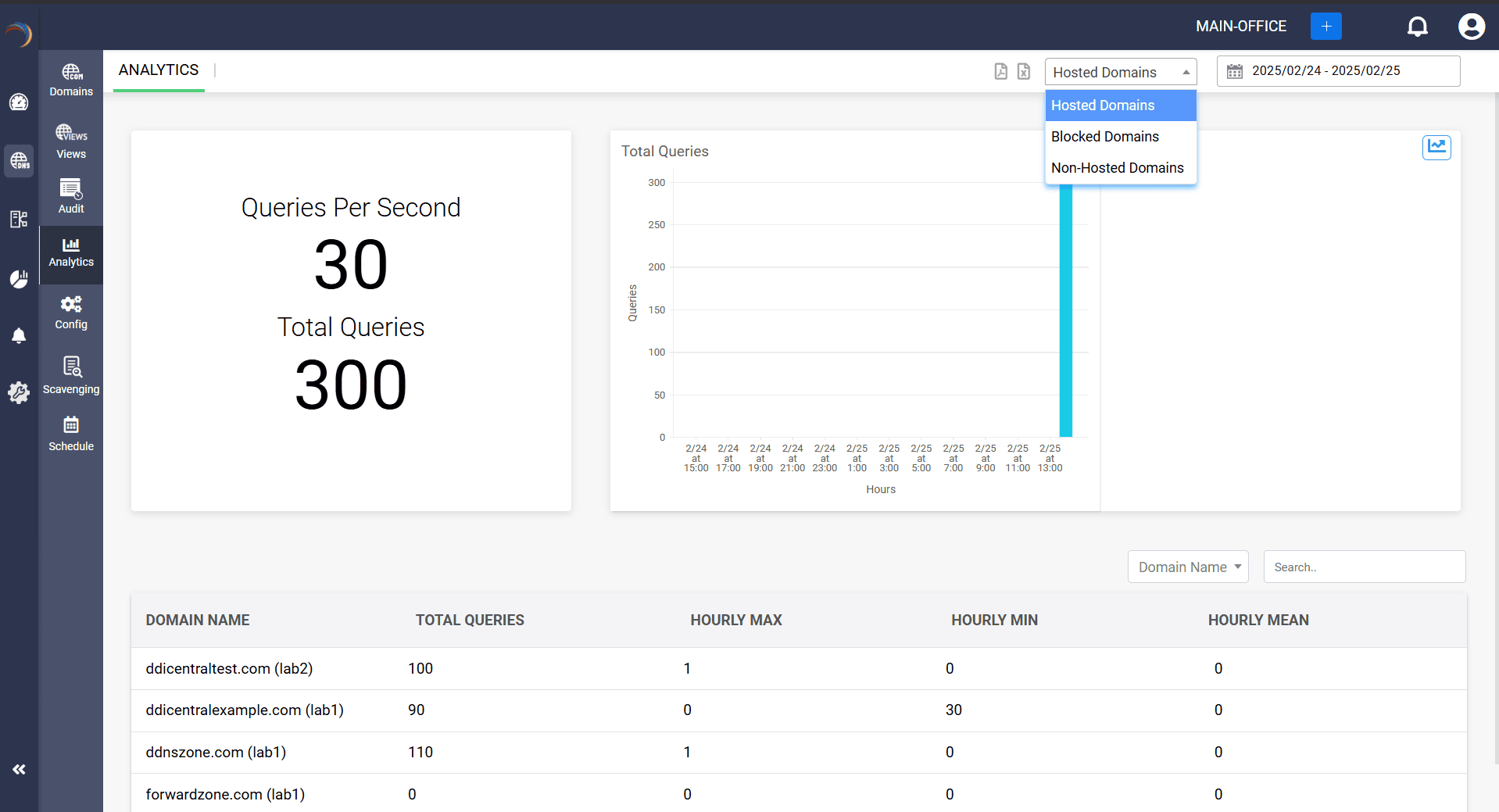
Comparison of queries from time-to-time updates
The DNS reporting and analytics feature provides time-to-time updates on the changes that occurred in the network traffic. Network admins can compare queries of different time periods to verify any increase or decrease in the query count. This can help in identifying attacks and issues in the network for quick troubleshooting before attacks can cause disruptions.
Detecting DDoS attacks with unusual traffic spikes
The analytics feature can provide a visual representation of the query count, which means that administrators can view any unusual increases in traffic, such as from cyberattacks. One prevalent attack is a distributed denial of service (DDoS) attack, which relies on sending a large number of queries to a DNS server. This visual conveying can let administrators implement security measures against an attack immediately, before the server crashes.
Tracking hourly query load
The DNS reporting and analytics feature provides the query load received each hour, providing network administrators the information needed to track down and analyze the queries received from which users and for which domain(s). This can also help in identifying suspicious activity in the network when there are many query requests sent for a domain within a short time interval, which is indicative of a network attack.
Queries for non-hosted domains and sub-domains
The DNS analytics features allows network administrators to track the query count for non-hosted domains and for each sub-domain associated with a domain name. This also helps in identifying any unusual increase in traffic for the non-hosted domains and sub-domains.
Identifying hosts for safe and blocked domains
Network administrators gain visibility over each query request sent for safe domains as well as blocked domains. They can identify the hosts and their devices using the hostname and MAC address. This way, administrators can prevent users from accessing blocked domains.
IP based search
DDI Central's DNS query analytics provides a special feature called "IP based search". Here, administrators can view the data of a particular IP address and analytics of the domains it has queried, the total number of queries for the IP, time-based queries, and more. This helps in a more specific data analysis and troubleshooting in the network.
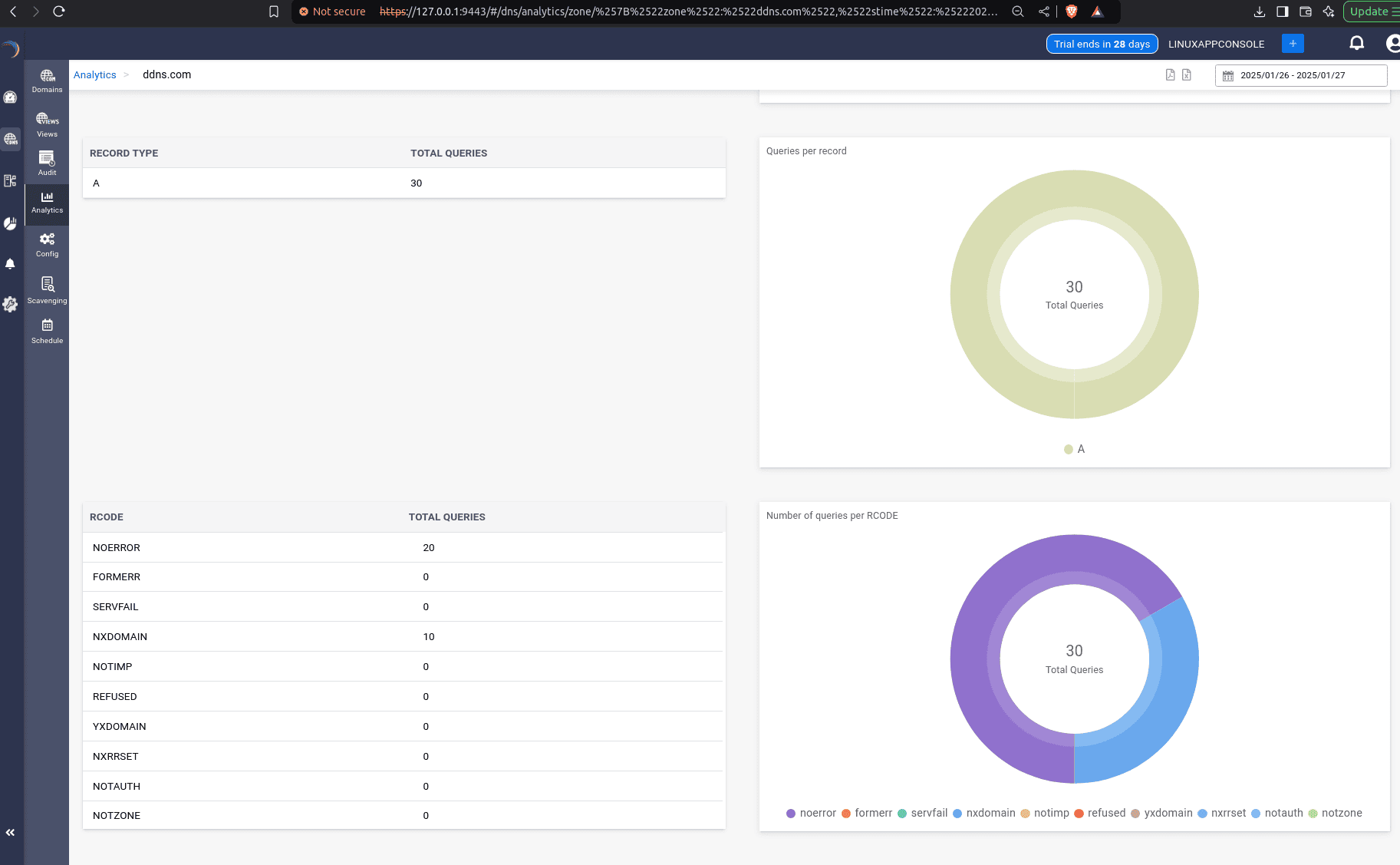
Record-based analytics
DNS analytics provide insights into the queries received for various DNS record types on the server. Administrators can click on a specific record type to view a visual breakdown of query analytics, offering a clear overview of the queries received for each record.
Response code analytics
Response code analytics in DDI Central, available for Hosted authoritative domains, lets network administrators have a clear visibility of the total queries received for every response codes, through visual representation and tabular summary. This helps network admins monitor and troubleshoot issues efficiently.
Download analytics report
DNS query analytics also allows network admins to download the analytics report in the form of PDF or CSV format, helping in making a better network decision through reports and analytics.
FAQs
1. What is DNS query reporting?
DNS query reporting is the process of collection the total query count occurred in a selected session and reporting to the network administrators for analysis of the data. This way, they can identify any form of unusual activities in the network services or any attacks.
2. Why is DNS analytics important?
DNS analytics plays an important role in maintaining network infrastructure as it simplifies the management and monitoring of the DNS services and clients. Administrators can use the time-to-time updates of the query count and compare each to see a difference, helping them identify network issues, malicious activities, and cyber threats.
3. How do DNS query reports help with detecting malware?
DNS query reports provide data on the increases and decreases in network traffic. With this data, administrators can view any sudden spike in query count and analyze the cause. Malware attacks mostly involve sending multiple queries, making DNS query reports useful for detecting them.
4. Can DNS analytics help with detecting DDoS attacks?
Yes, DNS analytics can help detect DDoS attacks by monitoring DNS query traffic for unusual patterns, such as sudden spikes in volume or high request rates for non-existent domains. DNS analytics can identify anomalies like excessive queries from specific IP addresses or regions, which may indicate a botnet or amplification attack.