- Quick Links
- Highlights
- MFA
- SSO
- Adaptive authentication
- Related Products
- ADManager Plus Active Directory Management & Reporting
- ADAudit Plus Real-time Active Directory Auditing and UBA
- ADSelfService Plus Identity security with adaptive MFA, SSPR, and SSO
- Exchange Reporter Plus Exchange Server Auditing & Reporting
- EventLog Analyzer Real-time Log Analysis & Reporting
- M365 Manager Plus Microsoft 365 Management & Reporting Tool
- DataSecurity Plus File server auditing & data discovery
- RecoveryManager Plus Enterprise backup and recovery tool
- SharePoint Manager Plus SharePoint Reporting and Auditing
- Identity360 A cloud-native identity platform for workforce IAM
- AD360 Integrated Identity & Access Management
- Log360 (On-Premise | Cloud) Comprehensive SIEM and UEBA
- AD Free Tools Active Directory FREE Tools
Why offline MFA is necessary for organizations
Offline MFA is not an unexpected use case, it is a gap that most authentication solutions leave unaddressed by design.
Standard MFA requires a live connection to an authentication server on every login attempt. When that connection is unavailable, most solutions face a binary choice: block the user entirely, or silently fall back to password-only authentication. Neither outcome is acceptable. Blocking halts operations. Silent fallback reintroduces single-factor authentication, the exact credential exposure MFA was deployed to prevent, without any indication in the audit log that MFA was bypassed.
That silent bypass has direct compliance consequences. NIST SP 800-63B, HIPAA, ISO 27001, and the PCI DSS require demonstrable MFA enforcement across all access events. An authentication event where MFA was silently dropped is not a compliant access event. It is an audit finding, regardless of whether the fallback was intentional or the result of a network condition outside the user's control.
The conditions that trigger this gap are more common than most organizations plan for:
- Network outages make the authentication server temporarily unreachable, even when the user retains internet access.
- Remote and traveling employees work from locations where connectivity is intermittent, absent, or restricted.
- Air-gapped environments are deliberately isolated from all external connectivity by design.
- VPN failures or firewall misconfigurations can sever the path to the authentication server without taking the broader network down.
In each scenario, an MFA solution without offline support either blocks legitimate users or creates an unlogged, non-compliant access event. ManageEngine Identity Access eliminates that choice, maintaining full MFA enforcement through locally cached credentials when the server is unreachable, with no silent fallback and no gap in the audit trail.
How offline MFA keeps authentication running without a server connection
Identity Access is a cloud-based identity security solution that sustains its Machine MFA feature even when users are disconnected from the network or the internet. Its offline MFA capability installs a lightweight local agent on each endpoint that holds encrypted credential verification data and validates the second factor locally at login. When a user attempts to log in while disconnected, the agent intercepts the attempt, prompts for the enrolled factor, and grants or denies access without contacting the server. The same identity check runs on the device, regardless of connection state.
Offline MFA in Identity Access applies in two distinct conditions:
- The user has internet access but cannot reach the Identity Access authentication server.
- The user has no internet connection at all.
The offline window is admin-configured, by number of days or login attempts. Once the limit is reached, the user completes one online MFA session to reset it, pulling any policy updates to the endpoint in the process.
Here is how that process works:
- The user attempts to log in to their machine while disconnected from the Identity Access server.
- The IdSecurity Agent on the device intercepts the login attempt and prompts for the enrolled second factor.
- The user enters their TOTP code or presents their hardware token or FIDO2 key.
- The agent validates the factor locally against the credential data stored on the device during enrollment.
- If verification passes, access is granted. If it fails, the login is denied.
Who needs offline MFA
Remote and traveling employees
Employees who log in before a VPN is established, work from locations with intermittent connectivity, or travel between sites regularly face the biggest exposure when MFA requires a live server connection.
Organizations in regulated industries
HIPAA, NIST SP 800-63B, and the GDPR require consistent MFA enforcement across all access scenarios. A network outage that drops MFA enforcement is an audit risk even when no breach occurs.
Businesses with distributed or field-based workforces
Field staff, on-site technicians, and branch employees need endpoint access that doesn't depend on server reachability. Offline MFA covers Windows logins, RDP sessions, macOS logins, Linux SSH access, and privilege elevation prompts without connectivity exceptions.
Enterprises enforcing Zero Trust on endpoints
Zero Trust requires identity verification at every access attempt, regardless of network state. Offline MFA ensures that requirement holds even when the device is outside the network perimeter.
What Identity Access's offline MFA includes
Configurable validity windows
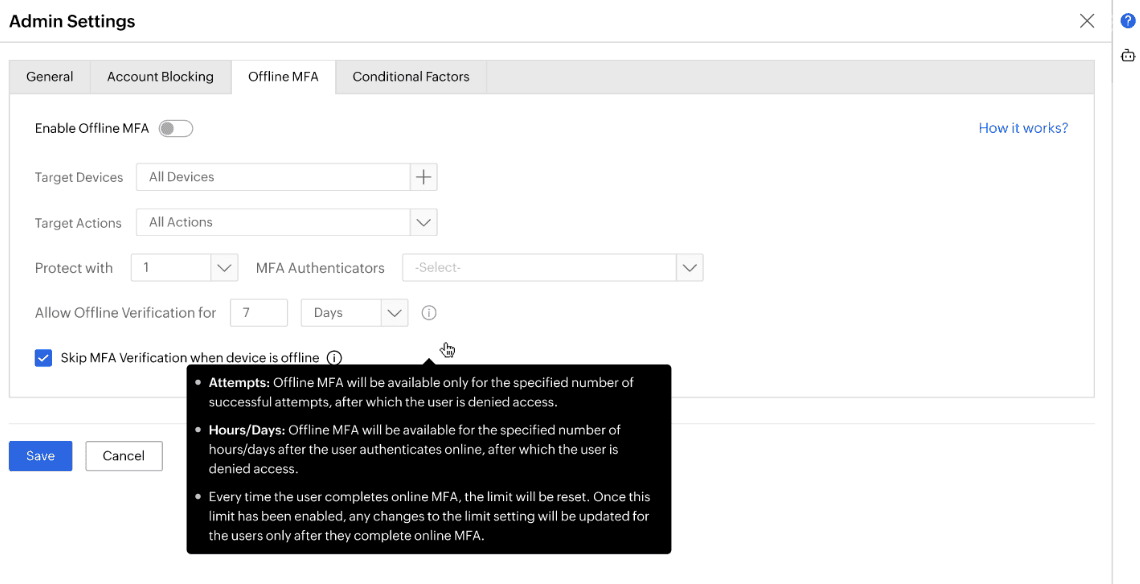
Set the maximum number of consecutive offline logins, by attempts or by days, before online reauthentication is required. Once the limit is reached, the user must complete one online MFA session to reset the window and pull any policy updates to the endpoint.
Flexible enrollment
Choose between user-initiated enrollment, prompted at the next online login, or admin-mandated enrollment for specified machines, users, or groups. Admins can also allow users to enroll across multiple devices, ensuring offline MFA is available on every machine they use regularly. Users who skip enrollment cannot authenticate offline.
Device and action targeting
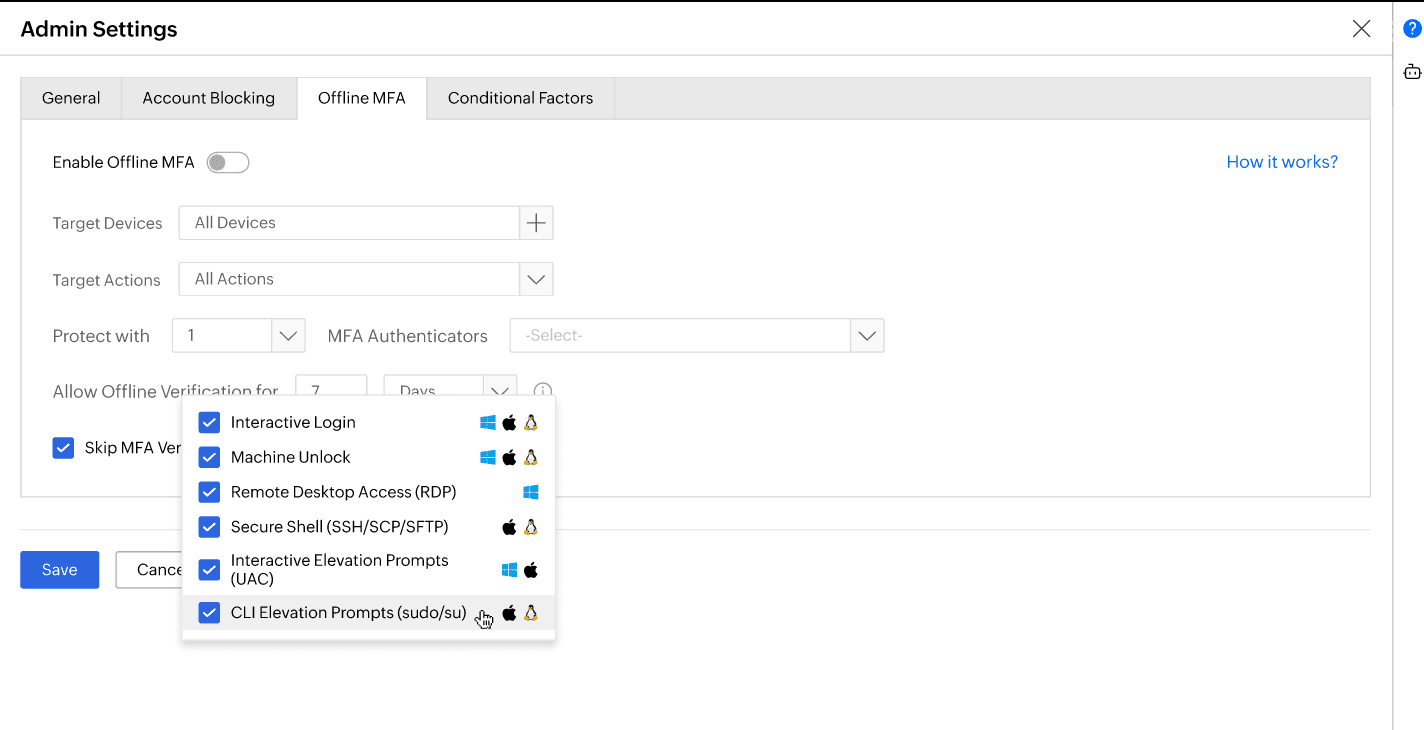
Scope offline MFA policies to specific machines, users, or groups and apply them selectively to interactive logins, machine unlocks, RDP, Secure Shell (SSH/Secure Copy Protocol (SCP)/SSH File Transfer Protocol (SFTP)), interactive elevation prompts (UAC), and CLI elevation prompts (sudo/su), across Windows, macOS, and Linux, so enforcement is as broad or as targeted as the environment requires.
Authenticators supported for offline MFA
Identity Access supports the following authenticators for offline MFA:
- FIDO2 authentication
- Biometric authentication
- Hardware TOTP
- DUO Security
- Smartcard authentication
- SAML authentication
- HOTP
Here is a comparison of some of the major authenticators:
| Authenticator | Does the method work offline? | Does the method require a smartphone? | Is it a phishing-resistant method? |
|---|---|---|---|
| TOTP app (Google Authenticator, Microsoft Authenticator, Salesforce Authenticator) | Yes | Yes | No |
| Hardware TOTP or HOTP token | Yes | No | No |
| FIDO2 passkeys | Yes | No | Yes |
| Offline bypass code | Yes | No | No |
Benefits of offline MFA with Identity Access
- No authentication gap during outages
When the server is unreachable, offline MFA continues without degrading to a password alone or locking users out. The second factor is still required and validated locally.
- Operations continue regardless of connectivity
Users can authenticate as normal during network outages, in dead zones, or in transit, without waiting for connectivity or requesting IT exceptions.
- Zero Trust enforcement extends to disconnected endpoints
Offline MFA ensures identity is verified before access is granted, regardless of network state. This is a foundational requirement for Zero Trust architectures that extend to remote or air-gapped environments.
- Consistent compliance posture
Offline MFA enforcement doesn't lapse during outages. Audit trails remain continuous, addressing a gap that commonly appears in disconnected-environment compliance reviews.
- Broad coverage without additional tools
The same agent that enforces offline MFA also handles online MFA for Windows logon MFA, RDP MFA, macOS login MFA, UAC MFA, and SSH MFA.
- Admin control without user disruption
Validity windows, enrollment mode, device targeting, and disenrollment are all managed from the Identity Access dashboard. Policy changes take effect at the next online session without requiring agent redeployment.
Other features
MFA
Add a second authentication factor to endpoint, application, VPN, OWA, and CLI logins. with authentication factors ranging from FIDO2 security keys to smartcards.
SSO
Give users one-click entry to every cloud application using a single set of credentials.
Passwordless authentication
Replace passwords with FIDO2 security keys and platform biometrics, removing the credential most often phished and replayed.
Conditional access policy
Evaluate every access request against user, device, IP address, geolocation, time, and operating system, then allow, deny, or challenge it accordingly.
Device authentication
Authenticate Windows, macOS, and Linux machines on cloud without Active Directory or Entra ID.
MFA for enterprise apps
Set MFA and access rules for each application on its own terms, so that critical applications carry a stronger challenge and routine ones stay quick.