


What is defense evasion (TA0005)?
Defense evasion is the collection of techniques adversaries use to avoid detection, bypass security controls, and remove the evidence of their activity. In MITRE ATT&CK®, it maps to tactic TA0005 and holds the distinction of being the largest tactic in the framework by technique count. Log360 maps 963+ pre-built correlation rules to this tactic, covering Windows, Active Directory, AWS, Microsoft 365, and network device platforms.
The core challenge with defense evasion is that most techniques exploit trust relationships that already exist in the operating system. An attacker using Rundll32 to load a malicious DLL looks nearly identical to Windows doing the same thing for a legitimate library load. A process named svchost.exe running from a temp folder is suspicious, but the detection logic needs to know what legitimate svchost behavior looks like to surface that anomaly. This is why detection requires both rule-based correlation and behavioral baselines working together.
MITRE ATT&CK TA0005 — Defense evasion: Log360 covers this tactic with 963+ rules, the highest rule count of any MITRE ATT&CK tactic. Key techniques include masquerading (T1036), obfuscated files or information (T1027), indicator removal (T1070), process injection (T1055), modify registry (T1112), and hide artifacts (T1564). View the full rule set at the Log360 detection rules library.
Why it matters in 2026
Defense evasion does not generate the same headlines as ransomware or data breaches, but it is the reason those attacks succeed. A threat actor who can keep their tools hidden, their processes camouflaged, and their log trail clean will have free run of a network for days or weeks before any alert fires. The 2025 IBM Cost of a Data Breach Report found the global average dwell time for attackers who were not detected by the victim's own team was 194 days. Defense evasion is the primary reason that number stays so high.
Three reasons this tactic deserves dedicated detection investment:
- It enables every other tactic. Credential access, lateral movement, and exfiltration all depend on the attacker remaining undetected long enough to operate. Defense evasion is the mechanism that buys that time.
- Security tool tampering removes your visibility. When an attacker kills an endpoint agent, adds a Defender exclusion, or clears Security event logs, the gap in your SIEM is itself evidence of a breach. A silent endpoint is often more alarming than a noisy one.
- LOLBin abuse is accelerating. Living-off-the-land techniques that abuse trusted Windows binaries have grown significantly as endpoint detection has improved. Using a signed Microsoft binary to proxy-execute a payload bypasses signature-based detection entirely, requiring behavioral correlation rules to catch it.
Defense evasion in the attack chain
Defense evasion does not occupy a fixed position in the kill chain. Attackers use it throughout an intrusion: immediately after initial access to remove phishing artifacts, during persistence establishment to hide new services or scheduled tasks, and during lateral movement to avoid triggering incident detection on remote hosts. It runs in parallel with every other tactic, not after it.
How defense evasion works
The 963+ TA0005 rules in Log360 cover dozens of sub-techniques. Six technique areas account for the largest share of real-world evasion activity and detection rule coverage in this cluster: masquerading, obfuscated files or information, indicator removal, process injection, modify registry, and hide artifacts.
1. Masquerading (T1036)
Masquerading covers any attempt to disguise a malicious file, process, or task as something legitimate. The simplest form is renaming a malware executable to a known-good process name like svchost.exe or explorer.exe and placing it in a system-like directory. More sophisticated variants involve naming malicious scheduled tasks or services after common Windows components so they blend into baseline noise.
Log360's masquerading detection covers 30+ rules, including several classified as Critical severity. Key behavioral indicators targeted include processes claiming to be system binaries but running from non-standard paths, explorer.exe spawned as a child process (which is not valid system behavior), and LOLBAS tool chains where wsmprovhost spawns unexpected children. The correlation engine matches process names against known-safe parent-child relationships and known-safe execution paths to surface these anomalies.
2. Obfuscated files or information (T1027)
Obfuscated files or information covers any method of encoding, encrypting, or structurally transforming payloads, scripts, and commands to defeat signature-based detection. PowerShell commands encoded in Base64, compile-after-delivery using csc.exe to produce malicious .NET assemblies on the victim host, software packing, and character-join command obfuscation all fall under T1027. Log360 maps 60+ correlation rules to this technique, with detection built around Script Block Logging (Event ID 4104) which captures deobfuscated content at execution time regardless of encoding method. Dedicated rules cover known obfuscation frameworks such as Invoke-Obfuscation and threat actor tooling including Winnti dropper activity.
3. Indicator removal (T1070)
Indicator removal covers all actions designed to destroy forensic evidence: clearing Windows Security event logs (Event ID 1102), deleting .evtx log files directly, wiping PowerShell console history, removing web server access logs, and using secure deletion tools like SDelete to overwrite files before deletion. A key advantage of centralized SIEM architecture is that events forwarded before clearing occurs remain preserved — the local log clear cannot affect the SIEM record. Log360's indicator removal rules surface the clearing actions themselves, making the anti-forensic attempt self-evidencing.
4. Process injection (T1055)
Process injection covers techniques where adversaries inject malicious code into legitimate running processes, executing under the host process's security context and identity. Methods include DLL injection, process hollowing (creating a suspended legitimate process and replacing its memory with malicious code), thread execution hijacking, and shellcode injection via CreateRemoteThread. Detection relies on Sysmon Event ID 8 (CreateRemoteThread), Event ID 10 (ProcessAccess), and behavioral anomalies like network connections initiated by processes that have no legitimate reason to reach the network. Log360 maps 39+ rules to T1055.
5. Modify registry (T1112)
Modify registry covers attacker interaction with the Windows Registry to disable security controls, store payloads, configure remote access, establish persistence, or disrupt forensic analysis. Targeted registry paths include Windows Defender policy keys, audit configuration, LSA authentication settings, and RDP configuration. Log360 maps 70+ rules to T1112 using Sysmon Event ID 12/13/14 for real-time registry change monitoring, covering tool-based detection (reg.exe, PowerShell registry cmdlets) and path-based detection (modifications to high-value keys regardless of the tool used).
6. Hide artifacts (T1564)
Hide artifacts covers techniques that prevent malicious files, processes, and users from appearing through standard system enumeration. Methods include setting Hidden and System file attributes with attrib.exe, storing executables in NTFS alternate data streams invisible to directory listings, running processes with hidden windows (-WindowStyle Hidden), creating hidden user accounts, and running malicious workloads inside Hyper-V virtual machines invisible to host monitoring. Log360 maps 35+ rules to T1564, catching concealment actions at the moment they are applied.
Key techniques under TA0005
The table below summarizes the six defense evasion technique areas covered in this cluster, along with detection difficulty and Log360's rule coverage for each:
| Technique | Description | Platforms | Detection difficulty | Log360 coverage |
|---|---|---|---|---|
| T1036 — Masquerading | Disguises malicious processes, files, or tasks as legitimate system components through binary renaming and wrong-path execution | Windows | Medium — execution paths and parent-child anomalies are detectable with behavioral rules | 30+ rules: binary rename detection, process masquerading, LOLBAS abuse, suspicious execution paths |
| T1027 — Obfuscated files or information | Encodes, encrypts, or transforms payloads and scripts to defeat signature-based detection and static analysis | Windows, Sysmon | High for static detection — behavioral detection via Script Block Logging remains effective regardless of encoding method | 60+ rules: PowerShell obfuscation, compile-after-delivery artefacts, Invoke-Obfuscation variants, encoded command detection |
| T1070 — Indicator removal | Destroys forensic artifacts including event logs, malware files, web server logs, and PowerShell history to impede investigation | Windows | Low — the clearing actions themselves generate detectable events; centralized SIEM preserves evidence before clearing | 45+ rules: Security log cleared (Event ID 1102), EVTX file deletion, SDelete execution, web server log deletion |
| T1055 — Process injection | Injects malicious code into legitimate running processes to execute under a trusted process identity and evade process-level detection | Windows, Sysmon | High — memory-resident code with no disk presence; requires Sysmon CreateRemoteThread and ProcessAccess monitoring | 39+ rules: CreateRemoteThread detection, process hollowing indicators, unexpected network connections from host processes |
| T1112 — Modify registry | Modifies the Windows Registry to disable security controls, store payloads, configure remote access, and establish persistence | Windows, Sysmon | Medium — Sysmon registry events provide real-time detection; path-based rules catch modifications regardless of tool used | 70+ rules: reg.exe suspicious paths, RDP configuration tampering, ShimCache flush, security tool disabling via registry |
| T1564 — Hide artifacts | Prevents malicious files, processes, and users from appearing in standard system enumeration tools through NTFS ADS, hidden attributes, and hidden windows | Windows, Sysmon | Medium — hiding actions produce detectable events; catching concealment at application time is more reliable than enumerating hidden content | 35+ rules: NTFS alternate data stream detection, attrib.exe hidden flag, PowerShell WindowStyle Hidden, Hyper-V cmdlet abuse |
Detection strategies for defense evasion
Defense evasion detection requires a layered approach. Any single detection method leaves gaps because the techniques are specifically designed to defeat individual controls. The layers below are complementary, each addresses a different class of evasion behavior.
Layer 1: Process behavioral analysis
The majority of defense evasion activity on Windows endpoints leaves a trace in process creation events (Event ID 4688 or Sysmon Event ID 1). Parent-child process relationships, process names relative to execution paths, and command-line argument patterns are the primary detection surfaces. Collecting these events into a SIEM and applying correlation rules that encode expected process lineage is the foundation of defense evasion detection.
Key fields to capture and correlate:
- Process name vs. execution path: svchost.exe running from C:\Users\Public is not a legitimate system process. Log360 compares process names against expected parent directories for all high-value system binaries.
- Parent-child legitimacy: Office applications spawning cmd.exe or wscript.exe is almost never legitimate behavior in a secure environment. Log360 ships rules for all major Office-spawning-script patterns classified as Critical.
- Command-line arguments: Encoded PowerShell (-EncodedCommand), DLL loads from temp paths via Rundll32, and regsvr32 with /s /u flags are high-signal patterns covered by dedicated rules.
Layer 2: Security control integrity monitoring
When an attacker modifies your security tooling, the modification itself is detectable. Audit policy changes (Event ID 4719), Defender real-time protection disabling (Windows Defender operational log), and service stop commands against known security processes all produce discrete log events that Log360 monitors with dedicated security monitoring rules. Treat any of these events as a high-priority investigation trigger.
Layer 3: Log integrity monitoring
Log clearing is a classic defense evasion sub-technique. Event ID 1102 (Security log cleared) and Event ID 104 (System log cleared) are single-event indicators that require no threshold or aggregation logic: one occurrence is a high-severity finding. Log360 monitors both events continuously and fires an immediate alert on detection. Gaps in log continuity (a host that stops forwarding logs unexpectedly) are also surfaced through Log360's log collection health monitoring.
Layer 4: UEBA behavioral baselines
The most sophisticated defense evasion techniques produce no discrete high-confidence events. An attacker who uses legitimate credentials, legitimate tools, and legitimate processes, but in slightly unusual patterns, requires behavioral detection. Log360's UEBA engine builds per-entity baselines covering process execution patterns, network connection profiles, and resource access behavior. Deviations from these baselines, even subtle ones, generate risk scores that surface for analyst review.
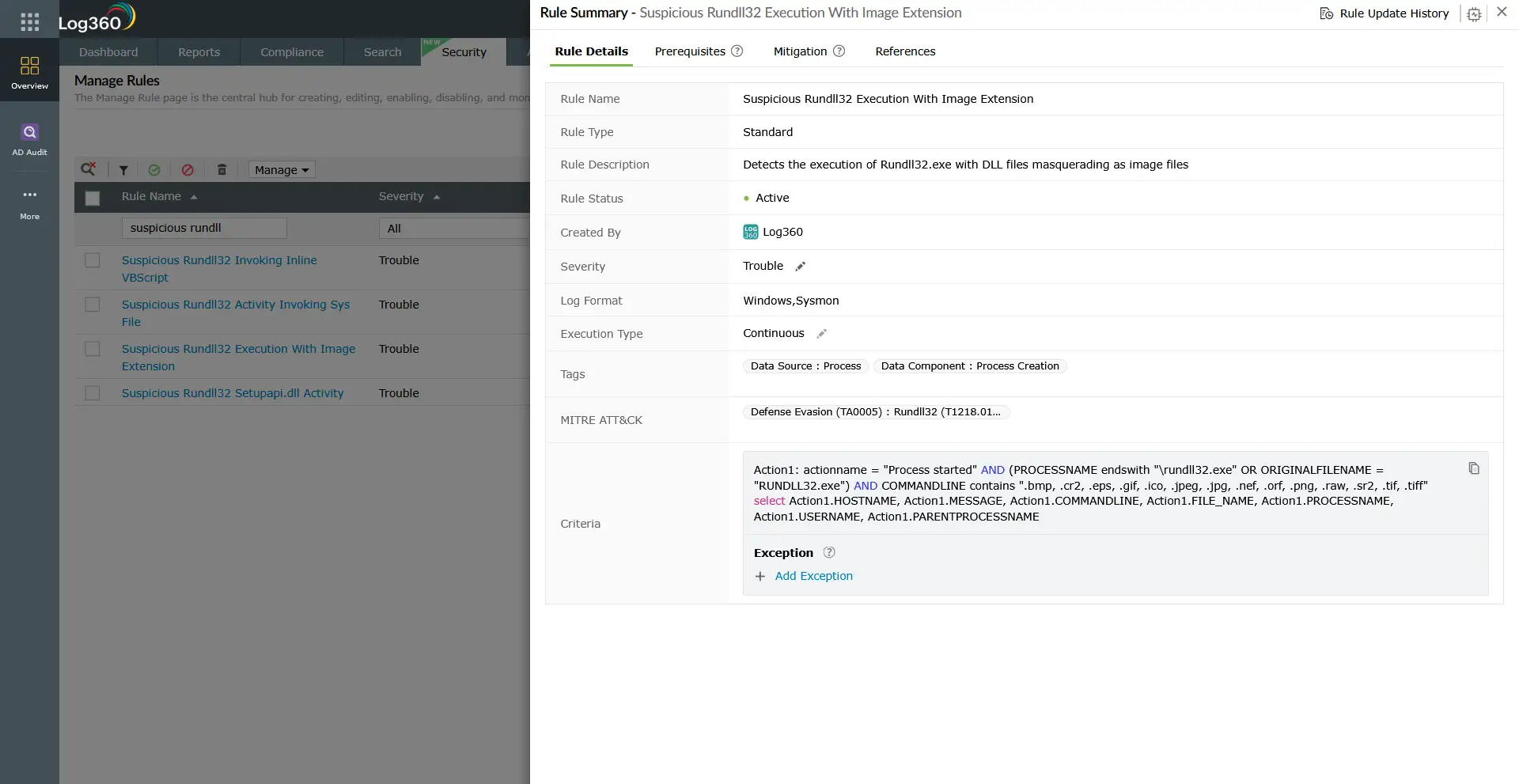
Log360 detection rules — TA0005 reference
Log360 ships 963+ correlation rules mapped to TA0005 defense evasion. The table below lists the highest-signal rules across the six technique areas covered in this cluster, sorted by technique.
| Rule name | Technique | Platform | Severity |
|---|---|---|---|
| Windows masquerading explorer as child process | T1036 — Masquerading | Windows | Critical |
| Wsmprovhost LOLBAS execution process spawn | T1036 — Masquerading | Windows | Critical |
| Potential Winnti Dropper Activity | T1027 — Obfuscated files | Sysmon, Windows | Critical |
| Invoke-Obfuscation RUNDLL LAUNCHER | T1027 — Obfuscated files | Windows | Trouble |
| Security Eventlog Cleared | T1070 — Indicator removal | Windows | Critical |
| EventLog EVTX File Deleted | T1070 — Indicator removal | Windows | Critical |
| PowerShell ShellCode | T1055 — Process injection | Windows | Critical |
| Potential Pikabot Hollowing Activity | T1055 — Process injection | Sysmon, Windows | Critical |
| RestrictedAdminMode Registry Value Tampering | T1112 — Modify registry | Sysmon, Windows | Trouble |
| Reg Add Suspicious Paths | T1112 — Modify registry | Sysmon, Windows | Trouble |
| NTFS Alternate Data Stream | T1564 — Hide artifacts | Windows | Trouble |
| Suspicious PowerShell WindowStyle Option | T1564 — Hide artifacts | Windows | Trouble |
Note: This table shows a representative subset of Log360's TA0005 detection rules. Log360 ships 963+ rules mapped to the defense evasion tactic across all six technique areas in this cluster. The full rule library, including prerequisites, mitigation steps, and MITRE ATT&CK references for each rule, is available at Log360's detection rule library.
Investigation and response
When a defense evasion alert fires, the immediate goal is to determine whether the evasion attempt is part of an active intrusion or an isolated misconfiguration. Speed matters: an attacker who has successfully impaired defenses is in an unmonitored state. Response time is measured in minutes, not hours.
Investigation checklist
- Identify the process and account: What process triggered the alert? What user account was associated with it? Check whether this account has made similar requests before and whether it is expected to run the triggering process.
- Check the execution path: Is the binary running from its expected location? A process named svchost.exe in C:\Users or C:\Temp is a red flag regardless of the process name match. Validate path against known-good baseline.
- Review the process lineage: What spawned the suspicious process? Office applications spawning cmd.exe or PowerShell are high-confidence indicators of a macro dropper or phishing payload. Trace back to the root parent.
- Assess the scope of evasion: What specifically was the attacker trying to hide? Log clearing (T1070) suggests an attempt to destroy forensic history. Registry tampering (T1112) may indicate persistence or security tool disabling. Process injection (T1055) suggests code is running under a legitimate process identity. Obfuscated execution (T1027) indicates payload delivery was attempted. Follow the alert context to determine which evasion layer was activated.
- Search for concurrent activity: Defense evasion does not occur in isolation. Query Log360 for correlated events on the same host within the same 30-minute window: new scheduled tasks, registry modifications, outbound connections to uncommon destinations, and new account creations are all relevant.
- Determine lateral scope: If the affected host is not isolated, check whether the evasion-enabling activity has been replicated to other hosts (e.g., GPO-deployed Defender exclusions, domain-wide service stops via PsExec, or a deployment to multiple endpoints via a compromised management tool).
Response actions
- Immediate containment: If evasion is confirmed as part of an active intrusion, isolate the affected host. Re-enable any disabled security controls and restore audit policy settings before detaching from the network, so that subsequent forensic collection captures complete telemetry.
- Restore security controls: Re-enable Defender real-time protection, restore the modified audit policy to baseline, and restart any stopped security services. Verify that endpoint agent heartbeats resume from the host.
- Preserve evidence: Capture memory and disk images before remediation if forensic analysis is required. Defense evasion techniques often destroy log evidence as part of their operation, so collect volatile data first.
- Threat hunt for persistence: Assume that any successful defense evasion attempt had a follow-on phase. Hunt for new scheduled tasks, new services, new startup registry entries, and new local admin accounts created in the same timeframe on the affected host and its network neighbors.
- Review registry and GPO changes: For T1112 (modify registry) events that affect multiple hosts simultaneously, check whether the change originated from a group policy modification or a deployment tool. Domain-wide registry changes to security policy keys are a high-severity finding requiring immediate Active Directory investigation.
ManageEngine Log360 for defense evasion detection
Log360's 963+ TA0005 correlation rules, combined with real-time Windows and Active Directory monitoring and UEBA behavioral baselines, give security teams the coverage depth to catch defense evasion techniques that signature-based controls miss. Pre-built investigation dashboards surface the complete evidence chain from initial masquerading or obfuscation events through process injection, registry tampering, indicator removal, and artifact hiding in a single correlated incident view.
Need to explore ManageEngine Log360? Schedule a personalized demo
Frequently asked questions
What is defense evasion in cybersecurity?
Defense evasion refers to the techniques adversaries use to avoid detection, bypass security controls, and erase traces of their activity inside a compromised environment. In the MITRE ATT&CK® framework, it is classified as tactic TA0005 and encompasses the largest technique count of any ATT&CK tactic. Log360 maps 963+ detection rules to this tactic, with coverage spanning Windows endpoints, Active Directory, cloud environments, and network devices.
Why is defense evasion the largest tactic in MITRE ATT&CK?
Defense evasion has the largest technique count because the attack surface for evading detection is enormous. Every detection mechanism in a security stack (endpoint agents, event logging, behavioral analytics, network monitoring) represents a potential bypass target. As security controls have increased in number and capability over the past decade, adversaries have responded by developing an equally broad range of evasion sub-techniques, from LOLBAS abuse to direct tampering with monitoring infrastructure. The breadth of the tactic reflects the breadth of the security tooling it is designed to defeat.
What are LOLBAS techniques and how does Log360 detect them?
Living-off-the-land binary and script (LOLBAS) techniques involve using legitimately signed operating system tools to execute malicious payloads, avoiding the need to drop custom malware on disk. Common examples include renamed system binaries (T1036), obfuscated PowerShell commands delivered in-memory (T1027), and injection into trusted host processes (T1055). Log360 detects LOLBAS abuse by monitoring child process relationships, command-line argument patterns, and directory-of-origin anomalies, comparing all of these against known-normal behavioral baselines. Rules under T1036 (masquerading), T1027 (obfuscated files), and T1055 (process injection) cover the majority of documented LOLBAS execution patterns.
How do I detect log tampering and audit policy changes with a SIEM?
Log tampering detection relies on monitoring two Windows events: Event ID 1102 (Security audit log cleared) and Event ID 104 (System log cleared). Either event is a high-priority finding requiring immediate investigation because legitimate administrators rarely clear Security logs in a production environment without a scheduled maintenance window. Audit policy changes are captured in Event ID 4719. Log360 monitors all three events with dedicated correlation rules and alerts in real time. Additionally, Log360's log collection health monitoring surfaces hosts that stop forwarding events, which can indicate that logging has been disabled or the agent has been stopped.
What is the relationship between defense evasion and privilege escalation?
Defense evasion and privilege escalation (TA0004) are frequently paired in real-world attacks. Attackers typically escalate privileges first to gain administrative access, then use those elevated rights to clear audit logs (T1070), tamper with security-related registry keys (T1112), or hide their tools and accounts from standard enumeration (T1564) without generating additional privilege-use events. A log clearing or registry tampering alert often indicates that a privilege escalation event happened moments or hours earlier. Correlating both tactics in your incident response workflow is essential for reconstructing the full attack timeline.
- What is defense evasion?
- Why it matters in 2026
- How defense evasion works
- Key techniques (TA0005)
- Detection strategies
- Log360 detection rules
- Investigation and response
- Frequently asked questions

