

- Home
- SIEM use cases
- Column integrity monitoring
How to detect database column integrity violations
In this page
Understanding the threat - What is column integrity monitoring?
Column integrity monitoring is a critical database security process focused on tracking unauthorized or suspicious changes (like UPDATE, INSERT, or DELETE commands) and alerting them to specific, high-value columns in a database. Instead of just monitoring who accessed a database, this use case monitors what they changed down to the exact column and value.
This is important to enterprises because their most valuable asset is data. A data integrity attack, where a malicious actor subtly changes a payment amount, a user's permission level, or a customer's PII, can be far more devastating than simple data theft. It undermines business operations, destroys customer trust, and can lead to massive financial fraud.
Category:
- Internal threat
MITRE ATT&CK® mapping
This use case directly maps to the Impact tactic:
- TA0040—Impact:
T1491—Data manipulation: This technique specifically covers adversaries modifying or destroying data. Monitoring column integrity is a direct counter-measure to detect this manipulation in real time.
Relevant compliance mapping
- CMMC SI.L2-3.14.1
- NIST SI-4 (System Monitoring)
- CIS 3.7 (IG2)
Scenario
A payroll manager at a logistics company is running a quarterly audit. They discover a discrepancy: A one-time bonus payment of $50,000 was made by the company to a newly created vendor account. The payment looks legitimate and was approved in the system, but the vendor is unknown.
A security analyst is brought in to backtrack the event. They find that the vendor's bank_account_number and vendor_name in the accounts_payable table were legitimate when the payment request was created, but were changed 10 minutes before the payment batch was executed. The change was made by a compromised IT administrator's account which then reverted the change five minutes after the payment went through to cover its tracks.
The company's basic database logging showed that the admin accessed the accounts_payable table, but because the company wasn't monitoring for the integrity of specific columns, a real-time, malicious UPDATE command was missed. The alert only came from a manual audit, weeks after the money was already gone.

What went wrong?
- Lack of granularity: The company monitored database access but not database changes. They knew who logged in, but not what they did to the data.
- No real-time alerting: The malicious UPDATE command, a clear indicator of fraud, happened without triggering any security alert, allowing the attacker to revert the change successfully and undetected.
- Compromised privileged account: The attacker leveraged a high-privilege account which had legitimate access to the database and was not monitored for anomalous behavior, such as changing financial records.
How data integrity monitoring helps
Database Activity Monitoring (DAM) or integrity monitoring tools are designed to solve the issues mentioned above. They provide:
- Granular auditing: They monitor for specific Data Manipulation Language (DML) commands (UPDATE, INSERT, DELETE) on critical tables.
- Compliance: Regulations like SOX and PCI DSS explicitly require that the integrity of financial and cardholder data be protected. PCI DSS Requirement 10, for instance, mandates tracking all access to network resources and cardholder data, including database modifications.
Threats at the gate: Real-world trends
- Rise of destructive ransomware: A growing trend in cyber extortion involves attackers not just stealing or encrypting data, but subtly manipulating it (e.g., altering formulas in spreadsheets or figures in a database) and then demanding a ransom to reveal what they changed.
- Insider-for-hire: The insider threat is now a service. Malicious actors on the dark web are hired by external groups to use their legitimate access to perform specific tasks, such as altering payment details or stealing intellectual property, making insider activity a key part of the external threat landscape.
Use case objective
To gain real-time visibility into changes made to an organization's most sensitive data, instantly detecting unauthorized modifications and alerting them to critical database columns to prevent financial fraud, compliance violations, and data destruction.
Prerequisites:
- Native auditing configured on the target database servers (e.g., Microsoft SQL Server, Oracle).
- A clear policy identifying the critical tables and columns that require integrity monitoring
How to detect with Log360
Log360’s Database Activity Monitoring (DAM) configuration is a two-part process: first, you must add the SQL server and enable general DML/DDL auditing. Second, you create the specific column integrity policy, which deploys a trigger to capture the "before" and "after" values.
Step 1: Add the SQL server and enable advanced auditing
- Navigate to Settings > Log Source Configuration > Database Audit > SQL Servers.
- Click Add Instance to add your Microsoft SQL server.
- While configuring the instance details and credentials, you must enable the Advanced Auditing. This allows Log360 to create the necessary audit policies on your SQL server to capture DML and DDL activities.
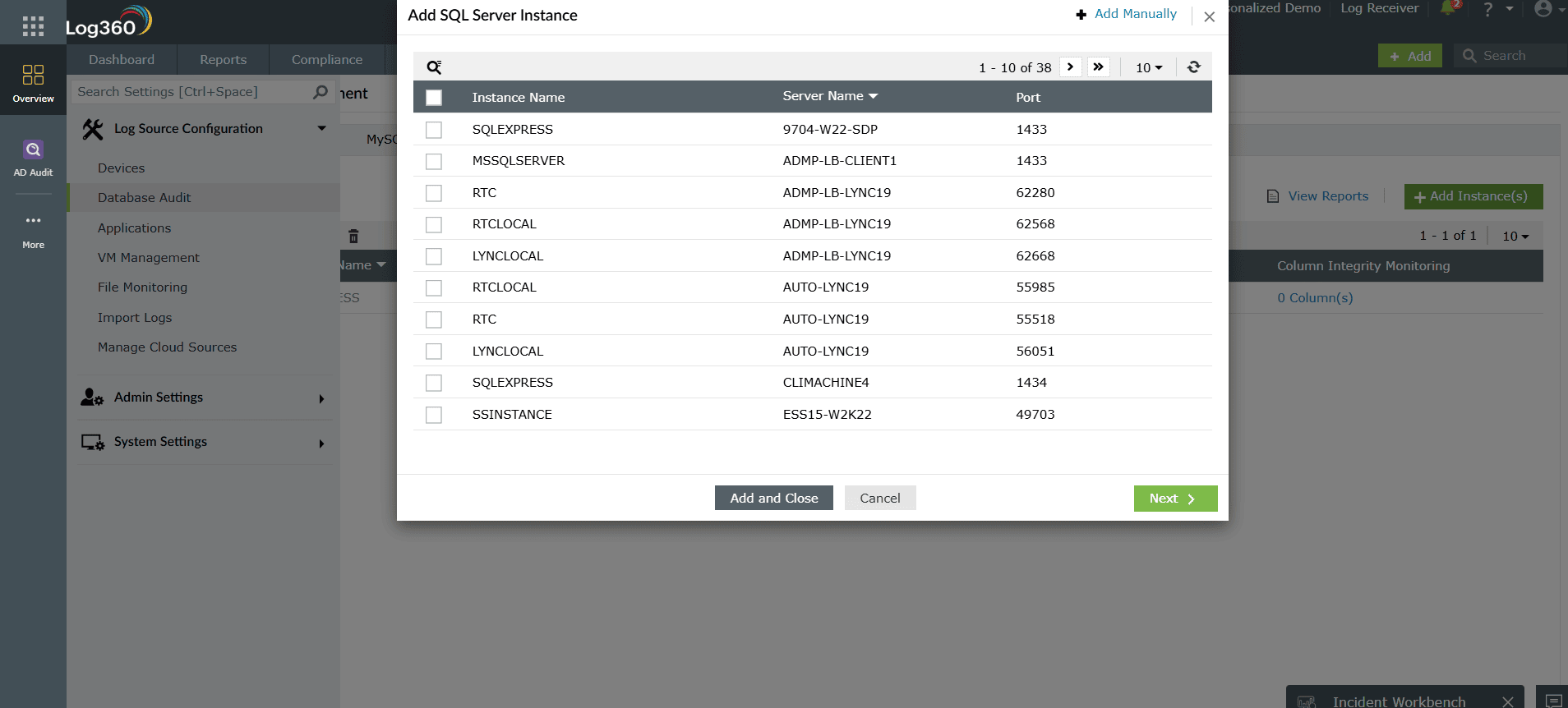
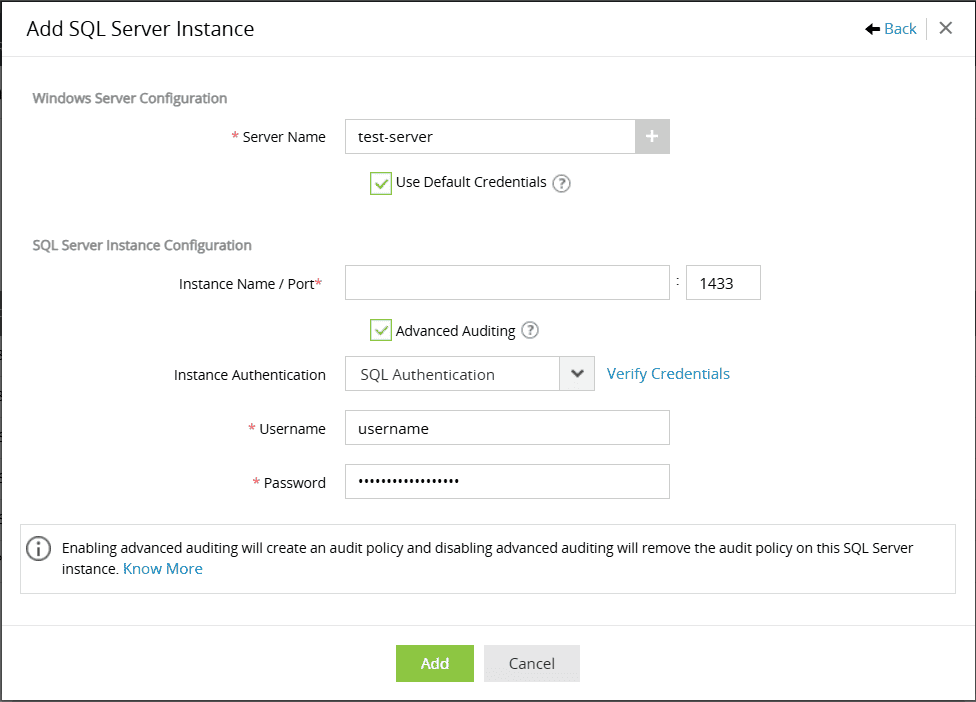
- Configure the column integrity monitoring policy:
- Select Database: Choose the database containing the sensitive table
- Select Table: Choose the specific table.
- Select Columns: Check the boxes for the critical columns you want to monitor.
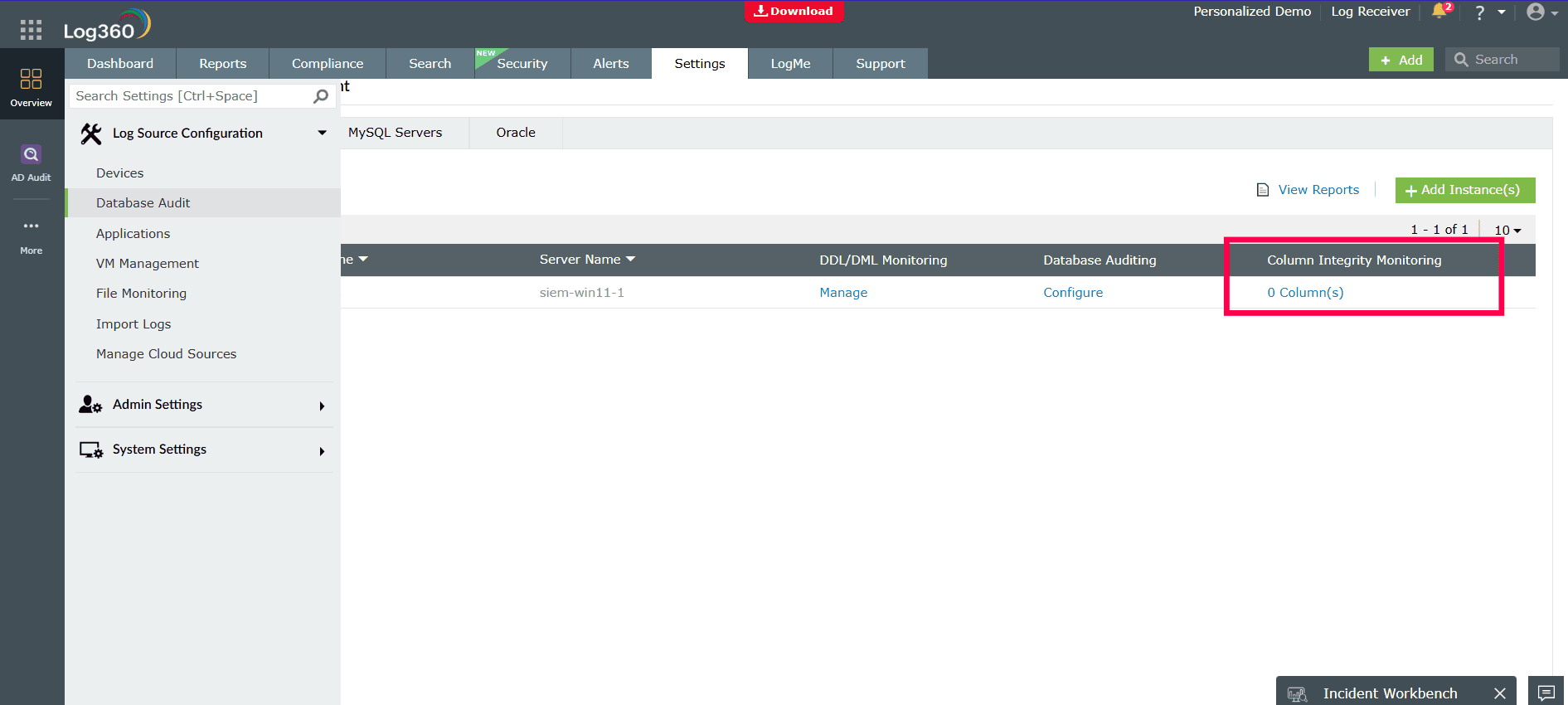


Note: For complete configuration information, please check here
Step 2: View the reports
Once configured, the data is automatically populated in the pre-built reports.
- Navigate to the Reports tab.
- Go to Applications > SQL Server > Advanced Auditing Reports > Column Modified Reports.
This report will now show you the complete audit trail for any changes, including the User, Action, Table, Column, Old Value, and New Value, providing immediate, actionable proof of any unauthorized data manipulation.

Step 3: Enabling alerts
- Navigate to Alerts > Manage Alert Profiles and click Add Alert Profile.
- Give the profile a clear name and set the Severity to "Critical".
- Click the Criteria section and select Predefined Alert Criteria.
- In the "Group" dropdown, choose SQL Server. Click Search, find and select the Column Modified Reports alert, and close.
- Configure the notification section to set up email or SMS alerts for your team, then click Save.

Next steps
- Integrate with UEBA: Correlate these database changes with Log360's User and Entity Behavior Analytics (UEBA) for a high-risk score.
- Develop a response plan: Create an automated workflow to immediately notify the database administrator, security team, and the business process owner (e.g., the head of payroll) when a critical column's integrity has been violated.

