

- Home
- SIEM use cases
- Dark Web Monitoring
Detecting corporate credentials leaks on the dark web
In this page
Understanding the threat - What is dark web credential exposure?
This refers to the discovery of corporate identities, such as employee email addresses, passwords, and other PII, in dark web marketplaces, forums, and data breach dumps. These credentials are often stolen not from the corporation itself, but from third-party websites (e.g., marketing tools, forums, e-commerce sites) where employees have reused their corporate email and password.
For enterprises, this is a critical pre-breach indicator. It means that the credentials to your SaaS applications (like Microsoft 365, Salesforce, and GitHub) are available for sale. An attacker can buy these credentials and log in directly to the corporate accounts, bypassing perimeter defenses (e.g., firewalls) and rendering them useless.
Category:
- External threat
Relevant MITRE ATT&CK® tactics and techniques
This use case maps to the reconnaissance and initial access tactics:
- TA0001—Reconnaissance:
T1589.002—Gather victim identity information Credentials: Attackers purchase credentials from dark web sources.
- TA0002—Initial access:
T1078: Valid accounts: The attacker uses the stolen, valid credentials to log directly in to corporate applications.
Relevant compliance mapping
- CMMC SI.L3-3.14.2
- NIST SI-5 (Threat Intelligence)
- CIS 13.7 (IG3)
Scenario
A security analyst receives an impossible travel alert at 10pm. A marketing manager's Microsoft 365 account, which did not have MFA enforced, successfully logged in from a data center IP in Romania. The analyst immediately locks the account to contain the threat but is puzzled, as the user did not report any phishing attempts.The analyst pivots to the Log360 threat intelligence dashboard, which is integrated with Constella's dark web monitoring service. They check the dashboard for recent exposures associated with their company's domain. They find a high-priority alert from two days prior: The marketing manager's email and a complex, hashed password were found in a newly released data dump containing credentials from MarketingAnalyticsForum, a site breached three months ago.
The analyst realizes the employee had reused their corporate email and a similar, or identical, password on this third-party site. An attacker bought the dump, cracked the hashed password, and used the employee's credentials to gain initial access, all before the company was even aware.

What went wrong?
- Employee password reuse: The breach's root cause was an employee using their corporate identity on an insecure, noncorporate website.
- Lack of proactive monitoring: The company was reactive. They only detected the bad login (the impossible travel alert) after the attacker was already in the system. They were blind to the credential being exposed on the dark web two days earlier.
- Inconsistent security controls: The lack of MFA on that single account turned a simple credential exposure into a critical breach.
How dark web monitoring helps
- Enables proactive alerting: It alerts the security team the moment a corporate credential appears in a new breach dump and before the credential can be widely sold or weaponized.
- Reduces attack window: The team can force a password reset and enable MFA on the exposed account immediately, neutralizing the threat before an attacker ever tries to use the credential.
- Identifies risk: It helps the security team identify which employees are reusing passwords, allowing for targeted retraining and policy enforcement.
- Provides context: It answers how the attacker attained the password, which is critical for incident response and preventing similar future breaches.
Threats in the data: Real-world trends
- Infostealer malware-as-a-service: Malware, like RedLine and Raccoon, steal credentials directly from user browsers and applications. These logs are packaged and sold on dark web markets within hours of infection, creating a fresh, high-quality supply of valid credentials.
- Industrialized breach supply chain: The process is now a business. One group breaches a third-party site, another group cracks the password hashes, and a third group (like a ransomware operator) buys the validated credentials for initial access.
Use case objective
To proactively monitor the dark web, deep web, and public data dumps for the appearance of corporate credentials (employee emails, passwords, executive PII). This provides an early warning to detect data exposure before it can be exploited, allowing the security team to mitigate the risk by resetting passwords and enforcing MFA.
Prerequisites
- Log360's threat intelligence module must be enabled.
- The dark web monitoring feature must be configured with the company's domains.
How to detect with Log360
Detecting corporate credential exposure with Log360 is a proactive, two-step process. First, you configure the assets you want to monitor. Second, you investigate the high-priority alerts generated by the system.
Step 1: Configure and enable dark web monitoring
You must first add the corporate assets to scan for on the dark web.
- Navigate to Settings > Admin Settings > Management > Threat Feeds > Advanced Threat Analytics > Log360 Cloud Threat Analytics > Darkweb Threat Feeds > Configure.
- You will be prompted to enter your corporate domain (e.g: yourcompany.com) and verify ownership by entering a one-time password (OTP) sent to a valid email address at that domain.
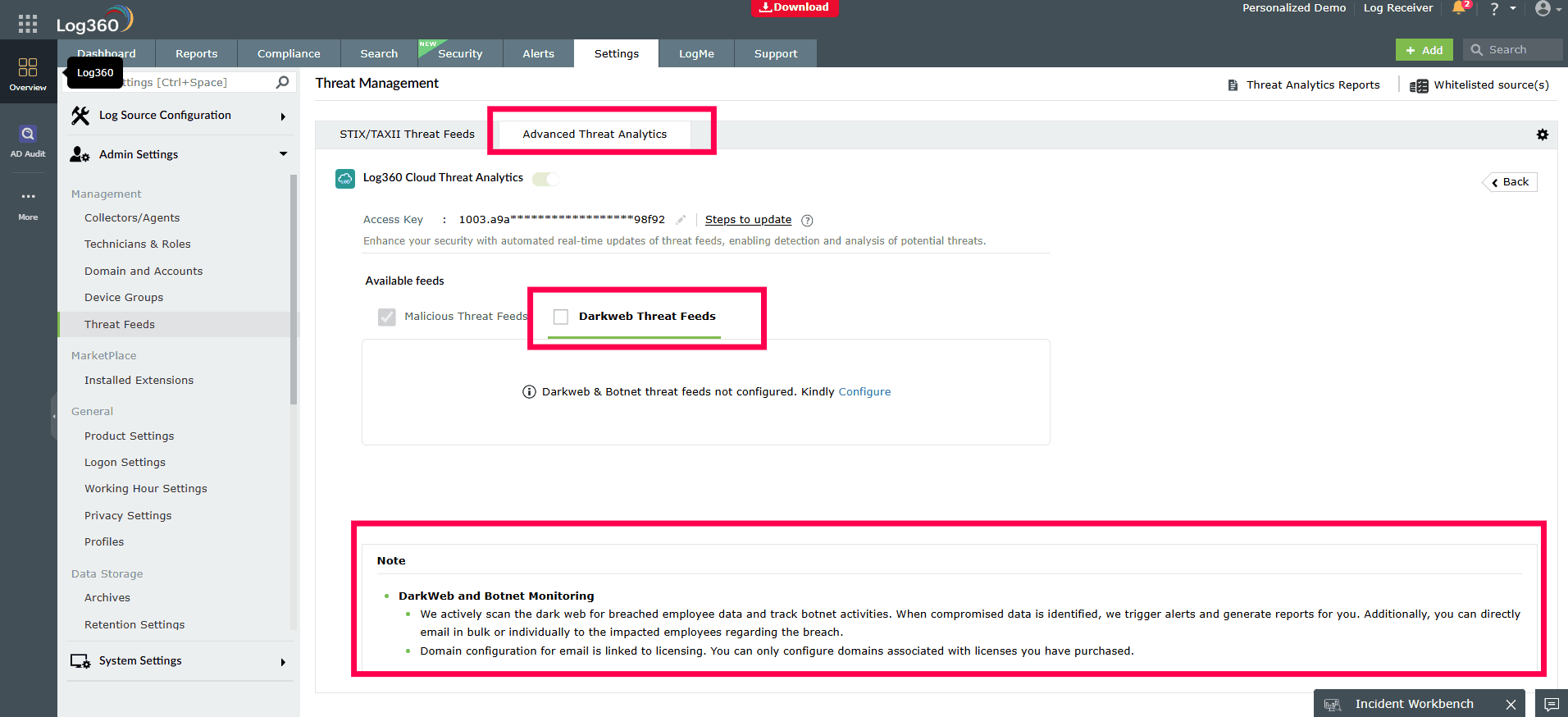
- Once the domain is verified, the monitoring service is active and Log360 begins scanning Constella's data for your assets.

Note: For complete configuration information, check here.
Step 2: Investigate dark web alerts
When a match is found, Log360 automatically creates a high-priority incident for you to investigate.
- Navigate to the Alerts tab and enable the All Breach Data and the Supply Chain Breach alert profiles.
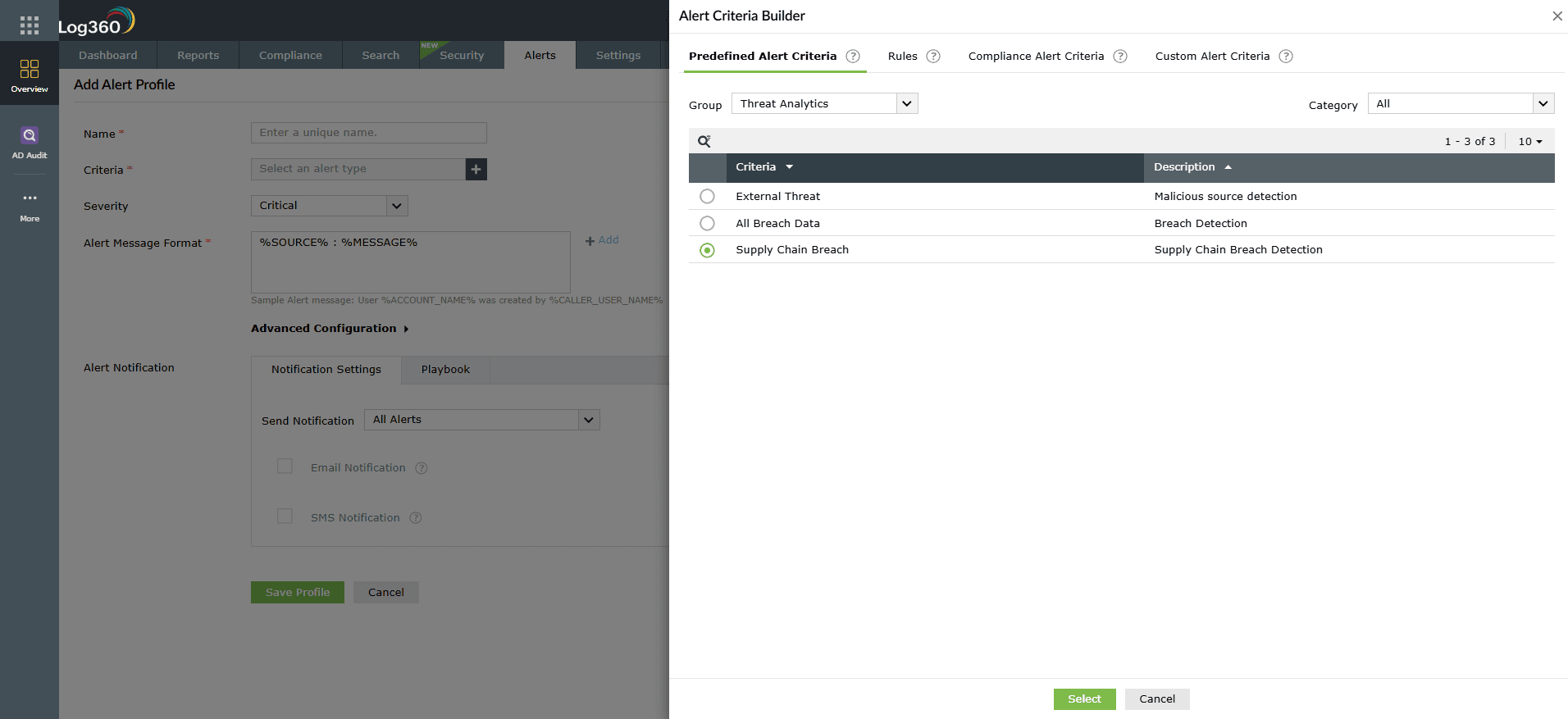
- Get notified if a breach is identified and view the alert details in the central Alerts tab.
- For a full investigation, click on the dark web alert to open it in the Incident Workbench.
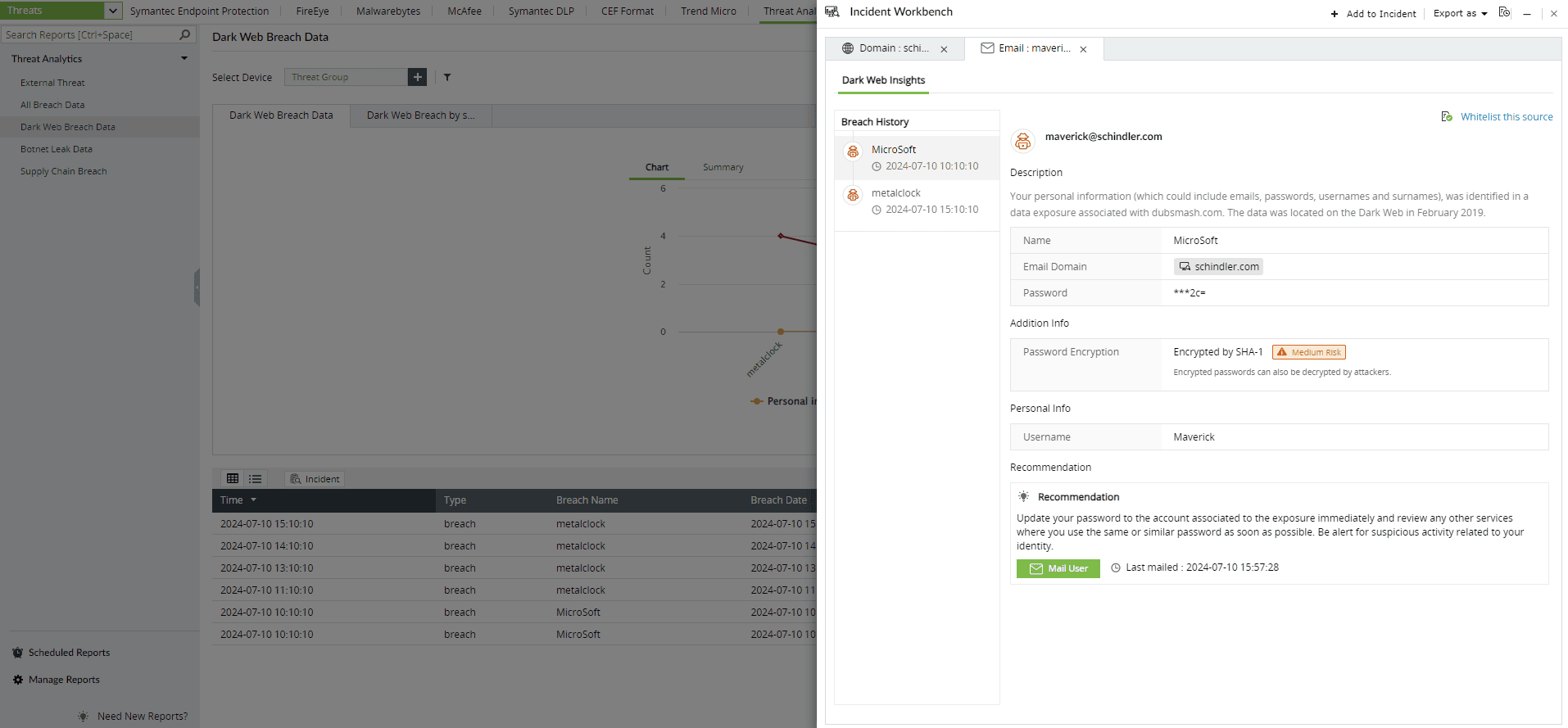
- Here, you will see the full context of the breach, including the exposed employee email, the source of the breach (e.g., "LinkedIn data dump"), the date of the exposure, and the type of data found.


Next steps
- Immediate remediation: Upon receiving an alert, immediately force a password reset for the affected user account.
- Enforce MFA: Ensure that MFA is enabled for the compromised account and, as a best practice, for all users.
- User education: Contact the employee, explain what a third-party breach is, and reinforce the company policy against using corporate credentials for noncorporate services.
- Investigate further: Use the breach source information to see if other employees also had accounts on the third-party site, as they are likely at risk as well.

