

- Home
- SIEM use cases
- Service account misuse
How to detect privilege escalation through service account misuse
In this page
Understanding the threat
Service accounts are non-human identities used by applications and services to access resources. If compromised or granted additional permissions, a service account can be utilized by a cyberattacker. That identity can be used to perform account manipulation or act as a valid account to gain higher privileges, persistence, lateral movement, and unauthorized access to sensitive systems and data.
Detection focuses on identifying unusual service permission changes, credential harvesting activity, and attempts to modify or repurpose existing services for privileged execution. These behaviors typically precede or accompany privilege escalation and help surface misuse of a service account before it leads to deeper compromise.
Category
- Internal threat
MITRE ATT&CK® mapping
T1543.003 | Create or Modify System Process: Windows Service
T1003 | Credential Dumping – Mimikatz
Compliance mapping
NIST (Data Security (PR.DS)), CIS controls (Safeguard 4.7: Manage Default Accounts on Enterprise Assets and Software)
Scenario
An attacker compromises a service account (e.g., svc-automation) and then modifies the ACL on a critical Windows service via Set-Service (or via direct API). They grant themselves or another account more permissions over the service. Next, they either install or repoint an existing service to a malicious binary or script. To escalate further, they run Mimikatz in memory via PowerShell or binary execution, dump credentials, and then use those credentials to access other systems or maintain persistence.
Scenario infographic

Why this happens
- Service accounts often end up with broader privileges than intended, which makes them valuable targets when compromised.
- Service DACLs are rarely modified during normal operations, so illicit changes stand out if audited.
- Services are a convenient persistence vector—modifying or creating a service gives an attacker long-term code execution under SYSTEM or a privileged account.
- Credential dumping (e.g., Mimikatz) is still one of the most effective ways to escalate from a service account to more powerful identities.
What can go wrong
Complete domain or administrative compromise: A service account could be used to run arbitrary code as SYSTEM or other high-privilege user.
Stealthy persistence: Attackers can hide inside legitimate services, making cleanup difficult.
Credential theft: Dumped credentials can lead to lateral movement and privilege escalation.
Low detectability: Without proper auditing, these actions may go unlogged or uncorrelated, making detection much harder.
Compliance risk: Misuse of service ACL permissions or dumping of privileged credentials can violate access control and audit policies.
Prerequisites
- Configure a dedicated service account with Event Log Readers, WMI, and DCOM permissions: This allows the platform to remotely collect Windows Security, System, and Service Control Manager events from monitored hosts.
- Ensure at least one Windows device is added because Event collection begins only after the source is onboarded.
- Enable “Audit Process Creation” (Success) and “Include command line in process creation events” through Group Policy: These settings generate detailed 4688 process creation events that are required to identify credential dumping activity or suspicious tool execution.
- Enable auditing for service control and service configuration changes: This ensures events related to service permission changes or service tampering are recorded and available for detection.
- Allow required ports: RPC (TCP 135), SMB (TCP 139/445), dynamic RPC ports 49152–65535, WinRM (5985/5986), and Syslog (UDP/TCP 514). These ports are necessary for remote log collection and communication.
- Keep system clocks synchronized across all monitored devices.
Detecting privilege escalation through service account misuse using Log360
- Enable and forward Windows Security, System, and Service Control Manager logs from domain controllers and key servers to ensure visibility into service permission changes, service tampering activity, and process execution events. These logs allow detection of DACL modifications, suspicious service alterations, and credential-dumping attempts.
- Navigate to Security > Manage Rules > Rule Library and enable Suspicious Service DACL Modification via Set-Service Cmdlet, HackTool – Mimikatz Execution, and Potential Persistence Attempt via Existing Service Tampering. These rules surface unauthorized DACL changes, credential-dumping activity, and attempts to modify or repurpose services for persistence or privilege escalation.
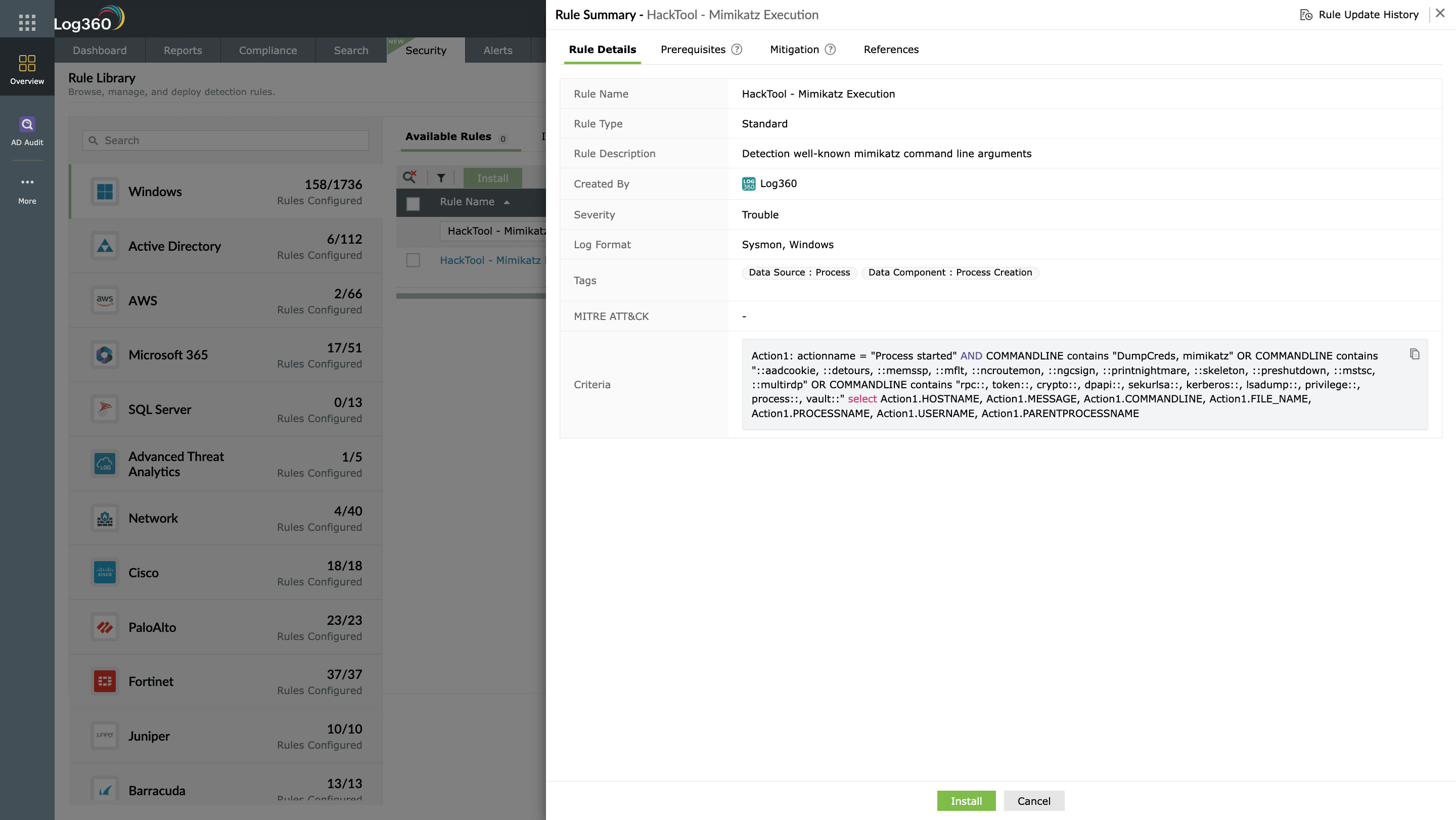
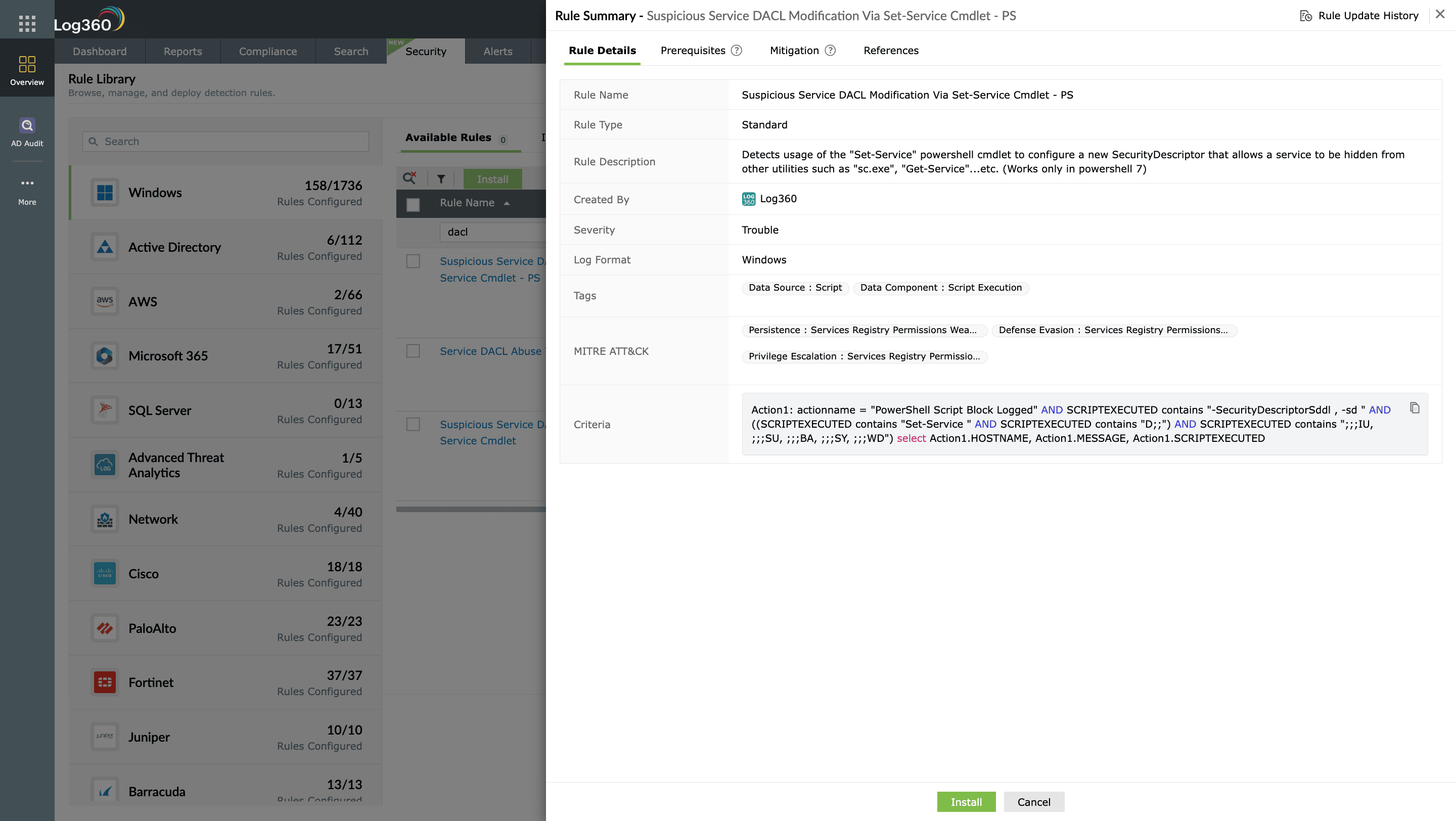
- Correlate triggered alerts with supporting audit events to confirm whether a service account was involved in modifying service permissions, launching credential-harvesting processes, or altering service configurations. Review related logs such as service-control events, process creation activity, and command-line parameters for deeper context.
- Use behavioral analytics to spot anomalies like a service account accessing new hosts, running tools it normally never executes, or interacting with services outside its usual scope. Sudden deviations from normal behavior often indicate compromise.
- Set up alerts to notify analysts as soon as these detections fire. From the incident console, disable the compromised account, revoke active sessions, or initiate remediation workflows through your integrated ITSM platform, such as Jira Service Management.


Next steps
Investigate alerts in context: Open the triggered alert in Log360, review correlated events, and analyze linked logs such as account creation, privilege escalation, or suspicious logons to confirm misuse.
Trace account activity: Use Log360’s audit trails and user activity reports to track where and when the service account was used, including hosts accessed, processes spawned, and privileges assigned.
Preserve forensic data: Export relevant event logs, rule matches, and incident timelines from Log360 to maintain evidence before initiating containment or cleanup.
Contain the threat: From the incident console, trigger automated workflows to disable the service account, revoke its active sessions, or open a high-priority ticket in your ITSM tool (like Jira Service Management).
Tune detection rules: Refine thresholds, filters, or correlation logic in Log360 based on investigation findings to prevent recurrence and reduce false positives.

