

- Home
- Play books
- Windows - AlwaysInstallElevated abuse response
Windows - AlwaysInstallElevated abuse response
In this page
Playbook Description
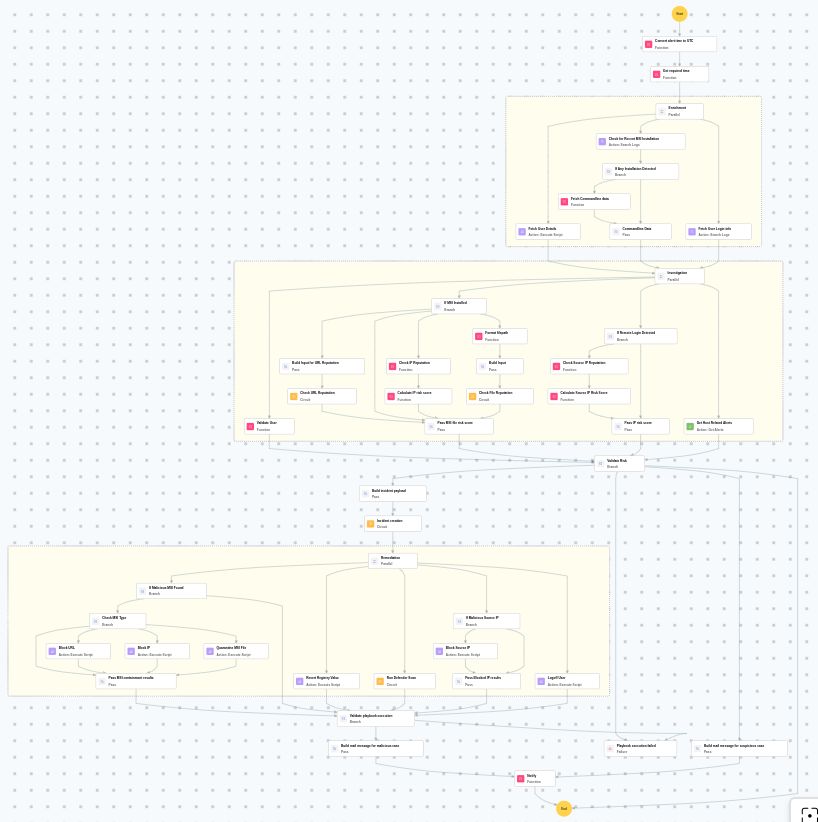
Investigates MSI-based privilege escalation by analyzing command lines, checking reputation of URLs/files/IPs, and validating user behavior. If malicious, the playbook blocks sources, reverts registry, runs Defender scan, and logs off the user.
MITRE ATT&CK mapping
| Tactics | Techniques | Sub-techniques |
|---|---|---|
| Privilege Escalation(TA0004) | System Binary Proxy Execution(T1218) | Msiexec(T1218.007) |
MITRE D3FEND mapping
| Tactics | Techniques | Sub-techniques |
|---|---|---|
| Detect(D3-Detect) | Identifier Analysis(D3-ID) | File Hash Reputation Analysis(D3-FHRA) |
| Evict(D3-Evict) | Credential Eviction(D3-CE) | Account Locking(D3-AL) |
Playbook input type
Alert
Prerequisites
- VirusTotal API - Need to connect with VirusTotal API and fetch access key to check URL, file, and IP reputation.
- Windows device configuration - Provide Windows Administrator credentials in Windows device configuration page. Username: DOMAIN\Administrator or .\Administrator (for local accounts)
Playbook creation input
- connectionName - Provide the VirusTotal connection name for executing the VirusTotal APIs
Dependencies
Extensions - VirusTotal
- virustotal_ipReputation
- virustotal_calculateRiskScore
Utility functions:
- utility_convertTimeToUTC
- utility_getRequiredTime
- utility_convertToString
- utility_sendMail
- windows_detectMaliciousUser
- windows_commandLineAnalysisMsiexec
Scripts
| Script Name | Description | Arguments |
|---|---|---|
| BlockUrlTraffic.ps1 | Blocks traffic to a given URL by resolving its domain to IPaddresses, creating inbound and outbound Windows Firewall block rules (via New-NetFirewallRule ) for each resolved IP, and flushing the DNS cache. | Url |
| BlockIP.ps1 | Creates or updates Windows Firewall rules to block network traffic to/from one or more IPaddresses. Uses consolidated rules (SOAR_AutoBlock_IP_Inbound / SOAR_AutoBlock_IP_Outbound) — new IPs are merged into an existing rule rather than creating a rule per IP. Validates IPformat, checks firewall profile status, and reports per-IPresults. | IpString, Direction |
| fetchUserDetails.ps1 | Fetches user identity details including UID/GID, group memberships, and sudo privileges by inspecting /etc/sudoers and /etc/sudoers.d/ — without invoking sudo. | Name |
| DisableAlwaysInstallElevated.ps1 | Disables the AlwaysInstallElevated Windows policy by setting the registry value to 0, preventing MSI packages from running with elevated privileges | - |
| TerminateSession.ps1 | Logs off one or more user sessions using logoff , with optional RDP-only filtering by remote IP | UserNames |
| QuarantineFiles.ps1 | Moves one or more files to a quarantine directory ( %USERPROFILE%\Forensic_Quarantine ), strips inherited permissions via .NET ACL API, and grants read-only access to Administrators. Skips protected PowerShell executables. | FilePaths |
Connections
VirusTotal connection - Need to connect with VirusTotal API and fetch access key to check the malware IP/URL/File details.
Sub playbooks
- Windows - File enrichment
- VirusTotal - URL reputation check
- Log360 Cloud - Create or update incident
- Windows - Defender Quick Scan
Execution workflow
Investigation:
- Checks for recent MSI installation.
- Checks if any installation is detected.
- Analyzes the command line for suspicious patterns, URLs, or file paths.
- Checks command line data.
- Fetches the user details.
- Fetches the user login info.
- Checks if MSI is installed.
- Builds the input.
- Executes the "Windows - File enrichment" sub-playbook.
- Passes MSI file risk score.
- Retrieves host related alerts.
- Validates the user.
- Checks if remote login is detected.
- Checks the source IP reputation.
- Calculates the source IP risk score.
Decision logic:
- Proceeds to remediation based on the following conditions:
- The calculated risk score exceeds the malicious threshold.
- The file or process reputation indicates high risk.
- The file or process reputation indicates medium or higher risk.
- Related investigation findings are present.
- If suspicious but not confirmed malicious, sends a notification for manual review and stops further actions.
- If no malicious indicators are confirmed, the playbook ends with no further actions.
Remediation:
- Executes the "Log360 Cloud - Create or update incident" sub-playbook.
- Checks if malicious MSI is found.
- Checks the MSI type.
- Blocks the URL.
- Passes MSI containment results.
- Reverts registry value.
- Executes the "Windows Defender protection" sub-playbook.
- Logs off the user.
- Checks for malicious source IP.
- Blocks the source IP.
- Passes blocked IP results.
- Validates that all remediation actions are completed successfully.
- Builds the notification email with remediation details and findings.
- Sends a notification email regarding the actions taken and required next steps.
Post execution procedure
- Review the blocked or quarantined MSI file for further forensic analysis.
- Investigate whether additional MSI packages were installed by the same user.
- Check whether the AlwaysInstallElevated registry key was re-enabled after remediation.
- Review Windows event logs for any signs of lateral movement or additional privilege escalation attempts.
- Confirm that the affected user account is not compromised and reset credentials if necessary.

