

- Home
- Play books
- CrowdStrike Falcon - Sensor removal alert handler
CrowdStrike Falcon - Sensor removal alert handler
In this page
Playbook Description
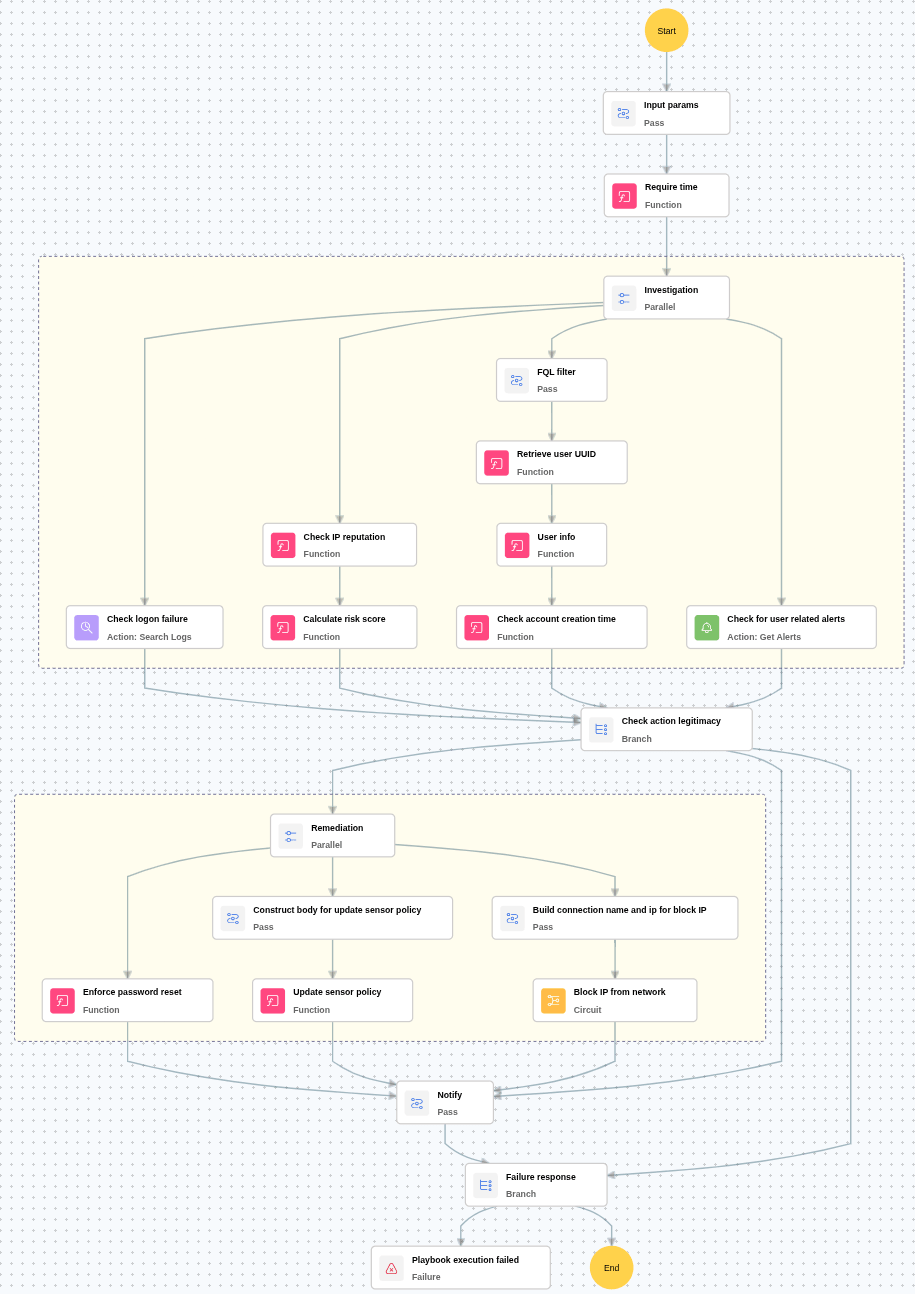
This playbook investigates user-related alerts by auditing user activity, login failures, and account history. It evaluates the source IP’s reputation to confirm malicious activity and triggers immediate remediation such as resetting passwords, blocking offending IPs, restoring the security update policy, and notifying the security team for further coordination.
MITRE ATT&CK mapping
| Tactics | Techniques | Sub-techniques |
|---|---|---|
| Defense Evasion(TA0005) | Exploitation for Defense Evasion(T1211) | - |
| Defense Evasion(TA0005) | Impair Defense (T1562) | Disable or Modify Tools(T1562.001) |
MITRE D3FEND mapping
| Tactics | Techniques | Sub-techniques |
|---|---|---|
| Isolate(D3-Isolate) | D3-NI | Inbound traffic filtering(D3-ITF) |
Playbook input type
Alert
Prerequisites
- User management - Read, Write
- Sensor update policies - Write
Playbook creation input
- connectionName - Provide the VirusTotal connection name for executing the VirusTotal APIs
- sensorPolicyName - Provide the policy name for updating the policy
Dependencies
Extensions - CrowdStrike
- crowdstrike_retrieveUserInfo
- crowdstrike_retrieveUserUuid
- crowdstrike_resetUserPassword
- crowdstrike_updateSensorPolicy
Extensions - VirusTotal
- virustotal_ipReputation
- virustotal_calculateRiskScore
Utility functions
- utility_getRequiredTime
- utility_isEntityNew
Connections
- VirusTotal connection - Need to connect with VirusTotal API and fetch access key to check the malware IP details.
- CrowdStrike connection - OAuth2 connection with clientId and client secret along with region.
Sub playbooks
CrowdStrike Falcon - Block IP
Execution workflow
Investigation:
- Checks whether the user has more than 5 logon failures within the previous 24 hours.
- Checks for any critical alerts related to the user.
- Checks the reputation of the source IP address associated with the activity.
- Calculates the malicious IP risk score based on threat intelligence data.
- Retrieves and verifies the account creation time of the user.
Decision logic:
- Proceeds to remediation based on the following conditions:
- The IP address is malicious or has a high-risk score, AND
- The user has more than 5 logon failures within the previous 24 hours or relevant alerts are present.
- If malicious activity is not confirmed, notify the user and stop further remediation actions.
Remediation:
- Confirms the activity as malicious.
- Executes the “Block IP” sub-playbook for the identified malicious IP address.
- Enforces a password reset for the user.
- Updates the sensor policy as required.
- Sends notification to the user regarding the actions taken and required next steps.
Post execution procedure
- Enforce tamper protection via policy: Ensure that tamper protection is enforced through endpoint protection policies to prevent manual or unauthorized deactivation.
- Audit role and permission assignments: Review the user roles and permissions to confirm that only authorized users can modify security settings.
- Handling false positives: If this alert is confirmed as a false positive, revert all associated remediation steps.
- Disable tamper protection if required.
- Unblock the non-malicious IPs.
- Provide their respective roles if they actually need

