Agent-based device monitoring in OpManager

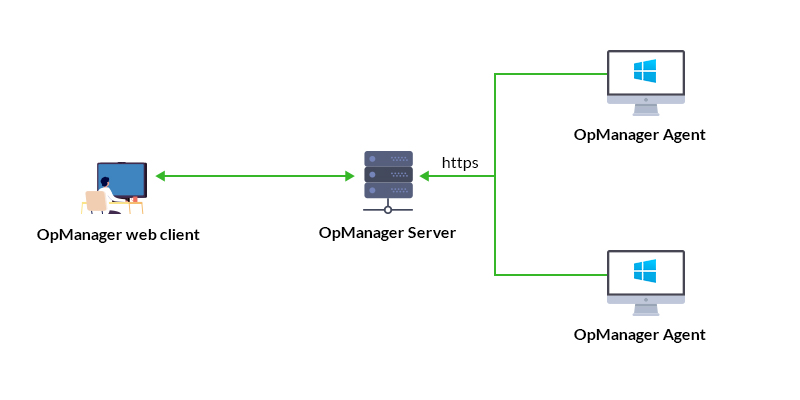
With the introduction of Agent-based monitoring in OpManager, users can now install a lightweight software component called an "agent" on their network devices, such as Windows and Unix servers, to aid OpManager in monitoring devices. The agent takes over all polling activities related to the device from OpManager, allowing the OpManager server to function more efficiently. For the smooth functioning of OpManager without requiring changes to the load configuration, it is recommended that the agent be installed on no more than 1,000 devices in Professional Edition and 3,500 devices in Enterprise Edition.
- Types of Agent-based monitoring
- Advantages of Agent-based monitoring
- Prerequisites for Agent-based monitoring
Types of Agent-based monitoring
1. Idle Agent
When the OpManager agent is installed on a device that is already being monitored via SNMP/WMI or other protocols in OpManager, the agent is classified as an Idle Agent. In this state, the agent remains installed but does not actively participate in any monitoring activities, since the device’s monitoring is already handled through existing methods.
2. Monitoring Agent
When a device is fully monitored using the OpManager agent (without relying on SNMP/WMI), the agent functions as a Monitoring Agent. In this mode, all data collection, performance monitoring, and health checks are handled directly by the agent installed on the device.
Advantages of Agent-based monitoring
- Credentials are not necessary to employ agent monitoring for your network devices (except when deployed from OpManager UI). It is sufficient if you install the agent in your device.
- Even if communication between the monitored device and OpManager server is lost, the device's monitoring data will be temporarily stored in the agent for up to 6 hours.
- Even if the IP address of the monitored device changes constantly, data collection will not be affected as long as the OpManager server's IP address remains static.
- Log files can also be monitored using the OpManager agent, allowing users to track, analyze, and troubleshoot issues effectively.
- Windows Servers can be fully monitored even when OpManager is installed on Linux, without relying on WMI.
Prerequisites for Agent-based monitoring
Prior to installing the agent and monitoring your network devices, ensure the necessary prerequisites are met.
Common for Windows and Unix
The prerequisites listed below are applicable for both Windows and Linux devices.
Hardware requirements
These are the minimum specifications required in the device where the OpManager agent will be installed:
Parameter Windows Linux FreeBSD OS X Processor speed 1.0 GHz 1.0 GHz 1.0 GHz 1.0 GHz RAM 512 MB 512 MB 512 MB 512 MB Hard disk space 100 MB 70 MB 70 MB 70 MB Supported OS versions:
The OpManager agent supports all major versions of Microsoft Windows and Unix systems as listed below:Windows OS Software Versions Supported Windows OS Windows 11/ Windows 10/ Windows 8.1/ Windows 8/ Windows 7/ Windows Vista Windows Server OS Windows Server 2025/ 2022/ 2019/ 2016/ 2012 & 2012 R2/ 2008 & 2008 R2 Unix OS Linux Distributions Versions Supported Ubuntu 14.04 and above (x86_64)
16.04 and above (Armv8 64bit)Debian Debian 7 "Wheezy", Debian 8 "Jessie", Debian 9 "Stretch" and above Red Hat 6 and above CentOS 6 and above CentOS Stream 8 and above Rocky Linux 8 and above AlmaLinux 8 and above SUSE SUSE 11 and above, SLES 12 and above, open SUSE 15 and above Fedora Fedora 26 and above (x86_64)
Fedora 27 and above (ARM v8 64bit)Mandriva Linux 21.1 and above Gentoo Linux 3.0.31 and above Linux Mint 6 and above Cloud/Server & Container-based UNIX Oracle Linux 6.8 and above Amazon Linux 2 and above CoreOS 37.20230205.3.0 and above Other UNIX Systems OSX 10 and above FreeBSD 9 and above IBM AIX 6.1, 7.1, and 7.2 Oracle Solaris 10 and above (x86_64) Port requirements
To ensure smooth functioning of Agent-based monitoring in OpManager, the following ports need to be opened/available in the firewall, with respect to the device being monitored.
Agent - OpManager server communication Port Protocol Direction Description OpManager webserver port* (https) TCP Outbound Used for communicating with the OpManager Server to transmit data. (8061 by default) Enabling SSL in OpManager
To start using Agent-based monitoring mode in OpManager, SSL needs to be enabled to ensure secure communication. Click here to read in detail about how you can enable SSL in OpManager.
Disabling older TLS versions or restricting only to TLSv1.3 may affect agent-based monitoring if the target device does not support the selected version. Ensure end devices support the required TLS version before applying this change.
Communication between the device and OpManager server:
Before starting the installation process, ensure that the OpManager web client is accessible in the Internet Explorer browser from the end device where you plan to install the agent.
For Windows:
The following prerequisites are only applicable for Windows devices.
Port requirement for remote agent deployment from the UI (Deploy Agent)
For remote deployment, Ports 135 and 445 should be kept open and Inbound with respect to the monitored device. Initially, port 135 is used. RPC later switches it to any random port of TCP Dynamic port range. This dynamic port range must also be opened (Inbound).
NOTE:
- These ports might also be needed to set an Outbound rule with respect to the OpManager-Installed device. (OpManager probe-installed device, in case of enterprise edition.)
- These ports are used only when the Deploy Agent option is used from the OpManager UI.
- Kindly note that these ports might not be needed post installation. If you do not want to open these ports for deploying the agent remotely, you can use other deployment options.
Firewall exceptions for Notification Server
If Push Mode is going to be enabled in any of the agents, it is necessary that there are no firewall restrictions for the Notification server to run smoothly.
- Ensure that WebSocket (WSS) protocol related requests are not blocked in the firewall, for the OpManager server's port (8061 by default, unless changed by the user).
- Ensure HTTP 1.1 GET requests are allowed in the firewall.
- Ensure Content Length is allowed to be included in the response.
- If Path Resolver has been enabled, then the relative path /NSHandler/ needs to be added in the exception list.
- All types of Websocket frames (except binary type frame) need to be allowed in the response, if Websocket connection monitor has been enabled.
- In your antivirus program, enable WebSocket handling option if it has been disabled.
Adding exclusions in Endpoint Management Solutions:
If any Endpoint Management solutions have been employed in your network to manage your client computers, these applications need to be added in the exclusion list to ensure the OpManager agent can run without any issues:
- OpManagerAgent.dll
- MonitoringAgent.exe
- MEAgentHelper.exe
- OpManagerAgentTrayIcon.exe
- OpManagerTroubleShooter.exe
- OpManagerAgentUpgrade.exe
- tracetcp.exe
- FileOPM.vbs
- FolderOPM.vbs
For Unix:
The following prerequisites are applicable only for Unix devices.
- To install the agent, the bash shell must be available on the system.
- Ensure that the following commands are supported on your target server/machine to fetch performance metrics:
- top, ps, df
- svmon (for AIX) and vmstat (for AIX and Solaris)
- Ensure that commands such as which, useradd, groupadd, awk, and unzip that are used in the installation script are available and supported on your target server/machine.
- If you are installing the agent on Solaris, AIX, BSD UNIX (FreeBSD), or macOS, ensure that Python version 3 or above is available on the system.
After verifying all the prerequisites, proceed with the installation. For detailed steps and setup guidance, refer to the installation help page.