Home » Features » » Case studies » <a href="https://www.manageengine.com/products/desktop-central/customers-home.html">customers</a> <a href="https://www.manageengine.com/products/desktop-central/customers-stories.html">Case studies</a> <span class="title">WD-40 Case study</span>
Enterprise-grade device management for precision fleet control
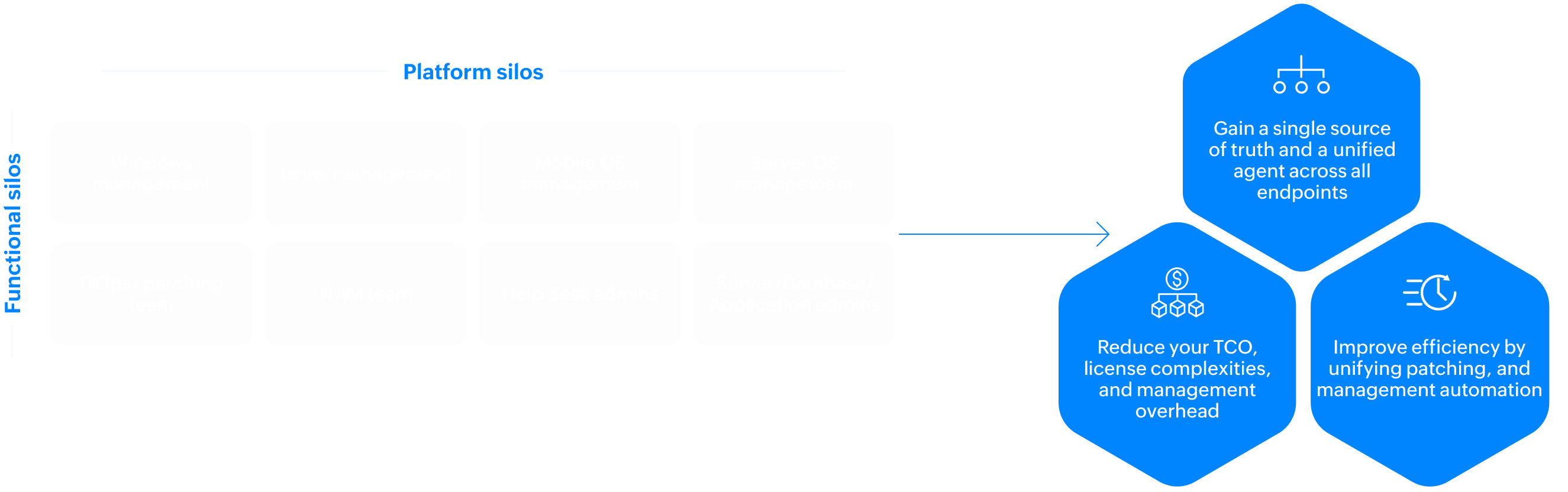
Modernize your IT operations by bringing your enterprise device management together. Transition away from disjointed legacy systems and consolidate your teams, tools, and workflows into one cohesive engine. This shift allows administrators to automate routine patching, streamline compliance audits, and proactively secure vulnerabilities - without the silos.
ManageEngine is recognised as a Challenger in the 2026 Gartner® Magic Quadrant™ for Endpoint Management Tools.
Zoho Corp. (ManageEngine) has been positioned as a Leader in the IDC MarketScape: Worldwide Unified Endpoint Management Software 2025—2026 Vendor Assessment
ManageEngine has been named a Strong Performer in The Forrester Wave ™ : Unified Endpoint Management, Q2 2026
9 of every 10 Fortune 100 companies trust ManageEngine
Every enterprise device. Total control.
Cross-platform device management across Windows, macOS, Linux, iOS, Android, ChromeOS, and specialty devices - giving your IT team a single console to manage every form factor, every OS version, and every user, wherever they work.
windows
macOS
Linux
Android
iOS & iPadOS
ChromeOS
BYODs
Servers
Speciality devices
Drop-ship devices with Windows Autopilot.
Manage legacy and modern Windows environments, including Windows 11, IoT devices, and servers.
Assess readiness for Windows 11 deployment and ensure a smooth transition by migrating user and workload data and ensuring day zero support for the new OS.
Configure native Windows security features, like Microsoft Defender, Windows Firewall, and Exploit Guard, to bolster endpoint security.
Extend advanced endpoint security from the same platform.
Gain visibility and control over all Linux distros, even those running on ARM architecture.
For the 15+ widely adopted distros, extend advanced support, including device and app management, first- and third-party patching, configuration and inventory management, remote control, and compliance.
Use over five onboarding methods, including Apple Business Manager and Apple Configurator, that cater to various COPE, BYOD, and COBO use cases.
Integrate with Apple's declarative management protocol to maintain devices in the desired state.
Implement shared device management through customized sign-ins, SSO, automation, reporting, and secure sign-outs.
Gain comprehensive kiosk capabilities (like single- and multi-app modes), customize home screens, lock down specific settings, configure VPNs, and do even more.
approved Google enterprise mobility management partners
What does this mean for you?
Drop-shipping using Android zero-touch enrollment
Complete ChromeOS management from provisioning to decommissioning
Shared device management through customized sign-ins, SSO, automation, reporting, and secure sign-outs
Comprehensive kiosk capabilities like single- and multi-app modes, customizable home screens, lockdowns of specific settings, and VPN configuration
Containerize and secure the corporate workspace by creating a separate work profile on personal devices without violating users' privacy.
Improve BYOD adoption and security by offering conditional access for Exchange email accounts and Microsoft 365, Google Workspace, and Zoho Workplace apps to balance security and the user experience.
Implement app-only management to secure corporate data within or moving between any productivity suites like Microsoft 365, Adobe Creative Cloud, Google Workspace, and Zoho One without having the devices under management.
Respect employee privacy by communicating and collecting consent for the management software's control over the devices.
Go beyond the limitations of cloud-native tools. Reduce the TCO by adopting a single platform to manage your physical and virtual servers across data centers and multi-cloud environments.
From device provisioning to device retirement, save countless hours by automating OS deployments and updates, software distribution, patching, tasks, and remote control across Windows, Unix, and Linux servers.
Employ nuanced server patching to balance the availability and security of server infrastructure. Implement automation, ring-based deployments across test beds and production environments, and multi-team approvals tailored to your organization's structure. Retain superseded patches and offer a self-service portal for server admins to control patching and reboot cadences.
Leverage the built-in vulnerability detection and Tenable integration to align with security teams and remediate vulnerabilities faster.
Confidently adopt AR and VR head-mounted wearables, IoT devices, POS devices, and backstore rugged devices to empower frontline workers with tools that scale with their operations.
Offer an exceptional experience for shoppers with self-service kiosks and digital signage.
Enjoy the advantages of our partnership with Google and leading OEMs, which offers deep customizations and bulk onboarding for over 30 OEM, OEMConfig, and AOSP devices.
Allow your help desk staff to remotely assist workers or troubleshoot devices kept in common areas, like ATMs, without user intervention.
Key Capabilities
Automate management throughout the endpoint life cycle
Onboarding
Asset management
Configuration management
OS life cycle management
App life cycle management
Automated patch management
Email and content management
Device tracking and location services
Remote help
Shared devices and kiosks
Diverse onboarding methods for your anywhere workforce
Choose from over 20 onboarding methods supporting diverse OSs, form factors, IT management styles (COPE, COBO, BYOD, and CYOD), and employee work styles (desk, hybrid, remote, and frontline workers).
Zero-touch provisioning
Leverage Windows Autopilot, Android zero-touch enrollment, and Apple Business Manager to ship devices from the factory to users' preferred locations, driving a faster time to use and improving the onboarding experience.
Active device discovery
Synchronize with your disjointed AD networks and workgroups to automatically discover endpoints and bring them under management.
Migration from legacy infrastructure
Get help from our platform to migrate your endpoints, users, groups, and policies from outdated PC life cycle management solutions and other UEM solutions to enable adoption and a faster time to value.
Maintain a single source of truth for all endpoints across any location and infrastructure, including EUC, remote, data center, and multi-cloud environments. Feed real-time data into the CMDB so you have recent, accurate asset information for operations and decision-making. Gain in-depth visibility into the following:
Balance simplicity and advanced control with co-management for over 100 attributes across OSs, apps, emails, browsers, data, VPNs, network connectivity, certificates, users, and more. Our platform uses modern management APIs that call on native OS functions and require less technical expertise. Agent-based management leverages automation workflows, over 200 configurations, and over 400 ready-made scripts, offering flexibility and control beyond native OS controls for OS-specific experts.
Form device cohorts for different functions, locations, or LOBs by defining them manually or dynamically based on the user persona attributes imported from IdPs such as AD and Entra ID, Okta, and Ping Identity. Standardize configurations for different personas based on corporate policies.
Use thresholds across attributes as triggers to dynamically define device groups and map automation workflows so the platform can self-heal devices back to the desired state.
Provision any endpoint, whether it's undergoing a break/fix scenario, hardware refresh, or bare-metal setup. This includes reimaging OSs, refreshing hardware without impacting apps or user data, deploying OSs in bulk for domain-joined users, and even delivering OSs via USBs for remote workers. We empower organizations to create images of live machines without affecting user productivity, to migrate user profile data during deployment, and to support hardware-independent deployments across diverse computer models.
Maintain a consistent user environment with golden images based on user personas. These images include approved OSs, policies, apps, drivers, and data. This standardization enhances the out-of-the-box experience for employees, making troubleshooting and management more straightforward.
Ensure your OSs are secure and updated by sequentially rolling them out to different cohorts, like user acceptance testing (UAT) and EUC environments. Validate updates through smaller groups of users over time to avoid surprises.
Give your end users a better user experience that comes with modern OSs. Gain insights into device readiness across your EUC environment while planning for OS upgrades across the organization. To make transitions seamless, our platform offers day zero support for modern OSs and helps migrate user and app data.
Ensure predictable deployments with pre-deployment workflows and scripts. These guarantee environment readiness, including essential libraries and dependencies, and minimize failures in organization-wide rollouts.
Personalize app experiences by presetting configurations such as per-app VPNs, email server setups, and certificates. This ensures a zero-touch setup experience for employees.
Implement per-app VPNs, conditional access, and in-app protection policies for apps and workspace suites (including Zoho One, Microsoft 365, and Google Workspace), providing secure, flexible experiences for hybrid workers.
For BYOD and privacy-conscious users, leverage app-only management to secure corporate data within or moving between any productivity suites, like Microsoft 365, Adobe Creative Cloud, Google Workspace, and Zoho One, without having the devices under management.
Decrease employees' reliance on the IT team with the self-service portal for downloading and installing apps and updates on their own. Distribute store and in-house apps, SaaS bookmarks, and even custom LOB apps built using Zoho Creator or Zoho CRM directly to the self-service portal's app catalog for easy access.
Use app usage trends to visualize adoption. Share user education materials through the self-service portal with timely notifications to drive employee adoption. Additionally, see over-licensed apps, reconcile unused licenses, and optimize software spending.
Schedule updates for all major OSs and over 1,000 third-party applications. Retain multiple versions of apps across different device cohorts for testing and phased rollouts. Roll back apps to a stable version in the event of unprecedented issues. Track apps nearing their end of life and uninstall them remotely.
Automate, fast-forward, schedule, roll back, and control patching based on risks, device cohorts, patching cycles, and maintenance windows. Decide the level of privileges for each end user (LOB employees or database and server admins) to get notified of, to postpone, or to have control over patching or rebooting using self-service models.
Build test beds and nuanced targets to sequentially roll out updates to different cohorts (UAT, preproduction, production, and EUC environments) and validate them through smaller groups of users over time. You can always roll back an app to a stabler version in the event of unpredictable behavior.
Remotely wake endpoints after shutdowns during maintenance windows. Have patches downloaded onto endpoints and staged for deployment even before the scheduled window. This way, you can achieve a higher first-pass success rate despite narrow maintenance windows.
Take advantage of how our platform adapts patch workflows based on workers' locations and environmental contexts. Patches are downloaded to the platform's server and shared locally with domain-joined endpoints. In LOBs, branches, or departments, patches are cached and shared locally to minimize bandwidth. For remote endpoints, patches are directly downloaded from vendor sites to avoid VPN issues. Closed networks use an edge component to download patches, updating them to the air-gapped server internally.
Use our platform—integrated with our low-code solution, Zoho Creator—to facilitate multi-admin approval tailored to your organization's structure. Security and ITOps teams can automatically test and approve patches. Subsequent rounds of approvals by database teams, server owners, and application owners take place before deployment to production servers.
Automate email setup in your email clients and sync contacts, calendars, and events to offer your employees an out-of-the-box experience. Our platform supports Exchange ActiveSync to allow users to access emails even when they're working offline. Control what actions can be performed on email data and attachments. Enable conditional access for emails and wipe emails on devices that are noncompliant.
Securely transfer work-related media and documents that can be viewed, modified, or shared by employees via the self-service portal. Restrict who and what can access this content with varying levels of privileges. Pair content sharing with device notifications to nudge employees to take action. These features are ideal for LOB managers sharing training videos to improve app adoption or field sales teams carrying Know Your Customer forms in a common, secure location.
Track and recover lost or stolen devices. Alternatively, enable a complete lockdown, reset passcodes, raise the alarm, and perform a factory reset to prevent data loss.
Natively built remote control without additional agents or licenses
Leverage our remote control capability, which is built into our platform natively, doesn't require additional agents or licenses, and supports all major OSs and over 30 rugged handhelds for frontline workers.
Manage who can help whom with varying levels of permissions using role-based access controls. Log every help desk interaction (including session recordings) and information on who helped whom, on what device, and for how long. Ensure help desk connections proceed with the end users' consent.
Allow your help desk admins to leverage file transfers and video, call, and chat functions to collaborate with end users and server admins to gain context and fix issues faster.
Access and monitor endpoints nonintrusively with the end users' consent to analyze event logs, registries, services, and CLIs in order to identify the root cause of issues. Record sessions and perform actions such as remotely commanding or managing power, including Wake-on-LAN and shutdowns. Remediate noncompliant devices by forcing restrictions on them, unenrolling them, or performing a corporate wipe on them.
Integrate with widely adopted help desk solutions to remotely troubleshoot issues directly from the ITSM console without switching contexts. After evaluating customer usage to determine the top recurring issues and most deployed fixes, we’ve built a library of UEM actions that are available in each ticket, incident, or request window to speed up response times.
Enable sign-ins and sign-outs to dynamically configure shared devices for each use case, worker role, or individual. Integrate our platform with your existing IdPs to enable SSO. Leverage our SDKs to wrap your HRMS with a management layer to automate workers' attendance as they sign in and out of the devices.
Personalize workspaces with apps, content, and policies associated with worker roles or use cases across any shared devices workers use. Customize the device UI, including the background, layout, and apps, to maintain brand consistency for shoppers and facilitate easy access to essential apps for workers.
Enhance frontline worker productivity and security by locking devices into single- or multi-app kiosk mode, allowing access to only the necessary apps, content, and privileges
Automatically sign out a device and clear all sensitive data whenever a worker finishes their shift, signs out of the device, or remains idle over a lengthy period.
Leverage ManageEngine's extensive ecosystem for seamless employee onboarding. Our enterprise service management solution integrates with our endpoint management platform, streamlining workflows across other ManageEngine solutions. In the employee onboarding workflow, the endpoint management platform plays a pivotal role in onboarding devices and personalizing user workspaces with OSs, apps, content, policies, and risk-based access based on the user's context. The workflow also extends to employee department changes, role changes, and offboarding use cases.
Reduce management overhead
Balance simplicity and advanced control with co-management for over 100 attributes across OSs, apps, emails, browsers, data, VPNs, network connectivity, certificates, users, and more. Our platform uses modern management APIs that call on native OS functions and require less technical expertise. It also offers agent-based management that leverages automation workflows, over 200 configurations, and over 400 ready-made scripts, offering flexibility and control beyond native OS controls for OS-specific experts.
Adopt persona-based employee enablement
Discover digital personas through our UEM platform with identity provider (IdP) integrations. Measure app usage patterns across lines of business (LOBs) and diverse functions to establish persona-based app bundles to accelerate employee onboarding. EUC teams can work with leaders of LOBs to improve employee awareness and adoption of these new applications. Along with app rollouts, teams can make announcements via the employee communication portal and can share educational materials with employees via the self-service portal.
Optimize procurement and changes
Pair our deep IT asset inventory and experience analytics to adopt intelligent, performance-driven device life cycle management. Get insights into device ages, hardware failures, and battery health and let business intelligence solutions ingest them to forecast and plan procurement. Hardware and software changes are inventoried and ingested into the CMDB in real time. The relevant teams stay notified of the changes via a help desk integration.
Save on licensing costs
Implement effective license position programs to optimize your software expenditures. This involves real-time analysis of software usage patterns among employees to identify license shortfalls or overages, efficiently manage unused licenses, and proactively track contract renewals. Software requests via the employee self-service portal are logged, helping you make informed decisions about self-service portal enablement. Our ROI dashboards showcase self-service success by quantifying reduced incidents and cost savings.
Improve help desk efficiency
Integrate with widely adopted help desk solutions to remotely troubleshoot issues directly from the ITSM console without switching contexts. After evaluating the customer demands, top recurring issues, and most deployed fixes, we’ve made a library of UEM actions available in each ticket, incident, or request window to speed up response times. For systemic issues, repeatable playbooks can be built using ManageEngine's ITSM workflow orchestration and our UEM platform's extensive APIs.
Empower your frontline workers
Empower your shift-based, frontline workforce with specialty and shared devices with personalized sign-ins, sign-outs, and kiosk modes. Support the adoption of BYOD programs, AR and VR wearables, and rugged handhelds to support employees' use cases or job roles. Use analytics for predictive insights, such as into battery failures, and automate timely replacements. Allow your help desk staff to remotely assist workers before any issues affect your bottom line.
Success stories
India's largest NBFC empowers road sales warriors to offer financial services nationwide.
Non-banking finance
1
man IT
Supports mobile sales workforce with
17,000+
corporate-owned devices
1,000+
Employee-owned devices
To serve customers securely across
500+
cities
3,119
branches
"With the implementation of ManageEngine's Device Management, we're able to leverage both Zoho and ManageEngine ecosystems together to utilize the full potential these platforms offer and have further enhanced the productivity of our in-office and remote teams."
A decade-long partnership with a global manufacturer: Battling ransomware to securing production lines
Manufacturing
From
1
location
Endpoint Central helps oversee
Over
25K
endpoints
across
350
facilities
in
41
countries
To manage, help and secure
End-user computing environments
Server infrastructure on production lines
"We didn't leave the room for 36 hours. When we finally saw a complete green chart on the patch compliance widget by the end of two days, we had a moment of respite. That was the first time we patched our entire fleet using Endpoint Central, including production servers. It was a monumental achievement considering the scale and complexity of our operations."
Infogain unifies visibility, consolidates tools, and patches EUC and DC environments across its global operations.
IT Consultancy & Services
"The tools you deploy should have flavours of collaboration, integration, & consolidation. It should be capable of co-existing with other tools on both the Data Center and EUC side. It should allow your teams to work together, not in silos. All this will help you achieve success in a global scenario. Our entire operations across the Globe runs with 4 set of tools - Endpoint Central, Open source, ITSM and AD management suite."
Manish Anand,
VP and CIO at Infogain
R Systems International achieves visibility and compliance across its global operations
IT Consultancy & Services
"Earlier we used to implement security controls with various tools, but we wanted to do it with a minimal number of tools. For that, we started using Endpoint Central. The challenge was when the lockdown happened and people started working from home. Thanks to my team, we worked days and nights, and with ManageEngine, we managed to bring all the assets under our visibility and control."
Sanjay Chouhan,
Vice president of IT infrastructure at R Systems International LTD.
Together, let's build a brave new world, where our people can work safely from anywhere, on any device, with a rich experience across all their workplace services.
Frequently asked questions on enterprise endpoint management
01. What is enterprise endpoint management and why do enterprises need it?
+-
Enterprise endpoint management is the practice of centrally managing every device connected to an organization's network, including desktops, laptops, servers, mobile devices, and IoT endpoints, across their entire lifecycle from provisioning to retirement. Enterprises need it because managing devices through separate tools creates visibility gaps, inconsistent policies, and operational overhead that slows IT teams down. Endpoint Central automates the entire device lifecycle across Windows, macOS, Linux, iOS, Android, ChromeOS, and servers from a single platform, giving enterprise IT teams complete visibility and control across every endpoint.
02. What is the difference between UEM, MDM, and traditional endpoint management?
+-
Mobile Device Management (MDM) was built to manage smartphones and tablets. Traditional endpoint management covered desktops and servers. As enterprise device estates expanded to include every OS and form factor, both approaches fell short. Unified Endpoint Management (UEM) consolidates all of these into one platform that manages every device type from a single console. Endpoint Central is a full UEM platform, rated 5/5 for multi-OS support by Forrester, managing everything from Windows desktops and Linux servers to Android, iOS, ChromeOS, rugged handhelds, and IoT devices without requiring separate tools per platform.
03. How does enterprise endpoint management bridge IT operations and security teams?
+-
IT operations and security teams have traditionally worked in silos, with separate tools, separate consoles, and separate visibility into the endpoint estate. This gap is where attackers operate. Enterprise endpoint management bridges this by giving both teams a shared view of every endpoint, its patch status, configuration compliance, vulnerability exposure, and risk score, from one platform. Endpoint Central aligns ITOps and SecOps by combining patch management, vulnerability detection, device control, and threat response in a single agent, so remediation happens faster and nothing falls through the gap between teams.
04. How does automated patch management work in an enterprise environment?
+-
Enterprise patch management requires phased rollouts, multi-team approval workflows, context-aware delivery based on device location, and rollback capabilities when updates cause issues. Endpoint Central automates all of these stages across 1,000+ third-party applications and all major OSs, adapting delivery based on whether devices are on-network, remote, or air-gapped, and giving server admins and end users granular control over patching cadence within IT-defined boundaries.
05. How does enterprise endpoint management support remote and hybrid workforces?
+-
Remote work has made endpoint management significantly more complex, with devices operating outside the corporate network and IT teams losing visibility over devices they cannot physically access. Endpoint Central manages on-network and remote devices through the same agent, downloads patches directly from vendor sites for remote endpoints to avoid VPN bottlenecks, and supports zero-touch provisioning so new devices can be shipped directly to employees anywhere in the world.
06. How does enterprise device management support employee onboarding and offboarding?
+-
Enterprise IT teams spend significant time manually onboarding and offboarding employees, configuring devices, assigning apps, and revoking access. Endpoint Central automates this by integrating with identity providers like Active Directory, Entra ID, and Okta to dynamically assign configurations based on user roles and departments. It supports over 20 onboarding methods including Windows Autopilot, Apple Business Manager, and Android zero-touch enrollment, and integrates with ITSM platforms to trigger device lifecycle workflows automatically.
07. How should enterprises evaluate an endpoint management solution at scale?
+-
Enterprises should evaluate endpoint management solutions across five dimensions: breadth of OS and device support, depth of lifecycle automation, scalability across thousands of endpoints, integration with existing ITSM and security tools, and total cost of ownership. Endpoint Central is recognized as a Challenger in the 2026 Gartner Magic Quadrant for Endpoint Management Tools, a Leader in the IDC MarketScape for Worldwide UEM Software, and delivers a Forrester-validated 442% ROI over three years with $913K saved through automated patching alone.