Configure life cycle management for Atlassian Jira

About Atlassian Jira

Atlassian Jira is a project management tool used by organizations to plan, track, release, and support their projects. It offers features such as issue tracking, agile project management, customizable workflows, and real-time collaboration to improve productivity and project visibility.

By integrating Atlassian Jira with ManageEngine Identity360, you can enable the following life cycle management capabilities:

  • Identity import  

    Import objects from Atlassian Jira into Identity360.
    Note: Please note that only user data is imported from Jira to Identity360. Because Jira's API isn't exposed, users will not be created automatically. During the directory sync review process, users must be linked to their existing Identity360 accounts manually.

  • Provisioning  

    Provision and modify users' account attributes across enterprise applications based on their profile changes in Identity360. Provisioning and orchestration eases onboarding and life cycle management, boosting productivity and efficiency.

  • Access management  

    Manage the projects, project roles, and project permissions of users in Atlassian Jira from the Identity360 portal. Enforce least privilege and reduce security risks by granting users only the permissions they need to perform their jobs.

Provisioning features supported

  • Create users: A new account will be automatically created in Jira when a user is provisioned to that application in Identity360.
  • Delete users: Promptly delete a user account in Jira from Identity360.
Note: Once you enable provisioning and configure orchestration for Atlassian Jira, user creation or deletion will automatically happen as and when users are created and deleted in Identity360.

The following steps will help you configure the supported life cycle management capabilities for Atlassian Jira from Identity360.
Prerequisites

  1. Log in to Jira with admin credentials.
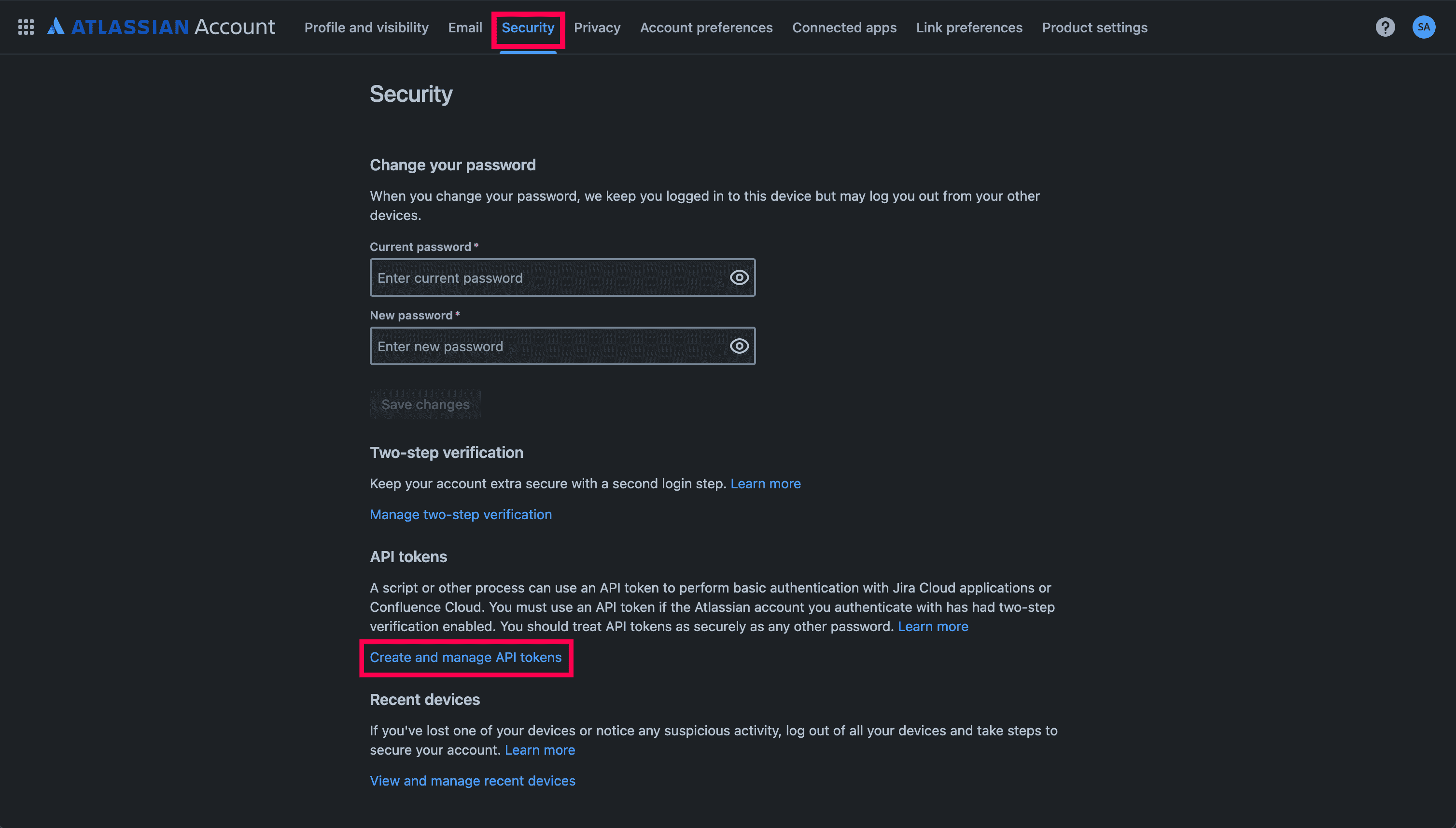
  2. Navigate to Account settings > Security, and click Create and manage API tokens.
    Atlassian Jira portal view.The portal view of Atlassian Jira.
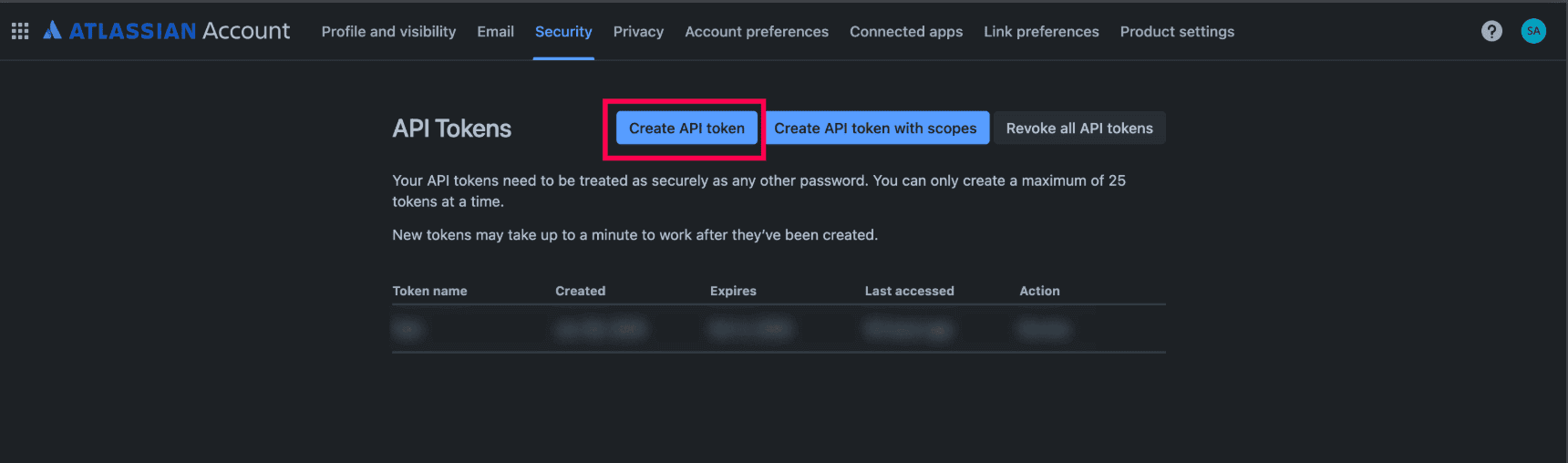
  3. Click Create API token.
    Creating an API token in Atlassian Jira.Creating an API token in Atlassian Jira.
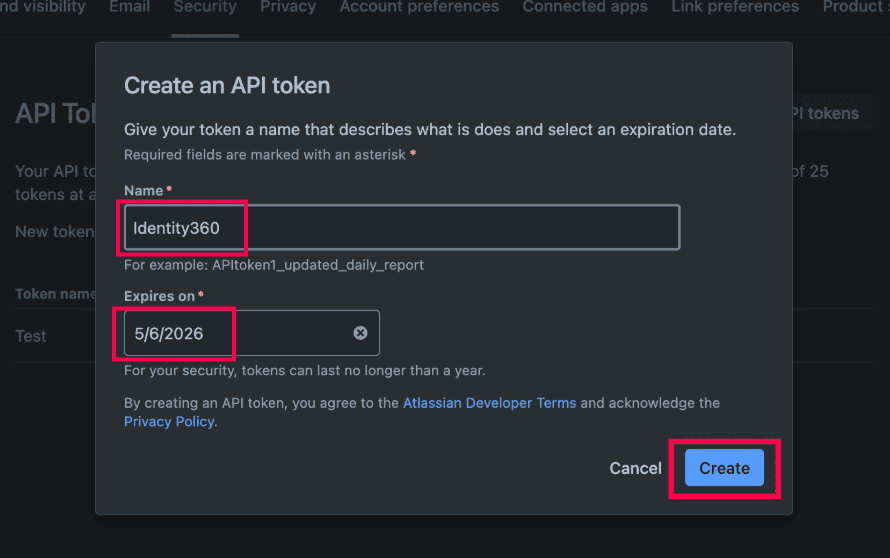
  4. Enter the Name and Expires on date for the API token, and click Create.
    Atlassian portal API tokens page.Creating an API token in the Atlassian portal.
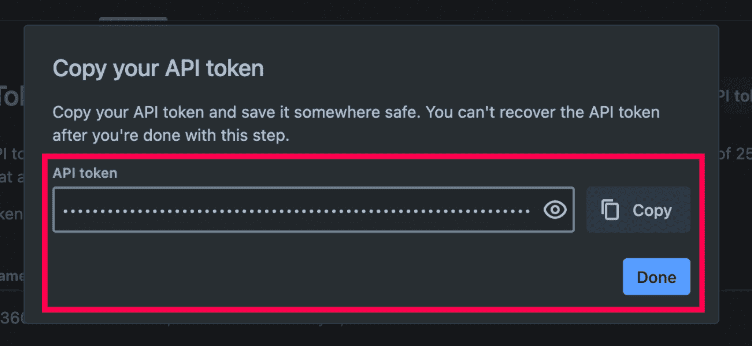
  5. Copy the API token and click Done.
    Copying API Token in the Atlassian portal.Copying API Token in the Atlassian portal.
    Note: The API token will be visible only once for copying.

Identity360 configuration steps

  1. Log in to Identity360 as an admin or super admin.
  2. Navigate to Applications > Application Integration and click Create New Application.
  3. Select Jira from the applications displayed.
    Note: You can also find Jira from the search bar located at the top.
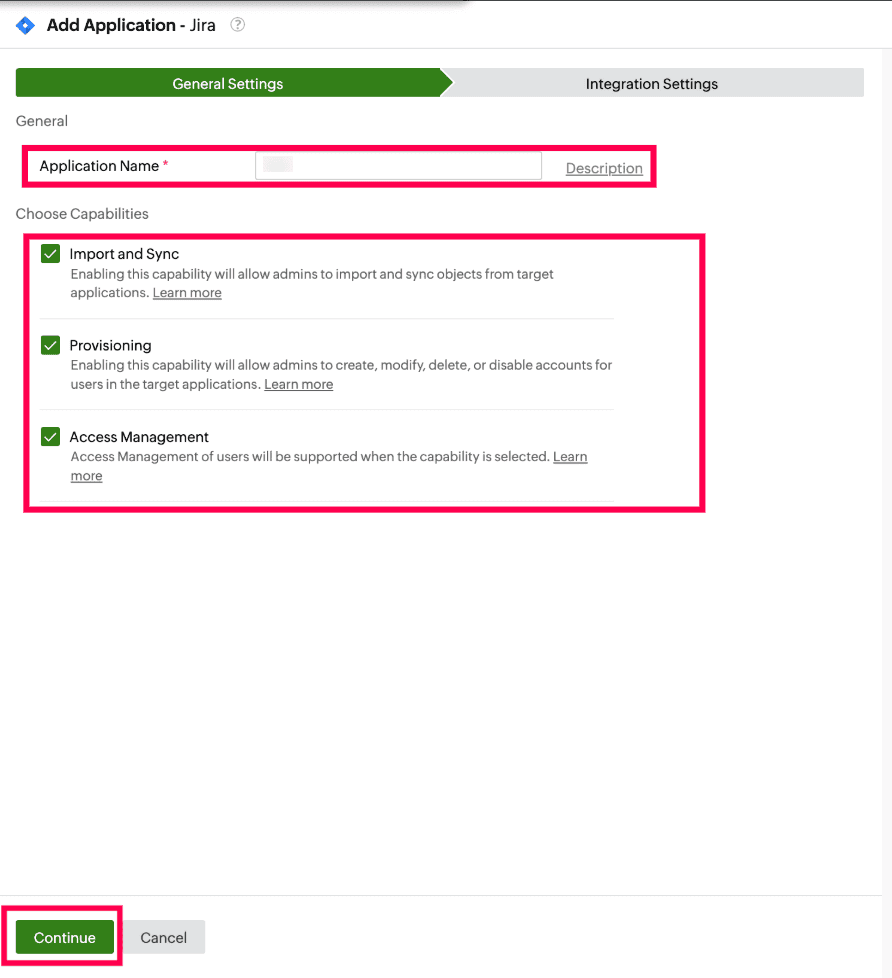
  4. Under the General Settings tab, enter the Application Name and Description, if necessary.
  5. Under the Choose Capabilities section, select the capabilities you wish to enable, and click Continue.
    Identity360 application configuration general settings.General settings of LCM configuration for Atlassian Jira.
    Note: If you select Provisioning or Access Management, the Import/Sync option will be enabled automatically. This is because the data imported or synchronized from an application is used for provisioning and access management capabilities.
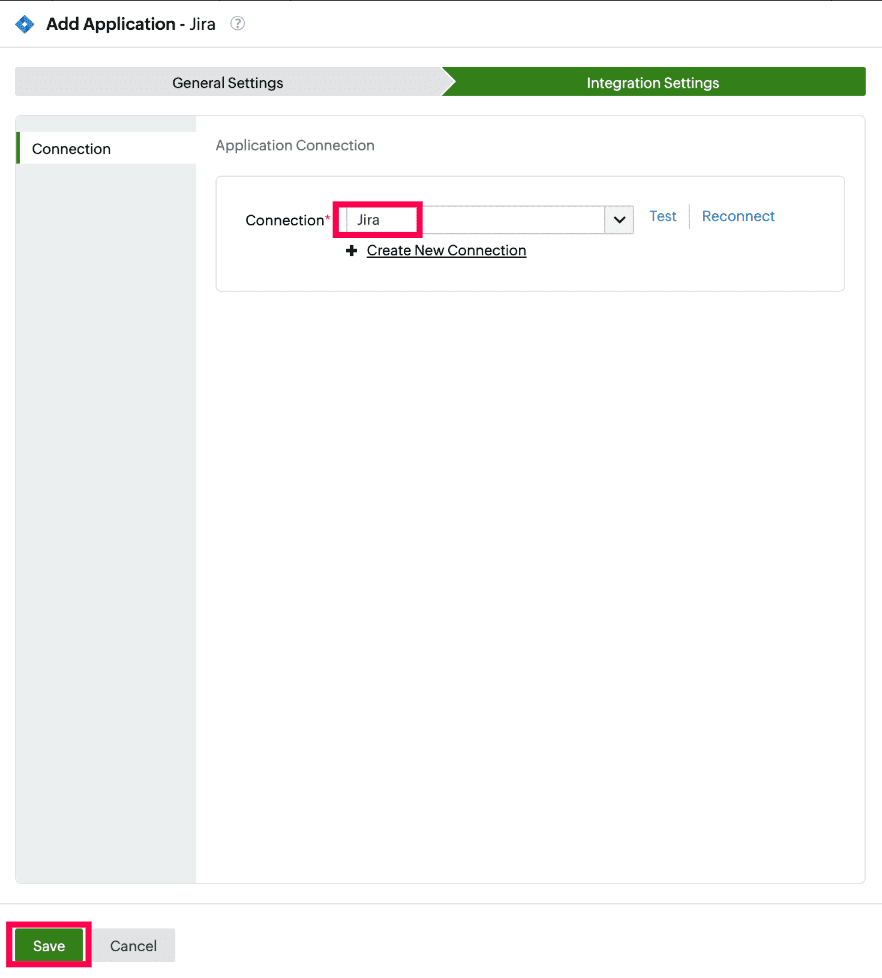
  6. Under the Integration Settings tab, select a suitable Connection from the drop-down. If there are no preconfigured connections, click Create New Connection to set up a new connection.
  7. Click Save to complete configuring Import/Sync, Provisioning, or Access Management for the application.
    Identity360 application configuration integration settings.Integration settings of LCM configuration for Atlassian Jira.

Application connection

An application connection is a link established between Identity360 and Atlassian Jira to automate the process of syncing, creating, updating, and deleting user accounts in Atlassian Jira. This ensures that user accounts and roles are consistently managed and synchronized between Identity360 and Atlassian Jira.
Steps to create a connection with Atlassian Jira

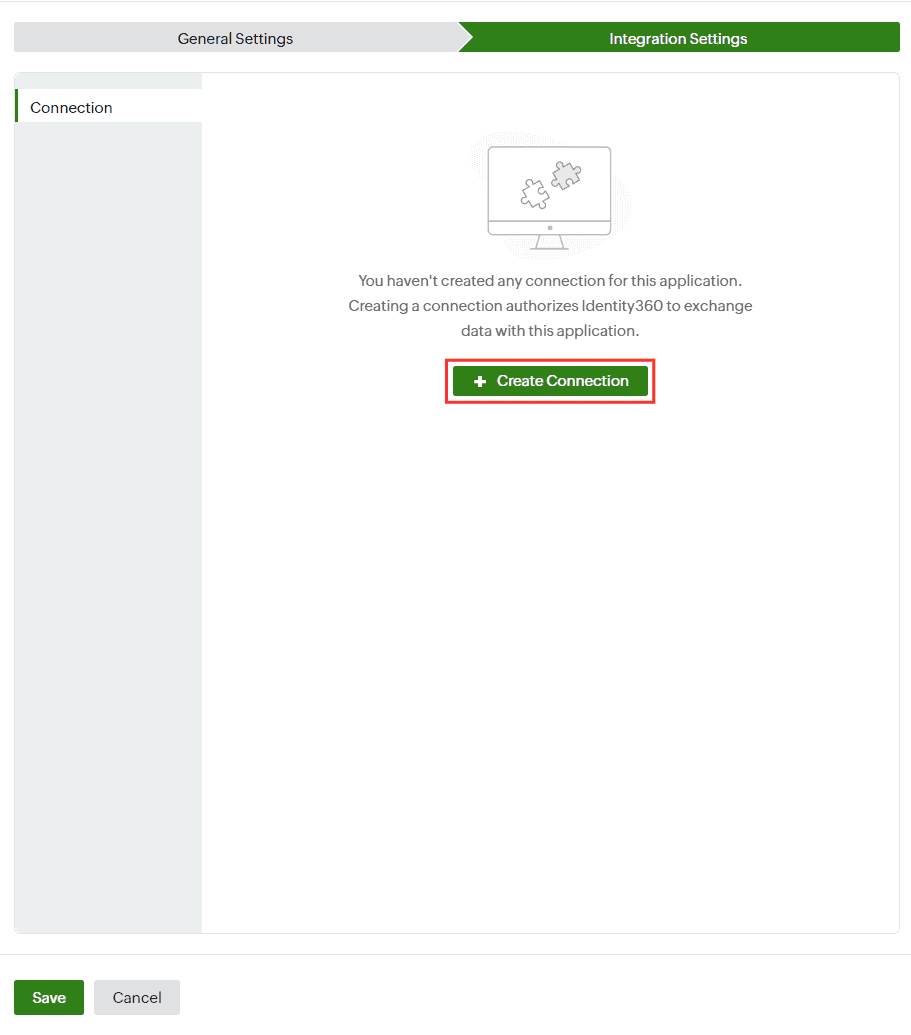
  1. After giving application-specific details, navigate to the Integration Settings tab and click Create Connection.
    Note: Alternatively, you can create and manage application connections by navigating to Applications > Application Connection > Create New Connection, and choosing Jira from the Application drop-down.
    New connection creation for Atlassian Jira.Creating a new application connection for Atlassian Jira.
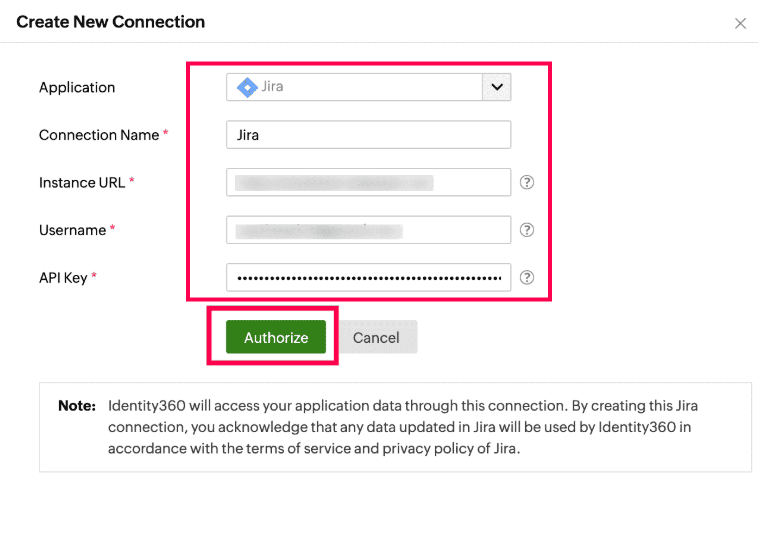
  2. In the Create New Connection pop-up, choose Jira from the drop-down.
  3. Enter the Connection Name.
  4. In the Instance URL field, enter your Jira account URL. For example, if your Jira account URL is https://identity360.atlassian.net, then enter https://identity360.atlassian.net.
  5. In the Username field, enter the user name or email of the admin who logged in during step 1 of the prerequisites.
  6. In the API Key field, paste the API token value copied from step 5 of prerequisites.
  7. Click Authorize. In case of any issues with establishing the connection, refer to the troubleshooting tips.
    Configuring the connection for Atlassian Jira.Configuring the connection for Atlassian Jira.
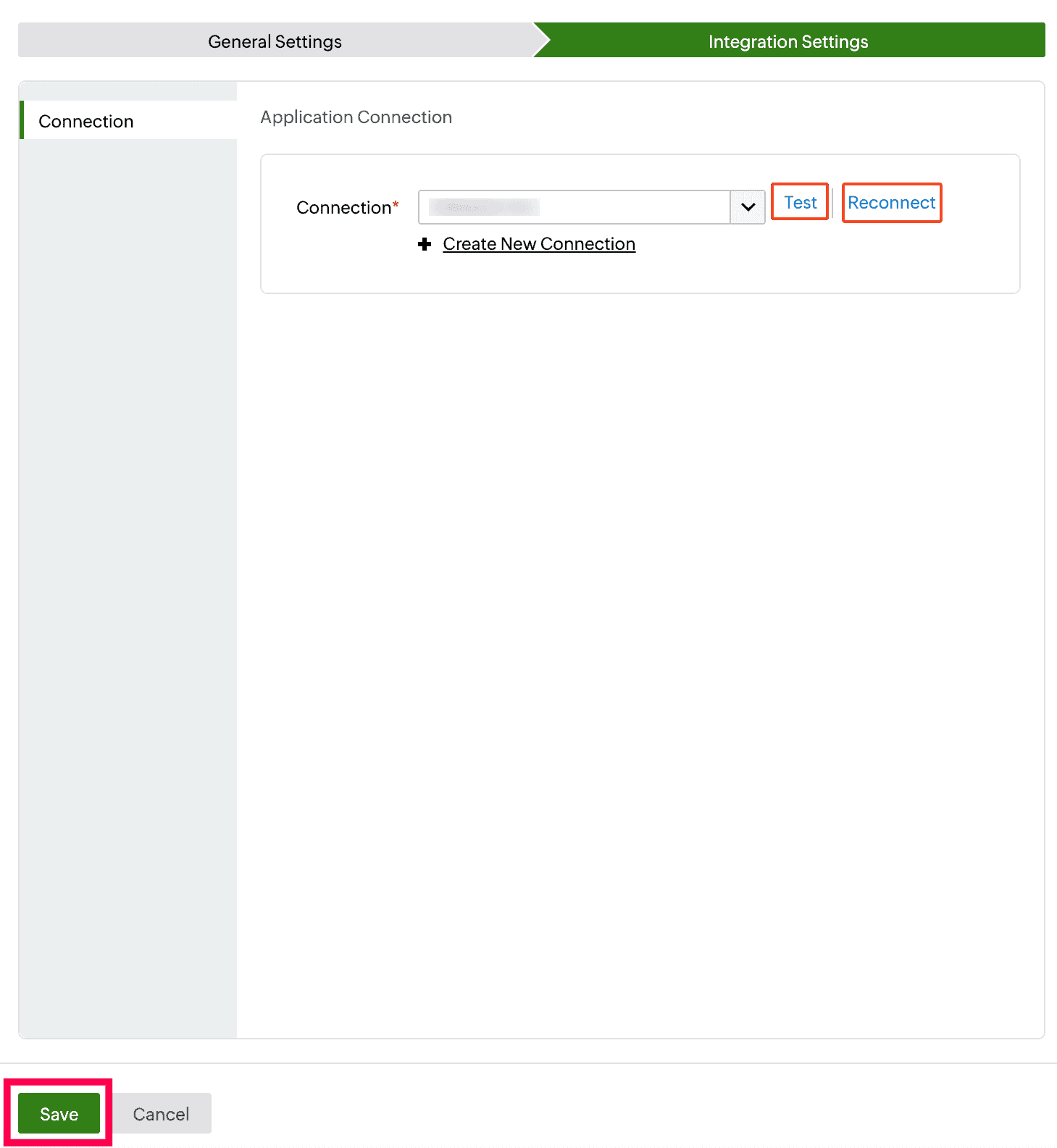
  8. You can test if the connection is active by clicking Test or reestablish the connection by clicking Reconnect.
  9. Click Save to complete the application configuration.
    Connection test for Atlassian JiraTesting the connection to Atlassian Jira.

You have now successfully configured provisioning for Jira, ensuring that user accounts are provisioned and synced to the application automatically.


Don't see what you're looking for?

  •  

    Visit our community  

    Post your questions in the forum.

     
  •  

    Request additional resources  

    Send us your requirements.