- Quick Links
- Highlights
- MFA
- SSO
- Adaptive authentication
- Related Products
- ADManager Plus Active Directory Management & Reporting
- ADAudit Plus Real-time Active Directory Auditing and UBA
- ADSelfService Plus Identity security with adaptive MFA, SSPR, and SSO
- Exchange Reporter Plus Exchange Server Auditing & Reporting
- EventLog Analyzer Real-time Log Analysis & Reporting
- M365 Manager Plus Microsoft 365 Management & Reporting Tool
- DataSecurity Plus File server auditing & data discovery
- RecoveryManager Plus Enterprise backup and recovery tool
- SharePoint Manager Plus SharePoint Reporting and Auditing
- Identity360 A cloud-native identity platform for workforce IAM
- AD360 Integrated Identity & Access Management
- Log360 (On-Premise | Cloud) Comprehensive SIEM and UEBA
- AD Free Tools Active Directory FREE Tools
The need to protect remote access
Remote access is the most targeted attack surface in enterprise environments. Coalition's Cyber Threat Index 2025 states that remote desktop products served as the entry point for 18% of ransomware attacks in 2024. In most organizations, a username and password or an SSH key pair is the only credential protecting RDP sessions, SSH logins, and file transfers over Secure Copy Protocol (SCP) and SSH File Transfer Protocol (SFTP).
Coverage gaps in existing tools compound the problem. Native Linux systems have no MFA capabilities for Linux machines that are not domain-joined. Legacy MFA agents only intercepted GUI-based login flows, leaving SSH, SCP, SFTP, and headless CLI sessions unprotected. VPN MFA Integration secures the network tunnel but not the destination, once a user is on the network, RDP sessions, SSH logins, and file transfers proceed without any further identity challenge.
Zero Trust Network Access requires that every authentication event is verified against identity regardless of network position. Remote access without MFA at the session layer is incompatible with a genuine Zero Trust posture.
MFA for remote access and CLI with Identity Access
ManageEngine Identity Access extends MFA for every remote access session: RDP connections, SSH logins, SCP and SFTP file transfers, and headless CLI sessions, across Windows, Linux, and macOS, from a single unified deployment.
With the solution, for Windows RDP sessions, enforcement is applied through the Remote Desktop Gateway. For Linux and macOS, a native pluggable authentication module (PAM) module intercepts authentication at the OS layer, covering SSH, SCP, SFTP, and headless CLI sessions regardless of whether a display manager is present. Non-domain Linux machines authenticate via RADIUS Authentication Protocol, with no Active Directory domain membership required.
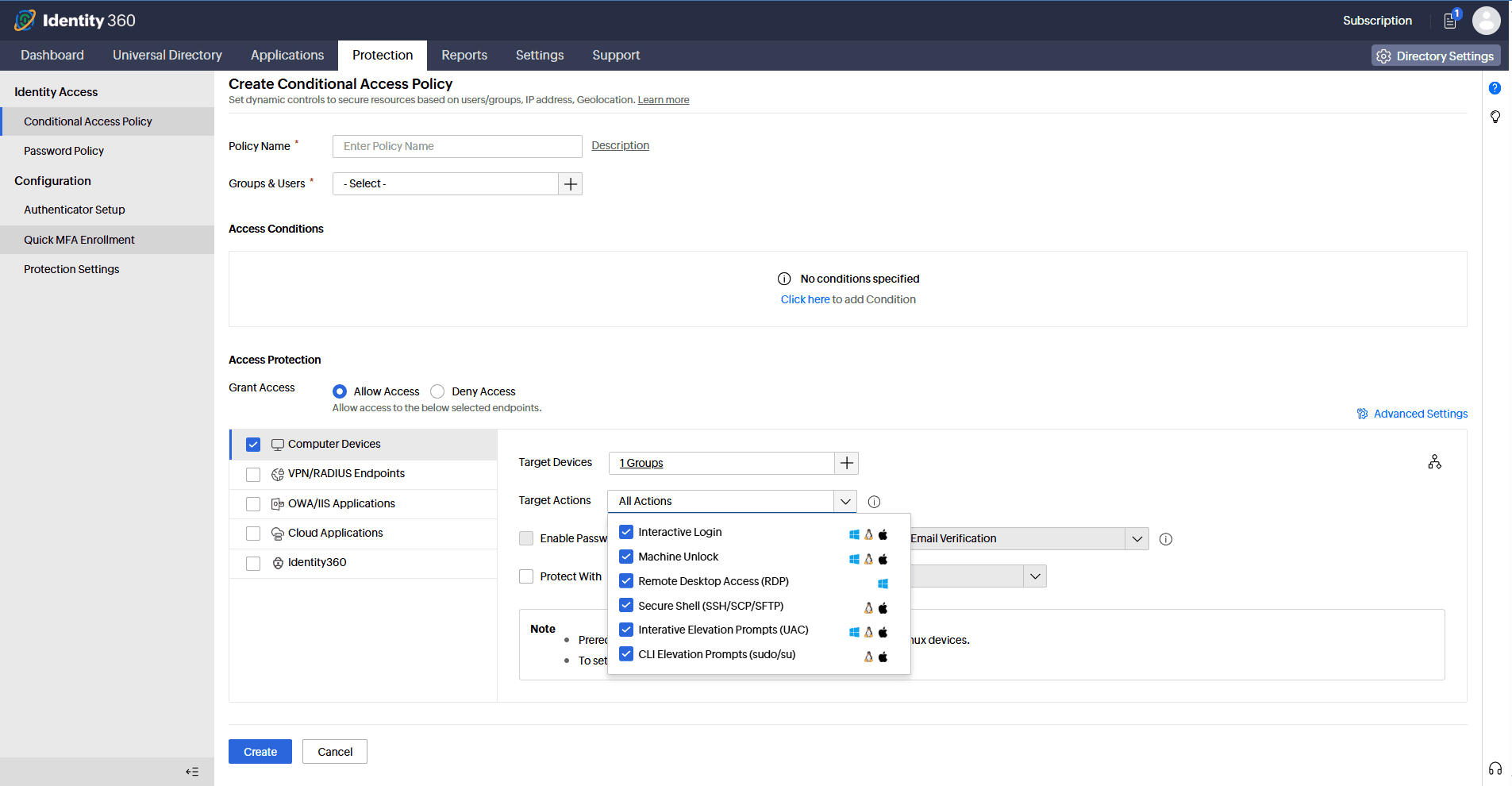
Identity Access' Conditional Access engine evaluates session context, IP address, geolocation, and device type, in real time, applying MFA requirements selectively based on who is connecting, from where, and under what conditions.
How remote access and CLI MFA works
MFA for RDP
Enforce MFA on every inbound RDP session to Windows servers and desktops. The IdSecurity login agent intercepts the authentication request before the session is established, requiring a verified second factor from every connecting user.
Here's the step-by-step MFA flow.
- A user initiates an RDP connection to a Windows server or desktop.
- The IdSecurity login agent installed on the machine intercepts the authentication request before the session is established.
- The agent attempts to contact the IdentityAccess server. If the server is unreachable, Offline MFA applies, the user is challenged using locally cached credentials, ensuring enforcement continues without server availability.
- If the IdentityAccess server is reachable, the agent evaluates the active Conditional Access policy for the connecting user—scoping MFA requirements based on user identity, group membership, device, and IP address.
- If primary credentials are valid and the session falls within a policy that requires MFA, the agent triggers a second-factor authentication challenge.
- The user completes the MFA challenge through their enrolled authenticator.
- Upon successful verification, the RDP session is established.
MFA for SSH, SCP, SFTP, and CLI
Enforce MFA across every Linux and macOS remote access session type:
- Inbound SSH connections covering both password-based and public key authentication.
- SCP and SFTP file transfers treated as independent authentication events
- Headless CLI sessions on servers with no display manager or graphical interface.
Here's the step-by-step MFA flow.
- A user initiates an SSH session, SCP or SFTP file transfer, or headless CLI connection.
- The IdSecurity agent installed on the machine intercepts the authentication request through its native PAM module at the OS layer.
- The agent attempts to contact the IdentityAccess server. If the server is unreachable, Offline MFA applies—the user is challenged using locally cached credentials, ensuring enforcement continues without server availability.
- If the IdentityAccess server is reachable, the agent evaluates the active Conditional Access policy for the connecting user—scoping MFA requirements based on user identity, group membership, device, and IP address.
- If primary credentials are valid and the session falls within a policy that requires MFA, a second-factor authentication challenge is triggered.
- The user completes the MFA challenge through their enrolled authenticator.
- Upon successful verification, the session or file transfer is permitted.
Supported authentication methods
Identity Access provides authenticators for remote access MFA, including:
- FIDO2 authentication
- Biometric authentication
- Hardware TOTP
- Software TOTP
- DUO Security
- Smartcard authentication
- SAML authentication
- SMS verification
- Email verification
- HOTP
Key capabilities of Identity Access' CLI and remote access MFA
- Granular policy configuration
Configure MFA requirements for particular users or groups, and apply stricter authentication to privileged accounts and administrators while standard users follow a separate policy.
- Adaptive authentication
Context-aware MFA challenge logic adjusts verification requirements in real time based on session type, endpoint recognition, user behavior, and risk signals, enforcing step-up authentication for high-risk sessions while reducing friction for routine access, solving MFA fatigue prevention without reducing coverage.
- Offline MFA
Maintain MFA enforcement when the machine cannot reach the Identity Access server, ensuring coverage continues during network interruptions, maintenance windows, and in air-gapped environments.
- Non-domain Linux and macOS support
Enforce consistent MFA policy on machines outside Active Directory, no domain membership required for Linux or macOS endpoints.
- Real-time audit reports
View detailed reports on RDP sessions, SSH logins, SCP and SFTP file transfers, and authentication failures, including login time, authentication method, user identity, and outcome.
Benefits of Identity Access' remote access and CLI MFA
- Prevent credential-based attacks
Stolen RDP passwords and SSH keys are no longer sufficient for unauthorized access, an attacker cannot complete authentication without the enrolled second factor, regardless of how credentials were obtained.
- Enforce Zero Trust at the session layer
MFA is enforced at the point of remote access itself, every RDP, SSH, SCP, and SFTP session, extending the Zero Trust boundary beyond the network perimeter to where access actually occurs.
- Complete the remote access security chain
VPN MFA Integration secures the network tunnel. Identity Access secures the session layer, covering RDP, SSH, and file transfers once a user is on the network.
- Achieve regulatory compliance
Support compliance with authentication requirements across PCI DSS 4.0 (Requirements 8.4.2 and 8.4.3), Cyber Essentials v3.3, NIST SP 800-63B-4, ISO 27001:2022, and SOC 2 Type II—and position for the proposed HIPAA Security Rule update—with every remote session logged against a verified identity.
- Manage all platforms from one console
Enforce consistent MFA policy across Windows RDP, Linux SSH and CLI, and macOS remote sessions, unified reporting and a single enrolment experience for end users, including non-domain machines authenticating via RADIUS Authentication Protocol.
Other features
MFA
Add a second authentication factor to endpoint, application, VPN, OWA, and CLI logins. with authentication factors ranging from FIDO2 security keys to smartcards.
SSO
Give users one-click entry to every cloud application using a single set of credentials.
Passwordless authentication
Replace passwords with FIDO2 security keys and platform biometrics, removing the credential most often phished and replayed.
Conditional access policy
Evaluate every access request against user, device, IP address, geolocation, time, and operating system, then allow, deny, or challenge it accordingly.
Device authentication
Authenticate Windows, macOS, and Linux machines on cloud without Active Directory or Entra ID.
MFA for enterprise apps
Set MFA and access rules for each application on its own terms, so that critical applications carry a stronger challenge and routine ones stay quick.