- Quick Links
- Highlights
- MFA
- SSO
- Adaptive authentication
- Related Products
- ADManager Plus Active Directory Management & Reporting
- ADAudit Plus Real-time Active Directory Auditing and UBA
- ADSelfService Plus Identity security with adaptive MFA, SSPR, and SSO
- Exchange Reporter Plus Exchange Server Auditing & Reporting
- EventLog Analyzer Real-time Log Analysis & Reporting
- M365 Manager Plus Microsoft 365 Management & Reporting Tool
- DataSecurity Plus File server auditing & data discovery
- RecoveryManager Plus Enterprise backup and recovery tool
- SharePoint Manager Plus SharePoint Reporting and Auditing
- Identity360 A cloud-native identity platform for workforce IAM
- AD360 Integrated Identity & Access Management
- Log360 (On-Premise | Cloud) Comprehensive SIEM and UEBA
- AD Free Tools Active Directory FREE Tools
Why VPN credentials alone are no longer enough
A virtual private network gives remote employees, contractors, and partners direct access to your internal network, making it one of the most targeted surfaces in enterprise security. Legacy VPN setups were not designed for today's threat environment. Many still rely on static passwords without any additional verification layer. A single phishing email or credential stuffing attack is all it takes for an attacker to move freely inside your network.
According to Cybersecurity Insiders over 48% of organizations have experienced a VPN-related cyberattack. The NSA and CISA's joint guidance on remote access VPN solutions explicitly directs organizations to configure all VPNs with multi-factor authentication.
Addressing these risks requires setting clear security goals for your VPN infrastructure. Two priorities stand out: password-based attack prevention and phishing-resistant VPN login. Password-based attack prevention ensures that compromised or weak credentials alone cannot grant network access, neutralizing threats like credential stuffing and brute-force attacks. Phishing-resistant VPN login goes further by replacing authentication methods that can be intercepted or spoofed, such as one-time codes sent via SMS, with hardware-bound or cryptographic mechanisms that attackers cannot replicate, even with a stolen password.
Protect VPN access with MFA
ManageEngine Identity Access enables organizations to enforce multi-factor authentication across all RADIUS-compatible VPN infrastructure without replacing existing clients or restructuring the network. Identity Access integrates through an extension installed on a Windows NPS, required for both standard MFA and fully passwordless VPN authentication. From there, organizations can choose to layer MFA on top of Windows primary authentication, or map identities to the Identity Access universal directory and eliminate passwords from the VPN login flow entirely. Conditional Access policies govern exactly how authentication is enforced, scoping MFA requirements by user, group, OU, device posture, IP address, and geolocation, so access decisions are always context-aware rather than uniformly applied.
Every authentication method is managed centrally, applied through policy, and logged, making Identity Access the single control plane for your entire remote access security posture.
Supported VPN clients for MFA
Identity Access supports VPN multi-factor authentication for all RADIUS Protocol-compatible VPN providers, including:
- Cisco AnyConnect
- Cisco IPSec
- Palo Alto GlobalProtect
- Fortinet FortiClient
- Juniper Secure Connect
- SonicWall NetExtender
- SonicWall Global VPN
- Pulse Secure
- Check Point Endpoint Connect
- OpenVPN Access Server
- Windows Native VPN
You can also enable MFA to secure non-VPN RADIUS endpoints such as Citrix Gateway, Microsoft Remote Desktop Gateway, and VMware Horizon View.
The VPN MFA flow with Identity Access
Identity Access provides VPN MFA through RADIUS Protocol integration using a Network Policy Server extension. Identity Access supports two verification modes depending on your VPN client's capabilities and the authenticators you want to enforce.
VPN client verification steps
The MFA challenge is delivered directly within the VPN client during login, supporting challenge-based authenticators like OTP and TOTP. RADIUS endpoints that do not support challenge-response mechanisms cannot be protected using it.
- The user opens their VPN client and submits their Windows username and password.
- The VPN server forwards the authentication request to the NPS where the Identity Access NPS extension is installed.
- Identity Access validates the primary credential against Windows and evaluates the login context through the conditional access policy engine—assessing device posture, geolocation, IP reputation, time of access, and login behavior.
- Based on the Conditional Access policy assigned to the user's OU or group, Identity Access issues a challenge-based MFA prompt directly within the VPN client.
- The user completes the MFA challenge, via software TOTP, email verification, or hardware token.
- Identity Access returns the verified result to the NPS, which signals the VPN server to grant or deny the session.
SecureLink verification steps
A time-limited verification link is delivered to the user's registered email address. This mode supports all authenticators available in Identity Access, including those not supported by VPN Client Verification. The RADIUS client timeout must be configured to at least 60 seconds to allow time for link completion.
- The user opens their VPN client and submits their Windows username and password.
- The VPN server forwards the authentication request to the NPS where the Identity Access NPS extension is installed.
- Identity Access validates the primary credential against Windows and evaluates the login context through the conditional access policy engine.
- Identity Access then sends a SecureLink verification email to the user's registered address.
- The user clicks the link and completes identity verification through their configured authenticator, including FIDO2 Passkeys, Smartcard, Biometric Authentication, or any other supported method.
- Identity Access returns the verified result to the NPS, which signals the VPN server to grant or deny the session.
Passwordless VPN MFA
For organizations ready to eliminate passwords from the VPN login flow entirely, Identity Access supports a fully passwordless model via the NPS extension. User identities are mapped to the Identity Access universal directory, and the VPN login is completed exclusively through passwordless methods, no Windows credential is presented or validated at any point in the flow. Both VPN Client Verification and SecureLink Verification modes are supported under passwordless authentication.
Multi-factor authentication for non-RADIUS VPN via SAML
For VPN clients that do not support the RADIUS Protocol, Identity Access extends multi-factor authentication coverage through SAML-based application MFA. Identity Access acts as the identity provider, authenticating the user and issuing a SAML assertion to the VPN client, enforcing MFA policies, Conditional Access, and reports similar to the RADIUS flow. This enables organizations with mixed VPN environments to enforce consistent multi-factor authentication across both RADIUS and non-RADIUS endpoints through a single platform, without deploying a separate identity solution for each client type.
Supported VPN authentication methods
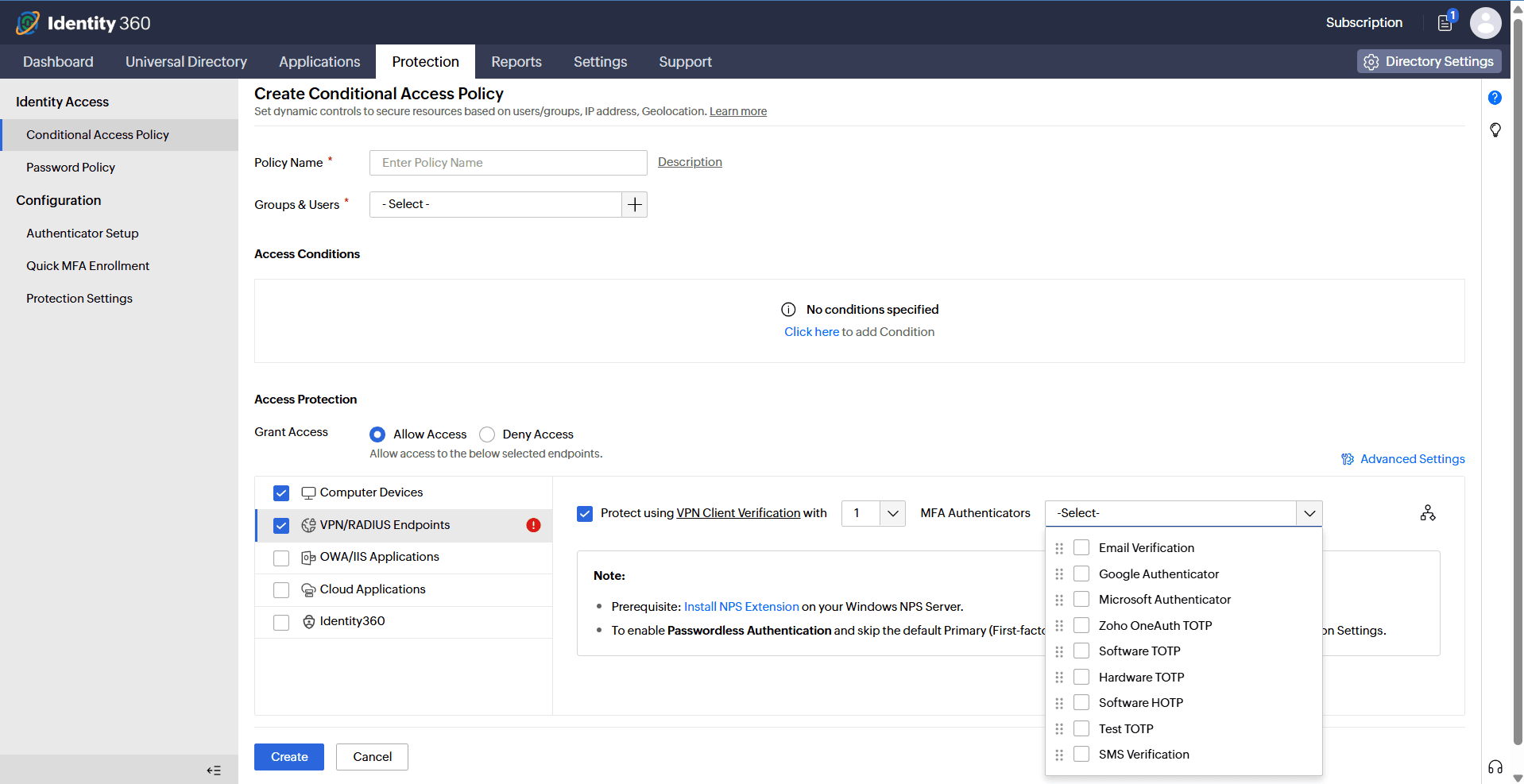
Identity Access supports a diverse lineup of authenticators for VPN MFA, configurable by user, group, domain, or OU using Group-Based Access Policy. Available methods differ slightly between the two authentication models.
Client-based verification
- Email verification
- SMS verification
- Google authenticator
- Microsoft Authenticator
- Zoho OneAuth TOTP
- Custom TOTP Authenticator
SecureLink-based verification
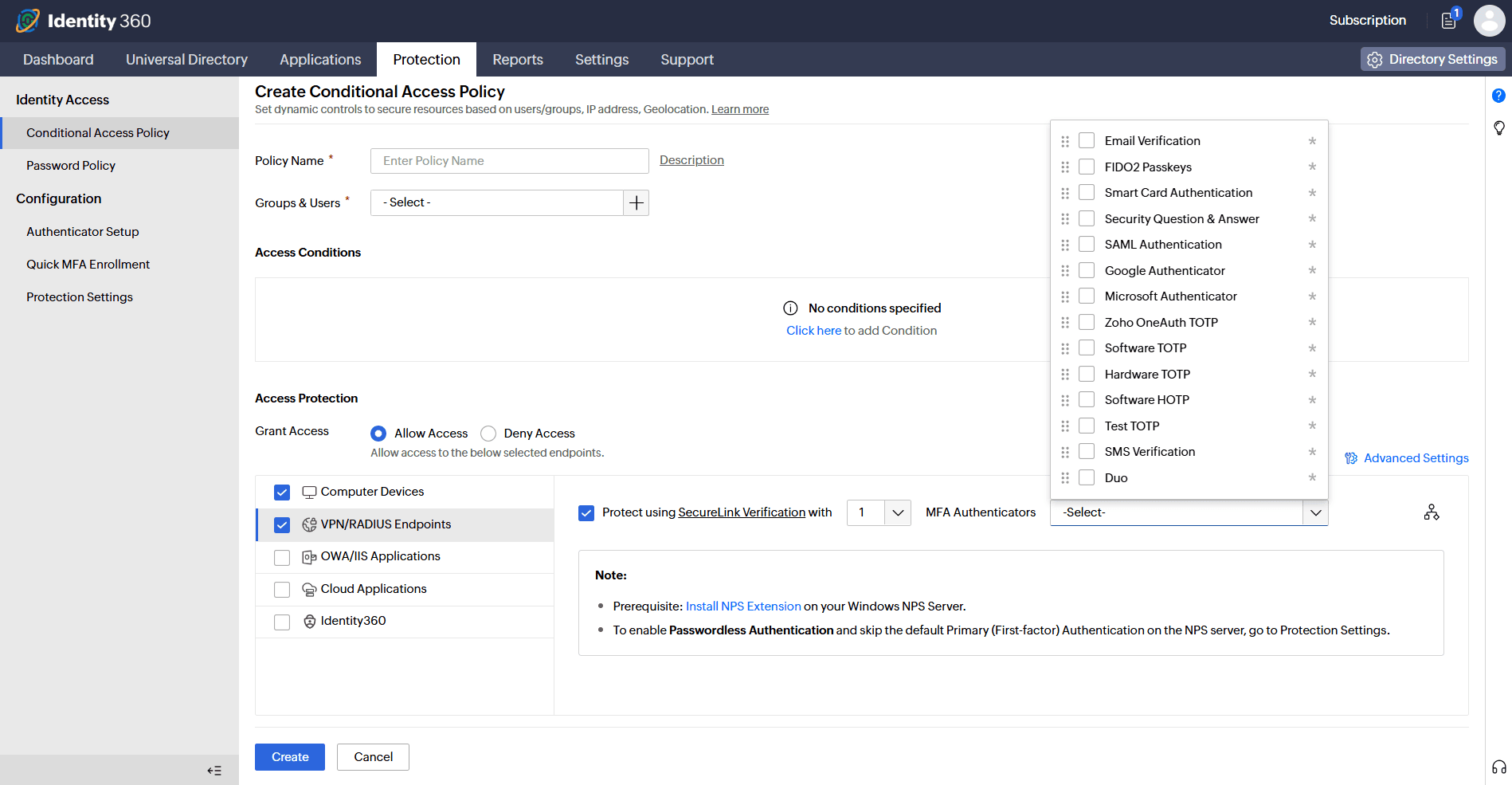
All the methods supported by Identity Access can be applied for SecureLink-based verification. This includes the methods supported by:
- FIDO2 authentication
- Biometric authentication
- Hardware TOTP
- DUO Security
- Smartcard authentication
- SAML authentication
- HOTP
Benefits of VPN MFA with ManageEngine Identity Access
- Eliminate credential-based breaches: Stolen passwords cannot complete a VPN login under either model. With passwordless authentication, there is no password in the flow to steal in the first place.
- Adaptive and low-friction flow: Adaptive authentication reduces unnecessary challenges for low-risk sessions while enforcing stricter controls where risk is elevated, reducing help desk tickets without weakening security posture.
- Works with your existing VPN infrastructure: RADIUS protocol compatibility means no VPN client replacement or network redesign is required. Your existing Cisco, Palo Alto, Fortinet, Juniper, or SonicWall deployment stays in place.
- Choose your identity model: Layer MFA on top of Windows primary authentication today, or transition to fully passwordless VPN access, without changing your VPN infrastructure.
- Granular policy control: Apply different authentication methods and models to different user populations using Group-Based Access Policy scoped by OU, role, domain, or group. Contractors and privileged administrators do not share the same authentication policy.
- Meet regulatory compliance requirements: Built-in reports, enforced MFA, and Conditional Access policies directly satisfy HIPAA, SOC 2, NIST SP 800-63B, NYCRR, FFIEC, the PCI DSS, and the GDPR audit requirements.
Frequently asked questions
Yes. OpenVPN Access Server supports MFA through RADIUS Protocol integration. Identity Access connects to OpenVPN via a Network Policy Server extension, adding a second-factor challenge to every VPN login without modifying the OpenVPN client or replacing any existing infrastructure. Both VPN Client Verification and SecureLink Verification modes are supported, giving administrators full control over which authenticators are enforced for OpenVPN users.
The most commonly cited disadvantage of MFA is added friction at login—users must complete an additional verification step every time they authenticate. This can slow access, increase help desk tickets for lost devices or locked accounts, and create resistance to adoption, particularly among non-technical users. Identity Access addresses this through Conditional Access, which evaluates the risk level of each login attempt in real time and only triggers additional verification when the context warrants it, reducing unnecessary friction for routine, low-risk sessions without compromising security posture.
Enabling MFA for VPN with Identity Access requires three steps:
- Install the Identity Access NPS extension on your Windows Network Policy Server.
- Configure your VPN client to forward authentication requests to the NPS via RADIUS.
- Create a Conditional Access Policy in Identity Access, select VPN/RADIUS Endpoints as the protected resource, choose your verification mode, VPN Client Verification or SecureLink Verification, and assign the authenticators you want enforced for each user group or OU.
Once the policy is active, every VPN login will require the configured second factor before access to the corporate network is granted.
Other features
MFA
Add a second authentication factor to endpoint, application, VPN, OWA, and CLI logins. with authentication factors ranging from FIDO2 security keys to smartcards.
SSO
Give users one-click entry to every cloud application using a single set of credentials.
Passwordless authentication
Replace passwords with FIDO2 security keys and platform biometrics, removing the credential most often phished and replayed.
Conditional access policy
Evaluate every access request against user, device, IP address, geolocation, time, and operating system, then allow, deny, or challenge it accordingly.
Device authentication
Authenticate Windows, macOS, and Linux machines on cloud without Active Directory or Entra ID.
MFA for enterprise apps
Set MFA and access rules for each application on its own terms, so that critical applications carry a stronger challenge and routine ones stay quick.