
Ransomware prevention best practices:
Prevent and respond to ransomware attacks

  •  
     
  • -Select-
By clicking 'Download PDF', you agree to processing of personal data according to the Privacy Policy.

Thank you!

The PDF link has been sent to your email.

We hope you enjoy reading and sharing these best practices.

Ransomware is a sophisticated class of malware that encrypts data and holds it hostage until a ransom is paid. It commonly infiltrates organizations through phishing emails, compromised websites, and malicious extensions. By implementing proactive security measures and establishing a well-structured ransomware detection strategy, organizations can significantly reduce the risk of falling victim to these extortion-driven cyberattacks. The following best practices outline effective strategies for preventing ransomware infections and ensuring a swift and effective response in the event of an attack.

Best practices to protect against ransomware attacks

     
  • Prevention plan
  • Response plan
 

Back up your files

  • Follow the 3-2-1 backup rule:
    • Keep three copies of data.
    • Use two different storage types.
    • Maintain at least one offsite or cloud backup.
  • Automate regular backups.
  • Periodically test backup restoration.
 

Patch vulnerabilities

  • Regularly update operating systems, browsers, and antivirus software.
  • Apply security patches for all applications and third-party tools.
  • Enable automatic updates wherever possible.
  • Keep track of vendor advisories for newly disclosed vulnerabilities.
 

Employ email filtering

  • Block malicious attachments, executables, and phishing emails.
  • Scan links and attachments for malicious content.
  • Continuously monitor inbound email traffic for anomalies.
 

Provide least-privilege access

  • Grant users only permissions required for their roles.
  • Limit administrative privileges and privileged account usage.
  • Implement role-based access control and enforce strong authentication protocol.
  • Regularly review and manage unnecessary or inactive accounts.
 

Educate end users

  • Train employees to recognize phishing and social engineering attacks.
  • Train users to follow best practices for handling email attachments safely.
  • Encourage secure browsing and download practices.
 

Employ an intrusion detection system

  • Cut off ransomware attacks in their early stages with continuous monitoring.
  • Deploy ransomware detection systems that can detect anomalous behavior quickly.
  • Generate real-time alerts for security incidents.
 

Logically separate networks

  • Segment networks into isolated zones based on function and risk.
  • Separate critical systems from user networks.
  • Restrict lateral movement between network segments.
 

Respond effectively after a ransomware attack

Response plan
 

Disable infected systems

  • Immediately isolate infected systems from the network.
  • Disconnect compromised systems to prevent lateral movement.
  • Block access to shared drives and network resources.
  • Preserve affected systems for forensic investigation.
 

Report the attack

  • Notify internal security teams, including:
    • Incident response team
    • Legal counsel
    • Shareholders
  • Notify external parties such as:
    • Law enforcement
    • Compliance agencies
 

Assess patient zero

  • Identify the initial compromised account or device.
  • Review login activity and access logs of all associated accounts.
  • Revoke or suspend affected user privileges in the interim.
 

Identify the ransomware variant

  • Examine file extensions added to encrypted files.
  • Analyze the ransom note left by the attackers.
  • Review encryption patterns and malware signatures.
  • Use threat intelligence databases to confirm the variant.
 

Restore backups and recover data

  • Use verified, offsite backups to restore affected systems.
  • Prioritize recovery of critical systems and data.
  • Monitor restored systems for reinfection.
 

Identify the root cause

  • Perform forensic investigation to trace the attack entry point.
  • Identify exploited vulnerabilities or misconfigurations.
  • Implement remediation to prevent future attacks.
 

Temporarily pause maintenance tasks

  • Disable automated cleanup and maintenance processes.
  • Preserve logs, temporary files, and system artifacts.
  • Avoid updates or changes that may overwrite evidence.
  • Resume maintenance only after investigation concludes.
 

Create a prevention and response checklist

View checklist

Defending against ransomware attacks with DataSecurity Plus

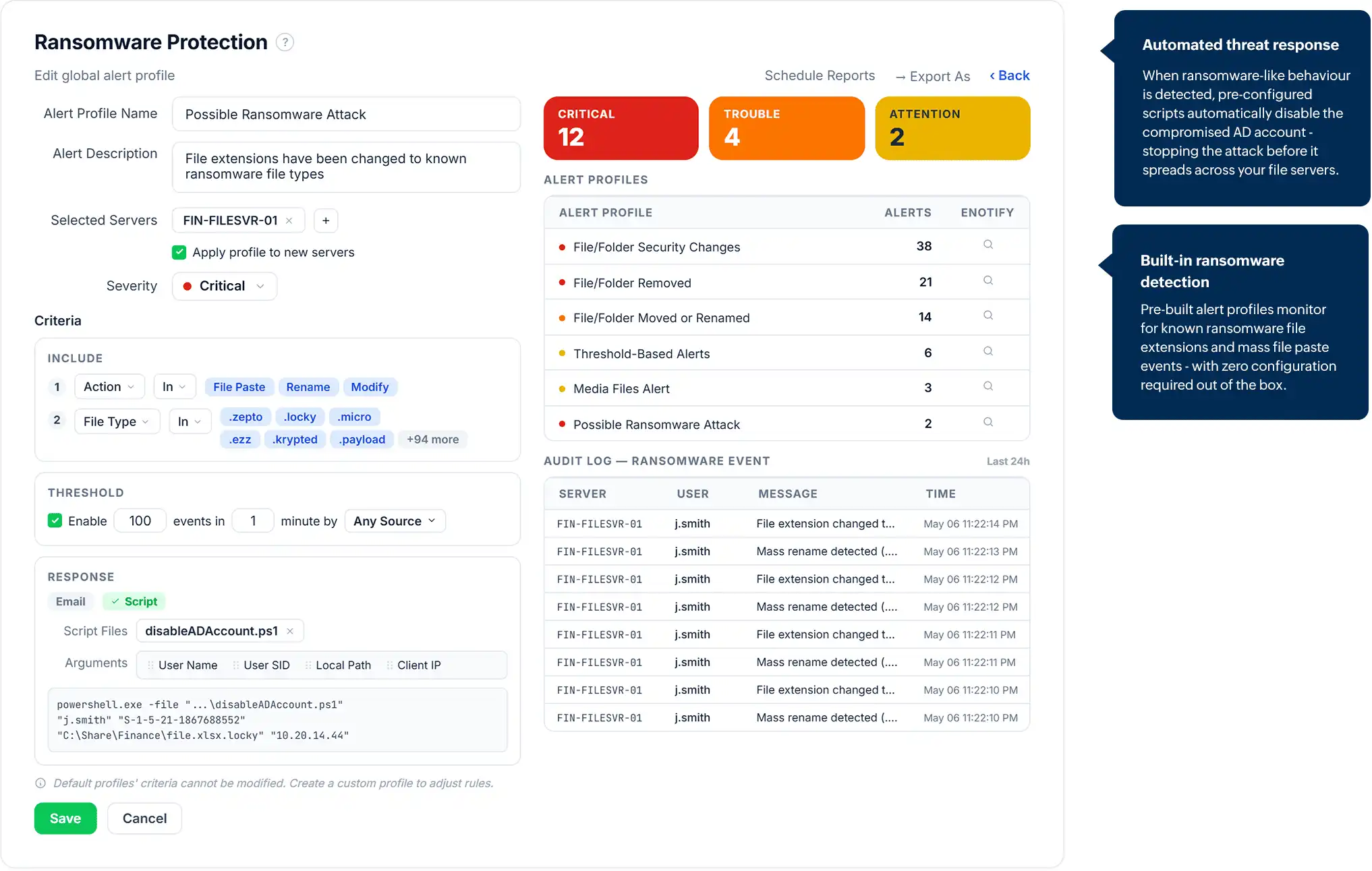
ManageEngine DataSecurity Plus is a unified data security posture management platform that helps secure your data across network servers, endpoint devices, and the cloud. With DataSecurity Plus, you can identify ransomware signatures and suspicious behaviors early on. Learn more about DataSecurity Plus' automated ransomware response mechanism.

Detect rapid file modifications to identify potential ransomware activity

Frequently asked questions

Ransomware is a type of malware that encrypts files or locks systems and demands payment for their release. Attackers typically infiltrate systems through phishing emails, malicious downloads, or exploited vulnerabilities. Once inside, they encrypt files or threaten to leak stolen data unless a ransom is paid.

Most ransomware infections begin through phishing emails, malicious attachments, compromised websites, or exposed services like RDP. Attackers trick users into executing malware or exploit unpatched systems to gain access to the network.

Early detection usually relies on monitoring abnormal file activity, such as rapid file modifications, mass file renaming, or sudden extension changes. Security monitoring tools can identify these suspicious behaviors and trigger alerts before widespread encryption occurs.

The first step is containment. Disconnect infected systems from the network to stop the spread. Organizations should then investigate the source of the attack, restore data from backups, and follow their incident response plan.

Paying a ransom is risky and generally discouraged. There is no guarantee attackers will provide a working decryption key, and even if they do, files may still be corrupted or only partially restored.

Get DataSecurity Plus easily
installed, configured and running within minutes.

Download Now  
Email Download Link