Eliminate blind spots in your cloud activity with
ManageEngine DataSecurity Plus

  • Cloud app discovery
  • Shadow IT management
  • Advanced URL filtering
  • Cloud access control
  • Upload and download control

Cloud app discovery eliminates blind spots

  • Track every cloud application accessed—including successful and failed requests—across networks, endpoints, browsers, and remote environments, while gaining deep visibility into your organization’s encrypted web traffic.
  • Analyze outbound traffic patterns, HTTP(S) requests, headers, user agents, device attributes, and sensitive data identifiers to accurately determine which apps and services employees are interacting with and how.
  • Assesses the cloud app’s security posture, categorizes it by function (e.g., storage, GenAI, government sites, search engines, communications), scores its risk level, and highlights usage trends.
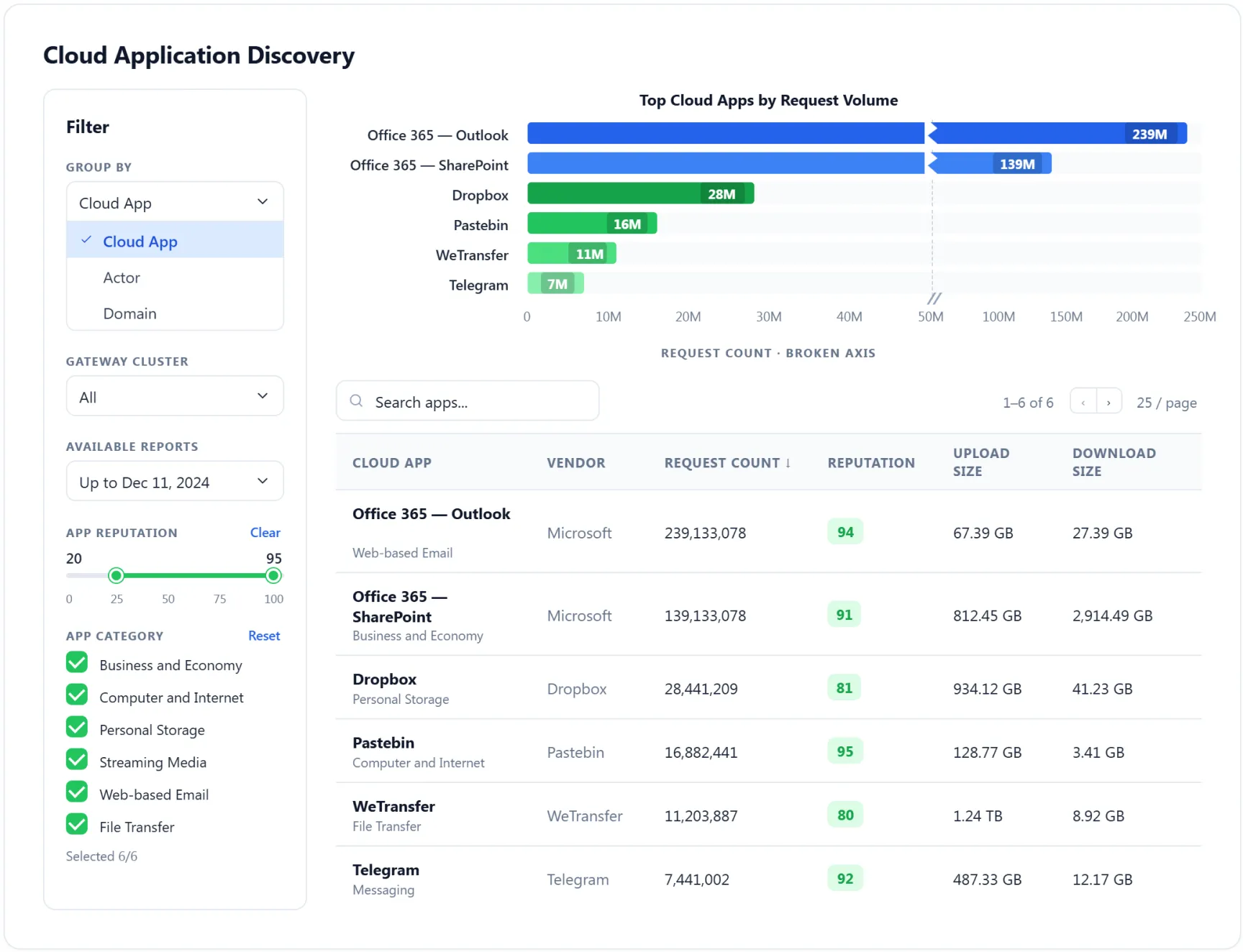
  • Use our interactive dashboards to group and scrutinize cloud activity by cloud app, actor, or domain, with granular filters for gateway clusters, reputation ranges, app categories, and precise time windows (day, week, all time).
Learn more about cloud app discovery

Shadow IT management reveals unmanaged SaaS usage

  • Discover and assess every unsanctioned cloud application in use within your organization, which typically includes personal storage apps, consumer-grade productivity tools, vetted AI platforms, external collaboration systems, and niche SaaS products.
  • Use detailed telemetry graphs—covering upload and download volume, request counts, access frequency, and identity-level patterns—to determine whether a cloud app should be blocklisted or allowlisted.
  • Manage the cloud app status instantly—sanctioned, shadow, or banned—on a per-app or bulk basis, while monitoring key metrics such as reputation score, request count, domain, vendor, and first/last access time.
  • Use our curated list of globally suggested to block high-risk domains, or select from recently accessed sites flagged by reputation scores.

Advanced URL filtering controls cloud interactions

  • Block unsafe or unapproved cloud access and prevent accidental data leakage, by creating URL filtering policies that reflect real-world usage patterns and security requirements.
  • Choose from over 25 predefined URL filtering policies that blocks common social media sites (e.g., Facebook, Instagarm, LinkedIn, Snapchat), Google AD services, messaging services (e.g., Whatsapp, Telegram, Discord), video streaming services (e.g., Netflix, YouTube, Amazon Prime, Hulu), and more.
  • Mitigate malware and phishing risks by blocking requests to malicious or low-reputation domains such as VPN websites, anonymizers, malware sites, hacking, spyware, adware, key-loggers, etc.
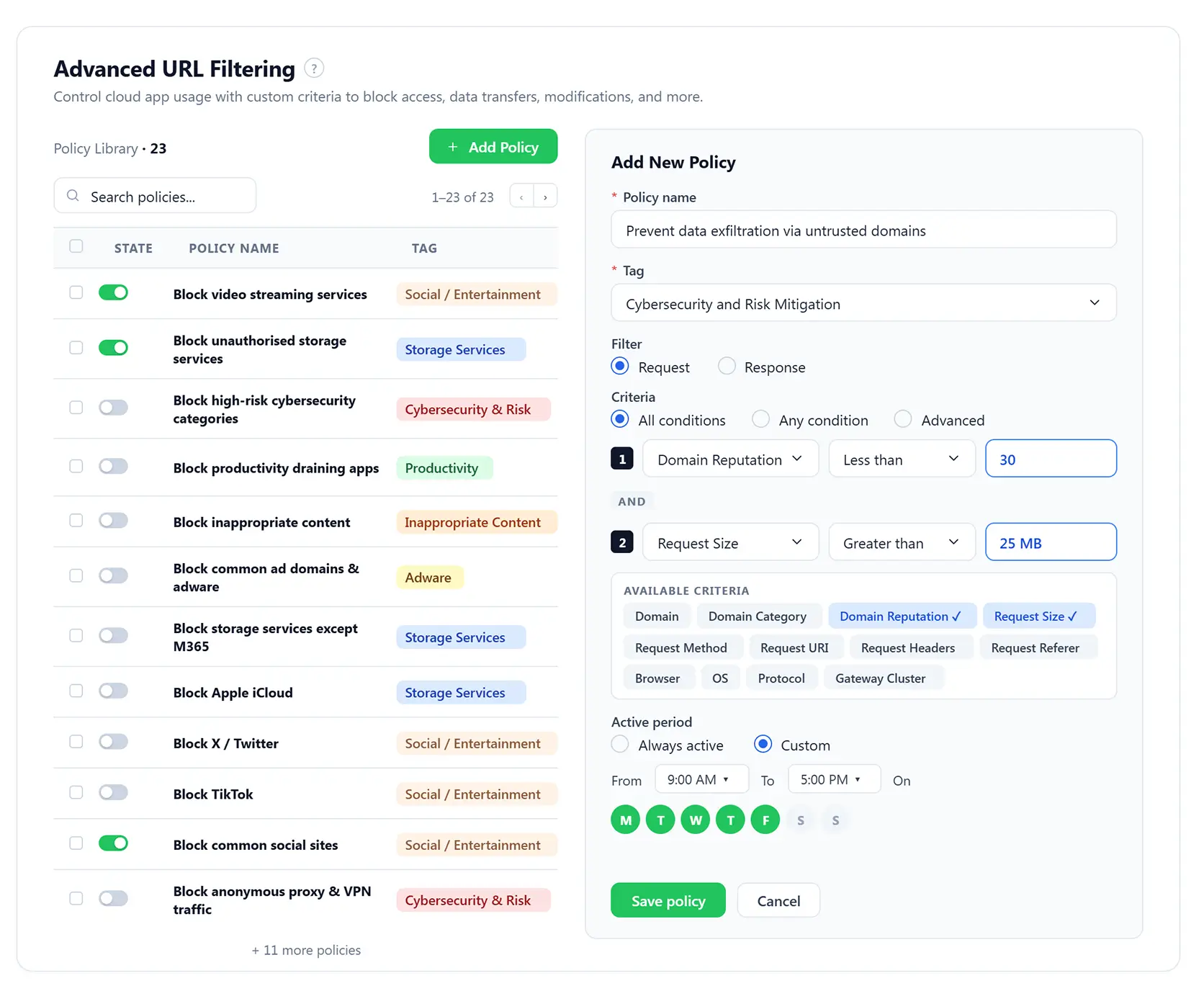
  • Create personalized highly granular, context-aware cloud interaction policies that secure cloud assets by applying multiple, configurable filters—spanning domains, request URIs, headers, response codes, categories, reputation scores, browsers, OS, request/response size, etc.

Cloud access control sets boundaries for cloud access

  • Enforce policies that regulates cloud usage, like which device can access which cloud apps, at what time, under what risk conditions, and exactly what actions they can perform.
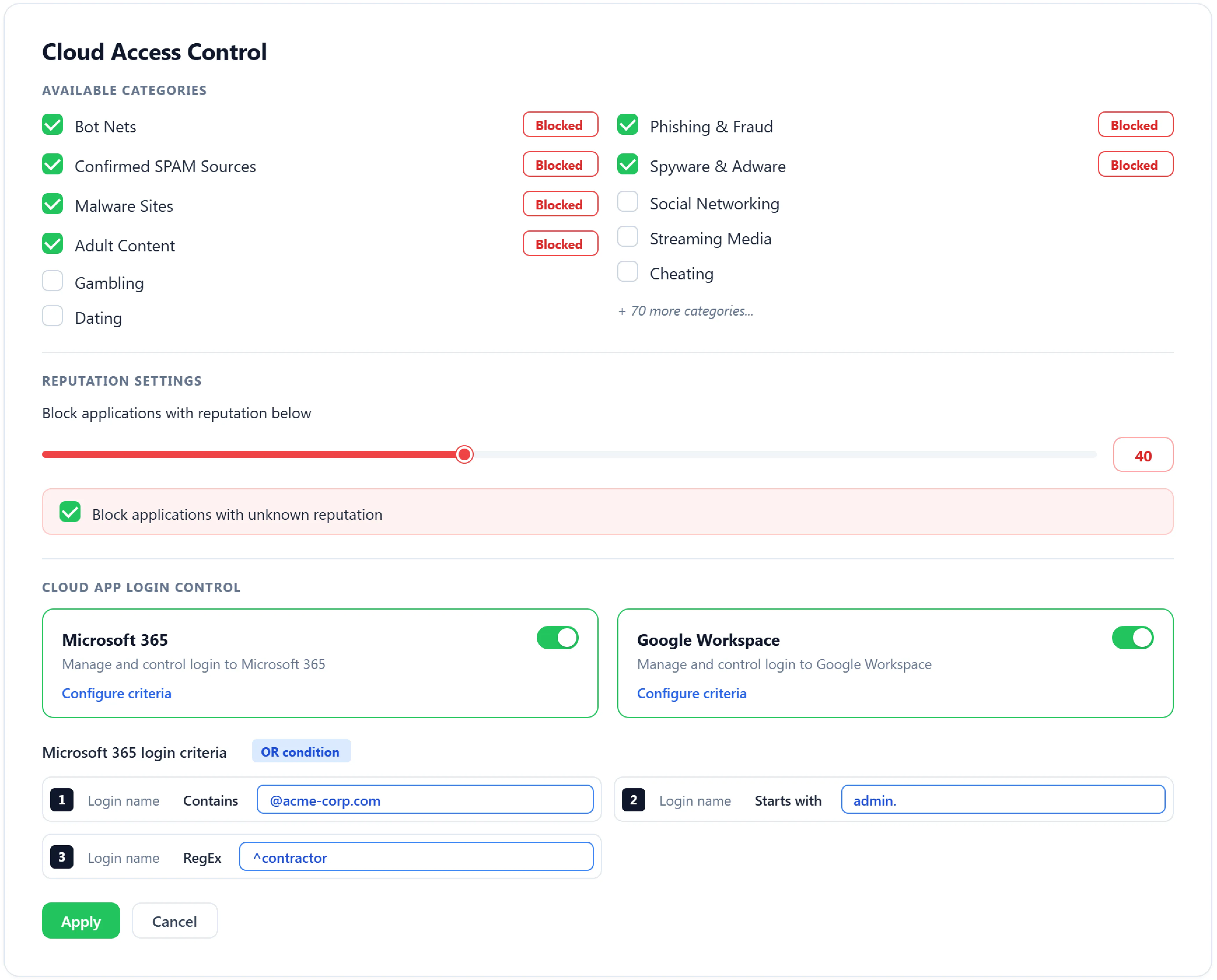
  • Ensure that only preapproved, trusted legitimate identities can access cloud suites like Google Workspace and Microsoft 365 by blocking unrecognized or non-corporate accounts, suspicious domains, personal logins, or risky regex-matched login patterns.
  • Define cloud access rules based on user roles (HR, Finance, IT) or attributes (department, device type) by mapping gateway servers and clusters to organizational units (OUs) that inherently represent these roles and attributes.
  • Apply precise, action-level restrictions within select cloud applications by controlling high-risk operations such as file uploads, downloads, sharing, copy/paste, edits, and deletions.
Learn more about cloud access control

Upload and download control regulates cloud file transfer

  • Prevent accidental or intentional leaks of business-critical data by tracking, filtering, and controlling all inbound and outbound file transfers.
  • Define and deploy custom upload and download control policies at multiple levels—including file size thresholds, file types, cloud app categories, user roles, devices, operating systems, browsers, and network gateways.
  • Create strong download restriction policies that prevent employees from retrieving risky data from untrusted, low-reputed, or malicious domains. Create policies to block downloads of large files, compressed archives, scripts, executables, HTTP transfers, and other high-risk content.
  • All actions—including attempted file download and upload violations—are logged and reported through detailed dashboards, giving security teams actionable insights into data flows and cloud app usage patterns.

Enforce precision level cloud control with ManageEngine DataSecurity Plus

A unified cloud security platform reduces attack surface, prevents data leakage, governs shadow risks, protects cloud applications from abuse, and secures hybrid workforces—all from one place.
Cloud app discovery dashboard
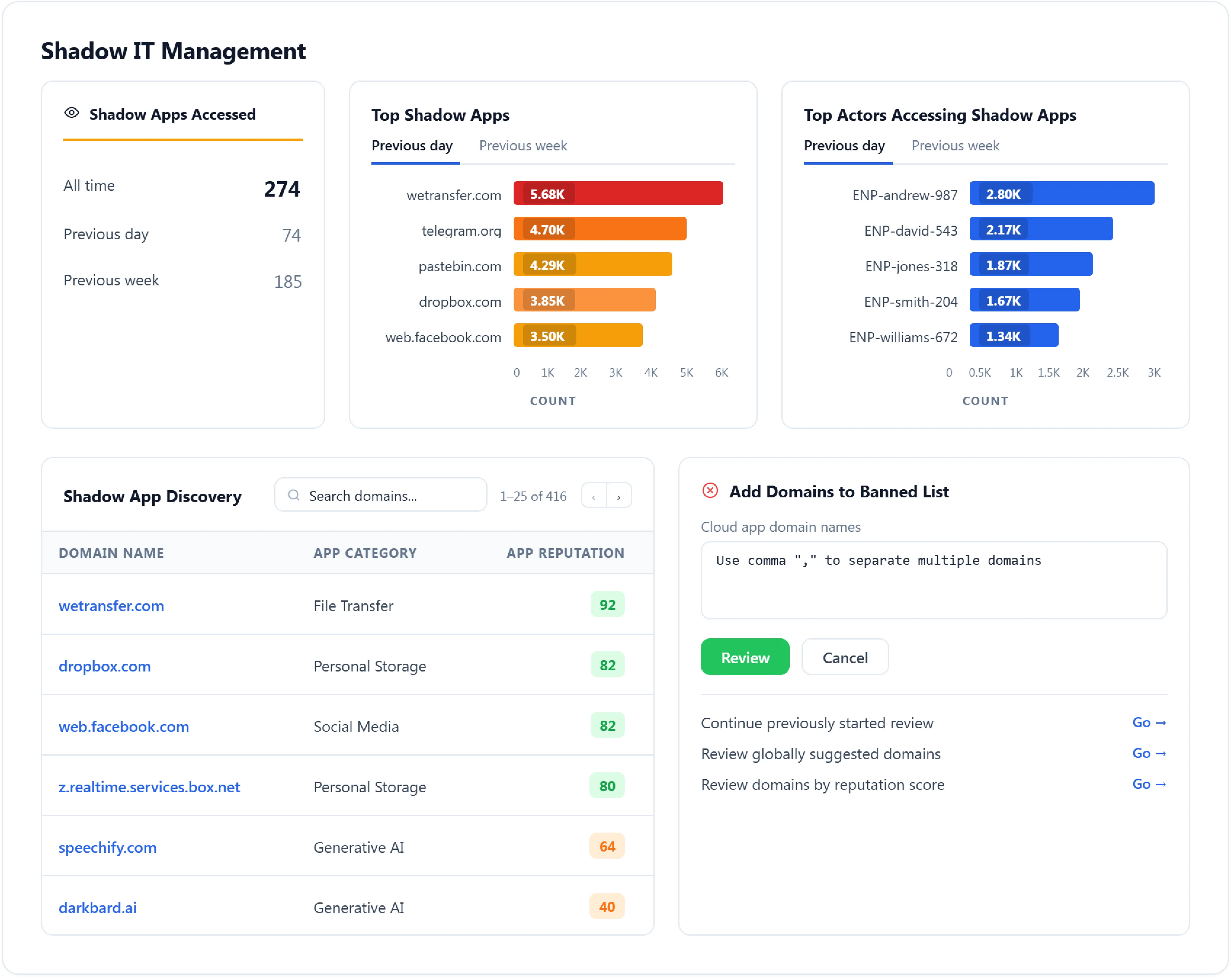
Shadow IT management dashboard
Advanced URL filtering dashboard
Cloud access control dashboard
Upload and download control dashboard

Use our intuitive dashboard that to adjust the app-reputation slider to spotlight low-trust, risky services and analyze usage patterns across any time frame.

App category selectors allow segmentation of traffic across business, personal storage, streaming, email, and more—helping you distinguish productivity-related activity from shadow IT.

Analyze shadow-app usage trends, highlight top shadow apps, and identify the main actors accessing shadow or banned apps.

Reclassify shadow apps discovered as sanctioned or banned to strengthen oversight and immediately dictate which services stay, and which are blocked.

Reduce risk exposure by blocking unsafe domains, suspicious referrers, malicious payload types, and abnormal request patterns using intelligent filtering criteria tuned to modern attack vectors.

Employ logical operands (AND,OR) enable the platform to evaluate multiple conditions together, such as domain reputation AND file size OR request method, reducing false positives drastically.

Use over 80 predefined cloud app categories to apply precise controls, and automatically block applications that fall below your custom reputation threshold, or those with unknown or unverified trust levels.

Set up login controls for Microsoft 365 and G Suite to block suspicious credentials automatically, preventing unauthorized access and reducing identity-based risks.

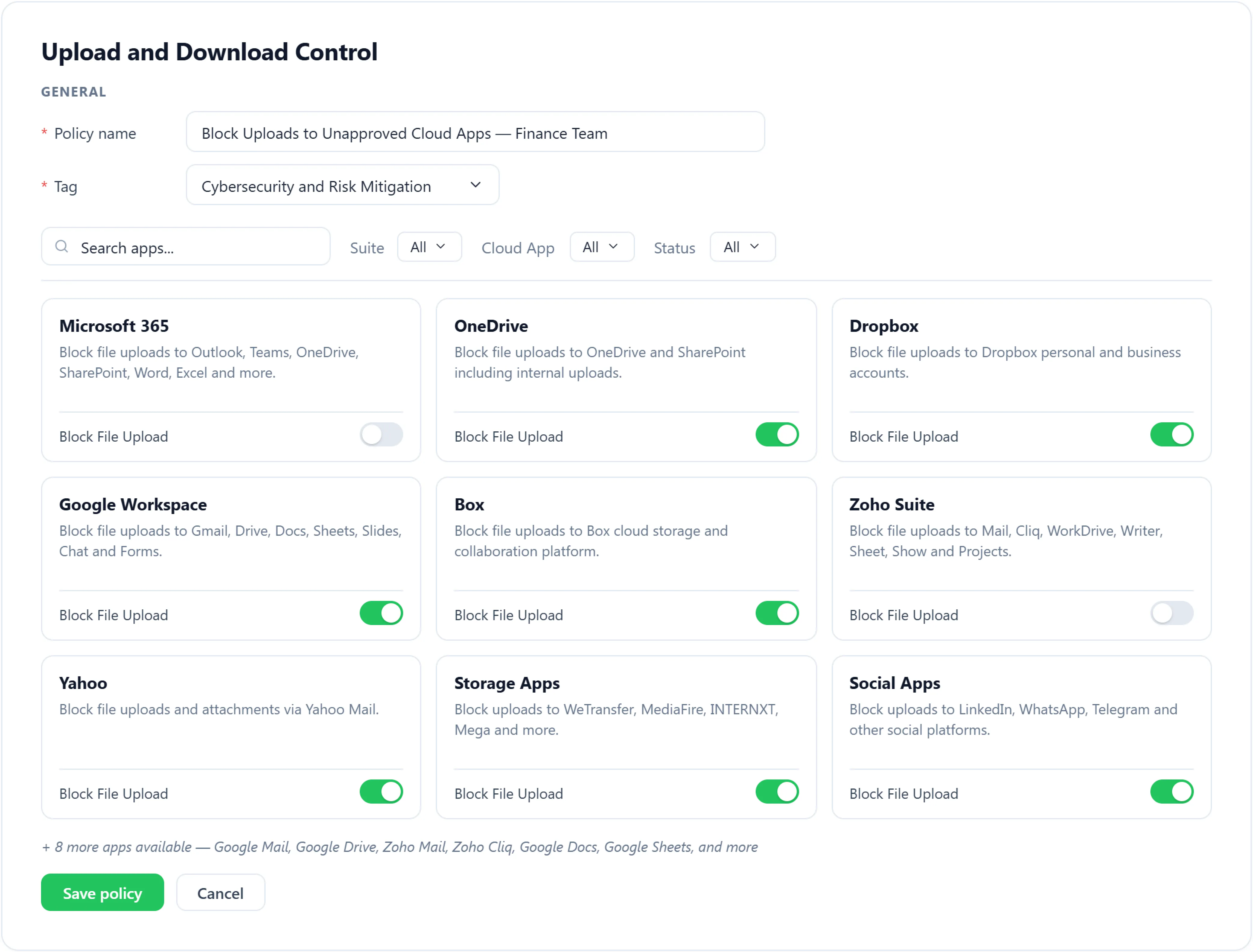
Create granular upload control policies to stop risky file uploads across major cloud suites and apps: Microsoft 365, G Suite, Zoho, Dropbox, Box, Yahoo, and social/storage apps.

Track policy violations by monitoring every attempt to bypass upload, download, or login controls, flag repeat offenders, and uncover hidden risk patterns to strengthen cloud security proactively.

Experience full spectrum cloud visibility with ManageEngine DataSecurity Plus

Top uses for cloud protection are:

Prevent data leakage

  • Stop emails containing files tagged as Sensitive or Restricted from leaving corporate domains.
  • Block access to risky APIs that can extract corporate data.
  • Restrict downloads of intellectual property stored in sensitive folders or shared drives.
  • Prevent employees from sharing links for sensitive shared drives across specific public cloud platforms (Dropbox, Box, etc).
  • Stop and flag attempts to move business-critical data to non-sanctioned cloud apps (All non-safelisted apps).

Reduce risk from shadow IT

  • Restrict interactions with unapproved SaaS apps, like users uploading files to iCloud Drive, Mega, MediaFire, or Sync.com.
  • Block unvetted app usage, such as access to free PDF converters, unverified file-sharing sites, or personal AI tools.
  • Analyze usage pattern and categorize unmanaged SaaS apps as Shadow, Sanctioned, or Banned.
  • Uncover compliance risks when unsanctioned apps begin handling corporate data.
  • Track and notify IT teams of suspicious app adoption trends.
  • Review recently accessed domains and block risky sites, like phishing or malware-hosting domains.

Boost employee productivity

  • Block use of high-distraction apps like YouTube, Instagram, Facebook, and TikTok during work hours.
  • Reduce bandwidth consumption by restricting streaming and gaming traffic on platforms such as Netflix, Spotify, Steam, Epic, and Riot Games.
  • Limit or restrict large personal cloud storage uploads or downloads.
  • Prioritize access to business-critical SaaS while restricting non-essential apps such as Twitch, Pinterest, and Discord.
  • Flag habitual use of shadow and banned apps and educate them about safe cloud practices.

Secure against phishing, malware, and internet threats

  • Block access to low-reputed and malicious domains—such as phishing and malware-hosting sites.
  • Restrict downloads of risky file types—like .exe, .js, .zip, .bat, etc.,—to prevent malware intrusions.
  • Restrict access to proxy services—like Tor, VPN-based web proxies, and public anonymizers like Hide.me or KProxy—to prevent bypassing cloud security controls.
  • Use device- and browser-specific policies to block risky actions on vulnerable browsers (e.g., Chrome or Edge).
  • Block unexpected API calls from internal apps to unknown cloud services.

Enforce Zero Trust policy and improve compliance

  • Perform contextual evaluation of every login and cloud interaction based on device posture, time of access, network, and risk signals.
  • Restrict cloud access from unmanaged, non-compliant, or high-risk devices.
  • Limit application permissions by department or project group through gateway cluster–based segmentation.
  • Block access for accounts using personal credentials or attempting logins outside approved business hours.
  • Generate audit-ready reports capturing cloud usage, access attempts, and policy violations.

Optimize cloud usage and reduce SaaS overspending

  • Identify duplicate SaaS subscriptions for video conferencing apps (Zoom, Webex, Google Meet), design platforms, and collaboration tools.
  • Control cloud access from BYOD devices, outdated operating systems, from personal devices, etc.
  • Identify unused or underutilized cloud applications and decommission them.
  • Track data transfer trends and per-app activity levels closely to optimize cloud usage and prevent shadow IT sprawl.
  • Use URL lookup to inspect a domain’s reputation, risk score, category, and other security attributes before allowing or restricting access.
 

Get a personalized quote for cloud protection*

Your requirements
Annual plans starting at
$345 for 100 workstations
Send me the quote to
 
  I'm from
By clicking 'Get Personalized quote' you agree to processing of personal data according to the Privacy Policy.

Thanks! One of our solution experts will get in touch with you shortly.

*Cloud protection is a free add-on to the data leak prevention solution. Learn about its features here.

Supported platform

Cloud applications:

  • Office productivity suites: Microsoft 365 (OneDrive, SharePoint, Exchange Online, Teams, etc.), Google Workspace (Gmail, Docs, Drive, etc.), Zoho (WorkDrive, Mail, Cliq, etc.), Yahoo, Salesforce, Slack, etc.
  • File storage and transfer services: Box, Dropbox, WeTransfer, MediaFire, Amazon, ShareFile, Hightail, etc.
  • Social and communication: LinkedIn, WhatsApp, Discord, Instagram, Facebook, etc.

Network protocols:

  • HTTP and HTTPS

Browsers:

  • Chrome, Firefox, Microsoft Edge, Internet Explorer, Safari, and all others that support proxy settings

Operating systems:

  • Windows, macOS, iOS, Android, and Linux

Deployment modes

  • Forward proxy

Other solutions offered by DataSecurity Plus


Data leak prevention

Detect, disrupt, and prevent sensitive data leaks via endpoints, i.e., USBs and email.

Learn More  
 

Data risk assessment

Analyze file content and context, and classify files based on vulnerability.

Learn More  
 

File analysis

Analyze files and identify unneeded data to declutter storage space.

Learn More  
 

File server auditing

Monitor, analyze, and report on all file server accesses and modifications.

Learn More  
 

Cloud protection

Track your organization's web traffic, and block malicious web applications

Learn More  
 

View all solutions

Check out the various solutions offered by DataSecurity Plus

Learn More  

Frequently asked questions

Cloud protection refers to the security controls organizations use to protect cloud application usage and services from unauthorized access, data exposure, and malicious activity. It encompasses access control, data flow protection, threat detection, and policy enforcement across cloud environments.

Cloud protection is critical because modern organizations rely heavily on cloud services for daily operations, collaboration, and data storage. Without effective cloud protection, businesses face increased risk of breaches, compliance violations, and disruptions.

Using dedicated solutions like tools such as cloud access security brokers (CASBs), that analyze network traffic, authentication events, data transfers, and API integrations to discover both sanctioned and unsanctioned cloud applications.

This insight allows the SOC teams to understand cloud app usage patterns, data flows, and potential risk exposure.

Listed below are some of the most significant cloud security risks frequently overlooked:

  • Lack of visibility into shadow IT and third-party integrations
  • Over-permissive access and identity sprawl
  • Insufficient monitoring of user sessions
  • Lack of risk based content and URL control
  • Data oversharing and weak controls over sensitive file movement
  • Inadequate protection against phishing and other online security threats
  • Lack of consistent policy enforcement

This decision on how to segment a cloud app is typically driven by a risk-based framework that evaluates:

  • Security risk posture and certifications of the app such as SOC 2 or ISO 27001.
  • Assess data handling practices, collaboration requirements, and storage behavior.
  • How critical the application is to business operations and how widely it is currently used.

Cloud applications that access sensitive data, lack basic security controls, or request excessive permissions present higher risk and would require tighter controls.

Sensitive data discovery and classification provide visibility into where critical information resides. Automated policy-based controls and continuous monitoring restrict unwarranted external sharing, public access, and risky downloads based on data sensitivity, risk posture, and context.

Enforcing least-privilege access and role-based permissions further reduces exposure by limiting who can access or share sensitive content. Visibility into user behavior and third-party integrations enables faster detection and remediation of intentional misuse or abnormal activity.

Resources you might be interested in

15 min read

EBook

Use our detailed guide to develop an effective data loss prevention strategy.

  •  
    How to

    How to prevent data theft by employees using DataSecurity Plus

  •  
    Best practices

    Top 7 best practices for cloud application security

  •  
    Infographic

    How to protect your organization from ransomware

Are you looking for a unified SIEM solution that also has integrated DLP capabilities? Try Log360 today!

Free 30-day trial
Email Download Link