
Overview
Last updated on:
In this page
Each installed instance of ManageEngine Log360 runs as a Log Processor. It receives logs from various sources and performs operations such as parsing, correlation, enrichment, indexing, archiving, alerting, and log forwarding. In scalable deployments, multiple Log Processors form a cluster where load balancing distributes logs evenly and roles can be assigned to optimize performance. This ensures higher throughput, eliminates bottlenecks, and provides reliable log management at scale.
- To learn more about scalability in Log360, refer to this document.
- To learn when to scale your Log360 deployment, refer to this document.
- To learn about Log360 capacity planning, refer to this document.
- To plan a scalable deployment, refer to this document.
Use cases
- Scalable log processing: By deploying multiple Log Processor nodes in a cluster, the processing capacity can be scaled horizontally with logs distributed evenly for balanced workloads and uninterrupted performance.
How it works?
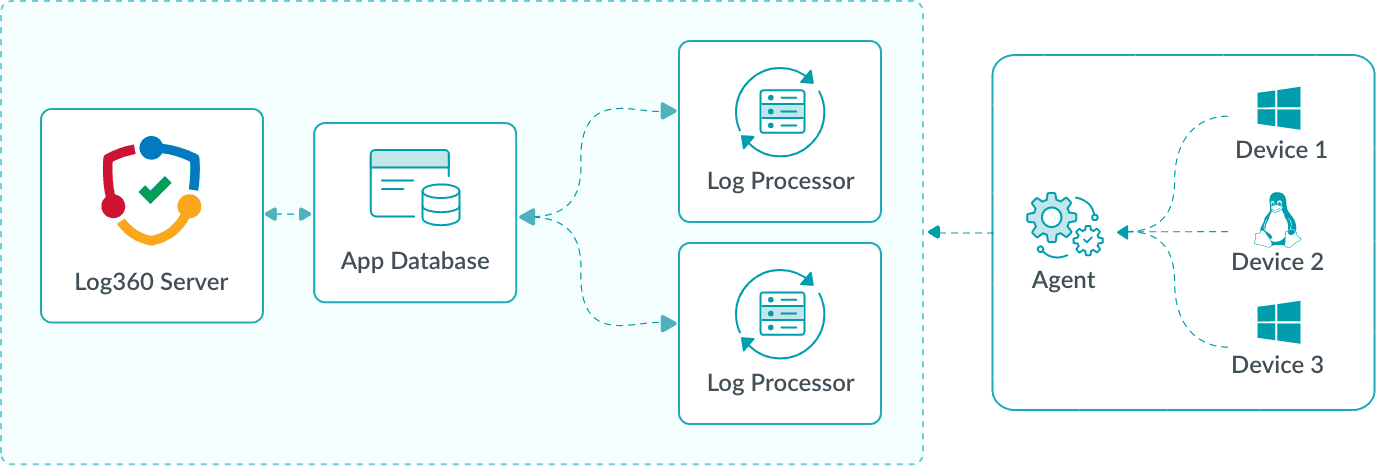
Logs generated by devices are collected by agents, which parse, filter, compress, and securely upload them to the Log Processor. Each Log Processor executes its assigned roles, such as parsing, indexing, or enrichment. The App Database maintains role assignments and routing information, ensuring logs are directed to the appropriate processor. As additional processors are deployed, workloads are automatically balanced, enabling horizontal scalability and preventing performance bottlenecks.
- Reliable log ingestion: The Log Processor uses a distributed queuing mechanism to temporarily store incoming logs in categorized queues, handling spikes without data loss.
- Role-based specialization for optimized performance : Log Processors can be configured to handle specific modules, such as indexing, correlation, alerting, archiving, or log forwarding, isolating heavy workloads for maximum efficiency.
How it works?
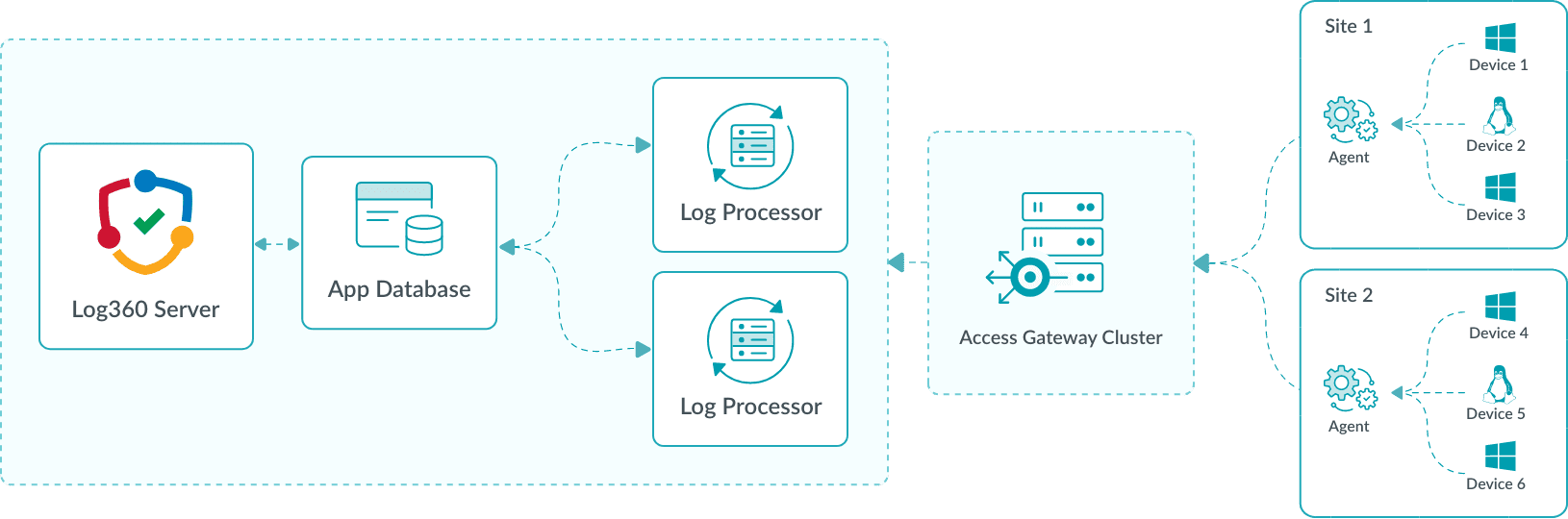
Agents upload logs to the processing layer, where they are distributed to role-specific processors. For example:
- The Correlation Log Processor evaluates events against security rules.
- The Log Forwarding Processor sends logs to external tools or destinations for further analysis or storage.
The App Database stores configuration and routing details, ensuring that logs are directed to the appropriate processor based on their role. By assigning processors to specific roles, organizations can optimize resource utilization and scale each component independently. For example, if correlation workloads increase, more Correlation Processors can be added without impacting log forwarding capacity.
- Distributed log collection: Multi-site deployment ensures that logs from remote sites can be monitored and managed from a single, central console, with the Access Gateway Cluster protecting internal processor details.
How it works?
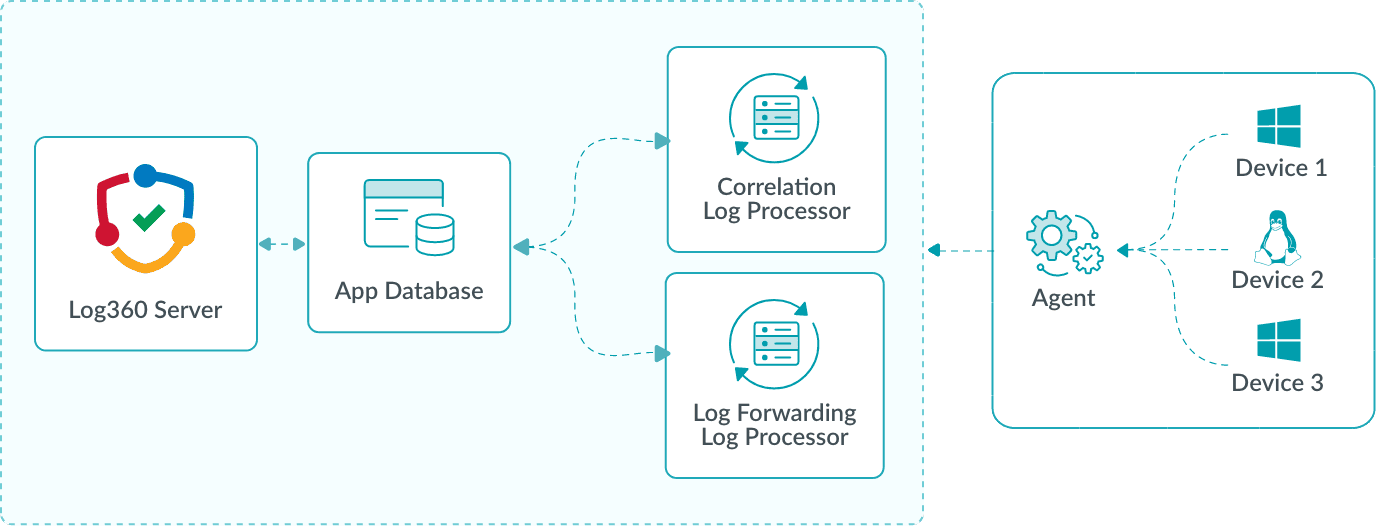
Agents at remote sites upload logs to a single public-facing endpoint, the Access Gateway Cluster. The cluster forwards the logs securely to Log Processors in the central environment. Acting as a bridge, the Access Gateway Cluster hides internal processor details from external agents, reducing exposure risks. Logs are then routed to the appropriate processors for parsing, indexing, or enrichment, with the App Database maintaining configurations and routing information. As log volumes grow, additional processors can be added at the central site without requiring changes at remote agents.
Roles and functions
A Log Processor can be configured to perform one or more roles, each with specific functions. The processor used to add and manage other processors is designated as the primary processor. Only the primary processor can perform cluster operations such as add, delete, or edit. Roles are categorized as follows:
- Default Roles: Predefined roles that are essential for core processing. These include:
- Processing Engine: Enriches parsed logs, handles log forwarding, alerts, and archiving.
- Correlation Engine: Evaluates events against security rules.
- Search Engine: Indexes data and handles user queries.
- Log Queue Engine: Manages event flow between components and prevents data loss.
- Custom Roles: Roles that can be added based on specific requirements. These include:
- Alerts: Triggers alerts when logs or events match specific criteria.
- Archive: Handles log archiving for long-term storage.
- Log Forwarding: Sends logs to external tools or destinations for further analysis or storage.
Read also
This document outlines the scalable architecture of Log360 and outlines key use cases. To learn how to configure and manage these components effectively, refer to the following articles: