PAM360 Application Gateway
Organizations often operate in complex IT infrastructures spanning multiple locations, secure subnets, diverse platforms, and isolated networks. Managing privileged resources across these varied environments can be challenging when those resources are not directly connected to the network where the PAM360 server is hosted. The PAM360 Application Gateway addresses this challenge, serving as a secure intermediary between the PAM360 server and remote resources, enabling seamless privileged resource management across environments. Whether the resources are deployed in diverse geographical locations, within secure subnets and DMZs, or in isolated networks managed by a service gateway, the Application Gateway ensures that privileged access management remains efficient and secure. It also facilitates cross-platform management by bridging Linux-hosted PAM360 servers with Windows-based resources.
This document explains how the PAM360 Application Gateway enables secure and efficient privileged resource management across distributed IT environments. It covers the gateway's setup, communication workflow with the PAM360 server, supported operations, and how tasks are securely handled, helping administrators manage resources effectively in segmented networks.
- Overview
- Supported Operations via Application Gateway
- Communication Between Application Gateway and PAM360
- Limitations
1. Overview
The PAM360 Application Gateway is a service designed to run on either Windows or Linux machines. It is specifically designed to execute key resource and password management operations, such as resource discovery, account discovery, password verification, and password reset for privileged resources not directly connected to the network where the PAM360 server is hosted, and facilitate privileged remote connections to remote resources managed via Application Gateways. Currently, RDP, SSH, and VNC sessions are supported. The Application Gateway allows organizations to manage and secure resources across various isolated or segmented networks, ensuring seamless administration despite network constraints.
After deploying an Application Gateway within a secure, isolated, or private network, you can discover the privileged resources and associated accounts that are otherwise inaccessible from the PAM360 server. Post discovery, these privileged resources are added to the PAM360 inventory, where administrators can associate them with the desired Application Gateway in bulk from the PAM360 Application Gateway window for streamlined resource management.
Once the resources are associated with an Application Gateway, any password management operations, such as password verification or reset triggered from the PAM360 interface, are executed by the corresponding Application Gateway to which the selected resources are associated. This comprehensive approach allows for secure and efficient management of privileged resources and accounts across isolated or segmented networks.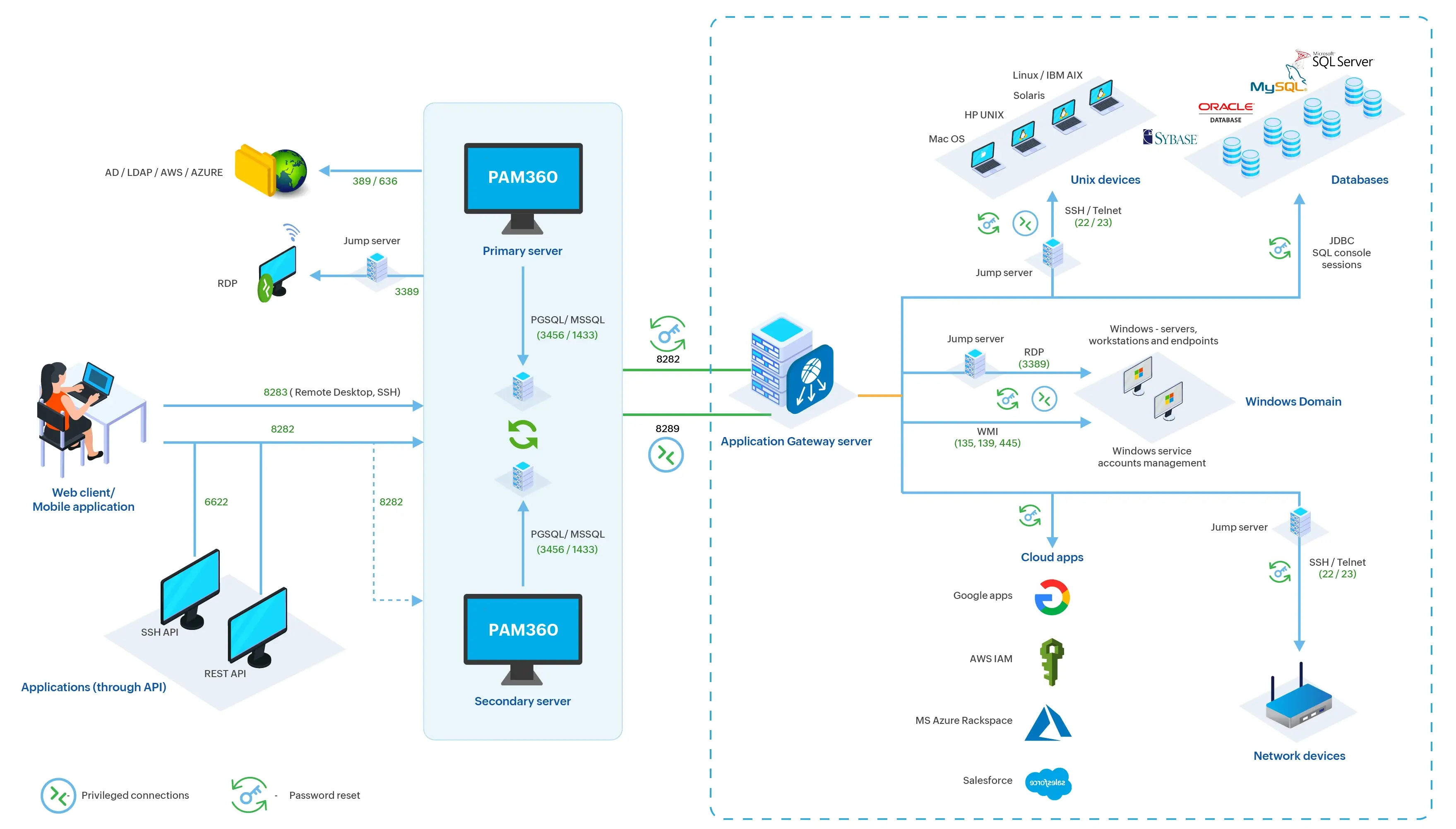
The following table details the list of ports to be opened for the Application Gateway server:
| Port Name | Port Number | Protocol | Purpose | Source (Outbound) | Destination (Inbound) |
|---|---|---|---|---|---|
Application Gateway | 8288 | TCP | For communication between the PAM360 Application Gateway server and the PAM360 server to execute Password Management Operations | Application Gateway Server | PAM360 Server |
Application Gateway | 8289 | TCP | For communication between the PAM360 Application Gateway server and PAM360 server to facilitate remote sessions | Application Gateway Server | PAM360 Server |
Application Gateway | 8282 | TCP | For general Application Gateway operations | Application Gateway Server | PAM360 Server |
SSH | 22 | TCP | For Unix and network device management | Application Gateway Server | Target Resource |
RDP | 3389 | TCP | For remote desktop connections to Windows devices | Application Gateway Server | Target Resource |
WMI, RPC | 135, 139, 445 | TCP | For managing Windows services and devices | Application Gateway Server | Target Resource |
LDAP, LDAPS | 389, 636 | TCP | For standard and secure directory communication and for managing LDAP passwords | Application Gateway Server | LDAP / LDAPS Server |
Session Gateway | 8283 | TCP | Facilities remote connections to the target resources | Application Gateway Server | Application Gateway Server |
PostgreSQL | 5432 | TCP | To rotate passwords and launch secure remote connections to the managed PostgreSQL databases | Application Gateway Server | PostgreSQL Server |
MS SQL | 1433 | TCP | To rotate passwords and launch secure remote connections to the managed MS SQL databases | Application Gateway Server | MS SQL Server |
Oracle | 1521 | TCP | To rotate passwords and launch secure remote connections to the managed Oracle databases | Application Gateway Server | Oracle Database Server |
Sybase ASE | 5000 | TCP | To rotate passwords and launch secure remote connections to the managed Sybase ASE databases | Application Gateway Server | Sybase ASE Server |
Additional Detail
Port 8283 should be open and free on the machine where the PAM360 Application Gateway is deployed. This port is used by the PAM360 Application Gateway service to facilitate remote connections to the target resources.
2. Supported Operations via Application Gateway
This section covers the list of operations supported by PAM360 via the Application Gateways.
2.1 Resource Discovery
PAM360 supports privileged resource discovery via the Application Gateway, enabling the discovery of privileged resources within networks not directly connected to the PAM360 server. With this capability, PAM360 can seamlessly identify Linux endpoints, VMware instances, and network devices in the environment that are part of isolated or secure subnets and discover the associated privileged accounts. Explore the relevant help documents for more details about discovering privileged resources and the associated accounts via the PAM360 Application Gateway.
Caution
- Currently, PAM360 supports resource discovery exclusively for Linux resources, VMware instances, and network devices via the Application Gateway. Windows and AWS devices should be manually added or imported into PAM360 and associated with the appropriate Application Gateway to enable password management operations.
- Upon discovering the privileged resources, you should associate them with the respective Application Gateway from the Resources tab or the PAM360 Application Gateway page. Explore this link to learn in detail about the steps to associate resources with an Application Gateway.
2.2 Account Discovery
Once the privileged resources within your environment are successfully onboarded into the PAM360 inventory, you can proceed with the discovery of the privileged accounts associated with those IT assets. PAM360 supports privileged account discovery via the Application Gateway for Windows, Windows Domain, Linux, macOS, VMware devices, database servers, network devices, and privileged accounts associated with any SSH-based devices. Additionally, PAM360 supports the discovery of Service Accounts, Scheduled Tasks, IIS AppPools, and IIS Web.config Credentials via the Application Gateway.
Similarly, PAM360 supports periodic discovery of privileged accounts through schedules via the Application Gateways to discover and add the newly added privileged accounts to the privileged resources in your environment into the PAM360 repository. Explore the provided links for more details about the privileged accounts discovery and periodic discovery of privileged accounts in PAM360.
2.3 Password Management Operations
PAM360 supports various password management operations via the Application Gateway for Windows, Linux, macOS, VMware devices, database servers, network devices, and privileged accounts associated with any SSH-based devices, as well as Service Accounts, Scheduled Tasks, IIS AppPools, and IIS Web.config credentials. The supported password management operations are as listed below:
- Password Verification - PAM360 supports password verification through the Application Gateway to verify the integrity of passwords for resources configured with remote password reset settings. This process ensures that the stored password in PAM360 matches the actual password on the target resource, maintaining data consistency and preventing access issues.
- Password Reset - PAM360 supports remote password reset through the Application Gateway for Windows, Windows Domain, Linux, macOS, VMware, database servers, and network devices. Administrators can view the task status on the Application Gateway Task Monitor window and the Resource Audits page. Explore the Remote Password Reset help page for more information about remote password reset in PAM360.
- Periodic Password Integrity Check - To ensure that the stored passwords in PAM360 remain consistent with the actual passwords on target devices, PAM360 supports periodic integrity checks through schedules via the Application Gateway.
- Periodic Password Reset Schedule - PAM360 allows the administrators to schedule password reset operations for the privileged resources in their environment via the Application Gateway. The Application Gateway executes the scheduled password reset operation and updates the status on the Application Gateway Task Monitor window. You can also track the changes on the Resource Audits page. Explore this link for more details about periodic password reset in PAM360.
| Resource Type | Resource Discovery | Account Discovery | Password Management |
|---|---|---|---|
Windows Domain | |||
Windows | |||
Linux | |||
Database Servers | |||
Network Devices | |||
SSH-Based Resources |
2.4 Remote Connections
PAM360 provides comprehensive support for establishing remote sessions to privileged resources in your environment that are managed through Application Gateways. Currently, only RDP, SSH, and VNC connections are supported. Additionally, PAM360 offers the flexibility to configure a landing server to tunnel the remote session launched to privileged resources managed by the Application Gateway servers.
Caution
If you choose to tunnel remote sessions through a landing server for resources managed by Application Gateways, ensure that the landing server is added as a resource in PAM360 and has connectivity to the PAM360 server.
2.5 Just-In-Time Privilege Elevation for Domain Accounts
PAM360 supports Just-In-Time (JIT) privilege elevation for domain accounts via the Application Gateway, enabling users to access privileged resources that are not directly accessible from the PAM360 server by using domain accounts configured for JIT privilege elevation. Explore this link for detailed information about how JIT privilege elevation works in PAM360.
3. Communication Between Application Gateway and PAM360
The Application Gateway communicates with the PAM360 server over port 8288, sending a ping every 5 seconds to maintain a continuous connection. This periodic communication enables PAM360 to monitor the status of the Application Gateway in real-time. On the PAM360 Application Gateway page, the status is shown as either Active or Inactive, allowing administrators to verify its availability and operational state.
When a user initiates an operation, such as password verification or reset, for a resource associated with an Application Gateway, PAM360 notifies the Application Gateway about the task through a secure encrypted channel. The Application Gateway executes the task and notifies the PAM360 server about the status, thereby facilitating seamless task handling and accurate tracking within the environment. All the communication between the PAM360 server and the Application Gateways occurs through a secure encrypted channel.
If the Application Gateway is down or there is a connectivity issue between PAM360 and the Application Gateway at the time of task execution, the task is placed in a queue for up to 3 minutes on the PAM360 server. If the Application Gateway remains unreachable beyond the 3-minute window, the task is marked as failed, and its status is updated on the Application Gateway Task Monitor window and the Resource Audits page.
4. Limitations
- Resources managed via agents or landing servers cannot be associated with an Application Gateway.
- Application Gateway mapping will not be retained when a resource is duplicated.
- IPv6 addresses are not supported during Application Gateway configurations.
- Adding or editing Application Gateways is restricted on secondary servers, read-only servers, and sub-nodes. However, resources can still be mapped to available Application Gateways from these servers.
- In environments configured with the Application Scaling setup, PAM360 does not support privileged remote sessions to devices managed through the Application Gateway when the session is initiated from a subnode, regardless of whether the main node is active or inactive.