- Knowledge base
- Active Directory management
- Active Directory reports
- Active Directoy integrations
- Active Directory automation
- Active Directory delegation
- Governance, risk, and compliance
- Microsoft 365 management and reporting
- AD migration
- Access certification
- Identity risk assessment
- Risk exposure management
- FAQs
- Pricing
- Online demo
- Request support
- Get quote
When an organization undergoes restructuring, be it a merger or an acquisition, it can be costly to maintain two separate Active Directory (AD) infrastructures. IT administrators are tasked with migrating objects from one Active Directory Domain Services (AD DS) environment to another to enable the sharing of resources. However, migrating an AD environment is one of the most complex tasks an IT administrator can face—and the Active Directory Migration Tool (ADMT) has been the standard utility provided by Microsoft to facilitate this process.
Throughout the migration life cycle, you will frequently rely on native management tools to verify data integrity. Familiarity with AD DS, Active Directory Users and Computers (ADUC), Active Directory Administrative Center (ADAC), Remote Server Administration Tools (RSAT), and the Group Policy Management Console (GPMC) is essential for managing objects and policies before and after the move.
What is the ADMT?
The ADMT is a free utility released by Microsoft that allows administrators to migrate users, groups, and computers between two AD domains. It is primarily used for:
- Interforest migration: Moving objects between different AD forests.
- Intraforest migration: Moving objects between domains within the same forest.

Steps to install ADMT
Installing ADMT is not as simple as running an EXE file. It requires a specific environment configuration to function correctly. Follow this detailed roadmap to ensure a successful deployment.
ADMT prerequisites
Before downloading ADMT 3.2, your environment must meet these strict requirements:
- Operating system support: The source and target domains must be running on one of the following operating systems:
- Windows Server 2008
- Windows Server 2008 R2
- Windows Server 2012
- Windows Server 2012 R2
- Target domain placement: ADMT must be installed on a member server joined to the target domain and not on a domain controller (DC).
- SQL Server database: ADMT requires a preconfigured SQL Server instance to store migration data. You must have this instance running and accessible before launching the ADMT installer.
- For SQL Server Express users: ADMT needs to be installed and operated directly on the server hosting the SQL Server Express database instance.
- For full SQL Server users: You have the flexibility to install and run the ADMT console on a remote machine with the option to operate multiple ADMT consoles on different remote computers.
- Configuration restrictions: ADMT cannot be installed and migration tasks will fail if computers are configured as read-only DCs.
- Administrative privileges: The user account running the migration must have administrator rights in the target and source domain.
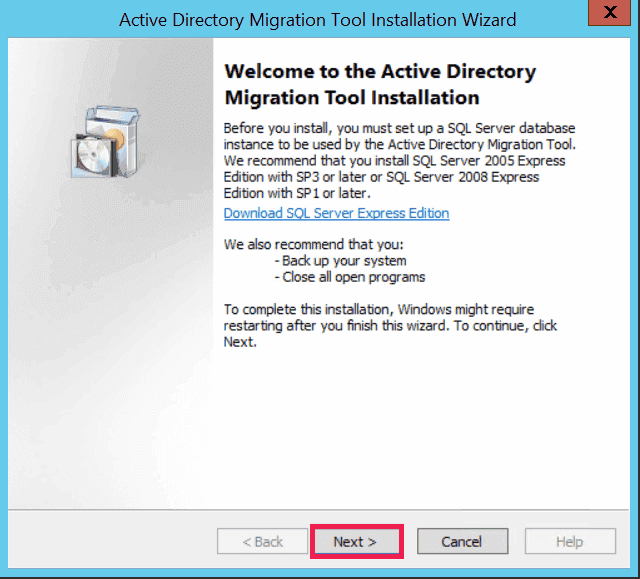
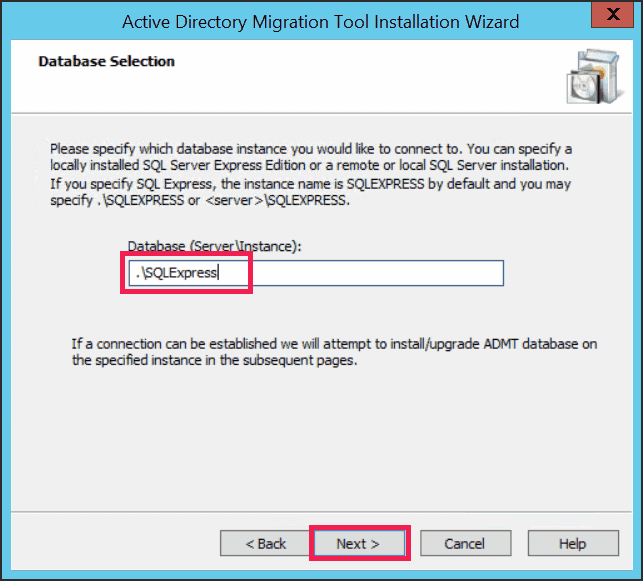
How to install ADMT 3.2
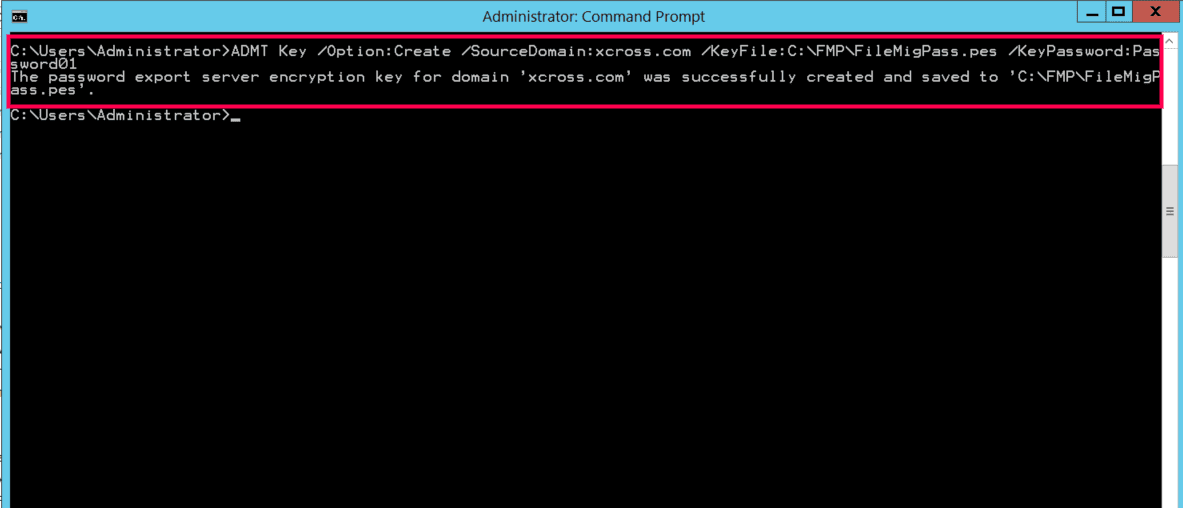
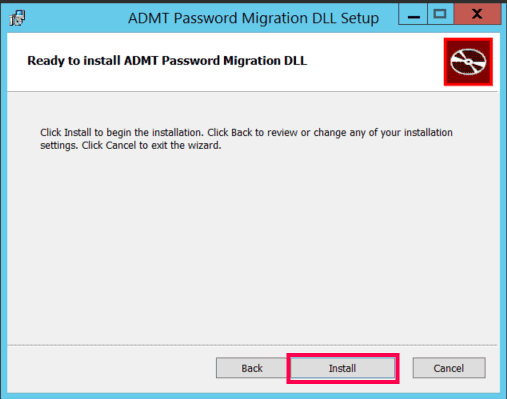
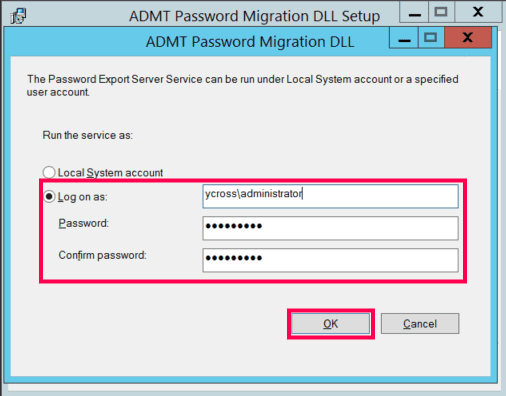
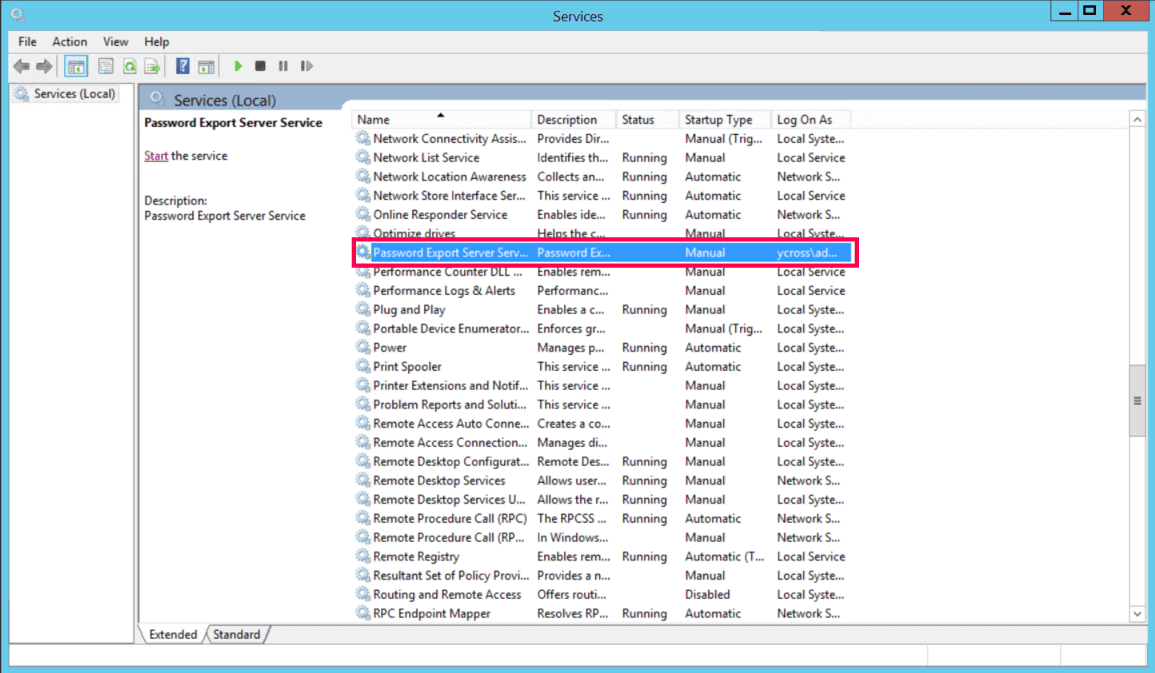
Setting up password migration using the PES
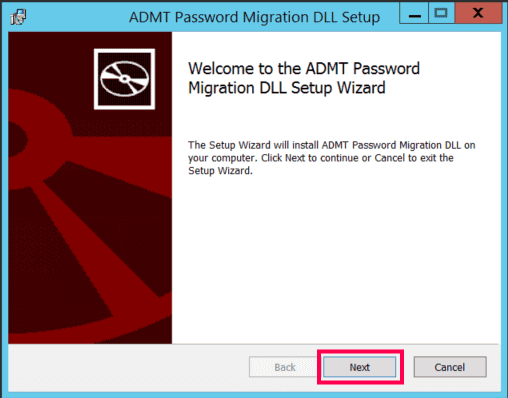
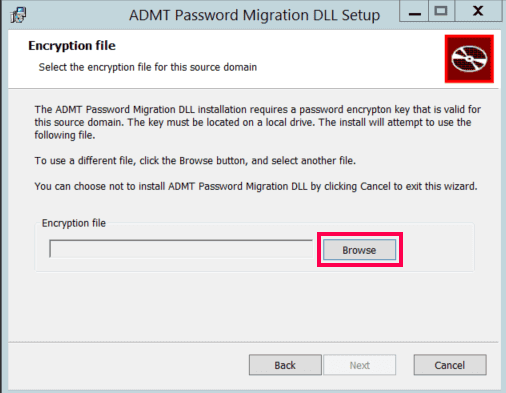
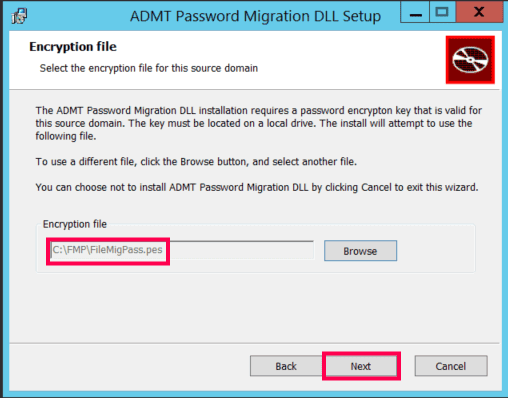
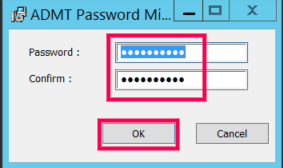
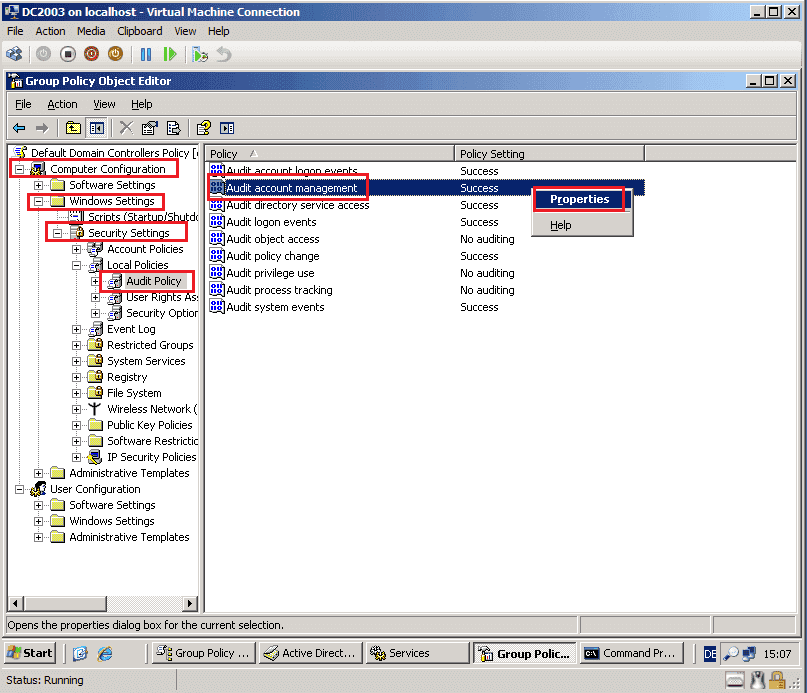
sIDHistory migration requirements
How to migrate AD objects using ADMT
Once the infrastructure is ready, you can begin the actual migration:
User migration
- Open ADMT on the target server.
- Right-click Active Directory Migration Tool and select User Account Migration Wizard.
- Select your Source and Target domains and DCs.
- Choose the users manually or import a user list file.
- Choose the destination OU in the Target Domain.
- Select Migrate passwords.
- Account transition options:
- Target Account State: Enable target accounts.
- Source Account State: It is a best practice to keep source accounts enabled for a transition period or disable them immediately for security.
- SID History: Check this box to access users' old file shares and resources while using their new account.
- Define how you would like conflicts to be managed during migration and click Finish.
Group migration and nesting
Migrating computer accounts
Migrating to Microsoft Entra ID
A common misconception among IT administrators is that ADMT can be used to move users from on-premises servers to the cloud. However, it is strictly designed for server-to-server migration within local networks. To move your environment to Microsoft Entra ID, you must choose a migration path that aligns with your infrastructure goals.
Method 1: The hybrid identity model
In this model, you do not migrate users in the traditional sense; you synchronize them, keeping your on-premises AD as the master copy using Microsoft Entra Connect or Cloud Sync.
The tool scans your local AD environment for users, groups, and credential hashes, then replicates this data to your Microsoft Entra ID tenant in near real time. The outcome is a seamless experience where users sign in to their Windows PC and Microsoft 365 apps with the same password, you continue to manage users in your AD environment, and changes are automatically pushed to the cloud.
Method 2: The cloud-only model
Organizations aiming for a cloud-only architecture must perform a full cut-over migration, permanently breaking the link with the local domain. This process typically involves exporting on-premises users and attributes to a CSV file and performing a bulk import into Microsoft Entra ID using PowerShell or the Microsoft 365 admin center. Once the identity is moved, you must manually delink workstations from the local domain and join them to Microsoft Entra ID using tools like Microsoft Intune or Windows Autopilot.
Known issues and limitations of ADMT
Since ADMT has not received a major architectural update since the Windows Server 2012 R2 era, modern IT environments often expose its limitations. Below are the most common issues administrators face and how to bypass them.
- ADMT is unable to connect to domain controller
When you see this error, it is almost always tied to network or registry misconfigurations rather than the tool itself.
- Firewall blocks: ADMT relies heavily on remote procedure call (RPC). If Port 135 and the dynamic RPC high ports are blocked by a hardware firewall between the source and target forests, the connection will time out.
- Missing registry keys: The source DC must have the TcpipClientSupport registry key manually created and set to value 1, followed by a reboot. Without this, the target ADMT server cannot establish a secure RPC channel.
- DNS resolution: Ensure your conditional forwarders are working perfectly. If the target server cannot resolve the source DC's fully qualified domain name to an IP address, the connection will instantly fail.
- Windows Defender Credential Guard failure
ADMT relies on older authentication protocols that are strictly blocked by Windows Defender Credential Guard. You must temporarily disable Credential Guard on the machine running ADMT and potentially on the target DCs to allow the legacy authentication required for migration.
Always consult your security team before altering Credential Guard settings, and ensure you back up the ADMT server prior to making any changes.
- Migration failures with special characters
Migration attempts will fail if object names or OU names contain special characters, such as double quotation marks, when using ADMT's command line options.
- Unconstrained delegation requirement
During migration, ADMT requires DCs to use unconstrained delegation, which is no longer recommended. Install and run ADMT on the target DC to eliminate the need for delegation.
- Attributes excluded during migration
When you run the ADMT user migration for the first time, the tool generates a system attribute exclusion list, which is stored in its database. By default, this exclusion list contains two attributes: mail and proxyAddresses. Additionally, ADMT scans the schema of the target domain and automatically excludes any attributes not present in the base schema.
You must manually run a script to modify the SystemPropertiesToExclude table in the ADMT SQL database to remove these attributes from the exclusion list.
Why ADManager Plus is a great ADMT alternative
Migration projects are high-stakes operations where downtime is not an option. ADManager Plus, an AD management and reporting solution, eliminates the complexity of traditional tools, offering a streamlined, GUI-based experience that helps you seamlessy migrate AD objects.
ADManager Plus includes specialized features to handle every migration scenario with precision:
- Interforest and intraforest migration: Seamlessly migrate users, groups, GPOs, computers, and contacts between different forests or restructure domains within the same forest using a single console.
- Complete object support: Migrate objects while preserving their attributes and permissions.
- sIDHistory preservation: Automatically migrate sIDHistory to ensure users retain access to legacy file servers and resources immediately after the move.
- Group membership integrity: Ensure that when users are moved, their group memberships are automatically updated in the target domain.
- Profile and password handling: Securely migrate user passwords without PES complexity and map user profiles to ensure a frictionless login experience post migration.
FAQ
1. Does ADMT migrate user passwords?
No, ADMT only creates new accounts in the target domain with complex, random passwords. If you want users to keep their existing passwords, you must install PES on the source DC. This requires creating a specific encryption key file (.pes) on the ADMT server and physically copying it to the source controller. Note that even with a PES, passwords that do not meet the target domain's password policy will fail to migrate.
2. Can I use ADMT to migrate to Microsoft Entra ID?
No, ADMT cannot be used to migrate to Microsoft Entra ID. To move users to the cloud, you must use Microsoft Entra Connect if you want to sync existing on-premises users.
3. Does ADMT migrate GPOs?
ADMT includes a Group Policy Migration Wizard, but it frequently fails to translate UNC paths (like \\server\share) inside the policies or mapping security groups correctly. Most experts recommend rebuilding GPOs manually in the new domain or using the GPMC to export or import them, rather than relying on ADMT for this specific task.
4. Can ADMT migrate Windows 10 and Windows 11 computers?
While ADMT 3.2 was designed for older versions of Windows and not for Windows 10 and 11 machines. However, you must ensure that legacy RPC settings are enabled and Windows Defender Credential Guard is temporarily disabled while attempting to migrate computers running these versions, as these modern security features often block the older authentication protocols used by ADMT.
5. What is sIDHistory and why is it critical for migration?
Every AD object has a unique security identifier (SID). When an object is moved to a new domain, it gets a new SID. SID history is an attribute that stores the object's old SID from the source domain and allows users to retain seamless access to resources using their new account, preventing permission-related errors.
6. Is sIDHistory a security risk?
sIDHistory can be a security risk if not managed properly. An attacker could potentially inject a highly privileged SID into a user's SID history to gain unauthorized access, a technique known as SID history injection. To mitigate this, Microsoft enforces SID filtering on forest trusts. Additionally, sIDHistory should be removed once the migration is fully complete and resources have been re-permissioned.
7. What is a Password Export Server?
A Password Export Server (PES) is a separate service required to migrate user passwords from a source domain to a target domain. Without a PES, ADMT cannot read the encrypted passwords and would instead force a password reset for every migrated user. The PES acts as a secure bridge, using an encryption key to safely move password hashes so users can log in with their original credentials after the move.