Install APM Insight Java agent in SonarQube
Follow the below steps to install APM Insight Java agent in SonarQube:
- Download the latest APM Insight Java agent (apminsight-javaagent.zip) file.
- Extract the zip file to a new directory to find agent jar and its configuration files.
- Open the apminsight.conf file in any text editor and include/modify the following keys:
license.key=[LICENSE KEY]
apm.host=http://[HOST]:[PORT]
application.name=[APPLICATION NAME]where
- [LICENSE KEY] - License key obtained from Applications Manager under APM Insight tab.
- [HOST] - Host at which Applications Manager is running.
- [PORT] - Port number at which Applications Manager is running.
- [APPLICATION NAME] - Name of your application.
Example:
license.key=APMI_74447444b666d7ab5174cc3021a9b68dd4b3364d50f99c2969360810313e8fac
To learn more about the configurations, visit our Configuration Guide page.
apm.host=http://apm-prod-server:9090
application.name=SonarQube_Server - Edit the sonar.properties file located under <Sonarqube_installed_directory>/conf/ directory. Under the WEB SERVER configuration, uncomment the property sonar.web.javaAdditionalOpts(if commented) and add the following argument:
-javaagent:<agent_directory_full_path>/apminsight-javaagent.jar
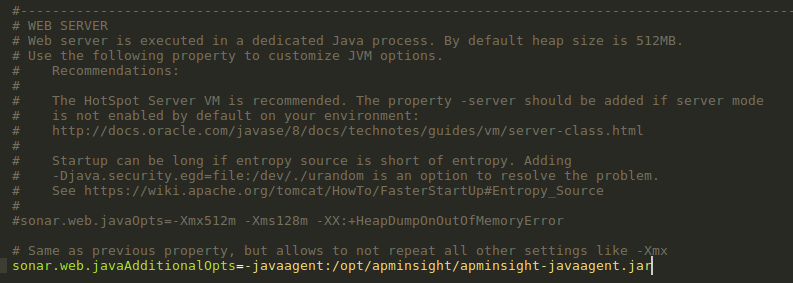
- Once the changes are made, save the file and restart the SonarQube server.
Note:
- You can also configure a secure APM URL. Ensure that the connection is stable and free from certificate-related issues.
Example: https://apm-prod-server:8443 - For an Applications Manager failover setup, you can specify multiple hosts in a comma-separated format (supported from Java Agent v6.8), as shown below:
apm.host=http://apm-prod-server-A:9090, http://apm-prod-server-B:9090

