Vulnerability Management Architecture
ManageEngine Vulnerability Manager Plus is an Enterprise vulnerability management software that helps you scan, assess, prioritize and remediate vulnerabilities in your network endpoints. It comprises of features like vulnerability scanning and vulnerability assessment, automated patch management, CIS compliance, security configuration management, zero-day vulnerability mitigation, high-risk software audit and web server hardening.
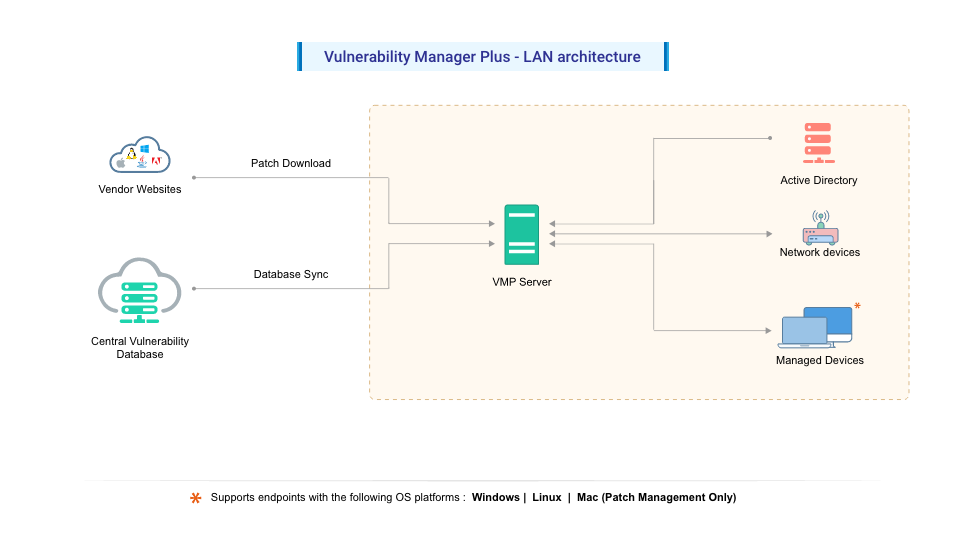
The following guide will help you understand the process of vulnerability management with the help of an architecture diagram.
Security Research Team:
The Security Research Team at Zoho Corp. plays a vital role in maintaining cybersecurity as they . They continuously probe the internet to:
- Obtain vulnerability information along with its CVE ID, CVSS scores, severity, details on exploit code and patches.
- Download Microsoft, Apple, Linux and other third-party patches from respective vendor sites.
- Derive security configurations for systems and hardening guidelines for servers from widely trusted benchmarks such as CIS and STIG.
- Obtain information on software such as End-of-Life, Remote Desktop sharing, and Peer-to-Peer software that are deemed unsafe by itself.
Then the authenticity and functional correctness of the patches are tested and correlated with the corresponding vulnerability it addresses.
Central Database:
The Central Vulnerability Database hosted at the Zohocorp site gets updated periodically with the latest details of
- Known and emerging vulnerabilities
- Latest patches that are released by Microsoft, Apple, Linux and other 3rd party vendors.
- Security configuration baselines and remediation content
- Web server hardening content
- High-risk software list
- New compliance policies and changes related to existing policies
The Central Vulnerability Database is a portal in the Zoho Corp. site, which is constantly updated with the latest information that serves as the baseline for vulnerability management in the customer organization.
At customer site:
IT administrators or network security teams need the following components to perform vulnerability management in the enterprise:
Vulnerability Manager Plus Server:
The Vulnerability Manager Plus Server helps you to centrally perform all the vulnerability management and compliance tasks in your network endpoints. Some of the tasks include the following:
- Installing agents in computers
- Scanning computers for vulnerabilities and misconfigurations
- Deploying patches and secure configurations
- Uninstalling high-risk software
- Auditing active ports
- Auditing for compliance against CIS benchmarks
Any of the Windows computers in your network with the requirements mentioned here can be hosted as your Vulnerability Manager Plus Server. This Vulnerability Manager Plus Server at the customer site subscribes to the Central Vulnerability Database, from which it synchronizes the latest information on threats, patches, vulnerabilities, and compliance policies. Patches are downloaded directly from vendor sites and stored centrally in the server's patch store and will be replicated to your network endpoints to conserve bandwidth.
Ports utilized for vulnerability management:
| Port | Purpose | Type | Connection |
|---|---|---|---|
| 8020 | Agent/Distribution Server to VMP Server | HTTP | Inbound to server |
| 8383 | Agent/Distribution Server to VMP Server | HTTPS | Inbound to server |
| 8027 | Agent Server communication | TCP | Inbound to server |
Ports utilized for Network Devices:
| Port | Purpose | Type | Connection |
|---|---|---|---|
| 161 | VMP Server to Network Device (SNMP) | TCP | Inbound to Network Device |
| 22 | VMP Server to Network Device (SSH) | TCP | Inbound to Network Device |
Distribution Server
| Port | Purpose | Type | Connection |
|---|---|---|---|
| 8384 | Agent to Distribution Server | HTTPS | Inbound to Distribution Server |
| 8021 | Agent to Distribution Server | HTTP | Inbound to Distribution Server |
Agents:
To perform Vulnerability scanning and management, a lightweight agent will be installed by the server in your managed endpoints. The agent contacts the server every 90 minutes to get the data to carry out the tasks delegated by the server. It returns back the result to the server after completion of the task. The agent also maintains a continuous thin connection with the server in order to perform on-demand tasks.
Network Devices:
After server installation, network devices can be discovered and added from the server console. Once the vulnerability database sync is complete, agentless scanning of network devices occurs for the credential mapped devices, enabling the detection of network devices' firmware vulnerabilities.
Web console:
The web console is a graphical user interface to access the server and perform vulnerability management tasks. It empowers users with a single pane view to perform all the vulnerability management tasks from anywhere, anytime.