Go beyond availability checks- achieve full-stack server visibility with OpManager Plus

Monitor your servers not in isolation, but holistically as part of a larger system. OpManager Plus correlates server performance with application behavior, bandwidth use, storage availability, and security incidents, powering your ITOps to get to the root causes faster and maintain service quality across the board.
it-stack - ManageEngine OpManager 

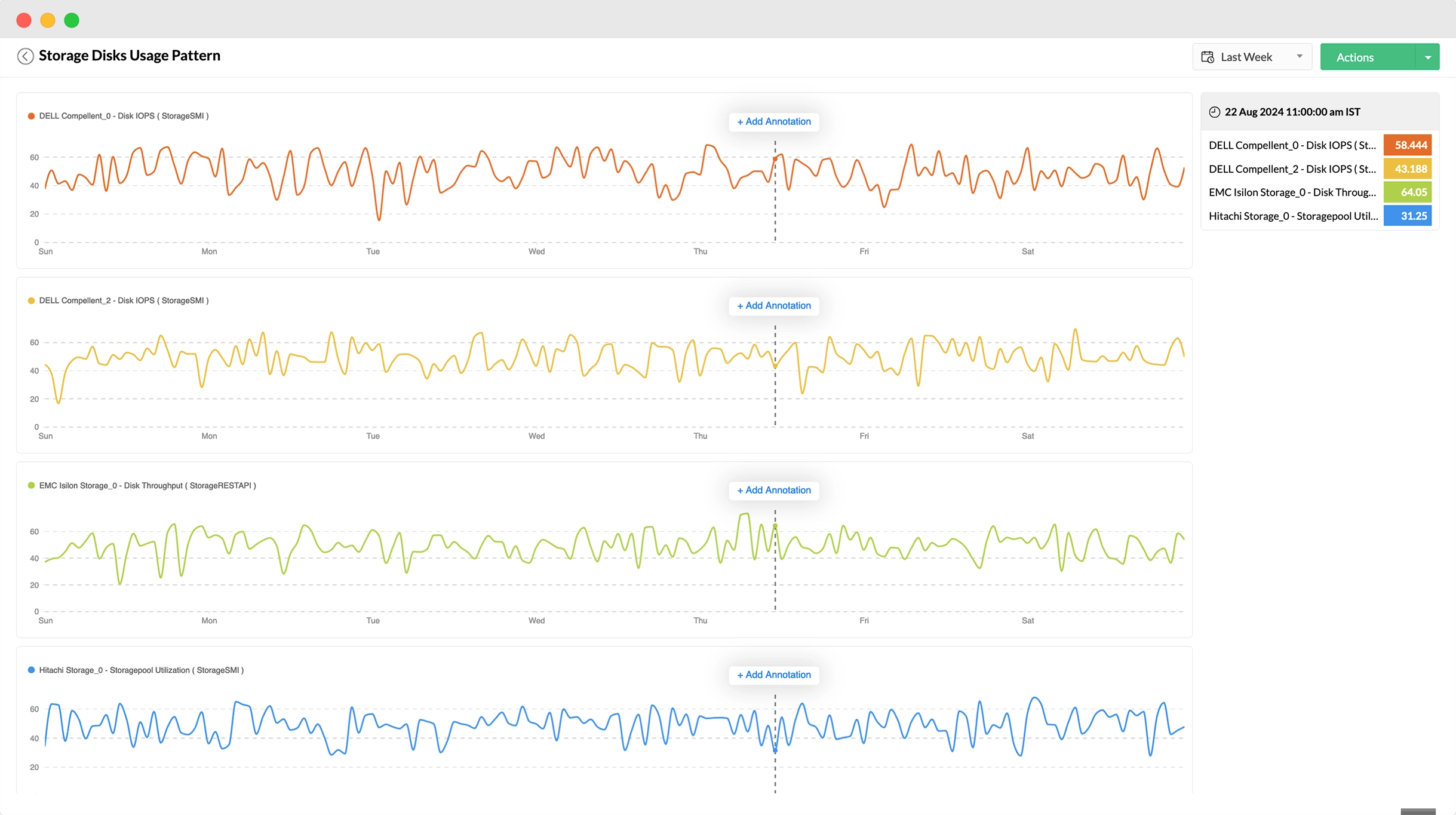
Visualize and analyze aggregated performance data from multiple components in a centralized window for faster and precise fault identification.
it-stack - ManageEngine OpManager 

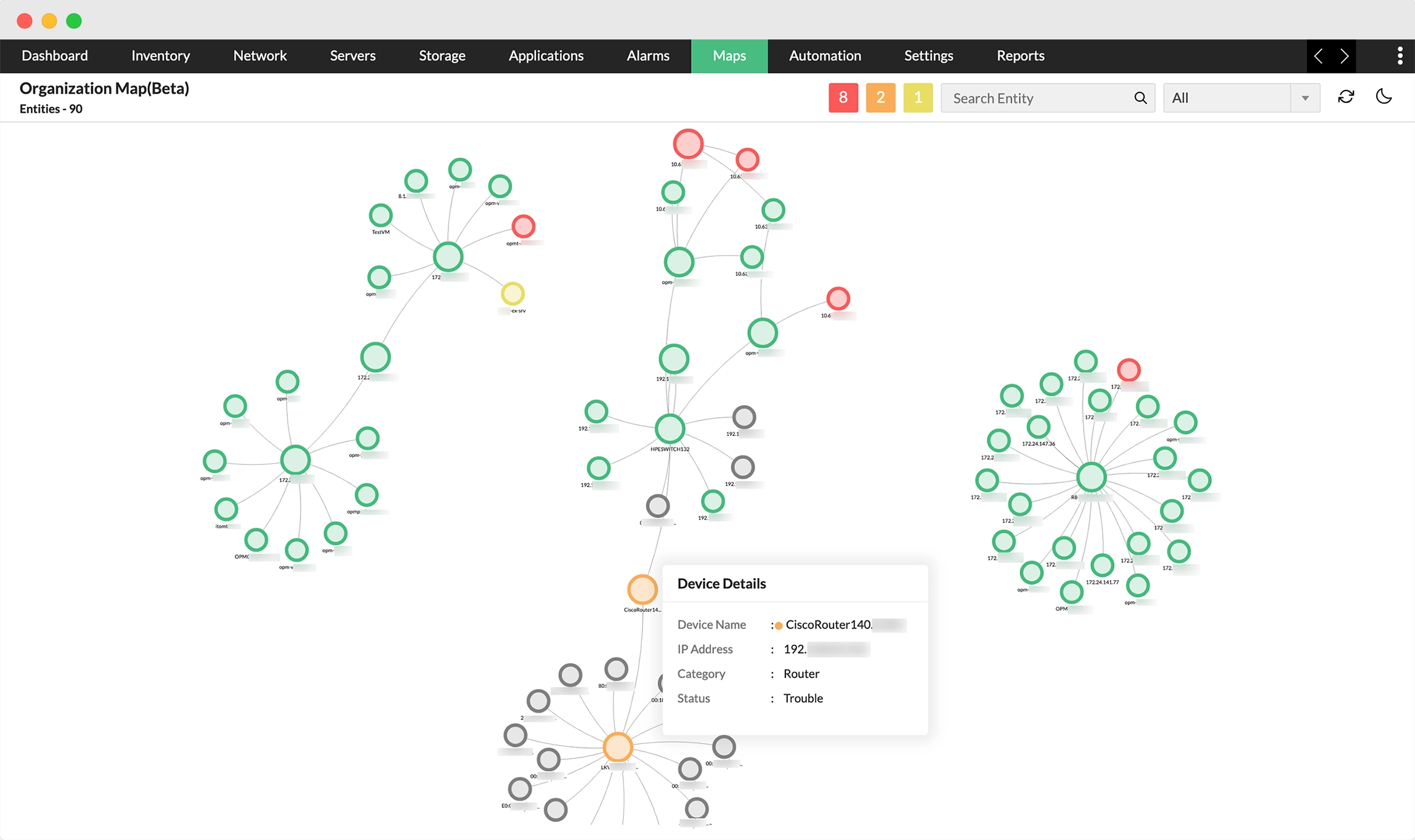
Chart your infrastructure's implemented topology with detailed visualization of business-critical applications, devices, and their dependencies (Note: feature in beta).
it-stack - ManageEngine OpManager 

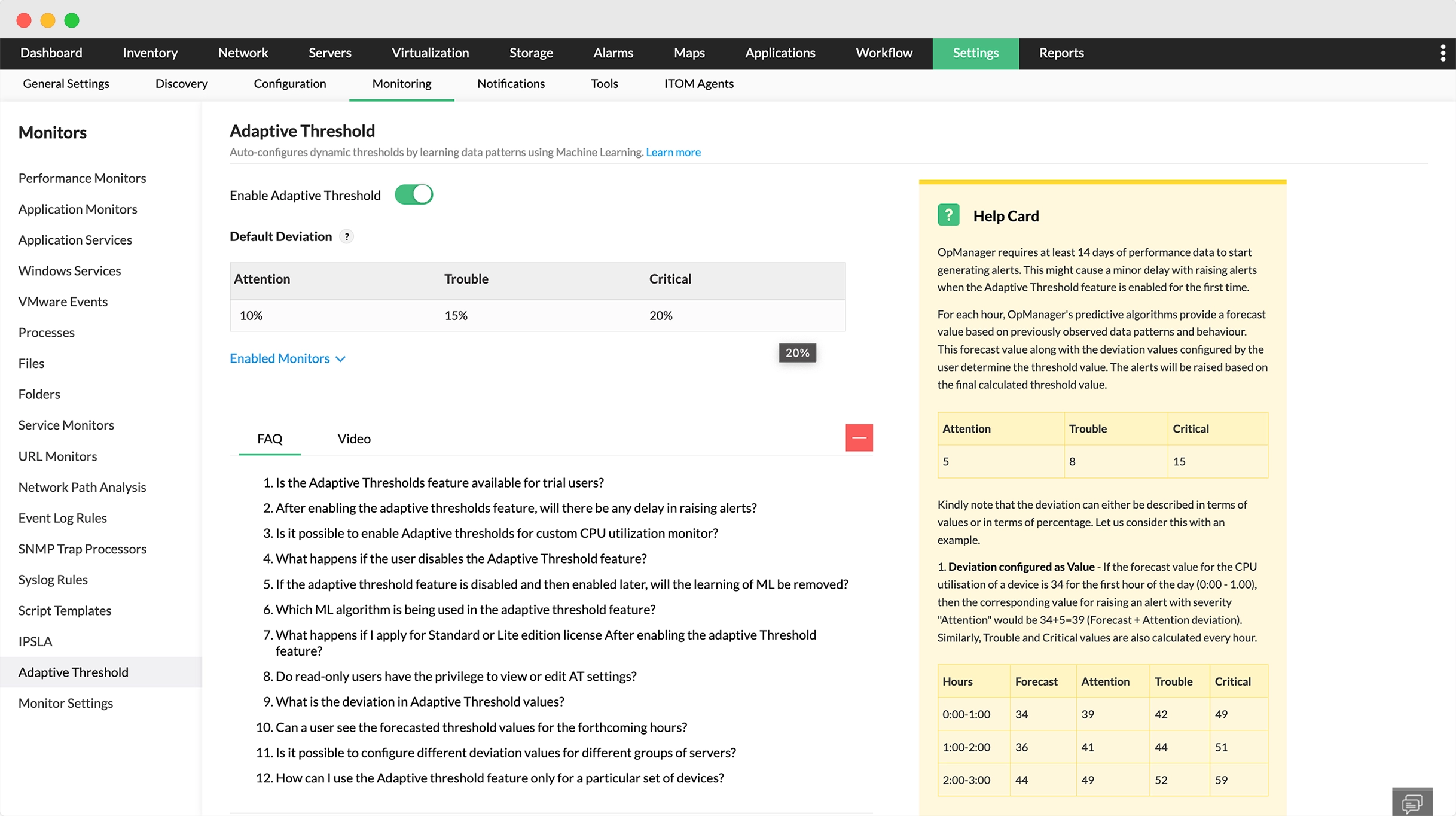
Power of AI and ML enables real-time configuration of performance thresholds . Adaptive thresholds use machine learning to dynamically adjust thresholds based on live metrics, making proactive monitoring effortless for IT admins.
it-stack - ManageEngine OpManager 

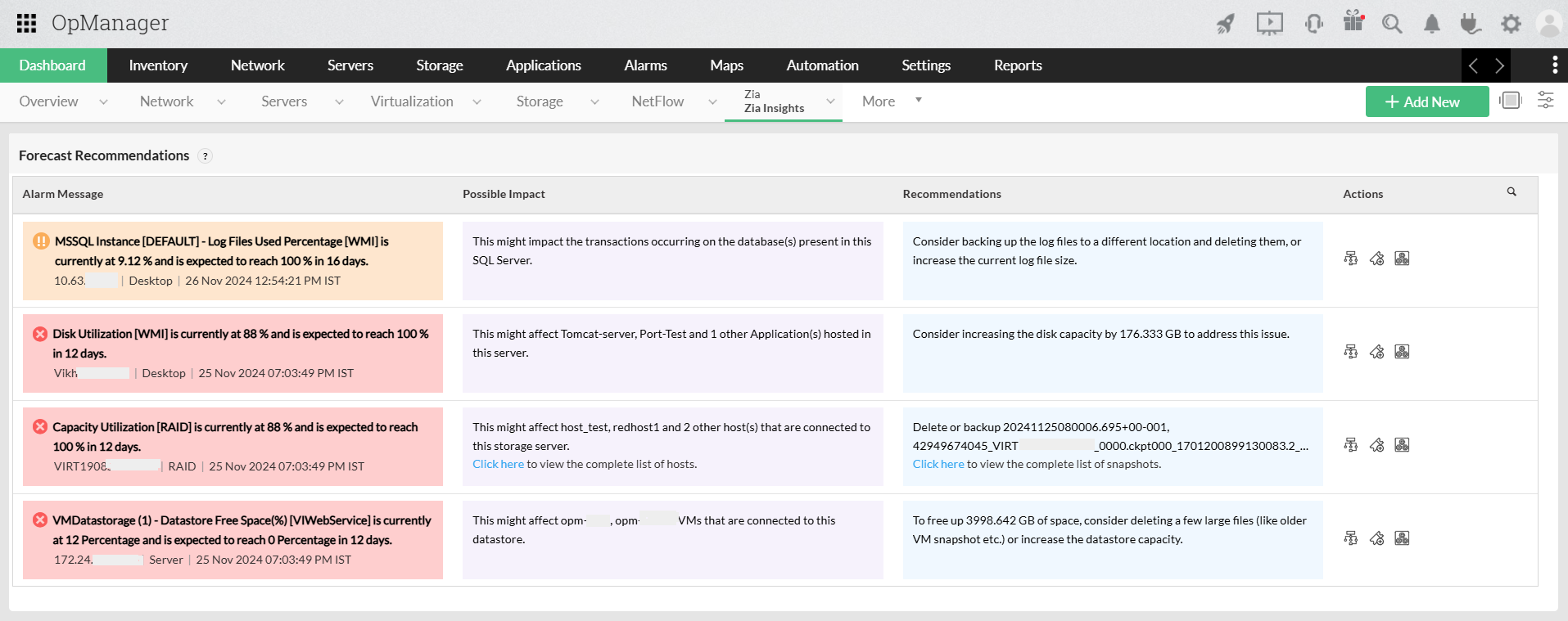
Zia Dashboard harnesses AI to deliver real-time insights, detect anomalies, and predict failure for quick troubleshooting.
it-stack - ManageEngine OpManager 

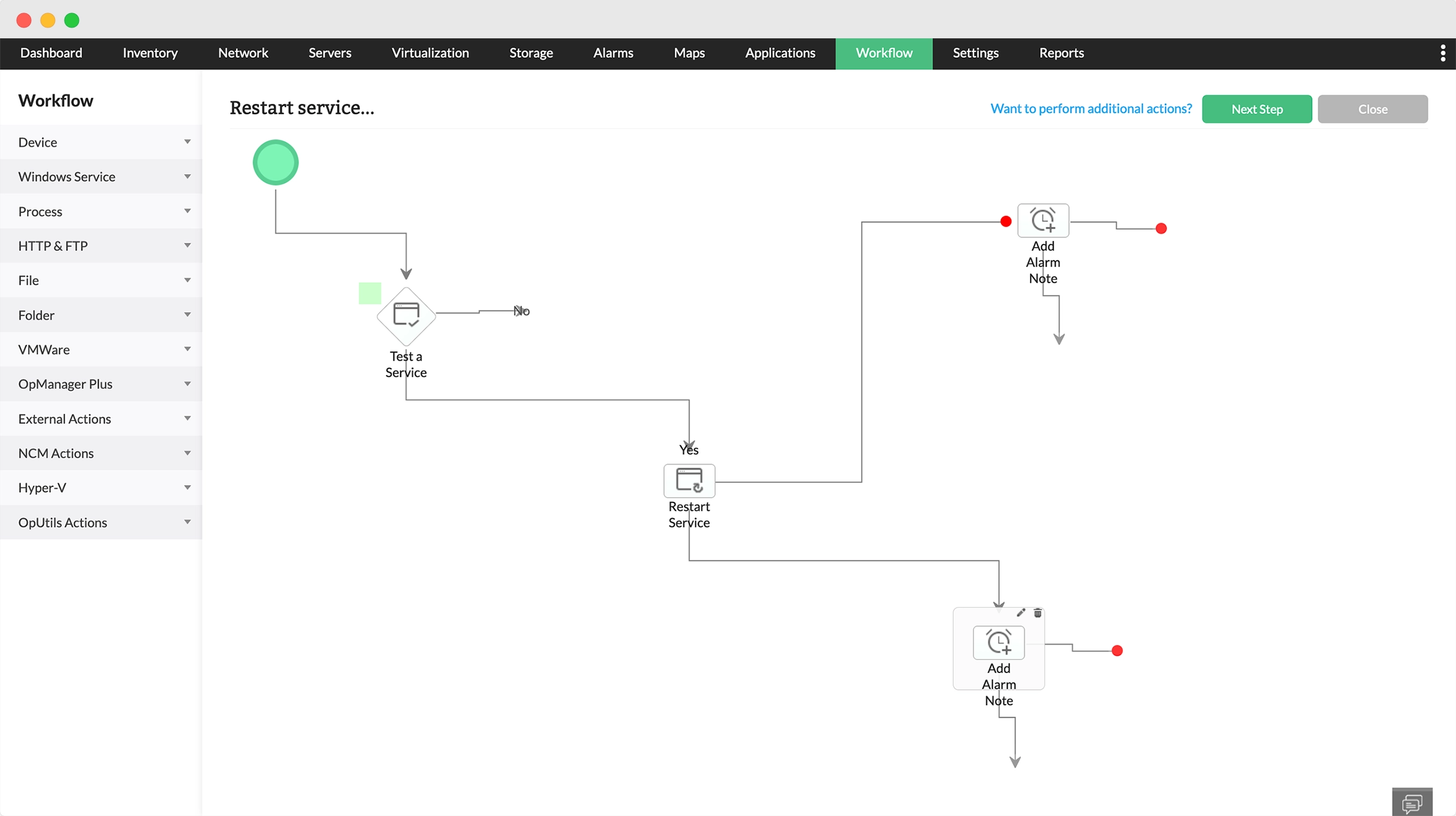
Reclaim time with advanced workflows, featuring 70 checks and actions grouped into 9 categories to help you implement enterprise network automation.
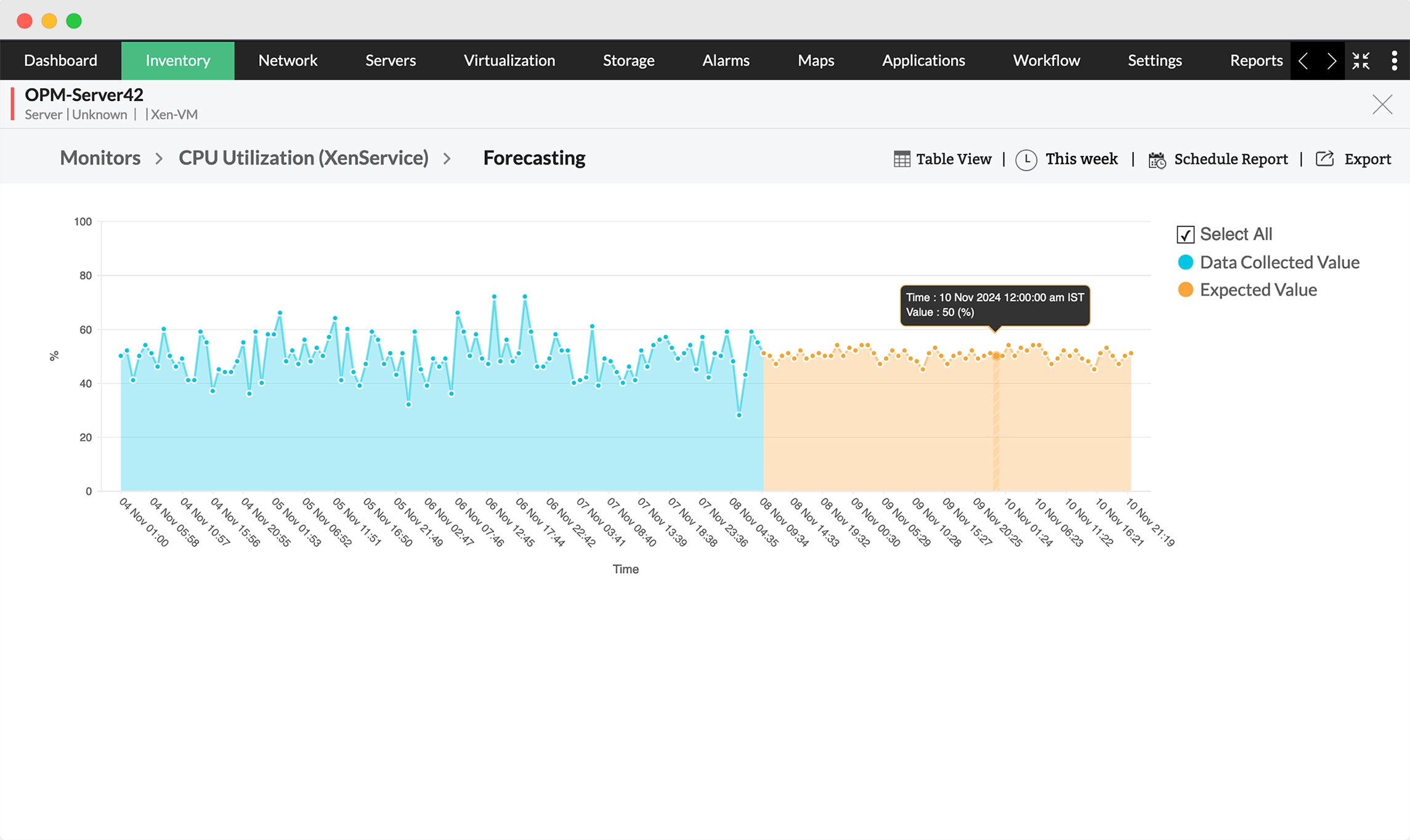
it-stack - ManageEngine OpManager 

Do away with manual data analysis - OpManager Plus leverages historical data and advanced algorithms to predict future performance trends.
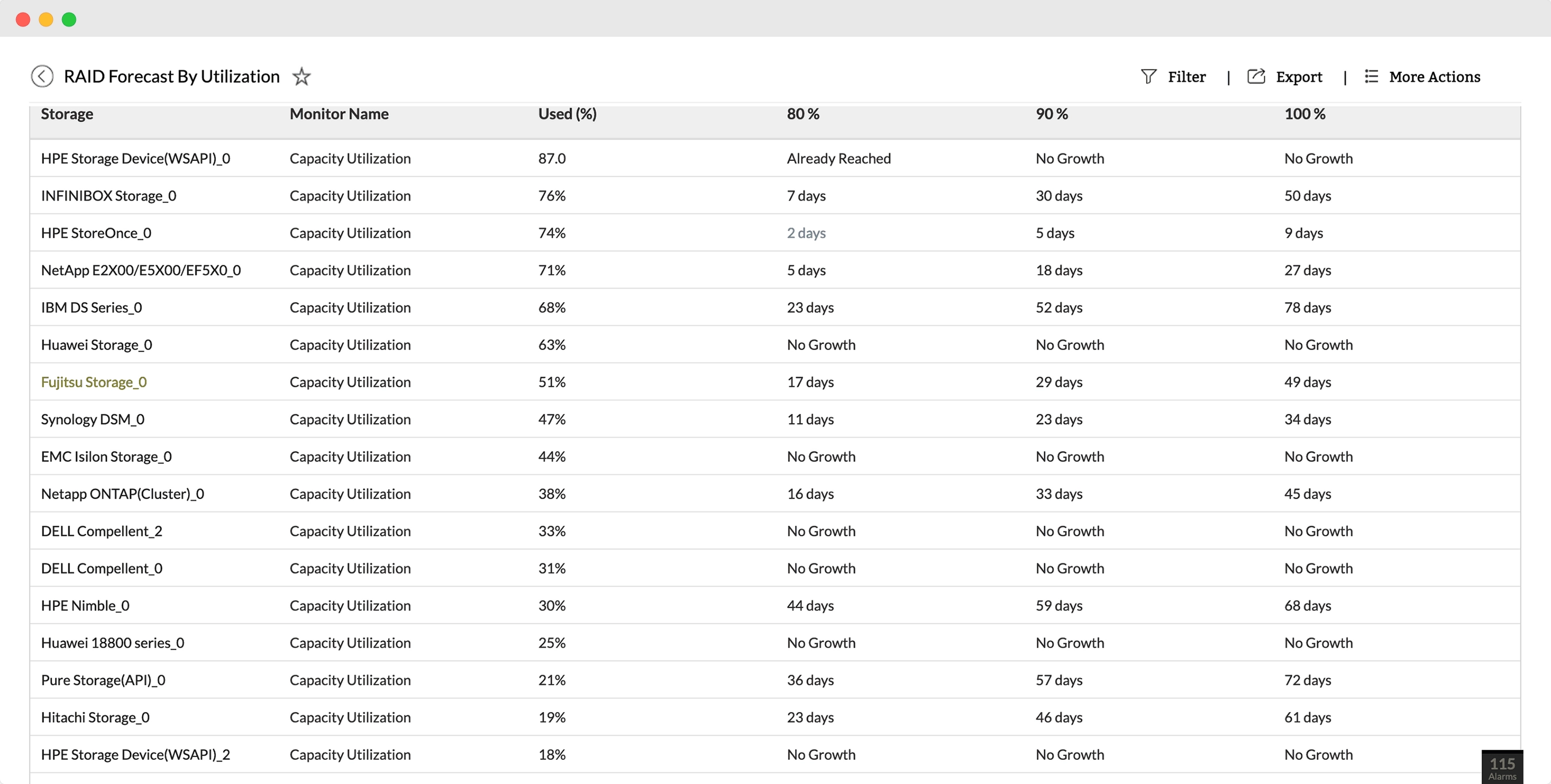
it-stack - ManageEngine OpManager 

Perform storage capacity planning and save costs while minimizing the risk of crises with storage capacity forecasting.
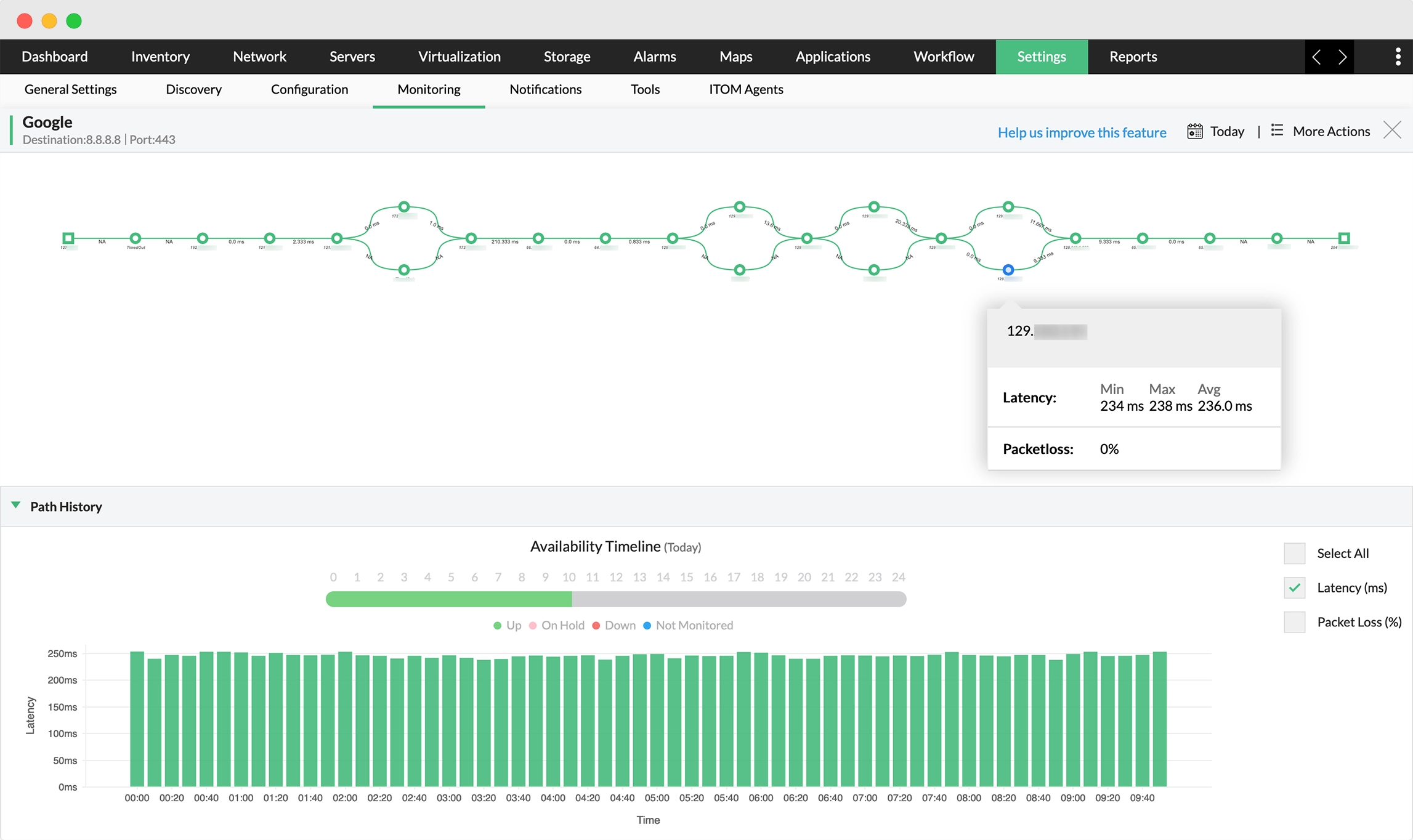
it-stack - ManageEngine OpManager 

Track hop-by-hop performance across multiple paths from source to destination. Visualize network path from probe to destination and maintain path history, helping identify communication delays in each path traversed.
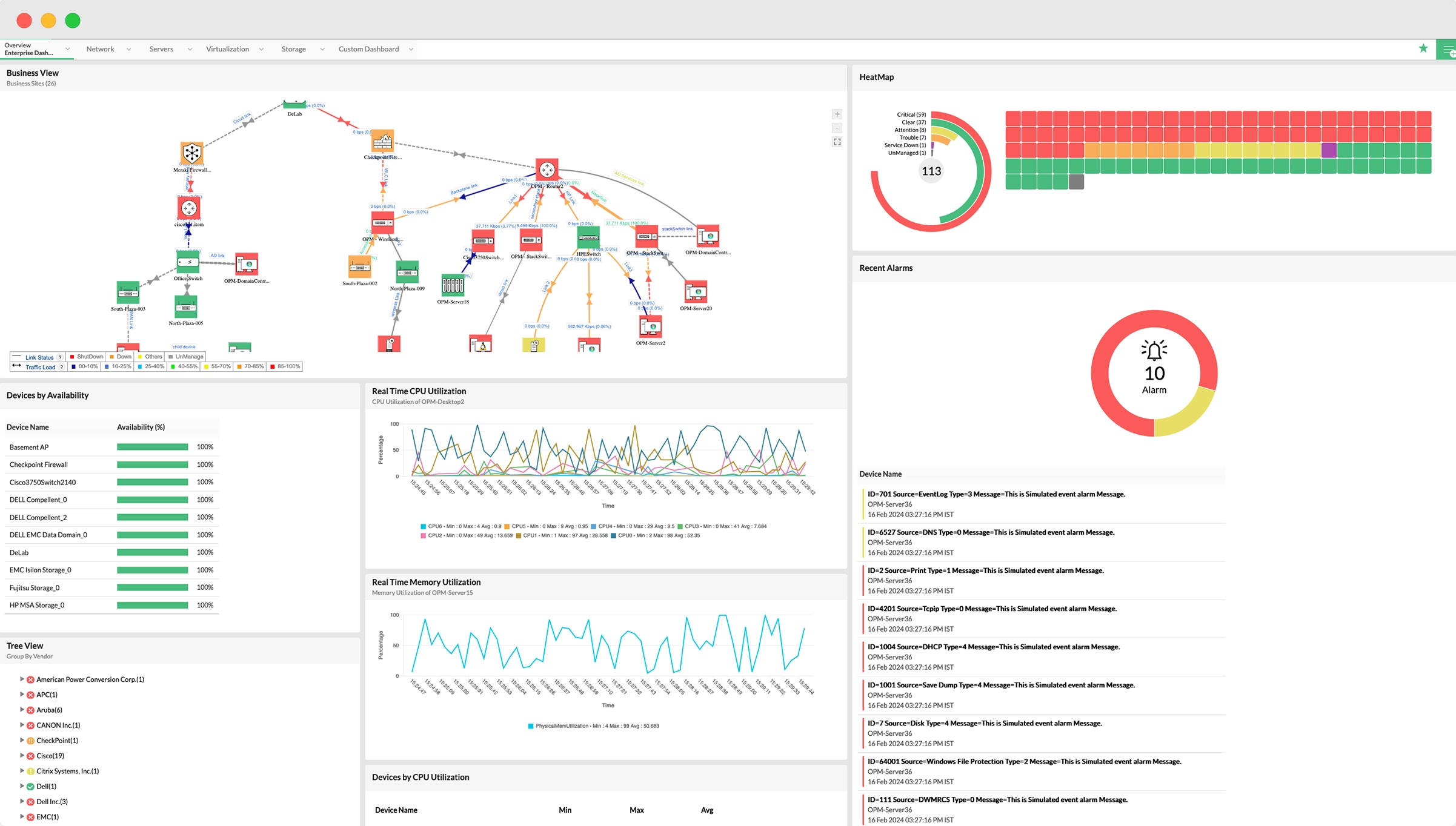
it-stack - ManageEngine OpManager 

Get an at-a-glance overview of your network's current status with dashboards displaying critical metrics from all your infrastructure components, including routers, switches, firewalls, servers, and more. Real-time performance graphs and one-click data refresh ensure up-to-date insights for quick troubleshooting.
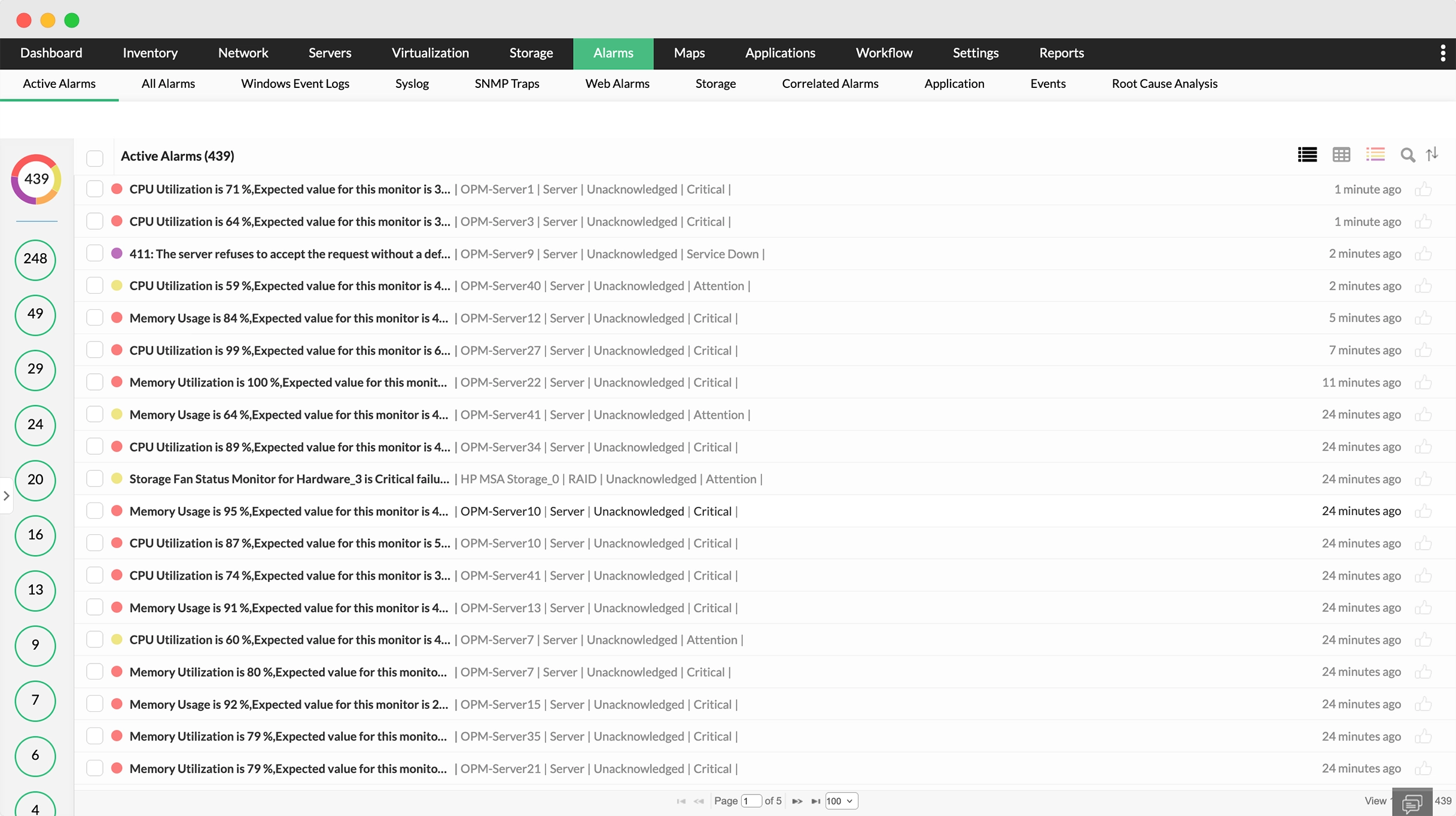
it-stack - ManageEngine OpManager 

View and manage all alarms using the alarms dashboard, with filters for active, event log, syslog, trap, web, VMware, application, and storage alarms. Easily access specific alarms from various modules, including bandwidth, configurations, and firewall monitoring, all in one centralized console.


 

What is Infrastructure Server Monitoring?

Infrastructure-level server monitoring is an approach where servers are monitored in relation the to the full IT stack. This includes not just CPU, memory, or disk metricsm but also the server's role in application delivery, network routing, data storage, and even compliance or threat surfaces.


Understand the bigger picture behind every server slowdown

Rather than looking at network alerts in silos, OpManager Plus offers a centralized view across IT layers. From an application causing high CPU to a misconfigured firewall rule choking server access, infrastructure-level visibility empowers quick, coordinated response and better decision-making.

Learn more

Reduce alert fatigue with layered analysis

Too many alerts with no context can bury critical issues. OpManager Plus connects the dots—linking server alerts with application usage, bandwidth spikes, or storage errors—giving clarity and enabling IT teams to focus on what truly matters.

Learn more

Deliver uninterrupted digital services

Server monitoring at the infrastructure level ensures service continuity. Whether it’s a database slowdown, a virtual machine performance dip, or an overloaded access point, all factors affecting the server are monitored together. This minimizes service impact and enhances user satisfaction.

Learn more

Enable proactive, coordinated IT operations

Rather than looking at network alerts in silos, OpManager Plus offers a centralized view across IT layers. From an application causing high CPU to a misconfigured firewall rule choking server access, infrastructure-level visibility empowers quick, coordinated response and better decision-making.

Learn more

AIOps to power your ITOps with smart detection and analysis

Service and processes monitoring 

Unified server monitoring across vendors/entities 

Monitor all server and OS types 

Less noise, more clarity and efficiency
  • OpManager Plus pings every server around the clock with ICMP, SNMP, WMI, and TCP to verify uptime and keep critical hosts reachable.
  • Continuous availability checks ensure I/O requests are answered promptly, preserving smooth application performance for end‑users.
  • Live packet‑loss and response‑time tracking helps identify latency at its source, letting admins fix sluggish servers before complaints roll in.
  • High‑availability dashboards spotlight MTTR and MTBF, showing exactly how quickly faults are resolved and how long hardware stays healthy.
  • Historical uptime analytics reveal chronic weak spots, guiding capacity upgrades or redundancy plans that cut downtime across the network.
Stay ahead of bottlenecks with AI and ML-based alerts
  • Along with system-level checks like HTTP, LDAP, and SMTP, OpManager also monitors Windows Services like Alerter, FTP, DHCP Server, IAS, and more.
  • If a service goes down, OpManager can auto-restart the service—or even reboot the server if needed.You can also track custom services running on specific TCP ports by adding them as monitors.
  • OpManager detects all active server processes, showing details like ID, name, path, and arguments.
  • The Remote Process Diagnostics tool highlights top CPU and memory-hungry processes in real time.
  • Admins can also remotely kill stuck or suspicious processes directly from the OpManager interface.
Keep stakeholders informed with real-time notifications
  • Track physical servers from Dell, HP, IBM and virtual hosts on VMware, Hyper‑V, Nutanix, or Xen from a single OpManager dashboard.
  • Monitor domain‑controller services and resources in real time and trigger instant alerts when critical metrics slip.
  • Manage remote IPMI devices over SNMP or Redfish and view their hardware status as intuitive graphs in the same console.
  • Export granular IPMI health data for detailed trend analysis and capacity planning across your hybrid environment.
  • Schedule automated remediation actions—like service restarts, script executions, or ticket creation—so recurrent server issues are fixed instantly without waiting for manual intervention.
Collaborate and reach solutions faster
  • Oversee every server role—mail, database, application—plus Windows and Linux hosts through one OpManager console, unifying visibility across your mixed environment.
  • Poll Windows servers via WMI and Linux hosts through Telnet or SSH; coverage spans Windows NT to 2019 and leading distros like RHEL, Ubuntu, SUSE, Debian, and CentOS..
  • Track more than 50 MSSQL health metrics—locks, cache hits, memory, critical services—with preset thresholds to isolate issues before they disrupt database performance.
  • Guard Exchange environments from 2000 through 2019, catching mail storms early and maintaining stable mailbox, queue, and storage utilization at all times.
  • Combine OS‑level insights with application performance, correlating CPU, memory, and service stats to spot root causes fast and keep business services available.

Dependency-aware Monitoring

Dynamic thresholds

Unified alerting

Correlated insights

Service-centric diagnostics

Monitor in context- not isolation
  • OpManager Plus tracks not just server metrics but how the server is linked to apps, users, storage arrays, and network components.
  • By identifying which dependent service or path is at fault, IT teams spend less time guessing and more time resolving.
  • OpManager Plus' infrastructure maps visually lay out server relationships—helping teams prioritize actions that affect business-critical services. Fewer false alarms, faster diagnostics, and a stronger handle on uptime.
  • Smarter correlations enables ITOps teams to triage incidents based on business impact, keep SLAs intact, and reduce resolution times even in the most complex environments.
Spot anomalies before they become disruptions
  • OpManager Plus uses dynamic thresholds, adjusting baseline values based on historical patterns and real-time conditions—across the stack.
  • When a server deviates from these intelligent baselines, contextual alerts are raised—color-coded by severity and linked to root causes. This adaptive approach ensures timely actions without false positives or missed warnings.
  • OpManager Plus eliminates the need for static rules, helping ITOps maintain server health dynamically, even during changing load conditions, upgrades, or migrations.
Align teams with real-time, actionable updates
  • Infrastructure-wide monitoring means faster, more informed alerts. Whether it’s a server, a router, or an app component causing latency, OpManager Plus integrates alerts with tools like ServiceDesk Plus, Slack, or Teams.
  • Each alert is enriched with cross-domain context—what else is failing, who it affects, and how it links to other systems.
  • From CPU thresholds to port link flaps to app crashes, alerts become collaborative, not chaotic.
  • With actionable insights and workflow-based responses, teams stay in sync, resolution is faster, and service quality remains uninterrupted.
Bridge silos and solve problems faster
  • A slow server might be a symptom, not the cause. OpManager Plus correlates server performance with app activity, bandwidth usage, storage latency, or even security events to present the whole story.
  • Relationship-aware dashboards reveal service dependencies and real-time health across layers.
  • Alarm Correlation Rules intelligently group incidents and suppress noise—helping teams resolve the right problems, not just the loudest ones.
  • By automating fault correlation and integrating with ITSM tools, OpManager Plus boosts response times, slashes MTTR, and supports a more stable IT ecosystem.
Service-centric diagnostics
  • Link every server metric directly to application SLA dashboards, so operations teams instantly know which business service is at risk when a resource dips.
  • Trace cascading impacts- from a single failed node to dependent databases, APIs, and user‑facing portals—before customers feel the slowdown.
  • Prioritize tickets by revenue or compliance importance, guiding engineers to address issues hurting critical services first.
  • Surface prescriptive remediation steps alongside alerts, slashing diagnostic time and boosting first‑fix success across complex, multi‑vendor stacks.
  • Validate post‑fix success automatically, closing the feedback loop and proving restored service health to stakeholders with real‑time reports.

Impact of OpManager Plus-enabled Enterprise Server Monitoring

Better application delivery

By identifying and resolving performance bottlenecks across all server touchpoints—storage, app layer, or traffic routes—OpManager Plus ensures that applications remain stable, fast, and available to users.

High end-user satisfaction

When server issues are solved before users even feel them, you ensure consistency in digital experiences. Infra-aware server monitoring leads to smoother service delivery, fewer complaints, and stronger user trust. 

Predictable IT performance

Infrastructure-level insights allow IT teams to forecast server overloads, storage saturation, or port overuse in advance. This foresight reduces emergencies and improves operational planning.

Rapid Incident Resolution

Faster root cause identification—whether it’s a switch port or an overloaded VM—translates to quicker fixes. With correlated alerts and automated playbooks, mean time to resolution drastically drops.

Leaner, more effective IT teams

When alerts make sense and priorities are clear, teams can automate repetitive responses and focus on strategic work. This boosts productivity and simplifies IT management.

Cost efficiency at scale

Unified monitoring reduces tool sprawl, slashes downtime, and minimizes manual intervention. The result? A healthier infrastructure that’s also easier on the budget.

Loved by customers all over the world


“Easy Implementation, Excellent support & Lower Cost Tool - Team Lead, IT Services Industry”

Reviewer Role: Infrastructure and Operations

Company size: 500M - 1B USD

We have been using OpManager since 2011 and our overall experience has been excellent. The tool plays a vital role in providing the value to our organization and to the customers we are supporting. The support is excellent and staff takes full responsibilities in resolving the issues. Innovation is never stopping and clearly visible with newer versions.

“OpManager - 10 steps ahead of the competition, one step away from being unequaled - Network Services Manager, Government Organization”

Reviewer Role: Infrastructure and Operations

Company size: 5,000 - 50,000 Employees

I have a long standing relationship with ManageEngine. OpManager has always missed one or two features that would make it truly the best tool on the market, but over it is the most comprehensive and easy to use the product on the market.

“Easy Implementation with a feature rich catalogue, support has some room for improvement - NOC Manager, IT Services Industry”

Reviewer Role: Program and Portfolio Management

Company size: 500M - 1B USD

The vendor has been supportive during the implementation & POC phases providing trial licenses. Feature requests and feedbacks is usually acted upon swiftly. There was sufficient vendor support during the implementation phase. After deployment, the support is more than adequate, where the vendor could make some improvements.

“Great Monitoring tool - CIO in Finance Industry”

Reviewer Role: CIO

Company size: 1B - 3B USD

ManageEngine provides a suite of tools that have made improvements to the availability of our internal applications. From monitoring, management and alerting, we have been able to peak performance within our data center.

“Simple Implementation, Easy To Use. Very Intuitive. - Principle Engineer in IT Services”

Reviewer Role: Enterprise Architecture and Technology Innovation

Company size: 250M - 500M USD


ManageEngine support was responsive to all our queries.

Capterra
Getapp
Software Advice
G2
Altaleb Alshenqiti

“OpManager helps me monitor all aspects of the data-center and equipment like servers, switches and routers. It is fast, intuitive and centralized and you do not need to be an expert to deal with OpManager.”

Altaleb Alshenqiti

NGHA

Donald Stewart

“Donald Stewart, IT Manager of Crest Industries is happy with ManageEngine OpManager for its end-to-end network monitoring software. It is easy-to-use and offers fault and performance management for router.”

Donald Stewart

IT Manager, Crest Industries

John Rosser

“John Rosser, MIS Manager of Yale Chase talks about the proactive nature of ManageEngine OpManager & how his organisation gained value from it.”

John Rosser

MIS Manager


Video Zone
OpManager Customer Videos
Michael Senatore, Operations Manager, Rojan Australia Pty Ltd.
  
  •  Venkatesan Veerappan, IT Consultant
     Mohd Jaffer Tawfiq Murtaja, Information Security officer from Al Ain sports club
  •  Jonathan ManageEngine Customer
     IT Admin from "Royal flying doctor service", Australia
  •  Michael Senatore, Operations Manager, Rojan Australia Pty Ltd.
     Michael - Network & Tech, ManageEngine Customer
  •  Altaleb Alshenqiti - Ministry of National Guard - Health Affairs
     Donald Stewart, IT Manager from Crest Industries
  •  John Rosser, MIS Manager - Yale Chase Equipment & Services
     David Tremont, Associate Directory of Infrastructure,USA