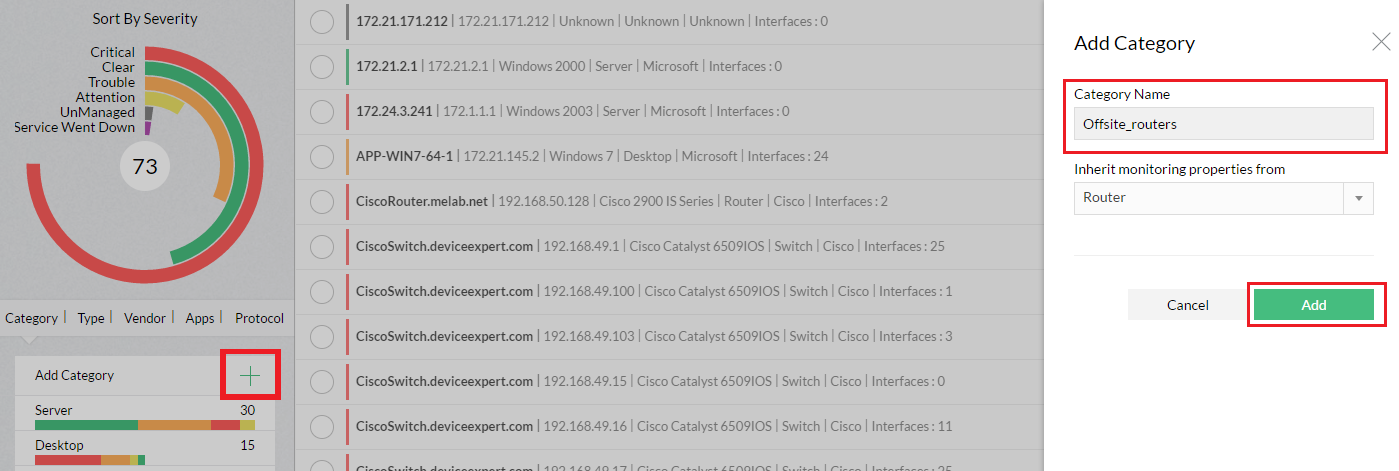
Adding new Infrastructure Views


You can create more defined groups by adding more custom views. For instance, you might want to group all your Environment Sensors or IP Phones into separate infrastructure views.


Steps to add a new Infrastructure View:

  • Go to Inventory > Sort By Category > Add Category

  • Specify the category Name.

  • Select the category whose properties needs to be inherited for this category

  • Click Add Category


After you create new infrastructure views, you can create device templates for devices of this category. This allows you to define monitors specific to the category and automatically applies the configurations defined in the template to the devices as soon as they are discovered.



Video Zone
OpManager Customer Videos
Michael Senatore, Operations Manager, Rojan Australia Pty Ltd.
  
  •  Venkatesan Veerappan, IT Consultant
     Mohd Jaffer Tawfiq Murtaja, Information Security officer from Al Ain sports club
  •  Jonathan ManageEngine Customer
     IT Admin from "Royal flying doctor service", Australia
  •  Michael Senatore, Operations Manager, Rojan Australia Pty Ltd.
     Michael - Network & Tech, ManageEngine Customer
  •  Altaleb Alshenqiti - Ministry of National Guard - Health Affairs
     Donald Stewart, IT Manager from Crest Industries
  •  John Rosser, MIS Manager - Yale Chase Equipment & Services
     David Tremont, Associate Directory of Infrastructure,USA