

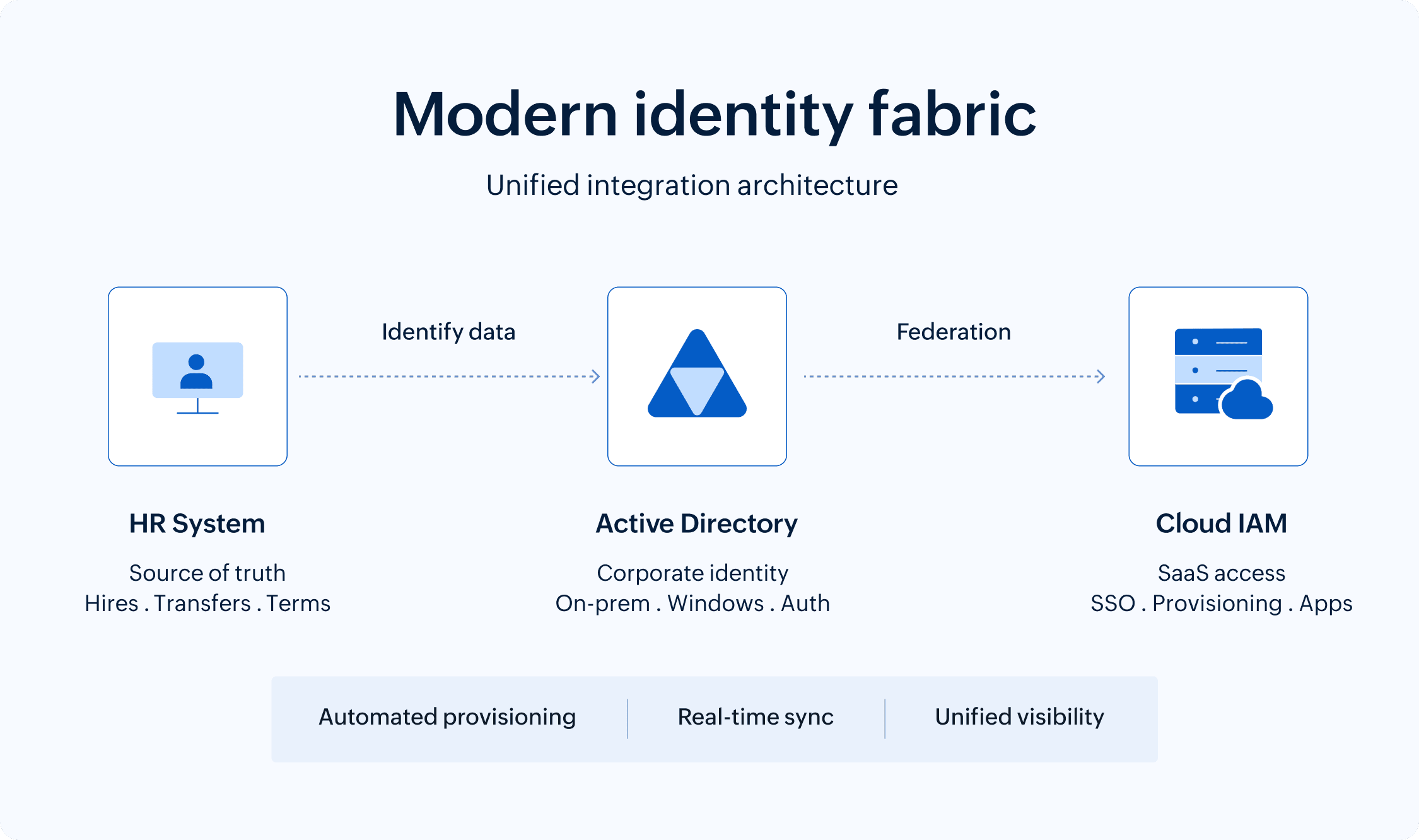
Identity fabric is unified architecture that connects HR systems, Active Directory, and cloud IAM platforms into a cohesive infrastructure. It enables automated onboarding when employees join, identity synchronization across systems, and automated offboarding when they leave, eliminating manual processes that create security gaps and access delays.
On this page
Your new marketing manager starts Monday. By 9am, she needs access to Microsoft 365, Salesforce, the company Slack, and a dozen other applications. Her identity and start date is already inputted in your HR system . As for adding her to Active Directory and granting SaaS access via your cloud IAM platform? It will all happen—eventually.
The problem? These three systems—HR, Active Directory, and cloud IAM—are starting three different conversations about the same person, and none of them are in sync.
Welcome to the identity fabric problem that enterprise IT teams wrestle with every day. The good news is that with the right integration tools and methods, achieving a modern, connected identity fabric is possible. In this blog, we'll explore how enterprises can bridge the gap between HR systems, Active Directory, and cloud IAM to build a unified identity architecture that automates provisioning, strengthens security, and eliminates the manual overhead holding most organizations back.
The identity disconnect nobody talks about
Here's what should happen when someone joins your organization: HR records their hire, identity systems create appropriate accounts, and access is provisioned to the necessary resources. On day one, the new hire can access every app and system they need to get started with work.
Here's what actually happens: HR creates a record in its system, say Workday or BambooHR. An IT technician gets a ticket and manually creates an Active Directory account, probably copying settings from someone in a similar role. Then, they create a separate account in your cloud IAM system, and send the credentials to the new hire. Three days later, IT realizes they forgot to add the hire to the VPN group. The new hire spends their first week requesting access to the various systems they need to do their job.
This isn't just an onboarding nuisance. It's a symptom of a deeper architectural problem. Your identity infrastructure is fragmented across systems that were never designed to work together.
Active Directory was built for on-premises networks in an era when "in the cloud" was a phrase only used by meteorologists. Cloud IAM platforms emerged to solve SaaS access requirements. HR systems evolved to manage people, not technical access. Each system your organization uses for identity management is perfectly functional within its domain. Yet they can't work together.
The technical debt in modern organizations is real and takes many forms: Manual processes that IT swears they'll automate when there's time. Shadow IT where departments provision their own SaaS access because IT can't respond fast enough. Service accounts that exist in Active Directory but not in cloud systems. Contractors who leave but whose accounts linger for months because deprovisioning requires touching three different systems.
Every enterprise IT team recognizes this pattern. Some have accepted it as the cost of doing business. The smart ones are demanding a unified identity fabric that actually connects these disparate systems into coherent infrastructure.
Why Active Directory refuses to retire gracefully
Let's address the elephant in the data center: Active Directory is over two decades old, and it shows. The directory and identity management service was designed when network perimeters were real and applications lived on-premises. Cloud evangelists have been predicting its demise for years.
And yet, it remains the authoritative identity source for the vast majority of enterprises. Not because IT teams are resistant to change, but because replacing Active Directory is like performing open-heart surgery on a system that absolutely cannot stop beating. From managing Windows endpoints and file services to authenticating on-premises applications and validating VPN credentials, the reliance on Active Directory is an architectural reality for most enterprises. This means you can't simply migrate from it to a cloud IAM platform.
The organizations that successfully modernize their identity architecture don't try to replace Active Directory. They extend it. They build identity fabric that acknowledges its continued role for on-premises and Windows-based resources while enabling cloud IAM platforms to handle SaaS provisioning, mobile device management, and modern authentication flows.
This hybrid approach requires synchronization mechanisms that keep user attributes, group memberships, and authentication credentials consistent across Active Directory and cloud IAM. When someone's title changes in the HR system, that update needs to flow to Active Directory and cloud systems. When an employee is terminated, their accounts need to be disabled everywhere, simultaneously—not through a series of manual steps across multiple administrative consoles.
Achieving coordination between these identity systems is a technical challenge. Active Directory uses its own schema and attribute definitions. Cloud IAM platforms have their own user models. HR systems track employment data that both identity systems need but don't natively understand. Building bridges between these systems means mapping attributes, handling schema differences, and ensuring bidirectional synchronization doesn't create conflicts.
The HR system as the source of truth
When someone gets promoted in your organization, where does that change get recorded first?
The correct answer should be the HR system, because that's where employment life cycle events are authoritative. The actual answer in most organizations? It depends on who processes the request first and whether anyone remembers to update the other systems.
HR systems contain the most accurate data about who works for your organization, including their role, department, manager, and employment status. This data directly determines what access someone should have. Still, most identity infrastructure treats HR as a peripheral system rather than the foundation.
This architectural mistake creates cascading problems. Without HR as the authoritative source, you're constantly correcting drift between what HR records show and what identity systems believe. This is evident when someone transfers departments, but their Active Directory group memberships still reflect their old role because nobody updated them. Or, when someone goes on extended leave, but all their accounts remain active because the leave status only exists in the HR system.
The solution to this problem is to treat HR as the source of identity life cycle events throughout the organization. That way, when HR records a new hire, account creation workflows across Active Directory and the cloud IAM platform are automatically triggered. When someone's role changes, the update propagates to your identity systems and triggers access re-certification. When someone is terminated, the status change immediately disables their accounts everywhere.
This requires integration architecture that connects your HR systems to your identity platforms in near real time. Unfortunately, there isn't a one-size-fits-all approach. API-based integrations are ideal but not always available depending on which HR platform you use. Scheduled synchronization works, but it can introduce delays where identity data is temporarily inconsistent across systems.
Another significant challenge is data mapping. HR systems track employment data like compensation, performance reviews, and benefits that identity systems don't need. Identity systems require technical attributes like User Principal Name suffixes, home directories, and group memberships that HR doesn't manage. Building the integration means carefully defining which HR attributes map to which identity attributes and handling cases where HR data doesn't translate cleanly.
Despite the challenges, organizations that successfully implement HR-driven identity provisioning discover several immediate benefits:
- Onboarding time drops from days to hours because account creation is automated.
- Offboarding becomes reliable because termination status in HR automatically triggers account disablement.
- Access reviews become more accurate because identity data reflects the current organizational structure rather than outdated information.
The cloud IAM layer that actually understands modern work
Cloud IAM platforms exist because Active Directory, for all its strengths, was never designed for the world of SaaS applications, mobile devices, and cloud infrastructure.
When employees need access to Salesforce, Workday, AWS, Google Workspace, Slack, Zoom, and thirty other cloud services, Active Directory can't handle the provisioning, deprovisioning, and access governance these platforms require. Cloud IAM fills this gap with connectors to hundreds of SaaS applications, automated provisioning workflows, and modern authentication protocols.
This is where federated identities become essential. Rather than creating separate local accounts in each SaaS application, cloud IAM enables single sign-on where users authenticate once and gain access to multiple applications. The technical implementation uses protocols like SAML, OAuth, and OpenID Connect that weren't part of Active Directory's original design.
Cloud IAM platforms also handle identity scenarios that Active Directory never needed to consider:
- Provisioning access for external contractors who shouldn't exist in your internal Active Directory.
- Managing B2B partner access to shared applications.
- Handling customer identity for external-facing applications.
- Supporting BYOD and personal device access to corporate resources.
As you can see, the provisioning capabilities of modern cloud IAM platforms extend beyond simple account creation. They can automatically assign users to the right groups in Slack based on their department, provision appropriate AWS permissions based on their role, and configure application-specific settings in bulk.
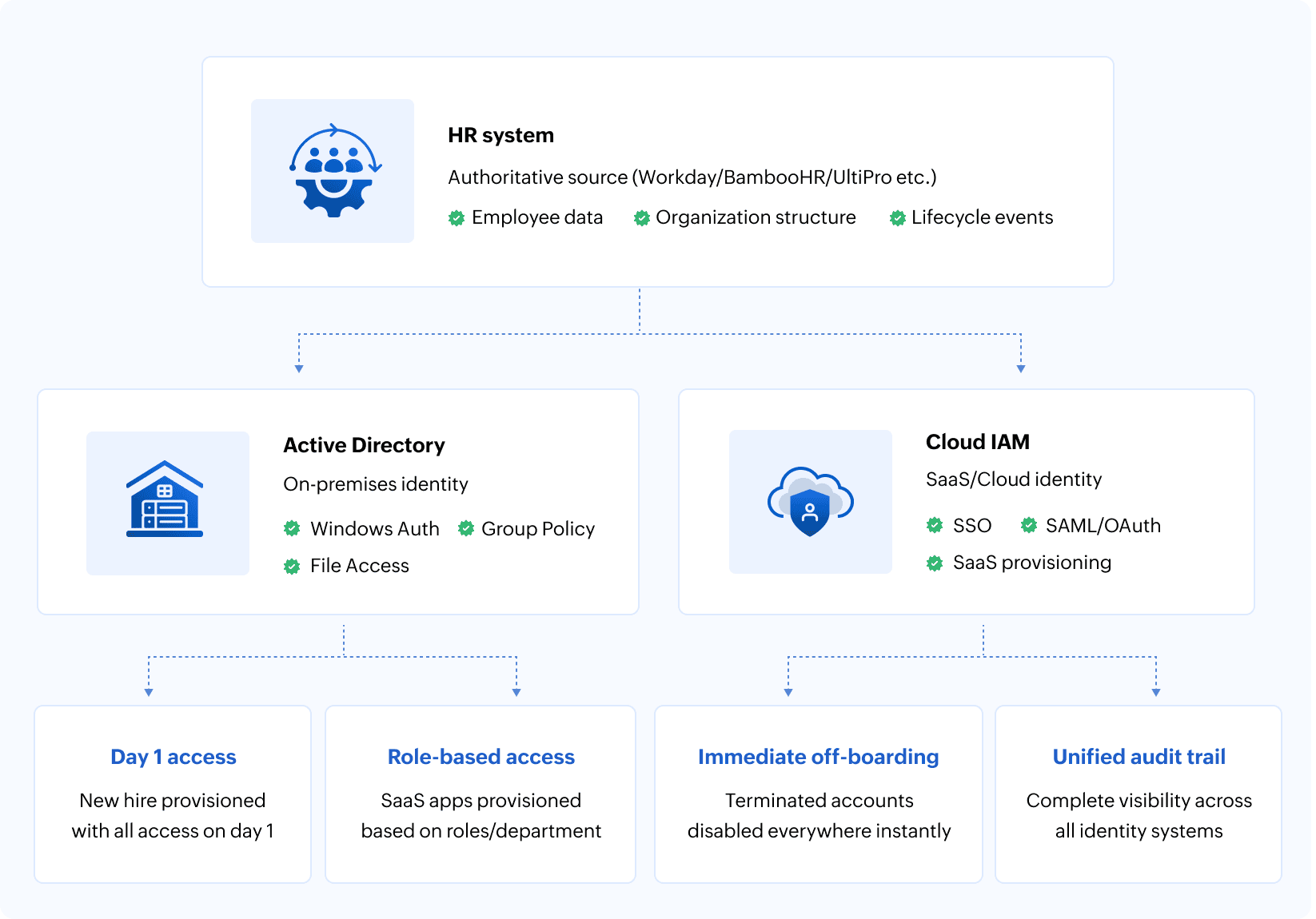
However, cloud IAM platforms shouldn't replace Active Directory as the identity source. They should consume identity data from Active Directory (which is consuming authoritative data from HR) and extend that identity to cloud resources. This creates a clear architectural hierarchy where HR defines who people are and what they do, Active Directory manages their corporate identity and on-premises access, and cloud IAM provisions their cloud and SaaS access.
Integration patterns that work
Connecting HR systems, Active Directory, and cloud IAM isn't a single integration project. It's an architectural pattern that requires careful design to avoid creating new problems while solving old ones.
The hub-and-spoke model is most common: The HR system is at the center, pushing identity data outward to Active Directory and the cloud IAM platform. In practice, this often means data flows from HR into Active Directory first, and the cloud IAM platform then consumes that synchronized identity—creating a layered flow rather than two fully independent pipelines. This keeps HR as the authoritative source of identity data and changes while allowing identity systems to maintain their own operational data. Identity systems don't write back to HR except in exceptional circumstances.
Some organizations implement a central identity governance platform that sits between all systems, orchestrating the data flow and maintaining a unified view of identity across the entire fabric. This adds complexity but provides better visibility and control, especially in large enterprises with multiple HR systems, numerous Active Directory forests, and complex cloud IAM requirements.
Real-time synchronization is the goal, but practical implementations often use near real-time scheduled sync with critical events triggering immediate propagation. A new hire might sync within minutes. A termination triggers immediate account disablement. Regular attribute updates like title or department changes sync on a schedule, perhaps every few hours.
Attribute mapping requires careful planning. An employee's legal name in HR might map to the displayName in Active Directory and the name attribute in the cloud IAM platform. Their employee ID becomes their username or email address, following whatever naming convention your organization uses. Their department, location, and manager all need to map correctly across systems, respecting the different schemas each system uses.
But even with the best mapping in place, conflicts will arise. When synchronization is bidirectional or when multiple systems update data for the same user, clear precedence rules are what prevent synchronization loops. HR always wins for employment data, Active Directory manages certain technical attributes, and the cloud IAM platform handles cloud-specific settings. When conflicts occur, the system with authoritative responsibility for that attribute takes precedence.
Mapping and conflict resolution handle the expected cases. What determines whether your identity fabric is truly robust is how it handles the unexpected. What happens when someone's manager in HR doesn't exist in Active Directory yet? When a department name contains characters that Active Directory doesn't accept? When a cloud IAM connector fails during provisioning? Good integration architecture handles these edge cases gracefully, logging errors for review rather than failing silently or creating corrupted data.
The security implications of integration
Integrating identity systems creates powerful automation and efficiency. It also creates powerful attack vectors if implemented carelessly.
A compromised service account that handles synchronization between HR and Active Directory can create privileged accounts, modify group memberships, or disable security controls. The credentials that identity provisioning systems use to connect to HR, Active Directory, and cloud IAM platforms represent high-value targets for attackers.
This means identity fabric integration requires security design from the start:
- Service accounts should use the minimum permissions necessary.
- Synchronization credentials should be stored in secure vaults, not configuration files or scripts.
- API access should use short-lived tokens rather than long-lived passwords where possible.
Moreover, audit logging becomes critical when identity changes flow automatically across systems. When a privileged account is created, you need to trace that action back through the identity fabric to understand whether it originated from a legitimate HR hire, an authorized manual override, or a compromise. Every system in the identity fabric should log changes comprehensively and correlate those logs for security investigation.
Segregation of duties matters more in automated environments than in manual ones. For example, the person who manages HR data shouldn't have administrative access to Active Directory or the cloud IAM platform. Since automation increases the speed and scale of potential abuse, having proper controls is essential.
The insider threat scenario—where someone with access to HR systems creates fictitious employee records to generate valid corporate credentials—is not theoretical. It has happened. Prevention requires HR data validation, identity provisioning review workflows, and monitoring for unusual account creation patterns.
External attackers increasingly target identity infrastructure because if they can compromise identity systems, they gain access to everything those identities can reach. For instance, a breach of your cloud IAM platform could expose every SaaS application. Integrating these systems means thinking about defense in depth: protecting each component while also protecting the integration points between them.
The life cycle events that test your integration
The quality of your identity fabric becomes clear during specific life cycle events, like onboarding a new hire. Best case? HR completes the hire record on Friday. By Monday morning, the new employee has an Active Directory account, email address, cloud application access, and all necessary group memberships. They can authenticate to the VPN, access file shares, and start working immediately. This requires HR-to-Active Directory-to-cloud IAM automation that actually works.
Employee transfers are the stress test of access re-certification. When someone moves from finance to engineering, they shouldn't retain finance-specific access. Your identity fabric should automatically remove old role-based access and provision new access based on the updated role in HR. This requires attribute-based access control that ties permissions to HR attributes rather than manually managed group memberships.
Termination is where weak identity fabric can visibly fail. When someone leaves the organization, their accounts need immediate disablement across every system. Failed offboarding creates security exposure and compliance gaps. Successful offboarding requires HR termination status to trigger automated account disablement across Active Directory, cloud IAM, and all connected systems.
An interesting edge case for your organization's identity fabric is an employee's leave of absence. Extended leave might require temporary disabling of access, while return from leave should automatically re-enable access. Most identity fabrics don't handle this process gracefully because leave status is tracked in HR but rarely flows to identity systems. Building proper leave handling requires custom logic that most organizations implement only after discovering the problem.
Finally, contractor and temporary worker management tests whether your identity fabric handles non-employee identities properly. Contractors often need access but shouldn't exist in your primary Active Directory. They need time-limited access that automatically expires. They require approval workflows different from regular employees. Handling these scenarios requires identity governance capabilities beyond simple HR-to-Active Directory synchronization.
What good integration looks like
Organizations with mature identity fabric integration don't necessarily have the fanciest tools or the biggest budgets. They have clear architecture, well-defined processes, and automation that reliably handles the common cases while providing manual override for exceptions.
Their HR system is genuinely authoritative
When someone asks "Who reports to whom?" or "What department is this person in?" the answer comes from the HR system's data, which flows consistently to the other identity systems. Employment life cycle events like hires, transfers, and terminations in HR automatically trigger identity provisioning workflows without manual intervention.
Their Active Directory reflects the current organizational reality
Group memberships align with actual job functions. Service accounts are documented and managed through formal processes. When compliance auditors ask for evidence of access controls, the data in Active Directory supports the attestation because it's synchronized with authoritative HR sources.
Their cloud IAM platform provisions SaaS access automatically based on role and department data from the HR system
New hires gain access to the cloud applications they need on day one. Terminated employees lose cloud access simultaneously with their Active Directory account disablement. Manual provisioning is the exception for unusual requests, not the standard process for routine access.
They have visibility across the entire identity fabric
When investigating a security incident or responding to an access audit, they can query across systems to understand who has access to what and why they have it. They can generate reports showing access based on current HR organizational structure rather than trying to reconstruct that information from disconnected systems.
They handle exceptions gracefully
When automation fails, and it sometimes will, they have fallback processes. When edge cases occur that automated workflows weren't designed for, they can manually provision access without breaking the overall integration. Their system is automated but not rigid.
The migration path for organizations starting from scratch
If your current identity infrastructure is heavily manual and your HR, Active Directory, and cloud IAM systems barely communicate, you might be wondering where to even begin.
1. Start with audit and documentation
Before integrating anything, understand your current state. How many accounts exist in Active Directory? Which ones are actually active employees versus contractors, service accounts, or orphaned accounts from former employees? What access patterns exist in cloud applications? Which HR attributes would be most valuable for automated provisioning? The answers to these questions will help you tailor a migration path for your unique environment.
2. Clean your data before synchronizing it
Automated integration will faithfully propagate bad data much faster than manual processes ever could. Outdated HR records, inconsistent Active Directory naming conventions, and incorrect department mappings will all create problems. Invest time in data quality before building automation that depends on that data.
3. Begin with read-only synchronization to build confidence
Set up HR-to-Active Directory integration that copies data but doesn't make changes automatically. Review what will happen with the current data. Identify and correct issues. You should enable automated provisioning only after you're confident the data mapping is correct.
4. Implement in phases rather than trying to integrate everything simultaneously
Start with new hire onboarding, the most visible pain point for most organizations. Get that process working reliably before moving to transfers, terminations, and more complex scenarios. Each success builds organizational confidence in the automation.
5. Use a pilot group to test the integration before rolling out broadly
Select a department or location where you can closely monitor the results, quickly correct problems, and learn from the experience without affecting the entire organization.
6. Plan for the long term but implement incrementally
Your eventual architecture might include full HR-to-Active Directory-to-cloud IAM integration with automated provisioning, role-based access control, and comprehensive audit logging. But you don't need to implement all of that on day one. Each incremental improvement delivers value while moving toward the complete vision.
The bottom line
The technology to build a unified identity fabric exists via identity provisioning platforms, synchronization tools, and integration frameworks that are proven in thousands of enterprises. What's often missing is the organizational commitment to treat identity infrastructure as critical architecture that deserves proper design, implementation, and maintenance.
Your identity infrastructure is the foundation for every authentication, authorization, and access decision across your enterprise. It deserves to be treated as unified architecture, not as three separate systems that occasionally talk to each other.
The time to build proper identity fabric integration isn't after the next security incident or compliance audit. It's now.
Frequently asked questions
HR becomes the authoritative source that triggers identity provisioning workflows. When HR records a hire or termination, automated synchronization creates or disables accounts across Active Directory and the cloud IAM platform simultaneously. Federated identity protocols like SAML and OAuth enable single sign-on to SaaS applications while Active Directory manages on-premises access.
You need both in a hybrid identity architecture. Active Directory handles Windows authentication, GPOs, and on-premises applications that cloud IAM can't manage. Cloud IAM handles SaaS provisioning and modern authentication that Active Directory wasn't designed for. Proper integration synchronizes identity data between both platforms.
Disconnected systems allow terminated employees to retain active accounts. Contractor management fails when access isn't automatically expired. Identity audits reveal contradictory data across systems, and provisioning delays create shadow IT where departments bypass proper access governance entirely.
Typical implementation requires three to six months. Start with identity audit and data cleanup, then enable read-only HR-to-Active Directory synchronization. Phase in automated onboarding first, followed by offboarding and access re-certification. Technical requirements include API connectivity, directory synchronization agents, and federated identity configuration for single sign-on.
Related solutions
ManageEngine AD360 provides unified Active Directory, Azure Active Directory, and Exchange management with automated user life cycle management that integrates HR systems, synchronizes identity data across on-premises and cloud environments, and automates provisioning workflows. Manage your complete identity fabric from a single platform designed for enterprise scale.
Schedule a personalized demoManageEngine Log360 delivers comprehensive audit visibility across your identity infrastructure with tracking for Active Directory changes, cloud IAM events, and real-time security monitoring. Gain unified visibility across Active Directory, Microsoft 365, and cloud systems with enriched audit trails that serve security, compliance, and operational needs.
Request a personalized demoThis content has been reviewed and approved by Ram Vaidyanathan, IT security and technology consultant at ManageEngine.