
About Zoho's Zia
Last updated on:
In this page
About Zia
ManageEngine Log360 uses Zoho's Zia Insights and the AI-based Investigation Agent to enhance log analysis, threat detection, incident response, and alert investigation.
Zia Insights leverages contextual AI to transform raw logs, security events, audit trails, alerts, and incidents into actionable insights, enabling you to quickly identify risks, get context on an event, possible mitigation steps, and add value by mapping MITRE ATT&CK® techniques to the events wherever possible for effective analysis.
Investigation Agent extends these capabilities by performing guided, autonomous investigations on alerts. It collects related alerts, alert profiles, logs, and entity data, applies reasoning using large language models (LLMs), and produces a comprehensive investigation result. The Investigation Agent can also respond to analyst queries within the same context, supporting an interactive investigation experience.
Understanding Investigation and Insights
Zia Insights and the Investigation Agent are two AI-driven capabilities in the product console. They can be used individually or together based on the analyst's requirement and the complexity of the event.
Both capabilities operate on the same AI framework, which provides a unified understanding of log, incident and alert data, allowing smooth transition from quick insights to detailed investigations.
| Capability | Insights | Investigation |
|---|---|---|
| Purpose | Provides AI-generated contextual summaries for logs, alerts, and incidents. Helps analysts quickly understand the nature, timeline, and impact of an event, along with possible mitigation guidance. | Performs a detailed, AI-guided investigation on alerts. Examines related alerts, entities, and logs to uncover correlations, assess risk, and determine potential attack chains. |
| Level of analysis | Focuses on single-event analysis. Summarizes the selected log, alert, or incident and highlights key indicators and activity timelines. | Conducts in-depth, multi-stage analysis across multiple alerts and entities within a defined time window to build a complete investigative view. |
| Availability and access | Available in Logs, Alerts, and Incidents modules. | Available only in the Alerts modules. |
| User interaction | None. Insights are generated and displayed in the product interface. | Supports interactive analysis. Analysts can ask follow-up questions, pause or extend the investigation, and refine results within the same session. |
| External intelligence integration | Uses built-in contextual AI to interpret event data. | Integrates with Threat Intelligence tools such as VirusTotal and Log360's Advanced Threat Analytics (ATA) to evaluate entity reputation and risk. Incorporates UEBA risk scores where applicable. |
| Output | Generates structured insights including event summaries, key indicators, impact assessments, MITRE ATT&CK® mappings, and suggested actions. | Produces a consolidated investigation report with related alerts, entity-level risk evaluations, MITRE ATT&CK® mappings, and recommended remediation guidance. |
How Zia Insights works
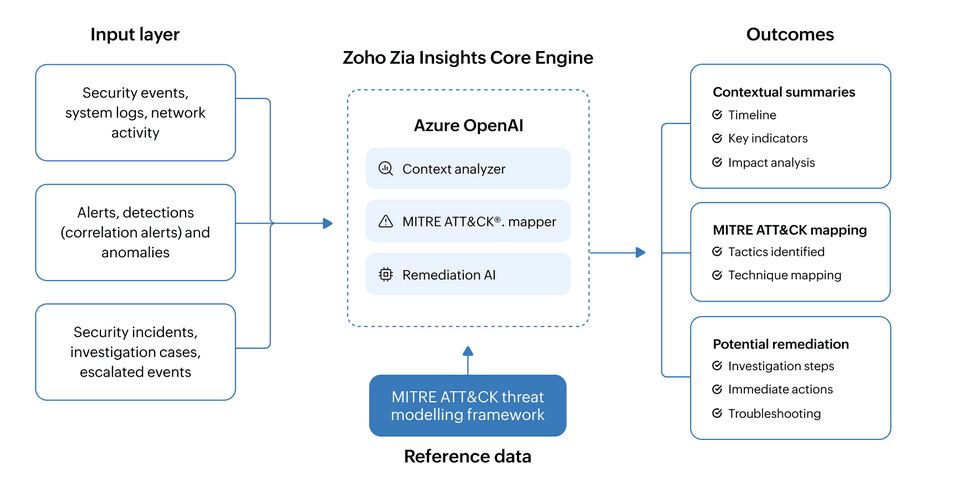
This section elaborates the underlying architecture and functioning of Zia Insights. Zia Insights capability works with bring your own key (BYOK) model with Azure Open AI. By processing logs, alerts, and incidents, Zia Insights delivers contextual summaries, highlights potential risks, maps relevant activities to MITRE ATT&CK® techniques, and suggests possible remediation steps. These insights enable security teams to understand the event context better, accelerate investigations, and strengthen response strategies.
1. Invoking Zia Insights
The workflow begins when a user initiates a request for insight by selecting a specific log, alert, or incident. This action triggers the Zia Insights engine to begin its analysis.
Once invoked, the product console automatically retrieves all relevant data associated with the selected item. This includes raw logs, event metadata, alert context, or incident timelines, depending on the request initiated by the user. This collected information forms the input layer, which is critical to the insight generation process.
The input layer aggregates a wide range of security data sources, including:
- Security events, system logs, and network activity: Collected from endpoints, firewalls, cloud infrastructure, and other monitored systems
- Alerts and detections (correlation alerts): Triggered through rule-based correlation alerts.
- Security incidents, investigation cases, and escalated events: Data related to ongoing or historical threats under review by the SOC team
This comprehensive dataset ensures that Zia Insights has all the context it needs to generate actionable insights.
2. Insight generation
Once the relevant security data is collected, it is passed to the Zia Insights core engine, which leverages the capabilities of Azure OpenAI and OpenAI to transform raw data into contextual insights.
Zia Insights pairs the retrieved data with a predefined set of instructions known as a prompt. This prompt defines how Zia Insights should interpret the data and how the output should be structured.
Zia Insights then processes the data through several core components:
- Context analyzer
Reconstructs the event timeline, identifies key actions, and potential threat classifications.
- MITRE ATT&CK® mapper
Matches detected behaviors to known attacker tactics and techniques using the MITRE ATT&CK® framework, helping the SOC team understand potential threat stages.
- Remediation AI
Suggests investigation steps, containment strategies, and recovery recommendations tailored to the specific scenario.
3. Outcomes from Zia Insights
After processing and analyzing the input data, Zia Insights produces a structured output that is both actionable and context-aware. The key components of the outcomesinclude:
Contextual summaries
Summarizes the event with a timeline, key indicators, and impact analysis
- Timeline: Reconstructs the sequence of related events to provide temporal clarity.
- Key indicators: Highlights important information such as source IPs, user accounts, and processes.
- Impact analysis: Evaluates the potential effect of the event on systems, users, or business operations, helping teams prioritize response.
MITRE ATT&CK® mapping
Based on the behaviors observed, Zia Insights maps the activity to corresponding MITRE ATT&CK® tactics and techniques. This enables standardized threat classification and aids in investigation and threat hunting.
Potential remediation
Zia Insights offers suggested investigation steps, immediate containment actions, and troubleshooting guidance to support timely and informed action.
How the Investigation Agent works
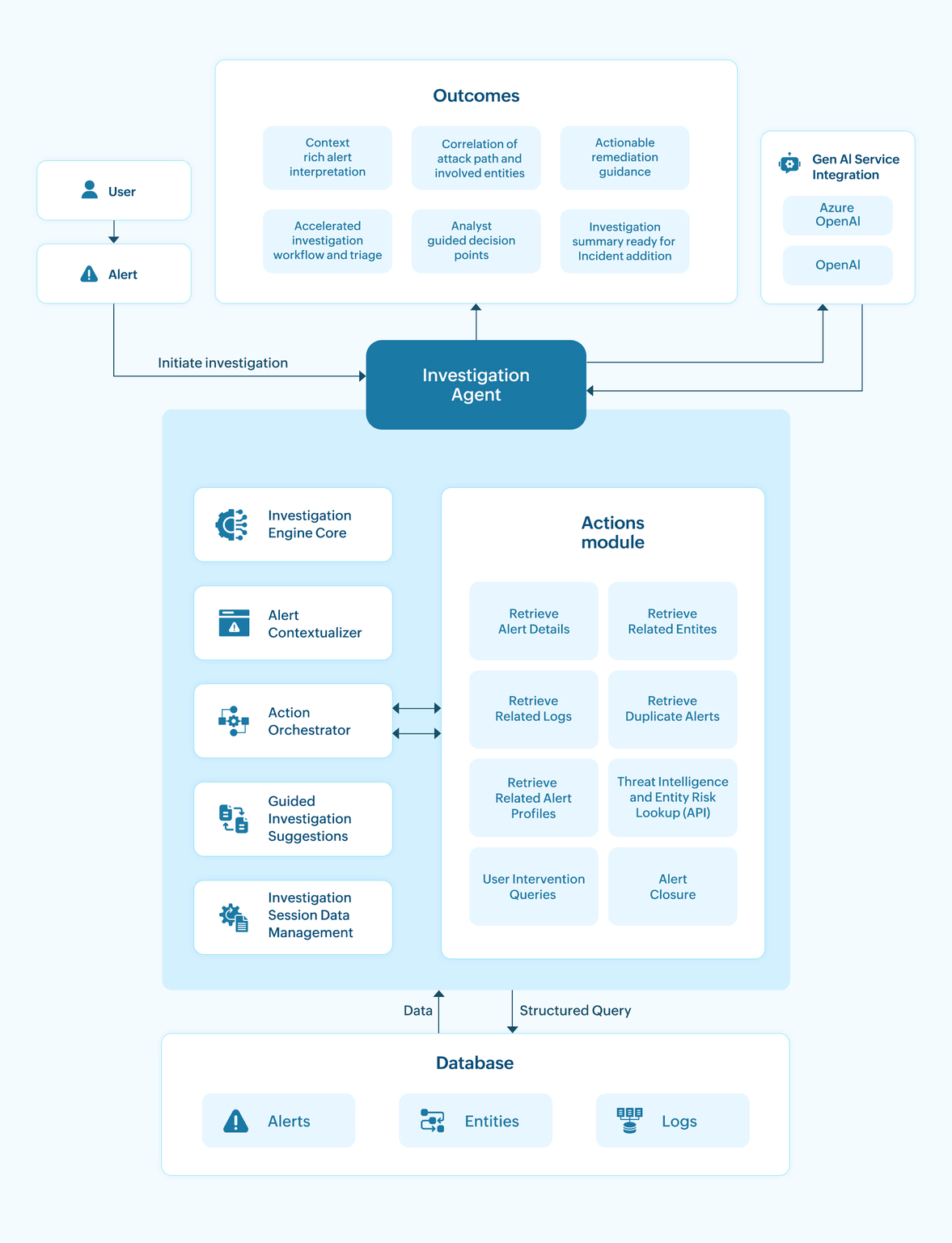
This section details the workflow of the Investigation Agent. The Investigation Agent leverages Gen AI (Azure OpenAI or OpenAI) to perform complex investigations on alerts, reconstruct attack paths, and guide analysts with actionable insights.
By orchestrating tool calls, contextualizing alert data, and generating correlation-rich results, the Investigation Agent reduces manual investigation effort.
1. Invoking the Investigation Agent
The workflow begins when an analyst selects an alert and starts an investigation. This action initializes the Investigation Agent and triggers the analysis workflow.
2. Investigation Engine Core
Once the investigation is initiated, the Investigation Agent progresses where multiple modules collaboratively orchestrate the investigation.The Investigation Agent works in a loop with the GenAI service requesting additional details as needed to refine the findings.
Below are the five core modules and their detailed roles.
a. Alert Contextualizer
The Investigation Agent then determines the key elements associated with the alert, such as the host, user, IP addresses, or processes involved. Basic alert enrichment is applied using information already available within the product to prepare the alert for further analysis.
b. Action Orchestrator
The orchestrator manages the execution of actions to fetch information and execute relevant commands. It receives query requests from the GenAI service and determines which action must be executed next. It ensures the right actions are executed in the right sequence and passes all results back to the Investigation Agent.
c. Guided investigation suggestions
Based on the alert type and intermediate findings, the engine suggests recommended next steps in the investigation to be taken.These suggestions guide the analyst and shape the investigation path, ensuring no critical evidence is missed.If certain data is unavailable, such as previous-day logs, the engine suggests alternative options, including extending the time range. It may also recommend reviewing specific entities, and alert profiles that are relevant to the alert.
d. Investigation Session Management
This module records and organizes all information gathered during the investigation, including alert details, related logs, retrieved entities, duplicate alerts, and risk-related insights. It maintains the full investigation state, allowing the session to be paused at any point and resumed later without losing progress.
When the investigation is executed again after a pause, the module restores the previously saved state so the analyst can continue from where the session left off.It also ensures that the final investigation output remains complete, consistent, and ready for export or incident addition.
3. Actions Module
The set of actions used to perform the tool calls required during an investigation. Each action converts requirements from the Investigation Agent into machine-understandable, structured queries or commands to retrieve data.
The available actions include:
- Retrieve Alert Details - Fetches complete alert metadata.
- Retrieve Related Entities - Gathers associated hosts, users, IPs, or processes.
- Retrieve Related Logs - Fetches log entries involving the alert's entities.
- Retrieve Duplicate Alerts - Identifies alerts that are relevant or similar to the alert under investigation, or associated with the analyzed entities.
- Retrieve Related Alert Profiles - Fetches rule/ alert configurations of the alerts involved in the investigation.
- Threat Intelligence and Entity Risk Lookup - Checks domain or IP reputation from Threat Intelligence integrations and behavioral risk scores (UEBA) of the involved entities.
- User intervention queries - Executes user-initiated questions during the investigation, allowing analysts to ask the agent for clarifications or additional context.
- Investigation outcome and alert closure - Consolidates all findings into a structured result, enabling analysts to review the investigation and close the alert directly from the interface if no further action is required.
These actions supply the Investigation Agent and GenAI with comprehensive evidence required to construct a contextual investigation.
4. GenAI service integration
The GenAI service integrates Azure OpenAI or OpenAI with the Investigation Agent to support reasoning and insight generation during the investigation.
The Investigation Agent provides structured data to GenAI and applies the model's responses to progress the investigation and produce the final findings.
5. Database layer
The database layer stores the operational data required for investigations, including alerts, logs, and associated entities.Logs and alerts are stored across the product's data stores such as Elasticsearch and Zlogs. Entity information is derived from and grouped alongside alert data within these stores to provide contextual relationships during investigations.
The Actions Module retrieves the required information from these data stores and returns it to the Investigation Engine.
6. Outcomes
- Context-rich alert interpretation: Provides clear, enriched context by analyzing the alert type, associated entities, and threat factors, enabling analysts to quickly understand the alert's relevance and potential impact.
- Accelerated investigation workflow: The Investigation Agent automates the typical investigation steps that an analyst would otherwise perform manually for each alert type. By automating these steps, it enables faster and more effective analysis, leading to quicker remediation and decision-making.
- Correlation of attack path and involved entities: If malicious behavior exists, the system reconstructs how events and entities connect.
- Analyst-guided decision points: The Investigation Agent enables analysts to intervene when needed, such as pausing the investigation, extending the log range, or reviewing specific entities. It provides points in the process where analyst input can guide how the investigation proceeds, ensuring effective human-in-the-loop control.
- Actionable remediation guidance: Delivers remediation recommendations tailored to the alert and affected entities, enabling analysts to take effective response actions such as containment, isolation, credential reset, or cleanup.
- Investigation summary ready for incident addition: A comprehensive, export-ready report that can be added directly to an incident for further tracking or escalation.
Benefits of integrated Zia experience
Log360's Zia Insights empowers SOC team's investigation process and effectively mitigate or neutralize a threat with unprecedented speed. It allows SOC professionals to:
- Proactively hunt for subtle indicators: Leverage the Summary, Insights, and Timeline in Zia Insights to uncover subtle indicators of compromise proactively. These segments quickly highlight relevant events, actors, and entities, letting you address anomalies sooner.
- Accelerate investigation: By automatically providing context, identifying actors, entities, and laying out the attack chain with MITRE ATT&CK® framework mapping.
- Enable rapid remediation: By offering specific, actionable steps tailored to the detected threat and log types.
- Enhance threat intelligence: By consistently mapping incidents to MITRE ATT&CK®, building institutional knowledge of adversary tactics.
- Optimize analyst productivity: By offloading initial analysis and information gathering to the AI, allowing human analysts to focus on critical decision-making and strategic defense.
- Understand sequence of events: Zia interprets event sequences and outlines how activities progressed, showing the flow of actions that contributed to the alert. This gives analysts a clear view of the incident's progression and helps determine the root cause.
Read also
This page explained the capabilities of Zia, including Zia Insights and the Investigation Agent, and how they enhance analysis and investigation workflows. To configure and use these features, refer to: