Ransomware attacks continue to disrupt a majority of organizations worldwide, with recent industry reports showing that nearly 6 in 10 organizations faced at least one ransomware incident in 2025 alone. These devastating cyberattacks remain one of the most destructive security threats companies and its damage goes way beyond locked files. Businesses suffer extended downtime, lose substantial revenue, and deal with costly recovery efforts. They also risk legal troubles and reputation damage. This makes one-click recovery and resilient data recovery architectures mission-critical for keeping downtime, data loss, and ransom pressure under control.
Understanding data recovery in ransomware scenarios
During a ransomware incident, recovery outcomes are defined less by how the malware operates and more by how prepared the environment is to restore data and services at scale. Organizations with well-designed backups, tamper-proof storage, and tested recovery processes can often treat an attack as a controlled outage, while others face prolonged downtime, data loss, and reputational fallout.
Effective ransomware data recovery rests on three tightly connected pillars: frequent backups, immutable storage, and rapid system-wide recovery. If any of these fail—outdated backups, compromised storage, or slow recovery—organizations may technically “have backups” but still face unacceptable data loss or ransom negotiations.
Frequent backups: Minimizing data loss
Frequent backups shrink the recovery point objective (RPO), so even if ransomware hits mid-day, you roll back to recent data rather than losing entire business cycles. Organizations that only back up once or twice a day routinely end up losing hours of transactions, patient records, or operational data even when recovery “works,” because the last safe copy is too far in the past. When backup intervals are measured in hours instead of days, recovery becomes a question of replaying a small amount of missed activity instead of reconstructing an entire day or more of business operations.
Immutable storage: Backups attackers cannot change
Immutable storage ensures that once backups are written, they cannot be modified, encrypted, or deleted until their retention period expires—even by compromised administrator accounts. This is critical, as modern ransomware often targets backup repositories first to eliminate clean recovery options.
Quick system-wide recovery: Restoring services, not just files
Rapid, system-wide recovery is more than just getting individual files back. It is about bringing entire applications, endpoints, and business services online within an acceptable recovery time objective (RTO). Even if backups are frequent and immutable, a slow, manual recovery process that takes days to rebuild servers, reconfigure endpoints, and validate data can still cause crippling downtime and lost revenue.
Building a ransomware data recovery plan
A solid defense against ransomware starts with preparation. Your ransomware recovery plan acts as a roadmap that helps you respond to attacks and keep your business running. Ransomware data recovery needs several components to work together effectively.
- Start by implementing the 3-2-1 backup rule:keep three copies of your data minimum, store them on two different types of media, and maintain one copy offsite. You can strengthen this approach with immutable backups that attackers cannot modify or encrypt.
- Air-gapped backups add a vital layer of protection.strong> These backups physically isolate your recovery data from network connections and create a barrier that ransomware cannot breach.
- Your plan must address two important targets: Recovery Time Objective (RTO)—how long you can afford to be down, and Recovery Point Objective (RPO)—the maximum data loss you can tolerate.
- Testing your backups is essential. You won't know if they'll work during an actual attack without proper verification.
One-click recovery succeeds only with preparation. Clear steps to identify attacks, isolate affected systems, remove malware, and restore critical services ensure fast recovery without paying ransom, by setting up clear steps to identify attacks, isolate affected systems, remove malware, and restore critical systems first.
Recovering ransomware-encrypted files using Malware Protection Plus
Malware Protection Plus enables structured, automated recovery by leveraging Microsoft’s Volume Shadow Copy Service (VSS). Shadow copies of endpoint files are captured at regular intervals, creating a rolling timeline of safe states that allow encrypted files to be rolled back with minimal data loss.
The solution continuously monitors processes and file activity for ransomware-like behavior, operating in Audit mode to flag suspicious patterns or Kill mode to terminate malicious processes as soon as they are confirmed.
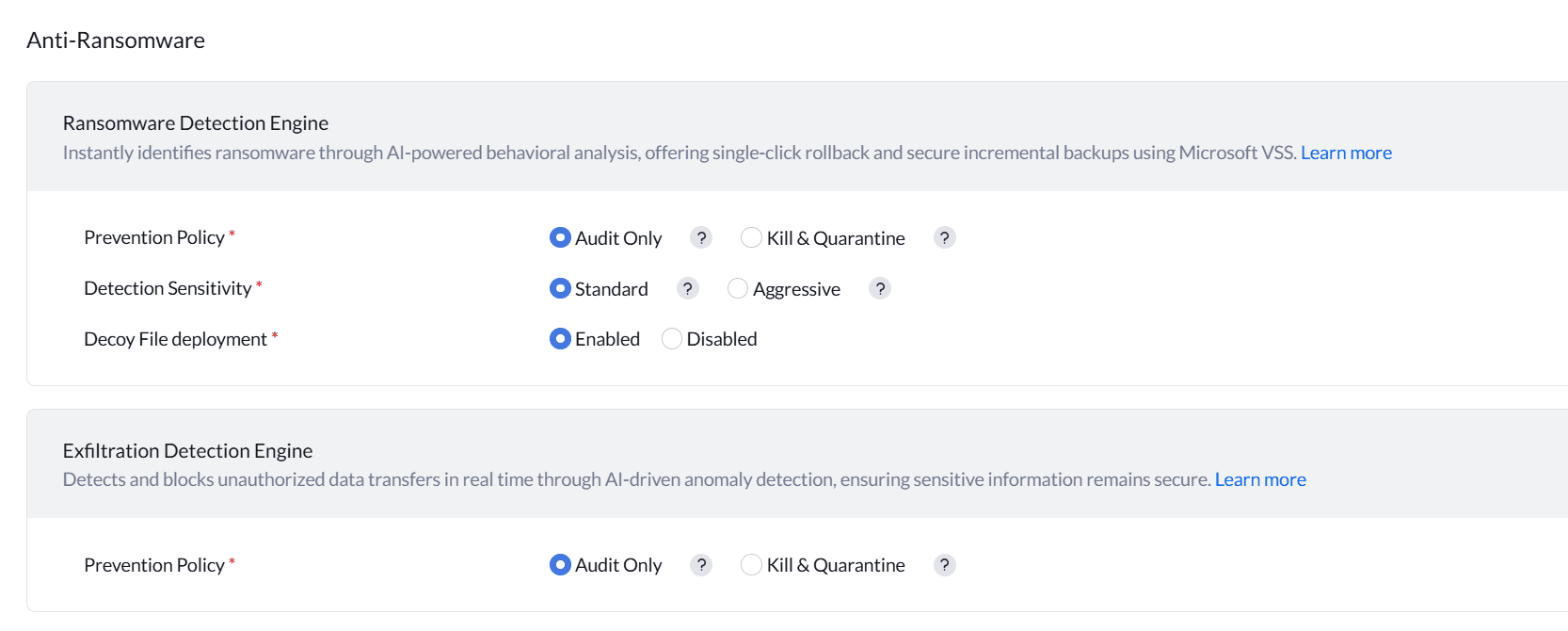
Once an attack is detected, the solution correlates impacted files with its VSS snapshot catalog and executes a one-click recovery workflow. Only encrypted or tampered files are restored to their last known good versions, avoiding full machine restores.
This detection and recovery logic is delivered through a lightweight, multipurpose agent that consumes around 1% of network bandwidth and is engineered for minimal CPU, memory, and disk overhead—ensuring protection without impacting user productivity.
One-click recovery workflow
- Detect abnormal file encryption behavior.
- Terminate the malicious encryption process.
- Delete files and configurations modified by ransomware.
- Identify all affected files and roll them back to the latest safe shadow copies.
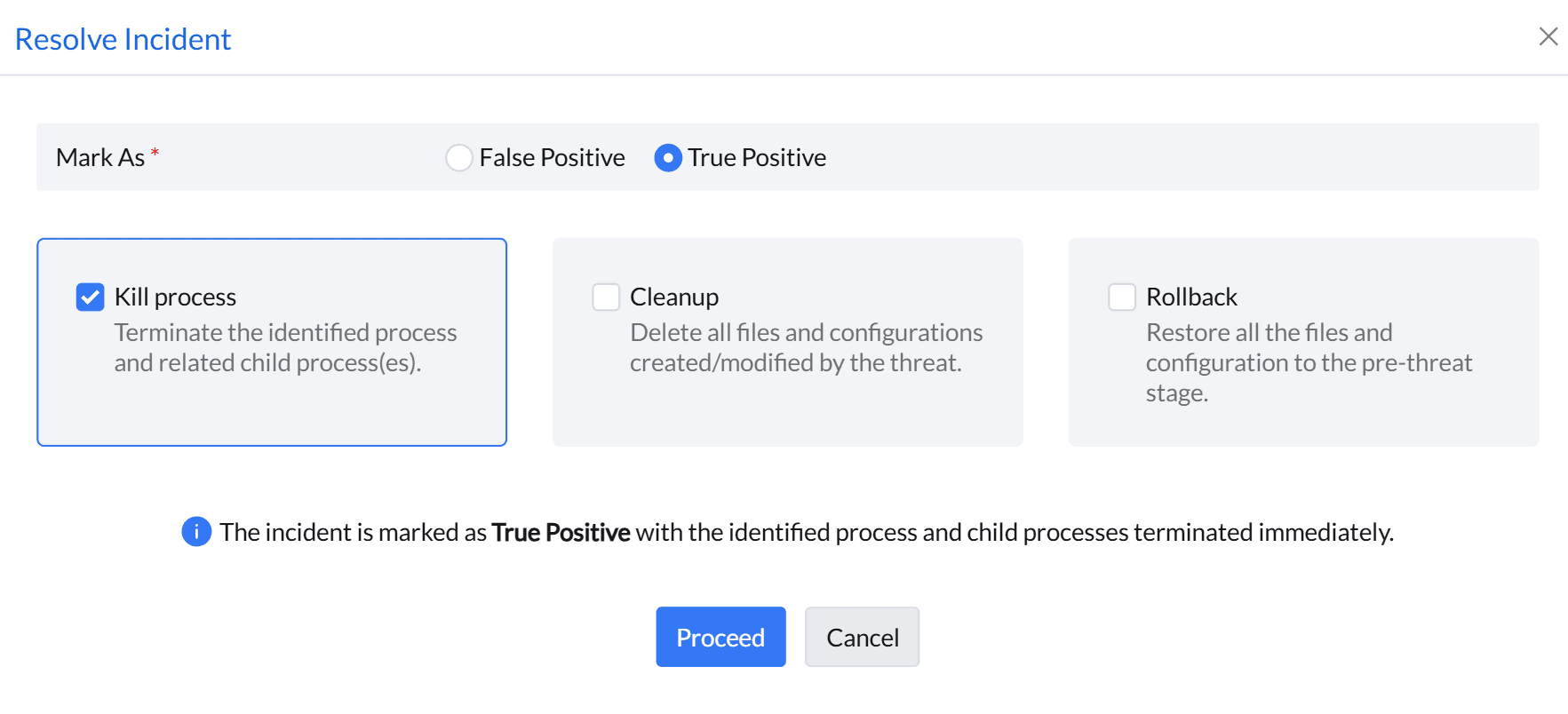
Because this process is policy-driven and automated, IT teams can restore multiple endpoints in parallel, keeping RTOs low and ensuring that users regain access to their data with minimal manual intervention. Malware Protection Plus is designed to treat backups as a protected last line of defense, guarding VSS snapshots against tampering attempts commonly used by advanced ransomware families (like LockerGoga) that try to delete or corrupt shadow copies before encrypting data. Over time, its detection logic is refined using observed attack patterns, improving its ability to both block new ransomware variants.
Frequently Asked Questions
01. What is one-click recovery in ransomware protection?
+-One-click recovery enables automated restoration of ransomware-encrypted files to their last known clean versions using secure snapshots, minimizing downtime and manual effort.
Read more02. Does one-click recovery require full system restoration?
+-No. One-click recovery restores only the files modified or encrypted by ransomware, avoiding full system rebuilds and reducing recovery time.
Read more03. How does Malware Protection Plus protect backups?
+-The solution safeguards Volume Shadow Copies from tampering and deletion attempts, ensuring clean recovery points remain available even during advanced ransomware attacks.
Read more