
Syncing Active Directory with Office 365

Your download is in progress and it will be complete in just a few seconds! If you face any issues, download manually here

Thank you for registering with ManageEngine.

We will send the download link to the registered email ID shortly.

Manage and Secure Microsoft 365 with M365 Manager Plus

  •  
  •  
  •  
  • By clicking 'Download 30-day free trial' you agree to processing of personal data according to the Privacy Policy.

There is a high chance that organizations with Office 365 may also have on-premises AD as their primary identity manager. In such cases it is possible to sync on-premises AD with Microsoft Azure AD using Azure AD Connect.

Following are the advantages that arise out of this integration,

  • Organizations can provide users with a common hybrid identity across on-premises or cloud-based services leveraging Windows Server Active Directory and then connecting to Azure Active Directory.
  • Administrators can provide conditional access based on application resource, device and user identity, network location and multifactor authentication.
  • Users can leverage their common identity through accounts in Azure AD to Office 365, Intune, SaaS apps and third-party applications.
  • Developers can build applications that leverage the common identity model, integrating applications into Active Directory on-premises or Azure for cloud-based applications

To use Azure AD Connect, take the following steps:

  1. Download the Azure AD Connect installer.
  2. Run the installer in the server that you want to use as the sync server.
  3. Agree to the license terms and click Continue.
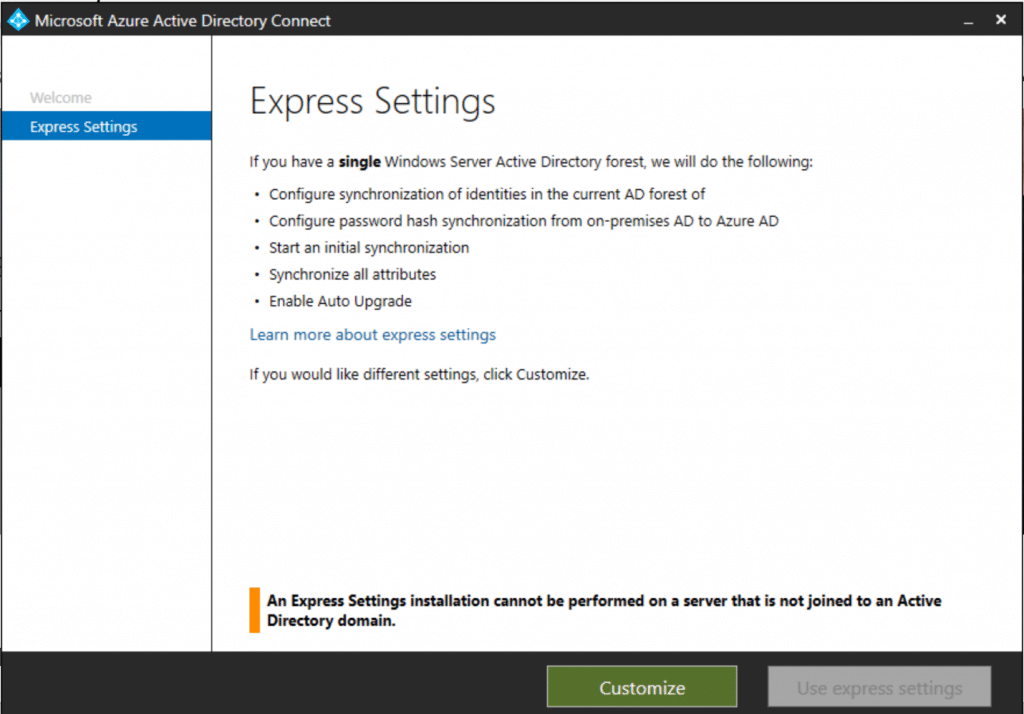
  4. In the Express Settings screen click on Use express settings.
  5. Syncing Active Directory with Office 365

    Figure 1. The Azure AD Connect Express Settings screen

  6. In the next screen enter your Office 365 administrator credentials and click Next.
  7. After authentication, the Ready to Configure appears. In this screen select or deselect the options you need.
  8. Click Install.
  9. On successful installation, reboot the machine.

Why businesses choose M365 Manager Plus?

What our customers say

  • We can now effectively reconcile which licenses we are using in the organization and assign the cost to the business unit. We were also able to identify a number of license changes that could be put in place that reduced our total Microsoft 365 spending.

    Timothy Ransom
    Group IT/IS manager at The Eclipse Group, United Arab Emirates

  • M365 Manager Plus is valuable to our future business and, most importantly, it allows me to keep improving the level of service we provide.

    IT infrastructure manager
    Sunstar Suisse S.A.

  • Our firm purchased ManageEngine M365 Manager Plus to help us protect our business from email-borne cyberthreats. We are absolutely satisfied with the features and ease of use. It has surpassed our expectations.

    Insurance agent
    Security and risk management Gartner review

A holistic Microsoft 365 administration solution

One-stop solution for all your
Microsoft 365 administration needs!

Download now