You can create and use upto 50 custom views in Microsoft 365 admin center, using the filter option available under the Users > Active users tab. You can further edit or delete these newly added custom views when required. You cannot however use combinations of various filters simultaneously to filter out users. You will have to choose from the pre-defined ones or create a custom filter with the set of limited conditions and attributes that you can choose from. What if you want to combine two or more filters? This is possible with M365 Manager Plus.
About M365 Manager Plus and custom views
M365 Manager Plus is an intuitive Microsoft 365 reporting, managing, monitoring, auditing, and alerting tool. Its easy and simple solutions redefine the management and handling of Microsoft 365 accounts. This tool offers easy-to-analyse dashboards and graphical views for most of the collected data. It also has options to add more than one filter to the reports to scrutinize and view them as you would like.
How to use filters to get the custom user views:
- Click on the Reports tab.
- Navigate to Azure Active Directory > User Reports > General User Reports..
- Choose the All Users report. (This report lists all users in your Microsoft 365 organization).
- Choose a suitable Microsoft 365 Tenant and filter the report further domain-wise or group-wise if you want.
- Once the report gets generated, click on the icon on the top-right corner of the report.
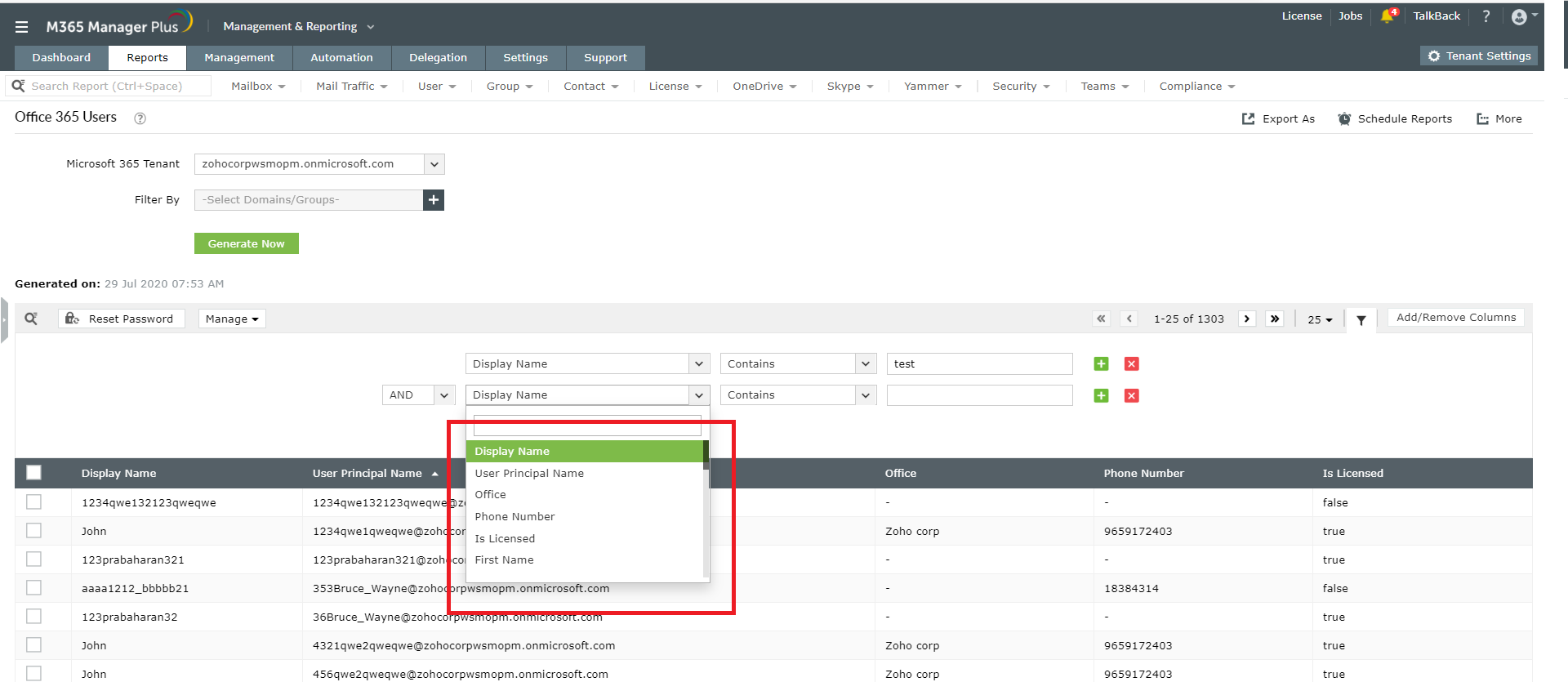
- Choose the attributes based on which you would like to filter the users and give the required conditions. You can add more than one filter conditions if required using the "+" icon.
-
Click on Filter to get the preferred custom view. You can also save this filtered report using the Save option that appears just on the top of the conditions given.
Benefits of using M365 Manager Plus
- 700+ pre-configured reports and unique custom reports.
- Bulk users and mailbox management.
- Customizable templates to manage users, groups and contacts.
- Automate management tasks.
- Indefinite audit log storage.
- Customizable profile based auditing and alerting.
- Geo-location enabled reports.
- Create and delegate custom roles and virtual tenants.
- Assign help desk technicians without giving admin rights.
Click here to learn more about how M365 Manager Plus simplifies various aspects of Microsoft 365.
