Last updated: August 13, 2026
Overview
This page explains how admins can view and manage device information within the ME MDM Admin Console. Using the Inventory Details section, admins gain a comprehensive overview of each enrolled device, including hardware specs, OS versions, installed apps, security settings, restrictions, geo-location, and certificates. It also covers how to access device details from the Inventory, Enrollment, and Device Management tabs, perform remote actions such as locking or wiping devices, and generate reports to track security compliance and device performance across Android, iOS, Windows, macOS, and Chrome platforms.
The Inventory details provides a comprehensive overview of each enrolled device, allowing admins to effectively monitor and manage their device fleet.
Visibility into your device estate: Gain a complete view of all managed devices within your organization, including device status, user details, and ownership information.
Granular Information: Access detailed information about device hardware, operating system versions, installed apps, security settings, restrictions, geo-location, and certificates. This ensures comprehensive monitoring of device health and compliance.
Troubleshooting: Quickly diagnose device performance issues, monitor alerts, and identify any potential problems. This enables admins to address concerns in real-time and enhance the operational efficiency of the device fleet.
Remote Actions: Perform remote actions such as locking, wiping, or restarting devices, ensuring you can take immediate control when needed, especially in case of lost or compromised devices.
Reporting: Schedule and generate reports based on the device details to track device performance, security compliance, and usage. These reports can be shared with your teams for better operational management and decision-making.
Accessing Device Details
Admins can view detailed device information from several locations within the ME MDM Admin Console. The following are the different areas where device details can be accessed:
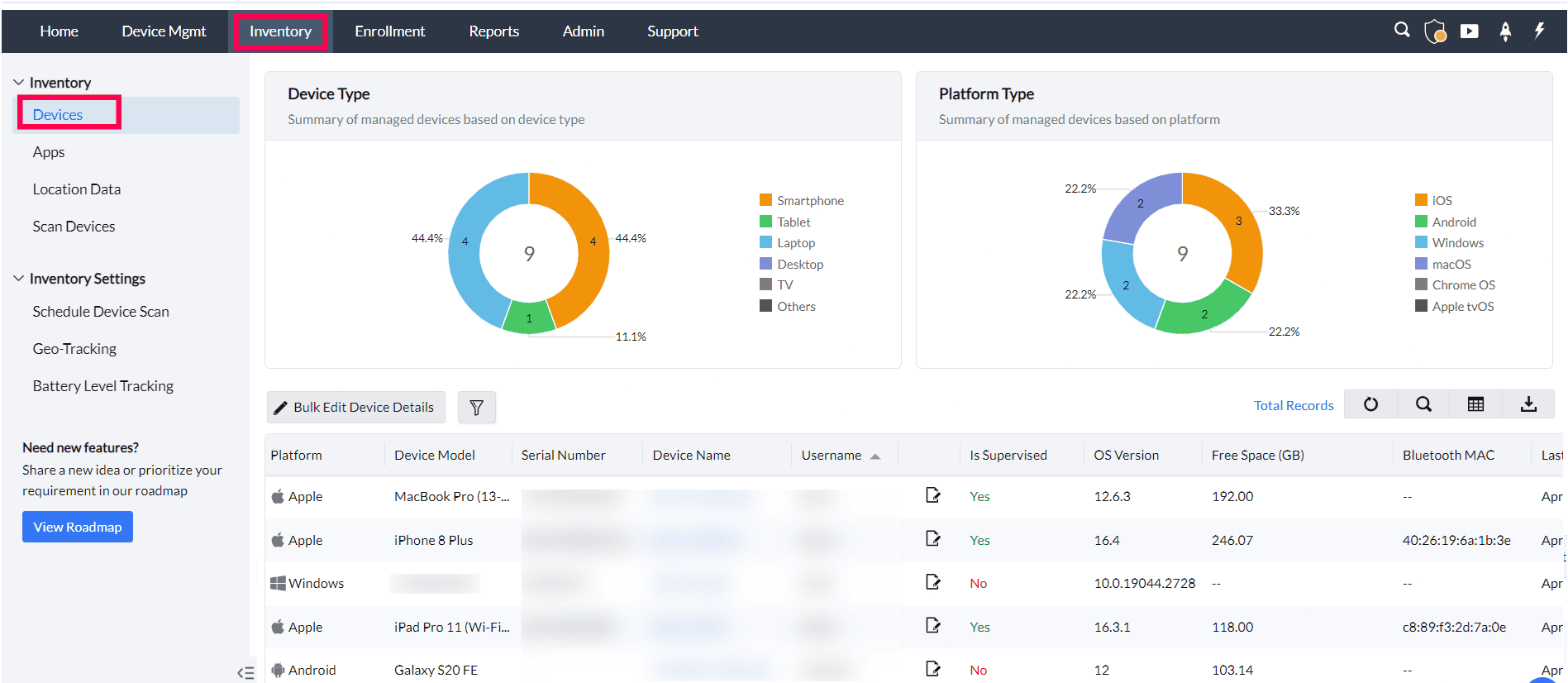
Inventory Tab:
- Navigate to the Inventory tab.
- Click on the Devices section to display a list of all managed devices.
- Select the device name to view its detailed information, including hardware, software, and status.
Enrollment Tab:
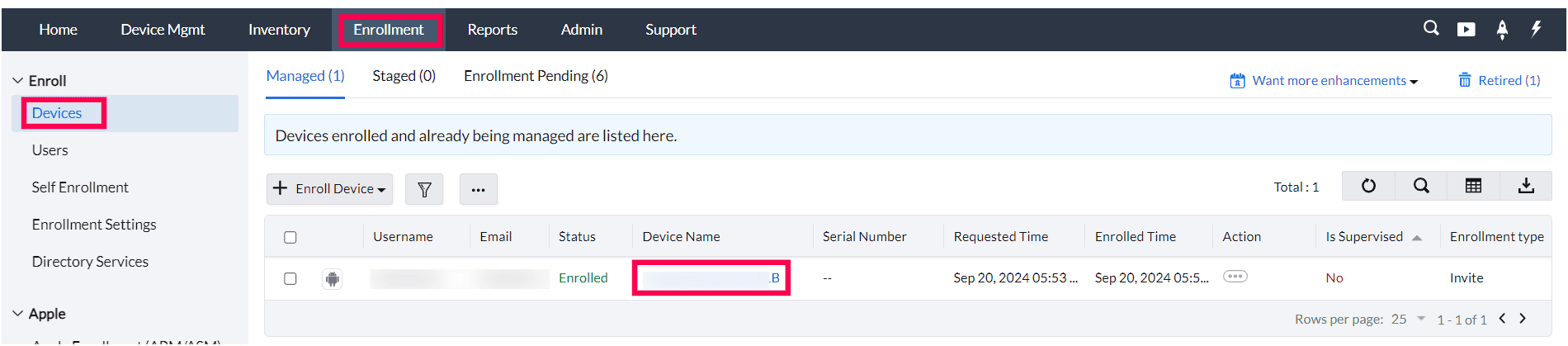
- Navigate to the Enrollment tab.
- Click on Devices to see a list of all enrolled devices.
- Select the device name to access detailed enrollment information and device attribute
Device Management Tab:
- Navigate to the Device Mgmt tab.
- Click on the Groups & Devices and select Devices to display the list of managed devices.
- Click on the device name and choose the View Device Details option (accessible via the arrow icon next to the device name) to view comprehensive device details, including installed apps, certificates, restrictions, and more.

Device Details Summary
To view the detailed information about a device, click on the Device Name in the MDM Console. The section is organized into several tabs, each providing specific details about the device:
- Summary: General information and statistics about the device.
- Device: Detailed device-specific information.
- Installed Apps: List of all applications installed on the device.
- Certificates: Information about certificates installed on the device.
- Restrictions: Policies and restrictions applied to the device.
- Alerts (Applicable only for Android): Notifications and alerts for the device will be enabled only after an alerts policy is created.
- Geo-Tracking: Location and tracking details for the device, if enabled.
- Security Settings (Applicable only for MacBook): View details on the device's FileVault Encryption Status and Firmware Password under the Security Settings tab.
- User Accounts (Applicable only for MacBook): Access user account details such as Username, Login Time, and Secure Token status.
- Threats (Applicable only for Windows): View detected security threats on the device, including malware and vulnerabilities.
List of device attributes
Choose a platform below to view its inventory attributes. Availability depends on hardware, OS version, enrollment and Device Privacy settings. Only attributes collected for each platform are listed, with explicit exceptions where a limitation needs explanation. Actions are listed separately from collected attributes.
Android
Management states: Fully Managed; personally-owned Work Profile; corporate-owned Work Profile. Fully Managed management applies device-wide. Work Profile restrictions and app blocklisting apply within the work container. Identifier collection depends on OS and enrollment, as noted below. These platform-level attributes are not guaranteed for every Android management mode.
| Attribute / action | Management scope / availability | Description / limitations |
|---|---|---|
| Device Information | ||
| Device Name | Managed devices; OS, enrollment and privacy dependent. | Name used to identify the device in Inventory. |
| Management Type | Fully Managed / Personally-owned work profile / Corporate-owned work profile | Shown on Summary. Fully Managed restrictions and app blocklisting apply device-wide; Work Profile restrictions and app blocklisting apply only inside the work container. |
| OS Version | Managed devices; OS, enrollment and privacy dependent. | Operating-system version reported by the device. |
| Build Version | Managed devices; OS, enrollment and privacy dependent. | Operating-system build reported by the device. |
| Last Security Update | Managed devices; OS, enrollment and privacy dependent. | Most recent reported security patch. |
| Model No | Managed devices; OS, enrollment and privacy dependent. | Manufacturer model number. |
| Device Model | Managed devices; OS, enrollment and privacy dependent. | Reported device model. |
| Device Type | Managed devices; OS, enrollment and privacy dependent. | Reported device category, such as Smartphone or Tablet. |
| Product Name | Managed devices; OS, enrollment and privacy dependent. | Manufacturer product name. |
| UDID | Managed devices; OS, enrollment and privacy dependent. | Unique device identifier; use this to match the device record. |
| IMEI | OS and enrollment dependent; unavailable on Android 12 Profile Owner devices. | Cellular equipment identifier. Availability is subject to Android identifier restrictions described below. |
| MEID | Managed devices; OS, enrollment and privacy dependent. | Mobile equipment identifier; distinct from IMEI. |
| Serial Number | OS and enrollment dependent; unavailable on Android 12 Profile Owner devices. | Manufacturer serial number; Android identifier restrictions apply. |
| Device Capacity (GB) | Managed devices; OS, enrollment and privacy dependent. | Total device storage capacity in GB. |
| Free Space | Managed devices; OS, enrollment and privacy dependent. | Available internal storage. |
| Available RAM Memory | Managed devices; OS, enrollment and privacy dependent. | Available device memory. |
| Total RAM Memory | Managed devices; OS, enrollment and privacy dependent. | Total device memory. |
| Cellular Technology | Managed devices; OS, enrollment and privacy dependent. | Reported cellular network technology. |
| Battery Level | Managed devices; OS, enrollment and privacy dependent. | Reported battery charge level. |
| External capacity | Managed devices; OS, enrollment and privacy dependent. | Total external storage capacity. |
| Available External Capacity | Managed devices; OS, enrollment and privacy dependent. | Available external storage. |
| OS Name | Managed devices; OS, enrollment and privacy dependent. | Reported operating-system name. |
| EAS Device Identifier | Managed devices; OS, enrollment and privacy dependent. | Exchange ActiveSync device identifier. |
| Processor Details | Managed devices; OS, enrollment and privacy dependent. | Reported processor details. |
| Number of Cores | Managed devices; OS, enrollment and privacy dependent. | Reported processor core count. |
| Cloud back up in device | Managed devices; OS, enrollment and privacy dependent. | Whether cloud backup is enabled. |
| Cloud last back up time | Managed devices; OS, enrollment and privacy dependent. | Most recent reported cloud backup. |
| Processor Type | Managed devices; OS, enrollment and privacy dependent. | Reported processor type. |
| Enterprise Factory Reset Protection | Managed devices; OS, enrollment and privacy dependent. | Reported enterprise factory reset protection state. |
| Is Supervised | Corporate-enrolled devices. | Indicates supervision for applicable corporate-enrolled devices. |
| Network Information | ||
| Bluetooth MAC | Managed devices; OS, enrollment and privacy dependent. | Reported Bluetooth hardware address. |
| IMSI | Managed devices; OS, enrollment and privacy dependent. | Subscriber identity associated with the SIM. |
| Data Roaming Enabled | Managed devices; OS, enrollment and privacy dependent. | Whether mobile data roaming is enabled. |
| Voice Roaming Enabled | Managed devices; OS, enrollment and privacy dependent. | Whether voice roaming is enabled. |
| IP Address | Managed devices; OS, enrollment and privacy dependent. | IP address reported for Android. This attribute is not collected for iOS. |
| Wi-Fi MAC | Managed devices; OS, enrollment and privacy dependent. | Reported Wi-Fi hardware address. |
| SIM Information | ||
| IMEI | OS and enrollment dependent; unavailable on Android 12 Profile Owner devices. | Cellular equipment identifier. Availability is subject to Android identifier restrictions described below. |
| IMSI | Managed devices; OS, enrollment and privacy dependent. | Subscriber identity associated with the SIM. |
| ICCID | Managed devices; OS, enrollment and privacy dependent. | SIM card identifier. |
| Phone Number | Managed devices; OS, enrollment and privacy dependent. | Reported SIM phone number; a device reporting Unknown may not supply a number. |
| Current Carrier Network | Managed devices; OS, enrollment and privacy dependent. | Current cellular carrier. |
| Carrier setting version | Managed devices; OS, enrollment and privacy dependent. | Reported carrier-settings version. |
| Current MCC | Managed devices; OS, enrollment and privacy dependent. | Current mobile country code. |
| Current MNC | Managed devices; OS, enrollment and privacy dependent. | Current mobile network code. |
| Subscriber MNC | Managed devices; OS, enrollment and privacy dependent. | Subscriber mobile network code. |
| Roaming | Managed devices; OS, enrollment and privacy dependent. | Reported roaming state. |
| Subscriber MCC | Managed devices; OS, enrollment and privacy dependent. | Subscriber mobile country code. |
| Installed Apps | ||
| App Marked as(Icon) | Fully Managed: device; Work Profile: work container. | Icon identifying the app entry. |
| App Name | Fully Managed: device; Work Profile: work container. | Application display name. |
| Version | Fully Managed: device; Work Profile: work container. | Reported application version. |
| App Identifier | Fully Managed: device; Work Profile: work container. | Application package or bundle identifier. |
| App Size (MB) | Fully Managed: device; Work Profile: work container. | Application size in MB. |
| Documents & Data (MB) | Fully Managed: device; Work Profile: work container. | Reported application documents and data size in MB. |
| App Short Version | Fully Managed: device; Work Profile: work container. | Application short version. |
| App Installed By | Fully Managed: device; Work Profile: work container. | User Installed means installed by the end user; Distributed by MDM means pushed through MDM. An iOS app can have separate entries for each installation source. |
| Is App Clip | Fully Managed: device; Work Profile: work container. | Indicates whether the app entry is a lightweight App Clip rather than the full app. |
| Certificates | ||
| Certificate Name | Managed devices; OS, enrollment and privacy dependent. | Certificate display name. |
| Client Certificate | Managed devices; OS, enrollment and privacy dependent. | Whether the certificate is a client certificate. |
| Certificate Expiry Date | Managed devices; OS, enrollment and privacy dependent. | Certificate expiration date. |
| Certificate Issuer Name | Managed devices; OS, enrollment and privacy dependent. | Certificate issuer. |
| Certificate Type | Managed devices; OS, enrollment and privacy dependent. | Reported certificate type. |
| Certificate Version | Managed devices; OS, enrollment and privacy dependent. | Certificate format version. |
| Certificate Serial Number | Managed devices; OS, enrollment and privacy dependent. | Certificate serial number. |
| Certificate Algorithm OID | Managed devices; OS, enrollment and privacy dependent. | Certificate algorithm object identifier. |
| Signature Algorithm Name | Managed devices; OS, enrollment and privacy dependent. | Certificate signature algorithm. |
| Certificate Subject Name | Managed devices; OS, enrollment and privacy dependent. | Certificate subject. |
| Restrictions | ||
| Restrictions on Device | Fully Managed: device; Work Profile: work container. | Applied Restrictions on Device restrictions; availability depends on the platform and management state. |
| Applications | Fully Managed: device; Work Profile: work container. | Applied Applications restrictions; availability depends on the platform and management state. |
| Security | Fully Managed: device; Work Profile: work container. | Applied Security restrictions; availability depends on the platform and management state. |
| Network and Roaming | Fully Managed: device; Work Profile: work container. | Applied Network and Roaming restrictions; availability depends on the platform and management state. |
| NFC and Bluetooth | Fully Managed: device; Work Profile: work container. | Applied NFC and Bluetooth restrictions; availability depends on the platform and management state. |
| Browser Restriction | Fully Managed: device; Work Profile: work container. | Applied Browser Restriction restrictions; availability depends on the platform and management state. |
| Geo-Tracking | ||
| Last Located At | Managed devices; OS, enrollment and privacy dependent. | Time of the most recent reported location. |
| Last Located | Managed devices; OS, enrollment and privacy dependent. | Most recent location information. |
| Coordinates | Managed devices; OS, enrollment and privacy dependent. | Reported location coordinates. |
| Location Status | Managed devices; OS, enrollment and privacy dependent. | Status of the location request. |
| Location History | Managed devices; OS, enrollment and privacy dependent. | Previously collected locations. |
| Deprovision (Wipe) | Managed devices; OS, enrollment and privacy dependent. | Reported Deprovision (Wipe) information. |
| Lost Mode | Managed devices; OS, enrollment and privacy dependent. | Reported Lost Mode information. |
| Alerts | ||
| SIM Card status | Managed devices; OS, enrollment and privacy dependent. | Reported SIM Card status alert information when an alerts policy is configured. |
| Location Services | Managed devices; OS, enrollment and privacy dependent. | Reported Location Services alert information when an alerts policy is configured. |
| Passcode Activity | Managed devices; OS, enrollment and privacy dependent. | Reported Passcode Activity alert information when an alerts policy is configured. |
| Device Reboot | Managed devices; OS, enrollment and privacy dependent. | Reported Device Reboot alert information when an alerts policy is configured. |
| Actions | ||
| Scan Now | Managed devices; OS, enrollment and privacy dependent. | Scan Now action; availability depends on OS, enrollment, permissions and device contact. |
| Remote Lock | Managed devices; OS, enrollment and privacy dependent. | Remote Lock action; availability depends on OS, enrollment, permissions and device contact. |
| Remote View | Managed devices; OS, enrollment and privacy dependent. | Remote View action; availability depends on OS, enrollment, permissions and device contact. |
| Clear Passcode | Managed devices; OS, enrollment and privacy dependent. | Clear Passcode action; availability depends on OS, enrollment, permissions and device contact. |
| Locate Device | Managed devices; OS, enrollment and privacy dependent. | Locate Device action; availability depends on OS, enrollment, permissions and device contact. |
| Enable Lost Mode | Managed devices; OS, enrollment and privacy dependent. | Enable Lost Mode action; availability depends on OS, enrollment, permissions and device contact. |
| Restart Device | Managed devices; OS, enrollment and privacy dependent. | Restart Device action; availability depends on OS, enrollment, permissions and device contact. |
| Deprovision (Wipe) | Managed devices; OS, enrollment and privacy dependent. | Deprovision (Wipe) action; availability depends on OS, enrollment, permissions and device contact. |
| Request Bug Report | Managed devices; OS, enrollment and privacy dependent. | Request Bug Report action; availability depends on OS, enrollment, permissions and device contact. |
| Clear App Data | Managed devices; OS, enrollment and privacy dependent. | Clear App Data action; availability depends on OS, enrollment, permissions and device contact. |
iOS / iPadOS
Management states: Supervised / unsupervised, subject to enrollment and OS support. Supervision and enrollment determine which restrictions and actions are available. IP Address is not collected for iOS in this inventory table.
| Attribute / action | Management scope / availability | Description / limitations |
|---|---|---|
| Device Information | ||
| Device Name | Managed devices; OS, enrollment and privacy dependent. | Name used to identify the device in Inventory. |
| OS Version | Managed devices; OS, enrollment and privacy dependent. | Operating-system version reported by the device. |
| Build Version | Managed devices; OS, enrollment and privacy dependent. | Operating-system build reported by the device. |
| Model No | Managed devices; OS, enrollment and privacy dependent. | Manufacturer model number. |
| Device Model | Managed devices; OS, enrollment and privacy dependent. | Reported device model. |
| Device Type | Managed devices; OS, enrollment and privacy dependent. | Reported device category, such as Smartphone or Tablet. |
| Product Name | Managed devices; OS, enrollment and privacy dependent. | Manufacturer product name. |
| UDID | Managed devices; OS, enrollment and privacy dependent. | Unique device identifier; use this to match the device record. |
| IMEI | Managed devices; OS, enrollment and privacy dependent. | Reported cellular equipment identifier, where supported by the hardware. |
| MEID | Managed devices; OS, enrollment and privacy dependent. | Mobile equipment identifier; distinct from IMEI. |
| Serial Number | Managed devices; OS, enrollment and privacy dependent. | Manufacturer serial number; Android identifier restrictions apply. |
| Device Capacity (GB) | Managed devices; OS, enrollment and privacy dependent. | Total device storage capacity in GB. |
| Free Space | Managed devices; OS, enrollment and privacy dependent. | Available internal storage. |
| Cellular Technology | Managed devices; OS, enrollment and privacy dependent. | Reported cellular network technology. |
| Battery Level | Managed devices; OS, enrollment and privacy dependent. | Reported battery charge level. |
| EAS Device Identifier | Managed devices; OS, enrollment and privacy dependent. | Exchange ActiveSync device identifier. |
| Modem Firmware Version | Managed devices; OS, enrollment and privacy dependent. | Reported modem firmware version. |
| Is Supervised | Corporate-enrolled devices. | Indicates supervision for applicable corporate-enrolled devices. |
| Battery Health | Managed devices; OS, enrollment and privacy dependent. | Reported battery condition. |
| Find my device enabled | Managed devices; OS, enrollment and privacy dependent. | Whether Find My Device is enabled. |
| Activation Lock Enabled | Managed devices; OS, enrollment and privacy dependent. | Reported Activation Lock state. |
| Do Not Disturb Enabled | Managed devices; OS, enrollment and privacy dependent. | Reported Do Not Disturb state. |
| iTunes Account Logged in | Managed devices; OS, enrollment and privacy dependent. | Whether an iTunes account is signed in. |
| iCloud back up in device | Managed devices; OS, enrollment and privacy dependent. | Whether iCloud backup is enabled. |
| iCloud last back up time | Managed devices; OS, enrollment and privacy dependent. | Most recent reported iCloud backup. |
| Network Information | ||
| Bluetooth MAC | Managed devices; OS, enrollment and privacy dependent. | Reported Bluetooth hardware address. |
| Data Roaming Enabled | Managed devices; OS, enrollment and privacy dependent. | Whether mobile data roaming is enabled. |
| Voice Roaming Enabled | Managed devices; OS, enrollment and privacy dependent. | Whether voice roaming is enabled. |
| IP Address | Not collected for this platform. | IP address reported for Android. This attribute is not collected for iOS. |
| Wi-Fi MAC | Managed devices; OS, enrollment and privacy dependent. | Reported Wi-Fi hardware address. |
| Personal hotspot enabled | Managed devices; OS, enrollment and privacy dependent. | Reported Personal Hotspot setting. |
| Embedded Identity Document (EID) | Managed devices; OS, enrollment and privacy dependent. | Embedded SIM identifier. |
| SIM Information | ||
| IMEI | Managed devices; OS, enrollment and privacy dependent. | Reported cellular equipment identifier, where supported by the hardware. |
| IMSI | Managed devices; OS, enrollment and privacy dependent. | Subscriber identity associated with the SIM. |
| ICCID | Managed devices; OS, enrollment and privacy dependent. | SIM card identifier. |
| Phone Number | Managed devices; OS, enrollment and privacy dependent. | Reported SIM phone number; a device reporting Unknown may not supply a number. |
| Current Carrier Network | Managed devices; OS, enrollment and privacy dependent. | Current cellular carrier. |
| Carrier setting version | Managed devices; OS, enrollment and privacy dependent. | Reported carrier-settings version. |
| Current MCC | Managed devices; OS, enrollment and privacy dependent. | Current mobile country code. |
| Current MNC | Managed devices; OS, enrollment and privacy dependent. | Current mobile network code. |
| Subscriber MNC | Managed devices; OS, enrollment and privacy dependent. | Subscriber mobile network code. |
| Roaming | Managed devices; OS, enrollment and privacy dependent. | Reported roaming state. |
| Subscriber MCC | Managed devices; OS, enrollment and privacy dependent. | Subscriber mobile country code. |
| Data Preferred | Managed devices; OS, enrollment and privacy dependent. | Whether the SIM is preferred for data. |
| Voice Preferred | Managed devices; OS, enrollment and privacy dependent. | Whether the SIM is preferred for voice. |
| Label | Managed devices; OS, enrollment and privacy dependent. | SIM label. |
| Label ID | Managed devices; OS, enrollment and privacy dependent. | SIM label identifier. |
| Slot | Managed devices; OS, enrollment and privacy dependent. | SIM slot. |
| Embedded Identity Document (EID) | Managed devices; OS, enrollment and privacy dependent. | Embedded SIM identifier. |
| Accessibility Settings | ||
| Zoom | Managed devices; OS, enrollment and privacy dependent. | Reported Zoom accessibility setting. |
| Voice Over | Managed devices; OS, enrollment and privacy dependent. | Reported Voice Over accessibility setting. |
| Touch Accommodations | Managed devices; OS, enrollment and privacy dependent. | Reported Touch Accommodations accessibility setting. |
| Reduce Motion | Managed devices; OS, enrollment and privacy dependent. | Reported Reduce Motion accessibility setting. |
| Reduce Transparency | Managed devices; OS, enrollment and privacy dependent. | Reported Reduce Transparency accessibility setting. |
| Increase Contrast | Managed devices; OS, enrollment and privacy dependent. | Reported Increase Contrast accessibility setting. |
| Bold Text | Managed devices; OS, enrollment and privacy dependent. | Reported Bold Text accessibility setting. |
| Text Size | Managed devices; OS, enrollment and privacy dependent. | Reported Text Size accessibility setting. |
| Installed Apps | ||
| App Marked as(Icon) | Managed devices; OS, enrollment and privacy dependent. | Icon identifying the app entry. |
| App Name | Managed devices; OS, enrollment and privacy dependent. | Application display name. |
| Version | Managed devices; OS, enrollment and privacy dependent. | Reported application version. |
| App Identifier | Managed devices; OS, enrollment and privacy dependent. | Application package or bundle identifier. |
| App Size (MB) | Managed devices; OS, enrollment and privacy dependent. | Application size in MB. |
| Documents & Data (MB) | Managed devices; OS, enrollment and privacy dependent. | Reported application documents and data size in MB. |
| App Short Version | Managed devices; OS, enrollment and privacy dependent. | Application short version. |
| App Installed By | Managed devices; OS, enrollment and privacy dependent. | User Installed means installed by the end user; Distributed by MDM means pushed through MDM. An iOS app can have separate entries for each installation source. |
| Is App Clip | Managed devices; OS, enrollment and privacy dependent. | Indicates whether the app entry is a lightweight App Clip rather than the full app. |
| Certificates | ||
| Certificate Name | Managed devices; OS, enrollment and privacy dependent. | Certificate display name. |
| Client Certificate | Managed devices; OS, enrollment and privacy dependent. | Whether the certificate is a client certificate. |
| Certificate Expiry Date | Managed devices; OS, enrollment and privacy dependent. | Certificate expiration date. |
| Certificate Issuer Name | Managed devices; OS, enrollment and privacy dependent. | Certificate issuer. |
| Certificate Type | Managed devices; OS, enrollment and privacy dependent. | Reported certificate type. |
| Certificate Version | Managed devices; OS, enrollment and privacy dependent. | Certificate format version. |
| Certificate Serial Number | Managed devices; OS, enrollment and privacy dependent. | Certificate serial number. |
| Certificate Algorithm OID | Managed devices; OS, enrollment and privacy dependent. | Certificate algorithm object identifier. |
| Signature Algorithm Name | Managed devices; OS, enrollment and privacy dependent. | Certificate signature algorithm. |
| Certificate Subject Name | Managed devices; OS, enrollment and privacy dependent. | Certificate subject. |
| Restrictions | ||
| Restrictions on Device | Managed devices; OS, enrollment and privacy dependent. | Applied Restrictions on Device restrictions; availability depends on the platform and management state. |
| Applications | Managed devices; OS, enrollment and privacy dependent. | Applied Applications restrictions; availability depends on the platform and management state. |
| Browser | Managed devices; OS, enrollment and privacy dependent. | Applied Browser restrictions; availability depends on the platform and management state. |
| Security | Managed devices; OS, enrollment and privacy dependent. | Applied Security restrictions; availability depends on the platform and management state. |
| Keyboard Settings | Managed devices; OS, enrollment and privacy dependent. | Applied Keyboard Settings restrictions; availability depends on the platform and management state. |
| Privacy | Managed devices; OS, enrollment and privacy dependent. | Applied Privacy restrictions; availability depends on the platform and management state. |
| Network and Roaming | Managed devices; OS, enrollment and privacy dependent. | Applied Network and Roaming restrictions; availability depends on the platform and management state. |
| Content Rating | Managed devices; OS, enrollment and privacy dependent. | Applied Content Rating restrictions; availability depends on the platform and management state. |
| Classroom | Managed devices; OS, enrollment and privacy dependent. | Applied Classroom restrictions; availability depends on the platform and management state. |
| iCloud | Managed devices; OS, enrollment and privacy dependent. | Applied iCloud restrictions; availability depends on the platform and management state. |
| Geo-Tracking | ||
| Last Located At | Managed devices; OS, enrollment and privacy dependent. | Time of the most recent reported location. |
| Last Located | Managed devices; OS, enrollment and privacy dependent. | Most recent location information. |
| Coordinates | Managed devices; OS, enrollment and privacy dependent. | Reported location coordinates. |
| Location Status | Managed devices; OS, enrollment and privacy dependent. | Status of the location request. |
| Location History | Managed devices; OS, enrollment and privacy dependent. | Previously collected locations. |
| Deprovision (Wipe) | Managed devices; OS, enrollment and privacy dependent. | Reported Deprovision (Wipe) information. |
| Lost Mode | Managed devices; OS, enrollment and privacy dependent. | Reported Lost Mode information. |
| Actions | ||
| Scan Now | Managed devices; OS, enrollment and privacy dependent. | Scan Now action; availability depends on OS, enrollment, permissions and device contact. |
| Remote Lock | Managed devices; OS, enrollment and privacy dependent. | Remote Lock action; availability depends on OS, enrollment, permissions and device contact. |
| Remote View | Managed devices; OS, enrollment and privacy dependent. | Remote View action; availability depends on OS, enrollment, permissions and device contact. |
| Clear Passcode | Managed devices; OS, enrollment and privacy dependent. | Clear Passcode action; availability depends on OS, enrollment, permissions and device contact. |
| Locate Device | Managed devices; OS, enrollment and privacy dependent. | Locate Device action; availability depends on OS, enrollment, permissions and device contact. |
| Enable Lost Mode | Managed devices; OS, enrollment and privacy dependent. | Enable Lost Mode action; availability depends on OS, enrollment, permissions and device contact. |
| Restart Device | Managed devices; OS, enrollment and privacy dependent. | Restart Device action; availability depends on OS, enrollment, permissions and device contact. |
| Shutdown | Managed devices; OS, enrollment and privacy dependent. | Shutdown action; availability depends on OS, enrollment, permissions and device contact. |
| Pause Kiosk | Managed devices; OS, enrollment and privacy dependent. | Pause Kiosk action; availability depends on OS, enrollment, permissions and device contact. |
| Deprovision (Wipe) | Managed devices; OS, enrollment and privacy dependent. | Deprovision (Wipe) action; availability depends on OS, enrollment, permissions and device contact. |
| Remove Screen Time Passcode | Managed devices; OS, enrollment and privacy dependent. | Remove Screen Time Passcode action; availability depends on OS, enrollment, permissions and device contact. |
Windows
Management states: MDM-enrolled Windows devices. Fields depend on the device and Windows management support.
| Attribute / action | Management scope / availability | Description / limitations |
|---|---|---|
| Device Information | ||
| Device Name | Managed devices; OS, enrollment and privacy dependent. | Name used to identify the device in Inventory. |
| OS Version | Managed devices; OS, enrollment and privacy dependent. | Operating-system version reported by the device. |
| Build Version | Managed devices; OS, enrollment and privacy dependent. | Operating-system build reported by the device. |
| Device Model | Managed devices; OS, enrollment and privacy dependent. | Reported device model. |
| Device Type | Managed devices; OS, enrollment and privacy dependent. | Reported device category, such as Smartphone or Tablet. |
| UDID | Managed devices; OS, enrollment and privacy dependent. | Unique device identifier; use this to match the device record. |
| IMEI | Managed devices; OS, enrollment and privacy dependent. | Reported cellular equipment identifier, where supported by the hardware. |
| Serial Number | Managed devices; OS, enrollment and privacy dependent. | Manufacturer serial number; Android identifier restrictions apply. |
| Device Capacity (GB) | Managed devices; OS, enrollment and privacy dependent. | Total device storage capacity in GB. |
| Cellular Technology | Managed devices; OS, enrollment and privacy dependent. | Reported cellular network technology. |
| OS Name | Managed devices; OS, enrollment and privacy dependent. | Reported operating-system name. |
| EAS Device Identifier | Managed devices; OS, enrollment and privacy dependent. | Exchange ActiveSync device identifier. |
| Modem Firmware Version | Managed devices; OS, enrollment and privacy dependent. | Reported modem firmware version. |
| Device Manufacturer | Managed devices; OS, enrollment and privacy dependent. | Device manufacturer. |
| Network Information | ||
| Bluetooth MAC | Managed devices; OS, enrollment and privacy dependent. | Reported Bluetooth hardware address. |
| Wi-Fi MAC | Managed devices; OS, enrollment and privacy dependent. | Reported Wi-Fi hardware address. |
| Wi-Fi IP | Managed devices; OS, enrollment and privacy dependent. | Reported Wi-Fi IP address. |
| Ethernet MAC | Managed devices; OS, enrollment and privacy dependent. | Reported Ethernet hardware address. |
| Ethernet IP | Managed devices; OS, enrollment and privacy dependent. | Reported Ethernet IP address. |
| SIM Information | ||
| IMEI | Managed devices; OS, enrollment and privacy dependent. | Reported cellular equipment identifier, where supported by the hardware. |
| ICCID | Managed devices; OS, enrollment and privacy dependent. | SIM card identifier. |
| Phone Number | Managed devices; OS, enrollment and privacy dependent. | Reported SIM phone number; a device reporting Unknown may not supply a number. |
| Current Carrier Network | Managed devices; OS, enrollment and privacy dependent. | Current cellular carrier. |
| Carrier setting version | Managed devices; OS, enrollment and privacy dependent. | Reported carrier-settings version. |
| Current MCC | Managed devices; OS, enrollment and privacy dependent. | Current mobile country code. |
| Current MNC | Managed devices; OS, enrollment and privacy dependent. | Current mobile network code. |
| Roaming | Managed devices; OS, enrollment and privacy dependent. | Reported roaming state. |
| Installed Apps | ||
| App Marked as(Icon) | Managed devices; OS, enrollment and privacy dependent. | Icon identifying the app entry. |
| App Name | Managed devices; OS, enrollment and privacy dependent. | Application display name. |
| Version | Managed devices; OS, enrollment and privacy dependent. | Reported application version. |
| App Identifier | Managed devices; OS, enrollment and privacy dependent. | Application package or bundle identifier. |
| App Size (MB) | Managed devices; OS, enrollment and privacy dependent. | Application size in MB. |
| Documents & Data (MB) | Managed devices; OS, enrollment and privacy dependent. | Reported application documents and data size in MB. |
| App Short Version | Managed devices; OS, enrollment and privacy dependent. | Application short version. |
| App Installed By | Managed devices; OS, enrollment and privacy dependent. | User Installed means installed by the end user; Distributed by MDM means pushed through MDM. An iOS app can have separate entries for each installation source. |
| Is App Clip | Managed devices; OS, enrollment and privacy dependent. | Indicates whether the app entry is a lightweight App Clip rather than the full app. |
| Certificates | ||
| Certificate Name | Managed devices; OS, enrollment and privacy dependent. | Certificate display name. |
| Client Certificate | Managed devices; OS, enrollment and privacy dependent. | Whether the certificate is a client certificate. |
| Certificate Expiry Date | Managed devices; OS, enrollment and privacy dependent. | Certificate expiration date. |
| Certificate Issuer Name | Managed devices; OS, enrollment and privacy dependent. | Certificate issuer. |
| Certificate Type | Managed devices; OS, enrollment and privacy dependent. | Reported certificate type. |
| Certificate Version | Managed devices; OS, enrollment and privacy dependent. | Certificate format version. |
| Certificate Serial Number | Managed devices; OS, enrollment and privacy dependent. | Certificate serial number. |
| Certificate Algorithm OID | Managed devices; OS, enrollment and privacy dependent. | Certificate algorithm object identifier. |
| Signature Algorithm Name | Managed devices; OS, enrollment and privacy dependent. | Certificate signature algorithm. |
| Certificate Subject Name | Managed devices; OS, enrollment and privacy dependent. | Certificate subject. |
| Restrictions | ||
| Restrictions on Device | Managed devices; OS, enrollment and privacy dependent. | Applied Restrictions on Device restrictions; availability depends on the platform and management state. |
| Applications | Managed devices; OS, enrollment and privacy dependent. | Applied Applications restrictions; availability depends on the platform and management state. |
| Bluetooth | Managed devices; OS, enrollment and privacy dependent. | Applied Bluetooth restrictions; availability depends on the platform and management state. |
| sercurity and privacy | Managed devices; OS, enrollment and privacy dependent. | Applied sercurity and privacy restrictions; availability depends on the platform and management state. |
| Restrictions on Network | Managed devices; OS, enrollment and privacy dependent. | Applied Restrictions on Network restrictions; availability depends on the platform and management state. |
| Geo-Tracking | ||
| Last Located At | Managed devices; OS, enrollment and privacy dependent. | Time of the most recent reported location. |
| Last Located | Managed devices; OS, enrollment and privacy dependent. | Most recent location information. |
| Coordinates | Managed devices; OS, enrollment and privacy dependent. | Reported location coordinates. |
| Location Status | Managed devices; OS, enrollment and privacy dependent. | Status of the location request. |
| Location History | Managed devices; OS, enrollment and privacy dependent. | Previously collected locations. |
| Deprovision (Wipe) | Managed devices; OS, enrollment and privacy dependent. | Reported Deprovision (Wipe) information. |
| Threats | ||
| User Name | Managed devices; OS, enrollment and privacy dependent. | User name reported in this section. |
| Actions | ||
| Scan Now | Managed devices; OS, enrollment and privacy dependent. | Scan Now action; availability depends on OS, enrollment, permissions and device contact. |
| Locate Device | Managed devices; OS, enrollment and privacy dependent. | Locate Device action; availability depends on OS, enrollment, permissions and device contact. |
| Restart Device | Managed devices; OS, enrollment and privacy dependent. | Restart Device action; availability depends on OS, enrollment, permissions and device contact. |
| Deprovision (Wipe) | Managed devices; OS, enrollment and privacy dependent. | Deprovision (Wipe) action; availability depends on OS, enrollment, permissions and device contact. |
macOS
Management states: MDM-enrolled macOS devices; agent-only where supported. Agent-only management does not satisfy the MDM profile requirement for the Personal Recovery Key. Battery fields are only partially applicable.
| Attribute / action | Management scope / availability | Description / limitations |
|---|---|---|
| Device Information | ||
| Device Name | Managed devices; OS, enrollment and privacy dependent. | Name used to identify the device in Inventory. |
| OS Version | Managed devices; OS, enrollment and privacy dependent. | Operating-system version reported by the device. |
| Build Version | Managed devices; OS, enrollment and privacy dependent. | Operating-system build reported by the device. |
| Model No | Managed devices; OS, enrollment and privacy dependent. | Manufacturer model number. |
| Device Model | Managed devices; OS, enrollment and privacy dependent. | Reported device model. |
| Device Type | Managed devices; OS, enrollment and privacy dependent. | Reported device category, such as Smartphone or Tablet. |
| Product Name | Managed devices; OS, enrollment and privacy dependent. | Manufacturer product name. |
| UDID | Managed devices; OS, enrollment and privacy dependent. | Unique device identifier; use this to match the device record. |
| Serial Number | Managed devices; OS, enrollment and privacy dependent. | Manufacturer serial number; Android identifier restrictions apply. |
| Device Capacity (GB) | Managed devices; OS, enrollment and privacy dependent. | Total device storage capacity in GB. |
| Free Space | Managed devices; OS, enrollment and privacy dependent. | Available internal storage. |
| Cellular Technology | Managed devices; OS, enrollment and privacy dependent. | Reported cellular network technology. |
| Battery Level | Partially applicable; depends on device hardware. | Reported battery charge level. |
| Is Supervised | Corporate-enrolled devices. | Indicates supervision for applicable corporate-enrolled devices. |
| Battery Health | Partially applicable; depends on device hardware. | Reported battery condition. |
| Network Information | ||
| Bluetooth MAC | Managed devices; OS, enrollment and privacy dependent. | Reported Bluetooth hardware address. |
| Wi-Fi MAC | Managed devices; OS, enrollment and privacy dependent. | Reported Wi-Fi hardware address. |
| Installed Apps | ||
| App Marked as(Icon) | Managed devices; OS, enrollment and privacy dependent. | Icon identifying the app entry. |
| App Name | Managed devices; OS, enrollment and privacy dependent. | Application display name. |
| Version | Managed devices; OS, enrollment and privacy dependent. | Reported application version. |
| App Identifier | Managed devices; OS, enrollment and privacy dependent. | Application package or bundle identifier. |
| App Size (MB) | Managed devices; OS, enrollment and privacy dependent. | Application size in MB. |
| Documents & Data (MB) | Managed devices; OS, enrollment and privacy dependent. | Reported application documents and data size in MB. |
| App Short Version | Managed devices; OS, enrollment and privacy dependent. | Application short version. |
| App Installed By | Managed devices; OS, enrollment and privacy dependent. | User Installed means installed by the end user; Distributed by MDM means pushed through MDM. An iOS app can have separate entries for each installation source. |
| Is App Clip | Managed devices; OS, enrollment and privacy dependent. | Indicates whether the app entry is a lightweight App Clip rather than the full app. |
| Certificates | ||
| Certificate Name | Managed devices; OS, enrollment and privacy dependent. | Certificate display name. |
| Client Certificate | Managed devices; OS, enrollment and privacy dependent. | Whether the certificate is a client certificate. |
| Certificate Expiry Date | Managed devices; OS, enrollment and privacy dependent. | Certificate expiration date. |
| Certificate Issuer Name | Managed devices; OS, enrollment and privacy dependent. | Certificate issuer. |
| Certificate Type | Managed devices; OS, enrollment and privacy dependent. | Reported certificate type. |
| Certificate Version | Managed devices; OS, enrollment and privacy dependent. | Certificate format version. |
| Certificate Serial Number | Managed devices; OS, enrollment and privacy dependent. | Certificate serial number. |
| Certificate Algorithm OID | Managed devices; OS, enrollment and privacy dependent. | Certificate algorithm object identifier. |
| Signature Algorithm Name | Managed devices; OS, enrollment and privacy dependent. | Certificate signature algorithm. |
| Certificate Subject Name | Managed devices; OS, enrollment and privacy dependent. | Certificate subject. |
| Geo-Tracking | ||
| Last Located At | Managed devices; OS, enrollment and privacy dependent. | Time of the most recent reported location. |
| Last Located | Managed devices; OS, enrollment and privacy dependent. | Most recent location information. |
| Coordinates | Managed devices; OS, enrollment and privacy dependent. | Reported location coordinates. |
| Location Status | Managed devices; OS, enrollment and privacy dependent. | Status of the location request. |
| Location History | Managed devices; OS, enrollment and privacy dependent. | Previously collected locations. |
| Deprovision (Wipe) | Managed devices; OS, enrollment and privacy dependent. | Reported Deprovision (Wipe) information. |
| Security Settings | ||
| FileVault Encryption Status | Managed devices; OS, enrollment and privacy dependent. | Reported FileVault encryption state. |
| Firmware Password Details | Managed devices; OS, enrollment and privacy dependent. | Reported firmware password details. |
| Personal Recovery Key | MDM profile required; agent management alone is insufficient. | Personal Recovery Key may show the escrowed key, or MDM Profile Required when the necessary MDM profile is absent. Agent management alone does not satisfy that requirement. See FileVault Encryption for enrollment/profile requirements before troubleshooting the value. |
| User Accounts | ||
| User Name | Managed devices; OS, enrollment and privacy dependent. | User name reported in this section. |
| Login Time | Managed devices; OS, enrollment and privacy dependent. | Reported user login time. |
| Secure Token Enabled | Managed devices; OS, enrollment and privacy dependent. | Whether the user has a secure token. |
| Mobile Account | Managed devices; OS, enrollment and privacy dependent. | Reported mobile-account state. |
| Login Status | Managed devices; OS, enrollment and privacy dependent. | Reported user login state. |
| User GUID | Managed devices; OS, enrollment and privacy dependent. | Unique user account identifier. |
| Actions | ||
| Scan Now | Managed devices; OS, enrollment and privacy dependent. | Scan Now action; availability depends on OS, enrollment, permissions and device contact. |
| Remote Lock | Managed devices; OS, enrollment and privacy dependent. | Remote Lock action; availability depends on OS, enrollment, permissions and device contact. |
| Restart Device | Managed devices; OS, enrollment and privacy dependent. | Restart Device action; availability depends on OS, enrollment, permissions and device contact. |
| Shutdown | Managed devices; OS, enrollment and privacy dependent. | Shutdown action; availability depends on OS, enrollment, permissions and device contact. |
| Deprovision (Wipe) | Managed devices; OS, enrollment and privacy dependent. | Deprovision (Wipe) action; availability depends on OS, enrollment, permissions and device contact. |
| Delete User | Managed devices; OS, enrollment and privacy dependent. | Delete User action; availability depends on OS, enrollment, permissions and device contact. |
| Recover user account | Managed devices; OS, enrollment and privacy dependent. | Recover user account action; availability depends on OS, enrollment, permissions and device contact. |
ChromeOS
Management states: Managed ChromeOS devices. Fields depend on device hardware and ChromeOS management support.
| Attribute / action | Management scope / availability | Description / limitations |
|---|---|---|
| Device Information | ||
| Device Name | Managed devices; OS, enrollment and privacy dependent. | Name used to identify the device in Inventory. |
| OS Version | Managed devices; OS, enrollment and privacy dependent. | Operating-system version reported by the device. |
| Build Version | Managed devices; OS, enrollment and privacy dependent. | Operating-system build reported by the device. |
| Device Model | Managed devices; OS, enrollment and privacy dependent. | Reported device model. |
| Device Type | Managed devices; OS, enrollment and privacy dependent. | Reported device category, such as Smartphone or Tablet. |
| UDID | Managed devices; OS, enrollment and privacy dependent. | Unique device identifier; use this to match the device record. |
| IMEI | Managed devices; OS, enrollment and privacy dependent. | Reported cellular equipment identifier, where supported by the hardware. |
| Serial Number | Managed devices; OS, enrollment and privacy dependent. | Manufacturer serial number; Android identifier restrictions apply. |
| Device Capacity (GB) | Managed devices; OS, enrollment and privacy dependent. | Total device storage capacity in GB. |
| OS Name | Managed devices; OS, enrollment and privacy dependent. | Reported operating-system name. |
| EAS Device Identifier | Managed devices; OS, enrollment and privacy dependent. | Exchange ActiveSync device identifier. |
| Modem Firmware Version | Managed devices; OS, enrollment and privacy dependent. | Reported modem firmware version. |
| Network Information | ||
| Bluetooth MAC | Managed devices; OS, enrollment and privacy dependent. | Reported Bluetooth hardware address. |
| Wi-Fi MAC | Managed devices; OS, enrollment and privacy dependent. | Reported Wi-Fi hardware address. |
| Wi-Fi IP | Managed devices; OS, enrollment and privacy dependent. | Reported Wi-Fi IP address. |
| Ethernet MAC | Managed devices; OS, enrollment and privacy dependent. | Reported Ethernet hardware address. |
| Ethernet IP | Managed devices; OS, enrollment and privacy dependent. | Reported Ethernet IP address. |
| SIM Information | ||
| ICCID | Managed devices; OS, enrollment and privacy dependent. | SIM card identifier. |
| Installed Apps | ||
| App Marked as(Icon) | Managed devices; OS, enrollment and privacy dependent. | Icon identifying the app entry. |
| App Name | Managed devices; OS, enrollment and privacy dependent. | Application display name. |
| Version | Managed devices; OS, enrollment and privacy dependent. | Reported application version. |
| App Identifier | Managed devices; OS, enrollment and privacy dependent. | Application package or bundle identifier. |
| App Size (MB) | Managed devices; OS, enrollment and privacy dependent. | Application size in MB. |
| Documents & Data (MB) | Managed devices; OS, enrollment and privacy dependent. | Reported application documents and data size in MB. |
| App Short Version | Managed devices; OS, enrollment and privacy dependent. | Application short version. |
| App Installed By | Managed devices; OS, enrollment and privacy dependent. | User Installed means installed by the end user; Distributed by MDM means pushed through MDM. An iOS app can have separate entries for each installation source. |
| Is App Clip | Managed devices; OS, enrollment and privacy dependent. | Indicates whether the app entry is a lightweight App Clip rather than the full app. |
| Certificates | ||
| Certificate Name | Managed devices; OS, enrollment and privacy dependent. | Certificate display name. |
| Client Certificate | Managed devices; OS, enrollment and privacy dependent. | Whether the certificate is a client certificate. |
| Certificate Expiry Date | Managed devices; OS, enrollment and privacy dependent. | Certificate expiration date. |
| Certificate Issuer Name | Managed devices; OS, enrollment and privacy dependent. | Certificate issuer. |
| Certificate Type | Managed devices; OS, enrollment and privacy dependent. | Reported certificate type. |
| Certificate Version | Managed devices; OS, enrollment and privacy dependent. | Certificate format version. |
| Certificate Serial Number | Managed devices; OS, enrollment and privacy dependent. | Certificate serial number. |
| Certificate Algorithm OID | Managed devices; OS, enrollment and privacy dependent. | Certificate algorithm object identifier. |
| Signature Algorithm Name | Managed devices; OS, enrollment and privacy dependent. | Certificate signature algorithm. |
| Certificate Subject Name | Managed devices; OS, enrollment and privacy dependent. | Certificate subject. |
| Restrictions | ||
| Restrictions on Device | Managed devices; OS, enrollment and privacy dependent. | Applied Restrictions on Device restrictions; availability depends on the platform and management state. |
| Applications | Managed devices; OS, enrollment and privacy dependent. | Applied Applications restrictions; availability depends on the platform and management state. |
| Bluetooth | Managed devices; OS, enrollment and privacy dependent. | Applied Bluetooth restrictions; availability depends on the platform and management state. |
| sercurity and privacy | Managed devices; OS, enrollment and privacy dependent. | Applied sercurity and privacy restrictions; availability depends on the platform and management state. |
| Restrictions on Network | Managed devices; OS, enrollment and privacy dependent. | Applied Restrictions on Network restrictions; availability depends on the platform and management state. |
| Geo-Tracking | ||
| Last Located At | Managed devices; OS, enrollment and privacy dependent. | Time of the most recent reported location. |
| Last Located | Managed devices; OS, enrollment and privacy dependent. | Most recent location information. |
| Coordinates | Managed devices; OS, enrollment and privacy dependent. | Reported location coordinates. |
| Location Status | Managed devices; OS, enrollment and privacy dependent. | Status of the location request. |
| Location History | Managed devices; OS, enrollment and privacy dependent. | Previously collected locations. |
| Deprovision (Wipe) | Managed devices; OS, enrollment and privacy dependent. | Reported Deprovision (Wipe) information. |
| Lost Mode | Managed devices; OS, enrollment and privacy dependent. | Reported Lost Mode information. |
| Threats | ||
| User Name | Managed devices; OS, enrollment and privacy dependent. | User name reported in this section. |
| Actions | ||
| Scan Now | Managed devices; OS, enrollment and privacy dependent. | Scan Now action; availability depends on OS, enrollment, permissions and device contact. |
| Locate Device | Managed devices; OS, enrollment and privacy dependent. | Locate Device action; availability depends on OS, enrollment, permissions and device contact. |
| Restart Device | Managed devices; OS, enrollment and privacy dependent. | Restart Device action; availability depends on OS, enrollment, permissions and device contact. |
| Deprovision (Wipe) | Managed devices; OS, enrollment and privacy dependent. | Deprovision (Wipe) action; availability depends on OS, enrollment, permissions and device contact. |
In corporate Samsung devices running Android 10.0 or later enrolled using Enrollment via Invites method, the ME MDM app cannot access the device's identifiers such as IMEI, serial number, etc. You can enroll the device as Device Owner or Profile Owner to collect the device ID, IMEI, etc. MDM cannot fetch IMEI, Serial number from Android 12 devices that are enrolled as Profile Owner, as per Android's Privacy policy. Only UDID is used for device identification.
For Knox-supported devices, additional details such as the Knox status, Container status, and Knox version will be displayed. You can view all installed apps within both the Knox container and the device itself. Additionally, any restrictions will be listed separately for the device and the Knox container.
Audit Logs
The Audit Logs tab provides a detailed record of all actions and changes performed on the device within the MDM console. This helps administrators track activity for compliance, troubleshooting, and accountability.
Key Features
- Date Range Filters: Select a predefined period (e.g., last day, week, or month) or define a custom range to view relevant logs.
- Module Type Filters: Narrow logs to specific modules such as Enrollment, Geofencing, Profile Management, App Management, Announcements, Certificates, Security Settings, OS Update Management, and more. Selecting All displays every logged activity.
- User Filter: Use the User dropdown to filter audit logs by the administrator who performed the action. By default, it shows All users, but you can select specific users to isolate their activity. This helps in quickly identifying who made specific changes.
Log Entry Details
Each entry in the Audit Logs table includes:
- Type: The event type of the action (e.g., Info, Warning, Error).
- Remarks: A short description of the action performed (e.g., device enrolled, policy applied, announcement sent).
- Module: The MDM module where the action occurred.
- Event Time: The exact timestamp when the action took place.
Monitor Device Restrictions
Restrictions in ME MDM allow administrators to enforce policies on enrolled devices, ensuring compliance with organizational security and operational standards. These restrictions can control access to features like cameras, app installations, data sharing, and more. Restrictions can vary based on the platform (iOS, Android, Windows), device ownership (corporate or personal), and specific user groups.
Applying Restrictions Profile:
Admins can configure restrictions by navigating to the Profiles section in the ME MDM console and assign them to individual devices or device groups. These restrictions are pushed over-the-air (OTA) during device synchronization with the MDM server, ensuring seamless enforcement without requiring physical access to the device.
Monitor the Restriction:
Admins can view the current restriction status of a device by navigating to the Device Details page, where the "Restrictions" tab lists all applied policies. This includes details such as disabled features (e.g., camera, app installations), allowed or blocked apps, and enforced data-sharing restrictions. The device regularly sends updates to the MDM server to confirm compliance with these restrictions, and any changes made to the restriction settings are communicated back to the MDM console in real-time or during scheduled sync intervals.
If a device is already unmanaged after the MDM/Self Service app has been manually uninstalled and no longer contacts MDM, deprovisioning simply deletes or retires its console record; it cannot deliver a command to clear restrictions on that device. To retire the record, use Enrollment > Devices > Managed > Actions > Deprovision - see the Deprovisioning Devices guide.
Last Contact Time
Last Contact Time is the most recent timestamp when an enrolled device communicated with the MDM server. This helps administrators identify inactive devices, verify policy sync status, and monitor how responsive devices are.
If a device has not reported in within the expected timeframe, it may be inactive, offline, or experiencing connectivity issues.
The device list also shows a separate amber indicator for Inactive status; this status indicator is distinct from the Last Contact Time value.
Update behavior by platform
For Android, iOS/iPad OS, and macOS devices, Last Contact Time is updated based on the conditions below:
| OS | Last Contact Time update behavior |
|---|---|
| Android | Updated every 6 hours. Additionally updated when any of the following events occur:
|
| iOS/iPadOS/macOS | Updated when any of the following events occur:
|
Where it appears: The Last Contact Time value is displayed in the Device Details Summary and as a column in the Inventory devices list.
A stale Last Contact Time also means restriction and profile changes will not reach the device until it next contacts the server; this can explain why a newly applied or changed restriction appears not to take effect.
If a wipe or sync command sent to a decommissioned device appears stuck, check this device's Last Contact Time first; the command cannot reach a device that has not contacted the server.
Real-Time Device Updates
If a scheduled scan was missed while the device was offline, review Scan Status and Remarks when checking whether inventory details have refreshed.
In ME MDM, the device information displayed in the View Device Details section is regularly updated to ensure that admins have access to accurate and current data. The system relies on two primary methods to keep device information up to date: scheduled scans and real-time updates from devices.
Based on Scheduled Scans
- Scheduled Device Scans: ME MDM allows administrators to configure periodic scans for enrolled devices. These scans are automatically initiated at set intervals, such as daily or weekly, depending on the organization’s preferences.
- Data Collected During Scans: During these scheduled scans, the system collects a wide range of device data, including hardware details, installed applications, security settings, network configurations, and any changes in compliance with assigned profiles and restrictions.
- Update Frequency: Admins can adjust the scan frequency according to organizational needs. For example, critical devices might be scanned more frequently, while other devices can be scanned at longer intervals.
- Offline Devices: If a device is offline during a scheduled scan, the information will be updated the next time the device connects to the network and syncs with the MDM server.
Real-Time Information Updates from Device
- Push Notifications for Critical Events: ME MDM uses push notifications to receive real-time updates from enrolled devices. This allows the system to report critical changes instantly, such as security incidents, new app installations, or modifications in device settings.
- Automatic Sync During Policy Changes: Whenever an admin makes changes to policies, profiles, or restrictions, the device is prompted to sync with the MDM server immediately, ensuring that any updates are reflected in the View Device Details page without delay.
- Instant Reporting of Actions: Real-time data updates also include the results of actions initiated by the admin, such as wiping a device, locking it, or installing a new app. The device reports back to the MDM server once the action is completed.
- Location Tracking and Geo-Tracking: If geo-tracking is enabled, the device sends location updates in real-time, which are displayed under the Geo-Tracking section of the device details.
Keeping Device Information Accurate: By combining scheduled scans and real-time data syncing, ME MDM ensures that admins always have the most up-to-date information about each managed device. This system allows for timely troubleshooting, policy enforcement, and effective device management. For more details on managing scan settings and real-time updates, refer to the Device Scanning Configuration section of the Help Guide.
Geo-Tracking update timing varies by platform and configured tracking criteria; the display of location updates in real time does not mean every platform reports continuously. For platform-specific behavior, see Location Tracking.
Device List Controls
- Search and filters: Use the search and advanced filter controls to narrow the device list.
- Column chooser: Choose the inventory columns to display and arrange them for your view.
- Rows per page: Use the control in the device-list footer to choose how many device rows are displayed on each page.
- Pagination: Use the page controls in the device-list footer to move between pages of results.
Managing and Updating Device Attributes
The View Device Details page in ME MDM allows admins to manage and update various attributes associated with each device. Maintaining accurate and up-to-date information is crucial for effective device management, asset tracking, and reporting. This section outlines how to modify device details, including individual and bulk modifications. For Windows phones, macOS devices, and Supervised iOS devices running iOS 7 or later, the updated device name in the server will also be reflected to the device.
Device Name
To change the device name, navigate to the View Device Details page, click on the Device Name, and then click the pencil icon to edit. Enter the new name that accurately reflects the device’s usage or assignment, and click "Save" to apply the changes. Keeping the device name up-to-date facilitates easier identification and tracking, particularly in environments with a large number of managed devices.
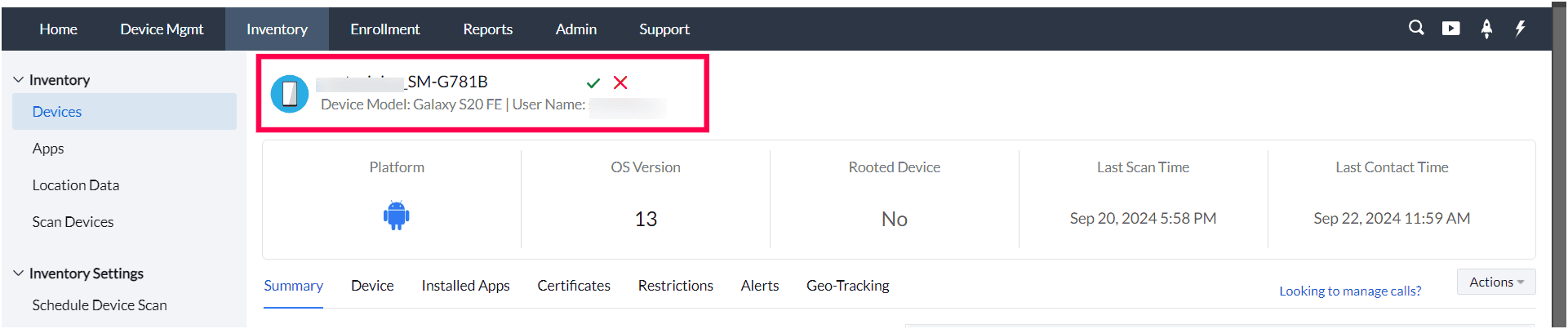
When a device is enrolled in Mobile Device Manager Plus (MDM), the Device Name is initially fetched from the device itself. Here is how the device name functions across different platfoms:
- Android Devices: If an admin changes the device name of an Android device, the modification will only be visible in the Device Details of the ME MDM app.
- iOS Devices: When the admin updates the device name of an iOS device in the MDM console, the new name will appear in the enrolled device settings->About->General->Name for the supervised devices.
- Windows Devices: Any changes made to the device name of a Windows device in the MDM console will not be reflected on the Device.
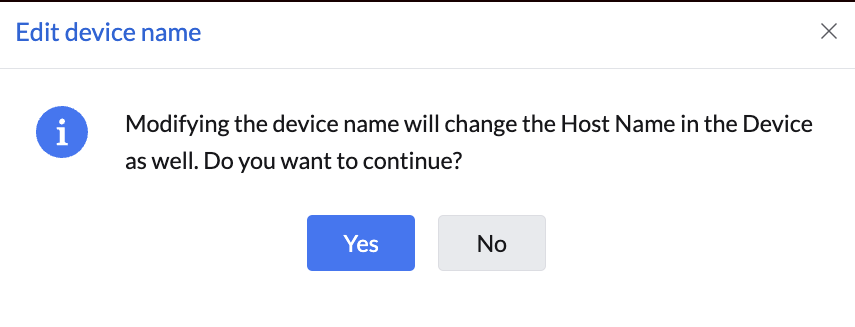
- macOS: If the admin modifies the device name on a macOS device, a confirmation prompt will appear stating, "Modifying the device name will change the Host Name on the device as well. Do you want to continue?" If the admin clicks "Yes," both the Device Name and Host Name will be updated.
Modifying Device Details
Admins have the ability to modify various device attributes directly within the MDM server. The following details can be updated:
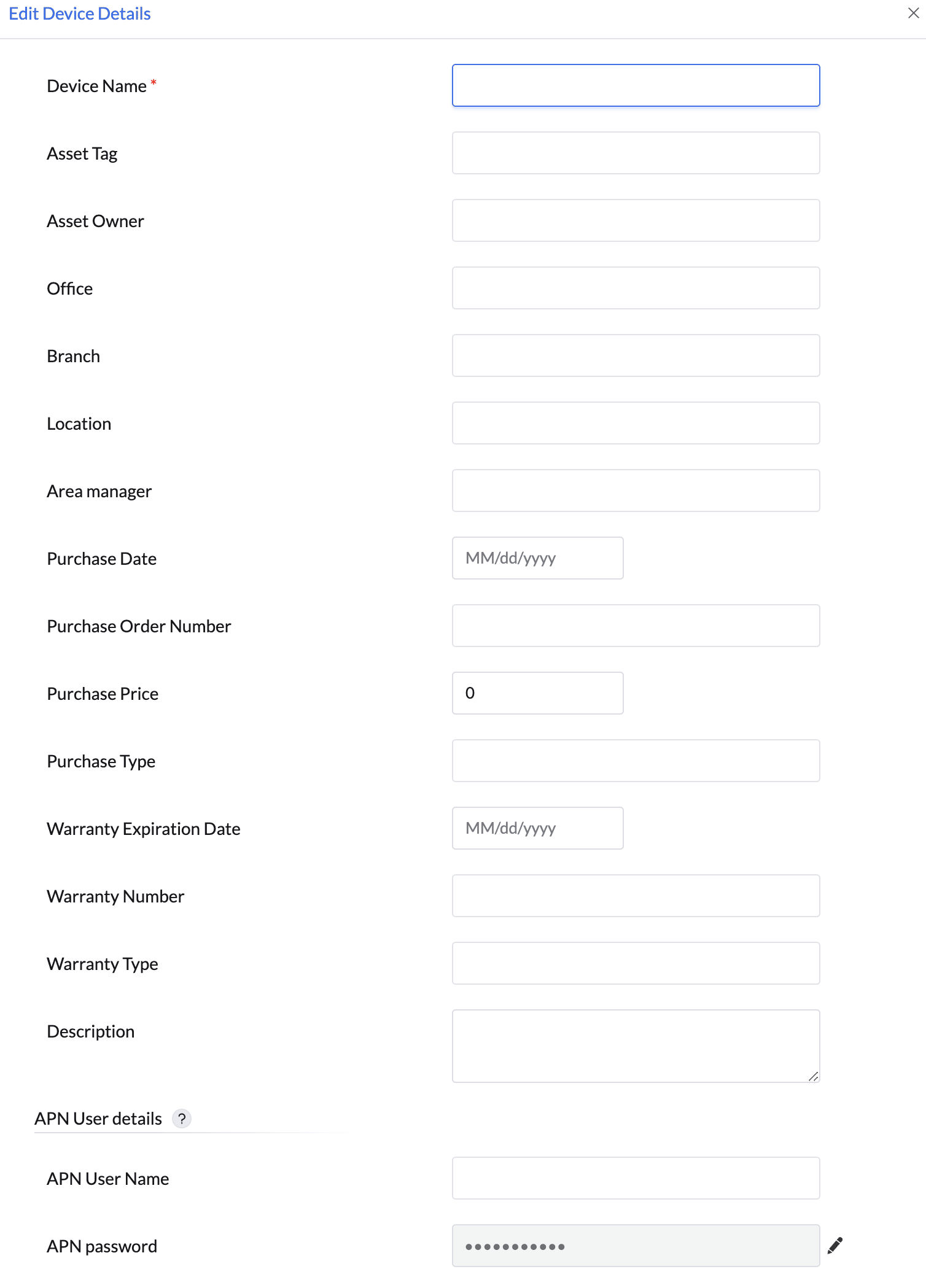
Device Name, Asset Tag, Asset Owner, Office, Branch, Location, Area Manager, Purchase Date, Purchase Order Number, Purchase Price, Purchase Type, Warranty Expiration Date, Warranty Number, Warranty Type, Description, APN User Details, APN User Name, APN Password
To modify these details:
For Single Devices:
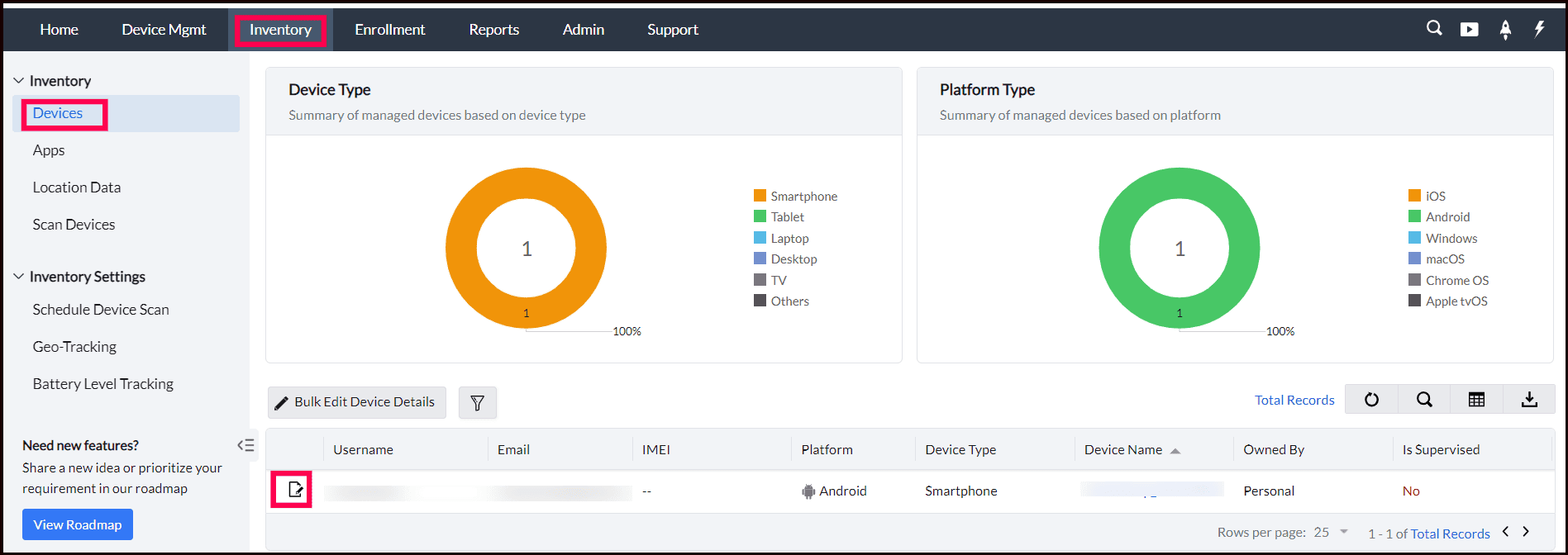
- Navigate to the Inventory section and locate the device. Click on the Edit icon next to the device name to modify the details. Enter the new information, and click Save to apply your changes.
For Bulk Device Modifications:
IMEI, SERIAL_NUMBER, and UDID identify the device row in Bulk Edit Device Details. They are not replacement values for the hardware identifiers. Use the documented editable fields for changes such as Device Name, Asset Tag, or Asset Owner; a CSV upload is not a way to overwrite an incorrectly reported IMEI.
For efficiency, admins can also modify device details in bulk. This feature is particularly useful for managing large fleets of devices with similar attributes. To perform bulk modifications:
- Go to Inventory > Devices > Bulk Edit Device Details.
- Create (Sample CSV) and upload a .csv file containing the device details to be modified, including the IMEI or Serial Number of each device.
- You can add or modify details in bulk, which will be reflected in the MDM server.
- After uploading the file, click Save to apply the changes.
Note :
- The CSV file can contain the following fields:
DEVICE_NAME,IMEI,SERIAL_NUMBER,UDID,ASSET_TAG,ASSET_OWNER,DESCRIPTION,OFFICE,BRANCH,LOCATION,AREA_MANAGER,PURCHASE_DATE,PURCHASE_ORDER_NUMBER,PURCHASE_PRICE,PURCHASE_TYPE,WARRANTY_EXPIRATION_DATE,WARRANTY_NUMBER,WARRANTY_TYPE,APN_USER_NAME,APN_PASSWORD
- Either IMEI or SERIAL_NUMBER or UDID is mandatory to identify the device.
- The first line of the CSV is the column header, and the columns can be in any order.
- Blank column values should be comma separated.
- If the column value contains comma, it should be specified within quotes.
Only devices enrolled in MDM can have their details modified. Once the changes are saved, the details are successfully updated.
Reports for Analysis and Decision-Making
Device Inventory page in ME MDM is not only essential for monitoring individual devices but also serves as a critical resource for generating comprehensive reports that aid in analysis and decision-making. This section outlines how to leverage device details to create meaningful reports that can enhance organizational efficiency and inform strategic decisions.
Export from the Devices List:
Admins can export device details from the Inventory Detailed page by customizing the columns using the column chooser option. These exports can be generated in PDF, XLSX, and CSV formats.
Pre-Defined Reports:
Admins can also export pre-defined reports available in the Reports section, including App reports, Hardware reports, Enrollment reports, Location reports, Security reports, Telecom expense reports, and more.
Scheduled Reports:
Admins can schedule reports to be generated automatically at specified times and sent directly to the designated admin email addresses. Additionally, column ordering can be customized to meet specific requirements. For more information, visit our Reports Guide.
Troubleshooting
MDM Cloud device communication
For MDM Cloud devices whose Last Contact Time remains stale, verify that the site network permits the domains and ports listed in Configure MDM Cloud.
Last Contact Time stays frozen after a manual sync
For self-hosted or on-premises MDM only, if Last Contact Time remains stale after device-initiated sync, check the MDM server SSL certificate and whether the device is reaching the configured HTTPS endpoint. An expired server certificate can prevent secure communication. See Certificate expired troubleshooting before retrying a scan.
FAQ
- Does the Restrictions tab show device compliance?
The Restrictions tab shows applied device restrictions. For geo-fence compliance, open Device Mgmt > Fence Policy and review the applicable Geo-Fencing policy. A device is non-compliant with that policy when it leaves its assigned fence; this is a different check from whether a Camera or app-installation restriction is applied. - Why does the console's IMEI Number field show a value that doesn't match the device's actual IMEI?
On some Android devices (particularly those with a CDMA radio or telematics/IoT-style hardware), the Android TelephonyManager API can return the device's MEID in place of a true GSM IMEI, causing the console's IMEI Number field to display an MEID-format value (often identical across many devices of the same batch/model). Re-scanning does not correct this, as it reflects what the device itself reports. This behavior is due to the Android OS. Contact MDM support for further assistance with this issue. - Why is the phone number not detected for my device?
The phone number might not be detected if there is no SIM card installed or if the phone number status on the device is "Unknown". Refer to our KB article on Phone number is not detected for detailed troubleshooting steps. - Why is my tablet displayed as a smartphone in the MDM inventory?
ManageEngine MDM classifies devices as either Smartphone or Tablet based on the Android recommended method for determining screen size. Android uses the smallest width (sw) qualifier to differentiate device types:- Devices with a smallest width of 600dp or greater are classified as Tablets.
- Devices with a smallest width below 600dp are classified as Smartphones.
Why does this happen?- Some manufacturers classify their devices differently based on internal display configuration.
- The screen resolution (in DPI) and smallest dp value may vary between devices of the same model depending on firmware or regional variants.
- This is a device-specific classification, not an MDM limitation.
- Does Last Contact Time indicate the last successful communication from the device to the MDM server?
Yes. Last Contact Time is updated only when the device successfully communicates with the MDM server. It represents the most recent successful device-to-server communication. - Does Last Contact Time indicate the last communication attempt initiated by the server, regardless of whether the device responded?
No. Last Contact Time does not represent server-initiated communication attempts. When an MDM scan is initiated, the server attempts to contact the device. If the device receives the request and successfully responds, the scan completes successfully. In this case, both Last Scan Time and Last Contact Time are updated. If the device does not respond, only the scan attempt is recorded, and Last Contact Time is not updated. - Can Last Contact Time be updated even if a server-initiated scan fails?
Yes, in certain scenarios. A server-initiated scan depends on platform notification services to wake the device:
a. APNs for Apple devices
b. FCM for Android devices
c. WNS for Windows devices
If these notification services are unavailable or encounter issues, the server may be unable to reach the device, causing the scan request to fail. However, device-to-server communication does not rely on these notification services. If the device later communicates with the MDM server on its own (for example, during a scheduled check-in or another background communication), Last Contact Time is updated to reflect that successful communication, even though the earlier server-initiated scan was unsuccessful.
What's Next?
Associate Profile / Apps:
Assign the necessary profiles and applications to the enrolled devices to ensure they have the required configurations and software. For detailed instructions, refer to our Profile and App Management Help Guide.
Configure Tracking:
Admins can configure various tracking options to enhance device management and monitoring.
Additional guidance and troubleshooting
Refresh a changed device name
If a locally changed device name or hostname is stale in Inventory, request a successful device scan and then check the Device Name field again.
Stale Last Contact Time and the Inactive Device Policy
A stale Last Contact Time indicates that the device has not successfully contacted MDM; an inactive classification does not restore that communication. Review Inactive Device Policy for the configured threshold and reporting options, and Android communication troubleshooting if commands remain pending.
Where do I find the device UDID?
Open the device in Inventory and check the UDID field in Device Summary. Use the device identifier, rather than its displayed name, when matching a device record or contacting support. Device Name can change and is not a substitute for UDID.
Export Custom Views is a one-time export
Export Custom Views produces a manual, one-time XLSX, CSV, or PDF export of the selected device list. For recurring email delivery, use Schedule Reports from the Reports tab and select the applicable predefined or custom query report. A saved inventory filter does not itself schedule delivery.