ComplianceIQ Rule Configuration - Network Configuration Manager
In Network Configuration Manager (NCM), rules define the criteria a device configuration must meet to comply with your organization’s standards. They form the building blocks of compliance policies, enabling you to detect deviations automatically, enforce best practices, and maintain security baselines.
- What is a rule?
- Steps to add a rule using ComplianceIQ
- Components involved in rule creation
- Field Definitions for Rule Components
What is a rule in Network Configuration Manager?
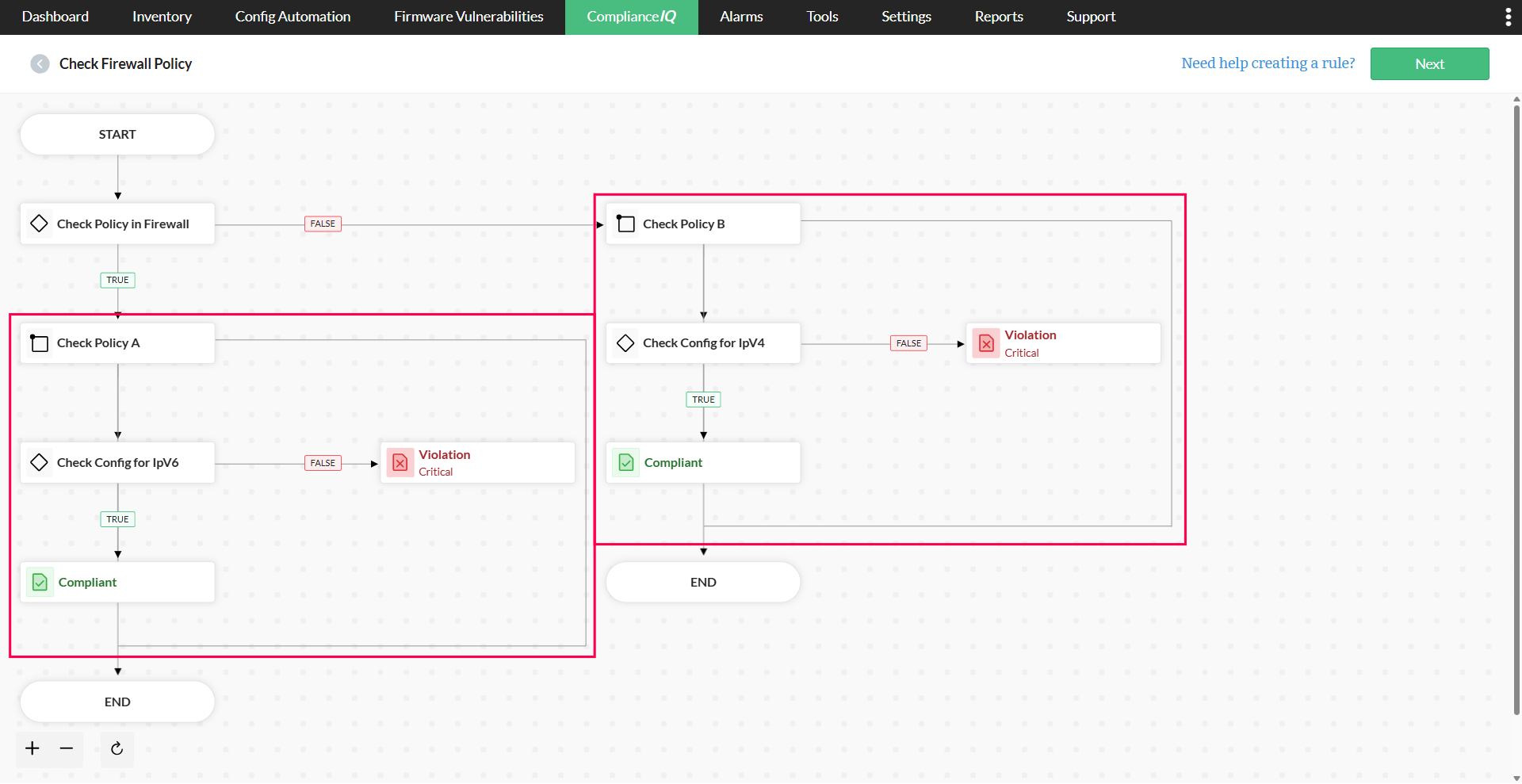
A rule is composed of multiple components, and each component has a specific function in determining whether a configuration passes or fails the compliance check. Using Network Configuration Manager's rule creation workflow, you can add and configure components in the required sequence.
Steps to add a rule in Network Configuration Manager
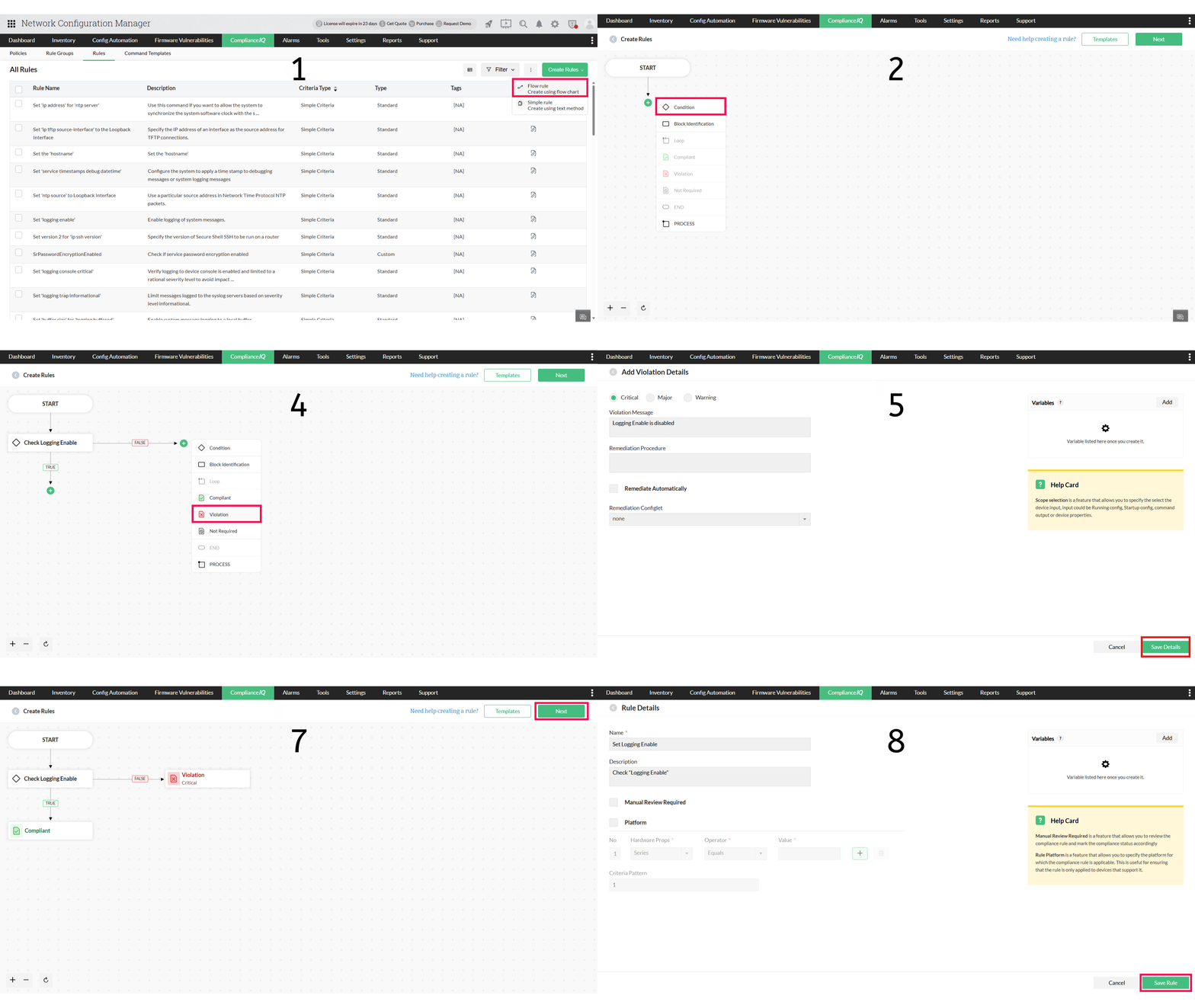
In Network Configuration Manager,
- Navigate to ComplianceIQ → Rules
- Click Create Rules on the top-right pane
- Select Flow Rule to add a new rule
To create a new rule,
- Click the plus icon below START
- Choose Condition and enter the name, scope, and criteria
- Select Save Condition
- Click on the plus icon next to FALSE to add a Violation
- Add violation details, and click Save Details
- Now, select the plus icon under TRUE to add Compliant status
- Click Next on the top-right pane
- Enter a rule name and description
- Click Save Rule
Click here to learn how to create a Compliance IQ rule for CIS Control 1.2.4 (Ensure unused interfaces are disabled).
Different Components involved in rule creation
| Component | Fields |
|---|---|
| Condition |
|
| Block Identification |
|
| Loop | Execute the defined Condition on each block |
| Compliant | If the evaluated block fully meets the defined Condition |
| Violation |
|
| Not Required | When a specific configuration does not need to be evaluated for compliance |
| End | To stop the process after the intended checks have been completed |
| Process | Execute multiple validations or operations independently, without interlinking |
1. Condition
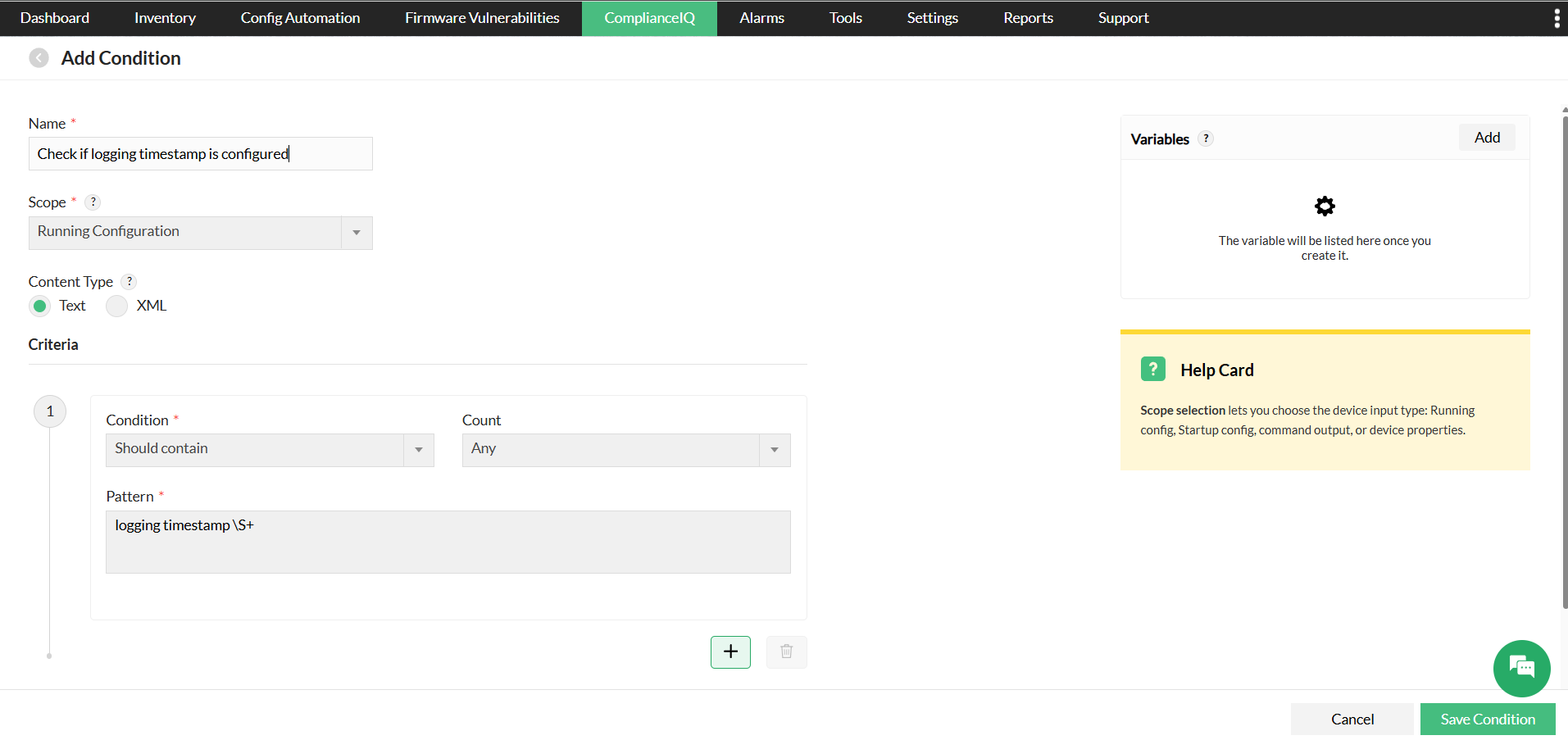
The Condition component defines the exact criteria to be matched within the device configuration. This is the primary validation stage where NCM evaluates whether a configuration meets or fails the set standard. You can specify the match scope, criteria, variables, and pattern. The actual compliance happens here, and the results from this step directly determine the outcome for the evaluated configuration section.
2. Block Identification
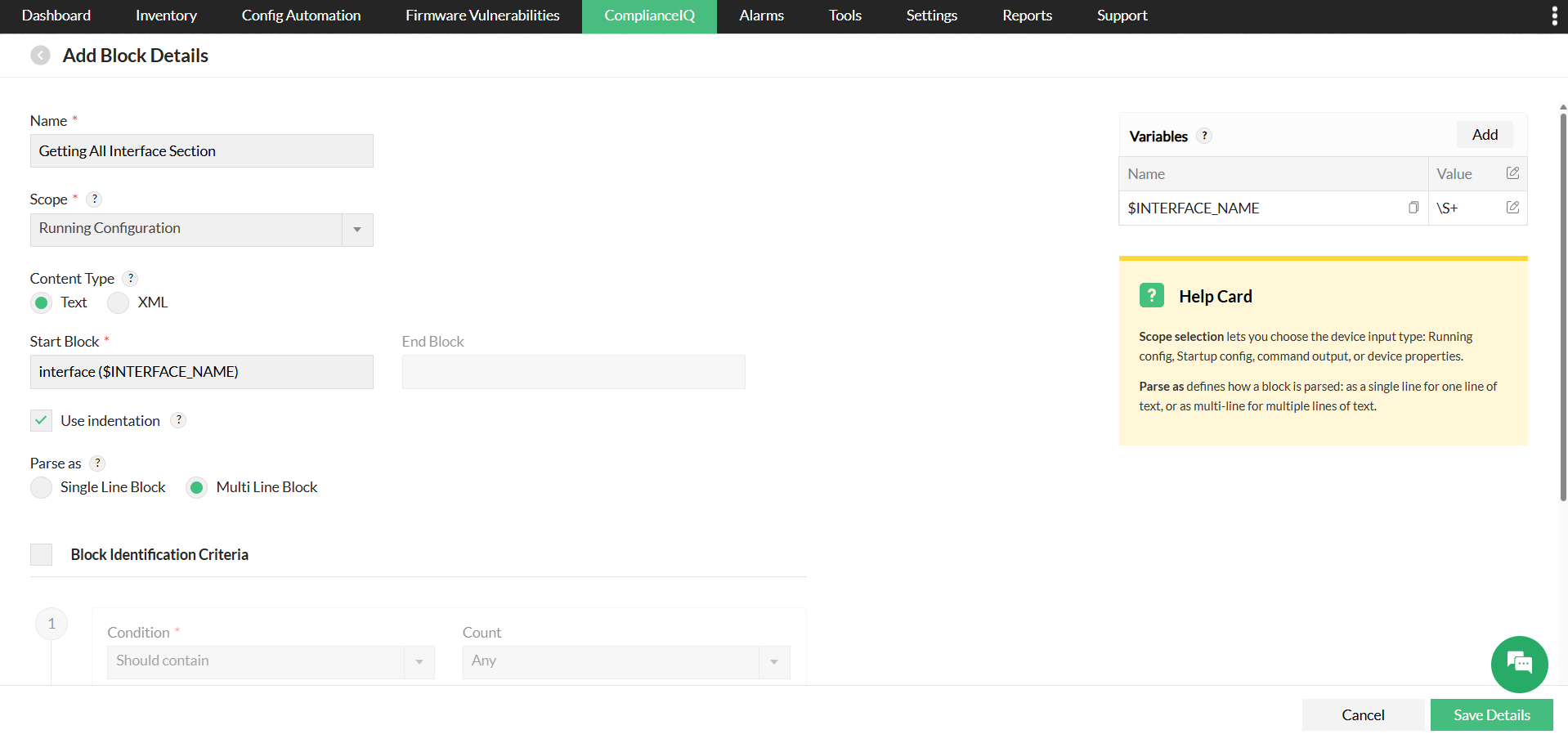
This is an optional component. The Block Identification narrows the Condition to specific sections of the configuration. It identifies and extracts relevant sections based on start and end markers, indentation, or parsing rules without performing validation itself. When a start block and an end block are defined to identify a configuration block, the block identification criteria can be applied to run conditions only within the matched block, allowing further filtering of the configuration. By isolating these blocks, subsequent checks are more targeted and efficient.
Start Block is a mandatory field used to define the beginning of a configuration block. The value can be defined as a regular expression, and it may also include rule inputs or Grep outputs.
End Block is an optional field to specify the end of the block. Both variables and regex patterns are supported.
There are three ways of identifying blocks:
- Start block and indentation - Specify the "Start Block" (example: Interface) and select the "Use Indentation" check box. The indented part of the text after the "Start Block" will be considered a block, and it ends when the indentation stops.
- Start and end Block - Here, users can specify the "Start Block" and "End Block". The text between the both will be considered a block. If you want the block to break earlier than the default behavior, enter a value as a regular expression.
- Start block alone - When the user only enters the start block (example: interface), the text till the next start block keyword (interface) will be considered a block.
Parse as
Consider a single line or multiple lines as a block.
- Multi Line Block - When MultipleLine Block is enabled, multiple lines are treated as a single block.
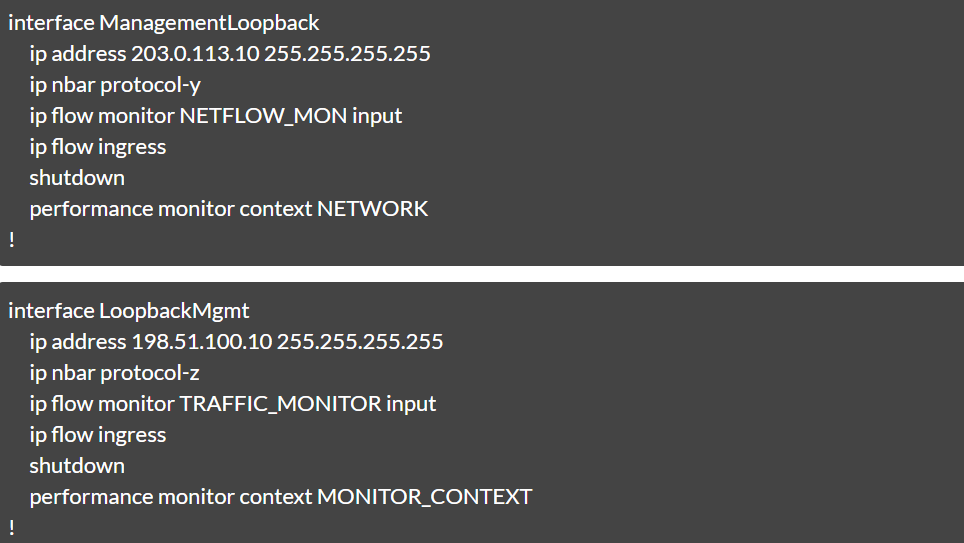
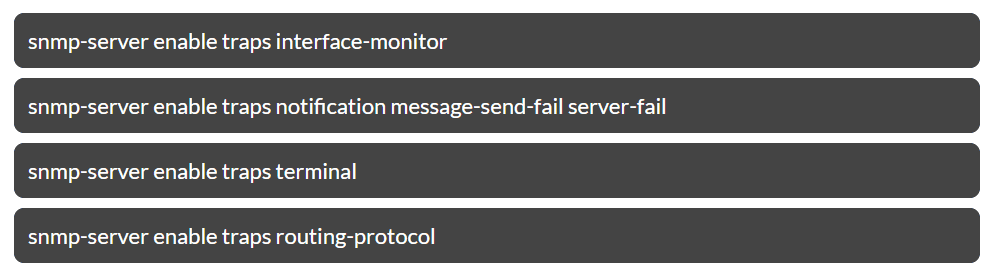
- Single Line Block - If "snmp-server" is the keyword, then enabling "Single Line Block" will consider each line as a block.
3. Loop
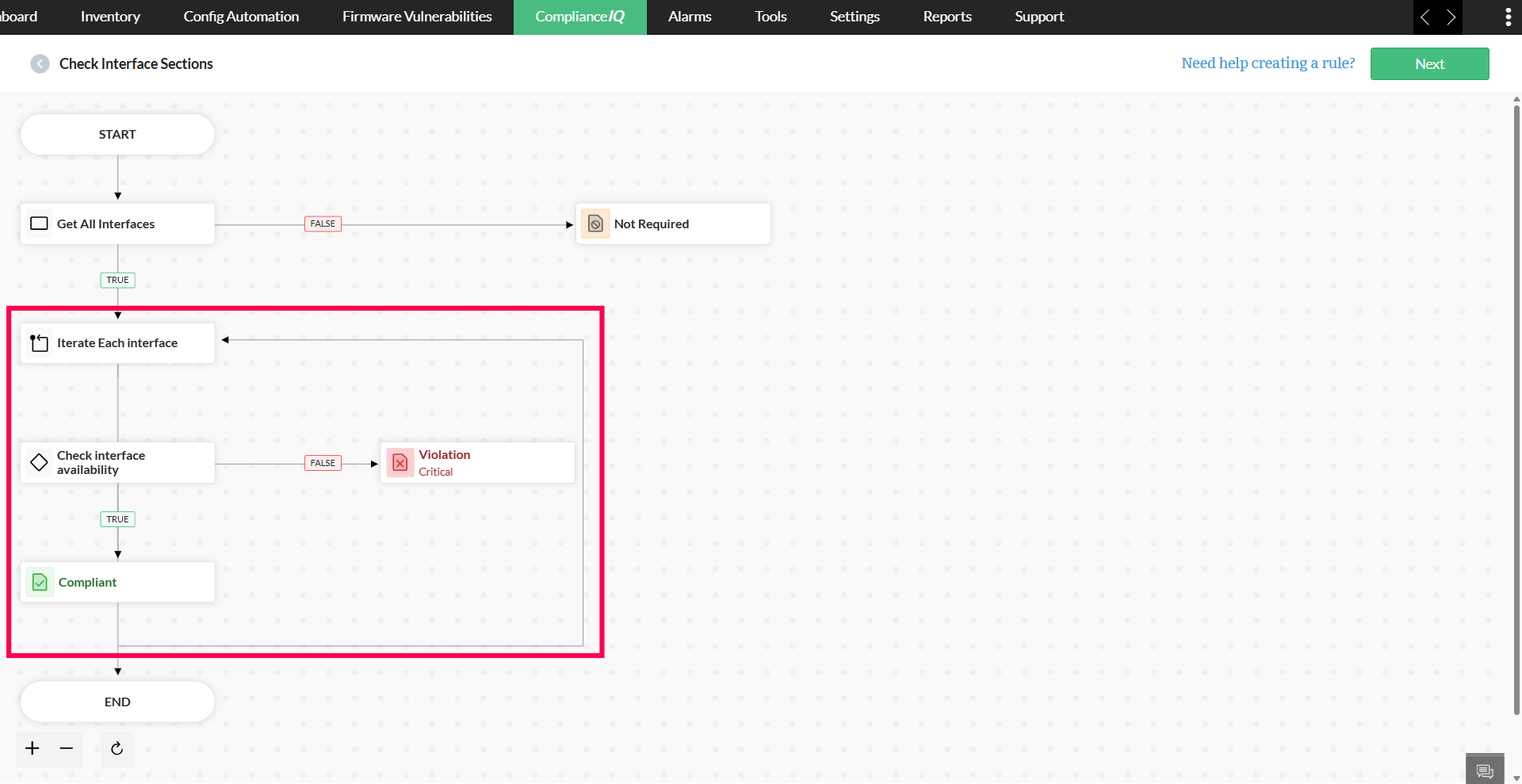
The Loop component executes the defined Condition on each block identified in the previous step. This ensures that every relevant block is individually checked, and the loop can also be used to trigger further block identification.
4. Compliant
If the evaluated block or pattern fully meets the defined Condition, NCM marks it as compliant. The result can be generated as a report for tracking.
5. Violation
If the evaluated block or pattern fails to meet the defined Condition, it is flagged as a violation. It includes severity levels, descriptive messages, remediation procedures, and automated configlets for resolution.
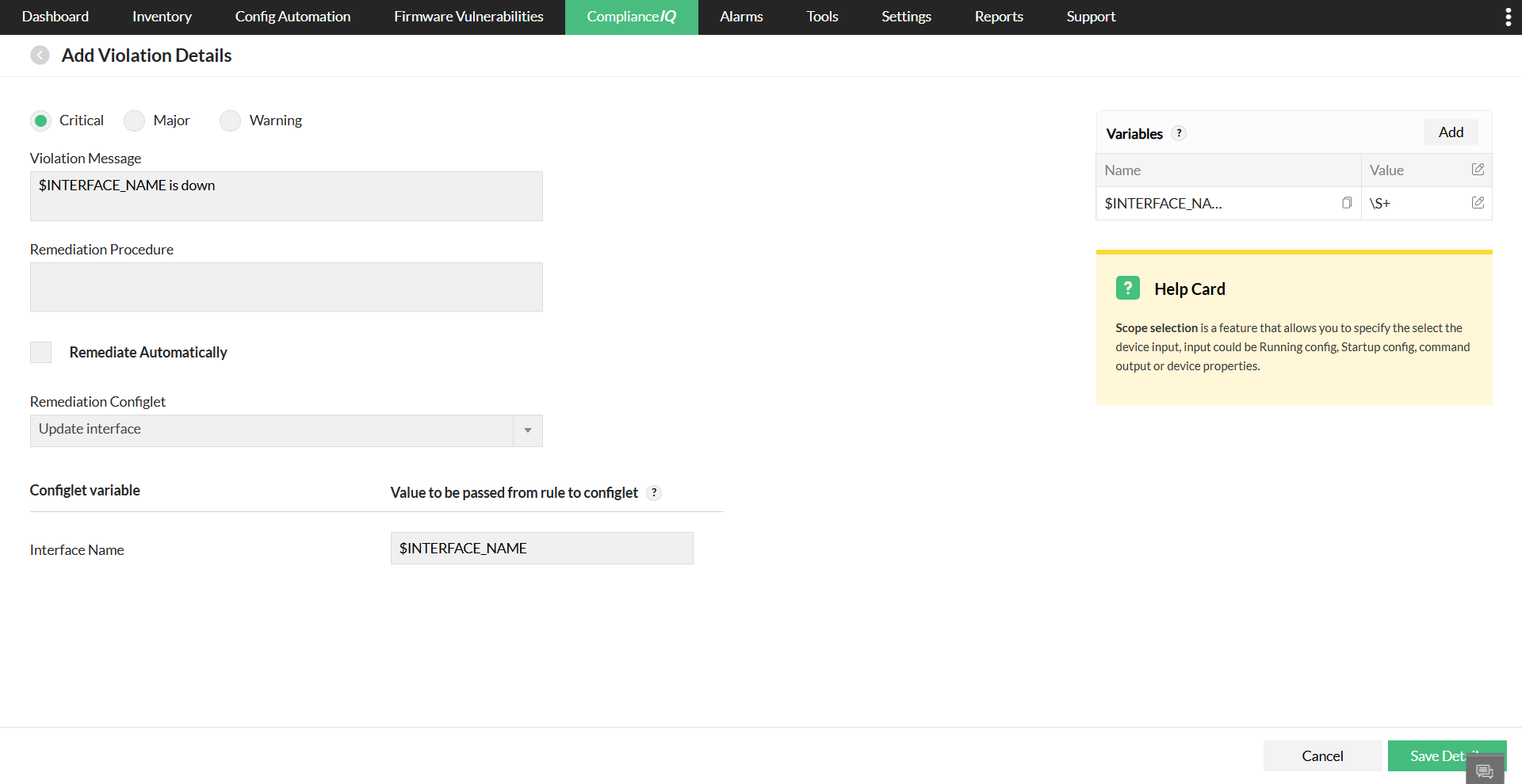
- Violation Severity - Specify the compliance severity level (Critical, Major, or Warning) based on the impact on network operations or security.
- Violation Message - A dynamic, parameterized description of the non-compliance that supports variables (e.g., $INTERFACE_NAME) for contextual customization, helping clearly understand the configuration deviation.
- Remediation Procedure - Step-by-step operational instructions for manually correcting the configuration or restoring compliance. Include the relevant CLI commands if the device does not meet the specified condition.
- Remediation Configlet - A pre-defined configuration template (configlet) that NCM can deploy to automatically remediate the violation. The value of compliance varibales can also be dynamically used in the configlet variable before deployment.
- Remediate automatically - Enable this option to allow NCM to execute the remediation configlet without manual intervention. Disable it to perform manual validation and controlled execution.
6. Not Required
Not Required is used when a specific configuration or section does not need to be evaluated for compliance. This way, the user can decide when a rule is not applicable to certain devices, contexts, or configurations.
7. End
The End component signals the conclusion of the loop. Once this step is reached, no further evaluation is performed for the current block or configuration. It is used to stop the process after the intended checks have been completed.
8. Process
It executes multiple validations or operations independently, without linking their logic together. It is particularly useful for running distinct compliance checks without creating multiple, separate rules. The results from each process are recorded individually.
Field Definitions for Rule Components:
| Field | Description |
|---|---|
| Name | A descriptive label. |
| Scope | Allows you to specify and select the device input, such as:
|
| Criteria |
|
| Variables | Variables can be used to store values that can be reused in other components of the same rule, remediation configlet, and command template.
Click here to learn more about variable configuration. |
| Criteria pattern | Users can add multiple expressions (AND/OR) to define the pattern of the criteria. |
Condition in Criteria:
- Should contain - The configuration section should contain the specified input data, but it does not need to be an exact match. For instance, if you specify that the section should contain
set grayware, then any line that includes that text will be considered compliant. - Should not contain - The configuration section must not contain the specified input data.
- Should match - The configuration section should match the specified input. This condition also supports regular expressions (RegEx).
- Should not match - The configuration section must not match the specified input. This condition also supports regular expressions (RegEx).
- Equals - The entire input line must be present in the configuration. If multiple lines are specified, they are checked in the same sequence, but other lines may appear in between.
- Not equals - The configuration must not exactly match the specified input. If multiple lines are provided, they must not appear in the same sequence, even if other lines are present between them.
- Should contain exact set - If multiple lines are specified, NCM checks whether the configuration contains all of them in the exact order provided. If the lines appear exactly in that order with no deviations, the configuration is considered compliant; otherwise, it is marked as a rule violation.
Variables:
Variables serve as placeholders that store values which can be reused across multiple conditions or blocks within a workflow. In both "Parse from config" and "User Input", the variable can be reused in other components of the same rule, remediation configlet, and command template.
Parse from Config
The Parse from Config variables allow you to extract specific values from a device’s configuration using predefined patterns. They are defined inside brackets like ($VARIABLE_NAME) and are linked to a regex pattern provided by the user. This enables dynamic extraction of values from configurations.
For example, if the configuration contains interface Loopback0 and you need to capture Loopback0 as a variable, you can define it as interface ($INTERFACE_NAME). The $INTERFACE_NAME variable will then match the value based on the regex pattern you specify—such as (\S+), which captures any non-whitespace characters following the word interface.
Let us consider a sample input and its desired output:
Start Block:interface ($INTERFACE_NAME)
Vairable Details:
- Type: Parse from config
- Name: $INTERFACE_NAME
- Value: \S+
Please note that the RegEx value can be modified as per the user need. For instance, in case of an integer, \d+ can be used. $INTERFACE_NAME is replaced by (\S+) and the updated start block, interface (\S+), is used to match content in the configuration.
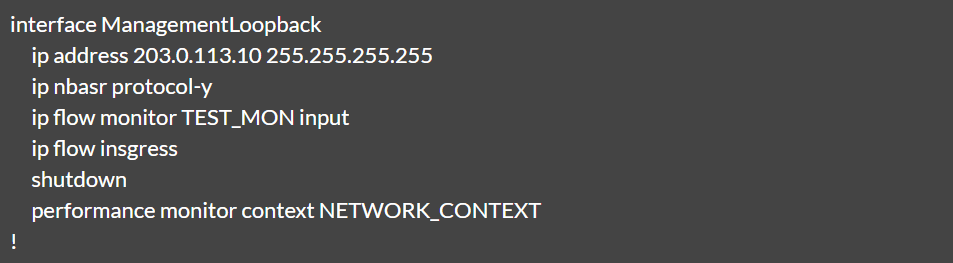
Sample configuration:

Output:
| Variable Name | Value |
|---|---|
| $INTERFACE_NAME | loopback0 |
User Input
Users can customize and change the input. Unlike "Parse from config", the user input is a static value. Here, enabling the "Make this a global variable" check box allows the variable to be used in other rules.