Every configuration on your routers, switches, and firewalls plays a critical role in keeping your business connected and secure. Yet, in dynamic environments, changes happen constantly with new policies, firmware upgrades, and quick fixes during outages. Without proper measures, one wrong command or an unexpected failure can undo hours of work and disrupt critical services.
This is where network configuration backups become indispensable. They provide a reliable fallback so you can restore devices quickly, maintain compliance, and eliminate the chaos of manual recovery. In this page, we’ll explain
- What are network backups?
- Why are they essential for business continuity?
- Which software can you use for network configuration backups?
- Why choose ManageEngine Network Configuration Manager?
What is network backup?
Network backup is the process of creating secure copies of your network device configurations and having them stored for later use, if and when the need arises. Unlike data backups, which focus on files and databases, configuration backups capture details such as:
- Interface and routing settings: Define traffic paths across the network through interface assignments and routing configurations.
- Access control lists (ACLs) and security rules: Enforce network access through ACLs and firewall configurations.
- VLAN configurations: Enable traffic segmentation and isolation through VLAN setups.
- Authentication and SNMP settings: Control device access and monitoring through authentication methods and SNMP configurations.
These backups ensure that if a device fails, gets misconfigured, or is replaced, you can restore it to its exact operational state in minutes, not hours.
Why are configuration backups important for your business?
Misconfigurations are among the leading causes of network issues, with research showing that most ransomware attacks start with simple configuration errors in software and devices. Most of these mistakes are human errors, and can be avoided by using a reliable configuration backup software. Here's why configuration backups are critical:
- Faster recovery: Restore the last known good configuration instantly instead of rebuilding from scratch.
- Compliance assurance: Industry regulations like HIPAA, SOX and Cisco IOS demand configuration tracking and auditability.
- Error rollback: Easily reverse faulty changes introduced during troubleshooting or upgrades.
- Operational resilience: Standardized, automated backups reduce human error and eliminate guesswork during emergencies.
Now that you know why backups are critical, let’s look at the tools that make it simple and foolproof.
Which software can you use for network configuration backups?
Choosing the right backup tool depends on your network size, device diversity, and compliance requirements. Here are some of the most reliable solutions:
- Oxidized (Open Source): A popular choice for those who need Git-based version control with strong multi-vendor compatibility. Ideal for smaller teams comfortable with open-source tools.
- RANCID: A long-standing option that tracks configuration changes and sends diffs via email. Best suited for simple environments without advanced automation needs.
- ManageEngine Network Configuration Manager (NCM): A comprehensive enterprise solution designed for automated backups, real-time change detection, compliance enforcement, and disaster recovery. It supports a wide range of devices, provides role-based access control, and integrates with ITSM tools for streamlined operations.
- Ansible: A great fit for organizations using Infrastructure-as-Code practices. It allows configuration backups alongside provisioning and deployment tasks, making it powerful for DevOps-driven workflows.
If you’re evaluating these tools and wondering which one delivers more than just basic backups by offering automation, compliance checks, and rapid recovery for complex networks, there’s a clear choice. Here’s why ManageEngine Network Configuration Manager stands out.
Why choose ManageEngine Network Configuration Manager?
ManageEngine Network Configuration Manager goes beyond just storing configuration files by turning backups into a strategic layer of security, compliance, and operational resilience for your network. Here’s how its features make backups more powerful:
Perform one-click backup for every device
Instead of logging into each router, switch, or firewall manually, Network Configuration Manager lets you back up all configurations instantly from a single dashboard. This means your latest network state is always preserved, reducing the risk of outdated or missing backups.
Automate real-time backup triggered by changes
The biggest gap in most backup strategies is timing. If backups only happen once a day or week, recent changes can be lost. Network Configuration Manager eliminates this risk by automatically creating a backup the moment a configuration changes, so you always have the most current version ready.
Run bulk backups across multi-vendor devices
Managing a mixed environment with Cisco, Juniper, Fortinet, and Palo Alto devices can make backup processes complex. Network Configuration Manager simplifies this by allowing bulk backups across vendors in one go, ensuring consistency and reducing administrative overhead.
Compliance and security built into backups
Backups aren’t just for recovery; they are also proof of compliance. With Network Configuration Manager, you can validate every backed-up configuration against industry benchmarks such as HIPAA, as well as custom policies. This ensures your backups are not only available but also aligned with security standards, minimising audit risks.
Achieve zero-touch disaster recovery
A backup only proves its worth when it can be restored instantly. During outages or device failures, Network Configuration Manager enables you to push the last known good configuration back to any device in seconds. This ensures immediate recovery, prevents prolonged downtime, and keeps critical services running without disruption.
Network configuration backups are your first line of defence against outages, failed updates, and security gaps. The faster you can restore the correct configuration, the less impact on your business. With ManageEngine Network Configuration Manager, every change is tracked, every backup is verified, and recovery takes seconds, not hours.
Ready to see how effortless and reliable network backup can be with ManageEngine Network Configuration Manager? Start your 30-day free trial or schedule a personalized demo with our product experts.
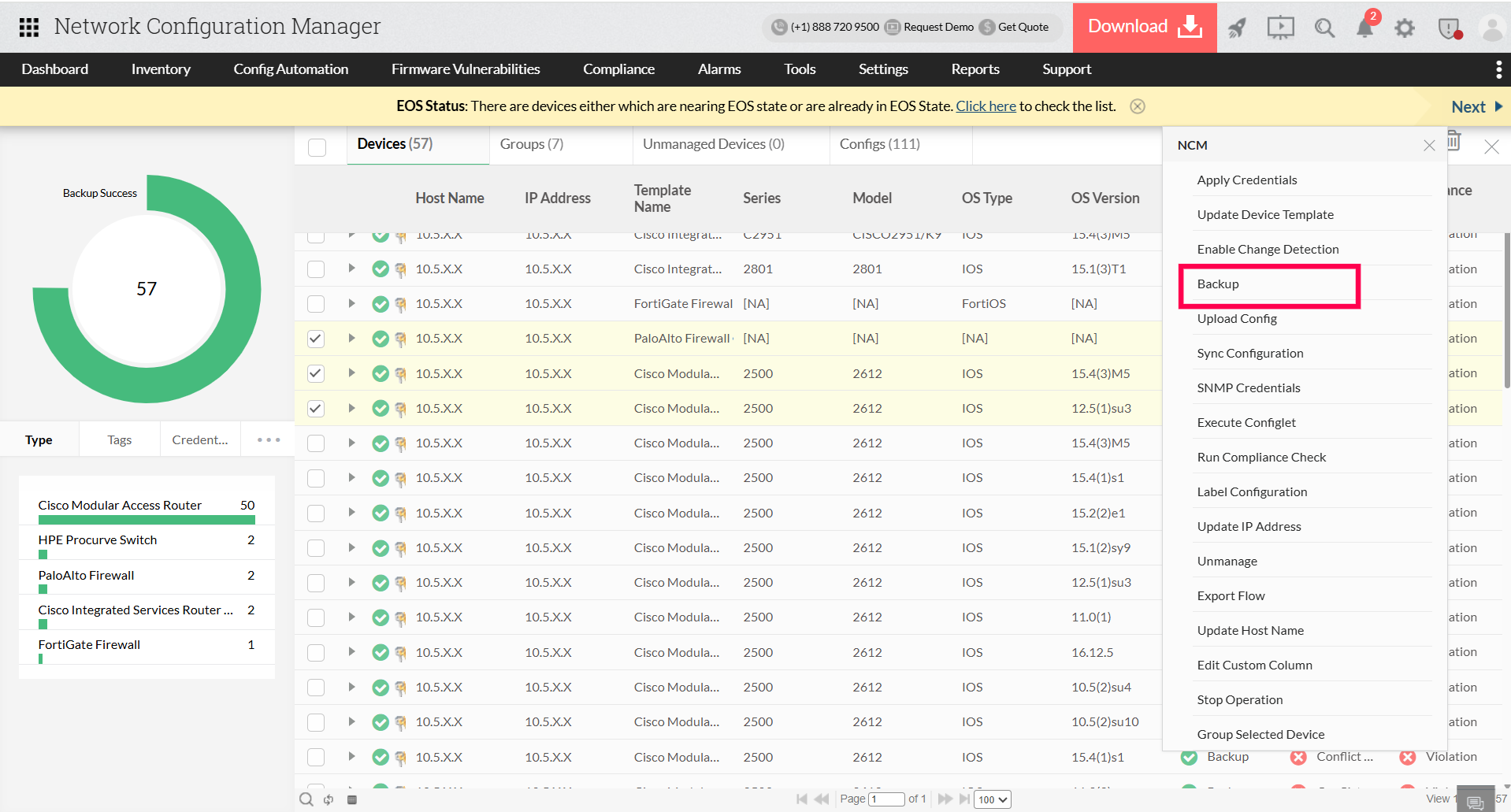
Perform one-click backup for every device
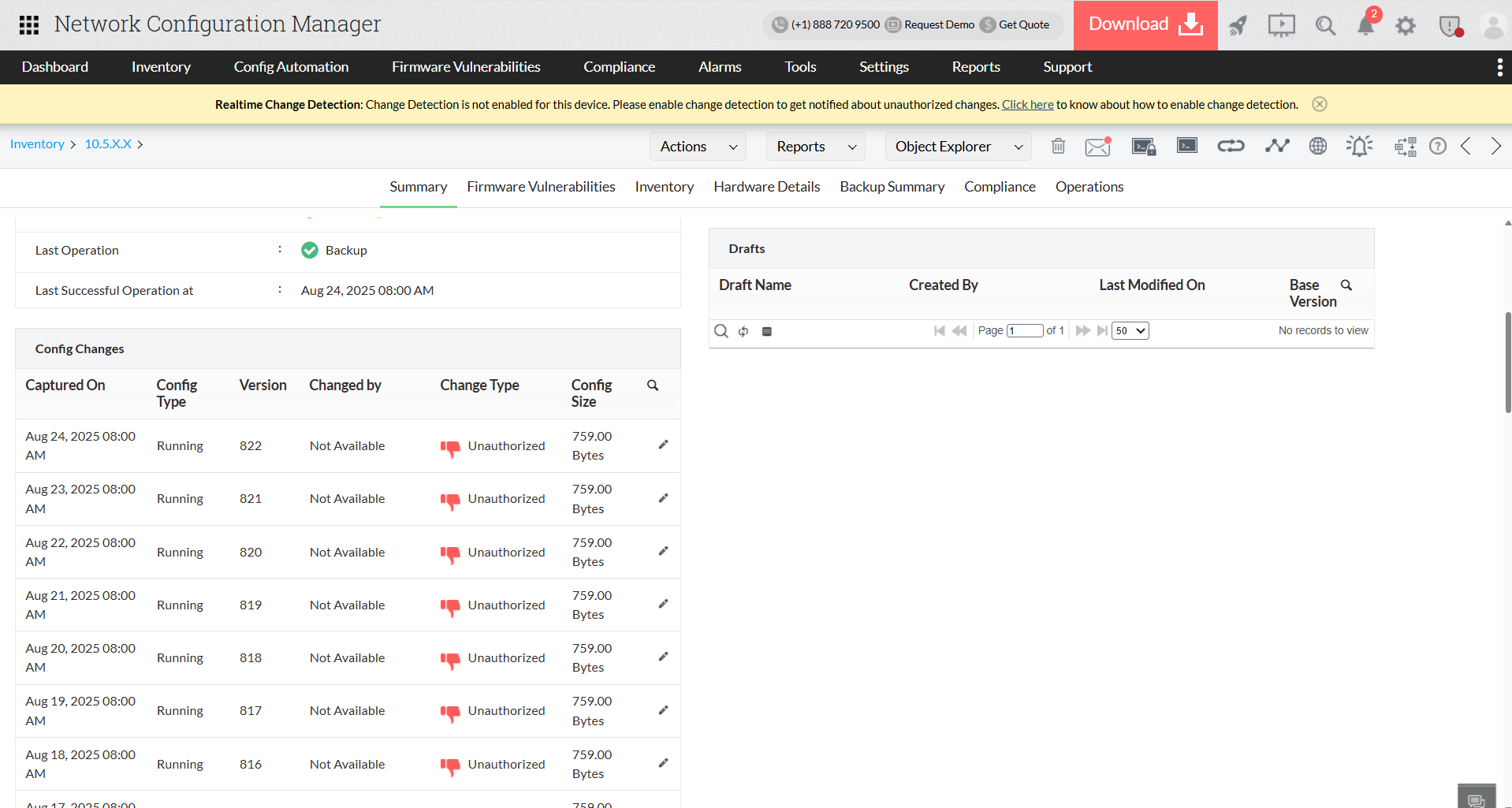
Automate real-time backup triggered by changes
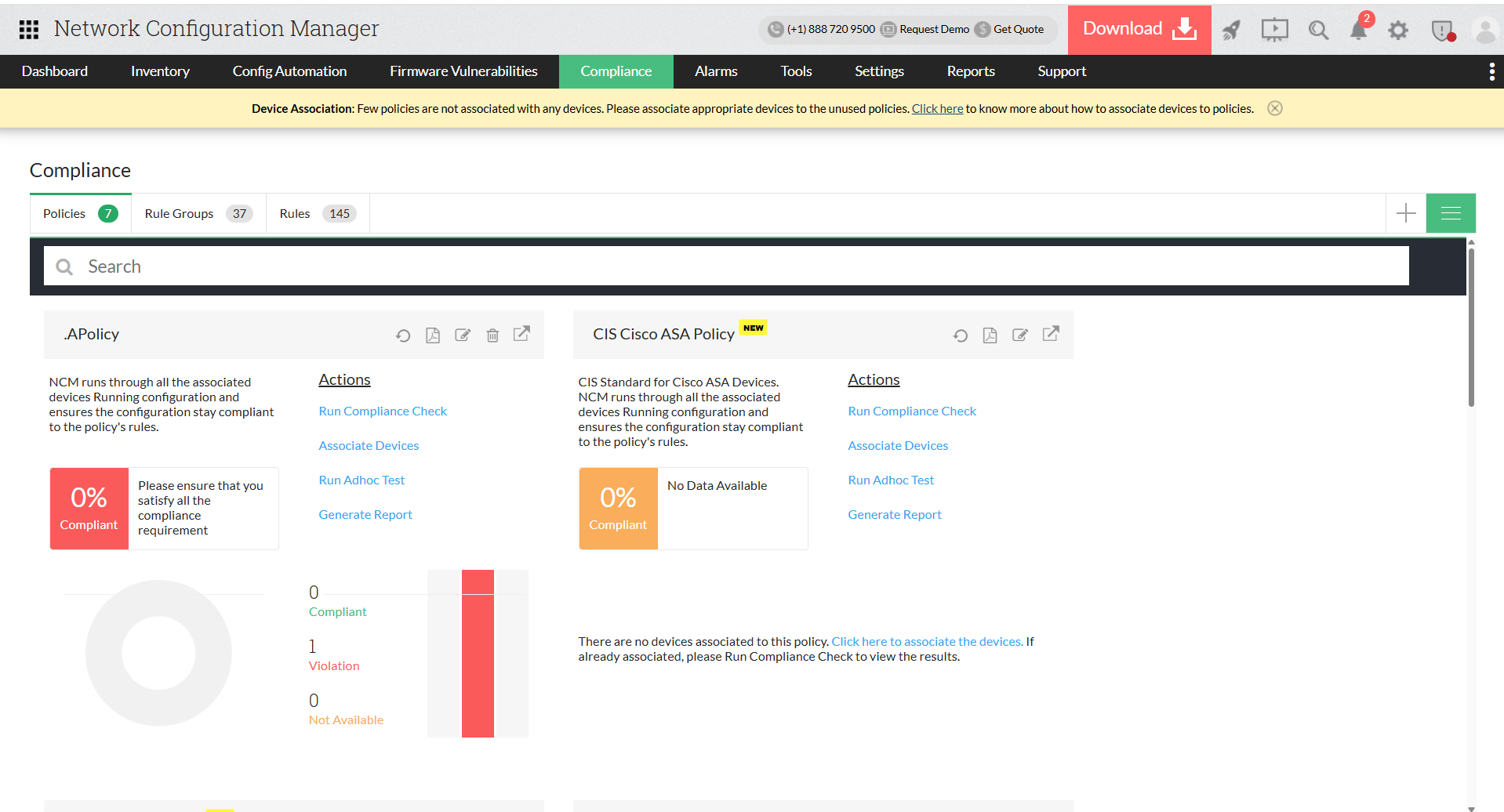
Compliance and security built into backups
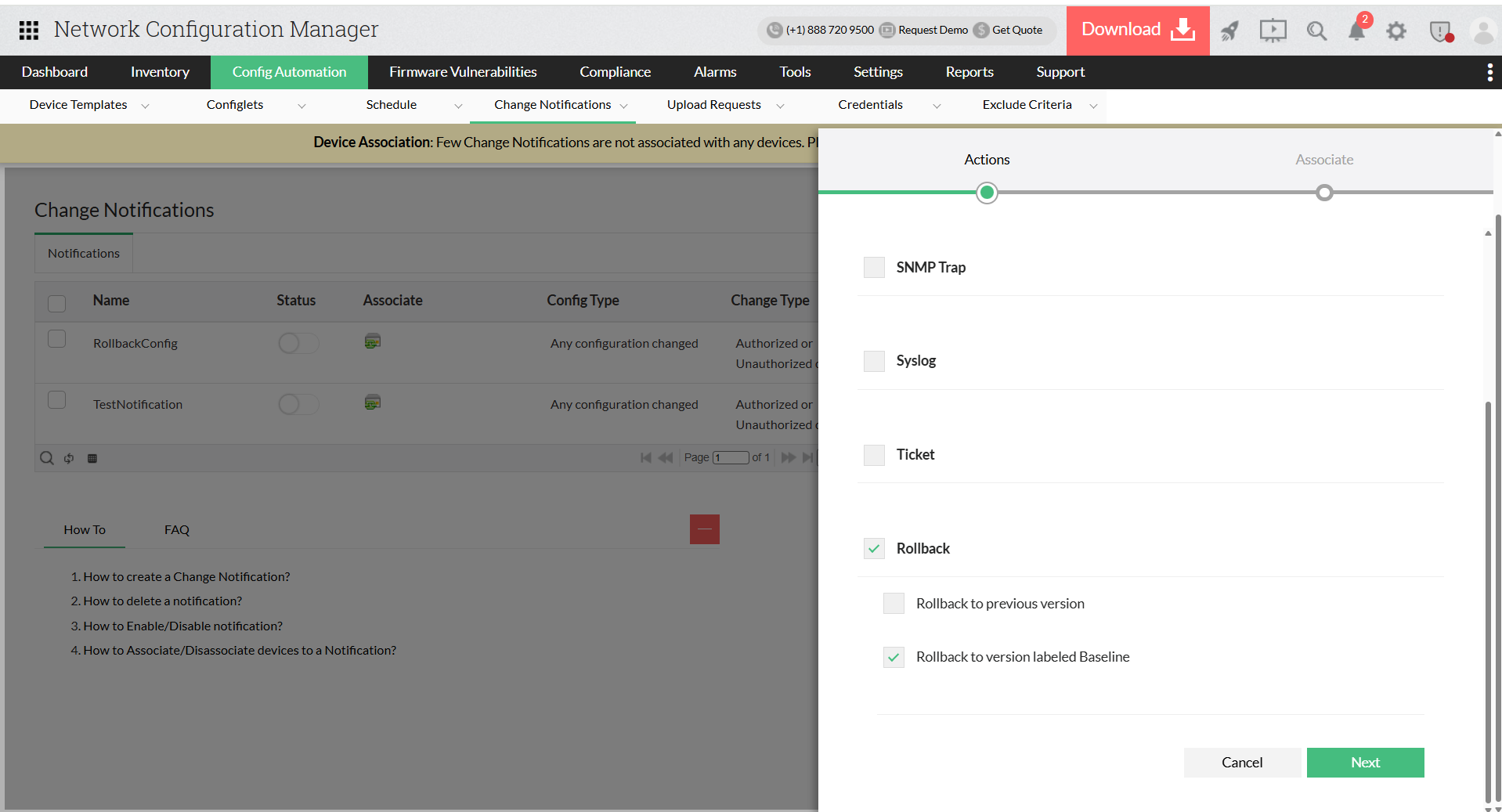
Achieve zero-touch disaster recoverys
FAQs on network backup software
What is configuration backup?
+
Best tool for backing up Cisco router and switch configurations?
+
What does everyone do for configuration management and backup of self-hosted services?
+