CVE-2025-20352 - Cisco IOS and IOS XE Software SNMP Denial of Service and Remote Code Execution Vulnerability
Important
| Vulnerability Name: | Cisco IOS and IOS XE Software SNMP Denial of Service and Remote Code Execution Vulnerability |
|---|---|
| CVE ID | CVE-2025-20352 |
| Source: | Cisco |
| Published date: | 24/09/2025 |
| Base score: | 7.7 |
Description
Cisco has identified a security issue in the SNMP (Simple Network Management Protocol) feature used in Cisco IOS and IOS XE devices. This issue, tracked as CVE-2025-20352, allows an attacker with valid SNMP credentials to either crash the device or, in some cases, take control of it. Cisco has confirmed that this vulnerability is being actively exploited, meaning attackers are already trying to use it in real world scenarios.
How to leverage Network Configuration Manager's Programmable Configlets to fix this issue
Programmable Configlets in ManageEngine Network Configuration Manager help automate configuration changes across network devices. Using intelligent scripting, dynamic logic, and scalable automation, you can create a single script that defines when and how changes should be made, ensuring consistent and efficient updates across your network without executing commands on each device manually.
This vulnerability impacts Cisco devices where SNMP access is enabled. Using programmable configlets, you can:
- Review device configurations to identify any unauthorized SNMP user accounts.
- Automatically remove the unauthorized SNMP user accounts detected during the review.
Steps to mitigate unauthorized SNMP users using a Programmable Configlet
To address the Cisco SNMP vulnerability, it is essential to identify and remove any SNMP users that are not required for monitoring or management. Unnecessary or unauthorized SNMP users can increase the risk of attacks, so cleaning up these accounts helps secure your devices. Using ManageEngine Network Configuration Manager, you can automate this process with a Programmable Configlet, which safely identifies and removes unwanted SNMP users across all your Cisco devices.
The following Programmable Configlet can be used to automatically detect and remove unnecessary SNMP users from Cisco devices. This helps prevent unauthorized access and ensures that only trusted SNMP accounts remain active.
Configlet script:
 #set($response =$device.execute("show snmp user | include User name"))
#set($responseArr=$util.split($response,"\n"))
#foreach($eachLine in $responseArr)
   #if($eachLine.contains("User name"))
     #set($regexPattern = "User name:\s*(\S+)")
     #set($user = $util.grep($eachLine , $regexPattern, 1))
     #if(!$userList.contains($user))
      $device.execute("configure terminal")
      $device.execute("no snmp-server user "+$user)
      $device.execute("exit")
   #end
  #end
#end
How the Configlet works
1. Fetch SNMP user details
The Configlet first runs the show snmp user command to list all configured SNMP users on the device.
#set($response =$device.execute("show snmp user | include User name"))2. Parse the response
It splits the command output line by line and identifies every entry that contains "User name".
#if($eachLine.contains("User name"))3. Extract usernames
Using a regular expression, it captures each SNMP username from the command output.
#set($regexPattern = "User name:\s*(\S+)")4. Compare against the approved list
The script checks if the username is part of the predefined $userList, which contains valid SNMP users that should remain active.
#if(!$userList.contains($user))5. Remove unauthorized users
If a username is not in the approved list, the Configlet automatically enters configuration mode and executes the no snmp-server user command to delete it and exits from the configuration terminal mode.
 $device.execute("configure terminal")
$device.execute("no snmp-server user "+$user)
$device.execute("exit")
By running this Configlet through Network Configuration Manager, administrators can ensure that all Cisco devices are free from unwanted SNMP accounts, reducing the risk of exploitation through CVE-2025-20352.
Steps to create a Programmable Configlet
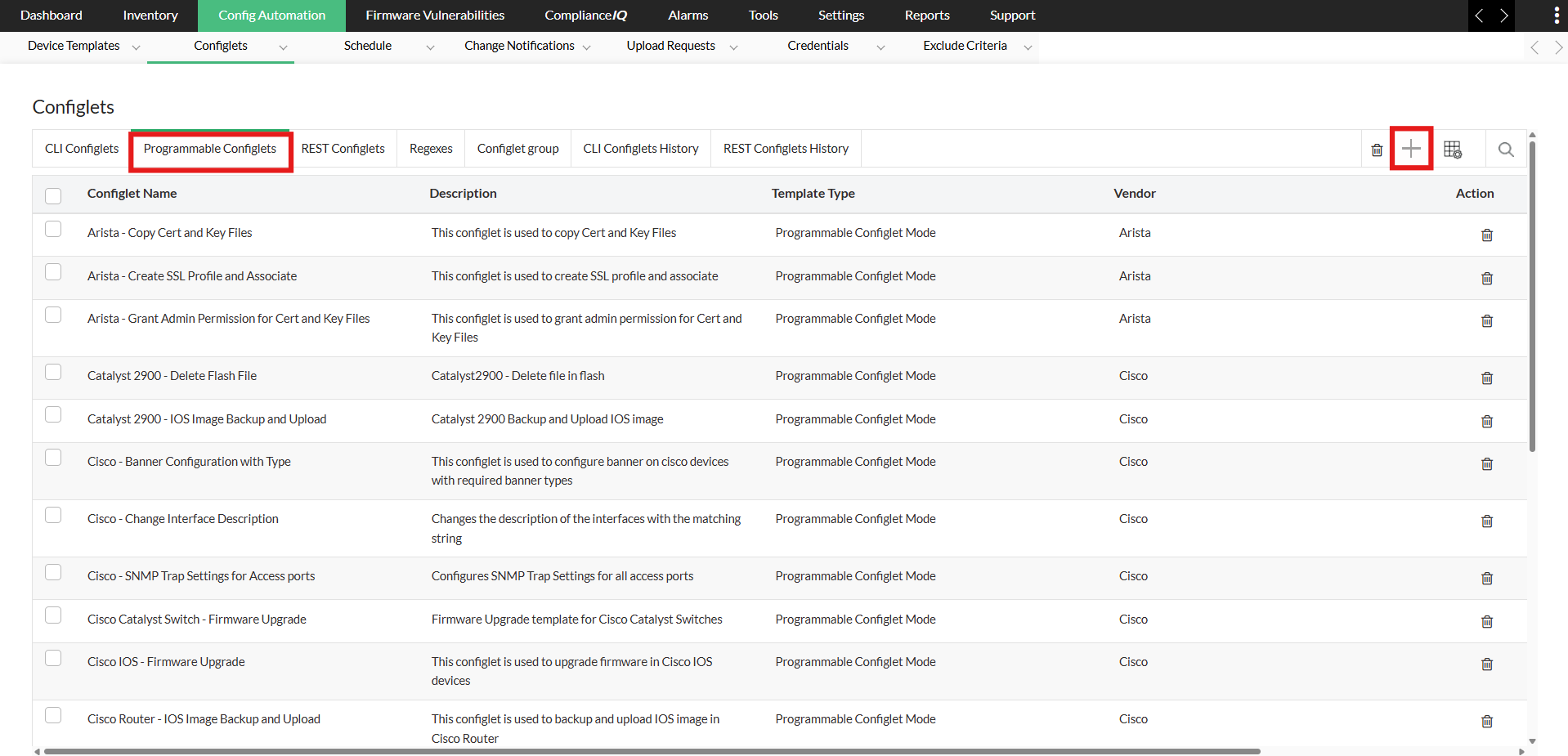
- Navigate to Network Configuration Manager → Config Automation → Configlets → Programmable Configlets.
- Click the "+" icon to add a new configurable script.
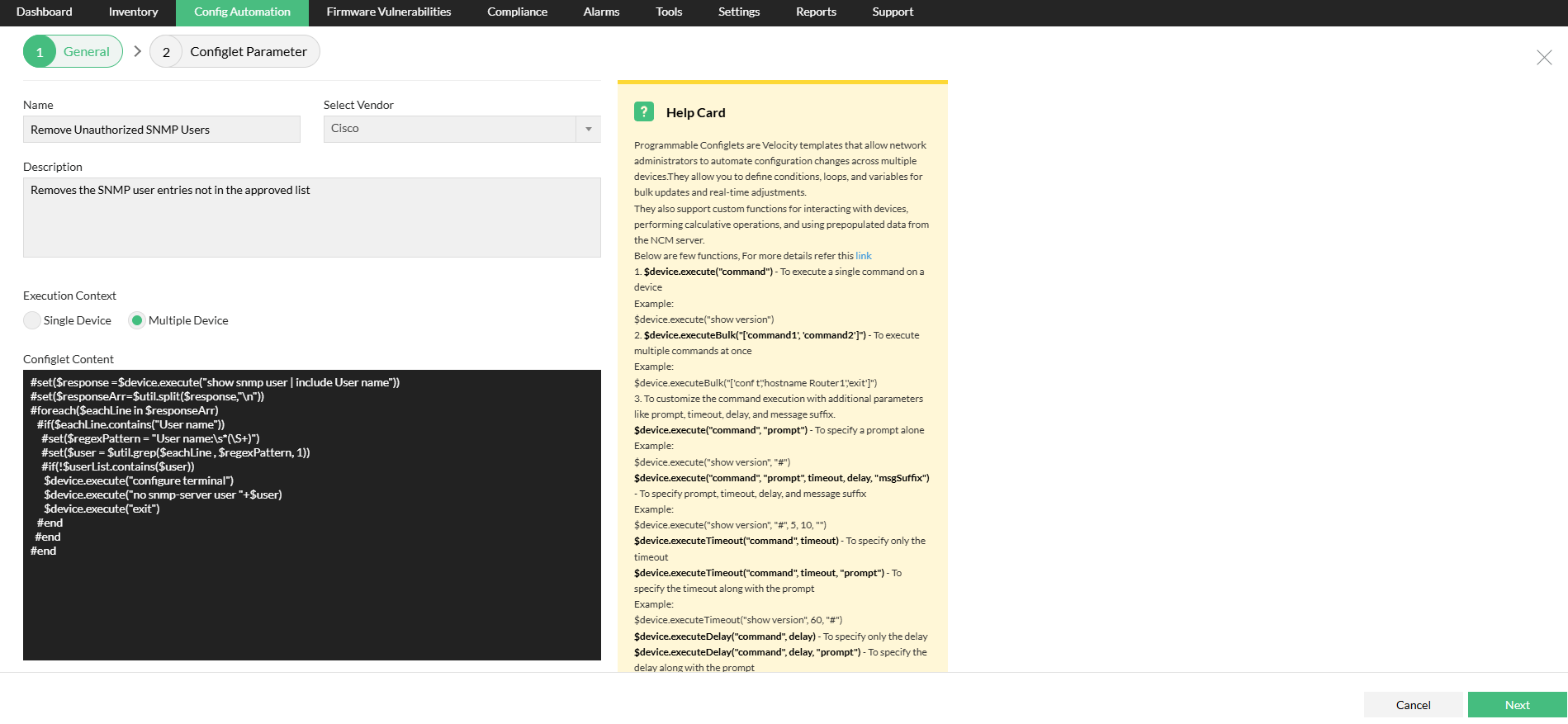
- Give the configlet a descriptive name (e.g., "Remove Unauthorized SNMP Users")
- Choose "Cisco" as the vendor
- Write a short explanation of what this configlet does (e.g., "Removes all SNMP-server user entries not in the approved list")
- Choose whether this should run on a single device or multiple devices.
- In Configlet Content, paste the script you have that detects SNMP users and removes unauthorized ones.
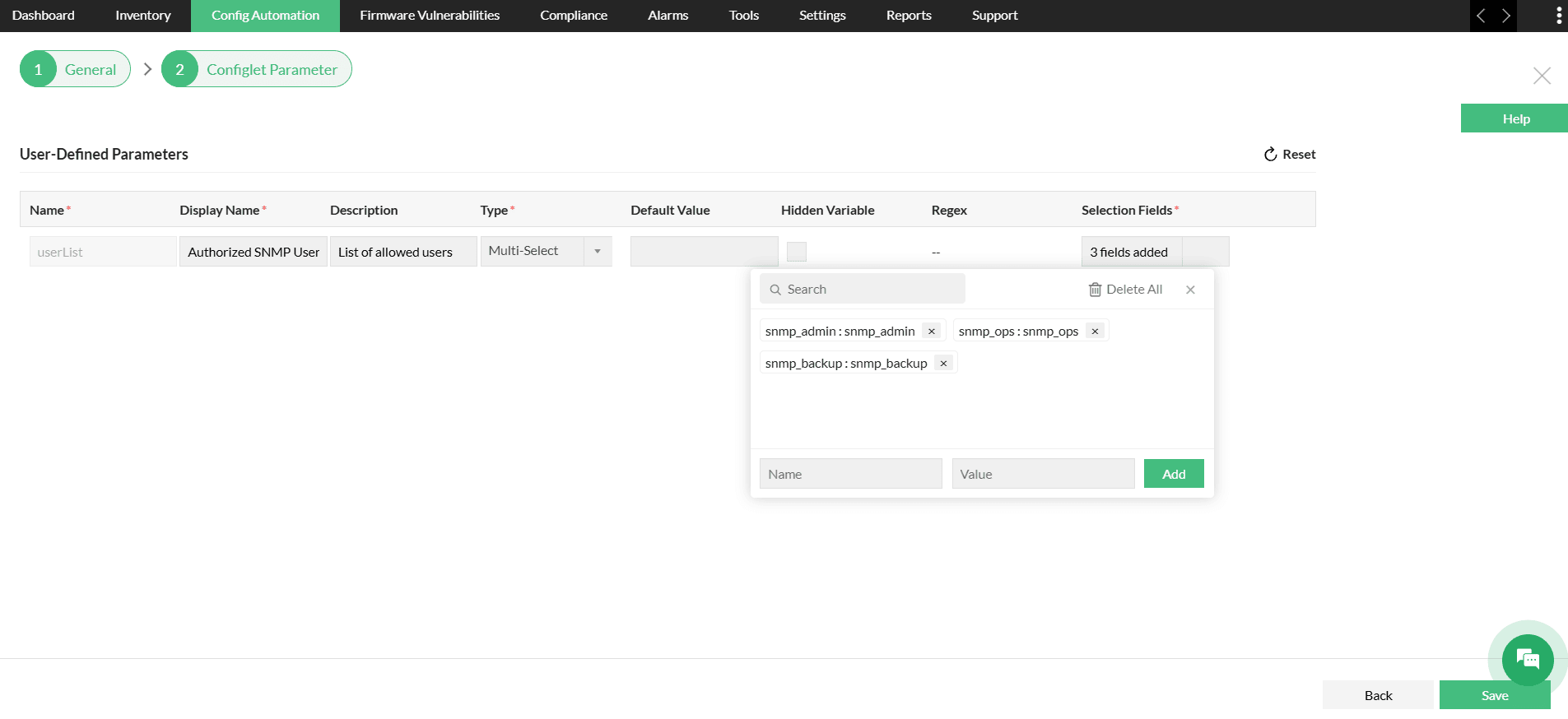
- Add user-defined parameters if you want to exclude specific SNMP users from being removed (for example, define a userList parameter of type Multi-select).
- Add the list of authorized users to this field. During execution, the Configlet compares each SNMP user with the list and automatically removes any user not included.
- Save the configlet.
Once saved, the configlet is ready for execution. Execute it on the target devices or device group to remove unauthorized SNMP users and protect against the CVE-2025-20352 vulnerability.
Stay ahead with ComplianceIQ
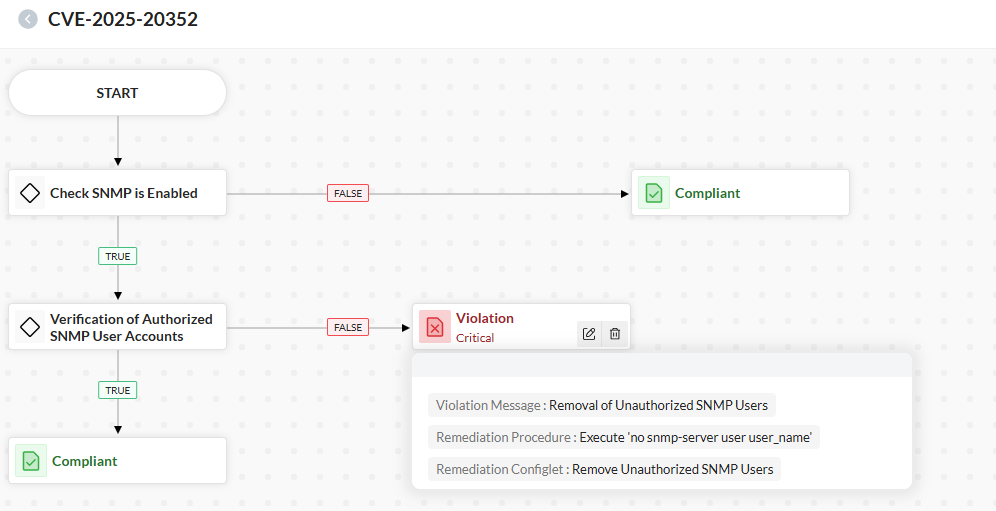
ManageEngine Network Configuration Manager will soon introduce ComplianceIQ, an enhanced and intelligent compliance management module. This powerful, next-generation compliance engine is an improvement over the existing compliance module that will automatically assess device configurations, identify policy violations (such as unwanted SNMP users), and guide you through remediation with ease. ComplianceIQ will help you detect and resolve issues like the SNMP vulnerability (CVE-2025-20352) more proactively and efficiently.
Secure your Cisco devices against SNMP exploits and maintain full control over user access while effortlessly enforcing compliance across your network. Download a free, 30-day trial or schedule a personalized demo today.