

Trusted bytop brands

Saint Gobain
NASA
Time Warner Cable
Loreal Paris
Siemens
DHL

Enable LLM-driven intelligence directly into your IT infrastructure management

Network administrators need a clear, unified view of device health, performance data, and system status to stay ahead of potential issues. As AI technology continues to evolve, actionable intelligence from network datasets is now extracted pro rata, by DeepSeek's advanced language capabilities bringing diagnostics, correlations, and recommendations directly into your monitoring interface.

ManageEngine OpManager now offers native integration with DeepSeek, embedding LLM-driven analytical processing directly into the network monitoring and management workflow. When configured, OpManager automatically processes device conditions, active alerts, and performance data through DeepSeek's language models, delivering consolidated summaries and practical recommendations, all from within the platform.

Get instant device health overviews with AI-driven summarization

  • Generate on-demand AI summaries for individual devices, device groups, or active alarm queues at the click of a button.
  • Surface key indicators — CPU usage, memory consumption, interface bandwidth, and uptime history in a single consolidated view without jumping between dashboards.
  • Gain instant clarity on critical parameters like availability status and resource consumption patterns, complete with diagnostic context and next steps to address potential issues before they escalate.
deepseek integration

Transform alarm floods into operational clarity

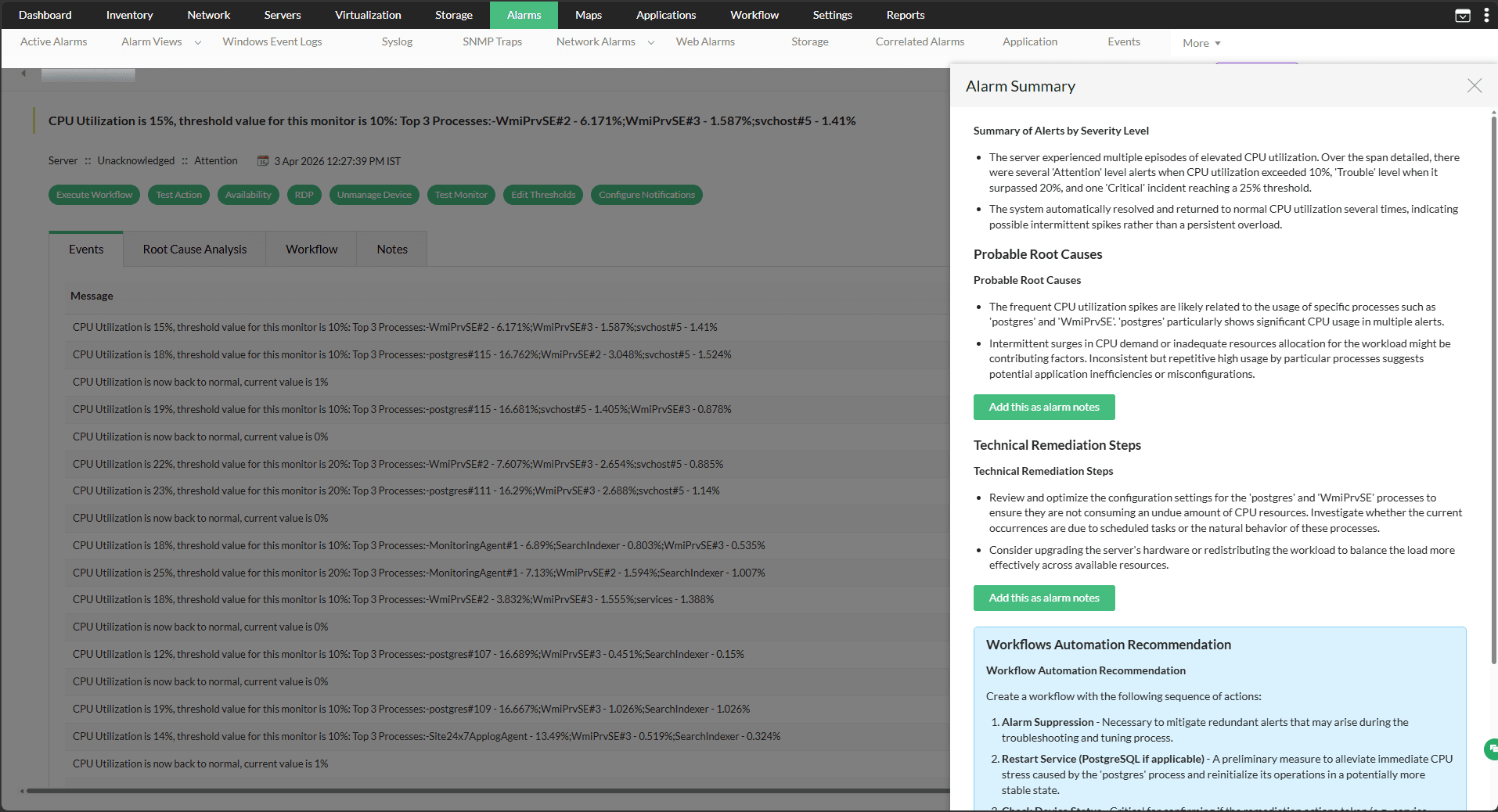
  • Analyze IT incidents at a deeper level with AI-generated alarm summaries that extend well beyond basic alert metadata.
  • Each summary explains the nature of the alarm, its probable root cause, severity classification, potential network impact, and a recommended troubleshooting path.
  • Aggregate all active alarms into a single prioritized overview to spot recurring failure patterns and shift toward more proactive monitoring (particularly valuable for NOC teams managing high alarm volumes.)

Build custom monitors with natural language script generation

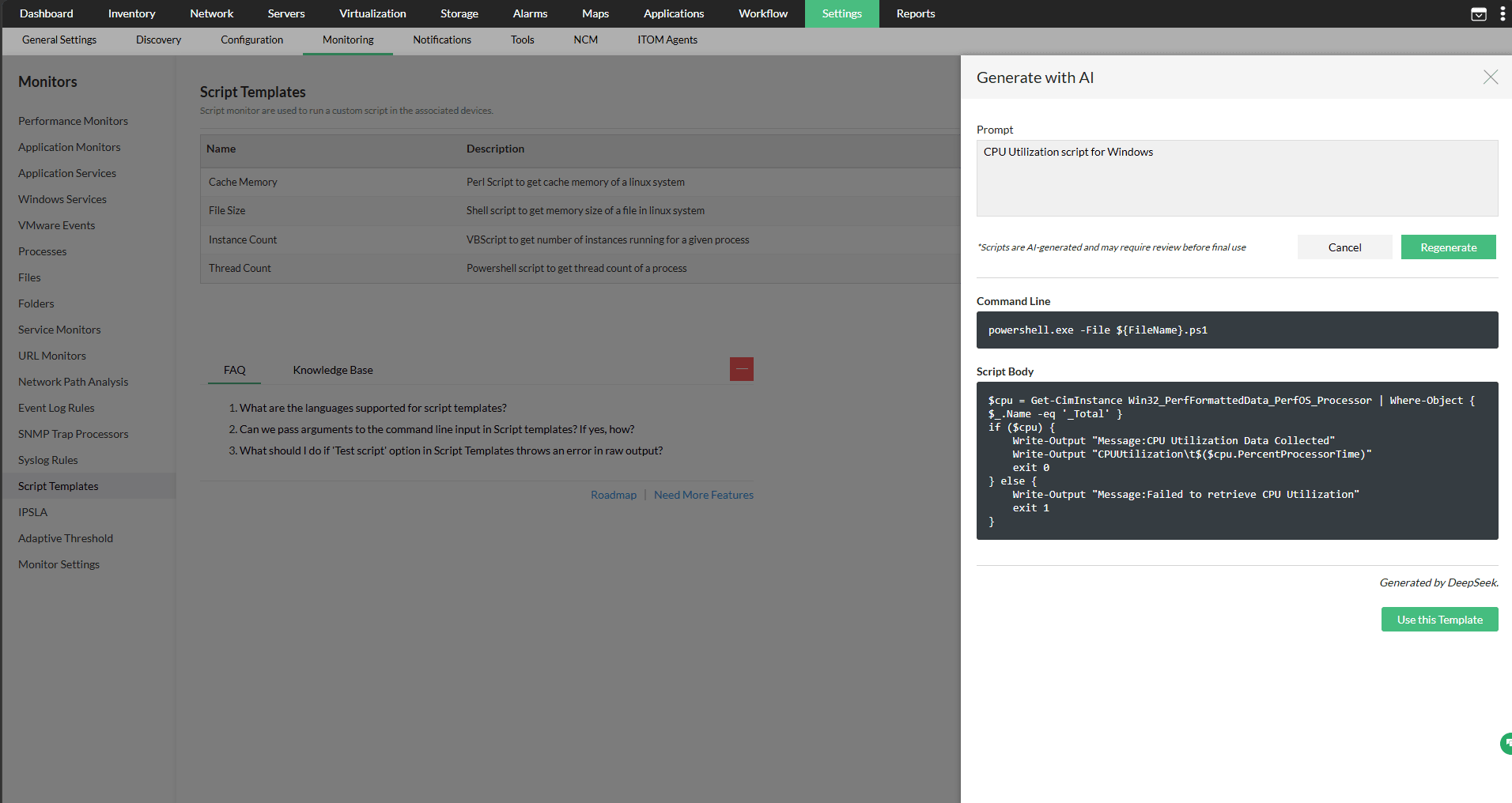
  • Operators can specify their monitoring requirements as plain-text prompts, and the DeepSeek integration automatically produces a ready-to-deploy script template tailored to the defined use case.
  • Generate scripts for PowerShell, Linux Shell, VBScript, Perl, and Python inside OpManager's script monitoring engine without any scripting proficiency required.
  • Every AI-generated script is fully editable before deployment, ensuring engineering teams retain complete control over the final implementation.
deepseek integration

Gain macro-level visibility with device group summaries

  • Reduce operational overhead with efficient AI-assisted workflows
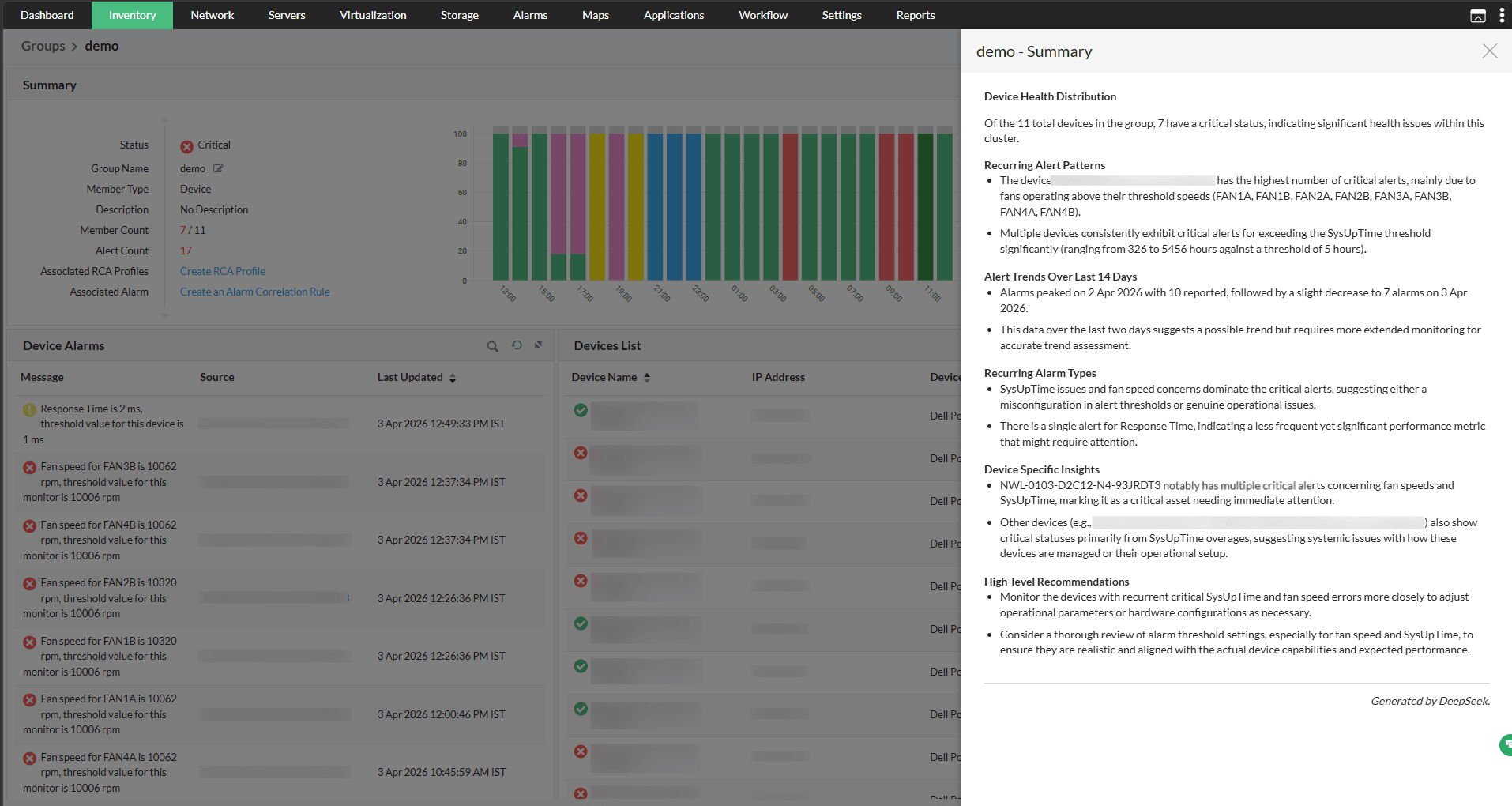
  • Where single-device summaries zoom in on individual machines, group-level summaries take a wider lens — helping teams detect systemic patterns and cross-device issues more effectively.
  • Scale AI-powered group diagnostics effortlessly across large, distributed environments spanning hundreds of device groups and thousands of monitored endpoints.

Use cases for all teams and verticals

Rapid fault isolation for power and utility control networks

A network operations engineer at a power utility monitors hundreds of SCADA-connected devices across multiple substations. Following a scheduled grid maintenance activity, several devices begin throwing cascading alerts, making it difficult to identify the actual source of the issue.

The engineer opens OpManager’s All Alarms Summary, where the DeepSeek model analyzes the incoming events, correlates related alarms, and presents a prioritized list of incidents with the most probable fault origins. This enables the operations team to isolate the issue quickly, and restore grid stability within minutes.

Proactive uptime assurance for e-commerce during peak sales

A few days before a major flash sale, a monitoring engineer at an e-commerce company notices increasing response times on critical application servers. With high transaction volumes expected during the sale, identifying and resolving performance bottlenecks becomes a top priority.

Using OpManager’s Group Summary, the engineer leverages the DeepSeek model to analyze memory utilization, thread pool exhaustion, and disk I/O anomalies across the infrastructure. The platform identifies the likely root cause and recommends corrective actions before customer traffic begins impacting the checkout experience.

Pre-migration health checks for data center consolidation projects

A network architect at an enterprise organization is leading a data center consolidation project that involves decommissioning an aging facility and migrating workloads to a new site. Before migration, the team needs a reliable health baseline for every device in scope. The architect runs Device Summaries across all in-scope devices in OpManager. The DeepSeek integration compiles uptime history, configuration details, performance irregularities, and availability data for each device into individual at-a-glance overviews. The team uses the output to flag devices with unresolved performance anomalies for remediation before migration, significantly reducing the risk of carrying existing faults into the new environment.

No-code custom monitoring for lean IT teams

A rapidly growing fintech startup needs to monitor proprietary trading APIs for latency spikes during peak transaction hours, but its lean IT team lacks dedicated scripting expertise. The system administrator opens OpManager’s Script Templates, describes the monitoring requirement in plain English, and clicks Generate with AI. DeepSeek instantly creates a production-ready Python script that tracks API response times and timeout conditions. This enables the team to deploy custom monitoring faster, reduce manual scripting effort, and proactively identify performance degradation before it affects critical trading operations.

FAQs on DeepSeek Integration

Can access to the DeepSeek integration be restricted to specific user roles?


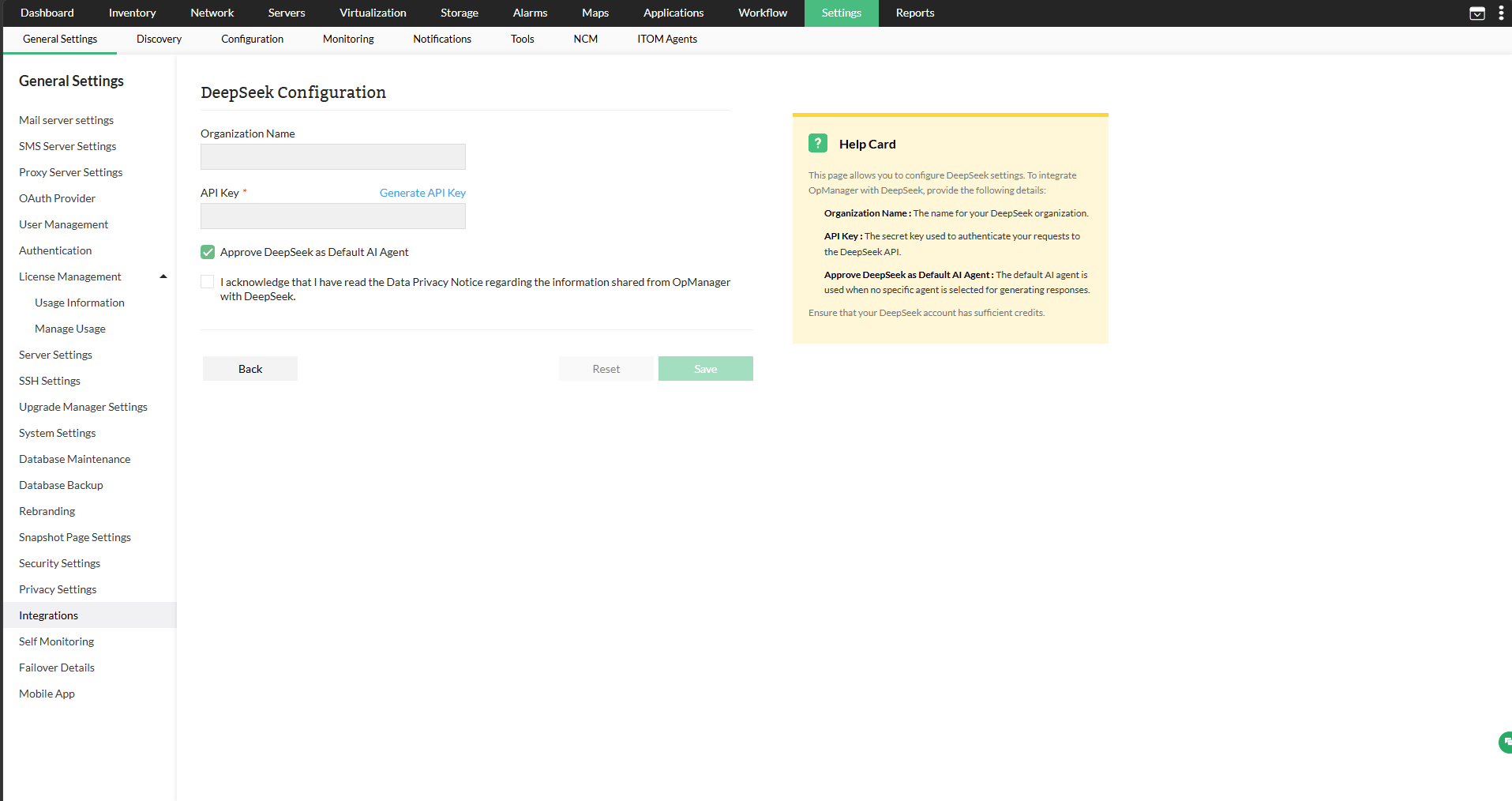
Yes. Only users with the Administrator role can configure the DeepSeek integration under Settings. Once set up, users in other roles can access the summarization features, such as device, group, and alarm summaries, but cannot modify or manage the integration settings themselves.

What data does the AI integration have access to?


The integration works with core device data, such as device details, recent alerts, utilization metrics, and alarm event information. Summaries are based entirely on current and recent observed conditions. It does not have access to data from any OpManager add-on modules, nor does it incorporate forecast or predictive data.

Are there usage limits on the number of summaries or scripts that can be generated?


Does the DeepSeek integration require an active internet connection to function?


Unlock AI-powered network monitoring with DeepSeek integration!

Loved by customers all over the world


“Easy Implementation, Excellent support & Lower Cost Tool - Team Lead, IT Services Industry”

Reviewer Role: Infrastructure and Operations

Company size: 500M - 1B USD

We have been using OpManager since 2011 and our overall experience has been excellent. The tool plays a vital role in providing the value to our organization and to the customers we are supporting. The support is excellent and staff takes full responsibilities in resolving the issues. Innovation is never stopping and clearly visible with newer versions.

“OpManager - 10 steps ahead of the competition, one step away from being unequaled - Network Services Manager, Government Organization”

Reviewer Role: Infrastructure and Operations

Company size: 5,000 - 50,000 Employees

I have a long standing relationship with ManageEngine. OpManager has always missed one or two features that would make it truly the best tool on the market, but over it is the most comprehensive and easy to use the product on the market.

“Easy Implementation with a feature rich catalogue, support has some room for improvement - NOC Manager, IT Services Industry”

Reviewer Role: Program and Portfolio Management

Company size: 500M - 1B USD

The vendor has been supportive during the implementation & POC phases providing trial licenses. Feature requests and feedbacks is usually acted upon swiftly. There was sufficient vendor support during the implementation phase. After deployment, the support is more than adequate, where the vendor could make some improvements.

“Great Monitoring tool - CIO in Finance Industry”

Reviewer Role: CIO

Company size: 1B - 3B USD

ManageEngine provides a suite of tools that have made improvements to the availability of our internal applications. From monitoring, management and alerting, we have been able to peak performance within our data center.

“Simple Implementation, Easy To Use. Very Intuitive. - Principal Engineer in IT Services”

Reviewer Role: Enterprise Architecture and Technology Innovation

Company size: 250M - 500M USD


ManageEngine support was responsive to all our queries.

Capterra
Getapp
Software Advice
G2
Altaleb Alshenqiti

“OpManager helps me monitor all aspects of the data-center and equipment like servers, switches and routers. It is fast, intuitive and centralized and you do not need to be an expert to deal with OpManager.”

Altaleb Alshenqiti

NGHA

Donald Stewart

“Donald Stewart, IT Manager of Crest Industries is happy with ManageEngine OpManager for its end-to-end network monitoring software. It is easy-to-use and offers fault and performance management for router.”

Donald Stewart

IT Manager, Crest Industries

John Rosser

“John Rosser, MIS Manager of Yale Chase talks about the proactive nature of ManageEngine OpManager & how his organization gained value from it.”

John Rosser

MIS Manager