Emergency Patching

The Emergency Patching feature automatically applies critical patches to fix vulnerabilities, thereby ensuring the security of production environments. As long as the user's production server is online, it checks for patch updates to keep the network systems secure. This feature is enabled by default from version 12.8.583 and above.

Note: Emergency Patching is not a replacement for regular service pack installations. It is designed to provide the fastest possible protection during critical situations.

What is Emergency Patching?

Emergency Patching is an auto-fix feature that constantly checks systems for vulnerabilities. When a new security patch is available, it is identified and applied automatically.
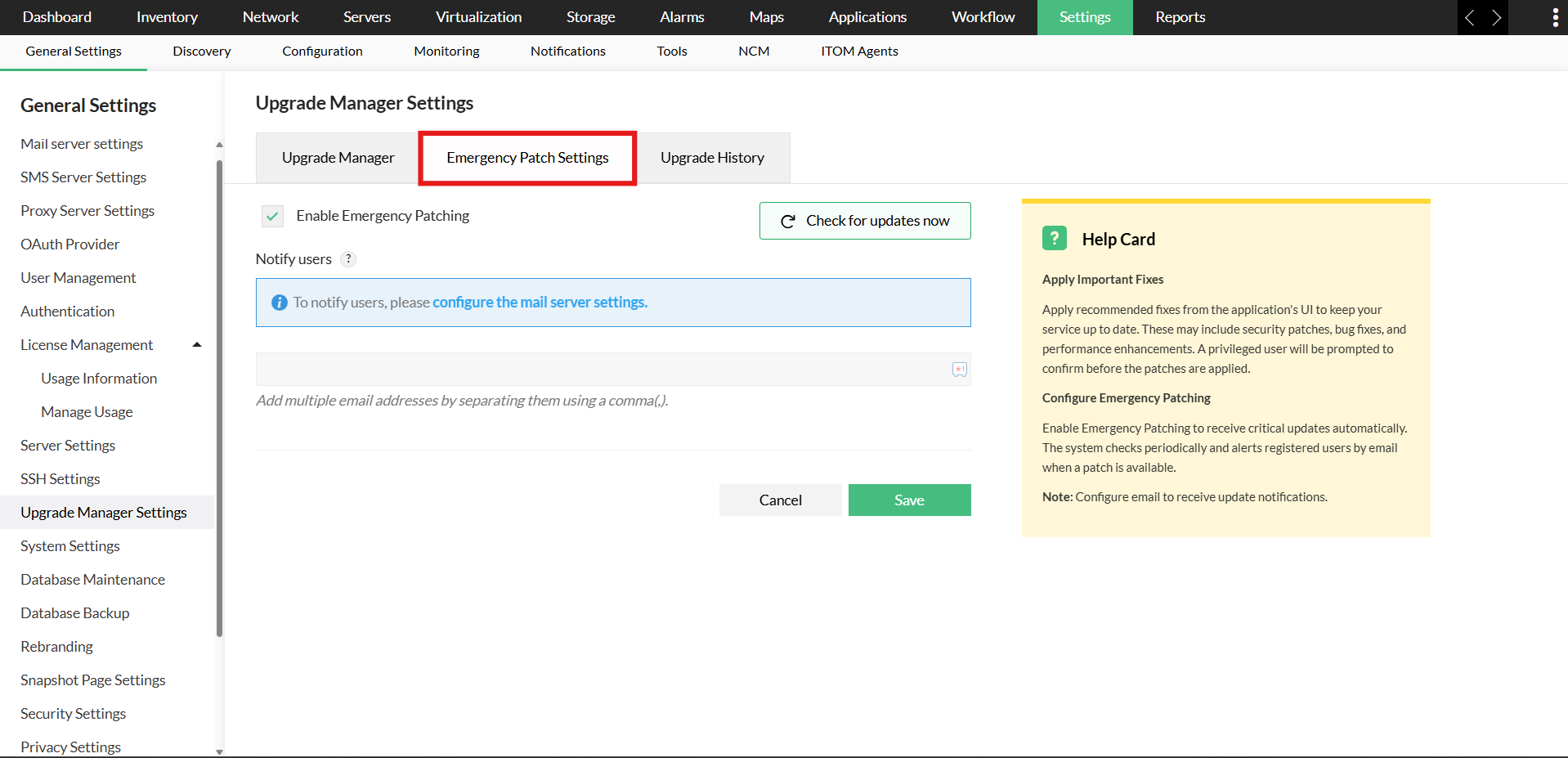
Emergency Patching Overview

In a highly productive network environment, it is difficult for administrators to rely solely on routine patch cycles to fix critical vulnerabilities. Even short delays can leave the environment exposed. Emergency Patching was built to bridge this gap, ensuring critical patches are delivered immediately with minimal disruption.

Why is Emergency Patching needed?

Cybersecurity and its real-world relevance are inevitable in IT. Without timely patch updates, networks and systems face major threats, such as hacking and malware. Automated patching not only protects the network from such threats but also ensures that vulnerabilities are proactively identified and fixed.

Emergency Patching is designed to do just this, aiding IT admins by addressing internal network threats. As a proactive mechanism, emergency patches resolve identified vulnerabilities and allow administrators to stay ahead of attacks.

How Emergency Patching works

As long as there is connectivity to the patch server, emergency patch checks are performed every six hours. Users can also perform an on-demand patch check using the UI. When a patch is available, it is downloaded automatically and administrators are notified through the UI and email. Email notifications can also be customized based on user preferences.

For all updates, users are notified through the UI and email. Patches are applied only after clicking "Apply", which initiates the upgrade process. In some cases, this upgrade involves a controlled service restart, resulting in brief downtime. Once the system restarts, all changes take effect permanently.

All probe services are patched centrally from the central server to make rollout seamless across distributed environments.

Always-on protection

Emergency Patching ensures your systems stay protected at all times, applying critical fixes without delay. By combining automation with centralized control, it strengthens security while keeping downtime to a minimum.

Note: Disabling the Emergency Patching feature is not recommended, as it may delay the application of critical fixes and compromise the security of the network environment.

Customer reviews

OpManager
OpManager - 10 Steps Ahead Of The Competition, One Step Away From Being Unequalled.
- Network Services Manager, Government Organization
Review Role: Infrastructure and OperationsCompany Size: Gov't/PS/ED 5,000 - 50,000 Employees
"I have a long-standing relationship with ManageEngine. OpManager has always missed one or two features that would make it truly the best tool on the market, but over it is the most comprehensive and easy to use the product on the market."
OpManager
Easy Implementation, Excellent Support & Lower Cost Tool
- Team Lead, IT Service Industry
Review Role: Infrastructure and OperationsCompany Size: 500M - 1B USD
"We have been using OpManager since 2011 and our overall experience has been excellent. The tool plays a vital role in providing the value to our organisation and to the customers we are supporting. The support is excellent and staff takes full responsibilities in resolving the issues. Innovation is never stopping and clearly visible with newer versions"
OpManager
Easy Implementation With A Feature Rich Catalogue, Support Has Some Room For Improvement
- NOC Manager in IT Service Industry
Review Role: Program and Portfolio ManagementCompany Size: 500M - 1B USD
"The vendor has been supporting during the implementation & POC phases providing trial licenses. Feature requests and feedback is usually acted upon swiftly. There was sufficient vendor support during the implementation phase. After deployment, the support is more than adequate, where the vendor could make some improvements."
OpManager
Great Monitoring Tool
- CIO in Finance Industry
Review Role: CIOCompany Size: 1B - 3B USD
"Manage Engine provides a suite of tools that have made improvements to the availability of our internal applications. From monitoring, management and alerting, we have been able to peak performance within our data center."
OpManager
Simple Implementation, Easy To Use. Very Intuitive.
- Principal Engineer in IT Services
Review Role: Enterprise Architecture and Technology InnovationCompany Size: 250M - 500M USD
"Manage Engine support was helpful and responsive to all our queries"


Case Studies - OpManager

OpManager

Hinduja Global Solutions saves $3 million a year using OpManager

Industry: IT

Hinduja Global Solutions (HGS) is an Indian business process management (BPM) organization headquartered in Bangalore and part of the Hinduja Group. HGS combines technology-powered automation, analytics, and digital services focusing on back office proces

Learn more

OpManager

USA-Based Healthcare Organization Monitor's Network Devices Using OpManager and Network Configuration Manager

Industry: Healthcare

One of the largest radiology groups in the nation, with a team of more than 200 board-certified radiologists, provides more than 50 hospital and specialty clinic partners with on-site radiology coverage and interpretations.

Learn more

OpManager

Netherlands-based real estate data company avoids system downtime using OpManager and Firewall Analyzer

Industry: Real Estate

Vabi is a Netherlands-based company that provides "real estate data in order, for everyone." Since 1972, the company has focused on making software that calculates the performance of buildings. It has since then widened its scope from making calculations

Learn more

OpManager

Global news and media company

Industry: Telecommunication and Media

Bonita uses OpManager to monitor their network infrastructure and clear bottlenecks

Learn more

OpManager

Bonita

Industry: Businesses and Services

Bonita uses OpManager to monitor their network infrastructure and clear bottlenecks

Learn more

OpManager

Thorp Reed & Armstrong

Industry : Government

Randy S. Hollaway from Thorp Reed & Armstrong relies on OpManager for prompt alerts and reports

Learn more


 Pricing  Get Quote