Adding User Accounts in PAM360
PAM360 streamlines the administrative process by offering a user-friendly interface for adding or importing users. Administrators have the flexibility to manually create users or leverage various importation methods, tailoring user roles to match specific operational requirements. This preliminary control ensures that individuals within an organization have precisely the right level of access to PAM360 to perform their duties effectively.
By navigating through the provided comprehensive help documents below, administrators can gain a deeper understanding of how to effectively add or import user roles within PAM360. This includes insights into best practices for role assignment, troubleshooting common issues, and optimizing user management workflows to enhance overall system security and efficiency.
1. Roles Required in PAM360 for User Management
There are certain privileges in a role required in PAM360 for user management.
- By default, user accounts with Privileged Administrator, Cloud Administrator and Administrator roles can completely manage the user accounts in PAM360.
- Apart from these predefined roles, you can also create a Custom Role with the privileges enabled as desired for managing the users.
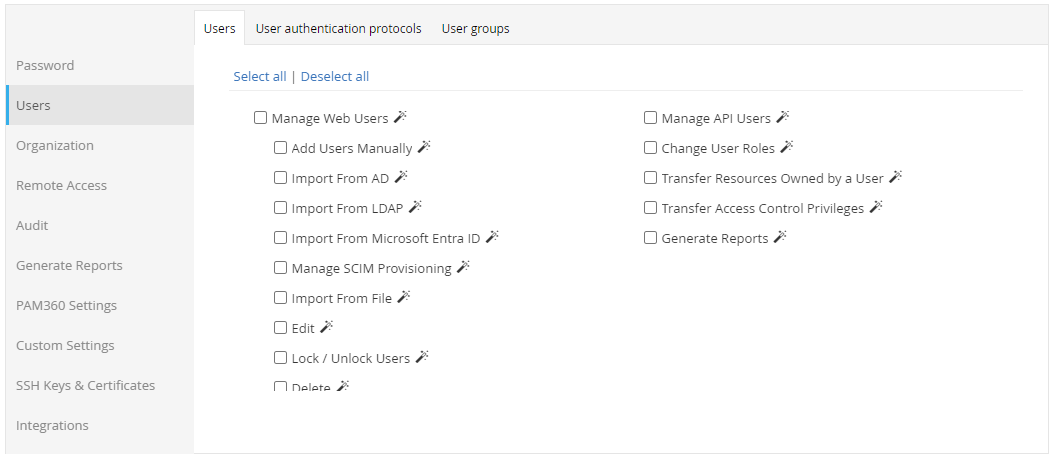
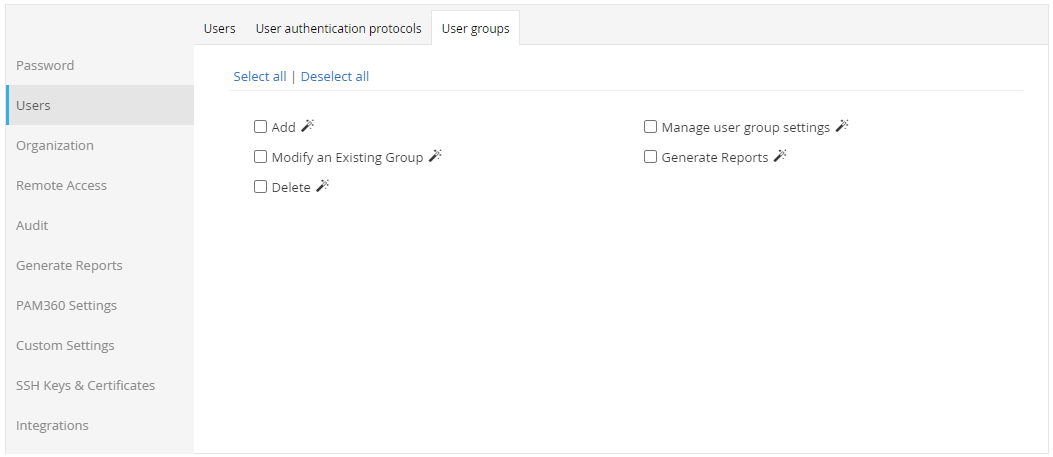
2. Adding User Accounts to PAM360 - Methods and Help Links
There are several methods available for adding user accounts to PAM360. Choose the one that aligns with your organization's structure:
- Manual User Provisioning: This involves manually creating user accounts and assigning access privileges. Typically, administrators perform this task through a graphical user interface or command-line interface.
How-To Procedure: Add Users Manually - Builds Preceding 6700 | Builds Following 6700 - Manual User Provisioning for API Access: This involves manually creating API user accounts and assigning access privileges. Administrators perform this task through a graphical user interface or command-line interface.
How-To Procedure: Add API Users - Builds Preceding 6700 | Builds Following 6700 - SCIM Based User Provisioning: SCIM integration enables seamless provisioning of users and user groups, empowering administrators to efficiently manage access to critical resources.
How-To Procedure: SCIM User Provisioning - File-based User Import: User account information can be imported from external files, such as csv, tsv, txt or excel files, into the PAM360 platform for user provisioning and management.
How-To Procedure: Import Users from a File - Active Directory User Import: This integration links the PAM platform with your native Active Directory (AD), facilitating seamless synchronization of user accounts and access privileges between the two systems.
How-To Procedure: Import Users from Active Directory - Microsoft Entra ID User Import: Integration with Microsoft's Entra ID authentication system enables streamlined user authentication and access control within the PAM platform.
How-To Procedure: Import Users from Microsoft Entra ID - LDAP User Import: Allows user account information from Lightweight Directory Access Protocol (LDAP) directories to be imported into the PAM platform, facilitating centralized user management and authentication.
How-To Procedure: Import Users from LDAP - Builds Preceding 6310 | Builds Following 6310