Secure Privileged Access for AI Agents using MCP Servers, and PAM360 Credential Brokering : A Sample Use Case
In modern IT environments, AI agents and automation platforms are increasingly responsible for executing privileged operations, ranging from software deployments and service restarts to file operations, database maintenance, and infrastructure provisioning. These workflows require access to privileged credentials that, if embedded directly within scripts or automation configurations, introduce significant risks of exposure and unauthorized access.
PAM360 provides OpenAPI YAML specifications for its extensive set of REST API operations, enabling organizations to integrate privileged access controls directly into any automation workflow. By loading the PAM360 OpenAPI specification into an MCP (Model Context Protocol) server, AI agents can securely discover, invoke, and chain PAM360 API operations to broker privileged credentials at runtime, without ever hard-coding them in the workflow.
This document presents a sample use case that illustrates how this integration works in practice. The scenario is intentionally generic: the trigger source, the target operation, and the target machine type can all vary. What remains consistent is the credential brokering pattern when needed, governed by PAM360 access configurations, and returned to the vault when the operation completes.
This help document covers the following topics of the use case:
- Operation Scenario
- How PAM360 Helps?
- Use Case Prerequisites
- How Credential Brokering Works?
- Security Benefits of Credential Brokering
1. Operation Scenario
Consider an IT operations team that manages a mixed production environment consisting of Linux application servers, Windows infrastructure hosts, and database systems hosted in a restricted network segment. The team relies on automation to perform routine and event-driven privileged operations across these systems, including deploying builds, restarting services, replacing configuration files, installing packages, executing administrative commands, running maintenance scripts, etc.
These operations are triggered through a variety of sources: CI/CD pipelines, IT service management (ITSM) platforms, other AI agents, or any webhook-capable automation tool. Regardless of the trigger source, each operation requires privileged credentials to access the target system.
Traditionally, these credentials are embedded within automation scripts, environment variables, or pipeline configurations. Such credentials often possess broad permissions and remain persistently accessible to the automation platform, increasing the risk of credential exposure, unauthorized access, and limited auditability.
2. How PAM360 Helps?
To address these challenges, the team integrates PAM360 with an MCP server using PAM360's OpenAPI. The AI agent communicates via MCP server and brokers privileged credentials from PAM360 at runtime, executes the required operation, and returns the credential to the vault on completion. This provides a secure access model that enables AI agents to perform authorized actions without direct exposure to privileged credentials, while ensuring strict access control and complete auditability of all privileged operations at runtime.
Examples of operations with webhook triggers:
- Software deployment: CI/CD pipeline (Jenkins, GitHub Actions, GitLab CI, Azure DevOps, etc.)
- Service restart or stop: ITSM ticketing system (ServiceNow, Jira Service Management, etc.)
- Configuration file replacement: Another AI agent or orchestration workflow
- Package or executable installation: Scheduled automation or event-driven webhook
- Administrative command execution: Custom webhook from any monitoring or alerting platform
- Database maintenance script: Change management approval workflow
3. Use Case Prerequisites
Before implementing this workflow, ensure the following configurations are in place in PAM360, MCP server, and the webhook payload.
3.1 PAM360 Configuration
- PAM360 user account for AI agent - A PAM360 user account with REST API access is provisioned for the AI agent communication, with permissions scoped only to the required resources and operations.
- Authentication token regenerated - The authentication token of the AI agent user account is regenerated and securely stored for AI agent communication.
- Resources and accounts onboarded - All target machines are added as resources in PAM360, with their privileged accounts configured and credentials stored in the vault.
- Access control and privilege elevation configured - Approval workflows, Just-In-Time (JIT) privilege elevation, Self-Service Privilege Elevation (SSPE) or credential rotation are configured for target resources that require controlled privileged access or execution.
Additional Details
When SSPE is enabled, the agent can execute only the specific commands permitted in PAM360, and no other actions are allowed within the elevated session.
- Ticketing system integration (if applicable) - If the trigger originates from an ITSM or ticketing system, PAM360's ticketing system integration should be configured so that ticket IDs can be validated during credential access requests.
3.2 MCP Server Configuration
- PAM360 OpenAPI YAML loaded - The PAM360 OpenAPI specification (YAML) is downloaded and loaded into the MCP server as the tool definition. The AI agent uses this specification to discover and invoke PAM360 API operations.
- Authentication token configured - The authentication token for the AI agent user account is securely configured within the AI agent, the MCP server, or any secure location accessible to the agent during workflow execution. This token is automatically included in the AUTHTOKEN header of every API request sent to PAM360 through the MCP server.
- Webhook endpoint configured - The AI agent exposes a webhook endpoint that accepts triggers from the source platform such as CI/CD tools, ticketing systems, other AI agents, or any webhook-capable automation platform.
3.3 Webhook Payload Requirements
The webhook payload sent to the AI agent should include sufficient information for the agent to identify the target resource and request the appropriate credential. Depending on the scenario, the payload should include the respective details such as, resource name, account name, ticket ID, execution command, service name, etc.
4. How Credential Brokering Works?
The following describes the end-to-end flow of a privileged operation brokered through the MCP server and PAM360. The trigger source, target operation, and target machine type will vary across implementations and the credential brokering pattern remains consistent.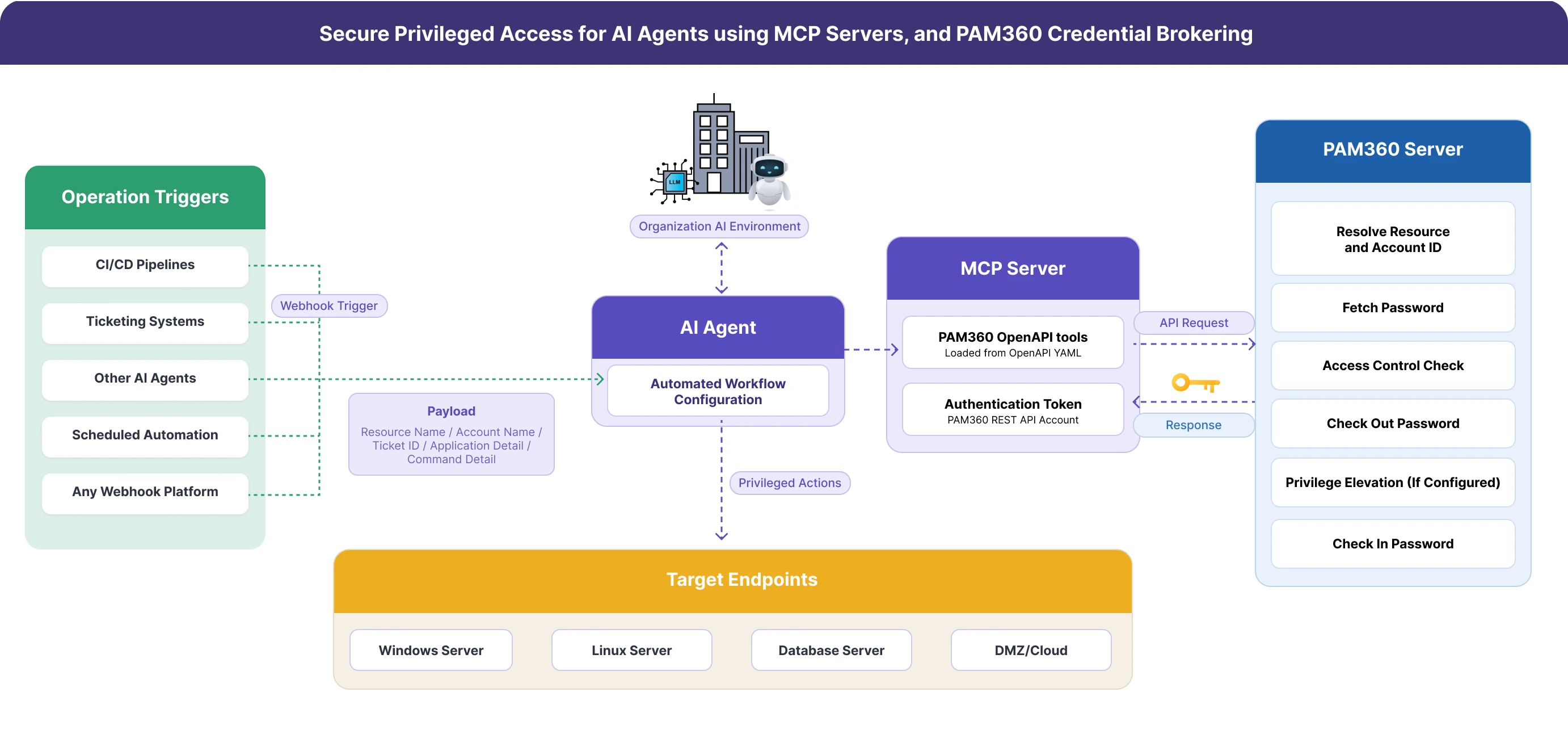
- Operation is triggered via webhook
- An operation is initiated from any trigger source, a CI/CD pipeline event, an approved ticket from an ITSM platform, a signal from another AI agent, a scheduled automation, or any webhook-capable platform. The trigger sends a webhook to the MCP server.
- The webhook payload includes the target resource name, account name, and any additional context required for the operation. If the trigger originates from a ticketing system and PAM360's ticketing integration is configured, the payload also includes the ticket ID, which PAM360 will validate before granting access. If the operation requires elevated privilege execution on the target system and SSPE is configured, the specific command to be executed should also be present in the payload.
- AI agent requests credentials from PAM360
- The AI agent receives the webhook and parses the payload via MCP server to PAM360 for credential brokering. Using the payload information, the agent invokes the PAM360 OpenAPI tools loaded on the MCP server to resolve the resource ID and account ID from PAM360. The MCP server communicates with PAM360 using the configured REST API account and authentication token, no additional authentication is required from the pipeline or trigger source.
- PAM360 authenticates the API request, authorizes the requested operation based on the permissions assigned to the REST API account, and identifies the requested resource and account in the vault.
- PAM360 evaluates access control policies
- Before releasing any credential, PAM360 evaluates the access control policies configured for the requested account. The evaluation depends on which configuration is active for that account and resource:
- No access control configured - PAM360 checks out and returns the credential immediately upon a valid API request.
- Approval workflow configured - PAM360 enforces the approval requirement. The request should satisfy the configured approval conditions before the credential is released.
- Ticketing system integration configured - PAM360 validates the ticket ID provided in the payload against the integrated ITSM platform. The credential is released only when the ticket is verified as valid and in the correct state.
- Just-In-Time (JIT) access configured - PAM360 grants time-limited access to the resource, creating a temporary privileged session for the duration of the operation.
- Self-Service Privilege Elevation (SSPE) configured - PAM360 grants temporary elevated privileges for the specific application or command included in the webhook payload. Elevation is scoped to the exact application or command specified and no broader privileges are granted.
- Upon successful policy evaluation, PAM360 checks out the password and returns it to the AI agent through the API response via MCP server.
- Before releasing any credential, PAM360 evaluates the access control policies configured for the requested account. The evaluation depends on which configuration is active for that account and resource:
- Agent connects to the target system and executes the privileged actions
- The AI agent uses the retrieved credential to establish a connection to the target endpoint, typically via SSH for Linux systems or RDP/Windows Remote Desktop for Windows systems. The agent then executes the required operation on the target machine.
- The operation itself can be any privileged action the workflow is designed to perform. Deploying a build artifact, restarting a service, replacing a configuration file, installing a package, running a maintenance script, executing a database command, rotating a certificate, or any other task that requires privileged access to the target system. If SSPE is in effect, the agent can only execute the specific command allowed in PAM360 and no other actions are permitted under the elevated session.
- Credential is checked back in and activities are recorded
- When the operation is completed, irrespective of the operation status, the AI agent invokes the PAM360 check-in API to return the credential to the vault. The session is closed and the credential is no longer accessible outside PAM360. If elevated privileges were granted via SSPE, the elevated session is terminated at this point. This limits the blast radius of compromised agents, enforces least-privilege and just-in-time access principles, and provides a complete audit trail of the credential lifecycle for governance and compliance purposes.
- PAM360 records all activities associated with the operation: credential requests, checkout and check-in events, access policy evaluations, ticket validations, privilege elevation activities, the identity of the requesting workflow, and timestamps for every action. This audit trail is available immediately and requires no additional compliance tooling.
5. Security Benefits of Credential Brokering
The credential brokering workflow eliminates the risk of standing credential exposure in automated privileged operations by implementing the following security measures:
- No hard-coded credentials - Credentials are brokered dynamically from PAM360 only when the operation requires them. They are never embedded in pipeline definitions, environment variables, automation scripts, or configuration files.
- Zero standing privilege - Credentials exist outside the PAM360 vault only during the active operation window. There are no persistent credentials that can be exposed, rotated inconsistently, or accidentally committed to source control.
- Automatic credential check-in - PAM360 ensures credentials are returned to the vault at the end of every operation irrespective of success or failure. No session is left open and no credential remains checked out beyond its intended use.
- Full audit trail - Every credential request, checkout, check-in, access policy evaluation, ticket validation, privilege elevation, and operation timestamp is logged in PAM360. Complete auditability is available without additional compliance reporting tools.
- Centrally governed access control - Approval workflows, ticket validation requirements, time restrictions, IP limitations, and privilege elevation rules are managed in PAM360 and apply automatically to every operation. No changes to the trigger source or automation workflow are required.
- Scoped privilege elevation - When SSPE is configured, elevated privileges are granted only for the specific command included in the operation payload. Broader administrative access is never exposed to the automation workflow.
- Unified credential brokering - The credential brokering pattern provides the same security guarantees regardless of the trigger source, whether the operation is initiated by a CI/CD pipeline, a ticketing system, another AI agent, or a custom webhook. The security layer does not depend on the integrity of the trigger source.
For the PAM360 OpenAPI specification download, endpoint reference, and integration guidance, see the PAM360 OpenAPI Specification page.