RC4 encryption is being phased out: ADAudit Plus helps you audit its usage
RC4 encryption has been silently running in the background of enterprise Active Directory environments for years, and the countdown to fix it has started. Microsoft is phasing out RC4 in Kerberos authentication through a staged rollout under CVE-2026-20833.
Beginning April 14, 2026, RC4 is disabled by default, with Domain Controllers accepting only AES-SHA1 unless manually re-enabled.
By July 2026, rollback to audit mode is removed, making RC4 fully disabled by default and usable only through explicit configuration for specific legacy accounts.
This isn't just a security concern; it's an availability concern too. Once enforcement kicks in, any application or device still depending on RC4 will simply stop authenticating. This includes:
Enterprise applications like older versions of SAP, Oracle E-Business Suite, and IBM WebSphere that use Kerberos for single sign-on
NAS devices from vendors like NetApp and EMC that fall back to RC4 when AES isn't explicitly configured
Linux and Unix systems running older Kerberos libraries (MIT Kerberos versions prior to 1.15)
Third-party VPN clients and printing services that use Kerberos but haven't been updated to negotiate AES
Custom internal applications built years ago that hardcoded RC4 as the expected encryption type
Older SQL Server instances using Kerberos delegation for database authentication
Java-based applications using outdated JGSS/JAAS Kerberos implementations that default to RC4
Microsoft has officially flagged this risk as CVE-2026-20833, a Kerberos information disclosure vulnerability with a CVSS score of 5.5.
This blog explains what RC4 is, why it's dangerous, and how ManageEngine ADAudit Plus gives you the visibility you need to audit and eliminate its usage before enforcement hits.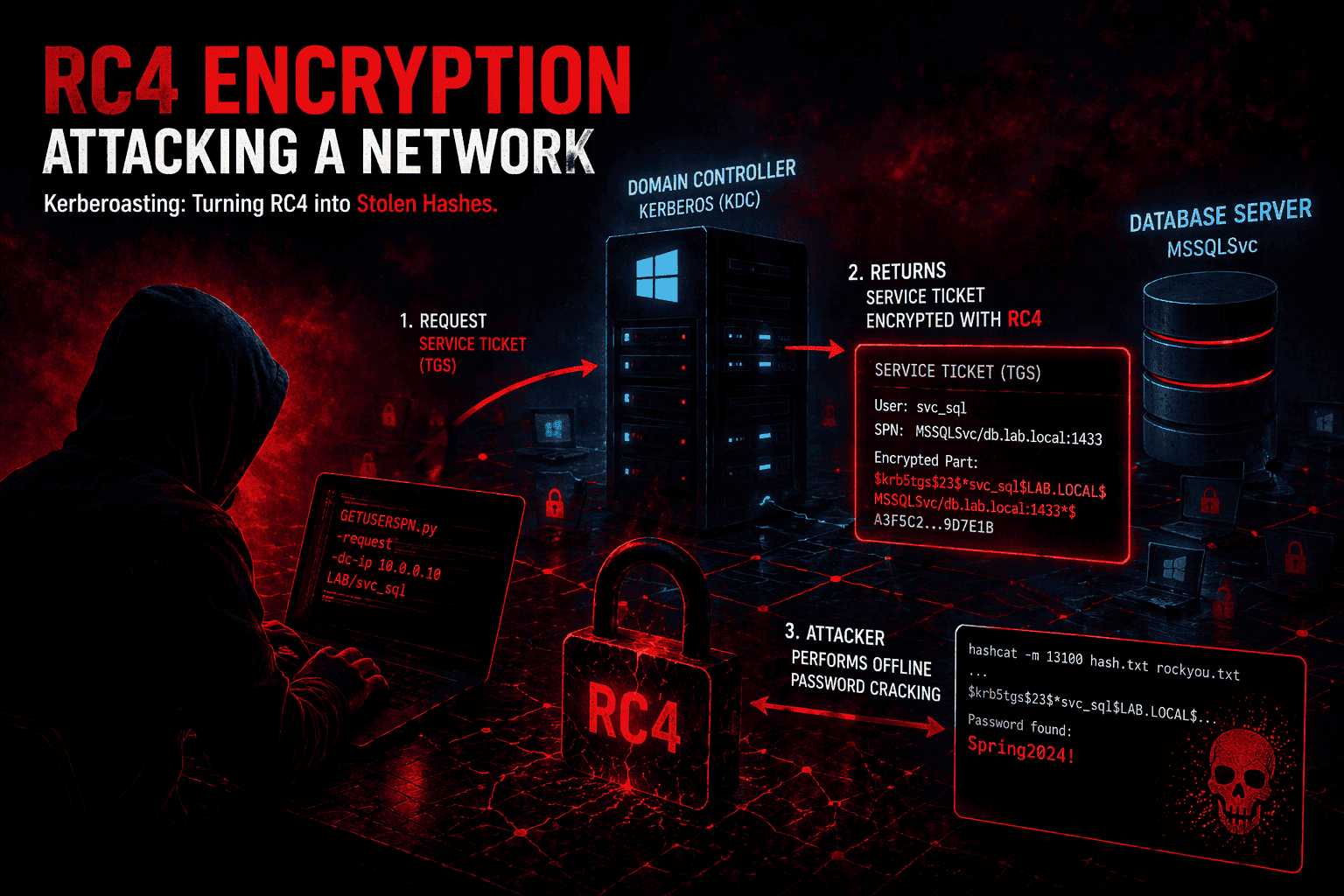
What is RC4, and why does it still exist in Active Directory?
Rivest Cipher 4 (RC4) was kept around because it worked well with legacy systems, and switching away from it required password resets and infrastructure changes that most organizations wanted to avoid.
When Kerberos was adopted as the default authentication protocol in Windows, it inherited RC4-HMAC as a supported encryption type because it allowed seamless interoperability without requiring password resets or infrastructure overhauls.
The problem is that RC4-HMAC, as implemented in Kerberos, has two serious weaknesses:
RC4 is now considered cryptographically broken: It lacks proper randomization (called "salting"), making it much easier for attackers to crack passwords derived from it.
MD4-based key derivation: The password-to-key conversion relies on MD4, which is a weak hash function by modern standards. This makes password recovery from captured Kerberos tickets feasible, especially for shorter or common passwords.
In simple terms: If RC4 is still active in your environment, attackers can use it to steal and crack service account credentials with a technique known as Kerberoasting, without needing any special access to your network.
What is Kerberoasting?
Kerberoasting is a real-world attack that takes advantage of RC4 in Kerberos. Here's how it works, step by step:
The attacker compromises any regular domain user account. No admin access needed.
They request a service ticket for an account that has a Service Principal Name (SPN), typically a service account.
The domain controller issues the ticket encrypted with RC4—the service account's password hash.
The attacker takes the ticket offline and runs password-cracking tools against it.
The password is recovered often within minutes, and the attacker now has service account credentials.
💡 Did you know? IBM's security team observed a 100% increase in Kerberoasting incidents between 2022 and 2023. And because RC4 is weak, the crack can happen fast even on a regular laptop.
A compromised service account can then be used to move laterally across your network, escalate privileges, and cause serious damage, all while looking like normal activity.Microsoft's RC4 phase-out timeline (2026)
Microsoft isn't just recommending you move away from RC4, they're enforcing it. Here's what's happening and when:
| Phase | Date | What it means for you |
| Audit mode | January 2026 | Domain controllers start logging new events (KDCSVC 201–209) to flag RC4 usage. Nothing breaks yet, but the warnings are there. |
| Enforcement mode | April 2026 | Domain controllers stop issuing RC4 tickets by default. Accounts without AES configured will fail to authenticate. |
| Full enforcement | July 2026 | RC4 only works for accounts where you've explicitly turned it on. No more rollback options. |
The bottom line: If you haven't identified and fixed your RC4 dependencies before April 2026, your users and services may start getting locked out.
How to spot RC4 usage the native way (and why it's painful)
Windows does log RC4 usage, but finding it isn't easy. Here are the key events to look for on your domain controllers:
Security log
Event ID 4768 – A TGT (login ticket) was requested. Check the Ticket Encryption Type field. If it shows 0x17, RC4 was used.
Event ID 4769 – A service ticket was requested. Again, Ticket Encryption Type = 0x17 means RC4. This is the most important event for spotting Kerberoasting.
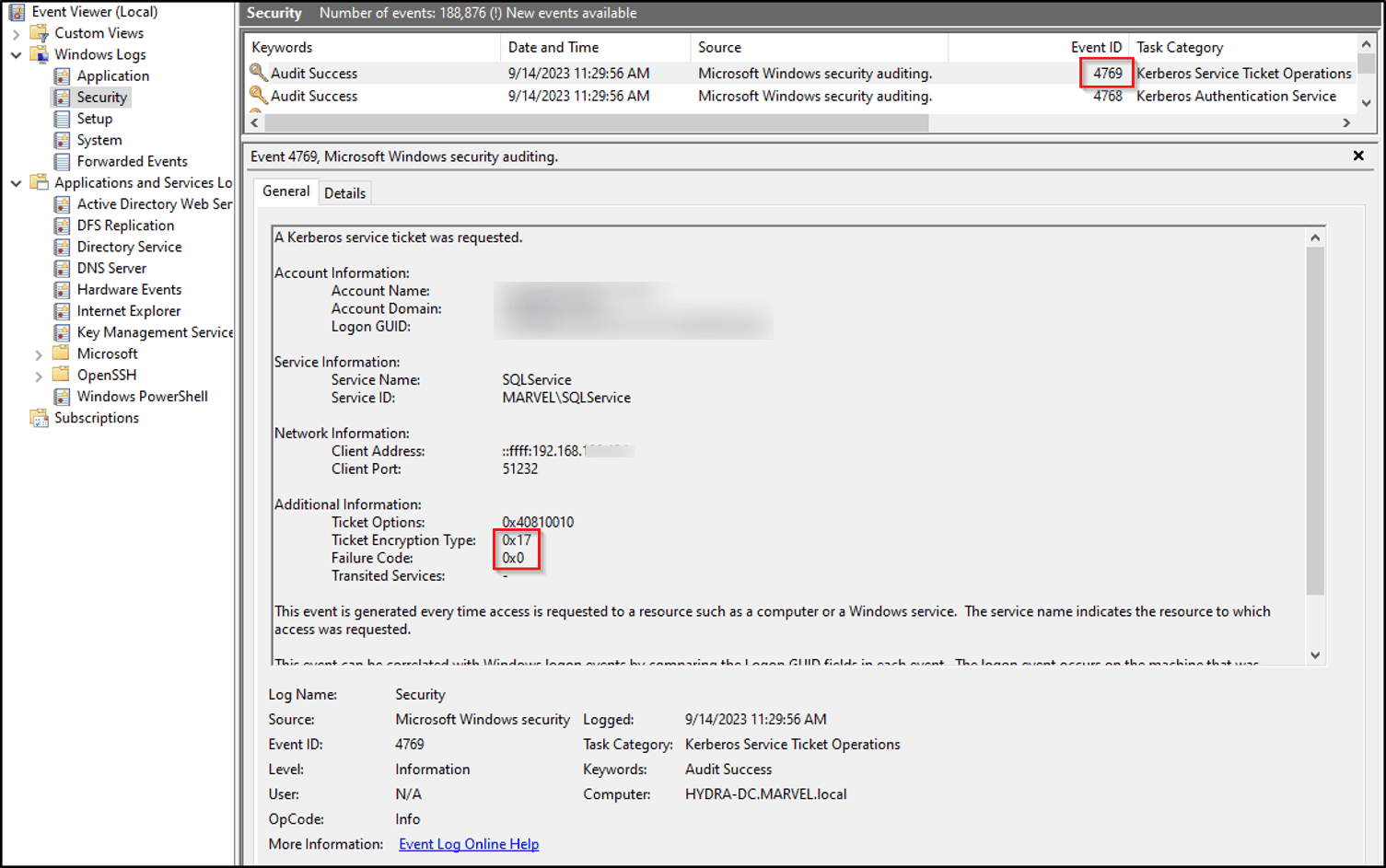
The catch: Event ID 4769 is extremely noisy, every single service ticket request generates it. Sifting through thousands of these logs across multiple domain controllers to find the ones with 0x17 is a huge time sink without the right tooling.Identify Weak Accounts and Services
RC4 is often used when:
Pre‑Windows‑7/2008 R2–era Windows systems
Service accounts don’t support AES
Kerberos settings are outdated
Check for:
Legacy applications
Old service accounts
Systems not updated to support AES (AES128 / AES256)
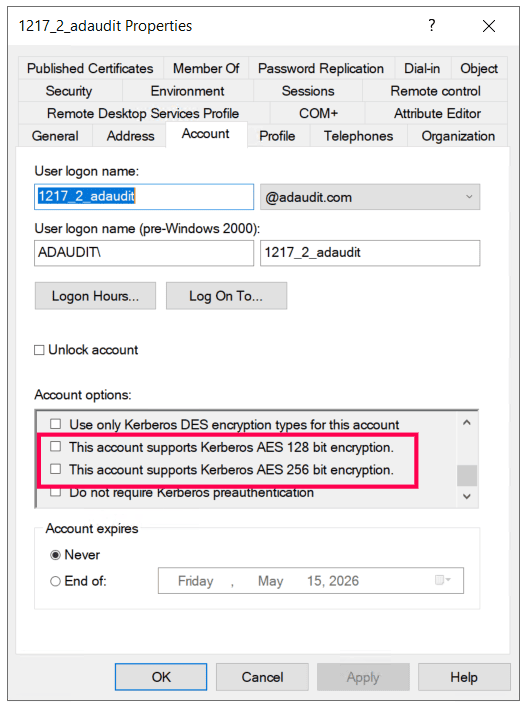
Audit account encryption settings
Check if accounts are explicitly allowing RC4.
Steps:
Open Active Directory Users and Computers
Find the account
Go to: Account tab → Kerberos Encryption Types
If AES is not enabled, the account may fall back to RC4.
Spot RC4 usage quickly with ADAudit Plus
ADAudit Plus collects events from all your domain controllers in one place and makes it easy to filter for RC4-specific activity, no manual log hunting required.
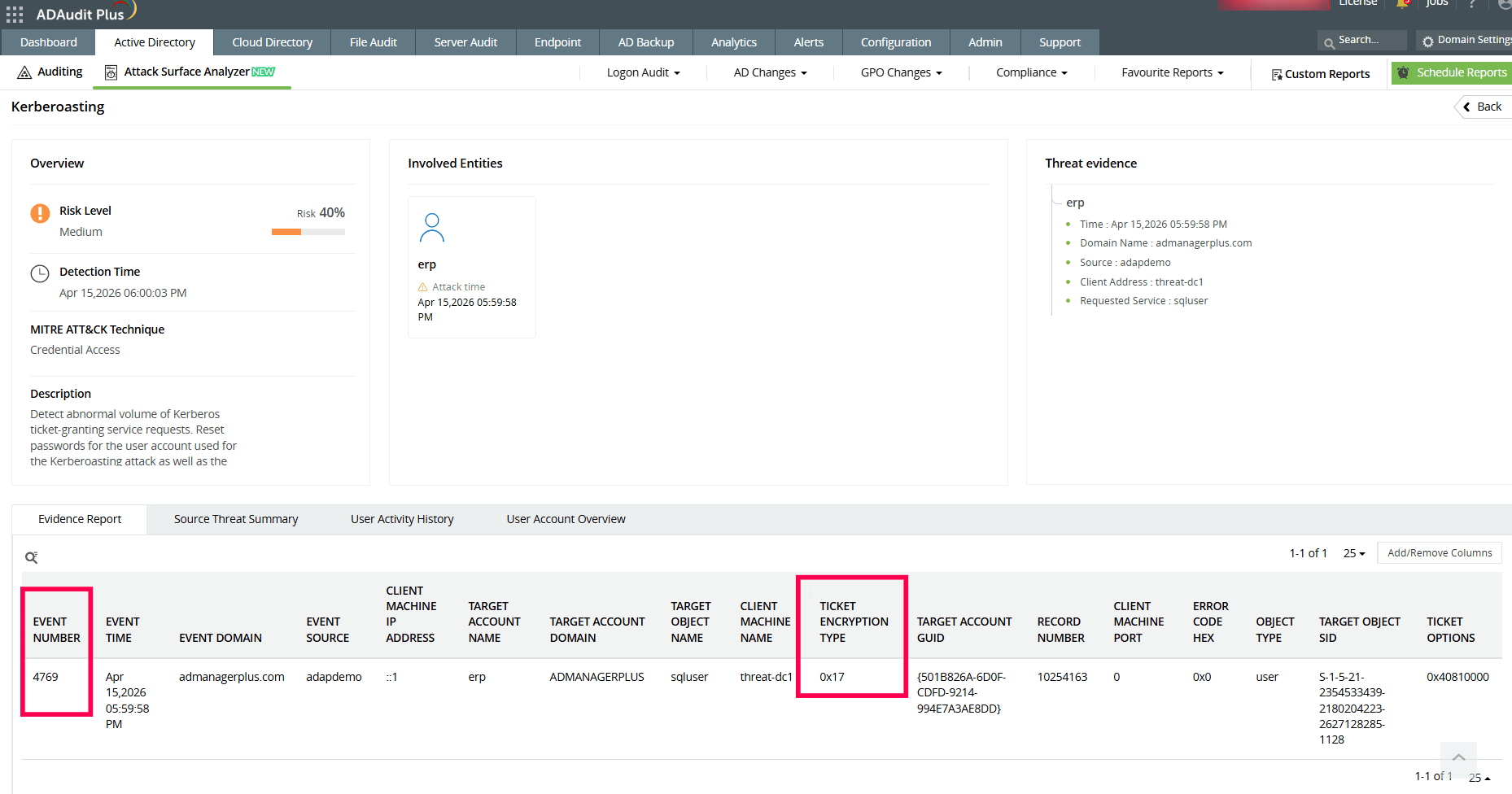
Open the ManageEngine ADAudit Plus console
Navigate to Active Directory → Attack Surface Analyzer
Under Threats, select Kerberoasting
Review the listed entries (if any), and click on a threat to view detailed insights
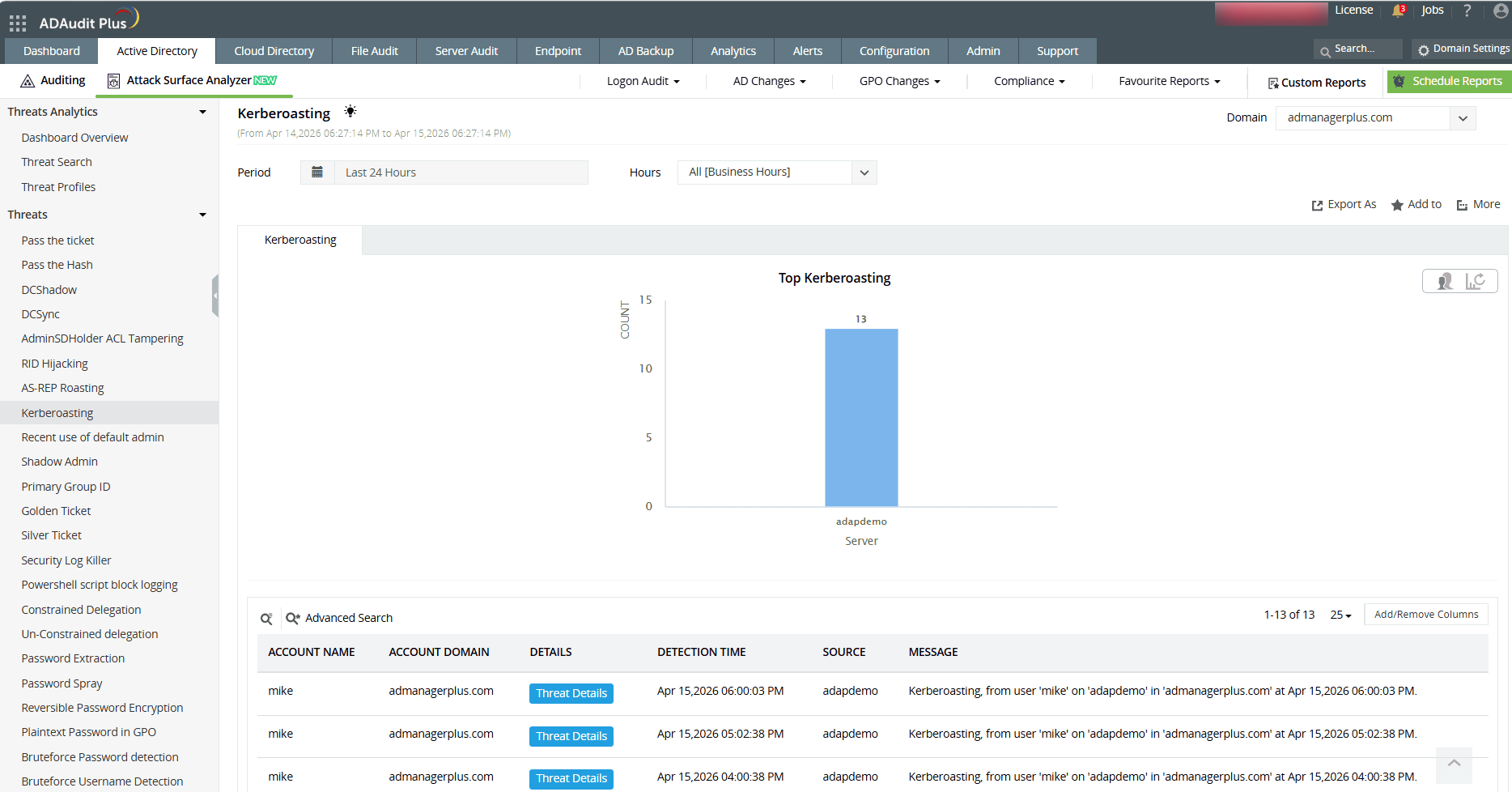
In the threat details, check the Event ID and Ticket Encryption Type
Identify RC4 usage by looking for the encryption type associated with RC4 (for example, 0x17)
These logon activity details can also be viewed in
Reports → Active Directory → User Management → User Logon Activity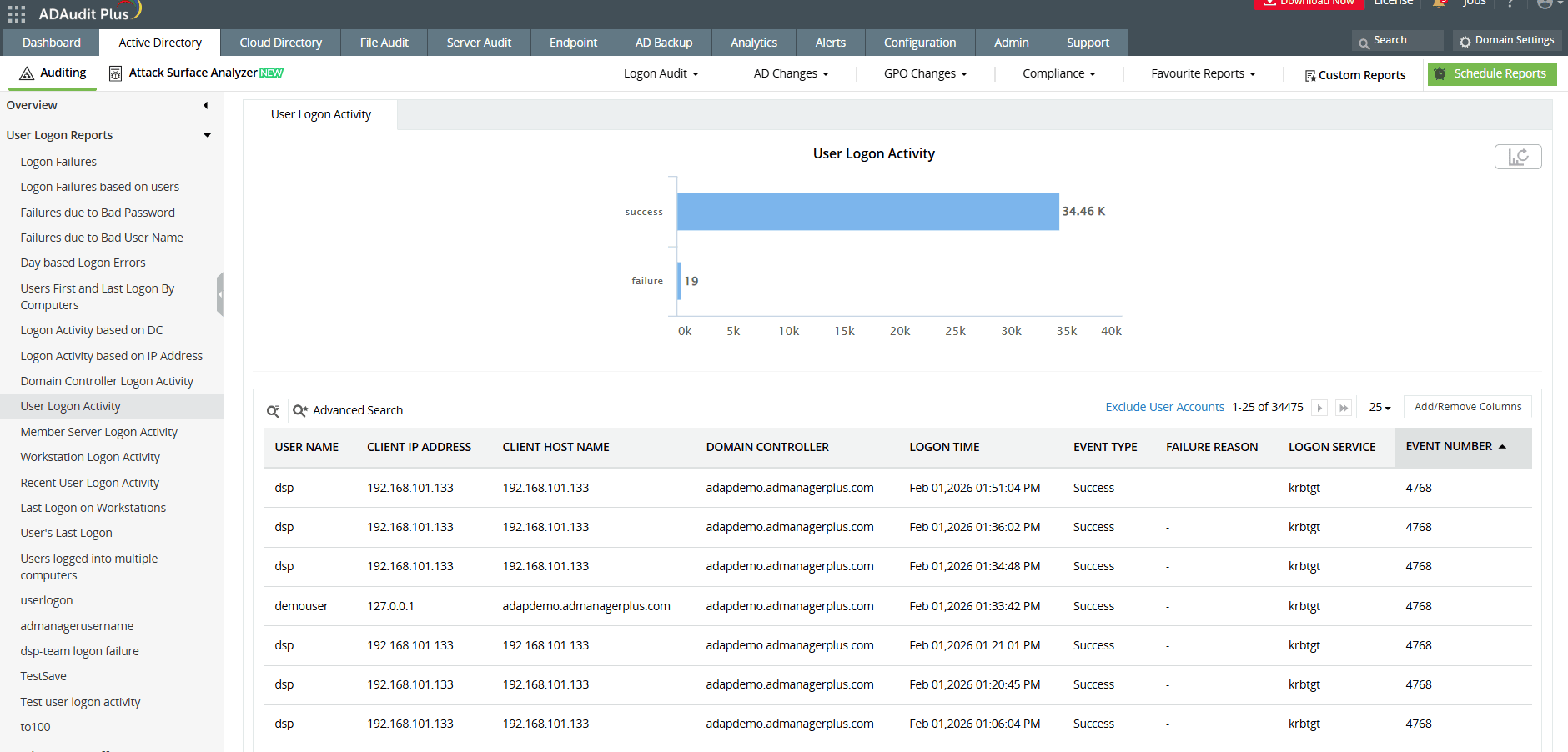
You'll immediately see who made the request, which service account was targeted, from which IP address, and when—all in one view.
CVE-2026-20833 under watch: Set up a real-time RC4 alert in ADAudit Plus
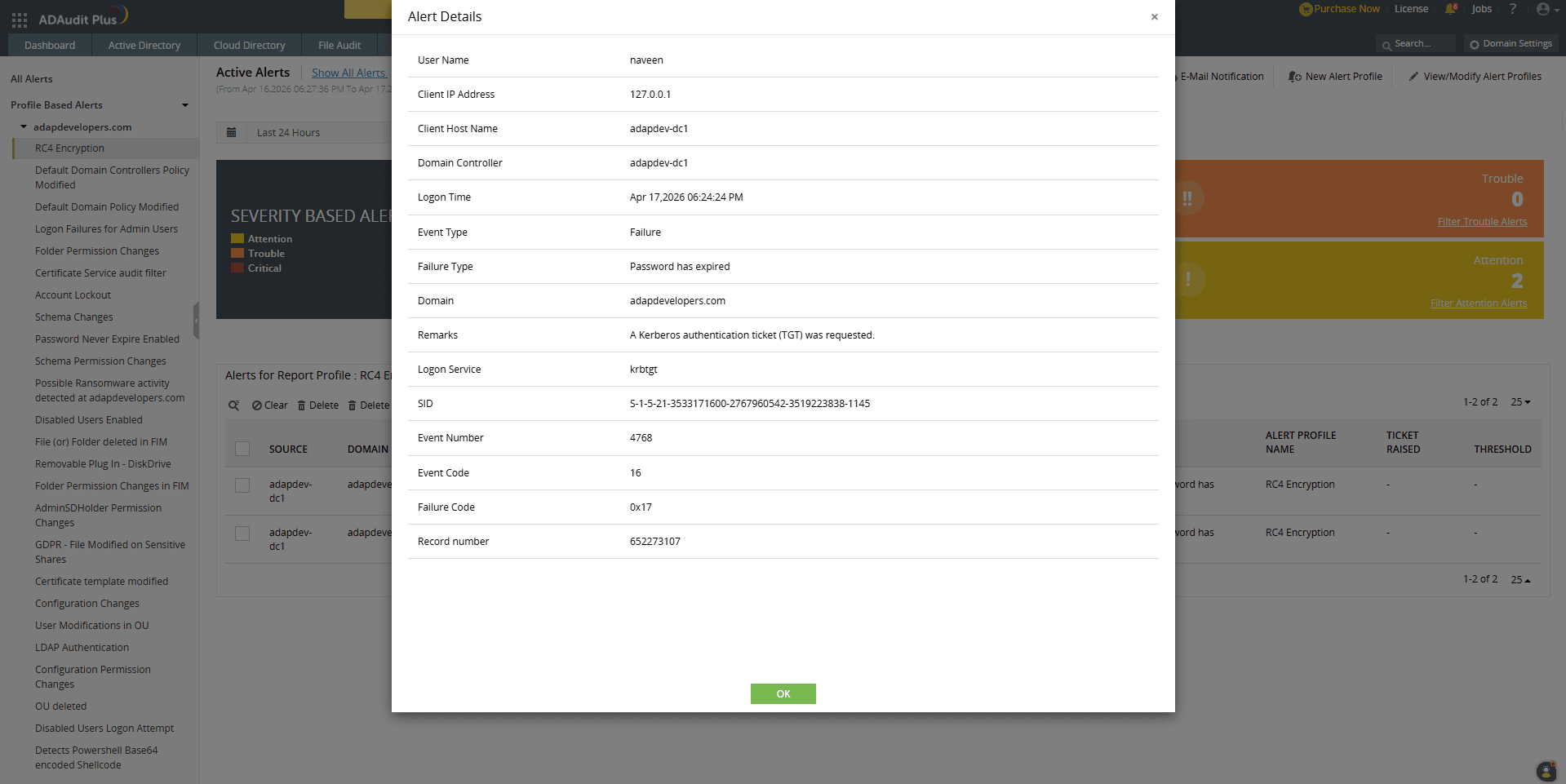
Here's how to configure ADAudit Plus to alert you the moment an RC4-encrypted Kerberos service ticket is requested.
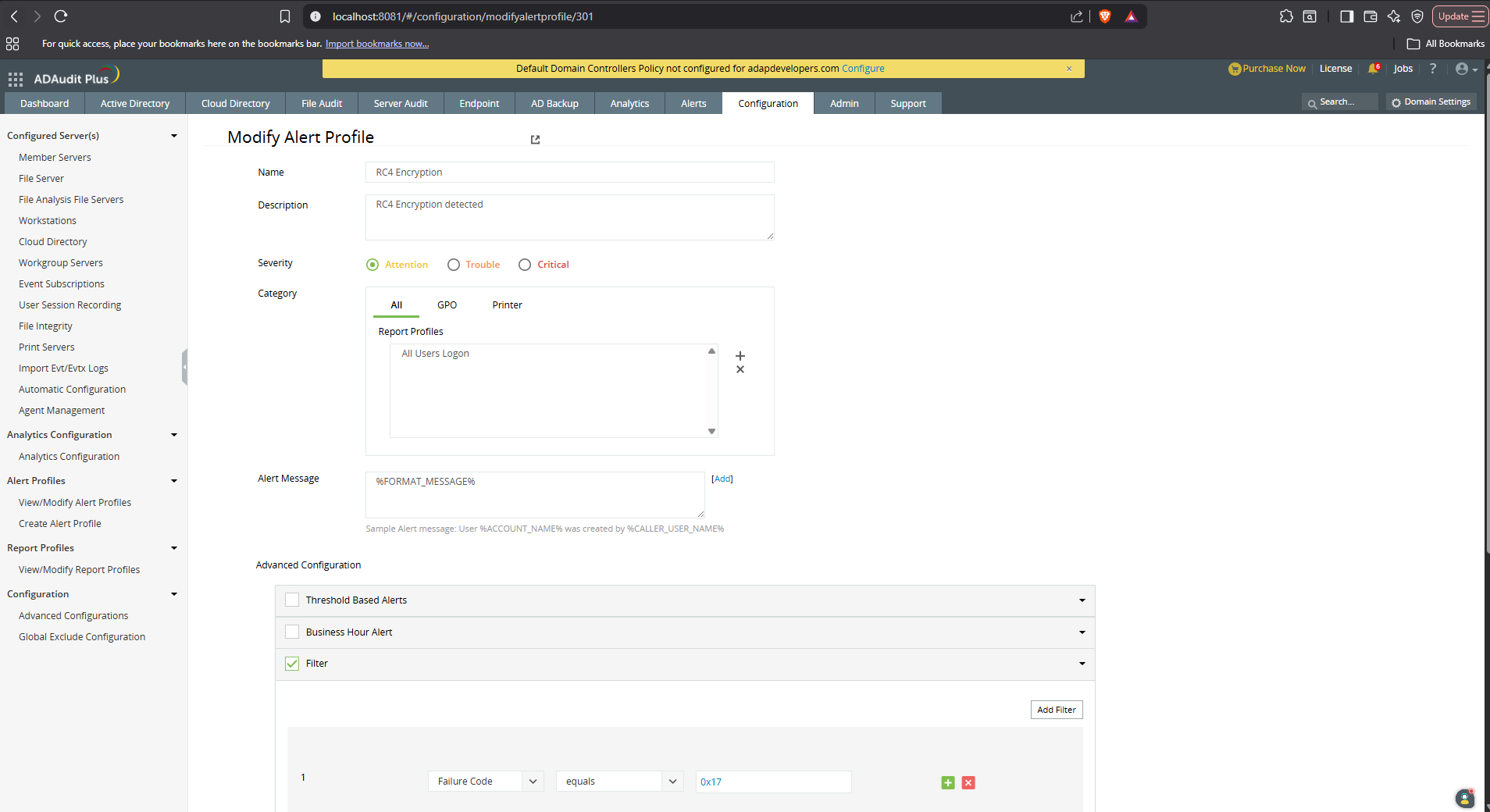
Go to the Configuration tab and click New Alert Profile to start.
Name the alert appropriately and add a description if needed.
Set the desired severity level based on your organization’s risk standards.
Under Category, select All, then choose the report profile titled All Users Logon.
In Advanced Configurations, enable the Filter checkbox and click Add Filter.
Choose the filter Failure Code -> equals -> 0x17
For faster incident response, you can also configure an appropriate script to execute against the target user or system automatically when the alert is triggered.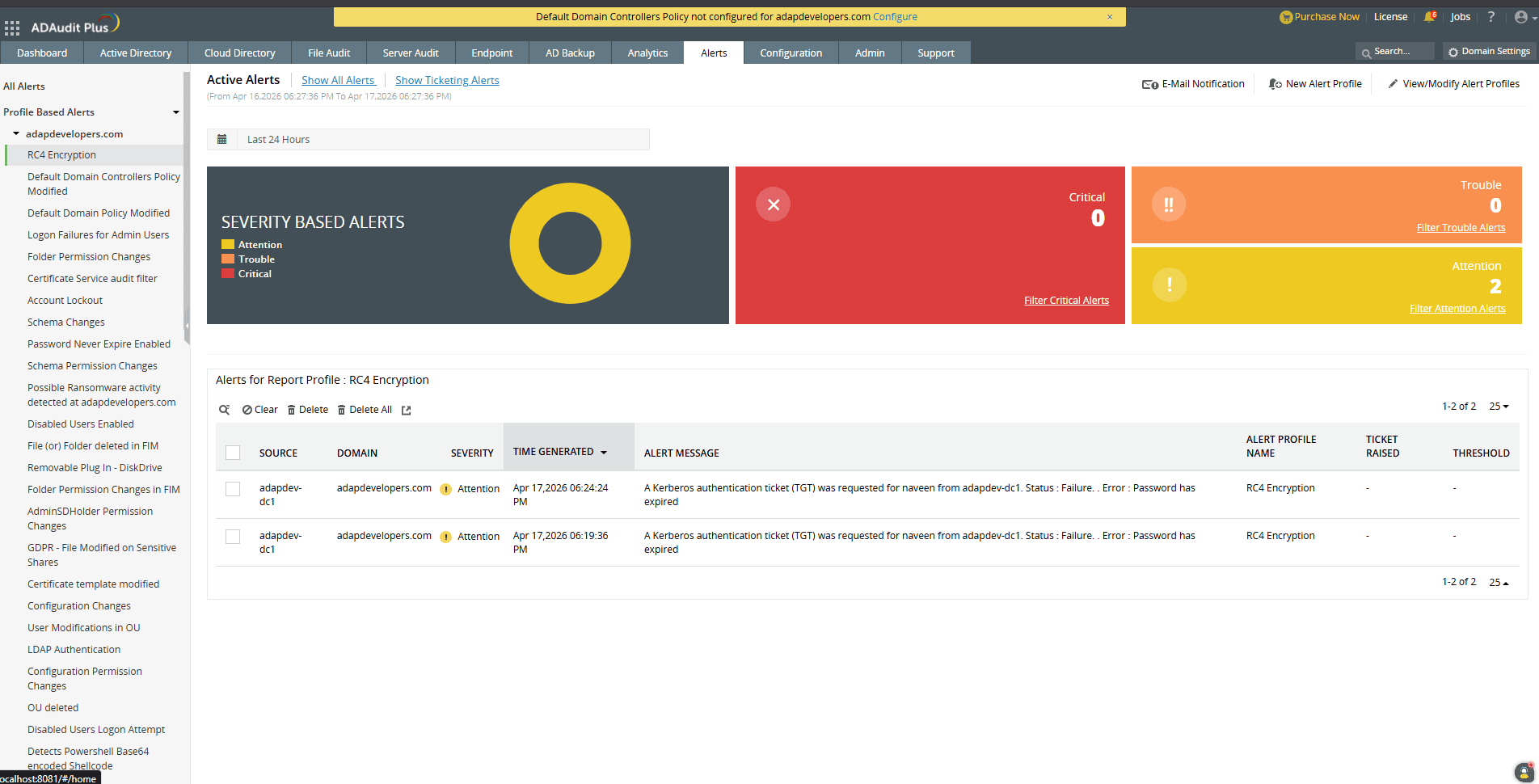
How to protect your environment from RC4 and Kerberoasting
Detection is just the first step. Here's what to do to fix RC4 dependencies in your environment actually:
Reset service account passwords
For service accounts that were created before AES support was introduced in your domain, resetting the password forces Active Directory to generate modern AES keys for that account.
Explicitly enable AES on accounts
In Active Directory Users and Computers, open a service account's properties → Account tab → check:
✅ This account supports Kerberos AES 128 bit encryption
✅ This account supports Kerberos AES 256 bit encryption
This sets the msDS-SupportedEncryptionTypes attribute to include AES—meaning the account will receive AES-encrypted tickets and won't be at risk once RC4 enforcement kicks in.
Clean up stale SPNs
Accounts with Service Principal Names (SPNs) are the target of Kerberoasting. Audit your environment for service accounts with SPNs that are no longer active or necessary, and remove them.
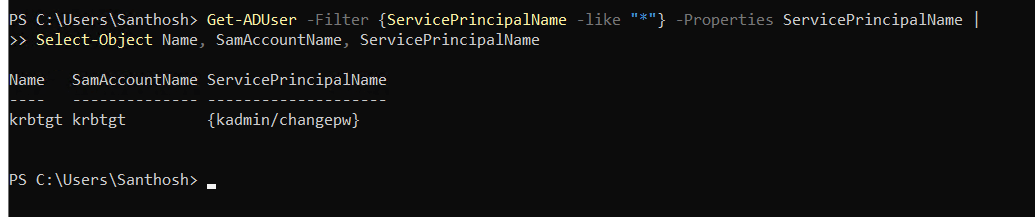
Use PowerShell to identify accounts that have SPNs configured:
| Get-ADUser -Filter {ServicePrincipalName -like "*"} -Properties ServicePrincipalName | Select-Object Name, SamAccountName, ServicePrincipalName |
-----------------------------------------------------
ManageEngine ADAudit Plus gives you the visibility to find RC4 usage across your entire AD environment, detect Kerberoasting attempts as they happen, and build the audit trail you need to prove your environment is on the path to compliance.
Download a free trial of ADAudit Plus to see how it can help you get ahead of the RC4 enforcement deadline.
Related reading: