
- Demo
- Get quote
- Download
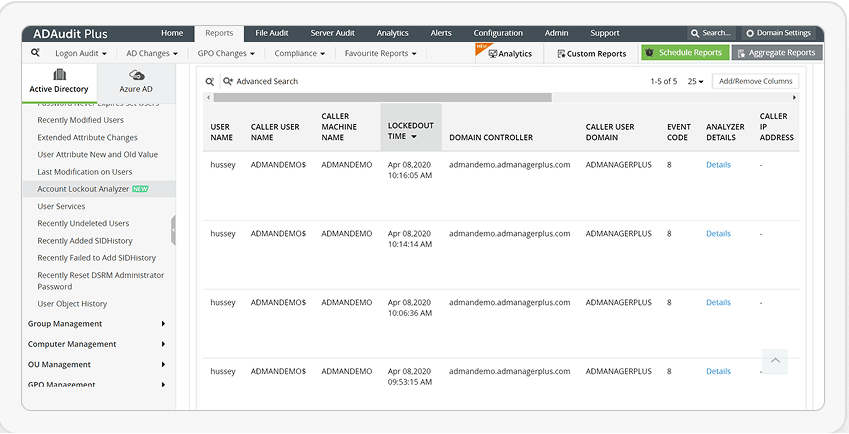
Root cause analysis takes too long with PowerShell. ADAudit Plus shows who locked the account, when, where, and why—instantly.
Start free trial Book demo*Fully functional 30-day free trial. No credit card required

Including 9 out of every 10 Fortune 100 companies
One of the biggest challenges for IT admins is finding account lockout sources. While PowerShell
can help, it’s complex. ADAudit Plus offers a simpler, comprehensive solution.
#requires -Module ActiveDirectory
                            #Import-Module ActiveDirectory -EA Stop
                            Function Get-AccountLockoutStatus {
                                [CmdletBinding()]
                                param(
                                    [Parameter(
                                    ValueFromPipeline=$true,
                                    ValueFromPipelineByPropertyName=$true,
                                    Position=0)]
                                    [string[]]
                                    $ComputerName = (Get-ADDomainController -Filter * |  select -ExpandProperty Name),
                                    [Parameter()]
                                    [string]
                                    $Username,
                                    [Parameter()]
                                    [int]
                                    $DaysFromToday = 3
                                )
                                 BEGIN {
                                    $Object = @()
                                }
                                PROCESS {
                                    Foreach ($Computer in $ComputerName) {
                                        try {
                                            $EventID = Get-WinEvent -ComputerName $Computer -FilterHashtable @{Logname = 'Security'; ID = 4740; StartTime = (Get-Date).AddDays(-$DaysFromToday)} -EA 0
                                            Foreach ($Event in $EventID) {
                                                $Properties = @{Computername   = $Computer
                                                                Time           = $Event.TimeCreated
                                                                Username       = $Event.Properties.value[0]
                                                                CallerComputer = $Event.Properties.value[1]
                                                                }
                                                $Object += New-Object -TypeName PSObject -Property $Properties | Select ComputerName, Username, Time, CallerComputer
                                            }

                                        } catch {
                                            $ErrorMessage = $Computer + " Error: " + $_.Exception.Message

                                        } finally {
                                            if ($Username) {
                                                    Write-Output $Object | Where-Object {$_.Username -eq $Username}
                                                } else {
                                                    Write-Output $Object
                                            }
                                            $Object = $null
                                        }
                                    }
                                }
                                END {}
                            }

Continuously track user logon activity, and audit everything from logon failures to logon history.
Audit privilege use to hold admins and other privileged users accountable for their actions.
Track changes to the operating system, programs, and other local files residing on Windows systems, and ensure system integrity.
Detect AD attacks, identify risky Azure, AWS, and GCP configurations, get visibility into anomalous user behavior, and automate incident response.
Get instantly alerted on who performed what change, when, and from where in your Windows Server environment.
Audit privilege use to hold admins and other privileged users accountable for their actions.
Audit file accesses, permission changes, and more across Windows and other NAS file servers.
Continuously monitor the active and idle time spent by employees at their Windows workstations.
We strive for excellence to provide your organization with the best security. Our commitment to innovate constantly and ensure customer satisfaction has earned us some awards and recognitions. Here are a few of the accolades from 2023-2024.
Niche Player in the 2024 Gartner Magic Quadrant for Security Information and Event Management
Contender in Extended Detection and Response (XDR) in the ISG Provider Lens Cybersecurity - Solutions and Services, 2023
Challenger in KuppingerCole's Leadership Compass: Data Leakage Prevention, 2023
Challenger and Outperformer in the GigaOm Radar for Autonomous SOC, 2023
Customer's Choice in the Peer Insights 'Voice of the Customer': Security Information and Event Management, 2023

Starts at $595 annually
Start free trialStarts at $945 annually
Start free trialWe have received your request for a price quote and will contact you shortly.
that best suits your requirements
2025 Zoho Corporation Pvt. Ltd. All Rights Reserved.

Your download should begin automatically in 15 seconds. If not, click here to download manually.
Schedule a
free personalized demo of
We have received your request for a personalized demo. Our product specialist will get in touch with you shortly.