Frustrated with PowerShell for Tracking User Logons? Try ADAudit Plus®

PowerShell makes logon tracking slow and complex. ADAudit Plus shows who logged in, when, from where, and how—instantly and effortlessly.

Start free trial   Book demo  

*Fully functional 30-day free trial. No credit card required

Worlds leading and largest enterprises trust ManageEngine

Including 9 out of every 10 Fortune 100 companies


How to generate and export last logged on user report

PowerShell

Steps to obtain the last logged on users using PowerShell:

  • Identify the domain from which you want to retrieve the report.
  • Identify the LDAP attributes you need to fetch for the report.
  • Identify the primary DC to retrieve the report.
  • Compile the script.
  • Execute it in Windows PowerShell.

Sample Windows PowerShell script

Get-ADComputer -Properties 
"LastLogonDate"
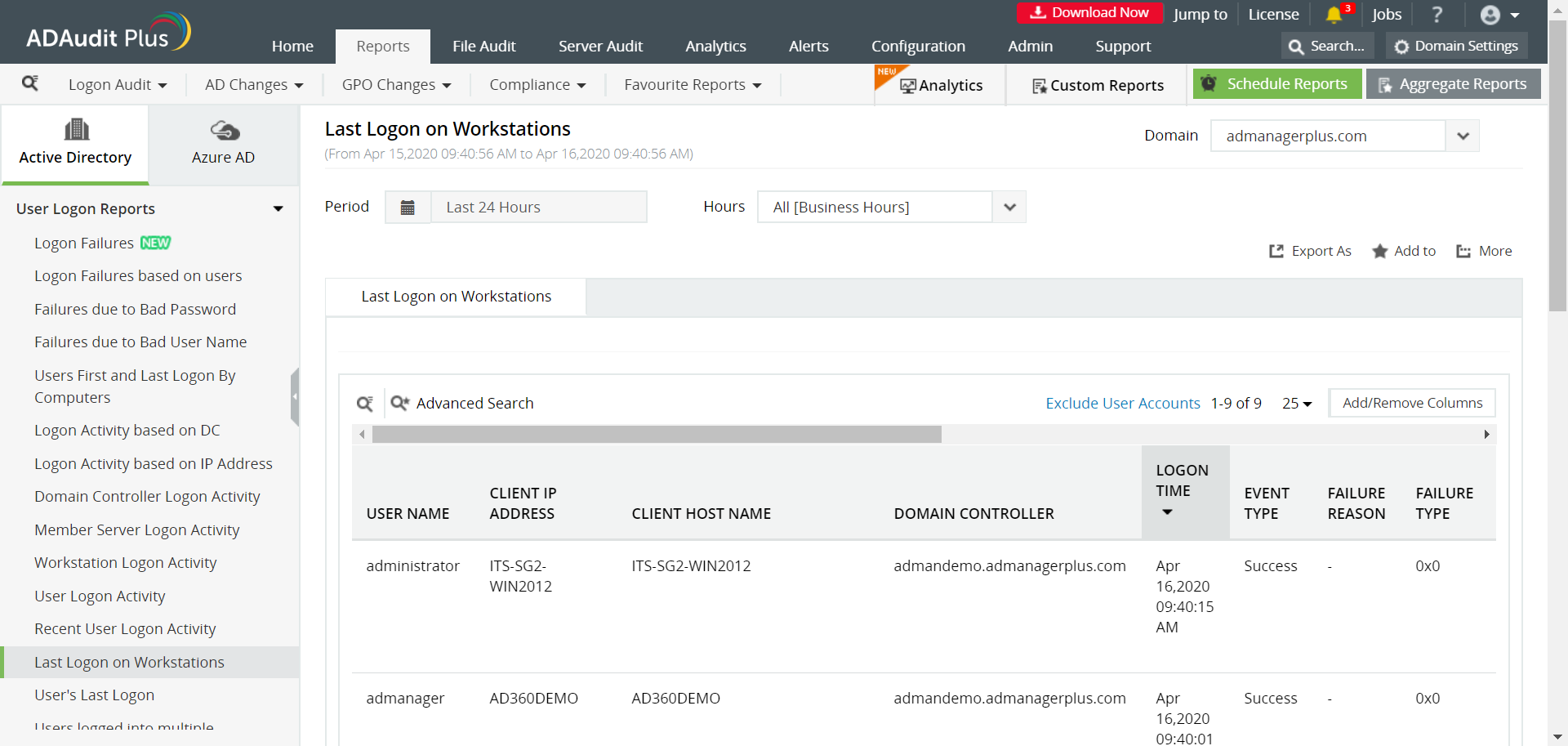
 

To obtain the report,

  • Login to ADAudit Plus web console as an administrator.
  • Navigate to the Reports tab and from the User Logon section in the left pane, select Last Logon on Workstations report.
powershell-last-logon

PowerShell Limitations vs ADAudit Plus Capabilities

Feature
PowerShell Scripts
Ease of use
Requires scripting knowledge and manual execution
Intuitive web interface with prebuilt logon audit reports
Real-time tracking
Manual execution or task scheduler setup required
Continuous monitoring with real-time updates
Scope of tracking
Requires multiple scripts for different logon types
Tracks all logon types—interactive, RDP, network, etc.
Failed logon insights
Requires parsing error codes manually
Shows failure reason, user, machine, and source instantly
Audit depth
Needs event ID correlation across systems
Shows who logged in, from where, and when—clearly
Alerting
Needs external integration and scripting
Built-in alerts for logon failures, abnormal activity
Reporting
Manual formatting and export needed
Predefined, filterable, and exportable reports
Historical data
Limited by log retention policies and script runs
Maintains long-term, searchable logon history
Maintenance
 
High upkeep, frequent troubleshooting
Zero manual upkeep—automated updates and support included
×

To assist your evaluation we offer

  • 30-day fully functional free trial.
  • No user limits.
  • Free 24*5 tech support.
Start free trial   Product Demo  

Empowering IT with actionable audit intelligence.

Windows logon monitoring

Continuously track user logon activity, and audit everything from logon failures to logon history.

Privileged user monitoring

Audit privilege use to hold admins and other privileged users accountable for their actions.

File integrity monitoring

Track changes to the operating system, programs, and other local files residing on Windows systems, and ensure system integrity.

Threat detection and response

Detect AD attacks, identify risky Azure, AWS, and GCP configurations, get visibility into anomalous user behavior, and automate incident response.

Real-time change notification

Get instantly alerted on who performed what change, when, and from where in your Windows Server environment.

Compliance reporting

Audit privilege use to hold admins and other privileged users accountable for their actions.

File change monitoring

Audit file accesses, permission changes, and more across Windows and other NAS file servers.

Employee time tracking

Continuously monitor the active and idle time spent by employees at their Windows workstations.

Awards & recognitions

We strive for excellence to provide your organization with the best security. Our commitment to innovate constantly and ensure customer satisfaction has earned us some awards and recognitions. Here are a few of the accolades from 2023-2024.

  • Niche Player in the 2024 Gartner Magic Quadrant for Security Information and Event Management

  • Contender in Extended Detection and Response (XDR) in the ISG Provider Lens Cybersecurity - Solutions and Services, 2023

  • Challenger in KuppingerCole's Leadership Compass: Data Leakage Prevention, 2023

  • Challenger and Outperformer in the GigaOm Radar for Autonomous SOC, 2023

  • Customer's Choice in the Peer Insights 'Voice of the Customer': Security Information and Event Management, 2023

ADAudit Plus is licensed on a per-server basis and
is available in the following editions

Standard edition

Starts at $595 annually

Start free trial
  • All features of free edition +
  • Reports and alerts on event log
  • Domain Controllers
  • Azure AD Tenants
  • Windows servers
  • Workstations
  • Windows file servers
  • Windows file servers

Professional edition

Starts at $945 annually

Start free trial
  • All features of standard edition +
  • Account lockout analysis
  • AD permissions change auditing
  • GPO settings change tracking
  • DNS and AD schema change auditing
  • Old and new values of AD object attribute changes
  • Support for MS SQL database
  • And much more...

Thank you!

We have received your request for a price quote and will contact you shortly.

Get a personalized quote

that best suits your requirements

  •  
  •  
  • Add-ons
    ?

    Track File Servers for document changes to files (file creation / modification / deletion) and folders audit-access, shares and permissions

     
    NetApp (or) EMC (or) Synology (or) Hitachi (or) Huawei file systems
    ?

    Audit Windows Server

    1. Local Logon/Logoff
    2. File Integrity
    3. Printer
    4. RADIUS/NPS
    5. ADFS
    6. LAPS
    7. ADLDS
    ?

    Audit Workstations

    1. Local Logon/Logoff
    2. Employee work hours
    3. Local Account Management
    4. Startup/Shutdown
    5. File Integrity
    6. System events
    7. Removable Storage Auditing(USB)
  • By clicking 'Submit', you agree to processing of personal data according to the Privacy Policy.

Struggling to find last logon details? ADAudit Plus gives you complete AD logon visibility. Instantly view who logged in and when.

Start free trial   Product Demo  


Request DemoGet Quote