Client-side vs Server-side Monitoring: Where RUM Fits
Modern observability must answer two questions at once: “Is my system healthy?” and “Does the user notice?”. Client-side and server-side monitoring each answer one half of that inquiry. Real User Monitoring (RUM) sits squarely on the client side and provides the “user sees it” answer, but its real value appears when RUM is combined with server-side signals.
This blog explains the distinction between client-side and server-side monitoring, shows where RUM belongs in a monitoring ecosystem, and gives practical advice for implementing an effective, privacy-conscious RUM strategy.
Two perspectives: What each layer actually measures
Server-side monitoring
It captures the internal mechanics of your stack: CPU, memory, thread-pool saturation, database latencies, service-to-service request times, infrastructure metrics, logs, and distributed traces. These are critical for detecting resource constraints, capacity issues, backend failures, and architectural bottlenecks.
Client-side monitoring (RUM)
It captures what users actually experience: pages rendering, first paint / first contentful paint, time to interactive, layout shifts, JavaScript errors, resource load delays, interaction latency, etc. Because it’s drawn from actual user sessions, it exposes variance due to device type, network variation, geographic conditions, browser differences, third-party scripts, and visual performance issues that server side cannot see directly.
Why the split matters
Ignoring either client-side or server-side monitoring means missing parts of the picture:
- A backend endpoint may be very performant (low latency) but if the frontend is loading huge images or running heavy scripts, users will still feel the app is slow. Without RUM you won’t see that.
- Conversely, a sluggish backend might be masked on the client side via caching or UI fallbacks, and client-side only metrics could mislead you into thinking everything is fine while backend SLAs are being violated.
- Misattributing issues wastes engineering time. RUM helps avoid “alert storms” or chasing expensive backend trace optimizations when the bottleneck is in the browser or delivery network.
Where RUM fits in the monitoring stack
Here are core roles RUM plays in a mature observability / monitoring stack:
- SLI / SLO foundation: RUM-derived metrics like time to interactive, first input delay, or Core Web Vitals become meaningful service-level indicators because they describe what users actually perceive.
- User-impact early warning: RUM can detect geographic / device / browser specific anomalies, third-party script failures (e.g. ad networks), or regressions introduced in a recent deployment that degrade frontend responsiveness even though backend services are nominal.
- Prioritization: Not all performance issues are equally important. A RUM spike affecting the purchase flow matters much more than minor delay in a non-transactional page. RUM lets you see where the users are, what they do, what breaks for them, so you can focus accordingly.
- Context for backend alerts: When server-side alerts (high error rates, latency) occur, RUM helps answer: Are real users affected? What sessions? Which journeys? Which devices / regions? This speeds investigation and reduces false positives.
Implementation considerations (What teams often miss)
- Smart sampling: Capturing all sessions at full fidelity isn’t always practical. Best practice is to sample heavily, but ensure critical traffic is captured fully (e.g. paths related to login, checkout, etc.).
- Correlation across layers: Instrument trace IDs or other identifiers in both frontend RUM events and backend traces/logs. This allows you to stitch together full “user journey” troubleshoots that start in the browser and end in the database or external API.
- Performance and privacy: Be mindful: Too much instrumentation can slow down the client. Control what resources are measured, limit third-party script impact, mask or omit sensitive fields. Comply with privacy regulations (GDPR, CCPA, etc.).
- Measured vs perceived performance: Raw metrics (like total backend response time) matter, but what users see (visual rendering progress, time to interactivity, layout shifts) often impacts satisfaction more. Prioritize UX metrics.
Organizational patterns: Who owns RUM?
- Platform / Observability teams often maintain the instrumentation, dashboards, threshold alerts, and tie backend and frontend signals together. Product teams use those insights to drive UX improvement and feature work.
- Product-led ownership, where each product area or team owns its user journeys; platform teams support instrumentation and backend visibility.
- Shared governance, where both platform / SRE and product / UX teams share responsibility & visibility. This fosters faster feedback loops when front end issues are spotted in RUM and connected to backend causes.
Practical KPIs & what to measure
In the broader RUM space, teams often track advanced KPIs like Core Web Vitals, conversion funnel drops, or latency percentiles. While those are valuable benchmarks, not every tool supports them out of the box. The important thing is to focus on indicators that reflect real user experience and that your monitoring platform can reliably provide.
With ManageEngine Applications Manager’s RUM, you can track practical, actionable KPIs such as:
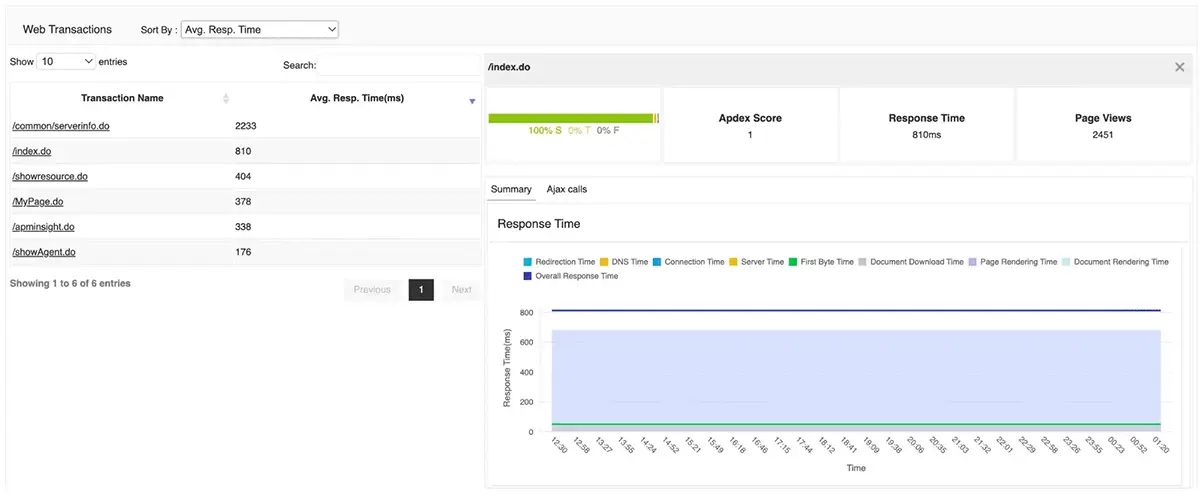
- Page response times: Monitor DNS, connection, server processing, and rendering times to identify where bottlenecks occur.
- Throughput and page views: Measure traffic volumes and activity patterns to understand how users engage with your site or app.
- AJAX call performance: Detect failures or slow responses in asynchronous requests that often power dynamic content.
- JavaScript errors: Capture client-side script issues that directly affect interactivity and user experience.
- Browser, device, and session breakdowns: Identify whether problems are isolated to certain browsers, OS versions, or devices.
- Resource and third-party performance: Spot whether delays are caused by external services such as CDN assets, ad networks, or analytics scripts.
- Geographic performance comparisons: Compare performance across countries and regions to uncover localized slowdowns (ISP-level detail available with geolocation add-ons).
These KPIs don’t just help track performance, they also help teams prioritize fixes by showing who is affected (which users, browsers, or geographies) and how the issues manifest (slow rendering, AJAX delays, or script errors).
By focusing on these user-facing indicators, DevOps and product teams can align their monitoring strategy around what customers actually experience rather than backend metrics alone.
Pitfalls and how to avoid them
- Single-page apps & virtual navigations: Some RUM tools only track page load events. Make sure your instrumentation handles in-app routing, lazy loading, etc
- Alert fatigue: Setting too many thresholds without user-impact context leads to noisy alerts. Focus on alerts with strong correlation to user experience or business value.
- Tool limitations: Differences in what vendors support (e.g. session replay, sampling, correlation, privacy). Evaluate in production-like environments.
- Ignoring mobile / network variability: Users on slower networks or mobile devices often suffer worst. Without RUM you might only see averages that hide big pain for a subset.
RUM with ManageEngine Applications Manager
ManageEngine Applications Manager brings real user insights into the same platform where you already monitor servers, applications, and databases. Here’s how it fits into the bigger monitoring picture:
- Frontend performance visibility: Track key browser-side metrics such as page response times (DNS, connection, server, rendering), throughput, and JavaScript errors. This gives teams a clear picture of how fast pages load and how stable they are for real users.
- Breakdowns across segments: View performance across browsers, devices, geographies, web pages, and user sessions. This makes it easier to spot whether issues are isolated to specific platforms, regions, or resource types.
- Resource and AJAX monitoring Identify bottlenecks caused by slow resources or third-party domains (like CDNs or widgets), and monitor AJAX calls that drive modern web interactions.
- Unified dashboards for backend correlation Because RUM lives alongside server, database, and infrastructure monitoring in Applications Manager, you can move quickly from “users are seeing slowness” to “here’s the backend or external dependency causing it.” This integrated view cuts down troubleshooting time.
- Actionable health states and alerts Applications Manager categorizes applications into clear, warning, or critical states and tracks availability and performance trends over time. This helps DevOps teams prioritize fixes based on user impact.
Client-side and server-side monitoring aren’t competitors, they are complementary lenses on the same system. When combined, they enable faster detection, smarter prioritization, and better user experiences. ManageEngine Applications Manager provides both, ensuring full-stack observability that bridges backend health with real user impact.