Database monitoring for capacity planning: Building scalable and future-ready systems
Modern databases don’t fail overnight; they fail gradually, often because organizations underestimate how quickly workloads evolve. As data grows, user traffic surges, and applications expand in complexity, the same database configuration that performed flawlessly yesterday may struggle tomorrow. Businesses that wait until performance degrades risk outages, revenue loss, and frustrated customers. The smarter approach is to pair database monitoring with capacity planning, ensuring resources scale in line with growth before issues arise.
Capacity planning isn’t just about “having enough” CPU or storage. It’s about forecasting demand, optimizing costs, and aligning IT resources with business priorities. And the foundation of this forward-looking strategy lies in monitoring.
Why capacity planning matters in database management
Capacity planning is about answering three critical questions:
- When will my current database resources run out?
- What level of demand should I anticipate in the future?
- How can I balance performance with cost efficiency?
Without a strategy, teams either over-provision (wasting money on unused infrastructure) or under-provision (risking slow queries and failed transactions). Both scenarios are costly.
Learn more about how you can identify unused or over-provisioned databases in your environment.
Take the example of a retail company gearing up for Black Friday sales. Without capacity planning, its database cluster might buckle under a sudden spike in transactions, leading to abandoned carts and lost revenue. On the flip side, permanently doubling server capacity for one day of peak traffic is wasteful. Monitoring-driven capacity planning solves this by forecasting resource needs based on historical trends and real-time growth patterns. Database monitoring provides the visibility needed for accurate, data-driven capacity planning.
The role of monitoring in capacity planning
Monitoring and capacity planning are not separate processes—they are two halves of the same coin. Monitoring provides the data, while capacity planning turns that data into action.
Here’s how monitoring fuels capacity planning:
- Workload characterization: Classify workloads to anticipate scaling strategies.
- Trend analysis: Use CPU, memory, and storage history to predict future growth.
- Bottleneck identification: Detect query execution delays and I/O hotspots early.
- Seasonal forecasting: Spot usage spikes tied to business cycles for precise provisioning.
Simply put, you cannot plan for the future if you don’t understand the past and present behavior of your database systems. Learn more about the key database metrics to watch out for.
Key capacity planning scenarios for databases
Capacity planning is not one-size-fits-all. Different organizations face unique challenges depending on their infrastructure, workloads, and growth patterns. Here are common scenarios where database monitoring supports smarter planning:
- Mergers and acquisitions: Consolidating multiple database systems requires forecasting not only storage but also user concurrency and transaction throughput.
- Cloud migration: When moving on-premises databases to the cloud, monitoring insights help determine the right instance size, storage tier, and scaling approach.
- Application rollouts: Launching a new customer-facing app can double or triple query volume overnight. Capacity planning ensures you don’t get caught off guard.
- Regulatory compliance: Some industries mandate data retention for years. Monitoring helps forecast long-term storage needs and avoid compliance risks.
- Elastic scaling: For businesses using both on-prem and cloud databases, monitoring enables decisions on when to scale vertically (more resources per server) or horizontally (more nodes).
Metrics that inform capacity decisions
While monitoring tools track hundreds of metrics, capacity planning hinges on a focused set of data points. Instead of re-listing generic database metrics, let’s highlight the capacity-centric ones:
- Resource consumption growth rate: Not just current CPU or memory usage, but how fast these metrics trend upward over time.
- Storage utilization and churn: Understanding not just size but also how quickly new data is generated and old data is archived.
- Concurrency levels Tracking how many users or sessions your database can handle before performance degrades.
- Workload variability: Identifying predictable peaks and troughs that guide elastic scaling strategies.
- Cost-performance ratio: Especially in cloud environments, mapping usage to spend ensures you’re not overpaying for idle capacity.
By focusing on growth patterns and usage velocity rather than static snapshots, you gain a realistic picture of future needs.
Best practices for database capacity planning
To make capacity planning actionable, organizations need more than just data—they need a structured approach. Here are some proven strategies:
- Build a capacity baseline: Start with at least 90 days of monitoring data. This gives you enough historical context to identify trends, anomalies, and recurring patterns.
- Use predictive analytics: Modern monitoring tools often include forecasting capabilities powered by machine learning. These can model resource utilization into the future, helping you make proactive scaling decisions.
- Simulate growth scenarios: Don’t just plan for average load. Use monitoring insights to run “what if” scenarios: What if traffic doubles during a campaign? What if storage requirements triple after a compliance change?
- Align with business goals: Capacity planning shouldn’t happen in isolation. Coordinate with application, infrastructure, and business teams to align provisioning with upcoming launches or market shifts.
- Avoid over-optimization: There’s a temptation to squeeze every ounce of efficiency from your resources. But a good capacity plan includes buffers for unexpected surges, minimizing the risk of outages.
Common pitfalls to avoid
Even seasoned teams fall into traps when capacity planning. Watch out for these mistakes:
- Relying on averages: Average CPU utilization might look fine, but peak loads could still overwhelm your system.
- Ignoring query patterns: Not all growth comes from more users. Poorly optimized queries can inflate resource usage unpredictably.
- One-time planning: Capacity planning is not a one-off project. It’s a continuous process fueled by ongoing monitoring.
- Over-reliance on manual spreadsheets: Manual forecasting is error-prone. Use automated tools that integrate with your monitoring platform.
The payoff of monitoring-driven capacity planning
When done right, database capacity planning delivers benefits that go beyond avoiding outages:
- Improved user experience: Applications stay fast and responsive even during high traffic.
- Cost savings: You provision just the right amount of resources—no more, no less.
- Business agility: With data-driven forecasts, you can support growth initiatives without infrastructure bottlenecks.
- Stronger resilience: Buffer capacity ensures continuity even under unexpected demand spikes.
Capacity planning with Applications Manager
Applications Manager is designed not just to monitor databases but to help organizations translate monitoring insights into capacity plans. It provides:
- Unified visibility: Monitor hybrid and multi-cloud databases side by side, essential for scaling modern environments.
- Forecasting tools: Leverage historical trends to predict when you’ll hit resource thresholds.
- Over- and under-provisioning detection: Identify unused resources or bloated instances.
- Actionable alerts: Be notified before you cross capacity limits, not after.
- Cost efficiency: Right-size your resources across environments to prevent waste.
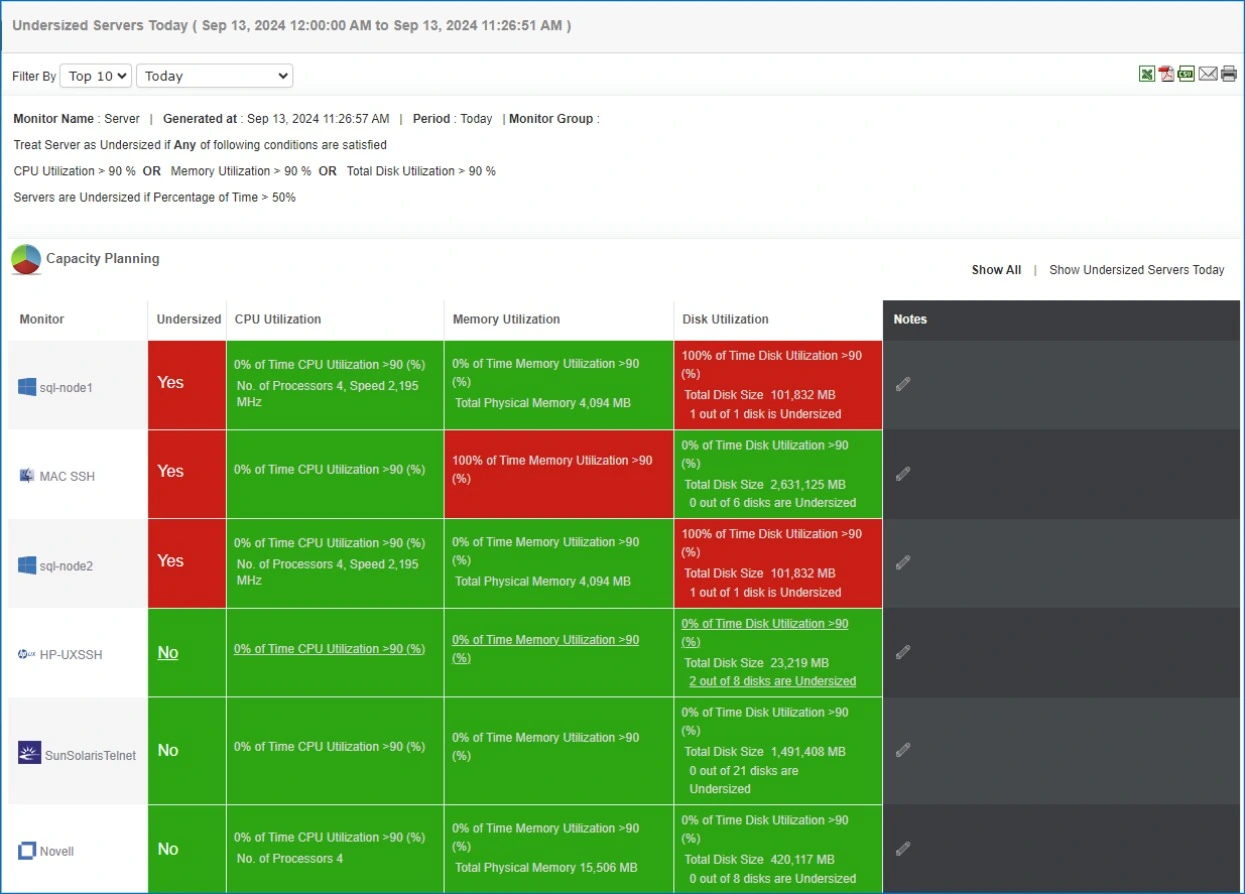
By combining deep monitoring with predictive planning, Applications Manager helps IT teams shift from reactive firefighting to proactive growth management. This ensures databases remain not only healthy today but also future-ready for evolving business demands.
👉 Get started by downloading a 30-day free trial of Applications Manager now!