AI insight for monitors in Applications Manager
Monitor AI Insight uses a configured GenAI provider to generate a structured, AI-generated analysis of a single monitor. Unlike a plain monitor summary, it is threshold- and alarm-aware, correlating active alarms with metric behavior to surface health status, operational risk, and probable root cause.
AI-generated insights are intended to assist investigation and decision-making. Review the generated output before taking any action.
- Overview
- Prerequisites
- How to generate Monitor AI Insight
- Coverage and admin controls
- AI Insight panel options
Overview
A monitor's default summary describes what is currently being measured. Monitor AI Insight goes further by evaluating the monitor's configured thresholds and its active alarms alongside recent metric data, so the analysis reflects both current health and risk.
The AI Insight panel includes:
- Health summary of the monitor
- Active alarms correlated with metrics
- Operational risk assessment
- Threshold review with suggested values
- Root cause
- Prioritized actions
Prerequisites
- Configure at least one GenAI provider from Settings > Product Settings > Integrations (Add-On Settings).
- Add one or more models to the provider configuration.
- Set a default model if you want Applications Manager to use a preferred model automatically.
- Ensure the Applications Manager server can connect to the selected AI provider or the locally hosted model (such as Ollama).
For provider setup details, refer to the AIOps Integrations section.
How to generate AI Insights for a Monitor
Monitor AI Insight is available from any monitor's detail page.
Follow the steps below to generate Monitor AI Insight:
- Open the required monitor's detail page.
- Click AI Insight next to the breadcrumb.
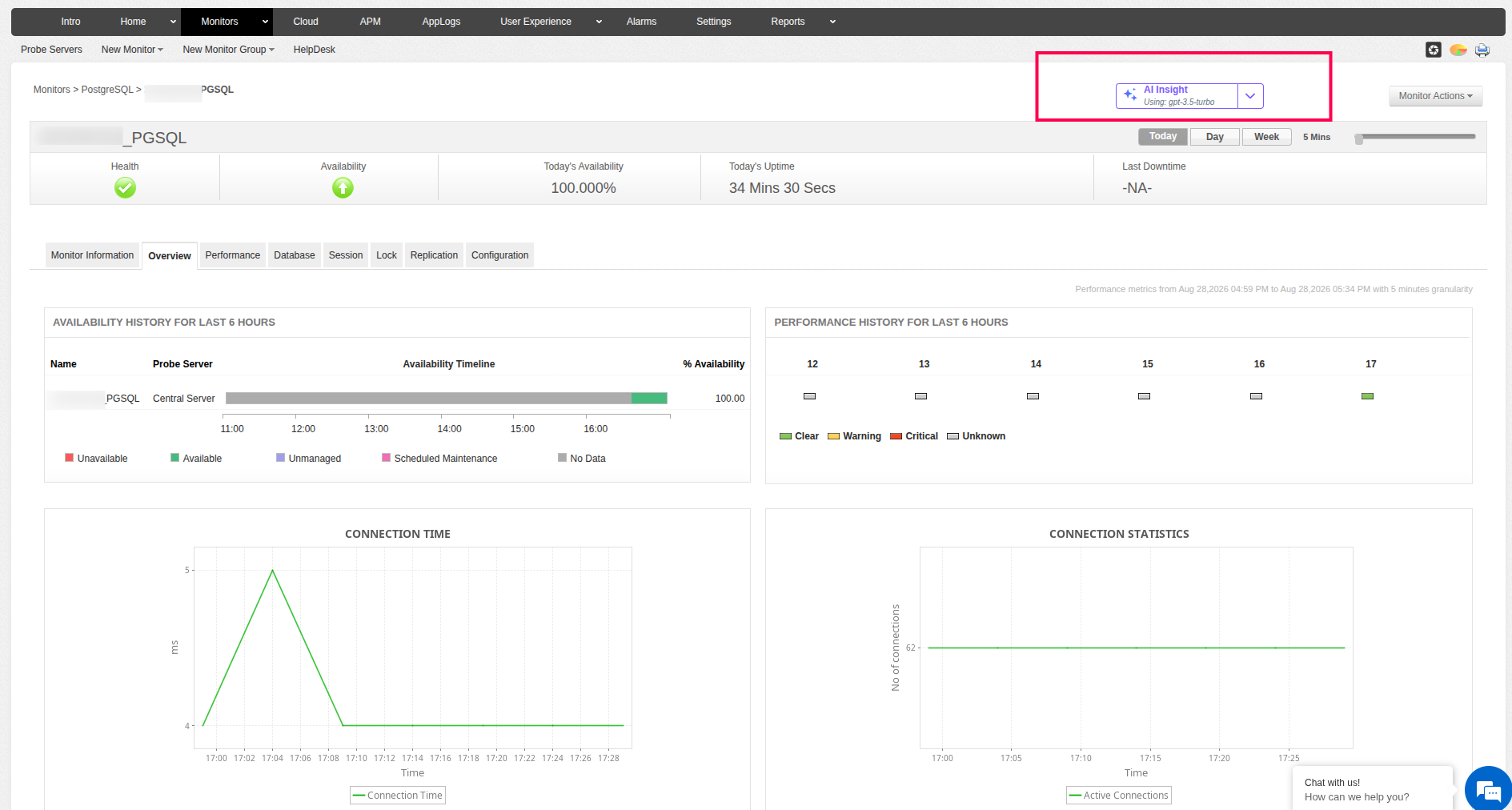
- Select the AI model from the dropdown, if required. If a default model is configured, it is selected automatically. If no default model is configured, the first available model is selected. You can choose a different configured provider and model if required.
- Review the generated analysis in the AI Insight panel.
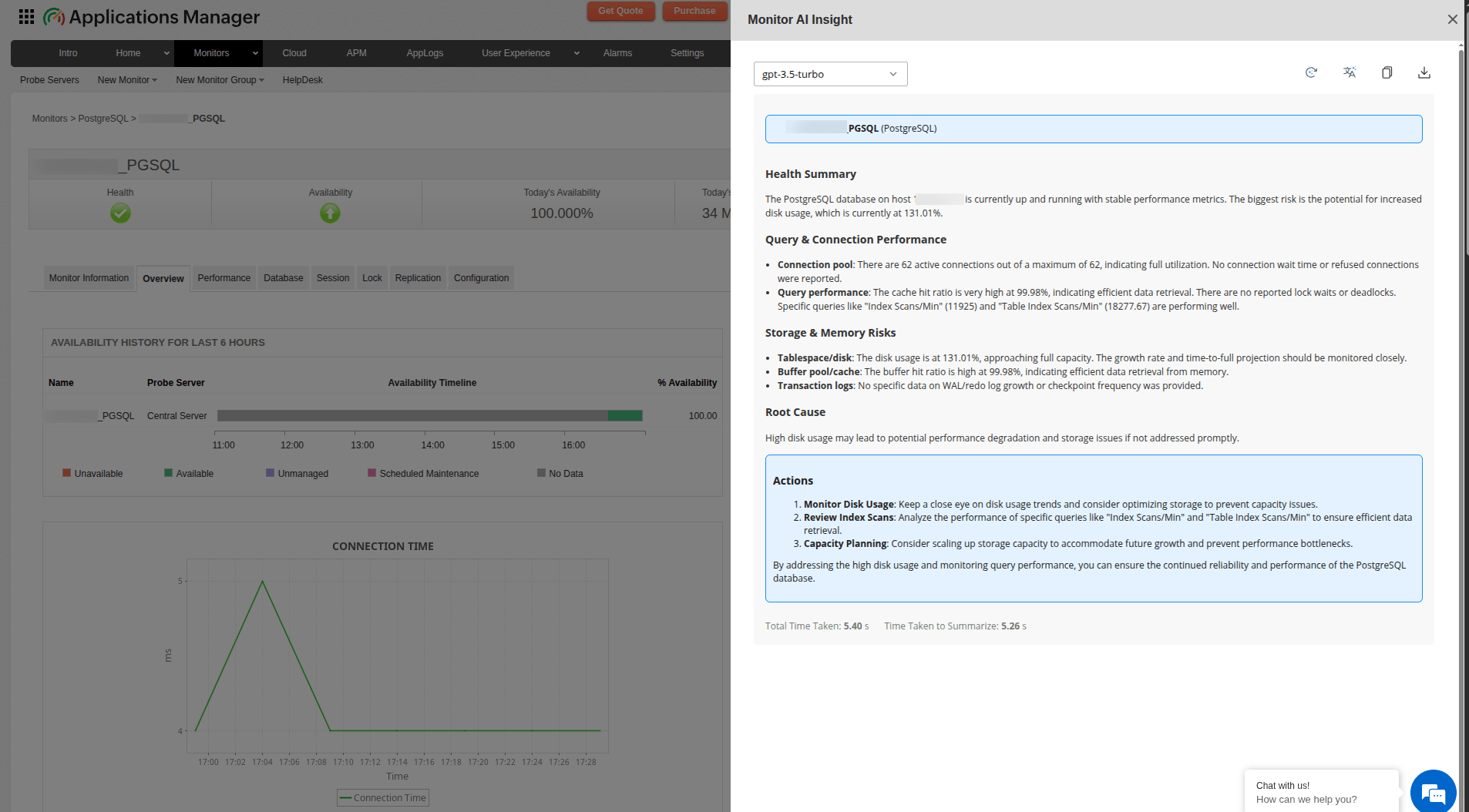
Note: The generated analysis reflects the monitor context available at the time of generation. Changing the model or summary language regenerates the analysis.
Coverage and admin controls
Monitor AI Insight is supported for all monitor types.
| Role | Access |
|---|---|
| Admin | Enabled by default. |
| Delegated Admin | Enabled by default. |
| Operator | Requires the corresponding permission key to be enabled for the role in User Management. |
| User | Requires the corresponding permission key to be enabled for the role in User Management. |
AI Insight panel options
The AI Insight panel displays the generated analysis and provides the following options, similar to AI Alarm Summary:
| Option | Description |
|---|---|
| Model selection | View the automatically selected model or choose a different configured provider and model. Changing the model regenerates the analysis with the selected model. |
| Regenerate | Generate the analysis again using the current monitor context and selected model. |
| Translation | Translate the generated analysis into any of the 38 supported languages. |
Note: If a GenAI provider is not configured, Applications Manager displays a GenAI Integration Required message with an option to configure a GenAI integration.
To learn more about generating AI-driven alarm summaries, see AI Alarm Summary.